Prop Firm Panel
- エキスパート
- バージョン: 3.0

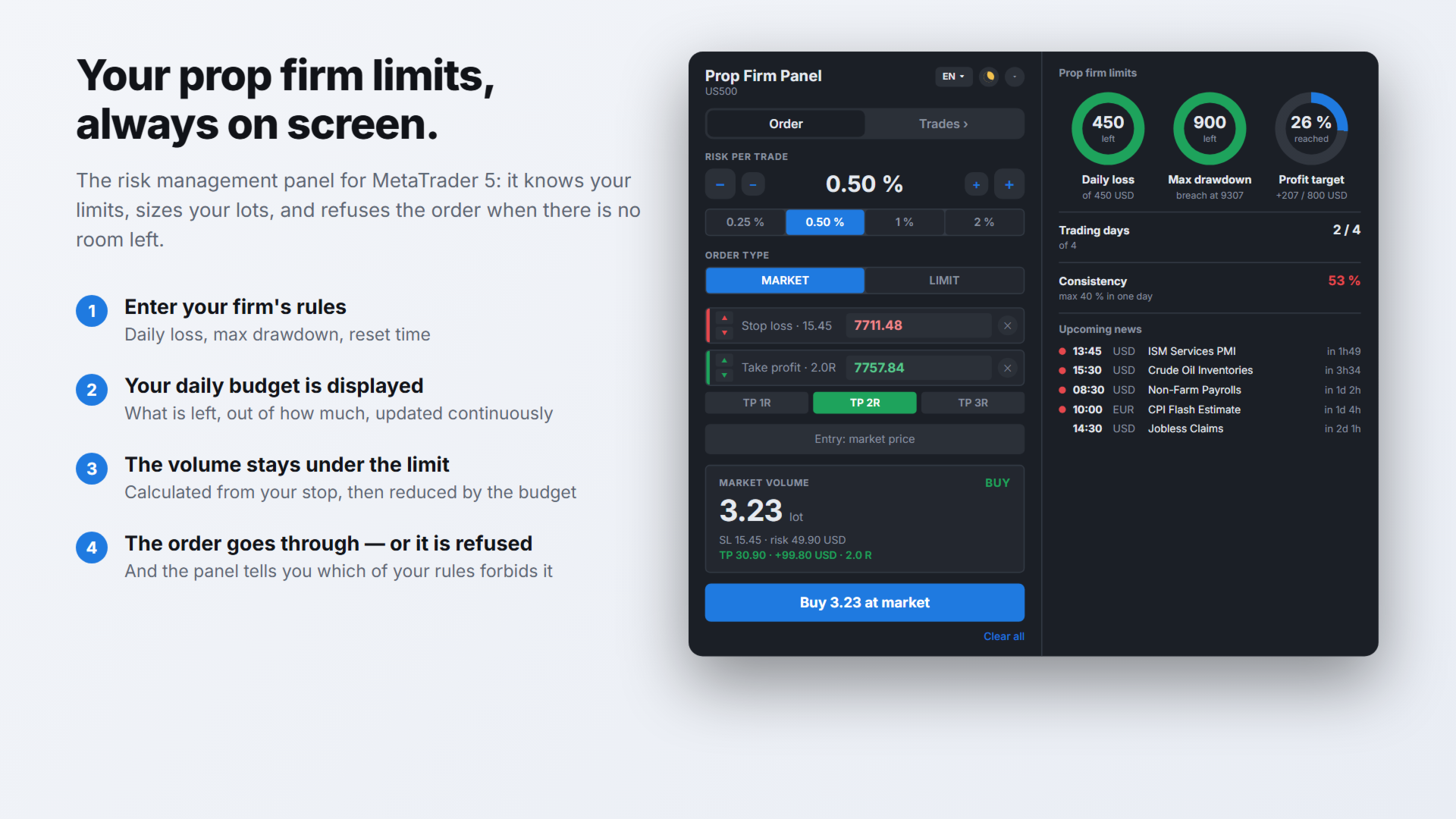
PROP FIRM PANEL — Risk and prop firm rule management on MetaTrader 5
Prop Firm Panel is a manual trading panel for prop firm accounts, in evaluation as well as
in funding. It calculates the volume from the chosen risk and the stop distance, monitors
the firm's limits continuously, and refuses to send an order that would breach one of them.
YOUR LIMITS, ALWAYS ON SCREEN
A side wing, opened by the arrow on the edge, keeps track of every rule. It opens on the
right or on the left, as dials or as bars, your choice in the settings.
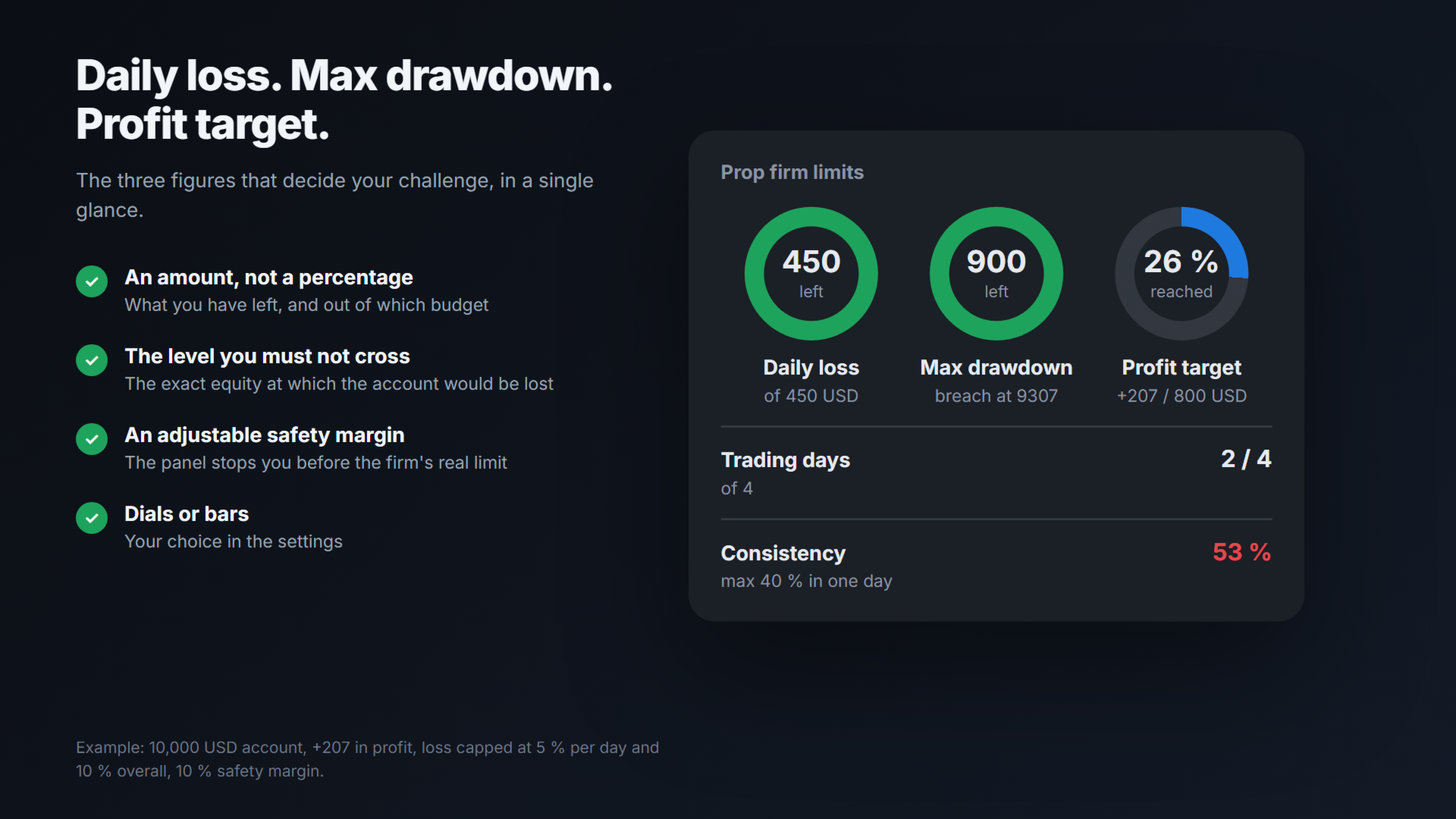
- DAILY LOSS: what is left of the daily loss budget, out of the total budget, and the
amount already lost during the day
- MAX DRAWDOWN: margin left before the maximum account loss, out of the total limit, and
the exact equity level at which the account would be breached
- PROFIT TARGET: amount achieved out of the challenge target, and the percentage reached
- TRADING DAYS: trading days completed, out of the minimum required
- CONSISTENCY: share of the total profit made on the best day. Many prop firms reject an
account where a single day accounts for too large a share of the result. The value turns
red beyond the configured threshold
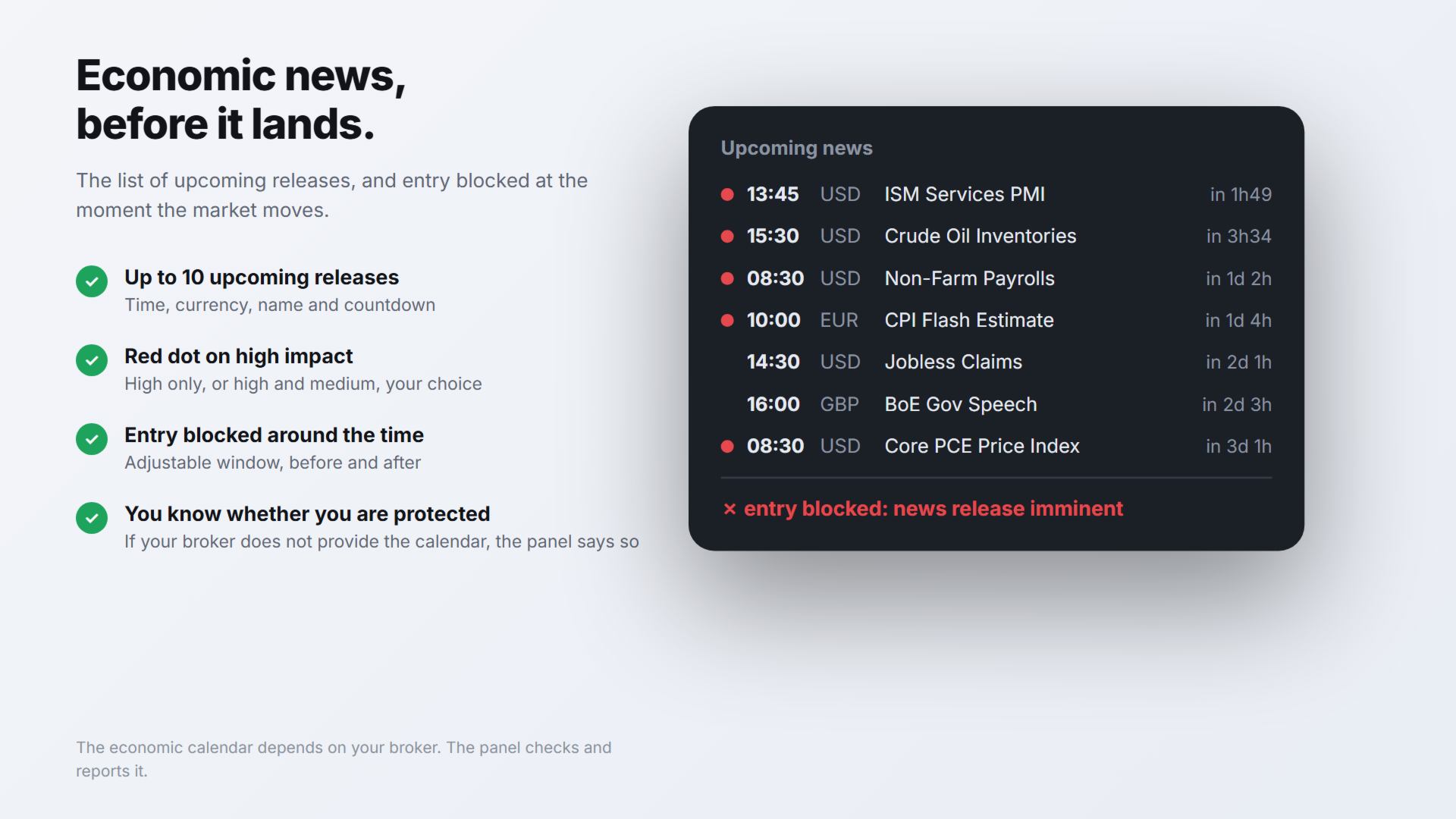
- UPCOMING NEWS: up to ten upcoming economic releases, with the time, the currency, the
name and the countdown. A red dot marks high impact ones
Every rule shows an amount and its budget, never a percentage alone. All of them are
rebuilt from the account history, the very source the funding company looks at, and they
survive a MetaTrader shutdown.
ORDER TAB — PREPARING AND SENDING
1. Risk per trade: 0.25 / 0.5 / 1 / 2 % buttons, −/+ buttons in steps of 0.1 % and 0.01 %,
or free keyboard entry between 0.01 and 10 %
2. The red button places the stop-loss line, the green button the take-profit line
3. Once placed, each line can be set in three ways: by dragging it on the chart, with the
up and down arrows for fine adjustment, or by typing the price directly. The arrow step
adapts to the instrument: one point on Forex, one full point on an index
4. An out-of-range price is refused and the previous value comes back: a typo never moves
a stop
5. The volume and the amount at risk are recalculated on every move, in the account
currency
6. The TP 1R / 2R / 3R buttons place the take-profit at one, two or three times the stop
distance
7. The direction follows the position of the stop: below the price for a buy, above for a
sell
8. Market mode: volume recalculated live, tick by tick
9. Limit mode: a click on the chart places the blue entry line. The order type follows
from the position of that line relative to the current price — Buy Limit, Sell Limit,
Buy Stop or Sell Stop
10. The send button transmits the order with its stop-loss and its take-profit
TRADES TAB — MANAGING POSITIONS
- Open P&L, number of positions, balance and challenge start capital
- For each position: symbol, direction, volume, P&L, stop-loss and take-profit
- BE: moves the stop to the entry price
- 1/2 and 1/3: partial close. Buttons greyed out when the remainder would fall below the
broker's minimum volume
- SL/TP: the levels appear as draggable dashed lines, confirmed with Apply
- Close a position with the cross; "Close all" closes everything and asks for a second
confirmation
- "This panel" filter: positions opened by other programs are left untouched
- Trailing stop: trigger threshold and trailing distance expressed in R. The stop never
moves backwards
CONTROLS APPLIED
- Volume capped by the daily budget: no proposed size can cross the limit. The reduction
is reported
- Sending refused when the daily budget is used up, the maximum loss is reached, or a news
release is imminent. The reason appears on the button itself
- Broker rejection shown in red on the panel
- Automatic cut-off at a configurable percentage of the daily budget consumed
- Close of all positions at a fixed time
- Start capital detected from the account's opening deposit: installing mid-challenge does
not distort the calculations
- Start capital inconsistent with the account: a permanent warning is displayed
- Configurable safety margin: the stop threshold is placed below the real limit, to absorb
commissions, swaps and the gap between the panel's measurement and the company's
FULL LIST OF SETTINGS
General
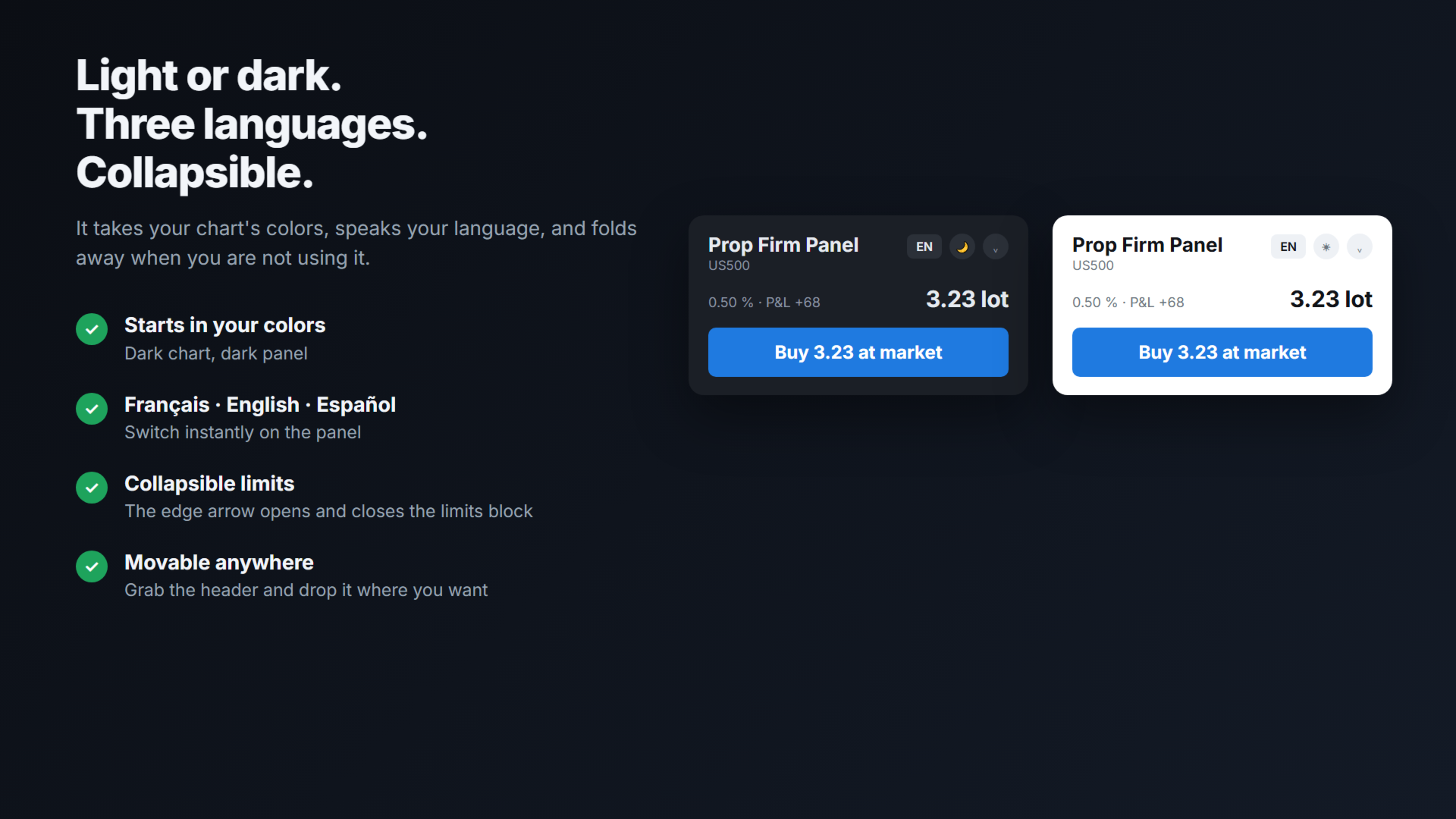
- Language: French, English, Spanish. Also switchable on the panel
- Risk per trade at startup, as a percentage
- Theme: automatic (chart colors), light, dark
- Magic number of the orders sent by the panel
- Trailing stop: multiple of R that starts the trailing
- Trailing stop: trailing distance, in multiples of R
0) METRICS PANEL
- Edge it opens on: right or left
- Display: dials or bars
- Wing open or folded at startup
A) DAILY RESET
- Time zone: broker server, GMT, New York, London, or a fixed offset you enter. New York
and London handle daylight saving time automatically
- Offset from GMT, used with the "fixed offset" option
- Reset time, HH:MM format. To be obtained from the funding company: this setting governs
every daily calculation
B) DAILY LOSS LIMIT
- Mode: off, % of initial balance, % of day-start balance, fixed amount
- Value: percentage or amount. 5 % is the most common value
- Safety margin, as a percentage: 10 places the stop at 90 % of the limit
C) MAX ACCOUNT LOSS
- Mode: off; static from the initial balance; trailing on the equity high; trailing then
frozen at the initial balance
- Value: percentage or amount. 10 % is the most common value
- Challenge start balance. 0 enables automatic detection
D) AUTOMATIC PROTECTIONS
- Close all positions at this percentage of the daily budget consumed. 0 disables
- Close all positions at this time, HH:MM format. Empty disables
Both options are disabled by default
E) ECONOMIC NEWS
- Mode: off, high impact, high and medium impact
- Entries blocked X minutes before and after the release
- Display of a table of upcoming releases in a corner of the chart
- Corner used: top left, top right, bottom left, bottom right
The names come from MetaTrader's economic calendar, in the terminal's language
F) TARGET AND CHALLENGE RULES
- Target: off, % of initial balance, fixed amount
- Target value. 8 % is the most common value in the first phase
- Minimum trading days required. 0 disables
- Consistency rule: maximum share of the total profit allowed on a single day. 0 disables
COMPATIBILITY
- MetaTrader 5, any broker and any prop firm server
- Netting and hedging accounts
- Forex, indices, metals, oil, crypto, stocks, futures
- Light and dark themes; interface in French, English and Spanish
- Panel movable, collapsible, limits wing retractable
- Distance and amount labels on the stop, entry and take-profit lines
IMPORTANT NOTES
- Prop Firm Panel does not trade on its own. No position is opened, modified or closed
without user action, apart from the automatic protections enabled deliberately
- The panel controls its own send button and can close positions automatically. It cannot
prevent an order sent through MetaTrader's standard order window: no MQL5 program can
- The default values (5 % daily, 10 % maximum, 8 % target) match the most common rules.
The funding company's own figures must be checked and entered
- The volume is rounded down according to the broker's volume step: the expected loss does
not exceed the target, slippage aside
- The availability of the economic calendar depends on the broker. The panel checks it at
startup and reports it: you know whether the news protection is active or not
- Strategy tester without visualization only: the panel opens and closes a position at the
minimum volume so that MQL5's automatic validation can check order execution. This does
not happen on a live or demo account
DEFINITIONS USED IN THIS DESCRIPTION
- Equity: the account balance, increased or decreased by the result of open positions.
Most prop firms measure their limits on this value
- R: the distance between the entry price and the stop-loss, that is the amount risked on
the trade. A 2 R target is worth twice the risk taken