TX Journal Sync MT5
- Утилиты
-
Josue Fernando Servellon Fuentes
 hi, we don't use bot. we use 100% real analytics.
 - Версия: 1.0
Stop exporting CSV files by hand. TX Journal Sync keeps your TX Journal trading diary up to date automatically: it reads your account history and open positions and securely pushes them to your journal at the interval you choose.
Security first
- 100% read-only: this utility never opens, modifies or closes trades.
- Every upload is signed with HMAC-SHA256. Your Secret never leaves your terminal.
- Only trade data is sent: symbol, direction, volume, prices, times, profit, commission and swap. Nothing else.
Setup in 3 steps
- In your TX Journal account, create an EA key and copy the Key ID and Secret.
- In MetaTrader go to Tools > Options > Expert Advisors, enable "Allow WebRequest for listed URL" and add the exact URL you see in the ApiUrl input of this utility.
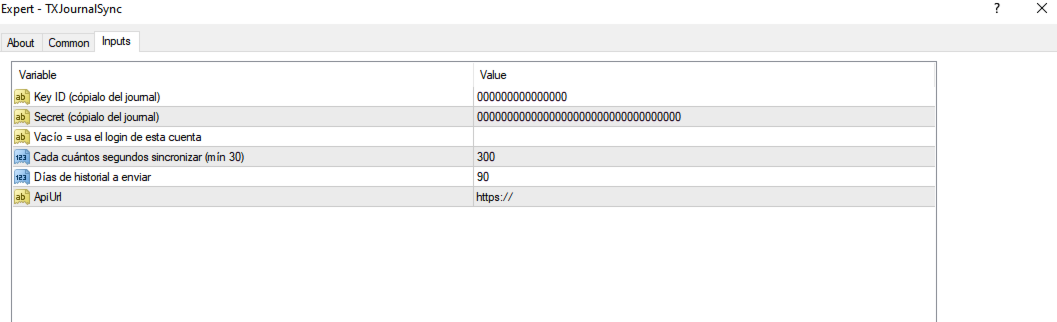
- Attach the utility to any single chart, paste your Key ID and Secret, enable Algo Trading. The chart comment shows the live sync status.
Inputs
- Key ID / Secret — your personal EA key from TX Journal.
- AccountLogin — leave empty to use the current account login.
- SyncSeconds — how often to sync (default 300, minimum 30).
- HistoryDays — how many days of history to send (default 90).
- ApiUrl — the endpoint to authorize in WebRequest settings.
Notes
- Works with any broker, any account type (hedging and netting), any symbol. One chart is enough for the whole account.
- Closed trades are rebuilt from the deal history so open/close pairs are accurate.
- Does nothing in the Strategy Tester (WebRequest is not available there).
- If the status shows a WebRequest error, the URL was not added to the allowed list (step 2).