Quantora Session Pro Indicator MT5
- インディケータ
- バージョン: 1.31
Quantora Session Pro MT5
Professional Trading Sessions Indicator for MetaTrader 5
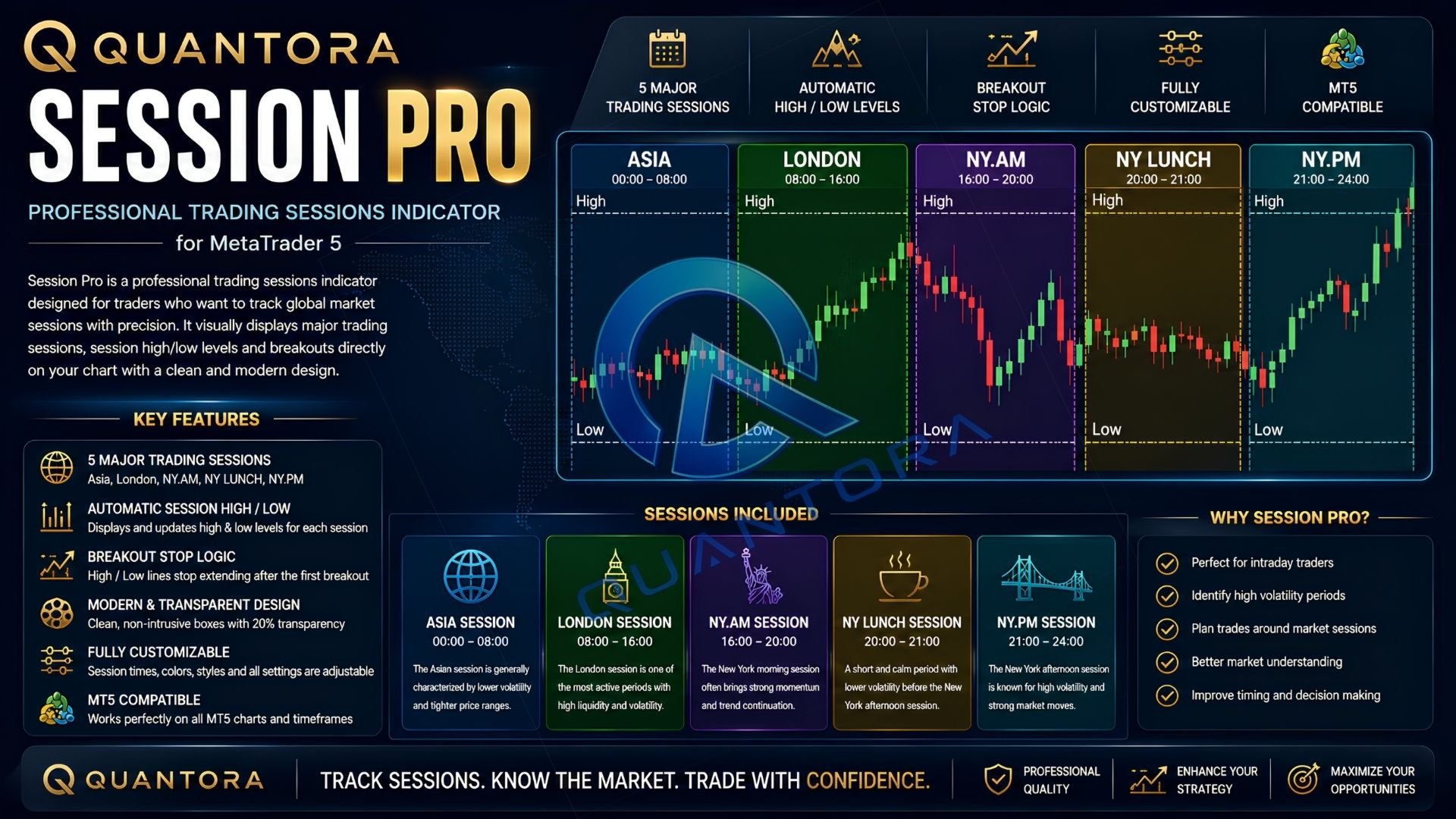
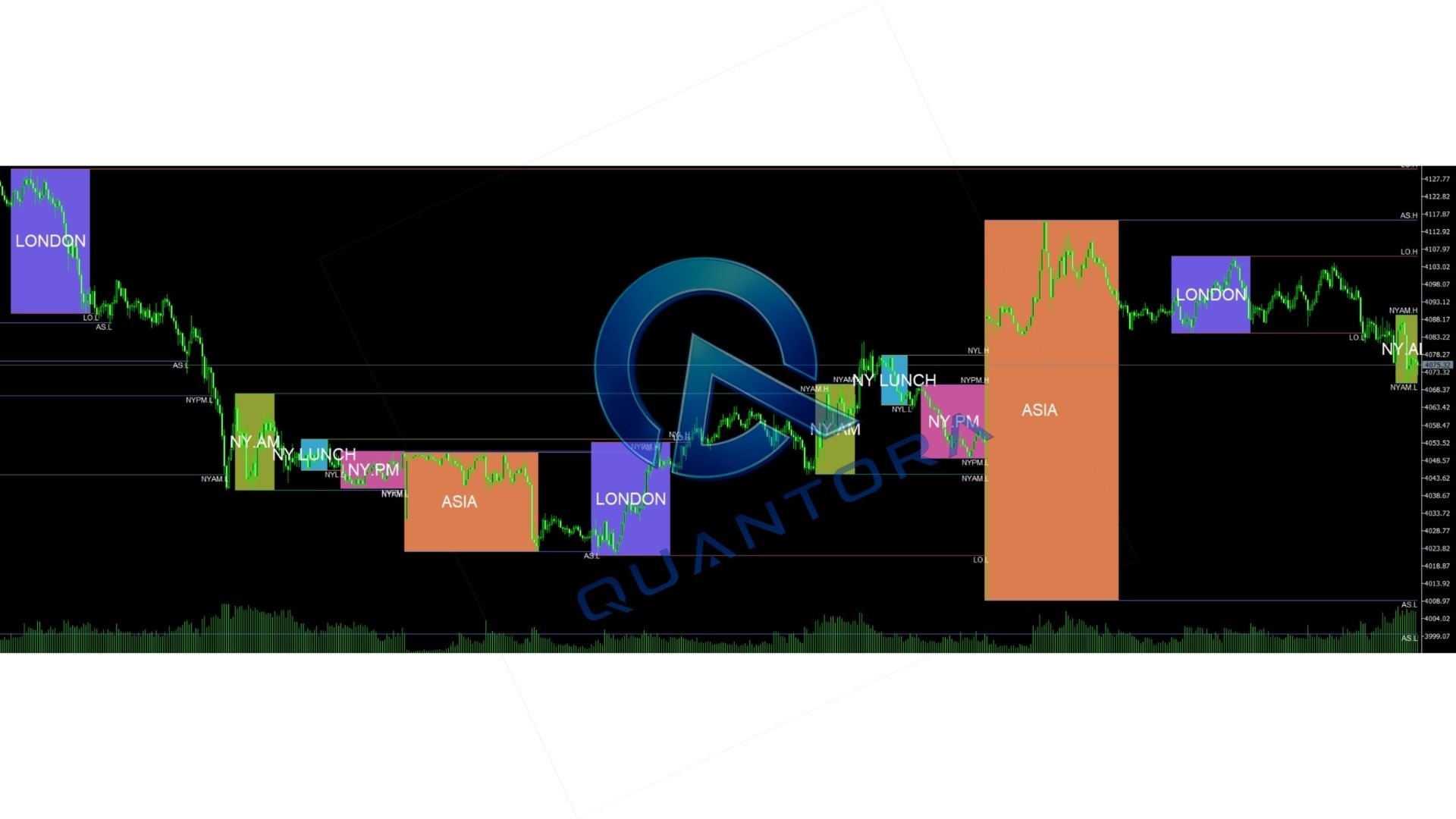
Quantora Session Pro is a modern and lightweight trading sessions indicator developed for MetaTrader 5. It helps traders monitor the most important global market sessions directly on the chart through clear session boxes, automatic High and Low levels, and customizable visual controls.
The indicator is designed to make session-based market analysis easier without overcrowding the chart. It can be used on Forex pairs, Gold, indices, commodities, cryptocurrencies, and other symbols supported by your broker.
Main Features
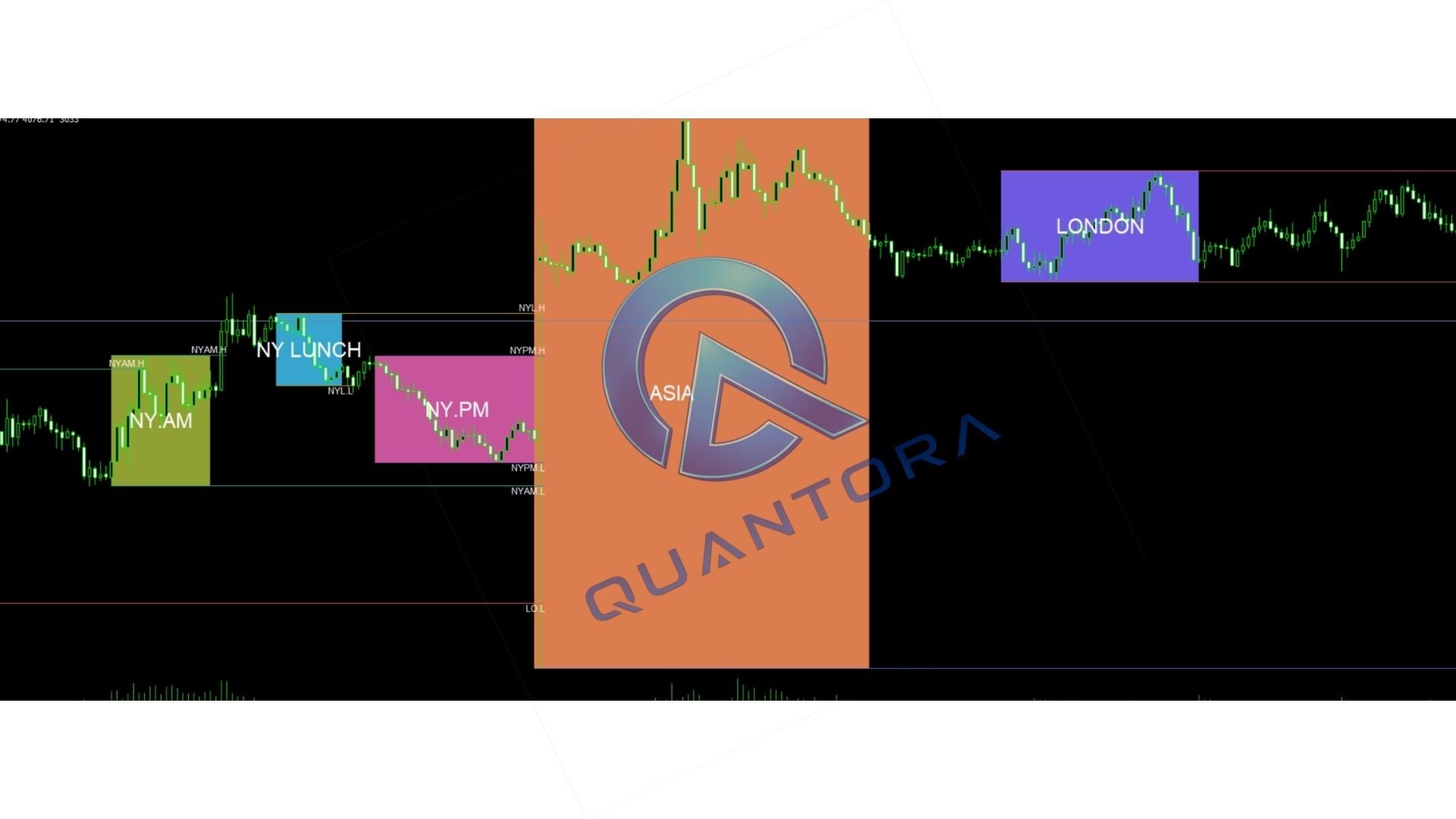
- Displays five major trading sessions automatically
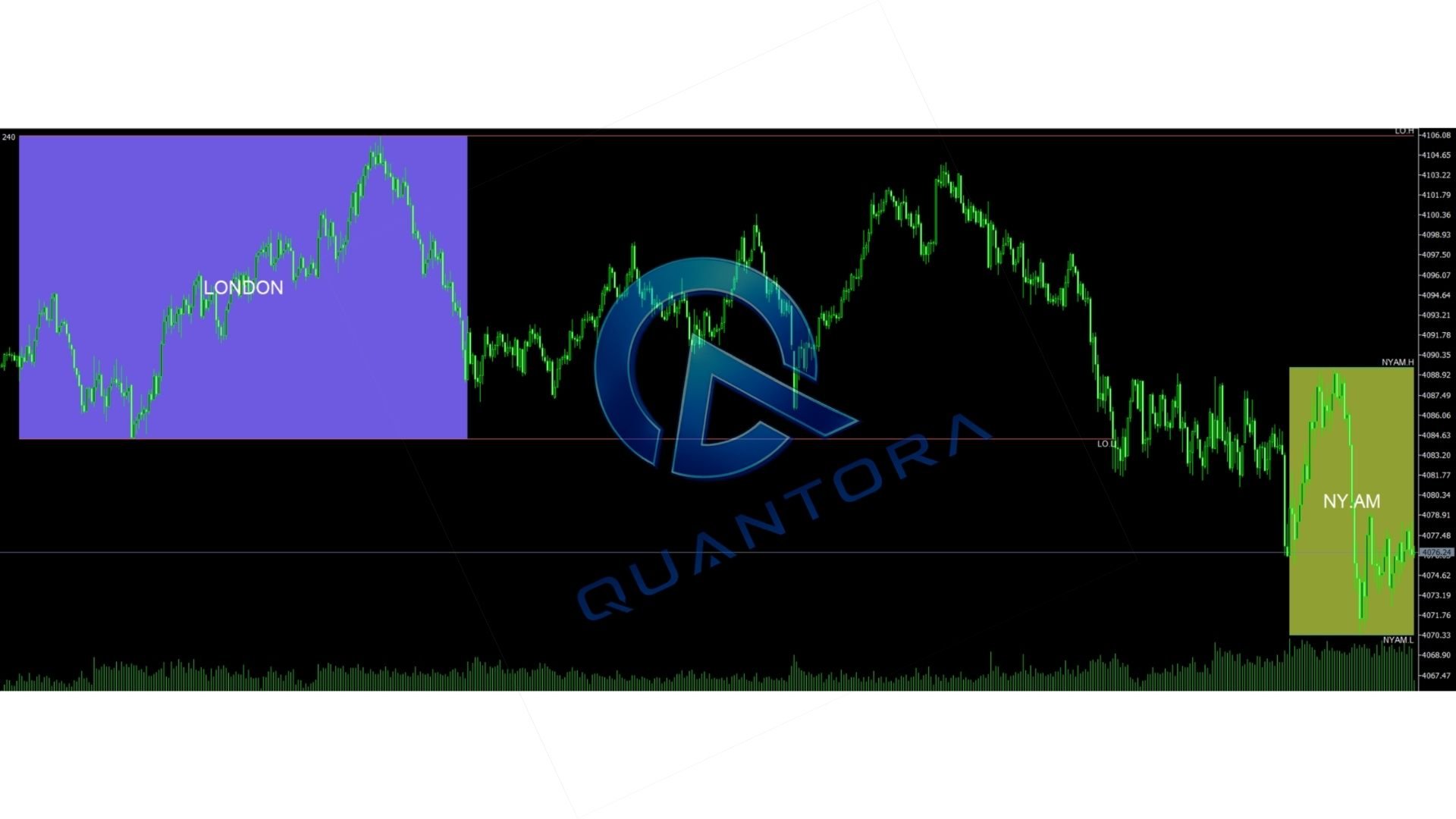
- Shows real-time session High and Low levels
- Extends important levels until a confirmed breakout
- Includes optional breakout stop logic
- Uses clean and transparent session boxes
- Supports custom session names and trading hours
- Allows individual colors for every session
- Provides adjustable transparency and label sizes
- Supports multiple line styles and visibility options
- Works on any symbol and timeframe
- Does not require external indicators
- Does not require DLL files or WebRequest
- Optimized for efficient MetaTrader 5 performance
Included Trading Sessions
Asia Session
The Asia session can help traders monitor early market liquidity, consolidation zones, and the price range formed before the European market becomes active.
London Session
The London session is one of the most active periods in the Forex market. Traders can use the session box and High/Low levels to observe increased volatility, liquidity movements, and possible range breakouts.
New York AM Session
The New York morning session often contains increased activity due to the overlap between London and New York. Quantora Session Pro makes this period easy to identify directly on the chart.
New York Lunch Session
The lunch period can experience reduced momentum and temporary consolidation. Displaying this session separately helps traders distinguish it from the more active New York periods.
New York PM Session
The final New York session allows traders to monitor late-session price behavior, liquidity adjustments, and potential continuation or reversal movements.
Automatic Session High and Low Levels
Quantora Session Pro automatically calculates the highest and lowest prices reached during each enabled trading session.
These levels can be useful for identifying:
- Session liquidity areas
- Potential breakout levels
- Support and resistance zones
- Previous session extremes
- Price expansion after consolidation
- Possible liquidity sweeps
- Intraday range boundaries
The High and Low lines update while the session is active. After the session closes, the levels can remain visible according to the selected settings.
Breakout Stop Logic
The indicator includes breakout stop logic designed to keep the chart clean and organized.
When enabled, a session High or Low line stops extending after price confirms the first breakout of that level. This prevents old session lines from continuing indefinitely across the chart.
This feature is especially useful for traders who monitor session liquidity and want to see which levels have already been broken.
Modern Chart Design
Quantora Session Pro uses a clean visual structure inspired by modern charting platforms.
- Transparent session backgrounds
- Minimalistic session labels
- Professional color combinations
- Clear High and Low lines
- Adjustable visual intensity
- Organized chart presentation
The indicator is designed to provide useful information while leaving enough space for candles, price-action tools, and other technical indicators.
Customization Options
Each session can be configured independently. Depending on the available inputs, users can customize:
- Session visibility
- Session name
- Session start time
- Session end time
- Session box color
- Session transparency
- High line visibility
- Low line visibility
- Line color
- Line width
- Line style
- Label visibility
- Label size
- Label color
- Breakout stop behavior
Session times should be configured according to your broker server time. Broker server time may differ from your local time.
Who Can Use Quantora Session Pro?
The indicator can support several trading approaches, including:
- Intraday trading
- Day trading
- Scalping
- Price-action trading
- Breakout trading
- Smart Money Concepts
- ICT-style analysis
- Liquidity-based analysis
- Session range trading
- Support and resistance analysis
Quantora Session Pro does not generate guaranteed Buy or Sell signals. It is a market visualization and analysis tool intended to help traders organize session information.
Example Uses
Asia Range Analysis
Traders can monitor the Asia session range and observe whether price breaks the session High or Low during London.
London Breakout Monitoring
The London session box can help identify the range formed during the European market opening and highlight possible breakout areas.
New York Overlap Analysis
The London and New York overlap can produce increased volatility. Displaying both sessions helps traders understand when this overlap occurs.
Liquidity Sweep Observation
Previous session High and Low levels can be monitored as potential liquidity areas. Traders may use these levels together with their own price-action confirmation.
Session-Based Support and Resistance
Session extremes can act as temporary intraday support or resistance. The indicator keeps these levels visible and easy to identify.
Recommended Setup
- Platform: MetaTrader 5
- Symbols: Forex, Gold, indices, commodities, cryptocurrencies, and CFDs
- Timeframes: Any timeframe
- Trading Style: Intraday and session-based analysis
- Broker: Any MetaTrader 5 broker
For detailed session analysis, intraday timeframes such as M1, M5, M15, M30, and H1 may provide a clearer view of session structures.
Installation
- Install Quantora Session Pro through the MetaTrader 5 Market.
- Open the required symbol chart.
- Select your preferred timeframe.
- Drag Quantora Session Pro from the Navigator window onto the chart.
- Enable the required sessions from the Inputs tab.
- Adjust session hours according to your broker server time.
- Customize colors, labels, transparency, and High/Low settings.
- Click OK to apply the indicator.
Important Time Information
All session start and end values are based on MetaTrader 5 broker server time.
The same market session may appear at different chart times depending on:
- Your broker
- The broker server location
- Daylight-saving time
- Seasonal market-hour changes
Before using the indicator, compare your broker time with the relevant market session and adjust the inputs when necessary.
Performance and Compatibility
Quantora Session Pro is developed to operate efficiently without unnecessary calculations. The indicator can be used together with other chart tools, indicators, and manual trading systems.
- No external indicator is required
- No DLL is required
- No WebRequest is required
- No additional installation files are required
- Compatible with common MetaTrader 5 symbol formats
The number of enabled sessions, visible historical objects, and other chart indicators may affect terminal performance on older computers.
Frequently Asked Questions
Does the indicator open trades?
No. Quantora Session Pro is an indicator and does not open, modify, or close trading positions.
Does it provide Buy and Sell signals?
No. The indicator displays market sessions and session High/Low levels. Trading decisions remain the responsibility of the user.
Can I use it on XAUUSD?
Yes. It can be used on XAUUSD, Forex pairs, indices, commodities, cryptocurrencies, and other symbols provided by the broker.
Can I change session times?
Yes. Session start and end times can be adjusted according to the broker server time.
Can I disable individual sessions?
Yes. Sessions can be enabled or disabled independently.
Can I change the colors?
Yes. Session colors and other visual settings can be customized through the Inputs section.
Why are my sessions displayed at the wrong time?
The most common reason is a difference between your local time and broker server time. Update the session start and end values according to the time shown in MetaTrader 5.
Does the indicator work on all timeframes?
Yes. However, intraday timeframes generally provide the clearest view of individual trading sessions.
Benefits
- Identify active global trading sessions quickly
- Monitor session High and Low levels automatically
- Observe possible liquidity and breakout areas
- Improve awareness of market timing
- Separate active and quiet market periods
- Keep charts structured and organized
- Support session-based trading analysis
- Customize the indicator for different strategies
Technical Information
- Product: Quantora Session Pro MT5
- Product Type: Technical Indicator
- Platform: MetaTrader 5
- Current Version: 1.31
- Price: Free
- Supported Symbols: Any symbol
- Supported Timeframes: Any timeframe
- External Dependencies: None
Risk Notice
Quantora Session Pro is an analytical tool and does not guarantee profitable trading results.
Trading Forex, Gold, indices, commodities, cryptocurrencies, and CFDs involves financial risk. Session levels, breakouts, liquidity areas, and previous High/Low values should not be treated as guaranteed entry or exit signals.
Users are responsible for their own trading decisions, position sizing, risk management, and broker settings.
Quantora Trading Tools
Quantora develops professional MetaTrader 5 indicators and Expert Advisors with a focus on clean interfaces, practical market analysis, automated trading tools, and structured risk management.
Visit the Quantora profile to discover additional indicators and automated trading products for MetaTrader 5.
Thank you for using Quantora Session Pro MT5.