Ouraniophos MT5 CopyTrader
- ユーティリティ
-
Prince Abiola Olaniyi
 MQL4/MQL5 programmer and founder of Ouranio Phos, developing commercial MetaTrader tools including CopyTraderpro, a master/slave trade copier with symbol mapping, auto-failover, and multi-channel support.
 - バージョン: 1.10
- アクティベーション: 10
Ouranio Phos MT5 CopyTrader — MT5 trade copier with symbol mapping, risk limits, and failover.
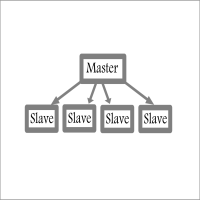
Ouranio Phos MT5 CopyTrader copies trades between MT5 master and slave accounts in real time, including both market positions and pending orders. It handles the situations that normally break simple copiers — mismatched broker symbol names, master disconnections, and manual intervention on the slave side.
Symbol names often differ between brokers. The EA maps master symbols to the correct slave symbol automatically, first through an editable mapping file, then through suffix stripping, and finally through fallback matching if no exact mapping exists. A trade is skipped rather than guessed if no reasonable match can be found.
Lot sizing can follow the master directly, scale by a fixed multiplier with minimum and maximum caps, or be calculated independently from the slave account's own balance or equity at a chosen risk percentage.
Copying can be restricted to a trading window (for example 09:00 to 17:00 server time) and specific days, useful for traders who avoid weekend or Friday trading. Existing open positions continue to be managed even outside this window.
If the master disconnects, the slave can automatically switch to managing open positions locally, including break-even and trailing stop logic, then switch back once the master returns. A manual close on the slave side is remembered, so that position is not silently reopened on the next sync.
Risk controls include a daily drawdown limit, daily loss limit, daily profit target, and a maximum trades per day cap, alongside a separate kill switch that closes all copier positions if session drawdown passes a set threshold. A spread guard can block new copies during abnormally wide spreads.
The on-chart dashboard shows master connection status, daily profit and drawdown, open positions and pending orders, active lot mode, copier status, daily trade count, and current management mode, so the account's state is visible at a glance. Push and email notifications keep you informed of important copier events when you're away from the terminal.
For money managers and signal providers, the panel background, watermark, and company logo can be customized to match your own branding.
Multiple independent master-slave pairs can run on the same account or machine at once using separate channel IDs — useful for copying from more than one signal source, or managing several client or prop accounts without interference.
Installation — Master account:
1. Attach the EA to any chart
2. Select Master mode
3. Set a unique Channel ID
4. Enable AutoTrading
5. Keep the terminal running
Installation — Slave account:
1. Attach the EA
2. Select Slave mode
3. Enter the same Channel ID as the master
4. Configure lot sizing and risk settings
5. Enable AutoTrading — the slave will automatically begin synchronizing trades
Suited for personal account copying, prop firm accounts, portfolio and money management, signal distribution, and running several accounts at once.
The demo version can be tested fully in the Strategy Tester before purchase. Introductory pricing of $59 is currently in effect for early buyers.