Gmail to MT5

5

Gmail to MT5 is a tool that automates the process of transferring trading signals from your Gmail inbox directly to your MetaTrader 5 trading platform. It's a bridge that connects these two platforms, allowing you to receive and execute trades based on information sent via email.

  • No DLL, no .exe, and no external software
  • Can receive TradingView signals
  • Would you like more features? We'd be glad to implement them based on your needs

How to set up:

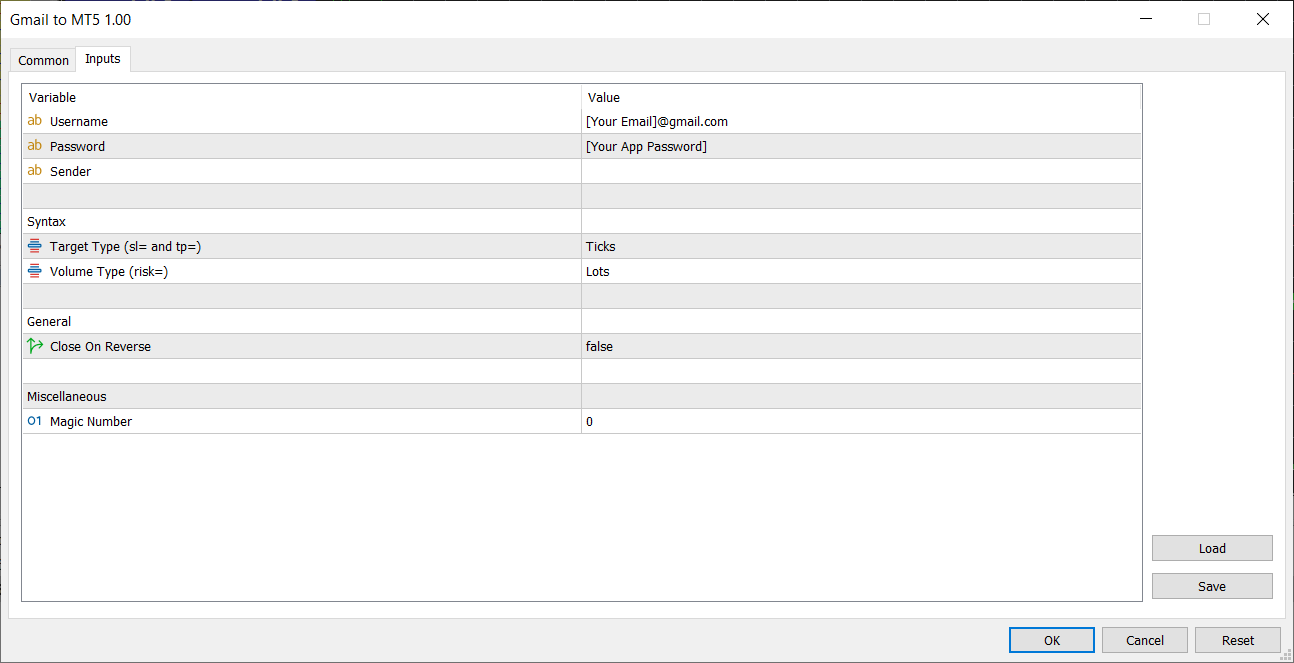
  1. Create an app password at https://myaccount.google.com/apppasswords and save it
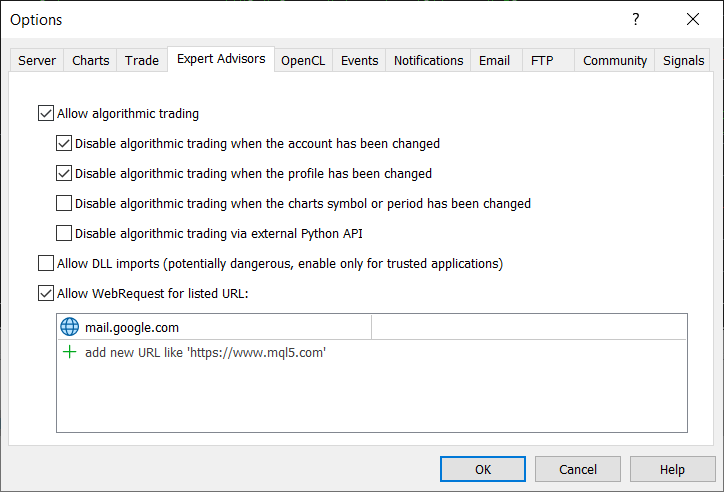
  2. Enable "Allow WebRequest for listed URL" and add "mail.google.com" to the list (see screenshot)
  3. Run the EA

Trade examples:

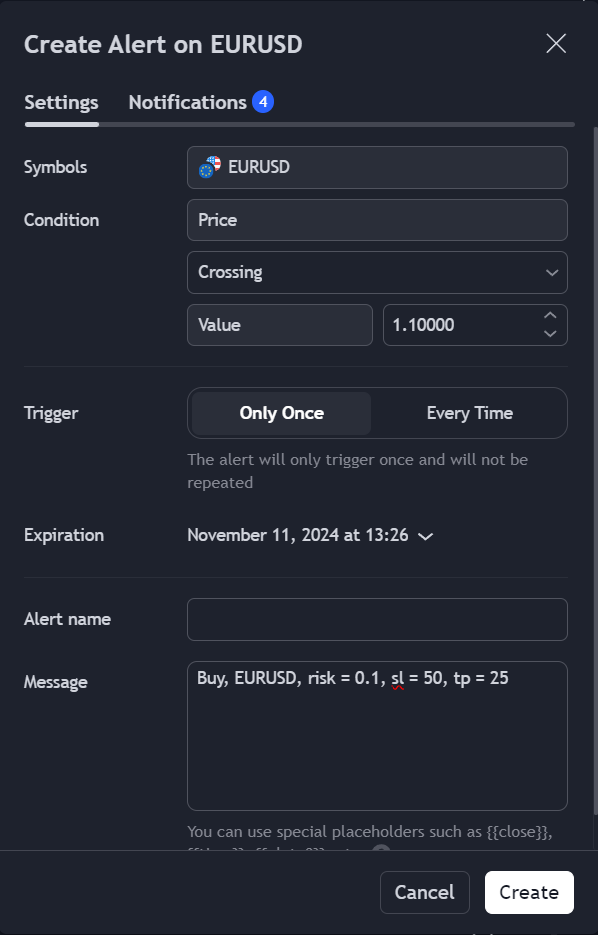
  1. To buy 0.1 lot EURUSD, stop loss 50 ticks, take profit 25 ticks: Buy, EURUSD, risk = 0.1, sl = 50, tp = 25
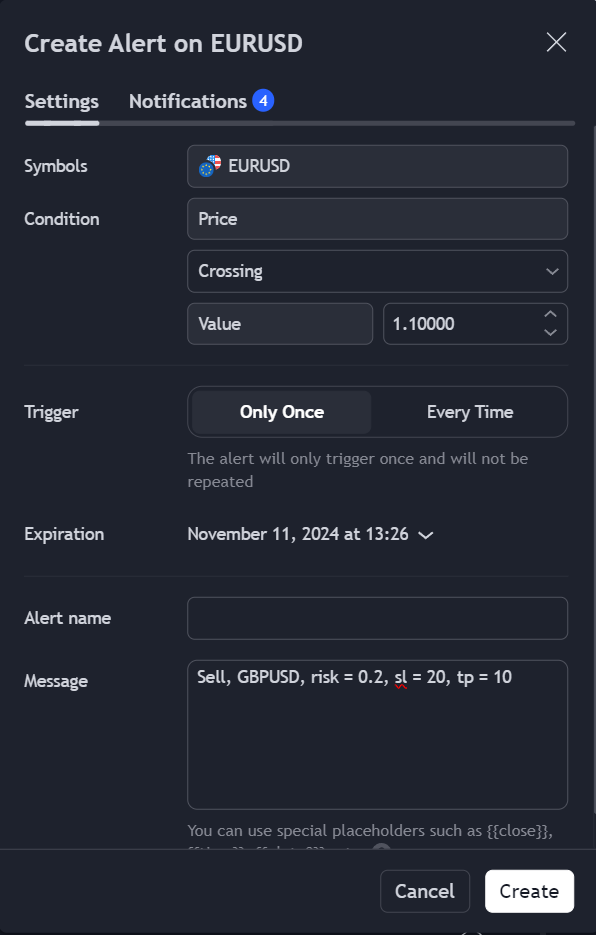
  2. To sell 0.2 lot GBPUSD, stop loss 20 ticks, take profit 10 ticks: Sell, GBPUSD, risk = 0.2, sl = 20, tp = 10

レビュー 1
Ali demirtas
47
Ali demirtas 2024.12.09 13:46 
 

It's exactly the tool I was looking for. I bought it, it works flawlessly. Thanks to this tool, I was able to create my own expert using tradingview indicators. The only problem is that it works with e-mail, so there is a slight delay when opening a transaction. This is a natural problem between platforms. In my tests, I measured the delay as approximately 0.6 milliseconds.

edit: I wrote it wrong. Correct 6 milliseconds

おすすめのプロダクト
通貨ストレングストレードパネルEAMT5は、初心者またはエキスパートトレーダーにとって革新的なソリューションです。通貨の強さの概念は、価格アクションと組み合わされ、8つの主要通貨の通常の28の組み合わせを除いて、任意のシンボル/ペアに適用できるため、まったく新しいレベルになります。つまり、すべての通貨、商品、暗号(インデックスではない)を含む、任意のペアの長所または短所をトレードできます。複雑な強さを解読することなく、ペアの2つの部分の強さ/弱さのバランスを視覚的に知らせる色付きのバーを使用することで、16/32シンボルを一目で明確に把握できる画期的な製品です。他の従来の通貨強度ソリューションと同様に、線またはヒストグラム。 通貨の強さのトレードパネルEAMT5は、MT5で見つけることができる最も簡単で使いやすいトレードパネルでもあります。追加のウィンドウやパネルを開く必要なしに、すべてのオプションと機能が1つのサーフェスにあります。これは、注文管理、リスク計算、部分閉鎖、アカウント保護ユーティリティのすべてを1つにまとめた、非常に便利なインターフェースです。 Currency S
Copier of deals from MetaTrader 5 to MetaTrader 5 ( MetaTrader 4<->MetaTrader 4 version is available ; with both versions, you can copy MetaTrader 5<->MetaTrader 4, MetaTrader 4<->MetaTrader 5, MetaTrader 5<->MetaTrader 5, MetaTrader 4<->MetaTrader 4). There is a demo version (restricting by grades and by lots) Works only in the mode of hedging Spread filter. Select the best price (start copying positions with a profit or loss). Configure the lot size, fixed or ratio-based (provider signals can
Instructions for Using Reverse Copier EA Attach EA to Charts Open MetaTrader and attach the EA to any chart on both accounts (master & slave). Make sure AutoTrading is enabled. Master Account (Signal Sender) Set Mode = Master in EA settings. This account will send trade signals. Slave Account (Signal Receiver) Set Mode = Slave in EA settings. This account will receive trades in reverse (opposite direction). Lot Multiplier In Slave EA settings, set Multiplier to control lot size. Example: 1.0
Indicator shows balance curves based on magic number for portfolio analysis. It allows to visually estimate different strategies performance on a single symbol. Any of magic number can be hidden by clicking on the value in legend. Parameters: HideAllOnStart - all magics are hidden and can be activated by clicking on its value; MAMode - shows average profit from trades; MAPeriod - Moving average period; Magics - a string with magic numbers separated by comma like "1,2,123". If this field is empty
Symbol Manager or Grid Manager, designed to group orders into one position (by Symbol or by Magic Number). This utility will be useful to multi-currency traders (many EAs), who can have multiple orders on several pairs. You will be able to see the total number of lots, the total profit, and set virtual stop loss and virtual take profit. To set a real TP (or SL), you must first set the virtual value, and then enter the command in this cell: "set". If you want to set real TP/SL for all orders at
Trade Assistant B90
Mohammadbagher Ramezan Akbari
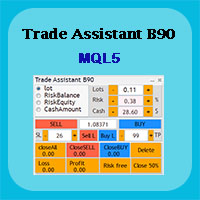
Trade Assistant B90 is designed for manual trading so that it helps us to manage capital and position well. This expert has the ability to change the default inputs of the expert as desired before use. You can see the expert entries in the photo below, each of which we explain below. 1.    Background Color : With this entry, you can change the assistant's background Color 2.    Font size: You can change the size of the fonts used in the assistant. 3.    Button‌ color: Change the color of assis
Local Trade Copier EA MT5
Juvenille Emperor Limited
4.96 (135)
Local Trade Copier EA MT5 による、驚くほど高速な取引コピーを体験してください。1分で簡単にセットアップできるこの取引コピー機は、同じWindowsコンピュータまたはWindows VPS上の複数のMetaTrader端末間で取引をコピーすることができ、0.5秒未満の高速コピースピードを実現します。 初心者であろうとプロのトレーダーであろうと、 Local Trade Copier EA MT5 には、あなたの特定のニーズに合わせてカスタマイズするための幅広いオプションが用意されています。これは、利益の可能性を高めたい人にとって究極のソリューションです。 今すぐ試してみて、これが市場で最も速くて簡単なトレードコピー機である理由を理解してください。 ヒント: デモアカウントで Local Trade Copier EA MT5 デモバージョンをダウンロードして試すことができます: ここ ダウンロードした無料のデモ ファイルを MT5 >> ファイル >> データ フォルダを開く >> MQL5 >> Experts フォルダに貼り付けて、ターミナルを再起動しま
Advanced Multi-Symbol Equity Protection & Hybrid Stops System Overview Professional-grade equity protection system designed for traders managing multiple currency pairs simultaneously. Features both individual symbol controls and master account-wide protection mechanisms. Key Features Hybrid Take Profit System - **Fixed TP:** Set specific profit targets per symbol - **Trailing TP:** Dynamic profit protection that follows price - **Hybrid Mode:** Combines both methods for optimal results
XagusdHamzai85pattern – Visual Pattern Detector for XAGUSD XagusdHamzai85pattern is a purely visual Expert Advisor designed for advanced technical analysis of Silver (XAGUSD) . It does not open any trades : its purpose is to clearly and instantly display price action patterns directly on the chart , making it ideal for backtesting, pattern study, and manual decision support . Detected Patterns The EA automatically detects and draws signals for the following classic patterns: Bullish & Bearish En
Trade Performance Journal — Your Visual Trading Summary Tool Trade smarter by understanding your performance. This Expert Advisor (EA) provides an instant visual summary of your trading results directly on the chart. Whether you’re a scalper, swing trader, or long-term investor, this tool helps you stay on top of your performance metrics with ease. Key Features Flexible Time Analysis View your performance by Quarter, Month, or Half-Year. Easily switch between display modes to analyze your res
FREE
Local Trade Copier   is an advanced tool designed for efficiently copying trades between accounts in the   local   mode. It allows for lightning-fast order replication from a master account to a slave account. In local mode, trades are copied instantly, while in remote mode, the copying process takes less than 1 second. MT4 Version MT5 Full Version (Local & Remote) MT4 Full Version (Local & Remote) Local mode refers to both MetaTrader platforms being installed on the same system. It fully suppo
"Quick Copier" is designed to copy trading without any complicated settings. It copies master orders faster than "Just Copier" (https://www.mql5.com/en/market/product/20920). Please also check this product at fxina.hostingerapp.com.  The copy can be done in one PC. One EA can be set as master (provider) or slave (receiver). The receiver lot can be set to multiple providers lots. Any type of copy is available. MT4 -> MT5 MT4 -> MT4 MT5 -> MT5 MT5 -> MT4 If you want to copy MT4 -> MT5 or MT5 -> MT
Reverse TradeCopier for Followers   can copy trades from an account that is running Reverse TradeCopier Source . Features: Copies trades from one source (master) account to multiple following (slave) accounts. Allows investor (read only) password for source (master) account. There are no complicated settings and input parameters, everything is easy. Works with different brokers. Works with different quotes symbols (EURUSD_FX, eurusd_m, etc.). Can copy orders from 4-digit quotes platform to 5-dig
Free Slave Version – Remote Trade Receiver MT5. This is the FREE Slave version of our professional Remote Trade Copier system. It allows you to receive trades from a Master account running our full Copy Trade solution. Designed for simplicity and reliability, this version is read-only and cannot send trades or operate independently. Key Features: One-click setup – simply connect to the Master. Fast and accurate order copying. Supports all symbols, order types, and brokers. Minimal resource us
FREE
「   Multi Symbol Trailing   」ユーティリティは、現在オープンしているすべてのポジション (マルチシンボル トレーリング) のストップ ロスを移動します。主に手動取引を支援することを目的としています。ユーティリティには、通貨ペアの名前または個々の識別子 (マジック ナンバー) による制限はありません。ユーティリティは、現在開いているすべてのポジションを完全に処理します。 「 トレーリング ストップ 」および「 トレーリング ステップ 」パラメーターの測定単位はポイントです (価格 1.00055 と価格 1.00045 の差は 10 ポイントです)。 ユーティリティを使用するための典型的なシナリオ (ビデオを見る): 最初は、市場にオープン ポジションはありません。このユーティリティは、最もアクティブなチャート (「EURUSD」など) に関連付けられています。次に、ユーザーは手動でポジションを開きます (ビデオの例: ポジションは「GBPUSD」、「XAUUSD」、「NZDUSD」、および「AUDCAD」で開かれました)。ポジションが開かれるとすぐに、「  
KC Trade Copier Pro is the ultimate local trade copying solution designed for high-performance trading on MetaTrader 5. Engineered for speed and reliability, it allows you to replicate trades between multiple accounts on the same PC or VPS with near-zero latency (1-5ms) . Whether you are a Prop Firm trader managing multiple funded accounts, a portfolio manager, or a scalper requiring instant execution, KC Trade Copier Pro offers a professional alternative to expensive monthly subscription servi
The program is use to copy trading from MT5 to MT4 and MT5 on local PC or copy  over the Internet .  Now you can easy copy trades to any where or share to friends. Only run one Flash Server on VPS, also need allow the apps if you turn on Windows Firewall. Can not add more than 20 account copier to server at same time,  include both  MT4 and MT5 Get free Copier EA  for MT4 and MT5 (only  receive signal), download here Instants copy, speed smaller 0.1 seconds, easy to setup How to setup and guide
Advanced History Collector Panel (MT5 履歴統計ツール) Advanced History Collector Panel は、MetaTrader 5 (MT5) 専用に開発された、高度な口座分析および可視化ツールです。膨大な取引履歴を瞬時に解析し、直感的なグラフと詳細なレポートで表示します。 主な機能: 多角的なデータ分析 : 日次・週次ごとの損益、ロング・ショートの比率、ロット数、入出金履歴などを正確に集計。 ダイナミック・チャート : 損益曲線(ラインチャート)、資産推移、注文数分布(ヒストグラム)など、多彩なグラフ表示に対応。 リスク管理の強化 : 最大含み益や最大含み損を自動算出し、トレードの「質」を客観的に評価。 自由度の高いカスタマイズ : フォントサイズ、カラー設定、パネルの大きさなどを自由に調整可能。高解像度モニターにも完全対応。 データの自動保存 : 履歴データをファイルに保存・読み込みが可能で、継続的なパフォーマンス管理を実現。 トレード手法の改善や資金管理の最適化を目指すトレーダーにとって、最も信頼できる分析パートナーとなる
FREE
️ TradeForge Trade Copier – マスターアカウントから複数アカウントへの取引ミラーリング TradeForge Trade Copier は、MT5用の強力なEAで、1つのアカウント(マスター)から複数の他アカウント(スレーブ)へ取引をリアルタイムにコピーします。ファンドマネージャー、プロップトレーダー、またはさまざまなブローカーで戦略を展開してリスクを分散したい個人トレーダーに最適です。 中核概念: トレードコピー/ミラートレード 複数クライアント口座を管理するファンドマネージャーに最適 異なるブローカーで同じ戦略を運用可能 リスクを分割して分散 2層アカウント構成 マスターアカウント :取引の発信源 スレーブアカウント :マスターの取引を反映 共有のバイナリファイルによる高スピード通信 ️ 技術的実装方法 マスターがバイナリファイルに取引情報を書き込む スレーブがそのファイルを読み取り、取引を同期 テキストやサーバー経由より高速かつ安定 リアルタイムポジション管理 新規オープンポジションの正確なコピー SL/TPも同等に同期 マスター
The utility displays in a convenient form the historical trades made on the account. You can filter trades by magic or comcent, display only profitable or losing trades, and only buy or sell trades. Using this utility, you can see trade entry and exit points, stop loss and take profit levels, trade profit, magic number and comment, order ticket and order size - you only need to run the utility on the chart of the currency pair you want information on get and customize the input parameters. MT4
このユーティリティを使用すると、マスター設定のある端末からスレーブ設定の他の端末に任意の取引をコピーすることができます 同時に、コピーするペアを選択し、いくつかのパラメータでコピーされた順序のサイズを設定することができます。 ドローダウンでリミット損失を設定するか、収益性の高い取引のみをコピーします あなたはMT4またはMT5からMT4またはMT5他のブローカーに取引をコピーすることができます これで、MT4で動作するExpert Advisorの信号をMT5ターミナルまたはバックにコピーすることは困難ではありません コピーマスターを使用して、他のシグナル、Ea、手動取引から任意の取引をコピーします。  設定を使用すると、ロットサイズ、取引方向を変更し、利益取引のみをコピーし、setdbvalueを使用して預金を保存することができます  コピーマスターは、一つのアカウント上の異なるサブスクリプションシグナルのいくつかの戦略を統合することができます MT4で取引をコピーするには、コピーマスター MT4バージョンが必要です: -ここで コピーマスター設定の詳細については:
MT5のエキスパートアドバイザーリスクマネージャーは非常に重要であり、私の意見ではすべてのトレーダーにとって必要なプログラムです。 このエキスパートアドバイザーを使用すると、取引口座のリスクを管理することができます。リスクと利益の管理は、金銭的およびパーセンテージの両方で実行できます。 エキスパートアドバイザーが機能するには、それを通貨ペアチャートに添付し、許容可能なリスク値を預金通貨または現在の残高の%で設定するだけです。 [Instruction for Risk Manager parameters] アドバイザ機能 このリスクマネージャーは、リスクの管理を支援します。 -取引のために -1日あたり - 1週間 - ひと月ほど 制御することもできます 1)取引時の最大許容ロット 2)1日あたりの最大注文数 3)1日あたりの最大利益 4)エクイティを引き受ける利益を設定する それだけではありません。設定で自動設定を指定した場合、アドバイザーはデフォルトのSLとTPを設定することもできます。 アドバイザーは各イベントにアラートを添えて、注文を削除する理由を説明し
Account Protector Metatrader 5
Emmanuel Lovski Ijeawele Maduagwuna
Account Protector Meta Trader 5 This utility prevents risk of ruin per trading cycle.  Retail forex trading accounts are designed with stop-out levels that make it nearly impossible to restore lost capital after a trader — human or algorithmic —   blows an account . This is especially frustrating for traders who have grown their account to multiples of its starting value, only to suffer irreparable losses from a series of bad trade entries. The Account Protector solves this by enforcing a specif
advanced version of 20pips challenge... semi auto... in 30 profitable steps 20$ account grows to 50000$+ , if sl hit only 1 step down...  with a beautiful dashboard... manually enter the trade according to your strategy... all calculation is automatic.. the lot size, the take profit distance... while stoploss (sl) must be set manually... and     best of luck :)
Auto Trade Copier is designed to copy trades to multiple MT4, MT5 and cTrader accounts/terminals with 100% accuracy. The provider and receiver accounts must be on the same PC/VPS. With this tool, you can copy trades to receiver accounts on the same PC/VPS. All trading actions will be copied from provider to receiver perfectly. This version can be used on MT5 accounts only. For MT4 accounts, you must use Auto Trade Copier (for MT4). Reference: - For MT4 receiver, please download Trade Receiver Fr
Inverted_Chart_EA Utility Expert Advisor Inverted_Chart_EA creates and maintains a mirror-inverted chart of any symbol and timeframe. It automatically generates a custom instrument (e.g. US30_INV ) and keeps its price history updated in real time, with bars mirrored around a chosen pivot. This utility gives traders a new way to analyze the market from a different perspective by flipping the chart upside down. Why use an inverted chart? Highlight hidden patterns – price formations that look ordin
Telegram to mt5 signal copier
Chukwuemeka Kingsley Anyanwu
5 (1)
Copies Signal from any Telegram channel and instantly executes the trade on MT5 without admin rights! Do you receive trading signals on Telegram and wish they could execute instantly on Meta Trader 5? READ THIS FOR SETUP GUIDE Telegram to MT5 Signal Copier is a powerful bridge between your Telegram signal channels and MetaTrader 5. It listens to messages from a specific Telegram channel and automatically extracts trading signals — including symbol, action, entry price, stop loss, and take prof
SonicTradeCopier: (Best for scalping) Easy Fast Reliable trade copier. Copy trades from one terminal to an other (internet copy feature coming soon.) MT4 to MT4. MT4 to MT5. MT5 to MT5. MT5 to MT4. MT4/MT5 to any other platform copy possibility for custom made solutions. Reverse trading. Advance filters for traders. Features: (Setting up copying policies) Sender only has to setup  signal name and start sending signals [ You must start signal sender first always ]. Receiver sets up  signal nam
Trade Copier This tool copies trades between MT5 or MT4 platforms running on the same computer. For example: MT5 --> MT4 & MT4 & MT4 etc. MT5 --> MT5 & MT5 & MT5 etc. MT5 --> MT4 & MT5 & MT4 & MT5 etc. Also download the version for   MT4 Parameters ID - is not required. If you want to use multiple MASTERs on one PC or on one MT5, each MASTER must have a different ID (alphanumeric). Then SLAVE must have the same ID as the MASTER. Mode MASTER - for a provider account; in this mode, the tool transm
アシスタント: トレードアシスタント-MT4 (クリックしてダウンロード) トレードアシスタント-MT5 (クリックしてダウンロード) 取扱説明書をよくお読みください。 基本事項: ポジションの迅速な開設と閉鎖、ワンクリックでのポジションの開設と閉鎖、ワンクリックでの注文の発注 ドローライントレード 自動SL/TP 近くのシンボル 利益保護 SLプロテクトを移動 トレーリングSL アカウントリスクコントロール 秩序の影 注文の自動追加 自動決済注文 閉じる 再開 記号情報 チャット受付中 データ統計 言語選択と切り替えに対応(現在、中国語と英語に対応)         自動言語認識 サポート   ホットキーの開閉   バインディング、ショートカットキーを使用してポジションを素早く開閉します...     ショートカットキーで閉じる。最大30個のホットキーをサポート。 ロック解除はほとんどの機能をサポートしています   リプレイ   操作と   テスト環境で使用される 求人情報(開店・閉店): ワンクリック位置オープン(       (損切り注文の便利な設定、ロットサイズの自
このプロダクトを購入した人は以下も購入しています
Farmed Hedge Yield Farming |  Arbitrage x Correlation x Currency Strength  (Manual - Hybrid - Semi/Automated EA) VERIFIED TRADING RESULTS - Farmed Hedge Yield Axi Copy:  https://www.mql5.com/en/signals/2356376 - Farmed Hedge Yield Exn Copy:   https://www.mql5.com/en/signals/2356404 - Farmed Hedge Yield V Copy:  https://www.mql5.com/en/signals/2357156 Contact me via private message to receive the User Manual and Setup Video. * Thai Lauguage Support Available VERSION 3 - WILD HARVEST UPDATE
Footprint Chart Pro — Professional OrderFlow EA for MetaTrader 5 Version 6.34 | Professional tool for real traders | Institutional-Grade Visualization DEMO USERS - PLEASE SELECT EVERY TICK / REAL TICK WHEN TESTING AND YOU HAVE DOWNLOADED HISTORICAL DATA. IF YOU SEE A WAITING SCREEN AND IT IS NOT DOWNLOADING, IT MEANS YOU HAVE LOW HISTORICAL DATA. TRY 1 MIN AND 5 MIN FIRST ON 1 DAY DATA. ONE DAY DATA SHOULD BE THE NEWEST AND MOST CURRENT DATE. PLEASE WAIT UNTIL THE MARKET HAS ROLLED OVER PERIOD.
Ultimate Extractor - Professional Trading Analytics for MT5 *****this is the local HTML version of Ultimate Extractor. For the online version please reach out to me directly****** Ultimate Extractor transforms your MetaTrader 5 trading history into actionable insights with comprehensive analytics, interactive charts, and real-time performance tracking. What It Does Automatically analyzes your MT5 trading history across all Expert Advisors and generates detailed HTML reports with interactive vi
AntiOverfit PRO:バックテストの不都合な真実 そのEAを買う前に、少し立ち止まってください。 年利250%をうたうシステムを見つけたところです。バックテストは完璧に見えます。販売者の価格は399ドル、あるいは1,999ドルかもしれません。表面上は、すべてが理にかなって見えます。 しかし問題があります。そのバックテストは、あなたが思っていることを証明してはいません。 過去データだけでは、ほとんど何も証明できません。確認できるのは、そのロジックが ある1つの 特定の市場シーケンスで機能したということだけです。価格が別の経路をたどった瞬間に、ロボットは崩れ始めます。 そして高額なEAの多くは、まさにそこで失敗します。 AntiOverfit PROがすること AntiOverfit PROは、システムを売る前にほとんど誰も見せないものを提供します。お金を使う 前に 、その堅牢性を確認する方法です。 数学者である必要はありませんし、難しく考える必要もありません。流れはとてもシンプルです。 MT5のチャートにAntiOverfitを配置します。 AntiOverfitが現実的な
The core idea: using the user interface, you configure the parameters the chart must meet before entering a position (or positions), choose which entry models to use, and set the rules for when trading and planning should end. Lazy Trader  handles the rest: it  takes over all the routine chart watching and execution! full description  :: 3 key videos [1] ->  [2]   ->  [3] What can it do? - Understands Larry Williams market structure - Understands swing market structure by Michael Huddleston
Crystal Trade Manager – Advanced MT5 Risk and Trade Control Utility Overview Crystal Trade Manager (CTM) is a professional MetaTrader 5 utility designed for risk management, trade automation, and instant execution control. It provides traders with an integrated system for protecting equity, managing daily drawdowns, controlling lot sizes, and applying automation features such as automatic SL/TP, break-even, and trailing stop. The tool is suitable for manual traders, prop-firm challenge particip
The product will copy all telegram signal to MT5 ( which you are member) , also it can work as remote copier.  Easy to set up, copy order instant, can work with almost signal formats, image signal,  s upport to translate other language to English Work with all type of channel or group, even channel have "Restrict Saving Content", work with  multi channel, multi MT5 Work as remote copier: with signal have ticket number, it will copy exactly via ticket number. Support to backtest signal. How to s
あなたがメンバーである任意のチャネルから(プライベートおよび制限されたものを含む)シグナルを直接あなたのMT5にコピーします。  このツールは、トレードを管理し監視するために必要な多くの機能を提供しながら、ユーザーを考慮して設計されています。 この製品は使いやすく、視覚的に魅力的なグラフィカルインターフェースで提供されています。設定をカスタマイズして、数分で製品を使用を開始できます! ユーザーガイド + デモ  | MT4版 | Discord版 デモを試してみたい場合は、ユーザーガイドにアクセスしてください。 Telegram To MT5 受信機は、ストラテジーテスターで動作しません! Telegram To MT5の特徴 複数のチャネルから一度にシグナルをコピー プライベートおよび制限されたチャネルからシグナルをコピー BotトークンまたはChat IDは必要ありません   (必要に応じて使用することができます) リスク%または固定ロットを使用して取引 特定のシンボルを除外 すべてのシグナルをコピーするか、コピーするシグナルをカスタマイズするかを選択 すべてのシグナルを認
YuClusters
Yury Kulikov
4.93 (43)
Attention: You can view the program operation in the free version  YuClusters DEMO .  YuClusters is a professional market analysis system. The trader has unique opportunities to analyze the flow of orders, trade volumes, price movements using various charts, profiles, indicators, and graphical objects. YuClusters operates on data based on Time&Sales or ticks information, depending on what is available in the quotes of a financial instrument. YuClusters allows you to build graphs by combining da
ManHedger MT5
Peter Mueller
4.83 (6)
THIS EA IS A SEMI-AUTO EA, IT NEEDS USER INPUT. Manual & Test Version Please TEST this product before BUYING  and watch my video about it. The price of the ManHedger will increase to 250$ after 20 copies sold. Contact me for user support or bug reports or if you want the MT4 version! MT4 Version  I do not guarantee any profits or financial success using this EA. With this Expert Advisor, you can: Implement your own Zone Recovery strategy to capitalize on trending markets. Create Grid trading s
Trend Cue is a basket-management utility for MetaTrader 5 hedging accounts. You open the first trade. You choose the direction, the timing, and the lot size. Trend Cue then manages the basket that forms around that decision — setting take-profit levels based on real market volatility, optionally building a grid of additional entries, tracking your average price, and protecting your account with drawdown limits that act on the entire basket rather than on individual positions. It works on any ins
Crypto Charting for MT5 – MetaTrader 5 向け暗号資産チャートツール 概要 Crypto Charting for MT5 は、WebSocket を介して暗号資産の OHLC チャートデータをリアルタイムで提供します。複数の取引所に対応し、MT5 上で履歴データの自動更新が可能です。 機能 WebSocket によるリアルタイムデータ 自動履歴データ更新 接続障害時のスケジュール更新 全ての MT5 時間足に対応 OHLCV データ構成 ストラテジーテスターに対応 自動再接続機能付き 対応取引所 Binance、Bybit、OKX、KuCoin、MEXC、Gate.io、Bitget、XT.com 補足情報 ティックデータおよび板情報には、別製品の Crypto Ticks をご覧ください。 注意事項 DLL を使用していません。VPS に適しています。 Strategy Tester では WebRequest 機能は動作しません。 デモをご希望の場合は、MQL5 のプライベートメッセージでご連絡ください。 Full Documentati
EASY Insight AIO – スマートで手間いらずな取引のオールインワンソリューション 概要 数秒で市場全体——FX、ゴールド、暗号資産、指数、さらには株式まで——を、手作業のチャート確認や複雑なセットアップ・インジケーター導入なしにスキャンできたらどうでしょうか? EASY Insight AIO はAIトレードのための究極のプラグ&プレイ型エクスポートツールです。市場全体のスナップショットを、クリーンなCSVファイルで一括出力。ChatGPT、Claude、Gemini、Perplexityなど、さまざまなAIプラットフォームで即座に解析できます。 ウィンドウの切り替えやグラフのごちゃごちゃしたオーバーレイはもう不要。自動エクスポートされる純粋で構造化されたインサイトだけで、無駄なチャート監視に悩まされず、スマートなデータ主導の判断に集中できます。 なぜEASY Insight AIOなのか? 本当のオールインワン • セットアップ不要、インジケーターのインストール不要、チャートへのオーバーレイ不要。インストールして起動し、エクスポートするだけです。 マルチアセット対
The product will copy all  Discord  signal   to MT5   ( which you are member  ) , also it can work as remote copier.  Easy to set up. Work with almost signal formats, support to translate other language to English Work with multi channel, multi MT5. Work with Image signal. Copy order instant, auto detect symbol. Work as remote copier: with signal have ticket number, it will copy exactly via ticket number. How to setup and guide: Let read all details about setup and download Discord To MetaTrader
This Expert Advisor is applicable to plot wave charts as per the NeoWave  method (Neely Extension of Wave Theory).  NeoWave is a scientific, objective and revolutionary style of Elliott Wave Theory that was invented by Glenn Neely in 1990 in the “Mastering Elliott Wave” book. To start analyzing with this method, we need a particular chart called the Wave Chart or Cash Data chart . This is the first step for a good wave analysis. To draw this chart, Highs and Lows should be plotted in the order t
PropFolio Command Manager Pro | The Ultimate Multi-Symbol Arrow Execution Terminal Overview: Stop staring at the charts waiting for your custom indicator arrows to appear. PropFolio Command Manager Pro is an institutional-grade, multi-symbol execution terminal that instantly automates your favorite custom indicator. Simply type the name of your arrow indicator into the settings, and the Command Manager will scan up to 30 currency pairs, indices, or metals simultaneously. When your arrow fires,
Custom Alerts AIO:マルチマーケット監視を一括で実現 — 設定不要ですぐに使えるインテリジェントツール 概要 Custom Alerts AIO は、追加のインジケーター設定が不要で、インストール後すぐに利用できる高機能マーケットスキャナーです。FX Power、FX Volume、FX Dynamic、FX Levels、IX Power を内部にすべて統合し、主要なすべての資産クラス(為替、金属、指数、暗号資産)を一括監視できます。MetaTrader の仕様により、株式は個別のシンボルとして追加可能ですが、一般的には利用頻度は低めです。 1. なぜ Custom Alerts AIO を選ぶべきか 追加ライセンス不要 • 必要なすべての Stein Investments インジケーターが内蔵されており、すぐに使用可能です。 • チャートに表示されるグラフィックは省略されており、アラート生成に特化した構成です。 市場を広範囲にカバー • 為替、金属、暗号資産、株価指数に対応(株式は手動追加可能)。 • シンボル名を入力する必要はなく、プロパティで資産クラス
************************************************ *********************************************** GoldMine Train は、ゴールドのトレンド取引戦略 EA です。 オペレーターは主要なトレンドの方向を決定し、トレインに指示を出します。 トレインはその方向で継続的に売買します。ロット数は、アカウント残高と事前設定されたレバレッジ比率によって異なります。 オペレーターがトレンドの方向を変更すると、トレインは停止し、利益を固定します。 ユーザーはチャート上のボタンを使用してトレンドの方向を簡単に選択できます。 ************************************************ ***********************************************
Unlimited Trade Copier Pro MT5 is a tool to copy trade remotely to multiple MT4, MT5 and cTrader accounts at different computers/locations over internet. This is an ideal solution for you if you are a signal provider and want to copy your trades to other receivers globally on your own rules. One provider can copy trades to multiple receivers and one receiver can get trade from multiple providers as well. The provider can even set the subscription expiry for each receiver, so that receiver will n
MT5 用 Dynamic Fibonacci Grid Dashboard の最新バージョンを紹介します。 数多くの新機能を搭載したこの新しいダッシュボードは、トレード体験を一新し、市場や価格アクションをまったく新しい視点から見ることができます。複数のタイムフレームと複数のシンボルを同時に分析することで、新たな可能性を発見できます。手動トレードやポジション管理のための使いやすいインターフェース、そしてあらかじめ設定された自動売買戦略を適用するための拡張機能を備えています。さらに、DFGはストラテジーテスター内でトレーディングシミュレーターとして完全に機能し、過去データを使用してさまざまな市場環境を再現できます。ビジュアルモードで手動トレードを練習したり、高速モードで自動売買戦略をテストしたりすることが可能です。 主な特徴 • Dynamic Fibonacci Bands の概念に基づく、複数タイムフレームおよび複数シンボルの高度なテクニカル分析。 リアルタイム市場監視ダッシュボードにより、これまでにない効率性を体験できます。M1、M5、M15、H1 のチャートから得られる複雑な
Mt5 To InterativeBrokers Copier allows you to copy deals from MT5 account to Interactive Brokers. With this, you can run your EA strategy on a MT5 Demo/Real Account, then copy all the deals to Interactive Brokers account real time. Features: 1. Copy or Invert-Copy deals Realtime from MT5 to IB Account. 2. Synchronizing positions of both accounts periodicaly, in case any missing copying. 3. You can choose only Buy position or Sell position. Symbols Setup: General Format:  {MT Symbol} -> {IB S
Mentfx Mmanage mt5
Anton Jere Calmes
4.25 (8)
The added video will showcase all functionality, effectiveness, and uses of the trade manager. Drag and Drop Trade Manager. Draw your entry and have the tool calculate the rest. Advanced targeting and close portions of a trade directly available in tool (manage trades while you sleep). Market order or limit order on either side with factored spread. Just draw the entry, the tool does the rest. Hotkey setup to make it simple. Draw where you want to enter, and the stop loss, the tool calculates al
Trade on crypto exchanges in MT5! GRat_Crypto is a tool for manual and automated trading , including ANY available EA, ANY  cryptocurrency  on most popular crypto exchanges in the familiar MT5 environment 24/7. Features 1. ALL instruments of the 9 most popular crypto exchanges are available: Binance, BingX, Bybit, Coinbase, CoinEx, Kraken,   KuCoin, MEXC and OKX . 2. The ability to place ANY type of order available in MT5, both market and pending, to modify orders and positions, to delete order
Features   With MT5 to Interactive Brokers(IB) Trader, you can: 1. Load chart data from IB to MT5, and Analyze with all standard or customer Indicators. 2. Place Orders to IB Account Directly in MT5. 3. Make your Own EAs upon IB Securities by only making minus changes of the trading function. Usage 1) Installation Copy the "Mt5ToIBTraderEn.ex4" and sample files to [MT5 Data Folder]->MQL5->Experts.  2)  MT5 Settings Add the IP Address to the MT5 Allowed URLs in 'Tools->Options->Expert Adviso
HYT (Help Your Trading) は、主に次の 2 つのテクニックを使用して、損失ポジション を平均化 できるように設計されたツールです。 標準平均化。 トレンドの方向に沿ってポジションをオープンすることでヘッジします。 このツールを使用すると、買いと売りの両方において、異なる方向に開かれた複数のポジションを管理できます。 HYT は、次のポジションのサイズ、注文価格、平均化の方向、指定された利益確定レベルでのポジションのクローズを自動的に計算します。 また、希望する利益確定レベルと初期ロットを指定して、「購入」ボタンと「販売」ボタンを使用してポジションを開くオプションも提供します。 使用を開始する には、ツールをチャートにドラッグし、利益確定レベルを設定して、「平均化を開始」ボタンをクリックするだけです。 初期ポジションが大きすぎない ことを確認し、平均を下げるときにツールによってポジション サイズが拡大されるため、追加費用が発生することを覚悟してください。 HYTは 自動取引 も可能です。自動取引を有効にすると、ツールは指定されたパラメータに従ってポジションを開閉しま
CRT Pro Trading EA Ultimate v10 - プロフェッショナルパターンスキャナー 概要 CRT Pro Trading EA Ultimate v10は、Helios Technologiesが開発した高度なマルチシンボルエキスパートアドバイザーで、インテリジェントなトレンドアライメントを備えたCRT(統合-操作-分配)パターンの検出と取引を専門としています。このEAは、機関投資家の取引コンセプトとスマートシグナル管理を組み合わせ、複数の市場で高確率の取引機会を提供します。 主な機能 トレンドアライメント型シグナル生成 スマートトレンド分析:支配的な市場トレンドに沿ったシグナルのみを生成 マルチタイムフレーム確認:上位タイムフレーム分析を使用して低確率セットアップをフィルタリング アダプティブシグナル方向:強気トレンド = 買いシグナルのみ、弱気トレンド = 売りシグナルのみ、中立トレンド = 両方向許可 マルチシンボル市場スキャナー 12以上の銘柄サポート:EURUSD、GBPUSD、USDJPY、USDCHF、AUDUSD、USDCAD、EURGB
MT5用Binance取引ツール 1. 本製品には、Websocketからのライブチャート、ヒストリカルチャート、そしてMT5ターミナルの再起動時に自動更新される機能が搭載されています。これにより、手動操作なしでスムーズにBinance取引を行うことができます。 スポットと先物で取引、ライブチャート、ヒストリカルデータが利用可能です。 チャート機能: 1. Websocket (wss) 経由のライブOHLCチャート 2. APIからの履歴更新 3. MT5を開くたびにチャートの履歴を自動更新 4. M1からMN1まで、すべての時間枠に対応 5. 利用可能なデータ:始値、高値、安値、終値、実出来高、ティック出来高 6. ストラテジーテスターを使用して、暗号資産データでエキスパートアドバイザーのあらゆる戦略をバックテストできます。 チャートと履歴に関する手順: 1. MT5オプションにURLを追加します。 2. 任意のチャートでユーティリティを起動し、モードをLIVEに設定し、取引所(例:Binance Spot)を選択します。初回実行時のみ「シンボルの作成」を「有効」にして、
Modern Trading HUB | MT5 Refined The aesthetic and functional evolution of MetaTrader 5. Recommended for (best usage): Desktop trading, Windows OS, Screen resolution > HD  FULL LIST OF SCREENSHOTS :  https://deliberate-bronze-wiwwprz0fj.edgeone.app/ DETAILED DOCUMENTATION :  https://devoted-amethyst-zrbhosohlp.edgeone.app/ Advanced Visuals Account balance & Quick History Detailed statement (Period Selection) Hot streak tracking Collapsible/Configurable UI Sizing of different buttons Configurable
VOLUME BUBBLES ORDERFLOW FOOTPRINT PROFESSIONAL Expert Advisor for MetaTrader 5 Complete Feature Documentation Introduction: Volume Bubbles OrderFlow Footprint Professional is an advanced order flow visualization tool designed for the MetaTrader 5 platform. It provides institutional-grade market analysis through real-time volume bubbles visualization, volume profiling, and sophisticated order flow analysis. This Expert Advisor transforms raw market data into actionable trading intelligence, hel
Trade on Binance in MT5! GRat_Crypto is a tool for manual and automated trading , including ANY available EA, ANY  cryptocurrency  on most popular crypto exchange Binance in the familiar MT5 environment 24/7. Features 1. ALL instruments of the 5 most popular crypto exchange  Binance . 2. The ability to place ANY type of order available in MT5, both market and pending, to modify orders and positions, to delete orders and close positions (even partially), to set trailing stop and trailing profit.
作者のその他のプロダクト
Gmail to MT4 is a tool that automates the process of transferring trading signals from your Gmail inbox directly to your MetaTrader 5 trading platform. It's a bridge that connects these two platforms, allowing you to receive and execute trades based on information sent via email. No DLL, no .exe, and no external software Can receive TradingView signals Would you like more features? We'd be glad to implement them based on your needs How to set up: Create an app password at   https://myaccount.goo
フィルタ:
Ali demirtas
47
Ali demirtas 2024.12.09 13:46 
 

It's exactly the tool I was looking for. I bought it, it works flawlessly. Thanks to this tool, I was able to create my own expert using tradingview indicators. The only problem is that it works with e-mail, so there is a slight delay when opening a transaction. This is a natural problem between platforms. In my tests, I measured the delay as approximately 0.6 milliseconds.

edit: I wrote it wrong. Correct 6 milliseconds

Nguyen Hoang Phu
17076
開発者からの返信 Nguyen Hoang Phu 2025.12.25 04:29
Great to hear that you're finding the tool so useful!
レビューに返信