Obiriec Order Panel

  • Utilità
  • Armando Brecciaroli
    Armando Brecciaroli
    Sviluppatore cTrader e specialista di trading
    Il mio approccio al trading si basa sull'utilizzo combinato di calcoli derivati ​​da algoritmi che seguono la logica di Ichimoku, Fibonacci, Gann e Smart Money Contract.
  • Versione: 2.11
  • Aggiornato: 8 ottobre 2026
  • Attivazioni: 5
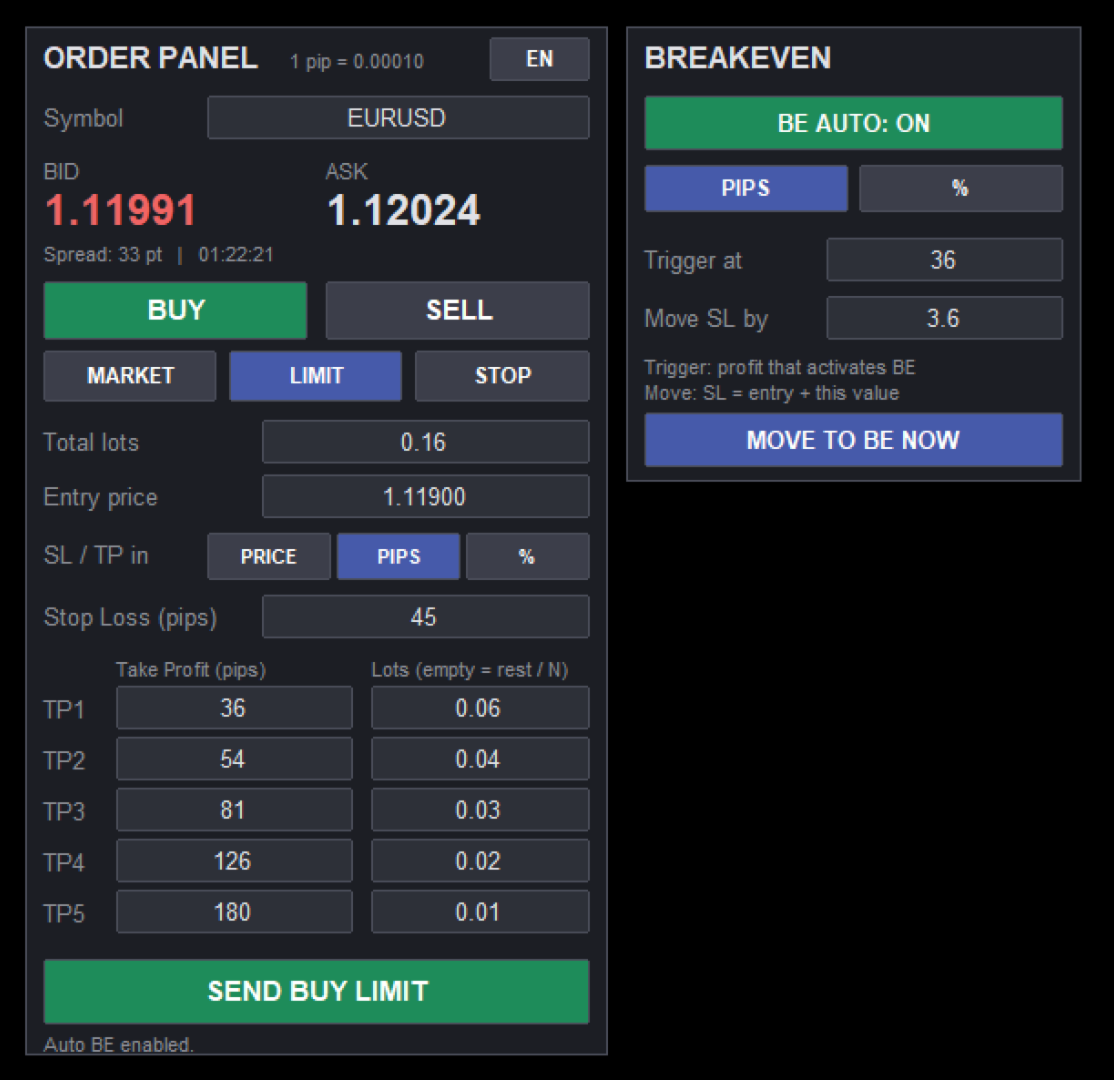
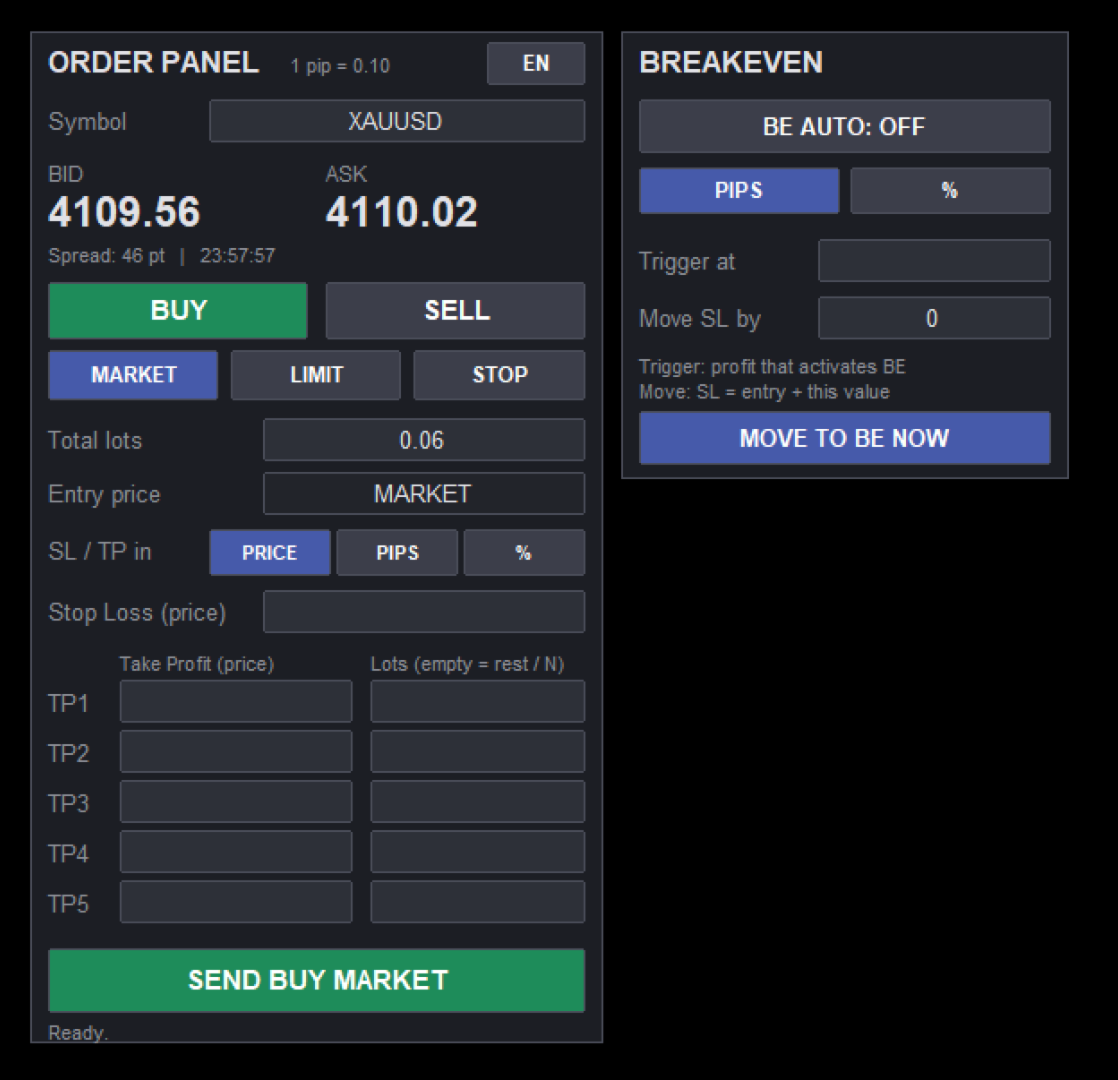
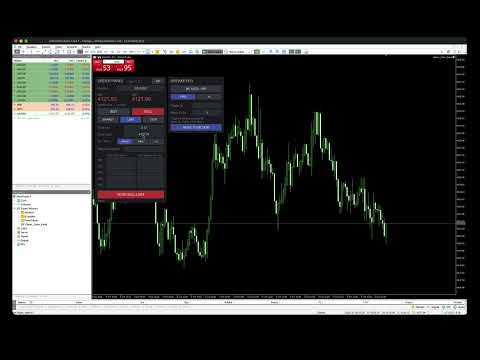
Obiriec Order Panel è un pannello mostrato sul grafico per inserire e gestire gli ordini a mano. Non apre operazioni in autonomia.

Funzioni
- Mostra il prezzo Bid, il prezzo Ask e lo spread del simbolo scelto. Il simbolo si scrive nel pannello (il valore iniziale è XAUUSD).
- Inserisce ordini Buy e Sell a mercato, Limit o Stop, con il prezzo d'ingresso indicato.
- Accetta i lotti totali e fino a cinque livelli di Take Profit. Ogni Take Profit può avere i propri lotti. Se un lotto è lasciato vuoto, i lotti rimanenti sono divisi in parti uguali tra i livelli vuoti.
- Mostra un avviso se i lotti non bastano per tutti i livelli di Take Profit, o se la loro somma non coincide con il totale.
- Accetta lo Stop Loss e i livelli di Take Profit come prezzo, come numero di pips o come percentuale del prezzo d'ingresso.
- Controlla i prezzi prima dell'invio (per esempio, il prezzo di un Buy Limit deve essere sotto il prezzo Ask) e può chiedere una conferma.
- Breakeven: sposta lo Stop Loss sul prezzo d'ingresso, più uno spostamento facoltativo. Può agire in automatico quando il profitto raggiunge un livello impostato (in pips o in percentuale), oppure quando si preme un pulsante.
- Il pannello è disponibile in inglese, italiano, spagnolo, tedesco e francese. Un pulsante sul pannello cambia la lingua.

Come si usa
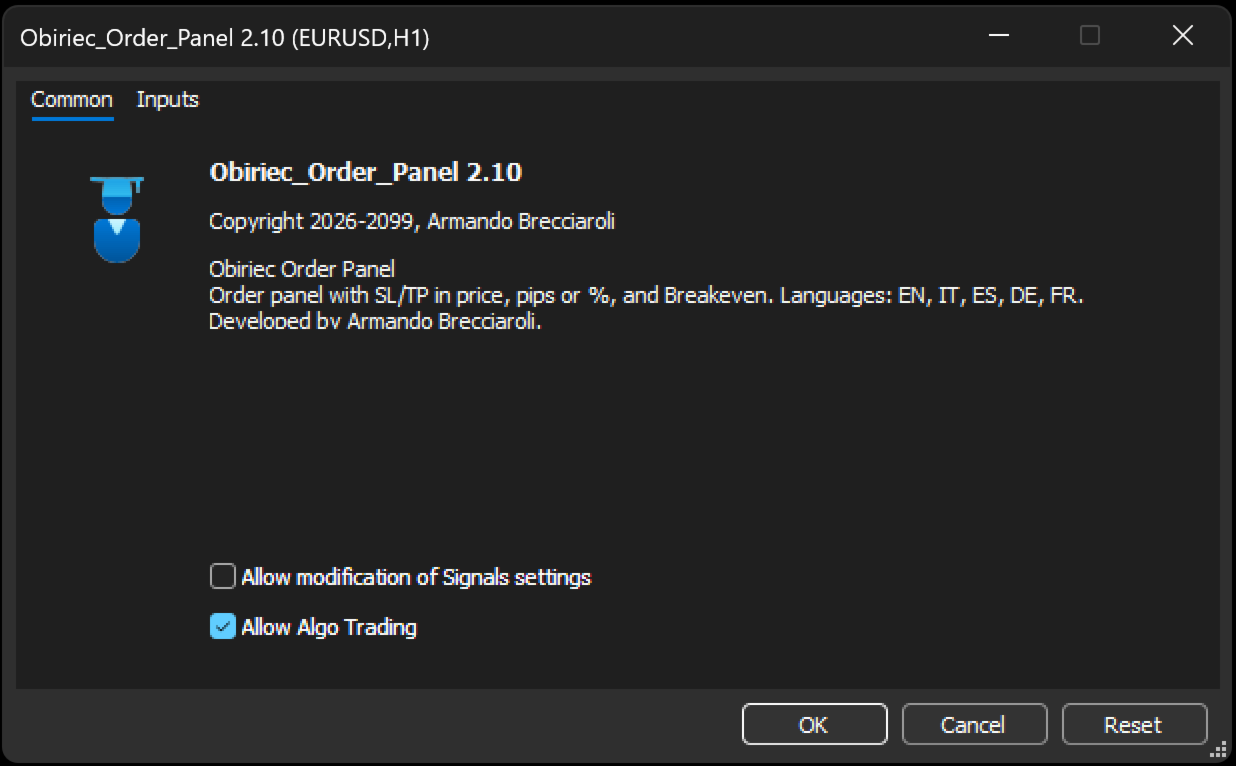
1. Applica il pannello a un grafico e consenti il trading algoritmico.
2. Scegli il simbolo, Buy o Sell, e il tipo di ordine.
3. Inserisci i lotti totali, lo Stop Loss e i livelli di Take Profit, poi premi il pulsante di invio.

Note
- Sui conti netting le posizioni sullo stesso simbolo si uniscono in una sola, quindi i livelli di Take Profit non possono restare separati. I conti hedging li mantengono separati.
- Il Breakeven automatico funziona mentre MetaTrader 5 è aperto.
- Di default il Breakeven riguarda solo le posizioni aperte dal pannello (stesso magic number). Un parametro permette di applicarlo a tutte le posizioni.
- La dimensione di un pip è impostata dal parametro "Points per 1 pip". Il valore iniziale è 10, quindi su XAUUSD un pip vale 0,10.
- Il trading comporta rischi. Prova il pannello prima su un conto demo.

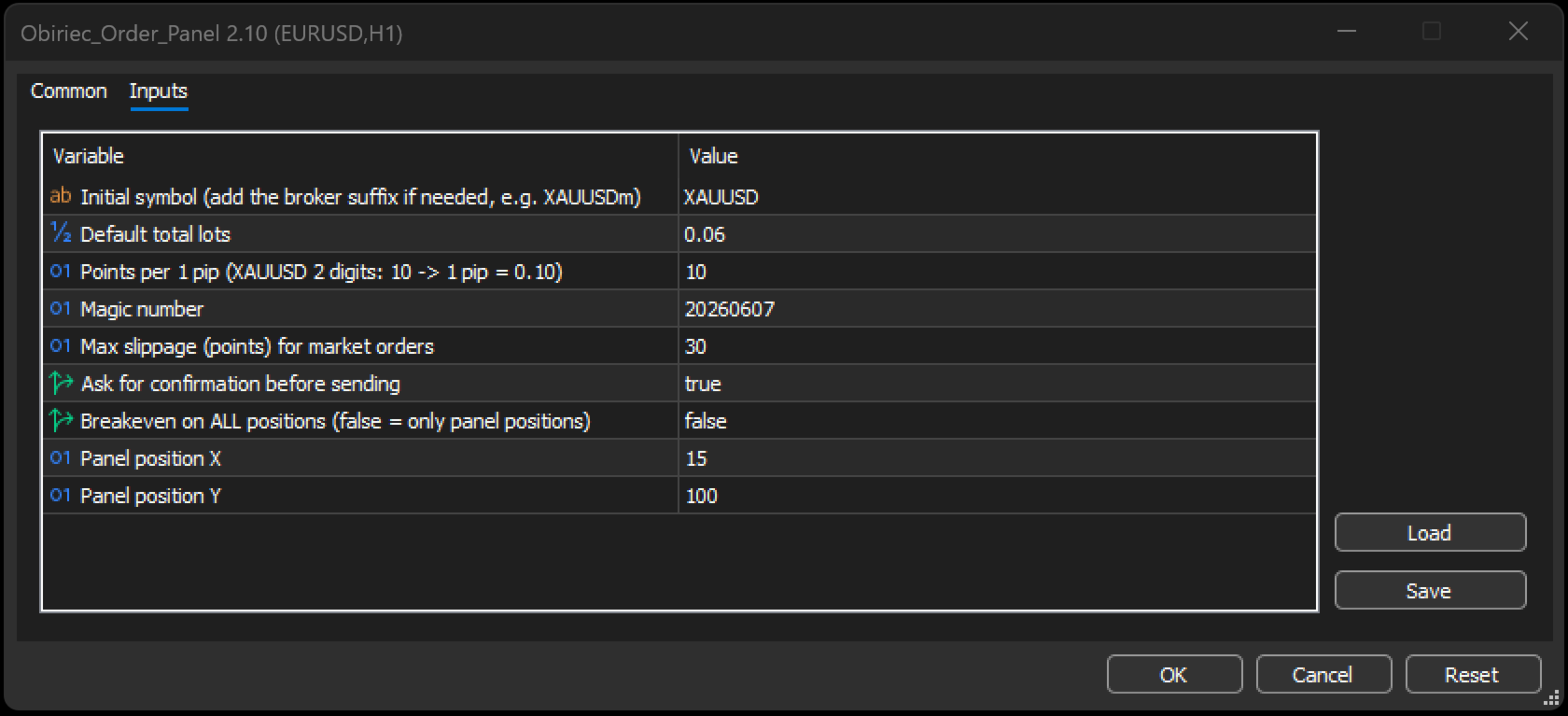
Parametri
- Initial symbol: il simbolo mostrato all'avvio. Aggiungi il suffisso del broker se serve.
- Default total lots: lotti totali iniziali.
- Points per 1 pip: punti che formano un pip.
- Magic number: numero identificativo degli ordini del pannello.
- Maximum slippage: slittamento massimo in punti per gli ordini a mercato.
- Ask for confirmation before sending: chiede conferma prima dell'invio.
- Breakeven on all positions: se disattivato, riguarda solo le posizioni aperte dal pannello.
- Panel position X e Y: posizione del pannello sul grafico.

p.s.: Nota sulla versione demo: questo pannello si usa a mano su un grafico. La versione demo offerta dal Market funziona solo nello Strategy Tester e non è pensata per mostrare il pannello. Per provare il pannello su un grafico è disponibile il noleggio di un mese.

Sviluppato da Armando Brecciaroli.
Prodotti consigliati
TradesManger
Ali Abdalrasool Ai-sayyd Sobai
Ultimate Manager is the ultimate Expert Advisor (EA) for MetaTrader5, empowering traders with seamless control over every aspect of their trades. This powerful tool manages lot sizes, stop losses, trailing stops, trade durations, and trailing activation thresholds with precision. Featuring intuitive buttons, you can execute two trades simultaneously, close all positions, close buys only, close sells only, or close profitable trades in an instant. Designed for efficiency and risk management, Ulti
SyncDB LT
Maxim Kuznetsov
A   service   to   keep   the   SQLite   database up   to   date .   Fast   real -t ime   operation .   Saves   open   positions   and   orders ,   current   quotes ,   and   trading   history .   Take   advantage   of   SQLite 's   capabilities   for   intermediate   data   storage ,   analytics ,   and   integration   of the   MetaTrader   platform .   Save   all   your   data   in   one   place .   Use   the   saved   data   in   SQL   analytical   queries ,   from   Python   and   other   la
FREE
MT5 Chart Replay
Hlomohang John Borotho
MT5 Chart Replay Rewind the Market. Replay Every Trade You Took. Review Every Decision . Have you ever wished you could rewind the candlesticks on your chart and the trades you took and watch the market unfold again ? Perhaps you wanted to see exactly where a trade started going wrong, identify the setup you missed, or revisit a period when your strategy was perfectly aligned with market structure. Introducing MT5 Chart Replay  — a professional MetaTrader 5 chart replay engine designed to help t
The trade panel that also backtests your setups on the chart. Aurum RR brings a clean, TradingView-style Risk:Reward tool to MetaTrader 5 - and goes further. Plan a trade visually, send it with the exact lot size in one click, manage it automatically once it is open, and backtest your setups on history with every box scoring itself. PLAN - Place a Risk:Reward box anywhere on the chart and drag the stop loss, take profit, entry and box length directly on the chart. - Lot size is calculated live
DD Guardian Bot — User Guide Requirements MetaTrader 5 (any broker) A Telegram account Step 1 — Create your Telegram Bot Open Telegram and search for @BotFather Send /newbot and follow the prompts to set a name and username BotFather will reply with a Bot Token — copy and save it Send any message to your new bot (e.g. /start ) so it can detect your Chat ID Open the following URL in a browser to find your Chat ID: https://api.telegram.org/bot&lt ;YOUR_TOKEN>/getUpdates Look for "chat":{"id": 12
MT5 AI Chatbot
Thomas Bradley Butler
SIATE PAZIENTI CON IL BOT IN QUANTO IL TEMPO DI RISPOSTA POTREBBE ESSERE DI POCHI SECONDI. RISPONDERÀ. ASSICURATI DI PREMERE INVIA E POI ASPETTA. È UN SEMPLICE BOT CHAT GPT PER MT5 E MQL5. Nei commenti, aggiungi la tua chiave API negli input e aggiungili alla richiesta web nella scheda Expert Advisor: CHAT CON AI SU MQL5 E MT5. IL PROMPT DEVE CONTENERE MQL5 O MT5, ALTRIMENTI NON RISPONDERÀ. È ADDESTRATO SOLO SU MT5 E MQL4. NOTA CHE FUNZIONERÀ SOLO NEI GRAFICI IN TEMPO REALE, NON NEL BACKTEST.
TradingX Hotkeys
Johannes Stephanus Lombard
Inputs Available Lotsizes Partial Close % You can change lotsizes as you require On an open chart click once to select chart to be able to use hotkeys on specific chart. All Pairs can be used with this expert We created this expert to be able to still trade C300 with a 0.06 Lotsize If you enter a 0.6 lot and close 0.90% you can trade with 0.06 Lot Keys to be used: B -Buy S -Sell C -Close Profitable D -Breakeven (Note if stoploss is set it won't break even) P -Partial close X -Close all
EQUITY DRAWDOWN MONITOR   This is a simple mt5 advisor that monitors the drawdon levels Features: Easy to use Useful for money managers How to Use  Load the EA once a single chart Type the maximum drawdown desired in inputs Leave the EA alone and never close that chart The EA monitors all trades and magic numbers in your account. Input Parameter Drawdown Percent:   Maximum drawdown in percentage terms allowable in the account. When the drawdown level is surpassed, the EA will close all trades
SPICA CLICK TRADE CONTROL MT5 Spica Click Trade Control is a complete one-click trading panel for MT5 — built for traders who want speed without giving up control. Every trade shows you the exact lot size, dollar risk, and reward before you click Buy or Sell. Manage open positions with breakeven, trailing stops, and partial closes. Protect your whole account with automatic equity-based shutoffs. All from a clean, tabbed panel that stays out of your way until you need it. KEY FEATURES Trading
Chart Spot Binance
Ghavamipour Mohammadreza
show live chart spot All symbol binance If you want to get this product with a 99% discount, send a message to my Telegram admin and rent this product for 1 $ per month or 10 $ per year. Even if you do not like the way the chart is displayed, you can tell the admin in Telegram how to display it so that your own expert is ready. https://t.me/Bella_ciao1997 https://t.me/Binance_to_mql5
MT5 for Telegram Signals
Sergey Batudayev
5 (10)
The utility is designed to send signals from MT4 to Telegram. It has several unique features, allowing not only the sending of trade signals but also the following functionalities: Send messages directly from the terminal to Telegram Send emojis along with custom text Send text and images from Telegram All of these features enable users to manage a signal channel while focusing on trading and finding quality signals. Customizable Signal Messages You can fully customize the signal message: Specif
Open Risk Profit  shows your current risk or possible profit of all open positions. Total open risk is your loss if all positions run into the stop loss. Total open profit is your profit if all positions reach your take profit. Total float is your current profit or loss of all positions. The program also breaks down the information into the individual symbols. For example, you can monitor how much is your current profit and your potential risk in EURUSD, no matter how many individual positions
ICT PD Arrays Trader
Aesen Noah Remolacio Perez
Attention All ICT Students! This indispensable tool is a must-have addition to your trading arsenal... Introducing the ICT PD Arrays Trader: Empower your trading with this innovative utility designed to enhance and simplify your ICT trading strategy and maximize your potential profits.  How does it work? It's simple yet highly effective. Begin by placing a rectangle on your trading chart and assigning it a name like 'ict' or any preferred identifier. This allows the system to accurately ident
A2 Trade Manager Finale EA  is an EA that made for you that like SCALPING, HEDGING, or LONG TIME TRADING. Features : TRADING INFORMATION Total Equity information Running Total Profit / Loss information Margin Level information Running Profit / Loss each trade BUY and SELL (if Hedging) Total Lots information Current timeframe remaining Daily Profit / Loss information All time Profit / Loss information Local Currency conversion TRADE MANAGER BUTTON Order Sell / Buy Breakevent (For multi layer pos
SQ Tactic Tracker
Devie Arevalo Montemayor
5 (3)
SQ TACTIC TRACKER — Multi-Bot Performance & Risk Dashboard for MT5 KNOW YOUR EDGE. DON'T GUESS IT. Every bot, every symbol, every session, every open position — decoded on one chart. Your equity curve tells you IF you're making money. It never tells you WHERE it comes from, WHEN you actually win, WHICH bot is quietly bleeding the account, or WHAT you're exposed to right now. SQ Tactic Tracker puts your entire trading account on a single chart and answers those questions at a glance — live. It
MarketMind AI
Perpetual Chinemerem Vincent
MarketMind AI Next-Generation Contextual Analysis for MetaTrader 5 Trade with the clarity of institutional-grade context. MarketMind AI is a professional decision-support system designed to bridge the gap between raw technical data and actionable market intelligence. Rather than generating signals or executing trades, MarketMind AI provides a structured, high-fidelity view of market conditions — enabling traders to make more informed discretionary decisions. USER GUIDE AND ANALYSIS PIPELINE AP
Introducing the "Auto Timed Close Operations", a useful utility for MetaTrader 5 traders! This utility has been developed to help traders of all levels automatically close their open positions at the exact moment they desire. With the "Auto Timed Close Operations", you gain the required control over your trades and can avoid unwanted surprises at the end of the day or at any other predefined time. We know how important it is to protect your profits and limit your losses, and that's exactly what
Trader Diary
Aleksandr Mel'nikov
Trader Diary is an AM QuantLab expert advisor for MetaTrader 5. It reads trades that are already closed and shows how the period turned out. It does not place orders or close positions. After launch it opens in its own full-screen window, off the price chart. Periods: 7 days, 30 days, 90 days, or one year. Languages: Russian, English, German, Spanish, French, and Chinese. Overview. Twelve cards: result, number of trades, win rate, profit factor, average win, average loss, result per trade, time
A professional tool for real-time monitoring of the account status and the work of Expert Advisors. Information about the account status can be sent to Telegram chats automatically at a specified interval or upon request. From the screenshots of the open charts of the terminal, you receive upon request from your Telegram bot. Account information includes: 13:02 Trade monitoring by Telegram v.1.0 (headline) Account : 6802ххх RoboForex-Pro (account information) Profit start: 2661 USD (profit earne
.................................. This script is intended to help users to get information about ticks and spreads (e.g. ticks count, minimum/maximum/average spread). It can export reports in the CSV format with this information. Traders can see spread statistics in real time in the chart window It is useful for comparing spreads of different brokers. --------------------------------------------------------------------------
Nova Forex Traderr
Eduar Ulises Toro Daza
An algorithm that uses artificial intelligence (AI) to analyze the best entries in the market over the 24 hours generally works by following these steps: Real-Time Data Collection: The algorithm collects real-time information from various sources such as market prices, trading volumes, technical indicators, economic news, and fundamental analysis. Data Processing: It uses data processing techniques such as time series analysis, noise filtering, and extraction of relevant features that help pr
Traders Choice
Israr Hussain Shah
All-In-One Multi-Functional Dashboard is a comprehensive trading utility designed to streamline your workflow, enhance your technical analysis, and simplify trade management on MetaTrader 5. Instead of cluttering your charts with multiple indicators and scripts, this single Expert Advisor provides a unified control panel that handles everything from market structure analysis and supply/demand zones to risk management and trade execution. Built entirely in pure MQL5 without DLL dependencies , thi
MT5【 Counter SELL Bot 】( for JPY Cross pairs ) Counter SELL Bot   { Quick steps to compile in MetaEditor } ※ You can set a lot of Orders in 10 sec. @ LINE of Round Number, Resistance & Support @ ZONE of OB & FVG by SMC Smrt Money Concept For : ・Order Block (OB) Counter ・Fair Value Gap (FVG) Counter ・Round Number (RN) Counter ・Fake Breakout (PINBAR) ・etc ... for : ・USD/JPY(米ドル/円) ・EUR/JPY(ユーロ/円) ・GBP/JPY(英ポンド/円) ・AUD/JPY(豪ドル/円) ・NZD/JPY(ニュージーランドドル/円) ・CAD/JPY(カナダドル/円) ・CHF/JPY(スイスフラン/円) ・
OrderManager MT5
Lukas Roth
4.83 (29)
Presentazione del   OrderManager : un rivoluzionario strumento per MT5 Gestisci le tue operazioni come un professionista con il nuovissimo utility Order Manager per MetaTrader 5. Progettato pensando alla semplicità e alla facilità d'uso, Order Manager ti permette di definire e visualizzare senza sforzo il rischio associato a ogni operazione, consentendoti di prendere decisioni informate e ottimizzare la tua strategia di trading. Per ulteriori informazioni sull'OrderManager, si prega di consultar
ReverseTune
Konstantin Chernov
A script for quick reversing positions and/or orders. If you need to reverse a position with the same volume, open an opposite position of a different volume or change the type of existing orders (for example, Buy Limit -> Sell Limit, Buy Stop -> Sell Limit, etc.) with the same or different take profit/stop loss, this script will make all the routine for you! Allow AutoTrading before running the script. Usage: Run the script on a chart. Input Parameters: Language of messages displayed (EN, RU, D
Smart Bulk Order Closer
Muhammad Hassan Muhammad Ahmad Atiyah
Smart Bulk Order Closer MT5 Script – PnL-Based Trade Closer Overview Smart Bulk Order Closer is a script for MetaTrader 5 that closes open positions based on their current floating profit or loss in account currency. The script executes once per attachment and only closes trades that meet the user-defined PnL conditions. It does not run in the background, does not modify Stop Loss or Take Profit, and does not open trades. Core Functionality The script evaluates each position individually and ap
MT5【 Counter BUY Bot 】( for JPY Cross pairs ) Counter BUY Bot   { Quick steps to compile in MetaEditor } ※ You can set a lot of Orders in 10 sec. @ LINE of Round Number, Resistance & Support @ ZONE of OB & FVG by SMC Smrt Money Concept For : ・Order Block (OB) Counter ・Fair Value Gap (FVG) Counter ・Round Number (RN) Counter ・Fake Breakout (PINBAR) ・etc ... for : ・USD/JPY(米ドル/円) ・EUR/JPY(ユーロ/円) ・GBP/JPY(英ポンド/円) ・AUD/JPY(豪ドル/円) ・NZD/JPY(ニュージーランドドル/円) ・CAD/JPY(カナダドル/円) ・CHF/JPY(スイスフラン/円) ・SGD
Macroeconomic News and Event Timing Indicator This indicator loads historical economic news data and visualizes it using standard MT5-style charts. It's a powerful tool for quickly assessing market trends and forecasting potential future movements. A key feature is the precise timing of events, which is essential for making informed trading decisions. Perfect for professional traders using modest leverage (1:1 or 1:2), where understanding the impact of upcoming macroeconomic events is critical t
Adaptive ATR Trailing Stop
Seref Oliver Joisten
4.5 (2)
Adaptive ATR Trailing Stop (MT5) Overview Adaptive ATR Trailing Stop is a utility Expert Advisor for MetaTrader 5 that manages stop loss levels for existing open positions. It uses the Average True Range (ATR) to calculate a volatility-based trailing distance. This EA does not open trades. It only modifies the Stop Loss (SL) of existing positions and keeps the current Take Profit (TP) unchanged. How it works - The EA runs on every tick of the chart where it is attached. - For each open posit
FREE
KS Hotkey Trading Panel Pro è un Expert Advisor per MetaTrader 5 che offre funzionalità di trading rapido tramite tastiera e una dashboard interattiva direttamente sul grafico. Caratteristiche principali Trading tramite tasti di scelta rapida (Hotkey) — Azioni attivabili con un singolo tasto per: Acquisto/Vendita a mercato (Market Buy/Sell) Buy Limit / Sell Limit Buy Stop / Sell Stop Chiusura di tutte le posizioni Chiusura solo posizioni Buy / Chiusura solo posizioni Sell Eliminazione di
Gli utenti di questo prodotto hanno anche acquistato
Trade Assistant MT5
Evgeniy Kravchenko
4.43 (216)
It helps to calculate the risk per trade, the easy installation of a new order, order management with partial closing functions, trailing stop of 7 types and other useful functions. Additional materials and instructions Installation instructions - Application instructions - Trial version of the application for a demo account Line function -   shows on the chart the Opening line, Stop Loss, Take Profit. With this function it is easy to set a new order and see its additional characteristics bef
Forex Trade Manager MT5
InvestSoft
4.98 (686)
Benvenuto a Trade Manager EA, lo strumento definitivo per la gestione del rischio , progettato per rendere il trading più intuitivo, preciso ed efficiente. Non è solo uno strumento per l'esecuzione degli ordini, ma una soluzione completa per la pianificazione delle operazioni, la gestione delle posizioni e il controllo del rischio. Che tu sia un principiante, un trader avanzato o uno scalper che necessita di esecuzioni rapide, Trade Manager EA si adatta alle tue esigenze, offrendo flessibilità s
Telegram to MT5 MultiChannel Copier
Sergio Marquez Uroz
4.63 (19)
Telegram to MT5 Multi-Channel Copier   copia automaticamente i segnali di trading dai tuoi canali Telegram e Discord direttamente su MetaTrader 5. Niente bot, niente estensioni del browser, niente copia manuale. Il segnale arriva su Telegram o Discord e l'EA apre l'operazione nel tuo terminale in pochi secondi. E prima di copiare un canale, il backtester integrato ti mostra cosa avrebbe fatto quel canale sul tuo conto. Il prodotto include due componenti: un'applicazione Windows che ascolta i tuo
================================================================================ POC BREAKOUT - V20.72. Full Professional Grade Toolkit ================================================================================ POC Breakout is a full MetaTrader 5 trading dashboard for discretionary traders who want breakout signals, Point of Control (POC) context, volume profiles, order flow, market structure, news, alerts, and advanced trade planning in one professional workspace. Attached directly to you
TradePanel MT5
Alfiya Fazylova
4.88 (170)
Trade Panel è un assistente commerciale multifunzionale. L'applicazione contiene più di 50 funzioni di trading per il trading manuale e permette di automatizzare la maggior parte delle attività commerciali. Istruzioni per l'applicazione: https://www.mql5.com/it/blogs/post/762331 Versione di prova dell'applicazione per un conto demo: https://www.mql5.com/it/blogs/post/762419 Come installare l'applicazione: https://www.mql5.com/it/blogs/post/762362 Come testare l'applicazione in modalità visuale:
The Patch
Mian Rameez Ali
The Patch It never opens a trade. It walks behind the ones that did. Every open position, every pending order — checked twice a second for the one thing that's easy to forget: a stop, a target. Found bare, it doesn't ask. It writes the missing number in, measured in points from wherever the position began, and moves on to the next. No strategy, no opinion on direction. Just the quiet assumption that nothing should ever sit on the market unprotected — not because someone decided it shouldn't,
Copia i segnali Telegram con le tue regole di trading Telegram to MT5 Signal Trader copia automaticamente i segnali di trading testuali dai canali e gruppi Telegram pubblici e privati in MetaTrader 5. Gestisci più fornitori e conti MT5 da un'unica applicazione desktop, con impostazioni di rischio e di trading specifiche per ogni fornitore . Per copiare i segnali non servono bot Telegram né configurazioni API. Accedi semplicemente con il tuo account Telegram tramite numero di telefono o codice QR
Floor Watch
Syed Tauqeer Hussain Shah
Floor Watch One number, watched every thirty seconds: how far equity has fallen since the day began — or since its highest point, if it's told to trail the peak instead of the open. Cross the line and it doesn't argue. Every open position closes, every pending order vanishes, and anything that slips through afterward gets shut the moment it appears. Not asked. Removed. The floor holds until the clock turns 5 AM Pakistan time — then, and only then, does the day start over. One rule. No except
Un solo acquisto. Tutti i miei indicatori MT4 e MT5, disponibili oggi e pubblicati in futuro, senza costi aggiuntivi. Dopo l’acquisto, contattami per sapere come riceverli. È previsto un aumento di 50$ ogni 10 acquisti, fino a 999$. Si applica il prezzo del Market al momento del pagamento. Mantieni l’indicatore di cui ti fidi. Automatizza il lavoro che lo circonda. Il tuo segnale. Le tue regole. La tua esecuzione. Hai già un indicatore MT5 su cui fai affidamento, ma devi ancora sorvegliare il g
Power Candles Strategy Scanner - Strumento di ricerca configurazioni multi-simbolo con ottimizzazione automatica Power Candles Strategy Scanner utilizza lo stesso motore di auto-ottimizzazione che alimenta l'indicatore Power Candles, applicandolo a tutti i simboli presenti nel tuo Market Watch, uno accanto all'altro. Un unico pannello ti indica quali simboli sono statisticamente negoziabili in questo momento, quale strategia è vincente su ciascuno di essi, la coppia ottimale di Stop Loss / Take
Grid Manual MT5
Alfiya Fazylova
4.73 (22)
Grid Manual è un pannello di trading per lavorare con una griglia di ordini. L'utilità è universale, ha impostazioni flessibili e un'interfaccia intuitiva. Funziona con una griglia di ordini non solo nella direzione delle perdite, ma anche nella direzione dell'aumento dei profitti. Il trader non ha bisogno di creare e mantenere una griglia di ordini, lo farà l'utilità. È sufficiente aprire un ordine e il manuale di Grid creerà automaticamente una griglia di ordini per esso e lo accompagnerà fino
MT5 to Telegram Signal Provider è un'utilità facile da usare e completamente personalizzabile che consente l'invio di segnali specificati a una chat, canale o gruppo Telegram, rendendo il tuo account un fornitore di segnali. A differenza della maggior parte dei prodotti concorrenti, non utilizza importazioni DLL. [ Dimostrativo ] [ Manuale ] [ Versione MT4 ] [ Versione Discord ] [ Canale Telegram ]  New: [ Telegram To MT5 ] Configurazione Una guida utente passo-passo è disponibile. Nessuna cono
Daily Trading Limiter
AL MOOSAWI ABDULLAH JAFFER BAQER
5 (8)
• Please test the product in the Strategy Tester before purchasing to understand how it works. • If you face any issues, contact me via private message—I’m always available to help. • After purchase, send me a screenshot of your order to receive a FREE EA as a gift. Daily Trading Limiter — the rule you cannot break Every trader knows the number. Three trades. Two percent. One bad day and stop. And every trader has watched themselves take the fourth trade anyway. The problem was never knowing th
Footprint Chart Pro — Professional OrderFlow EA for MetaTrader 5 Version 6.34 | Professional tool for real traders | Institutional-Grade Visualization DEMO USERS - PLEASE SELECT EVERY TICK / REAL TICK WHEN TESTING AND YOU HAVE DOWNLOADED HISTORICAL DATA. IF YOU SEE A WAITING SCREEN AND IT IS NOT DOWNLOADING, IT MEANS YOU HAVE LOW HISTORICAL DATA. TRY 1 MIN AND 5 MIN FIRST ON 1 DAY DATA. ONE DAY DATA SHOULD BE THE NEWEST AND MOST CURRENT DATE. PLEASE WAIT UNTIL THE MARKET HAS ROLLED OVER PERIOD.
Welcome to ENTRY IN THE ZONE with SMC MULTI TIMEFRAME SPECIAL BENEFIT / FOR OUR MQL5 CUSTOMERS FREE ACCESS TO THE NEW TOOL  — COMING SOON — Learn more on our official website  : https://www.fableedge.net Entry In The Zone with SMC Multi Timeframe is a real-time market analysis tool based on Smart Money Concepts (SMC), designed to analyze market structure, price direction, and key trading zones. It supports both Single-Timeframe and Multi-Timeframe Analysis, providing a clearer view of overall ma
Exp5 VirtualTradePad PRO SE for MT5
Vladislav Andruschenko
5 (1)
VirtualTradePad PRO SE MT5 — centro di controllo professionale per il trading su MetaTrader 5 VirtualTradePad PRO SE è un pannello di trading premium basato sul grafico e un ambiente di gestione delle operazioni per MetaTrader 5 . È progettato per i trader che desiderano esecuzione più rapida, controllo più chiaro delle posizioni, gestione strutturata delle operazioni, pianificazione visiva dei livelli e un workflow professionale direttamente dal grafico. Non è soltanto un semplice pannello BUY
Trading Chaos Expert
Hennadii Stanilevych
5 (11)
This software has no equals in the world and represents a universal trade "console" covering trading signals, automated market entry, setting of Stop Loss and Take Profit, as well as Trailing Profit for multiple trades at the same time in a single open window. Intuitive control of the Expert Advisor in "three clicks" ensures a comprehensive use of all its functions on different computers, including tablets PCs. Interacting with additional signal indicators that mark the chart to give a real mark
Copy your MT5 trades to Interactive Brokers You keep using MT5. Every order you open or close is sent to your IB account. In real time. No coding. No changes to your strategy or EA. Try it first Rent 1 month: $30. Test on a live or paper account. What it does Real-time copying: same direction, reverse, or one side only. Map any MT5 symbol to any IB symbol. Set a lot ratio for each. Forex, Futures, Stocks, CFDs, Metals and Crypto. Position sync: both accounts checked, any difference fixed. Optio
Exp COPYLOT CLIENT for MT5
Vladislav Andruschenko
3.97 (35)
Copiatore professionale di trade per MetaTrader 5 Un copiatore di trade veloce, professionale e affidabile per MetaTrader . COPYLOT consente di copiare operazioni Forex tra terminali MT4 e MT5 con supporto per conti Hedge e Netting . La versione MT5 di COPYLOT supporta: - MT5 Hedge → MT5 Hedge - MT5 Hedge → MT5 Netting - MT5 Netting → MT5 Hedge - MT5 Netting → MT5 Netting - MT4 → MT5 Hedge - MT4 → MT5 Netting Versione MT4 Descrizione completa + DEMO + PDF Come acquistare Come installare Come ot
Trade Copier Ultimate
Janitha Sandaruwan Amaradasa Wickramasingha Arachchilage
5 (5)
Trade Copier Ultimate - Telegram to MT5 Signal Copier Trade Copier Ultimate automatically copies Telegram trading signals into MetaTrader 5. The EA can read signal messages, detect the symbol, order type, entry price, Stop Loss, Take Profit levels and selected update commands, then execute or manage the trade in MT5 using your lot and risk settings. It is more than a basic Telegram to MT5 copier. TCU also supports Bot API and user-account Bridge workflows, Discord signal routing, local MT5 to MT
Trade Manager DaneTrades
Levi Dane Benjamin
4.23 (30)
Trade Manager per aiutarti a entrare e uscire rapidamente dalle operazioni calcolando automaticamente il tuo rischio. Incluse funzionalità che ti aiutano a prevenire l'eccessivo trading, il vendetta trading e il trading emotivo. Le operazioni possono essere gestite automaticamente e i parametri di performance del conto possono essere visualizzati in un grafico. Queste caratteristiche rendono questo pannello ideale per tutti i trader manuali e aiuta a migliorare la piattaforma MetaTrader 5. Suppo
Premium Trade Manager - Il pannello di trading con un coach integrato Premium Trade Manager porta un coach di trading direttamente nel tuo grafico, con un motore di esecuzione completo al di sotto. Imposta il trade come fai sempre, poi lascia che Max, il tuo coach di trading IA, legga esattamente quel setup rispetto al tuo conto live e ti dia un verdetto chiaro prima che tu confermi: lo stop rispetta un approccio disciplinato, il rischio è ragionevole, c'è un evento ad alto impatto tra pochi min
Signal Trading View to MT5 Pro
Mirel Daniel Gheonu
4.5 (2)
Signal TradingView to MT5 Pro Automator Esecuzione professionale istantanea tra TradingView e MetaTrader 5 Automatizza la tua strategia di trading con il ponte di comunicazione più robusto tra gli alert di TradingView e l'esecuzione reale in MT5. Progettato per i trader che richiedono velocità, flessibilità e una gestione del rischio impeccabile, questo Expert Advisor trasforma qualsiasi messaggio di avviso in un preciso ordine a mercato o limite. PUNTI DI FORZA E VANTAGGI Motore di Parsing Univ
Trade Indicator Assistant   is a powerful MT5 utility designed to turn indicators into automated trading systems. Its main feature is the ability to automatically detect an indicator’s   BUY and SELL signal buffers , without requiring you to know the buffer numbers, search through indicator settings, or modify the indicator source code. Bonus Indicator:   After purchasing Trade Indicator Assistant, contact me to receive   Trade Signal Pro   completely free as a bonus indicator. [Download Demo V
Anchor Trade Manager
Kalinskie Gilliam
5 (9)
Your EAs cannot see each other, but Anchor can. Anchor gives you one place to coordinate your EAs, manage risk, and decide when trading is allowed. It works alongside the trading bots you already use without any changes to them. The Problem One EA opens a trade. Then another starts trading. The next thing you know, you wake up to multiple grids built across your account. Each EA may be doing exactly what it was designed to do, but together they can place far more risk on your account than you in
EA Overfitter
Stephen J Martret
5 (1)
That backtest looks great. But will it still be making money tomorrow, next week, next month? EA Overfitter re-runs your EA on 100 price histories it has never seen. One score tells you if the edge is real. A backtest tells you what an EA did on one price history — the one that happened to occur. What you cannot tell from it is how much of that result was the strategy and how much was the particular path. EA Overfitter answers that. It builds up to 100 synthetic price histories your EA has n
Astro Trade MT5
Indra Maulana
5 (8)
25% discount on the release of the tool: only for the next 3 buyers Send a message to receive a demo version. AstroTrade Trading Assistant AstroTrade is a comprehensive multi-functional trading utility developed for the MetaTrader 5 platform. It integrates essential tools for trade execution, risk management, and technical monitoring into a single unified interface. The application is designed to assist traders in managing their daily operations through a visual and structured environment. Vi
The News Filter MT5
Leolouiski Gan
4.78 (23)
Questo prodotto filtra tutti gli esperti consulenti e i grafici manuali durante il periodo delle notizie, così non dovrai preoccuparti di improvvisi picchi di prezzo che potrebbero distruggere le tue impostazioni di trading manuali o le negoziazioni effettuate da altri esperti consulenti. Questo prodotto viene fornito anche con un sistema completo di gestione degli ordini che può gestire le tue posizioni aperte e gli ordini in sospeso prima della pubblicazione di qualsiasi notizia. Una volta che
VirtualTradePad One Click Trading Panel
Vladislav Andruschenko
4.59 (74)
Pannello di trading per MetaTrader 5 — controllo professionale del trading in un clic dal grafico e dalla tastiera Un pannello di trading avanzato progettato per trader attivi, pensato per aprire, gestire e chiudere operazioni molto più velocemente rispetto all’interfaccia standard di MetaTrader. Questa soluzione è dedicata a chi desidera controllare posizioni, ordini pendenti, profitto totale ed esecuzione da un unico spazio di lavoro professionale. Non si tratta di un semplice utilitario. È u
FarmedHedge Pair Trading Dashboard
Tanapisit Tepawarapruek
5 (5)
Farmed Hedge Yield Farming | All Markets (Manual - Hybrid - Semi/Automated EA) VERIFIED TRADING RESULTS - Farmed Hedge Yield Axi Copy:  https://www.mql5.com/en/signals/2356376 - Farmed Hedge Yield Exn Copy:   https://www.mql5.com/en/signals/2356404 - Farmed Hedge Yield V Copy:  https://www.mql5.com/en/signals/2357156 IMPORTANT NOTICE: FarmedHedge is a MANUAL-FOCUSED TRADING UTILITY ,not a fully automated EA. Results shown on this Signal include manual trades and overall strategic management.
Filtro:
Nessuna recensione
Rispondi alla recensione