TradeProtector MT5
- Utilità
- Versione: 2.0
- Attivazioni: 5

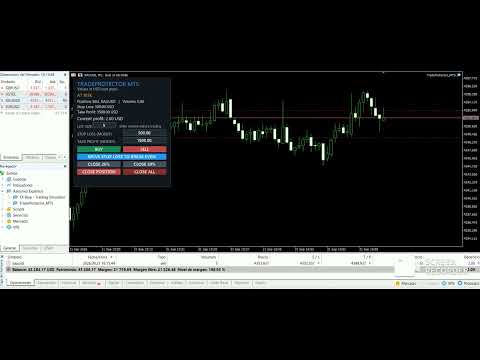
TradeProtector MT5 is a trade management utility for MetaTrader 5. It does not analyze the market and does not open positions automatically. The trader remains in control of every entry.
The panel can open a Buy or Sell position only after the user presses the corresponding button. Before entry, the user specifies the lot size, maximum loss amount and target profit amount. TradeProtector calculates the appropriate Stop Loss and Take Profit prices using the symbol specifications provided by the broker and the deposit currency of the account.
The utility is designed for traders who want consistent monetary risk settings without manually converting values between Forex pairs, metals, indices and CFDs.
Main features
- Manual Buy and Sell buttons.
- Editable lot size directly on the chart.
- Stop Loss specified as money in the account deposit currency.
- Take Profit specified as money in the account deposit currency.
- Manual Break Even button.
- Close 25% and Close 50% buttons.
- Close Position and Close All buttons.
- Double confirmation for Close All.
- Existing SL and TP prices remain unchanged after a partial close.
- Optional management of manual positions and positions opened by other EAs.
- Support for broker symbol suffixes and different symbol specifications.
- Intended for Forex, metals, indices, energies, CFDs and cryptocurrencies offered by the broker.
- No martingale, grid or automatic entry strategy.
- No DLL imports or external services.
How it works
1. Attach TradeProtector MT5 to a chart.
2. Enable Algo Trading.
3. Enter the lot size in the panel.
4. Enter the Stop Loss money amount.
5. Enter the Take Profit money amount.
6. Press BUY or SELL.
7. Use the management buttons when required.
The displayed money values use the account deposit currency. For example, an account denominated in USD uses USD values, while an account denominated in EUR uses EUR values.
Break Even
Break Even is never activated automatically. The Stop Loss is moved to the entry price only when the user presses MOVE STOP LOSS TO BREAK EVEN. The existing Take Profit remains unchanged.
If the current market price is too close to the entry price and the broker does not allow the modification, the utility displays a message and leaves the existing Stop Loss unchanged.
Partial closes
The Close 25% and Close 50% buttons respect the minimum volume and volume step defined by the broker. A partial close is performed only when both the closed volume and the remaining volume are valid.
After a partial close, the original Stop Loss and Take Profit prices are preserved.
Important notes
- TradeProtector is a trade management tool, not a trading signal or automatic strategy.
- It does not guarantee profit or prevent trading losses.
- Results depend on the user's decisions, market conditions, broker execution and symbol specifications.
- Test the product in the MetaTrader 5 Strategy Tester and on a demo account before using it on a live account.
Suggested settings
The default values shown in the panel are examples only. Every trader must select lot size, Stop Loss and Take Profit values appropriate for the account size and personal risk tolerance.