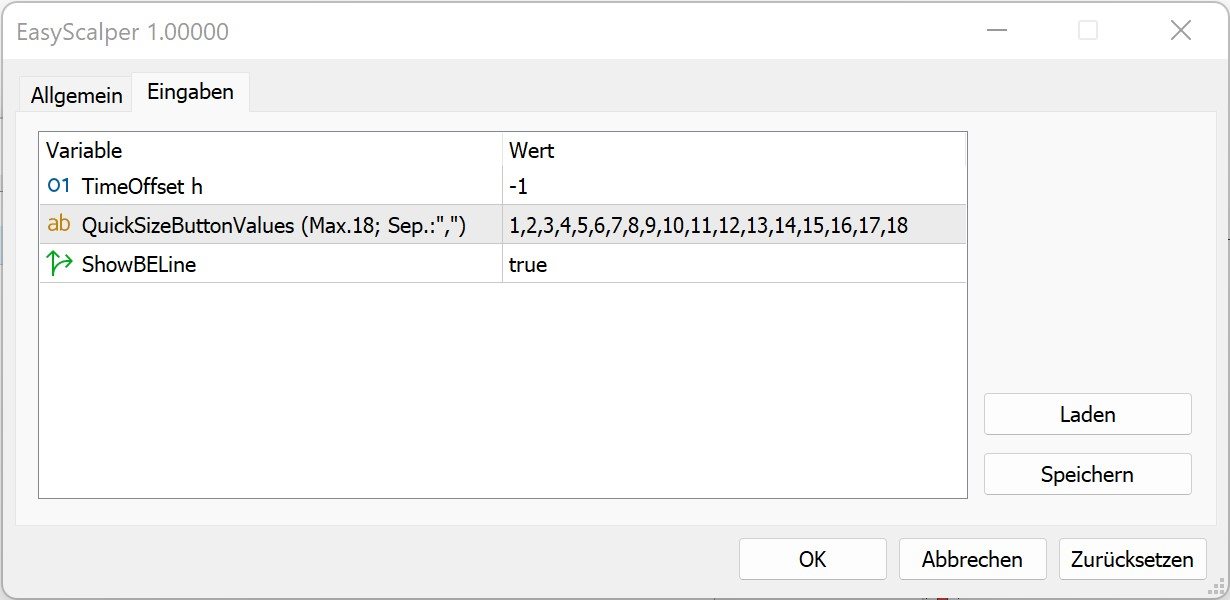
EasyScalper MT5

product video: https://vimeo.com/824742776?share=copy

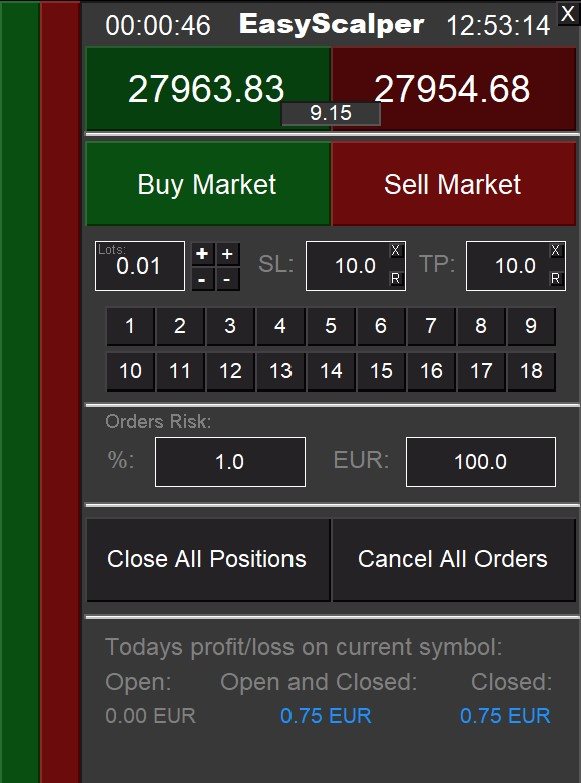
Trade Assistant, Trade Manager, Trade Panel for MetaTrader 5 with the following functions:

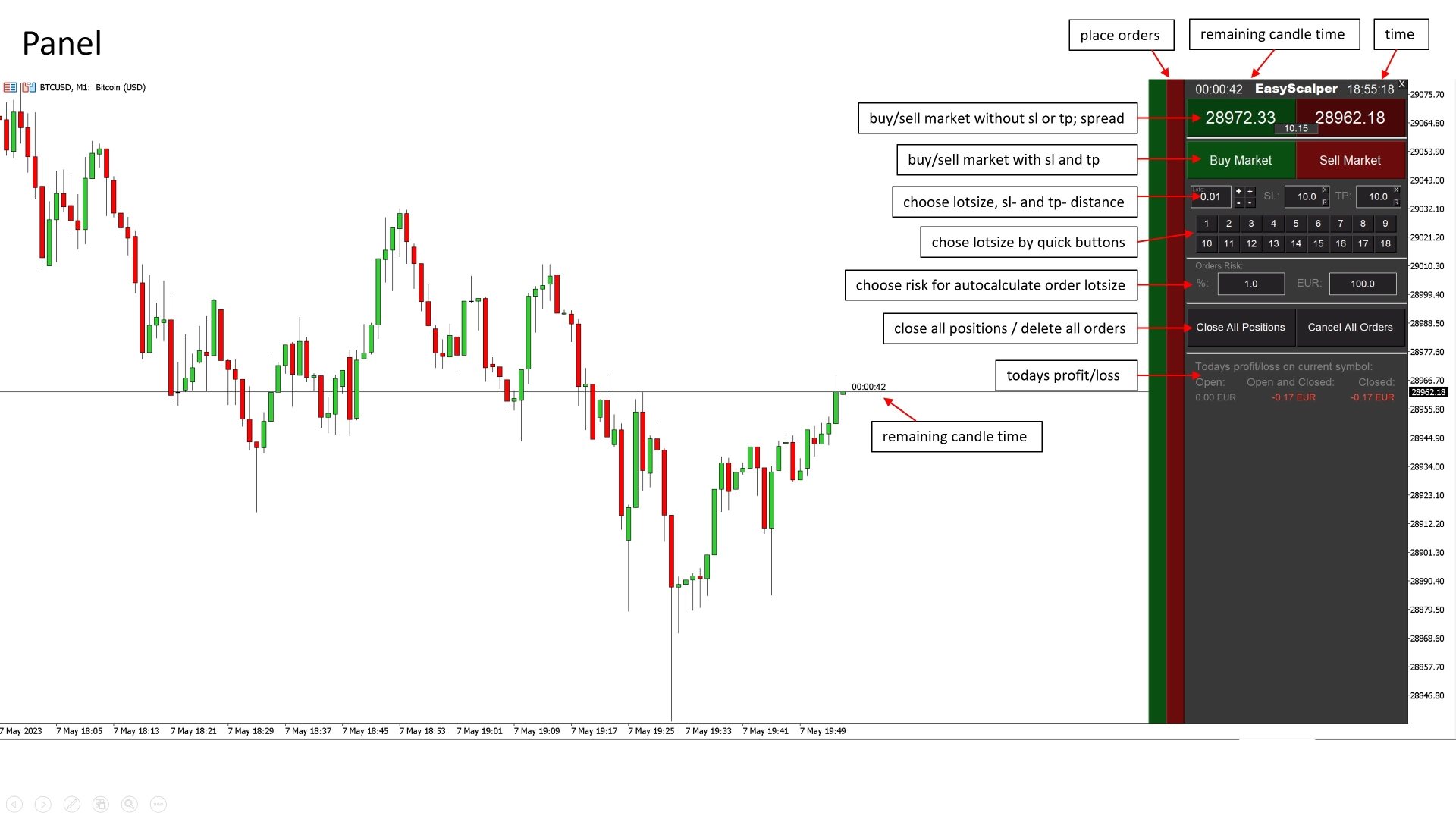
- Display the remaining candle time and the current time of day

- Open long and short positions without SL and TP at the current market price

- Display of the current ask, bid and spread

- Open long and short positions with predefined lot size, SL and TP at the current market price

- Quick selection of the lot size (freely selectable lot sizes)

- Place orders in the market with one click

- Automatic lot size calculation for orders according to predefined risk in % of balance or fixed amount

- Close all positions or orders at once

- Display of daily profit and current profits

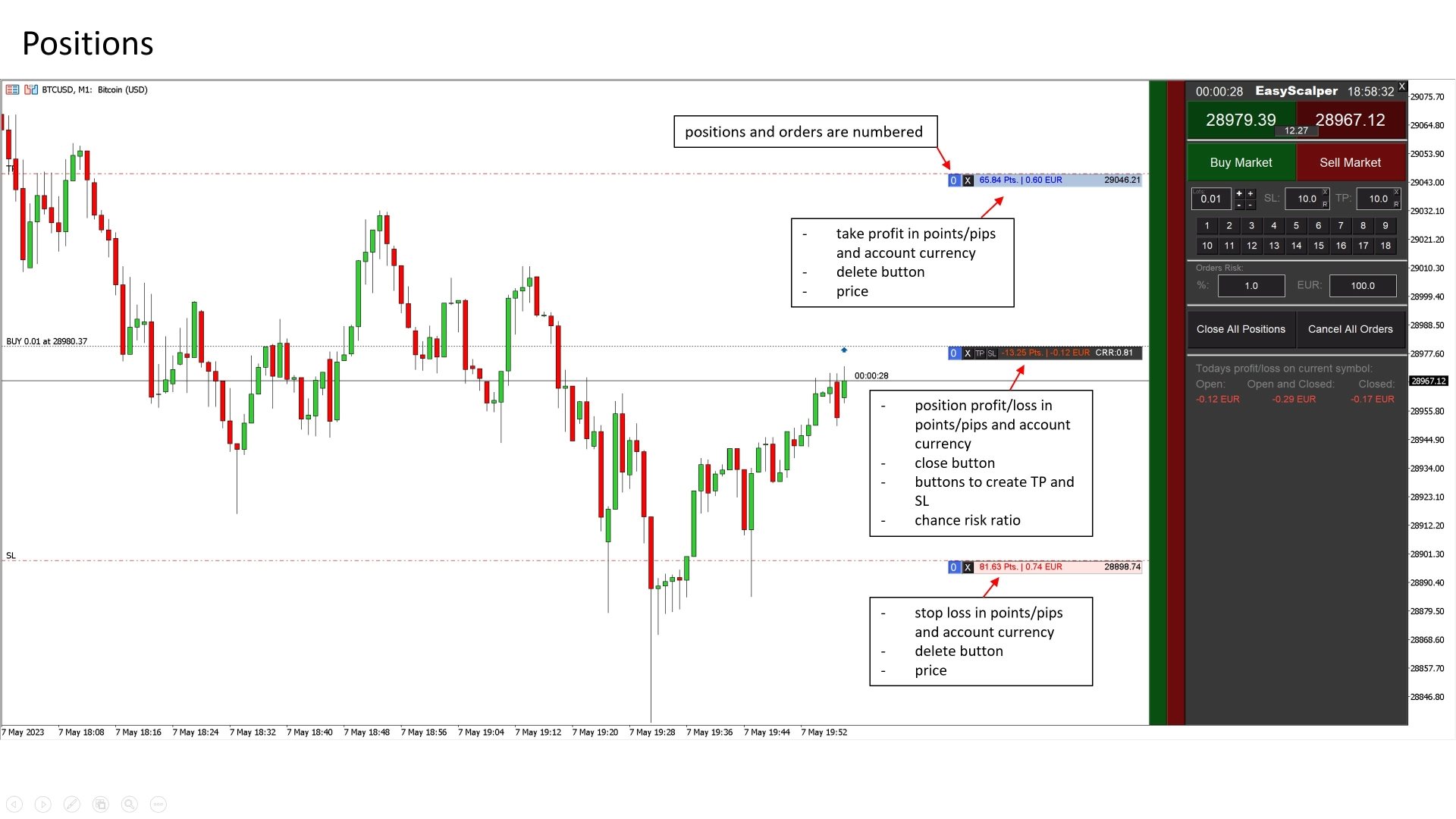
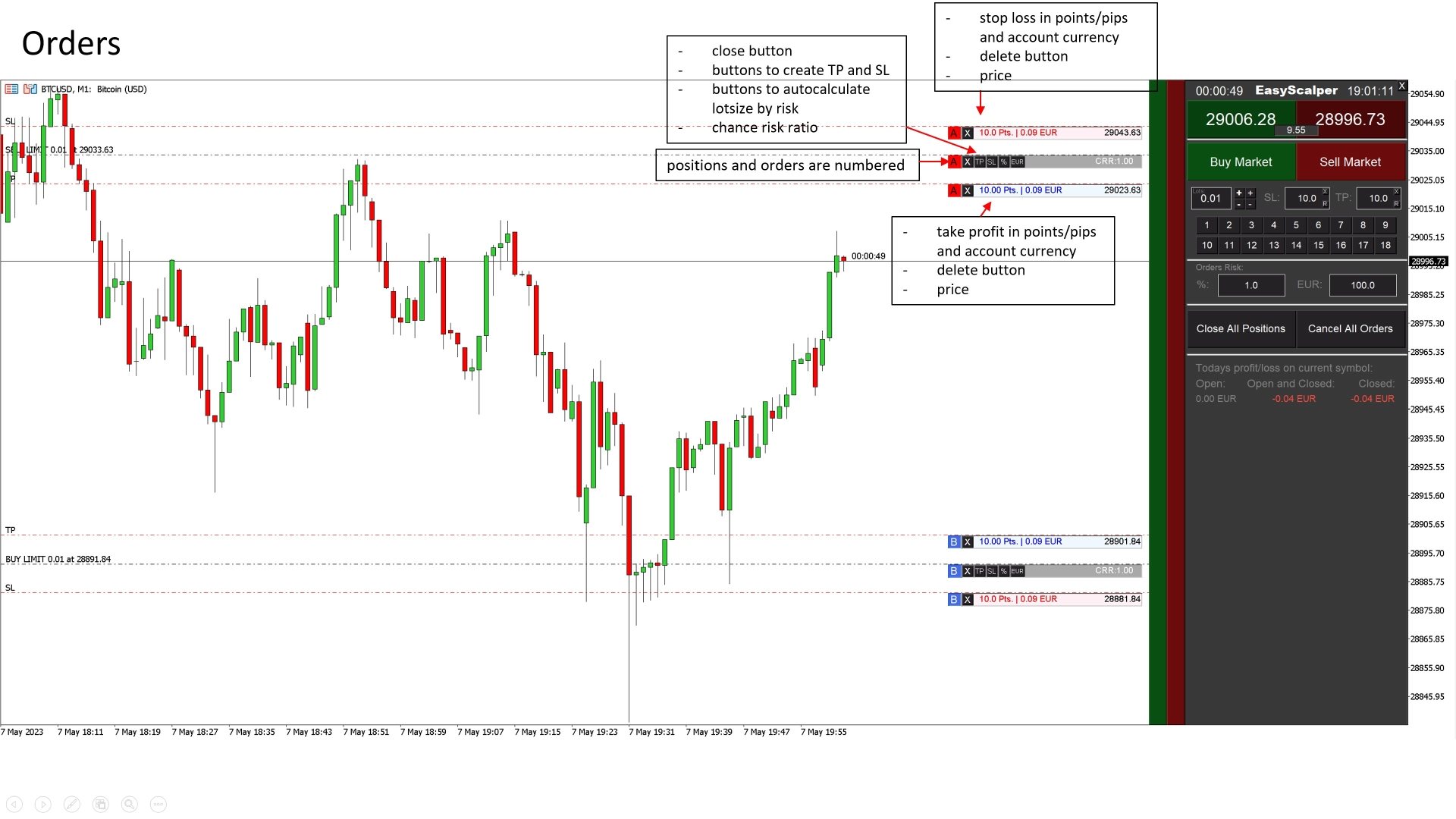
- Display of risk-reward ratio of each position and order

- Quickly add or delete TP and SL on positions and orders

- Display potential profits and losses at the SL and TP levels of positions and orders

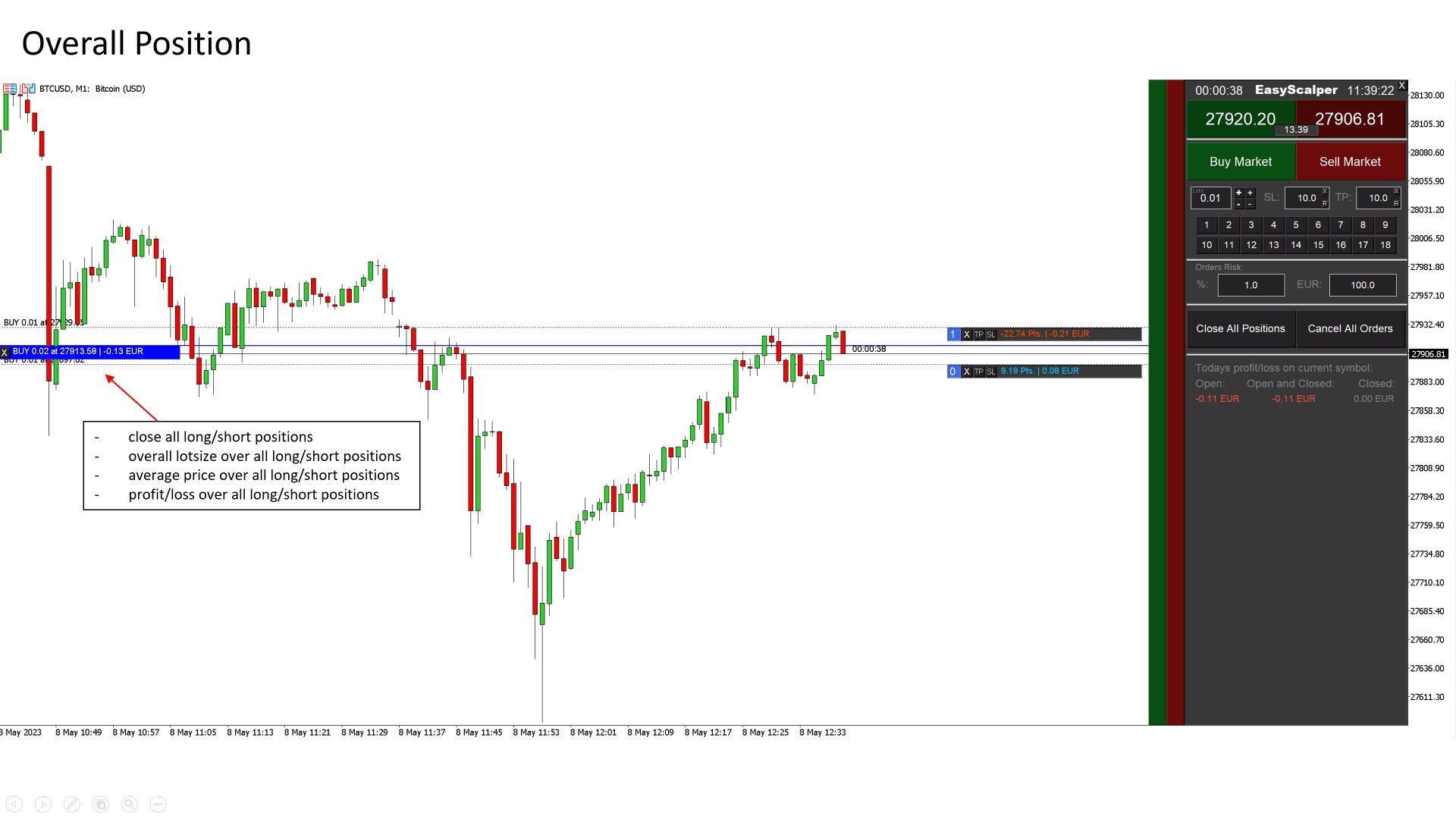
- Display of total positions for long and short positions (deactivatable)
 

Prodotti consigliati
Virtual Basket TP SL Manager
Moh Nugraha Kusuma
5 (1)
"Manage multiple positions as a single unit with hidden targets." The Virtual Basket TP SL Manager is a professional MetaTrader 5 utility designed to automate the closing of positions based on the total profit or loss of a group of orders (a "basket"). By utilizing Virtual Levels , all Take Profit (TP) and Stop Loss (SL) targets are stored locally within the EA's memory and are not sent to the broker's server, keeping your strategy safe from stop-hunting and price manipulation. Key Features Virt
FREE
Pending Orders Grid Complete System opens any combination of Buy Stop, Sell Stop, Buy Limit and Sell Limit pending orders and closes all existing pending orders. You will be able to Drag-and-Drop the Script on the chart and it will pick up the start price for the first position in the grid from the "Drop" point. Usually it should be in the area of Support/Resistance lines. Input Parameters Before placing all pending orders, the input window is opened allowing you to modify all input parameters:
The utility places trailing stop, breakeven, stop loss and take profit.‌ It is necessary to allow automated trading in the terminal settings. In testing mode, the utility opens Buy or Sell positions on the first ticks, which allows you to visually observe the given logic, changing the utility parameters. In real mode, the utility does not open positions. Discuss the complexities of Forex trading here:  chat "Age of Expert Advisors" . Parameters magic   - magic number. If less than 0, positions w
MarketMind AI
Perpetual Chinemerem Vincent
MarketMind AI Next-Generation Contextual Analysis for MetaTrader 5 Trade with the clarity of institutional-grade context. MarketMind AI is a professional decision-support system designed to bridge the gap between raw technical data and actionable market intelligence. Rather than generating signals or executing trades, MarketMind AI provides a structured, high-fidelity view of market conditions — enabling traders to make more informed discretionary decisions. USER GUIDE AND ANALYSIS PIPELINE AP
HotkeyTrader Pro — Expert Advisor for MetaTrader 5 HotkeyTrader Pro is an Expert Advisor that allows executing and managing trades through configurable keyboard shortcuts, with integrated risk management tools and position tracking. Keyboard execution The EA includes 11 predefined keyboard shortcuts for opening buy and sell orders, managing open positions, and executing partial or full closes. It is compatible with external macro software such as AutoHotKey and with programmable input devices. R
FREE
AKCAP Hotkey Tool
AK Capital Markets Limited
5 (3)
Special offer for the next 10 copies Are you tired of manually navigating through menus and inputting data every time you want to execute a trade or open an order on Meta Trader? Our hotkey tool is here to make your life easier and boost your trading efficiency. Our tool is natively coded for lightning-fast performance and comes loaded with all the features you could possibly want. From pending orders and OCO orders to trailing and multiple buckets, it has everything a scalper could need. And
Open Risk Profit  shows your current risk or possible profit of all open positions. Total open risk is your loss if all positions run into the stop loss. Total open profit is your profit if all positions reach your take profit. Total float is your current profit or loss of all positions. The program also breaks down the information into the individual symbols. For example, you can monitor how much is your current profit and your potential risk in EURUSD, no matter how many individual positions
DD Guardian Bot — User Guide Requirements MetaTrader 5 (any broker) A Telegram account Step 1 — Create your Telegram Bot Open Telegram and search for @BotFather Send /newbot and follow the prompts to set a name and username BotFather will reply with a Bot Token — copy and save it Send any message to your new bot (e.g. /start ) so it can detect your Chat ID Open the following URL in a browser to find your Chat ID: https://api.telegram.org/bot&lt ;YOUR_TOKEN>/getUpdates Look for "chat":{"id": 12
.................................. This script is intended to help users to get information about ticks and spreads (e.g. ticks count, minimum/maximum/average spread). It can export reports in the CSV format with this information. Traders can see spread statistics in real time in the chart window It is useful for comparing spreads of different brokers. --------------------------------------------------------------------------
Smart Bulk Order Closer
Muhammad Hassan Muhammad Ahmad Atiyah
Smart Bulk Order Closer MT5 Script – PnL-Based Trade Closer Overview Smart Bulk Order Closer is a script for MetaTrader 5 that closes open positions based on their current floating profit or loss in account currency. The script executes once per attachment and only closes trades that meet the user-defined PnL conditions. It does not run in the background, does not modify Stop Loss or Take Profit, and does not open trades. Core Functionality The script evaluates each position individually and ap
Chart Notes = MULTI LINE TEXT INPUT ON CHART FOR MT5 is finally here! # sticky notes This indicator is a powerful text editor for placing notes on chart, similarly like the feature on Tradingview. There are 2 types of messages: anchored (on screen ) and free (on chart).  1. Anchored = stays on the same place on screen (x point, y point) -this text can be EDITED on click (first line is for dragging the message around- this line is edited via right clicking- >properties) -move the messages by dra
Sync In Many Ways MT5
Sa No Tsuyoshi Kokorozashi
Description This is a Utility tool for MT5 which will make our chart analysis task quite more efficient and save large amount of time. As for chart analysis, some are watching out several symbol simultaneously with single timeframe and others are trading only one single pair with   multi timeframe analysis. For both, a common troublesome issue is “scroll chart to look back” or “draw chart objects” in multi charts at the same time.  Especially for those who are trading with multi timeframe soluti
MT5toTLGRM
Fernando Morales
4.2 (5)
Do not use Windows 7 with this EA MT5toTLGRM EA only sends text messages to a Telegram group or channel of your choice. The messages are customizable to show information about any trading activity in the account. Also it shows a daily PnL report. Several instances of this EA can be used simultaneously in the same MT5 terminal for sending messages to different Telegram group/channel but ensure that each one has a different number in [B13] setting. Following are the features of MT5toTLGRM EA send
FREE
Trades Manager Pro – Only Buy is a professional trade management tool designed to fully automate risk control and profit-taking for BUY trades only, on any symbol, pair, or instrument you apply it to . It calculates a risk-based stop loss once per position, ensuring consistent capital protection without repeated modifications. The system supports up to three customizable partial take profit levels (TP1, TP2, TP3), each closing a defined percentage of trade volume to secure profits step by step,
CC CopyCopy Full
Luiz Eduardo Teodoro De Carvalho
CopyCopy: Smart Replication Manager for MT5 CopyCopy is the ultimate tool for those who want to replicate trades with complete autonomy. Many signals and EAs operate with minimum lots (0.01) that do not match your account size or your growth strategy. With CopyCopy, you turn this limitation into an opportunity, taking full control over volume and risk. The difference? You don't have to copy "all or nothing." You decide exactly where the orders come from. Key Features: Flexible Source Selection:
Session panel
Timo Mario Hoffmann
Session Panel for MT5 Session Panel is a free MT5 indicator that gives you a fast and convenient live overview of the major trading sessions directly from the chart. Monitor Tokyo, London, and New York session times, see which session is currently active, track countdowns to the next session, and view session overlap information in one compact dashboard. Built for traders who want better market timing, clearer session awareness, and a cleaner chart workflow in live market conditions. Session Pan
FREE
Trading panel for manual trading. Has a fairly wide functionality. Allows you to automatically calculate the order size, open both market and pending orders. It has a wide range of options for closing orders, it is possible to partially close orders, close orders after reaching a certain profit or loss, separately close profitable and unprofitable, buy and sell, as well as pending orders. The panel also contains a simple implementation of a grid of pending orders, reverse and lock functions, tr
FREE
OrderManager MT5
Lukas Roth
4.82 (28)
Presentazione del   OrderManager : un rivoluzionario strumento per MT5 Gestisci le tue operazioni come un professionista con il nuovissimo utility Order Manager per MetaTrader 5. Progettato pensando alla semplicità e alla facilità d'uso, Order Manager ti permette di definire e visualizzare senza sforzo il rischio associato a ogni operazione, consentendoti di prendere decisioni informate e ottimizzare la tua strategia di trading. Per ulteriori informazioni sull'OrderManager, si prega di consultar
Introducing the "Auto Timed Close Operations", a useful utility for MetaTrader 5 traders! This utility has been developed to help traders of all levels automatically close their open positions at the exact moment they desire. With the "Auto Timed Close Operations", you gain the required control over your trades and can avoid unwanted surprises at the end of the day or at any other predefined time. We know how important it is to protect your profits and limit your losses, and that's exactly what
Adaptive ATR Trailing Stop
Seref Oliver Joisten
4.5 (2)
Adaptive ATR Trailing Stop (MT5) Overview Adaptive ATR Trailing Stop is a utility Expert Advisor for MetaTrader 5 that manages stop loss levels for existing open positions. It uses the Average True Range (ATR) to calculate a volatility-based trailing distance. This EA does not open trades. It only modifies the Stop Loss (SL) of existing positions and keeps the current Take Profit (TP) unchanged. How it works - The EA runs on every tick of the chart where it is attached. - For each open posit
FREE
Operational Management MT5
Leonardo Gabriel Caceres
Operative Management Pro – Advanced Trading Utility Operative Management Pro is a smart visual tool for traders who want to analyze and simulate their trades before placing them on the market. This panel displays in real-time the most important parameters of the current symbol: Current price and minimum lot size Required margin Spread cost in USD and pips Take Profit and Stop Loss value in USD Automatic risk and reward calculation With just a click on the chart, you can simulate BUY or SELL t
Pro Trader Assistant 1.1 - The Ultimate Trading Companion NB: DOES NOT WORK ON STRATEGY TESTER. FOR TESTING, DM ME   Trade Simple, Smarter, Safer, and More Efficiently Are you ready to transform your trading with institutional-grade risk management? Pro Trader Assistant 1.1  is your complete solution for mastering trading psychology, risk control, and execution efficiency. Built for both prop firm challenges and retail trading. Why Choose Pro Trader Assistant 1.1 Perfect for retail trading
This positions risk visualization indicators, indicators allow you to clearly know how much price go back will be generated account Stop Out.      This is a very useful indicator for Controlling Risk when account is open positions, attach this indicator to the chart of the open positions, the indicator will draw a Line Of Stop Out Price on the chart, and output Stop Out Point Value in the upper left corner.      Stop Out Price can give you clearly know what price is Account Stop Out, can giv
The analyzer makes it possible to quickly assess spread changes on historical data,   the magnitude and frequency of bursts, the dynamics and nature of the extensions by the days of the week, etc. The analyzer needs to be started in the tester (visualization mode) on the symbol and time interval required for analysis,   recommended TimeFrame H1, select "Every tick based on real ticks" mode.
Why execution quality matters more than you think You can have the best trading strategy, perfect entry points, and proper risk management. But if your broker consistently executes orders at worse prices, you lose money before the market even moves. A slippage of 0.01% seems insignificant. But over 100 trades per month, it becomes a noticeable amount. Over 1000 trades, it becomes a serious problem. Scalpers and algorithmic traders understand this well: execution quality directly affects your bot
ClickDesk Trader
Tommy De Jesus Rosario Santiago
ClickDesk Trader   is a fast, manual trade-management desk for MetaTrader 5. Open, close and protect your trades in one click — or with keyboard hotkeys — while a clean HUD keeps your P&L, risk and market pressure in view. It does not trade for you; you stay in full control. One-click desk & hotkeys Buy / Sell, Close All, Close Buys, Close Sells — buttons and hotkeys (B, S, C, Q, W). Lot stepping on the fly (L / K) with a hard lot cap. Glowing toggle tools (press again to undo) SL/TP (X)   —
FREE
"Telegram Notification EA for MetaTrader 5 with ThreadID Mode" Description: Introducing our advanced Expert Advisor (EA) tailor-made for MetaTrader 5, delivering seamless notifications for trade openings and closures, along with comprehensive profit and drawdown tracking. Stay ahead of the market curve with timely updates, empowering you to make informed decisions and optimize your trading strategy effortlessly. Key Features: Instant Trade Notifications: Receive real-time updates directly from y
This tool will assist all those who trade the forex market manually. It will help them in a sense that it will calculate the required margin in order to initiate a trade. This calculator is so simple to use that a  that the user only inputs only 2 pieces of information. which are   Price   and   Lot size   the trader wishes to take. All other information needed to calculate the calculator will work it out by itself. It will run or calculate  on the current opened chart. As the name suggest it's
The panel has the most intuitive interface that every beginner can handle. In the SLp column   – you need to specify the SL size in pips. If the value turns gray and at the same time the Bay / Sell buttons are also inactive, then you have specified a SL value that is less than that allowed before it was set by your broker. In the TP% column   – you indicate TP in% of the account balance. In the settings, you can choose on the basis of what this indicator will be calculated, by equity, balance or
Overview: The WWImportExportGV  is a versatile and efficient utility designed for MetaTrader 5 (MT5) users to manage global variables effortlessly. With this tool, traders can easily export all global variables from their terminal to a CSV file or import them into another terminal, ensuring seamless synchronization between trading environments. Features: Export Mode: Automatically extracts all global variables from the current MT5 terminal and saves them to a CSV file. This file can be shared o
FREE
Gli utenti di questo prodotto hanno anche acquistato
Trade Assistant MT5
Evgeniy Kravchenko
4.43 (214)
It helps to calculate the risk per trade, the easy installation of a new order, order management with partial closing functions, trailing stop of 7 types and other useful functions. Additional materials and instructions Installation instructions - Application instructions - Trial version of the application for a demo account Line function -   shows on the chart the Opening line, Stop Loss, Take Profit. With this function it is easy to set a new order and see its additional characteristics bef
Forex Trade Manager MT5
InvestSoft
4.98 (668)
Benvenuto a Trade Manager EA, lo strumento definitivo per la gestione del rischio , progettato per rendere il trading più intuitivo, preciso ed efficiente. Non è solo uno strumento per l'esecuzione degli ordini, ma una soluzione completa per la pianificazione delle operazioni, la gestione delle posizioni e il controllo del rischio. Che tu sia un principiante, un trader avanzato o uno scalper che necessita di esecuzioni rapide, Trade Manager EA si adatta alle tue esigenze, offrendo flessibilità s
Local Trade Copier EA MT5
Juvenille Emperor Limited
4.97 (143)
Sperimenta una copia di trading eccezionalmente veloce con il   Local Trade Copier EA MT5 . Con la sua facile configurazione in 1 minuto, questo copiatore di trading ti consente di copiare i trades tra diversi terminali di MetaTrader sullo stesso computer Windows o su Windows VPS con velocità di copia ultra veloci inferiori a 0.5 secondi. Che tu sia un trader principiante o professionista,   Local Trade Copier EA MT5   offre una vasta gamma di opzioni per personalizzarlo alle tue esigenze speci
TradePanel MT5
Alfiya Fazylova
4.88 (163)
Trade Panel è un assistente commerciale multifunzionale. L'applicazione contiene più di 50 funzioni di trading per il trading manuale e permette di automatizzare la maggior parte delle attività commerciali. Prima dell'acquisto, è possibile testare la versione dimostrativa su un conto demo. Scaricare la versione di prova dell'applicazione per un account dimostrativo: https://www.mql5.com/it/blogs/post/762419 . Istruzioni complete qui . Commercio. Consente di effettuare operazioni di trading con u
Versione Beta Telegram to MT5 Signal Trader è quasi pronto per il rilascio ufficiale in versione alpha. Alcune funzionalità sono ancora in fase di sviluppo e potresti riscontrare piccoli bug. Se riscontri problemi, ti preghiamo di segnalarli, il tuo feedback aiuta a migliorare il software per tutti. Telegram to MT5 Signal Trader è uno strumento potente che copia automaticamente segnali di trading da canali o gruppi Telegram al tuo account MetaTrader 5 . Supporta canali pubblici e privati e cons
Telegram to MT5 Multi-Channel Copier copia automaticamente i segnali di trading dai tuoi canali Telegram direttamente in MetaTrader 5. Nessun bot, nessuna estensione del browser, nessuna copia manuale. Ricevi un segnale su Telegram e l'EA apre l'operazione sul tuo terminale in pochi secondi. Il prodotto include due componenti: un'applicazione Windows che ascolta i tuoi canali Telegram, e questo Expert Advisor che esegue i segnali sul tuo terminale MT5. È disponibile anche una versione per MT4. G
Trade copier MT5
Alfiya Fazylova
4.56 (50)
Trade Copier è un'utilità professionale progettata per copiare e sincronizzare le transazioni tra conti di trading. La copiatura avviene dal conto/terminale del fornitore al conto/terminale del destinatario, che sono installati sullo stesso computer o vps. PROMOZIONE - Se avete già acquistato il "Trade copier MT5", potete ottenere gratuitamente il "Trade copier MT4" (per la copia MT4 > MT5 e MT4 < MT5). Per maggiori informazioni sulle condizioni, vi preghiamo di contattarci tramite messaggi priv
Exp COPYLOT CLIENT for MT5
Vladislav Andruschenko
3.97 (35)
Copiatore professionale di trade per MetaTrader 5 Un copiatore di trade veloce, professionale e affidabile per MetaTrader . COPYLOT consente di copiare operazioni Forex tra terminali MT4 e MT5 con supporto per conti Hedge e Netting . La versione MT5 di COPYLOT supporta: - MT5 Hedge → MT5 Hedge - MT5 Hedge → MT5 Netting - MT5 Netting → MT5 Hedge - MT5 Netting → MT5 Netting - MT4 → MT5 Hedge - MT4 → MT5 Netting Versione MT4 Descrizione completa + DEMO + PDF Come acquistare Come installare Come ot
Power Candles Strategy Scanner - Strumento di ricerca configurazioni multi-simbolo con ottimizzazione automatica Power Candles Strategy Scanner utilizza lo stesso motore di auto-ottimizzazione che alimenta l'indicatore Power Candles, applicandolo a tutti i simboli presenti nel tuo Market Watch, uno accanto all'altro. Un unico pannello ti indica quali simboli sono statisticamente negoziabili in questo momento, quale strategia è vincente su ciascuno di essi, la coppia ottimale di Stop Loss / Take
Anchor Trade Manager
Kalinskie Gilliam
5 (6)
Anchor: The EA Manager Run your full EA portfolio without conflicts, without stacked risk, and without watching every chart yourself. Anchor coordinates up to 64 Expert Advisors on a single account, including daily loss protection built for prop firm rules. Attach Anchor to any chart. Type your EA names and magic numbers in one line. Click OK. Anchor begins coordinating immediately. Built for portfolios. Built for prop firms. Built for discipline. The Problem Running multiple EAs on the same acc
Trade Manager DaneTrades
Levi Dane Benjamin
4.23 (30)
Trade Manager per aiutarti a entrare e uscire rapidamente dalle operazioni calcolando automaticamente il tuo rischio. Incluse funzionalità che ti aiutano a prevenire l'eccessivo trading, il vendetta trading e il trading emotivo. Le operazioni possono essere gestite automaticamente e i parametri di performance del conto possono essere visualizzati in un grafico. Queste caratteristiche rendono questo pannello ideale per tutti i trader manuali e aiuta a migliorare la piattaforma MetaTrader 5. Suppo
Premium Trade Manager - Il pannello di trading con un coach integrato Premium Trade Manager porta un coach di trading direttamente nel tuo grafico, con un motore di esecuzione completo al di sotto. Imposta il trade come fai sempre, poi lascia che Max, il tuo coach di trading IA, legga esattamente quel setup rispetto al tuo conto live e ti dia un verdetto chiaro prima che tu confermi: lo stop rispetta un approccio disciplinato, il rischio è ragionevole, c'è un evento ad alto impatto tra pochi min
FarmedHedge Pair Trading Dashboard
Tanapisit Tepawarapruek
5 (3)
Farmed Hedge Yield Farming | All Markets (Manual - Hybrid - Semi/Automated EA) MULTI-ASSET SUPPORT Trade any asset available on your broker - Forex: Major, Minor, Exotic pairs - Crypto: BTC, ETH, XRP, SOL, BNB - Stocks: Apple, Tesla, Amazon, Google, etc. - Commodities: Gold, Silver, Oil, Gas - Indices: US30, NAS100, SPX500, DAX40 - Any CFD your broker offers VERIFIED TRADING RESULTS - Farmed Hedge Yield Axi Copy:  https://www.mql5.com/en/signals/2356376 - Farmed Hedge Yield Exn Copy:   https:/
VirtualTradePad PRO SE MT5 — centro di controllo professionale per il trading su MetaTrader 5 VirtualTradePad PRO SE è un pannello di trading premium basato sul grafico e un ambiente di gestione delle operazioni per MetaTrader 5 . È progettato per i trader che desiderano esecuzione più rapida, controllo più chiaro delle posizioni, gestione strutturata delle operazioni, pianificazione visiva dei livelli e un workflow professionale direttamente dal grafico. Non è soltanto un semplice pannello BUY
EA Auditor
Stephen J Martret
5 (4)
EA Auditor is an independent analysis tool for traders evaluating Expert Advisors and trading signals on MetaTrader 5. It audits backtest reports, reviews posted developer signals, and cross-verifies the two against each other to help traders assess strategies before committing capital. The MQL5 market offers a wide range of Expert Advisors from many developers, with varying approaches, quality, and transparency. EA Auditor provides a consistent, data-driven framework for reviewing them, answer
Timeless Charts
Samuel Manoel De Souza
5 (7)
Timeless Charts è un'utilità di trading completa progettata per trader professionisti. Combina tipi di grafici personalizzati come Grafici a Secondi e Renko con analisi avanzata del flusso ordini tramite Footprints , Clusters , Profili di Volume , studi VWAP e strumenti di analisi ancorata per una visione più approfondita del mercato. Il trading e la gestione delle posizioni vengono eseguiti direttamente dal grafico tramite un pannello integrato di gestione delle operazioni , mentre Market Repla
Footprint Chart Pro — Professional OrderFlow EA for MetaTrader 5 Version 6.34 | Professional tool for real traders | Institutional-Grade Visualization DEMO USERS - PLEASE SELECT EVERY TICK / REAL TICK WHEN TESTING AND YOU HAVE DOWNLOADED HISTORICAL DATA. IF YOU SEE A WAITING SCREEN AND IT IS NOT DOWNLOADING, IT MEANS YOU HAVE LOW HISTORICAL DATA. TRY 1 MIN AND 5 MIN FIRST ON 1 DAY DATA. ONE DAY DATA SHOULD BE THE NEWEST AND MOST CURRENT DATE. PLEASE WAIT UNTIL THE MARKET HAS ROLLED OVER PERIOD.
MT5 to Telegram Signal Provider è un'utilità facile da usare e completamente personalizzabile che consente l'invio di segnali specificati a una chat, canale o gruppo Telegram, rendendo il tuo account un fornitore di segnali. A differenza della maggior parte dei prodotti concorrenti, non utilizza importazioni DLL. [ Dimostrativo ] [ Manuale ] [ Versione MT4 ] [ Versione Discord ] [ Canale Telegram ]  New: [ Telegram To MT5 ] Configurazione Una guida utente passo-passo è disponibile. Nessuna cono
================================================================================ POC BREAKOUT - V20.72. Full Professional Grade Toolkit ================================================================================ POC Breakout is a full MetaTrader 5 trading dashboard for discretionary traders who want breakout signals, Point of Control (POC) context, volume profiles, order flow, market structure, news, alerts, and advanced trade planning in one professional workspace. Attached directly to you
Unlimited Trade Copier Pro MT5 is a tool to copy trade remotely to multiple MT4, MT5 and cTrader accounts at different computers/locations over internet. This is an ideal solution for you if you are a signal provider and want to copy your trades to other receivers globally on your own rules. One provider can copy trades to multiple receivers and one receiver can get trade from multiple providers as well. The provider can even set the subscription expiry for each receiver, so that receiver will n
HINN Lazy Trader
ALGOFLOW OÜ
5 (1)
LIMITED SUMMER SALE -40% ! ONLY $470 insead of $790!  Maximum real discount! ONLY UNTIL 08/22 The core idea: using the user interface, you configure the parameters the chart must meet before entering a position (or positions), choose which entry models to use, and set the rules for when trading and planning should end. Lazy Trader  handles the rest: it  takes over all the routine chart watching and execution! full description  :: 3 key videos [1] ->  [2]   ->  [3] What can it do? - Understand
Scarica la demo funzionante Copy Cat More (Gatto Copione) — Copiatore di Trade (Trade Copier) MT5 è un copiatore locale di trade e un framework completo di gestione del rischio e di esecuzione, progettato per le sfide di trading di oggi. Dalle challenge delle prop firm alla gestione di portafogli personali, si adatta a ogni situazione con una combinazione di esecuzione robusta, protezione del capitale, configurazione flessibile e gestione avanzata dei trade. Il copiatore funziona in entrambe l
Trade Dashboard MT5
Fatemeh Ameri
4.95 (131)
Trade Dashboard simplifies how you open, manage, and control your trades, with built-in lot size calculation. It allows you to execute trades, manage risk, and control positions directly on the chart, with tools such as partial close, breakeven, and trailing stop. Designed to reduce manual work and help you stay focused on your trading decisions. A demo version is available for testing. Detailed explanations of features are provided within the MQL5 platform. Installation instructions are include
VirtualTradePad One Click Trading Panel
Vladislav Andruschenko
4.59 (74)
Pannello di trading per MetaTrader 5 — controllo professionale del trading in un clic dal grafico e dalla tastiera Un pannello di trading avanzato progettato per trader attivi, pensato per aprire, gestire e chiudere operazioni molto più velocemente rispetto all’interfaccia standard di MetaTrader. Questa soluzione è dedicata a chi desidera controllare posizioni, ordini pendenti, profitto totale ed esecuzione da un unico spazio di lavoro professionale. Non si tratta di un semplice utilitario. È u
Telegram To MT5 Ultra
Mirel Daniel Gheonu
5 (2)
Telegram To MT5 — Copiatore di segnali Trasforma le indicazioni di trading dei tuoi canali Telegram in veri ordini MT5 — automaticamente, su quanti account vuoi, con rischio e regole totalmente sotto il tuo controllo. Telegram To MT5 collega i canali VIP / di segnali che già segui su Telegram al tuo terminale MetaTrader 5. Un'app desktop companion gratuita legge i messaggi (anche dai canali che bloccano i bot), e questo Expert Advisor li esegue sul tuo conto — applicando le tue impostazioni di r
EasyInsight AIO MT5
Alain Verleyen
4.92 (12)
EASY Insight AIO – La soluzione all-in-one per un trading intelligente e senza sforzo Panoramica Immagina di poter analizzare l’intero mercato — Forex, Oro, Cripto, Indici e persino Azioni — in pochi secondi, senza dover controllare manualmente i grafici, installare indicatori o affrontare configurazioni complicate. EASY Insight AIO è il tuo strumento definitivo di esportazione per il trading alimentato dall’IA, pronto all’uso. Offre una panoramica completa del mercato in un unico file CSV pul
The product will copy all telegram signal to MT5 ( which you are member) , also it can work as remote copier.  Easy to set up, copy order instant, can work with almost signal formats, image signal,  s upport to translate other language to English Work with all type of channel or group, even channel have "Restrict Saving Content", work with  multi channel, multi MT5 Work as remote copier: with signal have ticket number, it will copy exactly via ticket number. Support to backtest signal. How to s
KT Equity Protector MT5
KEENBASE SOFTWARE SOLUTIONS
3.6 (5)
L’unico EA che ogni trader MetaTrader dovrebbe avere in esecuzione, ma che molti ancora non usano. La maggior parte dei conti non viene bruciata perché la strategia era sbagliata. Viene bruciata perché, in un momento difficile, il trader lascia correre una perdita, aumenta l’esposizione, mantiene operazioni aperte durante il weekend, restituisce al mercato una settimana profittevole o dimentica il limite giornaliero di una prop firm per un singolo clic sbagliato. KT Equity Protector è il guardia
Quant AI Agents
Ho Tuan Thang
5 (1)
Quant AI Agents are independent trading Expert Advisors. Instead of trading using a fixed strategy like other conventional EAs, Quant AI Agents   is a   multi-agent AI trading framework   that turns natural-language strategy prompts into live.  WANT THE SAME RESULTS AS MY LIVE SIGNAL?   Use the exact same brokers I do:   IC MARKETS , IC TRADING   .  Unlike the centralized stock market, Forex has no single, unified price feed.  Every broker sources liquidity from different providers, creating un
Grid Manual MT5
Alfiya Fazylova
4.73 (22)
Grid Manual è un pannello di trading per lavorare con una griglia di ordini. L'utilità è universale, ha impostazioni flessibili e un'interfaccia intuitiva. Funziona con una griglia di ordini non solo nella direzione delle perdite, ma anche nella direzione dell'aumento dei profitti. Il trader non ha bisogno di creare e mantenere una griglia di ordini, lo farà l'utilità. È sufficiente aprire un ordine e il manuale di Grid creerà automaticamente una griglia di ordini per esso e lo accompagnerà fino
Altri dall’autore
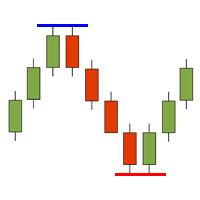
The HighsAndLowsPro indicator for MetaTrader 5 marks local highs and lows in the chart. It distinguishes between weak and strong highs and lows. The line thicknesses and colours can be individually adjusted. In the default setting, the weak highs and lows are displayed thinner, the strong ones thicker. Weak highs and lows have 3 candles in front of and behind them whose highs are lower and lows are higher. The strong highs and lows have 5 candles each.
FREE
ShowSessions MT5
PATRICK WENNING
4.5 (4)
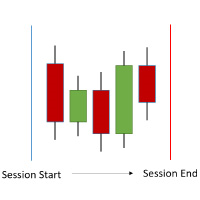
The ShowSessions indicator for MT5 shows up to two, self-selected, time intervals, for a free choosen number of days past and a few future days. Weekends are marked with an additional red vertical line. The indicator makes manuel backtesting of strategies more easily, but you can use ist for daily trading as well. Please note that the server time does not always correspond to the actual time.
FREE
BreakOutBox MT5
PATRICK WENNING
1 (1)
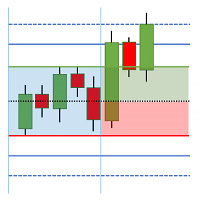
The Breakout Box for MT5 is a (opening) range breakout Indicator with freely adjustable: - time ranges - end of drawing time - take profit levels by percent of the range size - colors - font sizes It can  not only display the range of the current day, but also for any number of days past. It can be used for any instrument. It displays the range size and by request the range levels and the levels of the take profit niveaus too. By request it shows a countdown with time to finish range.  The indic
The Candlestick Patterns indicator for MT5 includes 12 types of candlestick signales in only one indicator. - DoubleTopsAndBottoms - SmallerGettingBars - BiggerGettingBars - ThreeBarsPlay - TwoBarsStrike - Hammers - InsideBars - OutsideBars - LongCandles - TwoGreenTwoRed Candles - ThreeGreenThreeRed Candles The indicator creats a arrow above or under the signal candle and a little character inside the candle to display the type of the signal. For long candles the indicator can display the exact
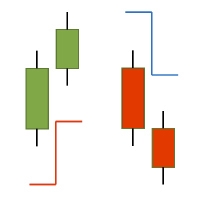
The ATR-StopLoss-Line indicator for MT5 calculates a stoploss line by the Average-True-Range (ATR) - Value of the particular candle.  As point of reference you can choose the High/Low or Close of the particular candle. The indicator is suitable for scalping and intraday trading. The indicator does not redraw (recalculate). Signals are generated strictly on the "Close of the bar". It can be used as a standalone tool or together with other indicators. Alerts on Colorchanges are activatable.
The SessionLines indicator for MT5 shows up the most important time intervalls and price levels in the DAX-Index. The following times get marked: Opening Time DAX Future, Opening Time DAX Kassa, Closing Time DAX Kassa, Closing Time DAX Future, Opening Time US Index Futures, Opening Time US Kassa Markets, Spezial Times, The following price levels get marked: Daily High/Low, Previous Daily High/Low, Weekly High/Low, Opening and Cloth Levels of Future and Kassa Daily (inkl. Previous Day).
The SessionLines indicator for MT5 shows up the most important time intervalls and price levels in the US- Indices . The following times get marked: Opening Time US Futures, Opening Time US Kassas, Closing Time US Kassas, Spezial Times, The following price levels get marked: Daily High/Low, Previous Daily High/Low, Weekly High/Low, Opening and Cloth Levels of Futures Daily (inkl. Previous Day).
The Multitimeframe-Candles (MCandles) - Indicator for MT5 shows the contour of an higher, free selectable, timeframe as an overlay on the current timeframe. You can freely choose the timeframe, number of candles and color of the overlays. The indicator only calculates the current candle frequently, so it saves computing capacities. If you like the indicator, please left a comment. 
RSIScalperPro
PATRICK WENNING
Introducing RSIScalperPro - the revolutionary RSI-based indicator for Metatrader 5, specifically designed for scalping in the one-minute chart. With RSIScalperPro, you'll have a powerful toolkit for precise entry and exit signals to take your trading to the next level. RSIScalperPro utilizes two different RSI indicators that provide clear signals for overbought and oversold areas. You can customize the time periods and limit values of the two RSIs according to your preferences to achieve the be
TrendLinePro
PATRICK WENNING
The TrendLinePro indicator for MetaTrader 5 creates a trend line based on the last candle highs and lows. The number of candles to be used to determine the direction can be selected yourself. The trend line can also be used to set an SL. Changes in trend directions can optionally be displayed with an arrow. Input Parameters: Number of Candles for Distance: 3 Display Direction Changes Arrows: false
TrianglesPro
PATRICK WENNING
The TrianglesPro indicator for MetaTrader5 draws triangles on the chart based on the local highs and lows. The length of the trendlines can be limited. Optionally, you can display the highs and lows that are used to determine the triangles. It is also possible to determine how far back the identification of triangles should start. Also check out my other indicators.
Filtro:
Nessuna recensione
Rispondi alla recensione