Easy Copy Link
- Utilità
- Versione: 1.0
- Attivazioni: 10

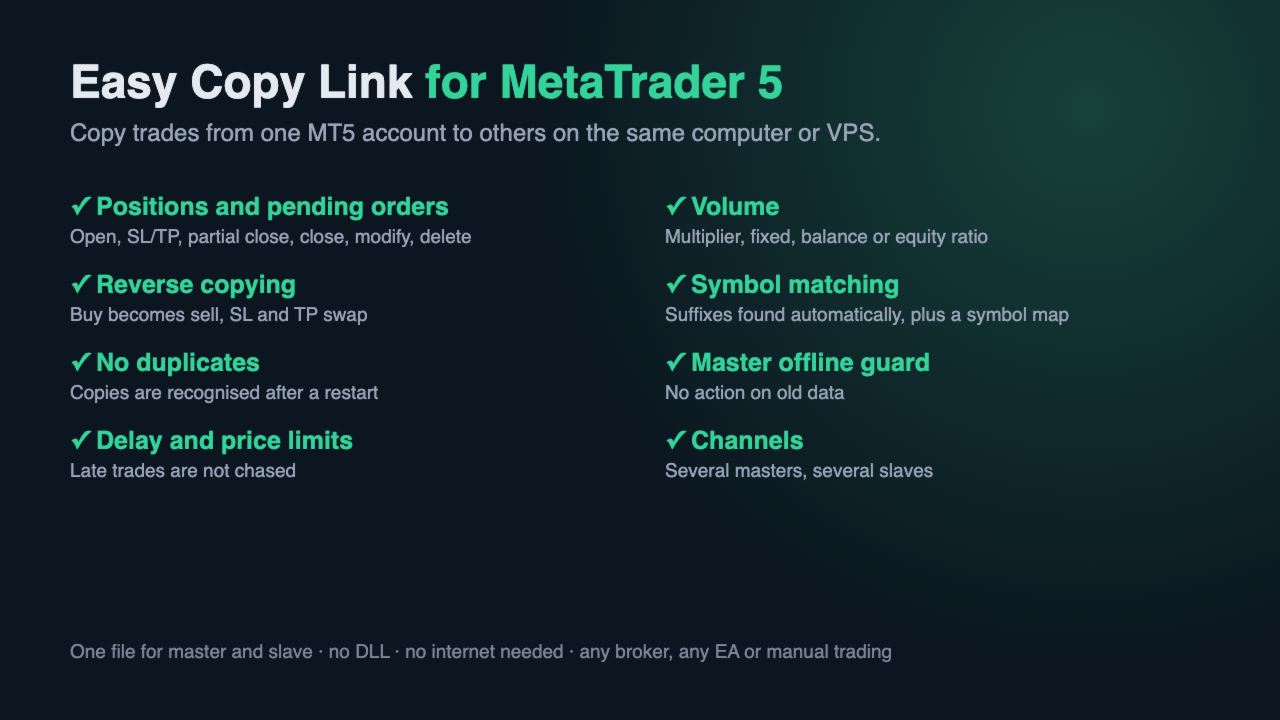
Easy Copy Link copies trades from one MetaTrader 5 account to one or more other MetaTrader 5 accounts running on the same computer or VPS. Attach it in Master mode on the account you trade and in Slave mode on every account that should copy. Manual trades and trades of any Expert Advisor are copied, at the same or at different brokers.
What is copied
- Market positions: open, stop loss and take profit changes, partial closes (proportional) and closes.
- Pending orders (limit and stop): placement, price/stop changes and deletion. When the master's pending order fills, the copy is filled too.
- Optional reverse copying: buy becomes sell, the stop loss and take profit swap places, buy limit becomes sell stop and so on.
Volume
Master volume × multiplier, fixed volume, balance ratio × multiplier or equity ratio × multiplier. Maximum volume per trade, and a choice between the minimum volume or skipping the trade when the result is below the broker's minimum.
Safety
- A copy is never opened twice: copies are recognised after a restart of either terminal, and a copy you close by hand is not opened again.
- If the master terminal stops (closed, frozen, computer asleep), the slave does nothing until it is back, instead of acting on old data. The panel shows how many seconds ago the master last reported.
- Trades older than a set number of seconds are not copied (default 60), and you can set a maximum price difference in points.
- Trades that were already open when the slave started are not copied unless you allow it.
- Trades that were copied are never sent on again, so a chain of terminals cannot copy in a loop.
Symbols
Names with broker suffixes or prefixes are matched automatically (EURUSD, EURUSD.r, EURUSDm, EURUSD_i). For different names, use the symbol map, for example XAUUSD=GOLD,US30=DJ30. You can limit which symbols and magic numbers the master sends and which symbols the slave copies.
Channels
The master and its slaves share a channel name. Several masters can run side by side with different channel names, and one slave account can follow several masters (one chart per channel). The magic number of the copies is derived from the channel name, so different channels never touch each other's trades.
How we tested it
Live on a demo account with two MetaTrader 5 terminals running at the same time, with an automatic scenario that checks every copy: open with stop loss and take profit, stop changes, partial close, pending order placement/modification/deletion, a pending order that fills, magic number filter, restart of the slave terminal (no duplicates), a copy closed by hand (not reopened), master offline for 15 seconds (no action, then a trade opened meanwhile is copied), reverse copying, fixed volume, balance ratio and symbol map.
Setup
- Install it in every terminal (each terminal is one activation).
- On the account you trade: attach it to any chart, Mode = Master.
- On each copying account: attach it to any chart, Mode = Slave, choose the volume mode, and allow Algo Trading.
- Use the same channel name on both (default "main").
Notes
- All terminals must run on the same computer or VPS (they share the MetaTrader Common folder). It does not copy over the internet and needs no WebRequest or DLL.
- Slave mode needs a hedging account. The master can be hedging or netting.
- Copies carry the comment ECL#ticket of the master trade; do not change it.
- In the Strategy Tester it cannot copy (there is no second terminal); the demo only shows the panel.
- It copies trades; it does not trade on its own and does not judge whether a trade is good.