Trend Trail Panel
- Utilità
-
Carl Daniel Axelsson
 Developer of trade-management tools for MetaTrader 5
- Versione: 1.13
- Aggiornato: 7 novembre 2026
- Attivazioni: 5
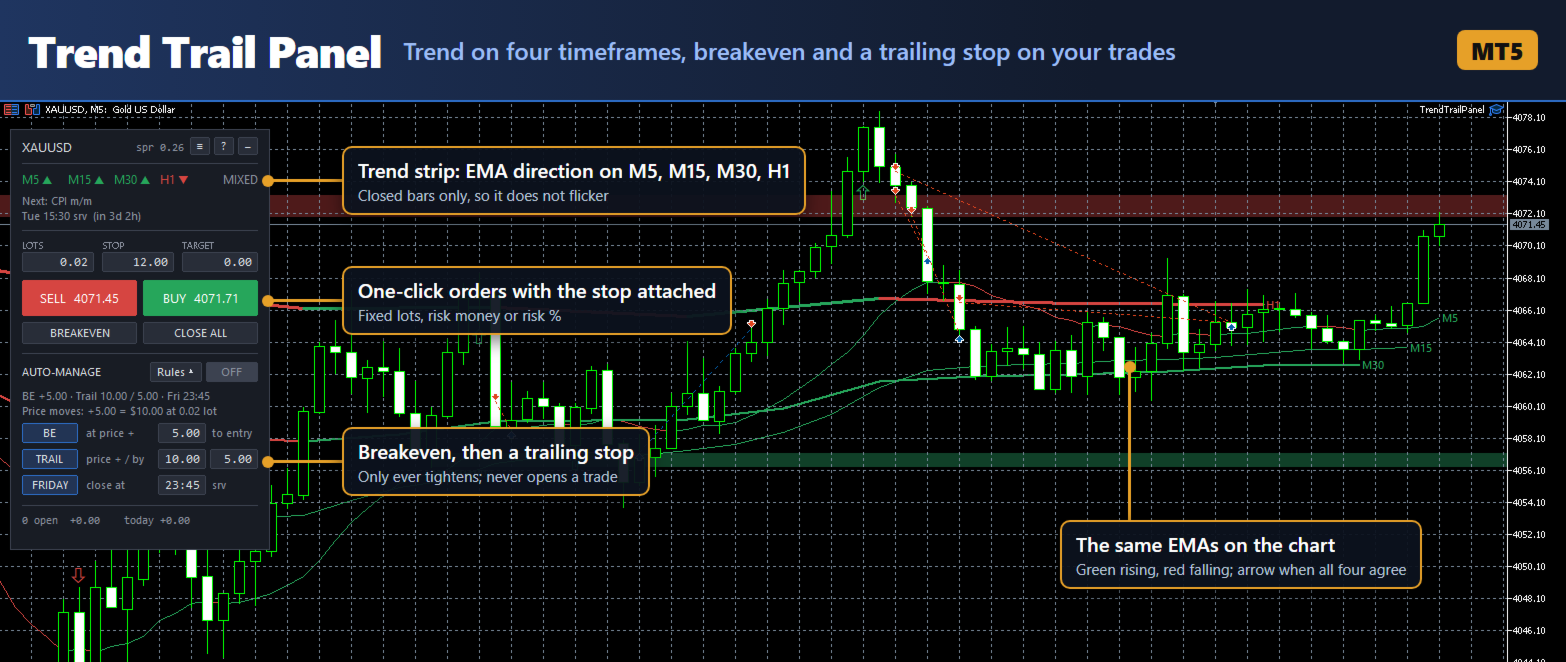
Trend Trail Panel shows which way four timeframes are leaning, then manages your exit: breakeven at a set profit and a trailing stop after that. You place the trade from the same panel. It is a tool for manual traders: you decide every entry, and the panel never opens a trade on its own.
What it does
- Trend strip: the EMA direction on four timeframes (default M5, M15, M30, H1), from closed bars only, so it does not flicker. The same EMAs are drawn on the chart, green where they rise and red where they fall. An arrow marks the bar where all four start to agree.
- Breakeven and trailing stop (auto-manage, off until you switch it on): the stop moves to entry at a set profit, then trails behind price, and trades can be closed before the weekend. Distances can be price moves or account money per trade. It only tightens stops and closes; it never opens a trade and never moves a stop further away. It can also manage trades you opened by hand, for example from the MT5 phone app.
- BUY and SELL at market with the stop and target already attached. After the fill, both are re-anchored to the real fill price, so slippage does not shift them.
- Position size as fixed lots, risk money or risk percent of balance. Risk sizing uses the terminal's own profit calculation, so it is correct for any symbol and account currency, and it rounds down to the broker's lot step.
- BREAKEVEN moves the stop of the panel's trades to entry. It never loosens a stop that is already better. CLOSE ALL closes the panel's trades on the chart's symbol.
- News window: reads the MT5 economic calendar and marks a window around major releases, by default 30 minutes before to 60 minutes after. Releases are matched by name (CPI, Nonfarm Payrolls, FOMC, PCE, PPI, Retail Sales, GDP), because the calendar's high-importance flag also covers minor events. Warn mode shows a red warning; Block mode refuses entries inside the window.
- Supply and demand: tested price levels drawn as shaded zones.
- Settings typed on the panel are saved per symbol and come back after a restart.
What it does not do
It does not touch positions from other Expert Advisors. It only manages trades with its own magic number, plus manual trades if you choose. It is not a signal service, and the trend strip and arrows are not buy or sell recommendations.
Recommendations
- Test it on a demo account first.
- The default distances are set for XAUUSD (stop 12.00, breakeven at +5.00, trail by 5.00 after +10.00, all in price units). Set the stop and the auto-manage distances for the symbol you trade before your first order.
- Turn on Algo Trading in the terminal toolbar and tick Allow Algo Trading when attaching. Without it the panel shows prices but refuses orders.
- Open the Calendar tab in the terminal's Toolbox once so the news data downloads.
- Auto-manage works only while the terminal is running and connected. Stops and targets set by the panel stay on the server when the terminal is closed.
- The economic calendar does not exist in the Strategy Tester, so in the tester the news window cannot be read and Block mode refuses every entry.
- All times on the panel are trade server time, marked "srv".
- To try the demo, run it in the Strategy Tester with Visualization ticked. The buttons and fields work there, so you can open a trade and watch breakeven and the trailing stop move it. Without visualization nobody can click, so the panel opens one trade of the minimum size and closes it an hour later. That is only a check that trading works, not a strategy.
Input parameters
Orders
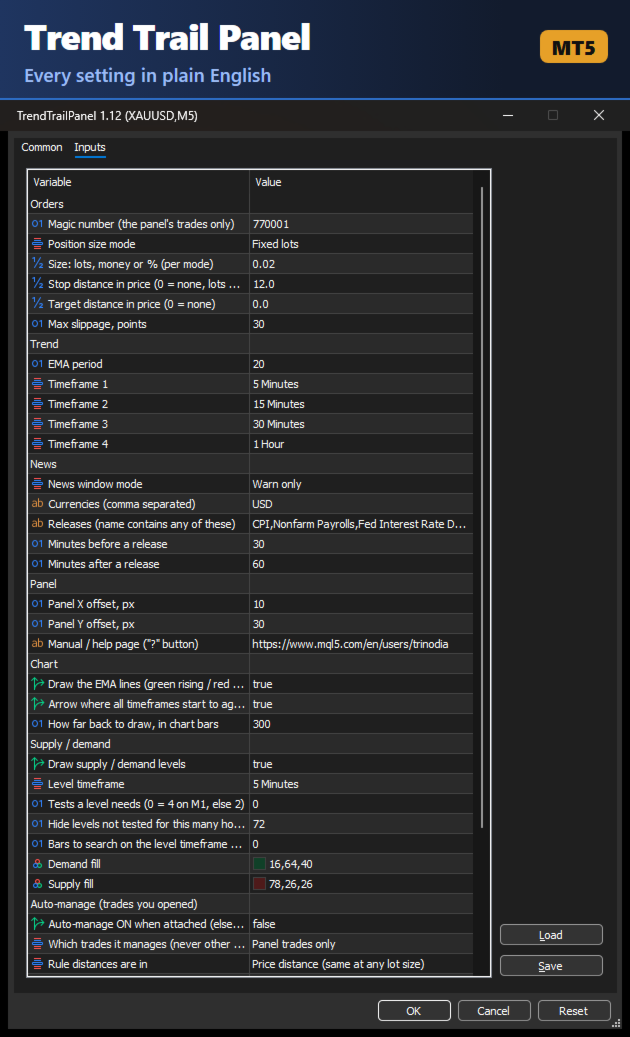
- Magic number: marks the panel's trades. Keep it different from your other Expert Advisors. Default 770001.
- Position size mode: Fixed lots, Risk money or Risk %. Default Fixed lots.
- Size: lots, money or percent, according to the mode. Default 0.02.
- Stop distance in price: 0 = no stop (fixed lots only). Default 12.0.
- Target distance in price: 0 = no target. Default 0.
- Max slippage, points. Default 30.
Trend
- EMA period. Default 20.
- Timeframe 1 to 4. Default M5, M15, M30, H1.
News
- News window mode: Off, Warn or Block. Default Warn.
- Currencies, comma separated. Default USD.
- Releases: an event counts if its name contains any of these. Default CPI, Nonfarm Payrolls, Fed Interest Rate Decision, FOMC Press Conference, PCE Price Index, PPI m/m, Retail Sales m/m, GDP q/q.
- Minutes before / after a release. Default 30 / 60.
Panel
- Panel X / Y offset, pixels. Default 10 / 30.
- Manual / help page: the link the ? button shows.
Chart
- Draw the EMA lines. Default on.
- Arrow where all timeframes start to agree. Default on.
- How far back to draw, in chart bars. Default 300.
Supply / demand
- Draw supply / demand levels. Default on.
- Level timeframe. Default M5.
- Tests a level needs: 0 = automatic (4 on M1, otherwise 2).
- Hide levels not tested for this many hours. Default 72.
- Bars to search on the level timeframe: 0 = automatic.
- Demand fill / supply fill colours.
Auto-manage
- Auto-manage ON when attached. Default off (click to activate).
- Which trades it manages: panel trades only, or panel and manual trades. Trades from other Expert Advisors are never managed.
- Rule distances are in: price distance or account money per trade.
- Breakeven rule, on/off, and the profit it triggers at. Default on, 5.0.
- Breakeven lock: the stop goes to entry plus this. Default 0.
- Trailing rule, on/off, the profit it starts at and the distance behind price. Default on, 10.0, 5.0.
- Close before the weekend, on/off, and the Friday time (server time, HH:MM). Default on, 23:45.