Smart Ratio Maker
- Utilità
- Versione: 3.32
- Aggiornato: 12 novembre 2026

Smart Ratio Maker
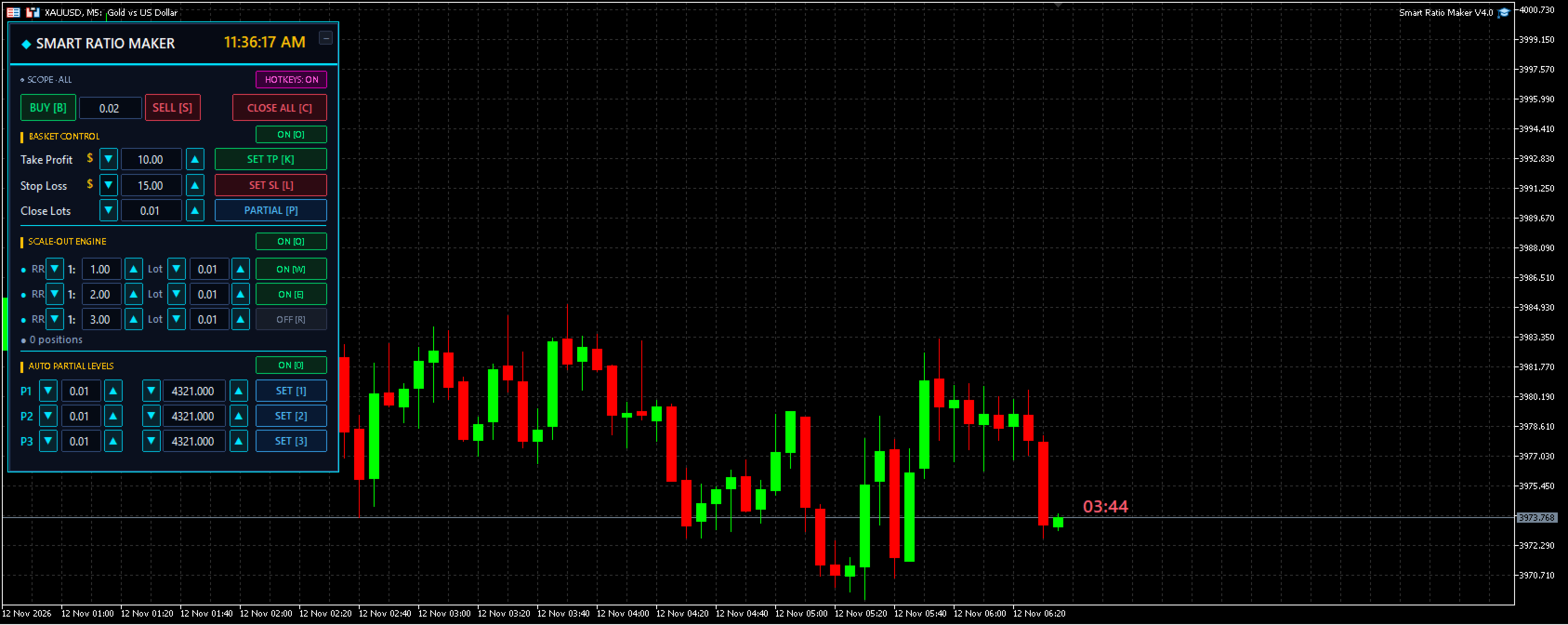
What it is: A trading control panel that sits on your chart and helps you manage multiple open trades together, as one group.
What it does, simply
1. Basket Control
Instead of setting Take Profit and Stop Loss on each trade one by one, you set them once for all trades together as a group. The EA does the math for you — even if you have Buy and Sell trades at the same time.
2. Auto Partial Levels (P1 / P2 / P3)
You can tell the EA: "When price reaches this point, close this much of my trade." Up to three points. Useful for taking some profit early and letting the rest run.
3. Scale-Out Engine (RR1 / RR2 / RR3)
This is the smart part. You say how much risk-to-reward you want (for example, 1:2 means risking 1 to make 2). When price moves your way, the EA automatically closes a portion at each reward level and moves your Take Profit further out. So you lock in profit step by step instead of hoping for one big exit.
4. Quick Trade Buttons
A BUY button, a SELL button, and a CLOSE ALL button right at the top — one click to enter or exit.
5. Hotkeys
Every button has a keyboard shortcut (like B for BUY, C for CLOSE ALL) so you don't have to move your mouse. All keys can be changed to whatever you prefer.
6. Extra conveniences
-
A live clock on the panel
-
A candle countdown timer on the chart
-
Three panel sizes (Small / Normal / Large) for different screens
Who it's for
Traders who open more than one trade at a time and want to manage them as a single group — with profits taken out in stages — without doing the math by hand.
What it is not
-
It does not predict the market or give buy/sell signals
-
It does not trade automatically on its own — you still decide when to enter
-
It is a management tool, not a strategy — you bring the strategy, it handles the exits and the paperwork