TradeMasterPanel

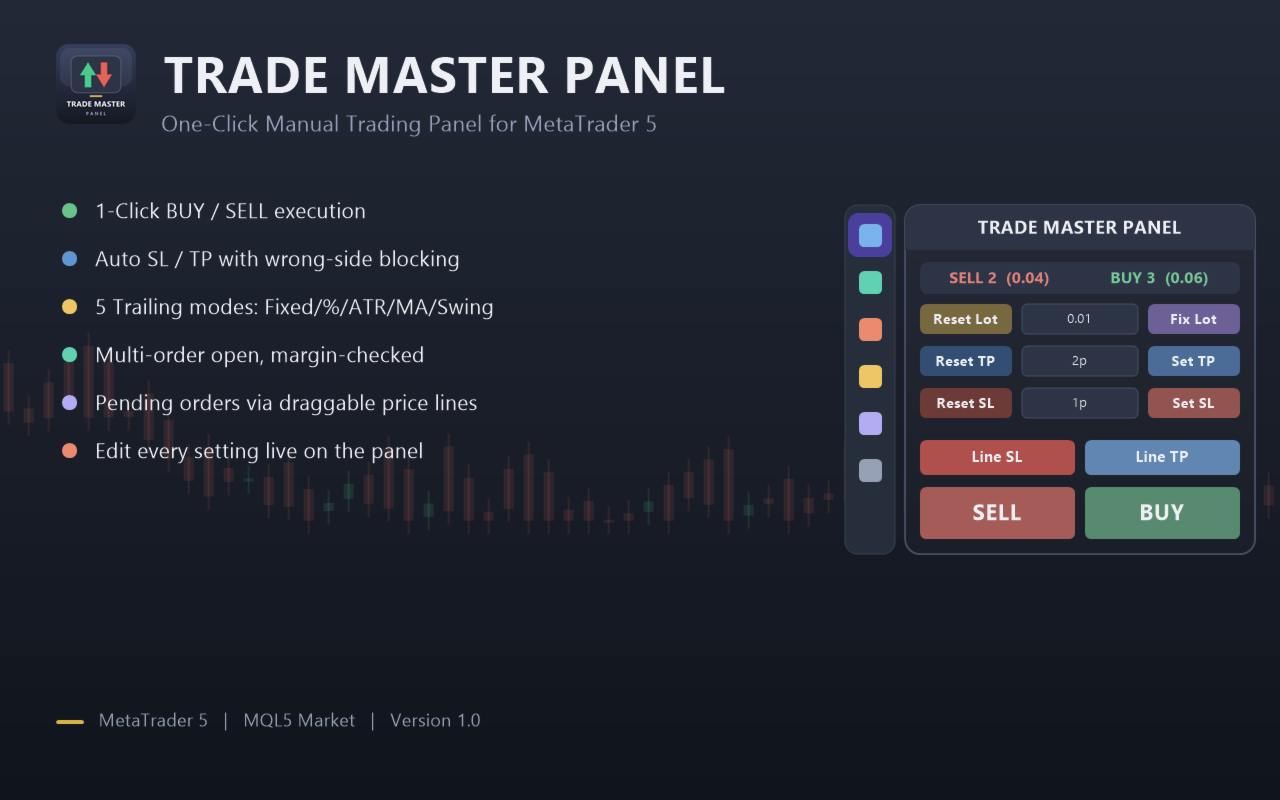
TradeMasterPanel — One-Click Manual Trading Panel for MT5

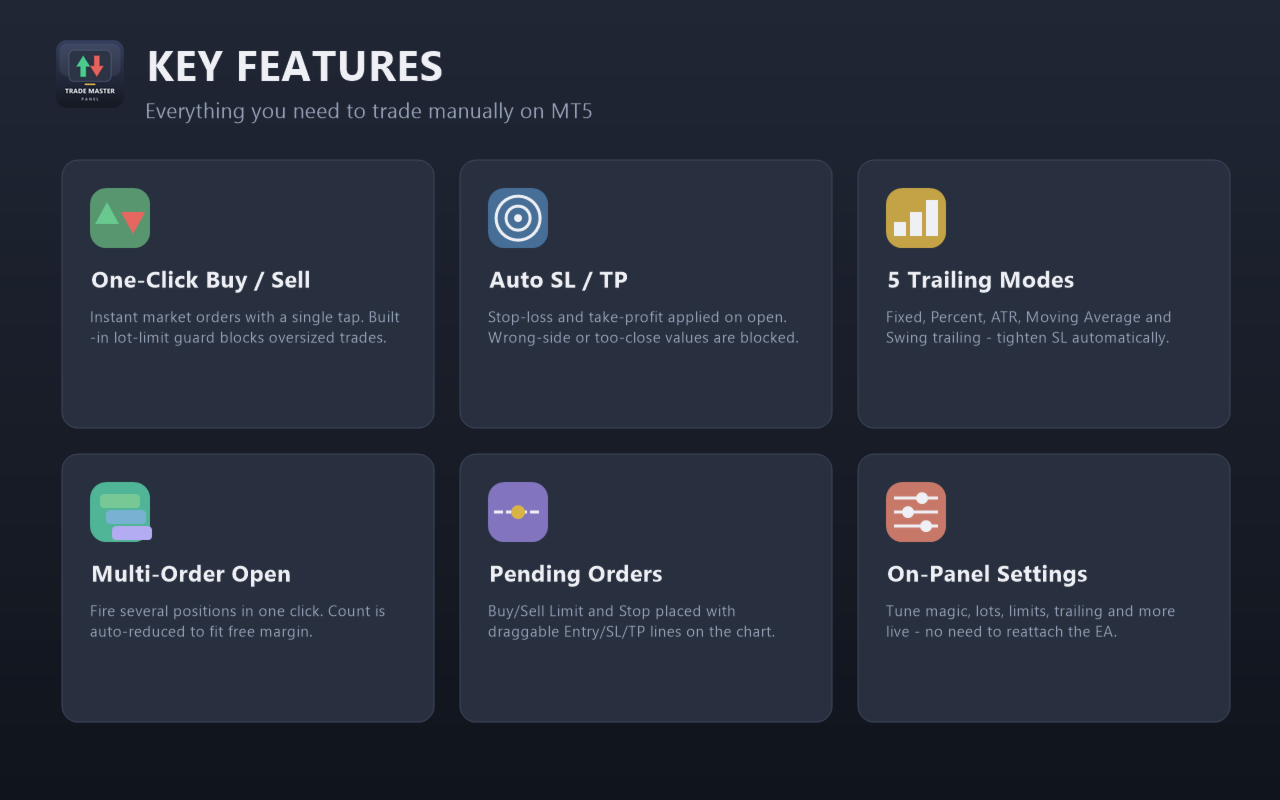
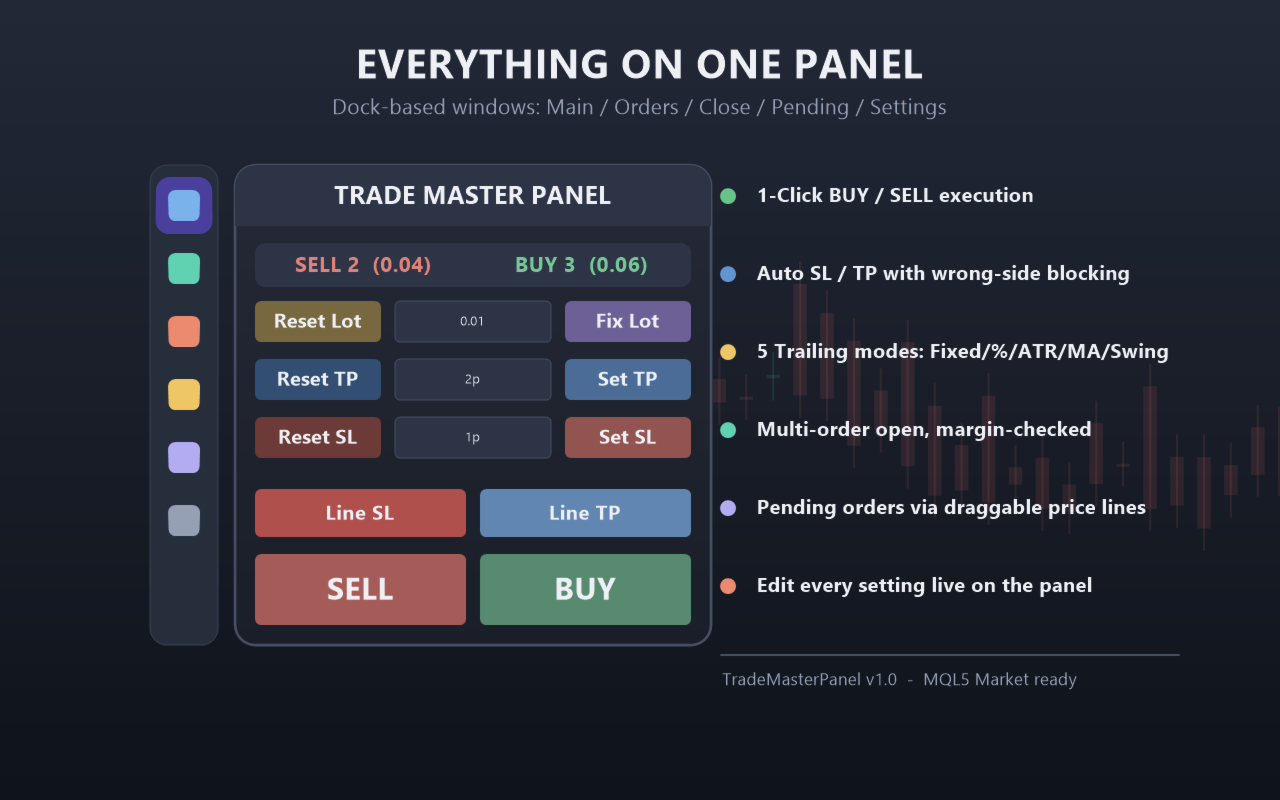
TradeMasterPanel is a professional one-click trading assistant for MetaTrader 5, designed to help traders execute, manage, and protect positions directly from the chart. All settings can be adjusted on-chart and are automatically saved for each trading symbol, eliminating the need to reopen the Inputs dialog or reattach the EA. The interface is fully scalable and DPI-aware for modern high-resolution displays.

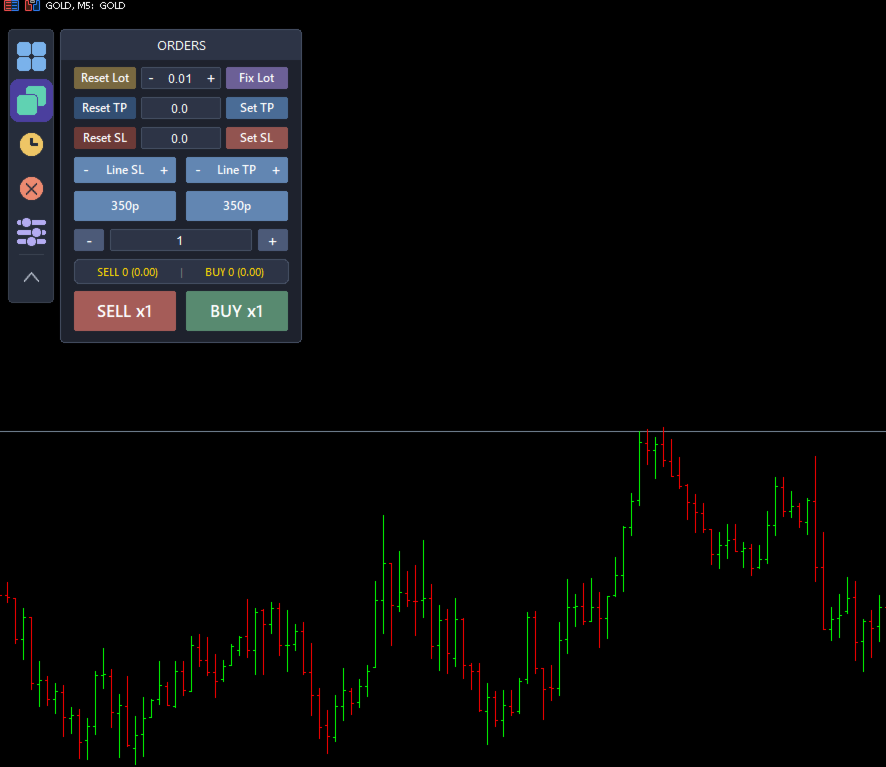
1. Market Order Entry

  • Open Buy or Sell market orders with a single click.

  • Position sizing modes:

    • Fixed Lot Size

    • Balance Percentage (margin allocation)

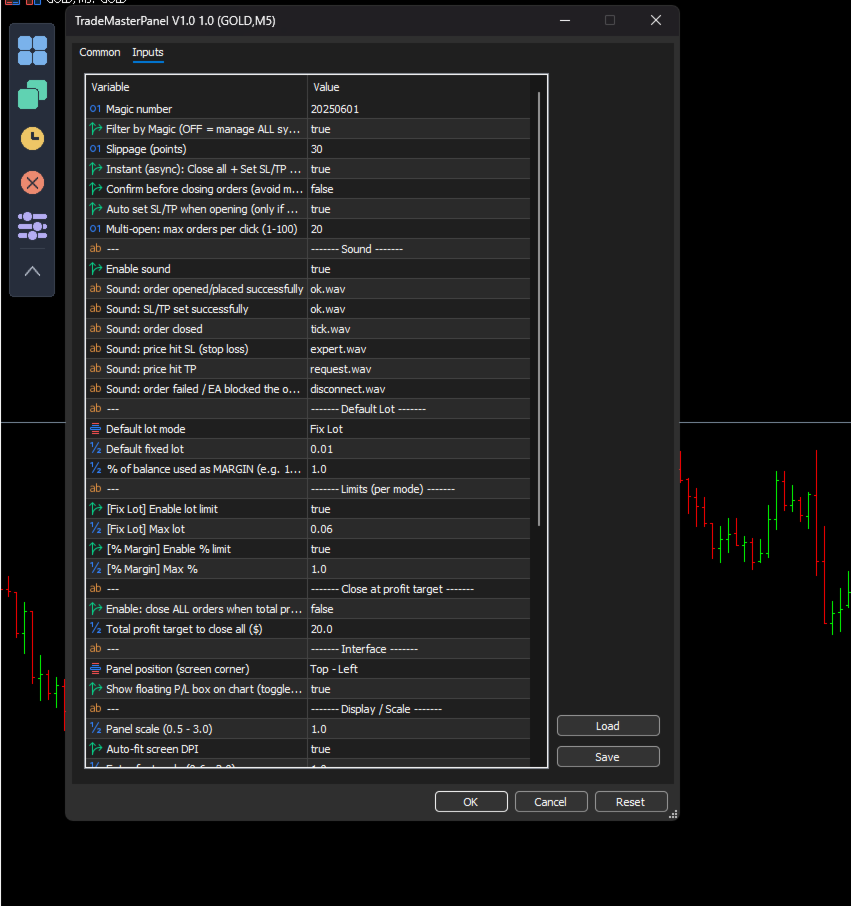
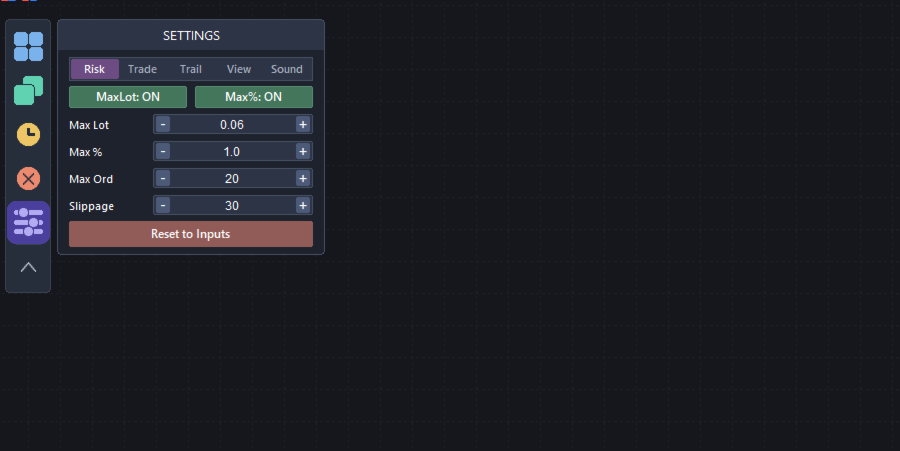
  • Maximum position size limits:

    • Maximum lot size in Fixed mode.

    • Maximum balance percentage in Percentage mode.

    • Order volume is automatically limited by available free margin.

  • Open multiple market orders with a single click (automatically limited by available trading capacity).

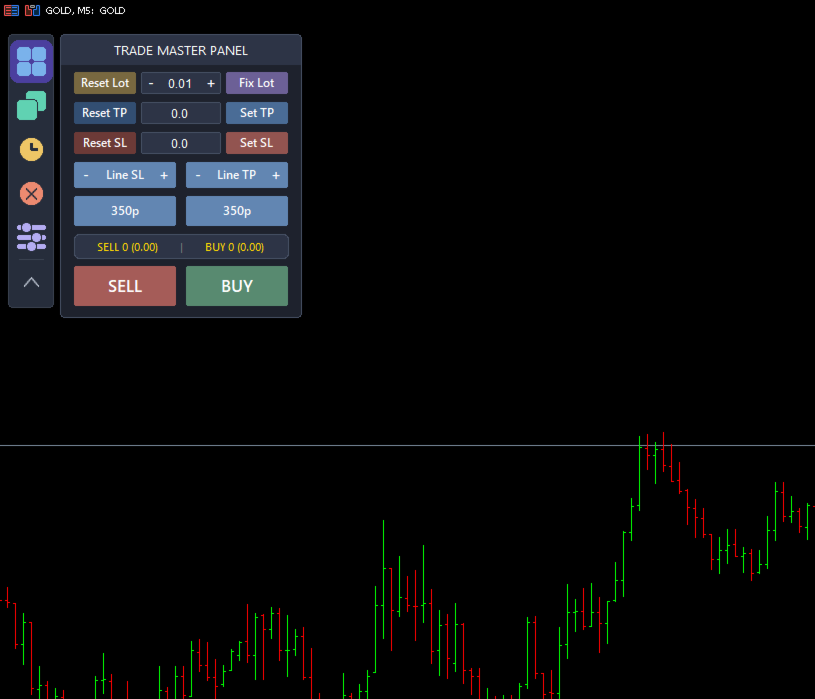
  • Live position counters displaying:

    • Number of Buy and Sell positions.

    • Total Buy and Sell volume.

  • Magic Number filter:

    • Manage only positions opened by this EA.

    • Or manage all positions on the current symbol.

2. Stop Loss & Take Profit

  • Four calculation modes:

    • Price

    • Pips

    • Money ($)

    • ATR Multiplier

  • Automatically apply Stop Loss and Take Profit when opening new trades.

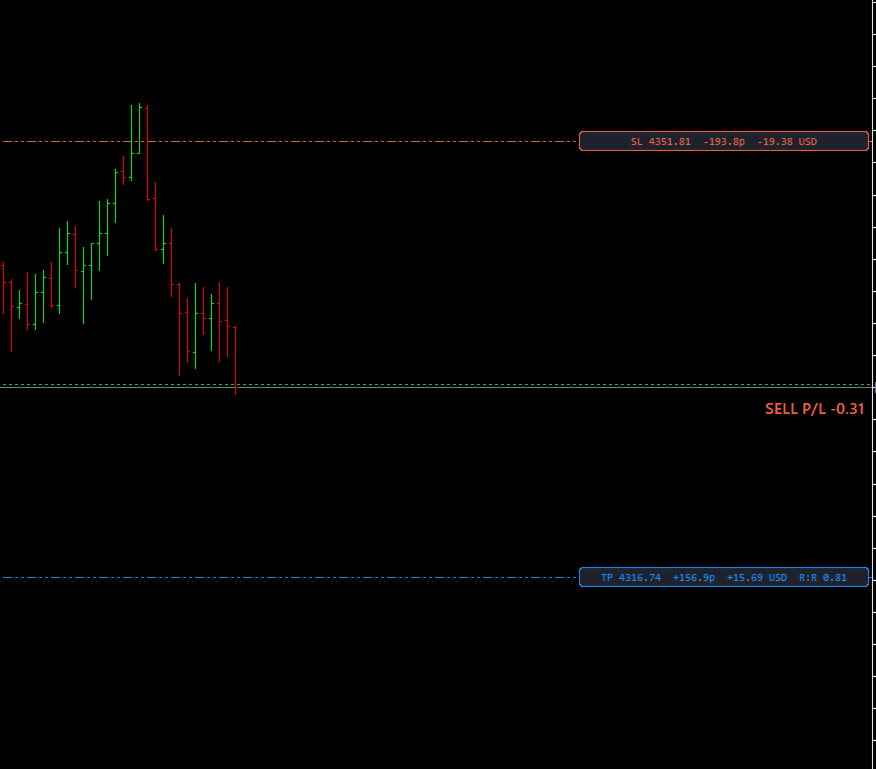
  • Drag-and-drop SL/TP lines on the chart with convenient increase/decrease adjustment buttons (Price mode).

  • Built-in validation for broker Stop Level and Freeze Level to prevent invalid trade requests.

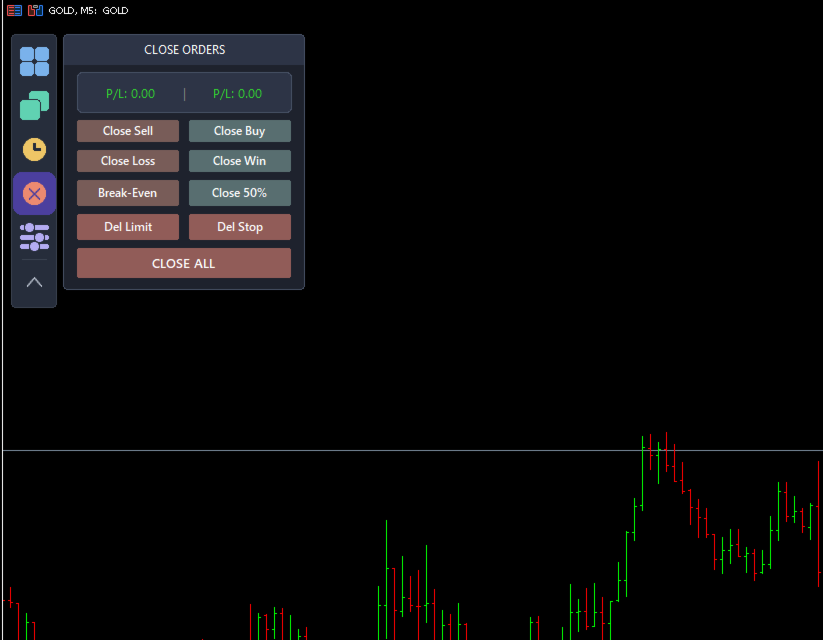
3. Trade Management

  • Close All Positions.

  • Close Buy Positions.

  • Close Sell Positions.

  • Partial Close (50% of total position volume).

  • Move Stop Loss to Break Even.

  • Close Winning Positions.

  • Close Losing Positions.

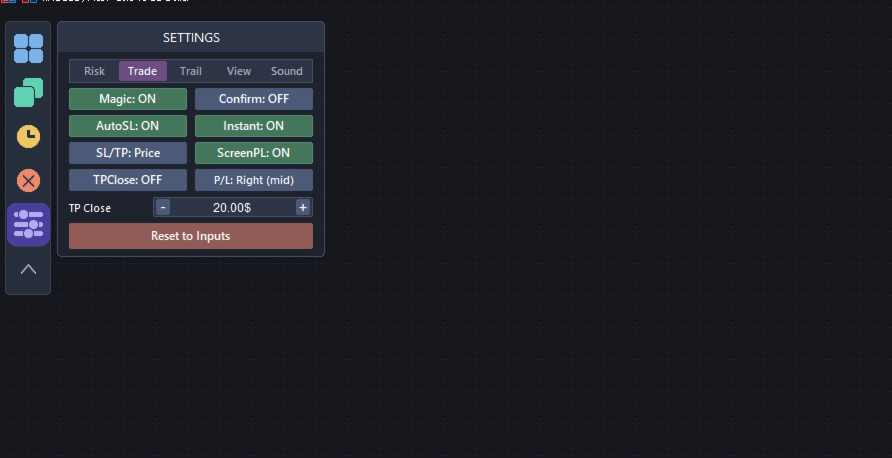
  • Automatically close all positions once a specified total profit target ($) has been reached.

  • Instant asynchronous execution for fast processing of multiple orders.

  • Optional confirmation dialog to prevent accidental clicks.

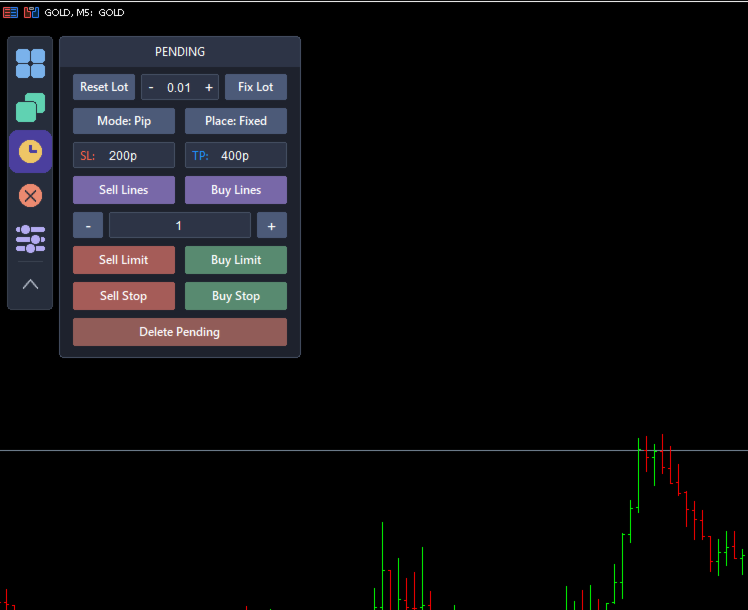
4. Pending Orders

  • Place Buy Limit, Sell Limit, Buy Stop, and Sell Stop orders using draggable Entry, Stop Loss, and Take Profit lines.

  • Stop Loss and Take Profit distances can be calculated in:

    • Pips

    • Money ($)

  • SL/TP placement modes:

    • Fixed

    • Ladder (Stepped)

  • Create multiple pending orders with customizable spacing.

  • Shared Stop Loss or individual Stop Loss for each pending order.

  • Independent lot size settings for pending orders.

  • Delete pending orders:

    • All Pending Orders

    • Limit Orders Only

    • Stop Orders Only

5. Automatic Trailing Stop

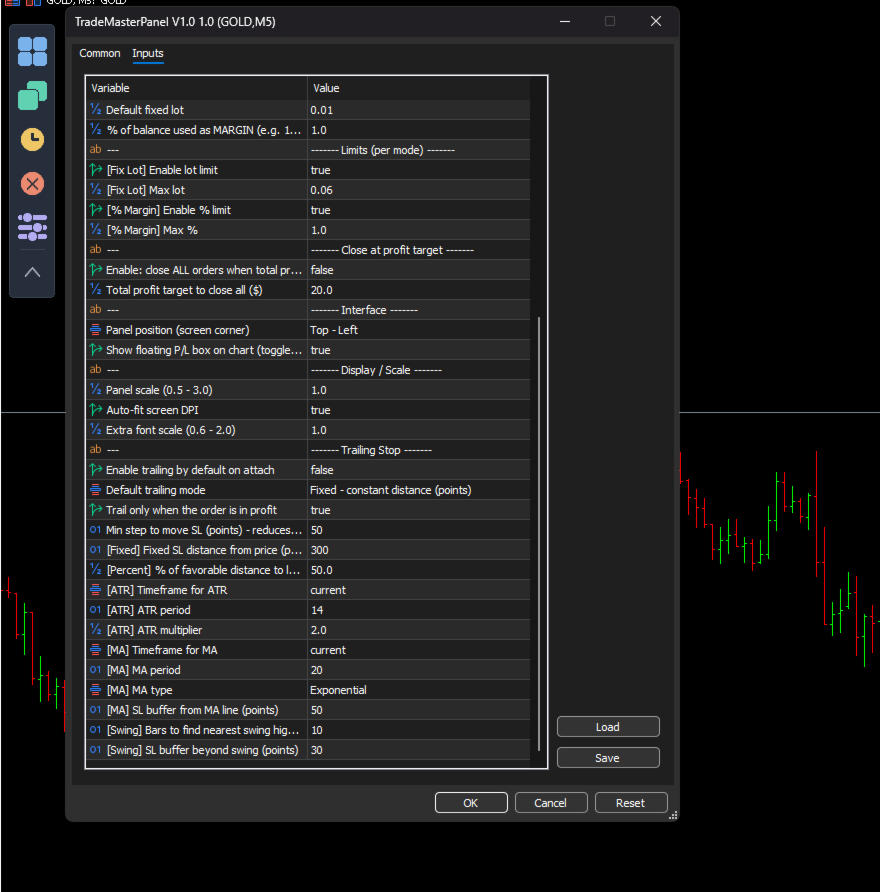
Five trailing stop modes are available:

  • Fixed Distance

  • Percentage

  • ATR-Based

  • Moving Average

  • Swing High / Swing Low

Trailing Stop activates only after the position becomes profitable and minimizes unnecessary order modifications to reduce server requests.

6. On-Chart Configuration (No Inputs Window Required)

A vertical toolbar provides quick access to:

  • Main Panel

  • Market Orders

  • Pending Orders

  • Close Functions

  • Settings

Settings are organized into the following tabs:

  • Risk

  • Trading

  • Trailing

  • View

  • Sound

All operating modes are selected through intuitive drop-down menus with the active option highlighted, including:

  • Trailing Stop Mode

  • Stop Loss / Take Profit Mode

  • Moving Average Method

  • Panel Position

  • Profit/Loss Display Position

  • Sound Selection

View Settings

  • Panel Corner

  • Panel Scale

  • Font Size

  • Automatic DPI Scaling

Sound Settings

  • Enable or disable sounds.

  • Assign a different sound to each trading event from the built-in sound list.

  • Preview sounds before applying them.

  • No manual filename entry required.

7. Floating Profit/Loss Display

A floating Profit/Loss panel displays real-time trading results directly on the chart.

Features include:

  • Color-coded profit and loss display.

  • Eight display positions:

    • Top Left

    • Top Center

    • Top Right

    • Middle Left

    • Middle Right

    • Bottom Left

    • Bottom Center

    • Bottom Right

  • Consistent Pip and Money calculations across:

    • Forex

    • Metals

    • Indices

    • Cryptocurrencies

8. Notes

TradeMasterPanel is a manual trading tool. Market orders are submitted only when the trader clicks the corresponding Buy or Sell button.

Trailing Stop and Close-at-Profit are optional trade management features that operate only after being enabled by the user.

AutoTrading must be enabled in MetaTrader 5 to allow the panel to execute trading operations.

All settings are stored as Terminal Global Variables on a per-symbol basis and remain available after changing timeframes, restarting MetaTrader 5, or reattaching the EA.
    Prodotti consigliati
    TrendVision AI
    Murtadha Majid Jeyad Al-Khuzaie
    TrendVision AI – Smart Trend Channels & Price Forecasting for MetaTrader 5 Discover market structure and explore potential future price direction with TrendVision AI, an advanced technical indicator for MetaTrader 5 that combines automatic trendline analysis with a machine-learning-based price forecasting model. How Does TrendVision AI Work? TrendVision AI analyzes historical candlestick data within a configurable lookback window. It automatically draws two trendlines directly on the chart:
    FREE
    This indicator automatically detects harmonic price patterns on your chart, both bullish and bearish, and shows them as soon as they form, including potential patterns that are still developing. For every pattern it draws the Potential Reversal Zone (PRZ), and for completed patterns it also draws two take-profit and two stop-loss levels. Supported Patterns: Gartley, Bat, Butterfly, Crab, Deep Crab, Shark and Cypher. Each pattern can be switched on or off individually. Key Features: Completed
    FREE
    La gestione manuale delle posizioni spesso causa uscite tardive, esitazioni emotive e ordini privi di adeguata protezione del rischio. Trade Manager Lite è una potente utility per MetaTrader 5 progettata per automatizzare la gestione operativa: Stop Loss, Take Profit, Break-Even (pareggio), Trailing Stop (stop dinamico) e Chiusura Parziale (Partial Close). Sia che apriate ordini manualmente dal computer, dall'app mobile di MT5 o tramite segnali di altri indicatori, Trade Manager Lite individua i
    FREE
    AI Weekly Open Bias Trader
    Fadi Hassan Khaled Ghanem
    Usa il prezzo di apertura settimanale come linea di bias e opera sui rifiuti di quella linea nella direzione del bias settimanale. Come funziona L'EA valuta le proprie regole una volta per ogni barra chiusa del timeframe del segnale (H1 per impostazione predefinita), quindi i segnali non vengono ridisegnati e la logica è la stessa nel tester e su un grafico live. Quando compare il setup e non c'è alcuna posizione aperta di questo EA sul simbolo, apre un ordine a mercato con uno stop loss e un ta
    FREE
    TradeDeck Lot Calculator
    Joaquin Nicolas Metayer
    LotCalc is a minimalist MT5 indicator designed for fast, precise position sizing. Set your risk amount in dollars, click the button, then click your entry and stop-loss levels directly on the chart — the lot size and point distance are calculated and displayed instantly. No clutter, no extra panels, just the one tool you actually need before placing a trade.
    FREE
    LT Watermark MT5
    Thiago Duarte
    4.79 (24)
    This indicator draw a watermark on the chart, with the timeframe and symbol name. You can change everything, including add a aditional watermark. Functions: Symbol watermark: Size -  text size. Font -  text font. Color -  text color. Background text -  watermark at foreground or background mode. Horizontal correction -  x correction in pixels. Vertical correction -  y correction in pixels. Separator period X symbol -  what will separate the period from symbol. Aditional watermark: Enable custom
    FREE
    Stop Out Line MT5
    Sergey Batudayev
    4 (1)
    Logica di lavoro L'utilità Stop Out è un indicatore semplice ma molto comodo che mostra quanti punti sono rimasti al livello Stop Out / Il suo vantaggio sta nel fatto che molti trader sopravvalutano deliberatamente il rischio nel trading in cerca di profitto, utilizzano al massimo il margine disponibile, e in questo caso è molto importante sapere dove il broker può forzare la chiusura delle proprie posizioni. Basta posizionare l'indicatore sul grafico e, a seconda della posizione aperta in C
    FREE
    Ninja MT5 Doctor
    Atsushi Katayama
    NINJA MT5 DOCTOR PANORAMICA NINJA MT5 Doctor è un'utility MT5 gratuita e di sola lettura che acquisisce un'istantanea diagnostica una tantum del terminale, del conto, dei grafici aperti, dello storico selezionato e del simbolo del grafico host corrente. È un'utility in formato Expert Advisor, non un EA di trading né un indicatore. I nomi del pannello e dei parametri di input sono in inglese. COSA CONTROLLA Verifica la connessione al server del broker, le autorizzazioni al trading del terminale e
    FREE
    MACD Enhanced
    Nikita Berdnikov
    4 (4)
    Introducing the MACD  Enhanced – an advanced MACD (Moving Average Convergence Divergence) indicator that provides traders with extended capabilities for trend and momentum analysis in financial markets. The indicator uses the difference between the fast and slow exponential moving averages to determine momentum, direction, and strength of the trend, creating clear visual signals for potential entry and exit points. Attention! To achieve the best results, it is recommended to adapt the indicator
    FREE
    Auto Lots MT5  Auto Lots MT5 is an innovative and powerful application designed for traders on the MetaTrader 5 (MT5) platform. The application offers a user-friendly and intuitive interface, allowing traders to efficiently manage their positions, set precise entry levels and apply advanced risk management. Key features: 1. Creation of SL/TP zones on the chart: The application allows users to create two customisable rectangles directly on the chart, making it easy to adjust entry points, take
    FREE
    Disegna i prezzi di apertura giornalieri, settimanali e mensili correnti e precedenti come linee etichettate, i livelli che molti trader intraday usano come punti di bias e di reazione. Caratteristiche principali Calcolato sulle barre chiuse, i valori non vengono ridisegnati Funziona su qualsiasi simbolo e timeframe Tutti i periodi, i livelli e i colori possono essere modificati negli input Leggero sulle risorse grazie all'impostazione del numero massimo di barre Gli oggetti vengono rimossi auto
    FREE
    Trade Behavior Mirror legge esclusivamente lo storico delle operazioni già chiuse del proprio conto e conta un solo schema: aprire una nuova posizione poco dopo una perdita realizzata, con un lotto superiore al proprio volume abituale. Lo strumento non prevede nulla e non dà alcun consiglio. Ogni numero nel pannello è qualcosa che è già accaduto su questo conto. Come vengono costruiti i numeri: legge fino a 31 giorni di operazioni chiuse su tutti i simboli e tutti i magic number - è una fotogra
    FREE
    See how your account is really doing at a glance, right on the chart. The dashboard reads your account and trade history and never opens, modifies or closes a trade. How it works Every second the dashboard reads balance, equity, margin and open positions. Closed results come from the deal history: for each closing deal the profit, swap, commission and fee are added together. From these deals it calculates closed profit for today, this week and this month, plus statistics for the period you choos
    FREE
    This indicator show the candle remaining time on the chart and/or in the corner of the window. It also display notificaton (popup and push) when a new candle is formed (optional). You configure the timer on candles and at chart corner. I don't need to explain the functions because are very simple. MT4 version:  https://www.mql5.com/en/market/product/38677 Any doubt or suggestion please contact us. Enjoy! This is a free indicator, but it took hours to develop. If you want to pay me a coffee, I a
    FREE
    Position Selective Close MT5
    Francisco Manuel Vicente Berardo
    The Position Selective Close is a multi-symbol multi-timeframe script used to close simultaneously various positions.  General Description   The Position Selective Close   possesses   three operation modes (Intersection,   Union   and All) that control the way   as   four position features (symbol, magic number,   type   and profit) are used. The modes, available through the Selection Mode input parameter, relate to the features, available through the “Select by Feature” and “Feature” input pa
    FREE
    Total Closed Trades – MT5 Indicator The Total Closed Trades indicator for MetaTrader 5 provides a quick, visual overview of your trading performance by displaying a simple and intuitive 3-value breakdown : Total Trades – The total number of closed trades. Winning Trades – Number of profitable trades. Losing Trades – Number of losing trades. Instead of digging through reports, traders can instantly monitor their historical performance with a compact and elegant pie chart-style widget. Key
    FREE
    StealthTrade Commander è un pannello di trading visivo avanzato e un'utility di gestione del rischio progettata per trader manuali, scalper e sfidanti delle Prop-Firm. Questo strumento ti aiuta a eseguire le operazioni visivamente direttamente dal grafico, a nascondere i tuoi livelli di Stop Loss e Take Profit al broker e a controllare rigorosamente il tuo Drawdown giornaliero, una caratteristica cruciale per superare le sfide e mantenere i conti finanziati delle Prop-Firm. CARATTERISTICHE PRINC
    FREE
    Trade Dock
    Sovannara Voan
    5 (3)
    A bot utility designed to streamline trade management. It offers auto lot calculation based on money, account risk, or fixed lot size, with order setup featuring draggable take profit, stop loss, and entry price to fit your plan. It supports Buy/Sell market, Buy/Sell limit, and Buy/Sell stop orders, with or without stop loss and take profit. Additional features include single-click breakeven, deleting positions/orders, and more, making trade management efficient and easy.
    FREE
    The utility draws pivot levels based on a selection from day week month The previous candlestick of the selected timeframe is taken and the values for the levels are calculated using the following formulas: Pivot = (high + close + low) / 3 R1 = ( 2 * Pivot) - low S1 = ( 2 * Pivot) - high R2 = Pivot + (R1 -S1) R3 = high + ( 2 * (Pivot - low)) S2 = Pivot - (R1 - S1) S3 = low - ( 2 * (high - Pivot)); The style and thickness for all lines are adjusted. The colors for the R, Pivot and S lines ar
    FREE
    Why use it See at a glance how much room is left before your own daily loss and max loss limits. Know the equity level that would reach each loss limit, before it happens. Get an on-screen note when a limit reaches the warning levels you choose. It is an indicator with no trading functions: it never opens, modifies or closes a position. What it shows Balance, equity and today's result (closed trades since the day reset plus open positions). For the account history: number of trades, win rate, pr
    FREE
    AI Harmonic Pattern Scanner
    Fadi Hassan Khaled Ghanem
    Automatic detection of the classic harmonic patterns, with PRZ, stop and targets drawn for you. How it works A built-in swing algorithm finds turning points using a depth setting and a minimum swing size measured in ATR. Each time a new swing is confirmed, the scanner checks the five swings before it as X-A-B-C-D. It looks for Gartley, Bat, Butterfly, Crab and Cypher, plus AB=CD on the last four points. Each pattern uses standard Fibonacci ratio ranges with an adjustable tolerance. A pattern is
    FREE
    GANN TRIANGLE PRO v4.0 - OPTIMIZATION ANALYSIS REPORT CURRENT VERSION ASSESSMENT (v3.8) Strengths Feature Evaluation Swing Point Detection Clear logic using Left/Right bars Fibonacci/Gann Ratios Properly applied 61.8%, 100%, 161.8% Dashboard Real-time updates with visual indicators Code Structure Clean, maintainable architecture Critical Limitations Issue Impact Win Rate Effect No Trend Filter Signals against major trend -20% to -30% Missing Volume Confirmation False breakouts not filt
    FREE
    ChartTime
    Waheed Hussain
    Never miss a candle close again! The Candle Closing Time Remaining indicator is an essential utility tool designed for traders who rely on precise timing, candlestick patterns, and chart confirmation before entering or exiting trades. Whether you trade Forex, Crypto, Gold, Indices, or Stocks, this indicator seamlessly works on every chart, every symbol, and all timeframes .
    FREE
    Donchian Breakout And Rsi
    Mattia Impicciatore
    4.33 (3)
    Descrizione generale Questo indicatore è una versione avanzata del classico Donchian Channel , arricchita con funzioni operative per il trading reale. Oltre alle tre linee tipiche (massimo, minimo e linea centrale), il sistema rileva i breakout e li segnala graficamente con frecce sul grafico, mostrando solo la linea opposta alla direzione del trend per semplificare la lettura. L’indicatore include: Segnali visivi : frecce colorate al breakout Notifiche automatiche : popup, push e email Filtro R
    FREE
    Position Size Tool – Smart Risk Management & Trade Execution Panel The Position Size Tool is a powerful and intuitive MT5 panel that simplifies your trading by combining position sizing , risk calculation , risk/reward visualization , and order placement —all in one place. ️ Clean & Functional Interface The tool features a compact, real-time panel with the following: Balance & Equity display Live Price tracking Customizable Risk % input Auto-calculated Lot Size based on SL and Risk Input for S
    FREE
    Chiudere le Posizioni sul Simbolo Corrente Uno script semplice e affidabile per chiudere tutte le posizioni sul simbolo corrente. Elimina il lavoro manuale e fa risparmiare tempo prezioso. Vantaggi: Concentrato solo sul simbolo corrente: Lo script chiude solo le operazioni sul simbolo selezionato, senza toccare altre posizioni. Veloce e comodo: Con una sola esecuzione, tutte le posizioni vengono chiuse in pochi secondi. Perfetto per qualsiasi strategia: Ideale sia per chi gestisce più posizioni
    FREE
    CC CopyCopy
    Luiz Eduardo Teodoro De Carvalho
    *** Free Version: Maximum Lot 0.10 *** CopyCopy: Smart Replication Manager for MT5 CopyCopy is the ultimate tool for those who want to replicate trades with complete autonomy. Many signals and EAs operate with minimum lots (0.01) that do not match your account size or your growth strategy. With CopyCopy, you turn this limitation into an opportunity, taking full control over volume and risk. The difference? You don't have to copy "all or nothing." You decide exactly where the orders come from.
    FREE
    Important Lines
    Terence Gronowski
    4.88 (24)
    This indicator displays Pivot-Lines, preday high and low, preday close and the minimum and maximum of the previous hour. You just have to put this single indicator to the chart to have all these important lines, no need to setup many single indicators. Why certain lines are important Preday high and low : These are watched by traders who trade in a daily chart. Very often, if price climbs over or falls under a preday low/high there is an acceleration in buying/selling. It is a breakout out of a
    FREE
    Prop Edge Heartbeat
    Nuno Madeira Amaro Pire Costa
    EA to prevent inactivity violations on prop firms. This EA will scout for your most recent trade and if it is older than the number of days defined, will enter a micro lot position size 0.01 on the pair defined. It is recommended to use a tight spread pair like EURUSD. This EA will not act as long as you have at least one trade in the last X days (defined on config). This EA will not place other trades or modify existing position.
    FREE
    FXSN EasyPanel
    Davindra Adrian Pyankaroo
    An Essential Tool for Traders regardless of experience Problem : You want to place trades for a few trading pairs, you now have to scroll through individual charts to place your trades. Your playing it wisely and would like to secure small gains for trades that go in your favour and here you are again checking your trades back and forth and closing some off manually Solution : Use the panel. Drag and Drop the panel into any single chart and type in the pairs you need in the inputs. Save time an
    FREE
    Gli utenti di questo prodotto hanno anche acquistato
    Trade Assistant MT5
    Evgeniy Kravchenko
    4.43 (216)
    It helps to calculate the risk per trade, the easy installation of a new order, order management with partial closing functions, trailing stop of 7 types and other useful functions. Additional materials and instructions Installation instructions - Application instructions Line function -   shows on the chart the Opening line, Stop Loss, Take Profit. With this function it is easy to set a new order and see its additional characteristics before opening.   Risk management  - The risk calculation
    Forex Trade Manager MT5
    InvestSoft
    4.98 (689)
    Benvenuto a Trade Manager EA, lo strumento definitivo per la gestione del rischio , progettato per rendere il trading più intuitivo, preciso ed efficiente. Non è solo uno strumento per l'esecuzione degli ordini, ma una soluzione completa per la pianificazione delle operazioni, la gestione delle posizioni e il controllo del rischio. Che tu sia un principiante, un trader avanzato o uno scalper che necessita di esecuzioni rapide, Trade Manager EA si adatta alle tue esigenze, offrendo flessibilità s
    Telegram to MT5 MultiChannel Copier
    Sergio Marquez Uroz
    4.68 (22)
    Telegram to MT5 Multi-Channel Copier   copia automaticamente i segnali di trading dai tuoi canali Telegram e Discord direttamente su MetaTrader 5. Niente bot, niente estensioni del browser, niente copia manuale. Il segnale arriva su Telegram o Discord e l'EA apre l'operazione nel tuo terminale in pochi secondi. E prima di copiare un canale, il backtester integrato ti mostra cosa avrebbe fatto quel canale sul tuo conto. Il prodotto include due componenti: un'applicazione Windows che ascolta i tuo
    FarmedHedge Pair Trading Dashboard
    Tanapisit Tepawarapruek
    5 (7)
    Farmed Hedge Yield Farming | All Markets (Manual - Hybrid - Semi/Automated EA) VERIFIED TRADING RESULTS - Farmed Hedge Yield Axi Copy:  https://www.mql5.com/en/signals/2356376 - Farmed Hedge Yield Exn Copy:   https://www.mql5.com/en/signals/2356404 - Farmed Hedge Yield V Copy:  https://www.mql5.com/en/signals/2357156 IMPORTANT NOTICE: FarmedHedge is a MANUAL-FOCUSED TRADING UTILITY ,not a fully automated EA. Results shown on this Signal include manual trades and overall strategic management.

    Local Trade Copier EA MT5
    Juvenille Emperor Limited
    4.94 (149)
    Local Trade Copier EA MT5 è un trade copier rapido e flessibile per copiare e gestire operazioni tra più conti MetaTrader 5 sullo stesso computer Windows o Windows VPS. Combina la sincronizzazione locale delle operazioni con controlli lato Receiver per dimensione del lotto, gestione del rischio, filtraggio delle operazioni, mappatura dei simboli, gestione delle operazioni e protezione del conto. Configura i terminali Transmitter e Receiver in circa 1 minuto e copia operazioni manuali o aperte d
    Strategy Ledger Pro
    Abdullah Uygar Tuna
    5 (14)
    Ora disponibile in italiano. Strategy Ledger Pro è un pannello di analisi del conto in sola lettura per MetaTrader 5. Separa i risultati del conto per Expert Advisor, strategia, simbolo e numero magic, così puoi vedere quanto contribuisce davvero ciascuno. Il pannello è disponibile in 11 lingue: English, Français, Deutsch, Español, Italiano, Português, Русский, Türkçe, 中文, 日本語 e 한국어. Prima di scaricare la demo. Il Market esegue la demo di qualsiasi prodotto a pagamento solo nello Strategy Teste
    Copia i segnali Telegram con le tue regole di trading Telegram to MT5 Signal Trader copia automaticamente i segnali di trading testuali dai canali e gruppi Telegram pubblici e privati in MetaTrader 5. Gestisci più fornitori e conti MT5 da un'unica applicazione desktop, con impostazioni di rischio e di trading specifiche per ogni fornitore . Per copiare i segnali non servono bot Telegram né configurazioni API. Accedi semplicemente con il tuo account Telegram tramite numero di telefono o codice QR
    TradePanel MT5
    Alfiya Fazylova
    4.88 (170)
    Trade Panel è un assistente commerciale multifunzionale. L'applicazione contiene più di 50 funzioni di trading per il trading manuale e permette di automatizzare la maggior parte delle attività commerciali. Istruzioni per l'applicazione: https://www.mql5.com/it/blogs/post/762331 Versione di prova dell'applicazione per un conto demo: https://www.mql5.com/it/blogs/post/762419 Come installare l'applicazione: https://www.mql5.com/it/blogs/post/762362 Come testare l'applicazione in modalità visuale:
    ================================================================================ POC BREAKOUT - V20.72. Full Professional Grade Toolkit ================================================================================ POC Breakout is a full MetaTrader 5 trading dashboard for discretionary traders who want breakout signals, Point of Control (POC) context, volume profiles, order flow, market structure, news, alerts, and advanced trade planning in one professional workspace. Attached directly to you
    MT5 to Telegram Signal Provider è un'utilità facile da usare e completamente personalizzabile che consente l'invio di segnali specificati a una chat, canale o gruppo Telegram, rendendo il tuo account un fornitore di segnali. A differenza della maggior parte dei prodotti concorrenti, non utilizza importazioni DLL. [ Dimostrativo ] [ Manuale ] [ Versione MT4 ] [ Versione Discord ] [ Canale Telegram ]  New: [ Telegram To MT5 ] Configurazione Una guida utente passo-passo è disponibile. Nessuna cono
    Exp5 VirtualTradePad PRO SE for MT5
    Vladislav Andruschenko
    5 (1)
    VirtualTradePad PRO SE MT5 — centro di controllo professionale per il trading su MetaTrader 5 VirtualTradePad PRO SE è un pannello di trading premium basato sul grafico e un ambiente di gestione delle operazioni per MetaTrader 5 . È progettato per i trader che desiderano esecuzione più rapida, controllo più chiaro delle posizioni, gestione strutturata delle operazioni, pianificazione visiva dei livelli e un workflow professionale direttamente dal grafico. Non è soltanto un semplice pannello BUY
    REVDEN AI Desk: gestisci il tuo trading da un'unica conversazione con la tua IA, sul contesto di mercato di REVDEN Immagina di gestire il tuo trading da un'unica conversazione. REVDEN AI Desk la porta in MetaTrader 5: chiedi alla tua IA come legge il mercato, e lei risponde dal contesto completo di REVDEN sui simboli che operi, con il loro stato, il loro quadro di rischio e le pubblicazioni in arrivo. Le sue proposte arrivano con ingresso, stop, target e rischio, e tu approvi quelle che ti convi
    Exp COPYLOT CLIENT for MT5
    Vladislav Andruschenko
    3.97 (35)
    Copiatore professionale di trade per MetaTrader 5 Un copiatore di trade veloce, professionale e affidabile per MetaTrader . COPYLOT consente di copiare operazioni Forex tra terminali MT4 e MT5 con supporto per conti Hedge e Netting . La versione MT5 di COPYLOT supporta: - MT5 Hedge → MT5 Hedge - MT5 Hedge → MT5 Netting - MT5 Netting → MT5 Hedge - MT5 Netting → MT5 Netting - MT4 → MT5 Hedge - MT4 → MT5 Netting Versione MT4 Descrizione completa + DEMO + PDF Come acquistare Come installare Come ot
    Trade copier MT5
    Alfiya Fazylova
    4.61 (57)
    Trade Copier è un'utilità professionale progettata per copiare e sincronizzare le transazioni tra conti di trading. La copiatura avviene dal conto/terminale del fornitore al conto/terminale del destinatario, che sono installati sullo stesso computer o vps. Prima di acquistare, puoi testare la versione demo su un account demo. Versione demo qui . Istruzioni complete qui . Funzionalità e vantaggi principali: Supporta la copia degli ordini: MT5> MT5, MT4> MT5, MT5> MT4, inclusi i conti di compensaz
    News Trade EA MT5
    Konstantin Kulikov
    4.55 (11)
    Presento un utile robot che io stesso utilizzo da diversi anni. Questo robot può essere utilizzato sia in modalità semiautomatica che completamente automatica. >>> Chat <<< Il programma contiene le impostazioni flessibili per fare trading sulle notizie del calendario economico. Non può essere verificato nel tester delle strategie. Soltanto il vero lavoro. Scarica l'ultimo archivio di impostazioni: https://www.mql5.com/en/blogs/post/747929 Monitoraggio dei segnali: https://www.mql5.com/en/signa
    EA Portfolio Control & Cloud Monitoring for MetaTrader 5 Your EAs manage trades. KONTROL_01 manages your EAs. A control system for traders running multiple Expert Advisors on the same account. Coordinate EA activity, manage trading risks and monitor your setup remotely. A detailed User Manual is available via DM after purchase. IN PRACTICE Multiple EAs. No coordination. Your EAs trade independently, unaware of each other's activity. KONTROL_01 coordinates them, limits simultaneous activity a
    RETAILBERG FOOTPRINT CHART PRO — Order-Flow Workspace for MetaTrader 5 Version 7.00  |  Professional System  |  31 tools  |  One chart A full 150-page illustrated User Manual is included. Please read the full manual to understand this feature packed footprint chart elements and ui. https://www.mql5.com/en/blogs/post/777982 DEMO / STRATEGY TESTER — PLEASE READ FIRST
    Seconds Chart MT5
    Boris Sedov
    4.61 (18)
    Seconds Chart - uno strumento unico per creare grafici in secondi su MetaTrader 5 . Con Seconds Chart , puoi generare grafici con timeframe definiti in secondi, ottenendo una flessibilità e una precisione d'analisi ideali, non disponibili nei grafici standard in minuti o ore. Ad esempio, il timeframe S15 indica un grafico con candele di 15 secondi. Puoi utilizzare qualsiasi indicatore e Expert Advisor con supporto per simboli personalizzati. Lavorare con loro è comodo quanto operare sui grafici
    The Patch
    Mian Rameez Ali
    The Patch It never opens a trade. It walks behind the ones that did. Every open position, every pending order — checked twice a second for the one thing that's easy to forget: a stop, a target. Found bare, it doesn't ask. It writes the missing number in, measured in points from wherever the position began, and moves on to the next. No strategy, no opinion on direction. Just the quiet assumption that nothing should ever sit on the market unprotected — not because someone decided it shouldn't,
    Prossimo aggiornamento — Versione 2.52 in arrivo! [NOVITÀ] Preparati a 4 nuove funzionalità principali progettate per migliorare la tua analisi di mercato e il tuo flusso di lavoro nel trading Portiamo l’analisi di mercato a un livello superiore con 4 nuove funzionalità progettate per soddisfare le tue esigenze di trading. Ecco le novità: 1. TRADE OVERVIEW DASHBOARD 2. CONFLUENCE AT ZONE 3. STRONG & WEAK HIGH/LOW 4. OTE 1. TRADE OVERVIEW DASHBOARD Una dashboard che ti aiuta a comprendere più fa
    HINN MagicEntry Extra
    ALGOFLOW OÜ
    4.74 (19)
    HINN MAGIC ENTRY – the ultimate tool for entry and position management! SIMPLE. FASTEST. INTUITIVE. MAX AUTOMATED. Place orders by selecting a level directly on the chart! full description   ::  demo-version  :: 60-sec-video-description Key features: - Market, limit, and pending orders - Automatic lot size calculation - Automatic spread and commission accounting - Unlimited partitial take-profits  - Breakeven and trailing stop-loss and take-profit  functions - Invalidation leves - Intuitive, a
    Anchor Trade Manager
    Kalinskie Gilliam
    5 (8)
    Your EAs cannot see each other, but Anchor can. Anchor gives you one place to coordinate your EAs, manage risk, and decide when trading is allowed. It works alongside the trading bots you already use without any changes to them. The Problem One EA opens a trade. Then another starts trading. The next thing you know, you wake up to multiple grids built across your account. Each EA may be doing exactly what it was designed to do, but together they can place far more risk on your account than you in
    The product will copy all telegram signal to MT5 ( which you are member) , also it can work as remote copier.  Easy to set up, copy order instant, can work with almost signal formats, image signal,  s upport to translate other language to English Work with all type of channel or group, even channel have "Restrict Saving Content", work with  multi channel, multi MT5 Work as remote copier: with signal have ticket number, it will copy exactly via ticket number. Support to backtest signal. How to s
    Astro Trade MT5
    Indra Maulana
    5 (8)
    25% discount on the release of the tool: only for the next 3 buyers Send a message to receive a demo version. AstroTrade Trading Assistant AstroTrade is a comprehensive multi-functional trading utility developed for the MetaTrader 5 platform. It integrates essential tools for trade execution, risk management, and technical monitoring into a single unified interface. The application is designed to assist traders in managing their daily operations through a visual and structured environment. Vi
    Timeless Charts
    Samuel Manoel De Souza
    5 (9)
    Timeless Charts è un'utilità di trading completa progettata per trader professionisti. Combina tipi di grafici personalizzati come Grafici a Secondi e Renko con analisi avanzata del flusso ordini tramite Footprints , Clusters , Profili di Volume , studi VWAP e strumenti di analisi ancorata per una visione più approfondita del mercato. Il trading e la gestione delle posizioni vengono eseguiti direttamente dal grafico tramite un pannello integrato di gestione delle operazioni , mentre Market Repla
    Floor Watch
    Syed Tauqeer Hussain Shah
    Floor Watch One number, watched every thirty seconds: how far equity has fallen since the day began — or since its highest point, if it's told to trail the peak instead of the open. Cross the line and it doesn't argue. Every open position closes, every pending order vanishes, and anything that slips through afterward gets shut the moment it appears. Not asked. Removed. The floor holds until the clock turns 5 AM Pakistan time — then, and only then, does the day start over. One rule. No except
    Telegram To MT5 Ultra
    Mirel Daniel Gheonu
    5 (5)
    Telegram To MT5 — Copiatore di segnali Trasforma le indicazioni di trading dei tuoi canali Telegram in veri ordini MT5 — automaticamente, su quanti account vuoi, con rischio e regole totalmente sotto il tuo controllo. Telegram To MT5 collega i canali VIP / di segnali che già segui su Telegram al tuo terminale MetaTrader 5. Un'app desktop companion gratuita legge i messaggi (anche dai canali che bloccano i bot), e questo Expert Advisor li esegue sul tuo conto — applicando le tue impostazioni di r
    Power Candles Strategy Scanner - Strumento di ricerca configurazioni multi-simbolo con ottimizzazione automatica Power Candles Strategy Scanner utilizza lo stesso motore di auto-ottimizzazione che alimenta l'indicatore Power Candles, applicandolo a tutti i simboli presenti nel tuo Market Watch, uno accanto all'altro. Un unico pannello ti indica quali simboli sono statisticamente negoziabili in questo momento, quale strategia è vincente su ciascuno di essi, la coppia ottimale di Stop Loss / Take
    Equity Protect Pro: Il tuo esperto di protezione del conto completo per un trading senza preoccupazioni Se stai cercando funzionalità come protezione del conto, protezione del capitale proprio, protezione del portafoglio, protezione multi-strategia, protezione dei profitti, raccolta dei profitti, sicurezza del trading, programmi di controllo del rischio, controllo automatico del rischio, liquidazione automatica, liquidazione condizionale, liquidazione programmata, liquidazione dinamica, trailin
    Trader Evolution
    Siarhei Vashchylka
    5 (7)
    " Trader Evolution " - A utility designed for traders who use wave and technical analysis in their work. One tab of the utility is capable of money management and opening orders, and the other can help in making Elliott wave and technical analysis. Manual (Be sure to read before purchasing) | Version for MT4 Advantages 1. Trading in a few clicks. Immediate and pending orders are available in the panel 2. Money management. The program automatically selects the appropriate lot size 3. Simplifies
    Altri dall’autore
    Volume Profile FREE — Multi-Session Heatmap (POC · VAH · VAL) See where trading activity actually occurs—not just where price moves. This indicator builds a clear, color-coded Volume Profile Heatmap directly on your chart and highlights the market's most important price levels: the Point of Control (POC) and the Value Area (VAH/VAL) , where price is most likely to react.
    FREE
    Volume Profile PRO — Công cụ giao dịch đa phiên dành cho tổ chức Phân tích khối lượng giao dịch nâng cao và dòng lệnh thông minh cho XAUUSD, Forex, Chỉ số và Tiền điện tử Volume Profile PRO là một chỉ báo phân tích khối lượng chuyên nghiệp được thiết kế dành cho các nhà giao dịch muốn đọc cấu trúc thị trường, tính thanh khoản, hành vi của các tổ chức và dòng lệnh theo phiên trực tiếp từ biểu đồ. Được thiết kế đặc biệt cho các nhà giao dịch trong ngày và giao dịch lướt sóng, chỉ báo này kết hợp V
    FREE
    TradePanelPro
    Dang Tam Tran
    5 (1)
    TradePanel Pro v1.0 – Professional Manual Trading Panel for MT5 TradePanel Pro v1.0 is a professional, high-performance manual trading panel built exclusively for the MetaTrader 5 platform. Designed for speed and precision, it allows traders to execute trades instantly with a single click directly from the chart, eliminating the need for manual order calculations and repetitive trading dialogs. Featuring a modern, elegant dark-themed interface with fully adjustable scaling, TradePanel Pro maxim
    FREE
    SmartTrade EA is a manual trading panel that docks on the chart. It brings order entry, position management, risk limits, statistics, the economic calendar and price alerts into one interface, so you can open, protect and close a trade without leaving the chart or opening a dialog. It is a tool, not a strategy. It does not place trades on its own and does not generate signals. Every entry is yours. What it handles is the work after the click: moving stops, closing in parts, and keeping you ins
    Filtro:
    Nessuna recensione
    Rispondi alla recensione