Adaptive Closer MT5
- Utilità
- Versione: 6.21
- Aggiornato: 13 ottobre 2026

Trade manager gratuito per MetaTrader 5: lotto in base al rischio, ordini dalle linee, chiusura parziale, break-even e trailing - più la gestione di tutte le posizioni come un unico portafoglio.
Pianifica l'operazione sul grafico, vedi il denaro in gioco prima di cliccare e lascia che un solo pannello si occupi di ogni posizione. Gratis. Nessuna versione a pagamento, nessun periodo di prova, nessuna DLL, nessuna richiesta web. Conti hedging (netting: non ancora testato).
| Tipo | Utility (gestione di operazioni e posizioni) |
| Simboli | Qualsiasi |
| Conto | Hedging (Netting: non ancora testato, vedi la sezione 9) |
| Apre operazioni | Solo quando premi un pulsante |
Perché i trader lo tengono sul grafico
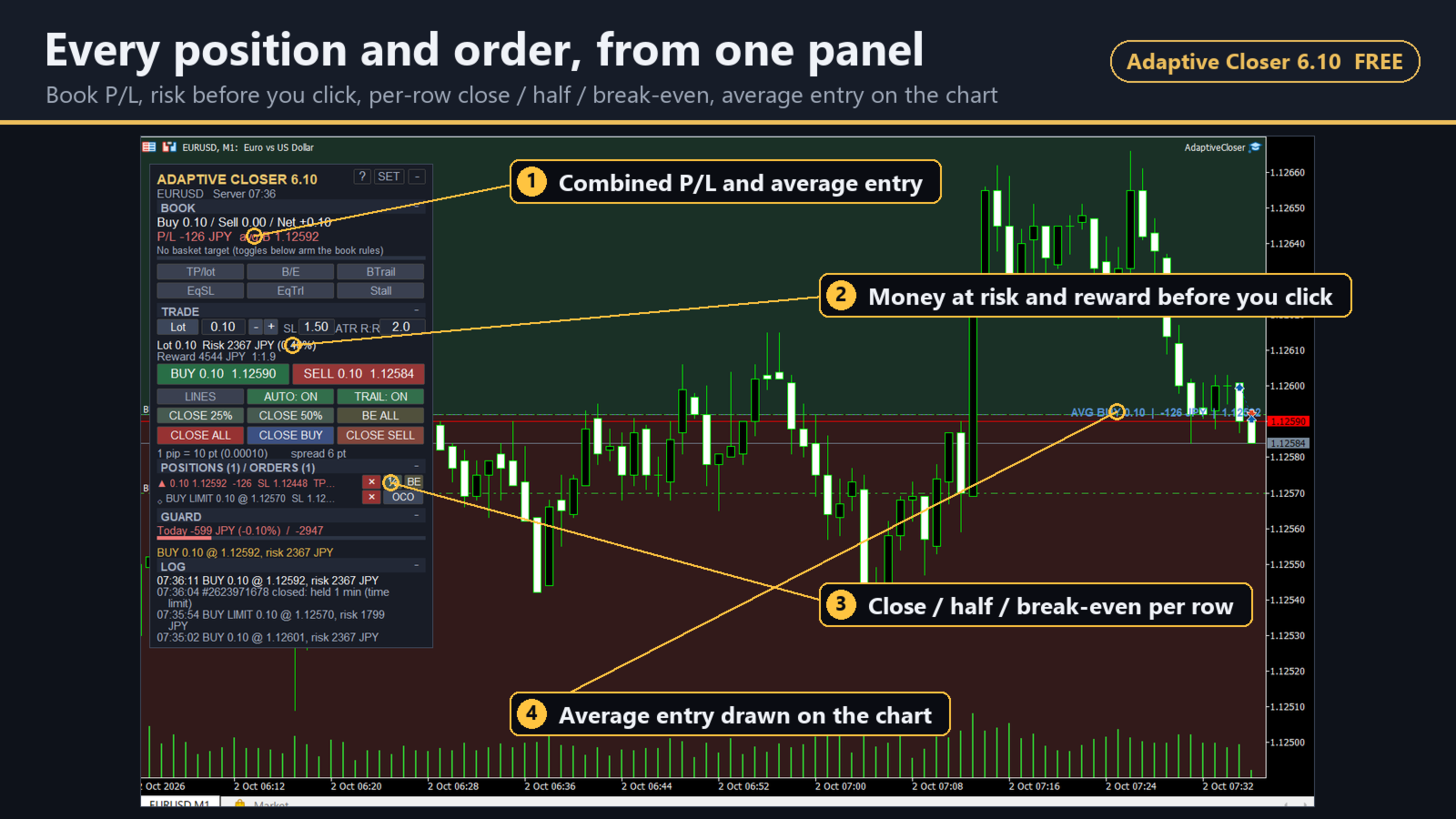
- Conosci il costo prima del clic. Trascina la linea di stop e lotto, denaro a rischio, guadagno atteso e R:R si aggiornano sul pannello - nella valuta del conto, JPY compreso.
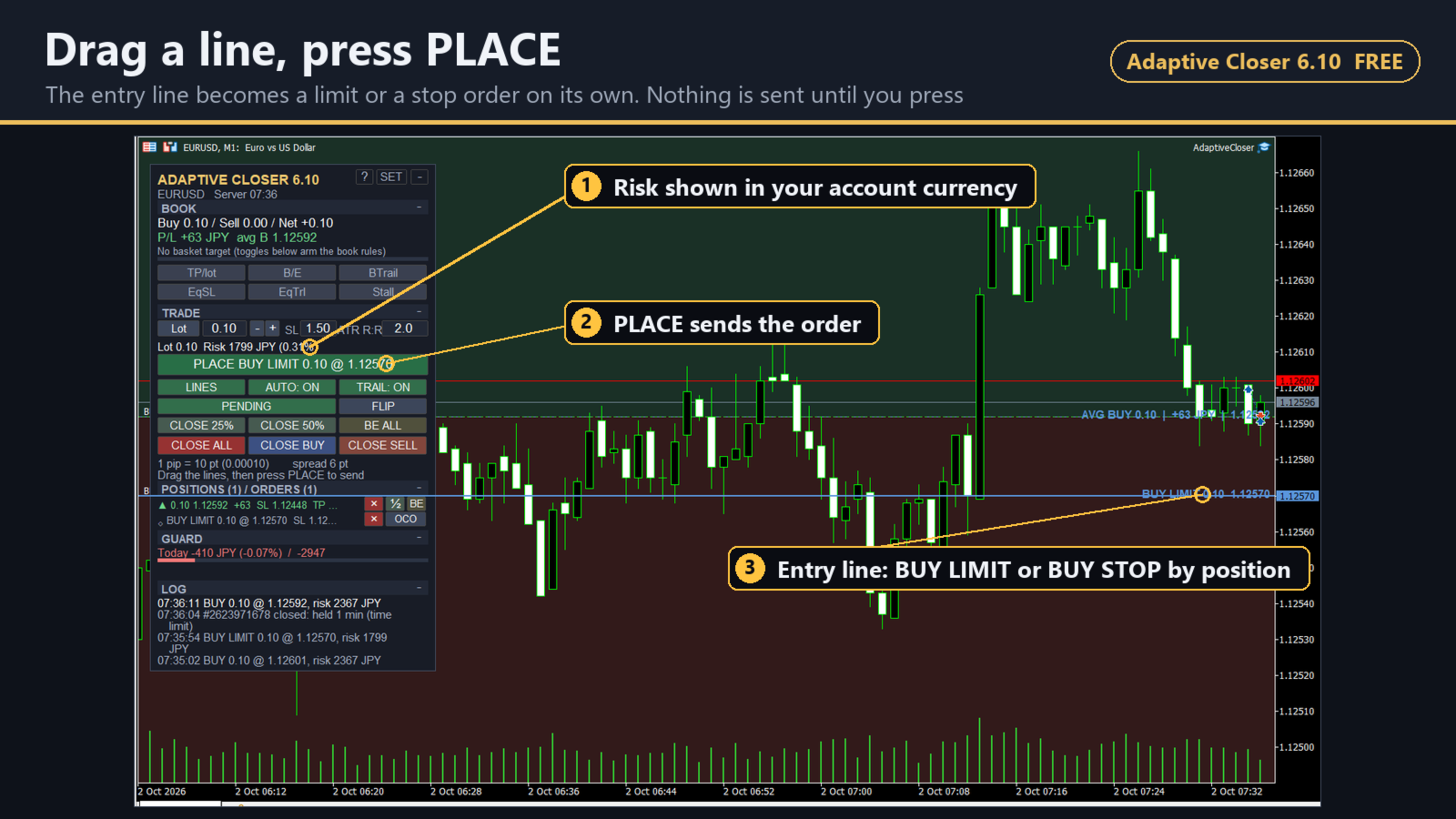
- Ordini dalle linee. Trascina ENTRY, STOP e TARGET; la linea di ingresso diventa da sola un ordine limit o stop. Non parte nulla finché non premi il pulsante. Abbina due ordini pendenti come OCO.
- Una gestione che va da sola. Presa di profitto a scaglioni, break-even, trailing e uno stop reale su ogni posizione che ne è priva - comprese le operazioni aperte dal telefono.
- Tante posizioni, una sola decisione. Chiudi tutto a un obiettivo complessivo, al break-even complessivo, oppure fai il trailing di un intero lato dal prezzo medio di ingresso.
- Un limite alla giornata. Un limite di perdita giornaliera chiude ciò che è aperto e blocca i nuovi ordini fino a domani.
- Leggero per il terminale. Ridisegnato con un timer e solo dove qualcosa è cambiato - mai a ogni tick.
0. In 60 secondi
- Ingresso: imposta il rischio (% del saldo o un importo), trascina la linea di stop, leggi il lotto e il denaro, premi BUY / SELL - oppure piazza un ordine limit o stop dalle linee.
- Uscita: presa di profitto a scaglioni, break-even e trailing vanno da soli; CLOSE 50%, BE ALL e i pulsanti di ogni riga quando vuoi intervenire.
- Portafoglio: tutte le posizioni sul simbolo contate insieme - chiudi tutto a un obiettivo complessivo, al break-even complessivo o a un limite di perdita giornaliera.
1. Cosa fa
Imposta il rischio in percentuale o come importo, trascina una linea di stop e il pannello mostra il lotto, il denaro a rischio, il guadagno atteso e l'R:R prima che tu prema qualsiasi cosa. Invialo come ordine a mercato, oppure trascina una linea di ingresso e diventa un ordine limit o stop di acquisto/vendita. Una volta aperta l'operazione, lo strumento prende profitto a scaglioni, sposta lo stop a break-even, lo segue con il trailing e mette uno stop di protezione reale sulle posizioni che non ne hanno.
La seconda metà è la gestione del portafoglio. Quando ci sono più ticket aperti - a mano, da telefono o (con il filtro del magic number disattivato) da altri Expert Advisor - il risultato che conta è quello complessivo. Adaptive Closer può chiudere il portafoglio a un obiettivo complessivo per lotto, chiuderlo a break-even, seguirlo con il trailing dal prezzo medio ponderato di ingresso, limitare la perdita a una quota del saldo e fermare la giornata a un limite di perdita giornaliera.
2. Aprire un'operazione
- Rischio: un lotto fisso (predefinito), oppure con un clic percentuale del saldo, percentuale dell'equity o importo fisso. Il lotto è calcolato con il calcolo del profitto del server stesso, quindi è corretto su un conto in JPY, sull'oro e sui cross.
- Costi: facoltativamente include nel rischio la commissione andata e ritorno (la inserisci per lotto) e uno spread.
- Distanza dello stop in multipli di ATR o in pip; take profit come R:R dello stop.
- LINES: una linea ENTRY, una STOP e fino a tre linee TARGET sul grafico. Trascinale; ogni linea mostra il prezzo, la distanza in punti, l'importo e l'R. Con PENDING attivo, la linea di ingresso sceglie automaticamente tra limit e stop.
- I pulsanti BUY / SELL diventano grigi, con il motivo, quando l'ordine verrebbe rifiutato: sotto il lotto minimo, margine insufficiente, spread sopra il tuo limite, fuori dalla tua finestra di trading, mercato chiuso, limite giornaliero raggiunto.
- Un'operazione che rischia più del tuo tetto (5% predefinito) richiede una seconda pressione.
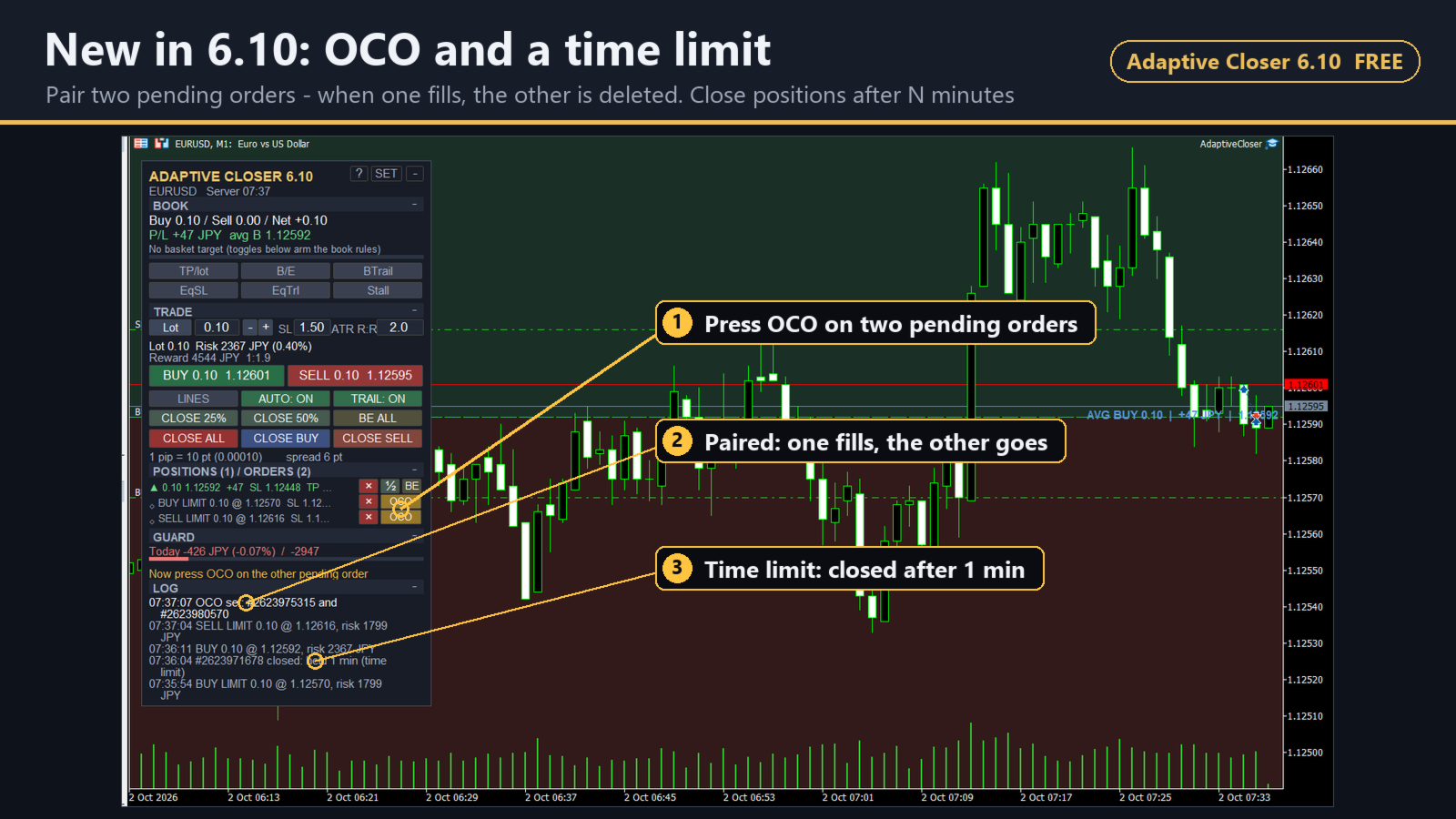
- OCO (novità della 6.10): abbina due ordini pendenti con il pulsante OCO sulle loro righe; quando uno viene eseguito, l'altro viene eliminato. Se uno sparisce senza essere eseguito, viene sciolta solo la coppia.
- Scorciatoie da tastiera (disattivate per impostazione predefinita): Shift + B compra, S vende, P invia l'ordine delle linee, L linee, E break-even su tutto, C chiude tutto, H chiude il 50% (i tasti di chiusura agiscono alla seconda pressione, come i pulsanti). I tasti si possono cambiare dal pannello.
3. Gestire le posizioni
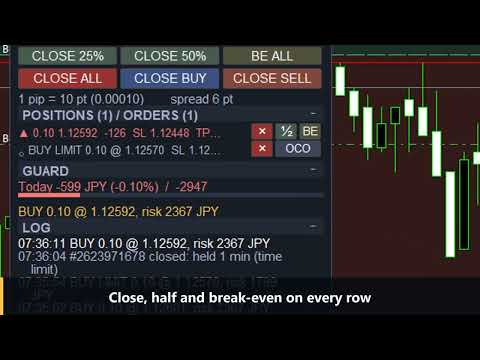
- Tabella delle posizioni: ogni posizione e ordine pendente che lo strumento gestisce sul simbolo, con profitto, stop, obiettivo ed età. Ogni riga ha chiudi, chiudi metà e break-even; le righe degli ordini pendenti hanno elimina.
- Trascina sul grafico la linea di stop o di obiettivo di una posizione per modificarla. Un livello più vicino di quanto consentito dal broker non viene inviato - la linea torna indietro e il pannello spiega il motivo.
- Chiusura parziale a scaglioni: fino a tre obiettivi; predefinito 40% / 30% / il resto.
- Break-even dopo il primo o il secondo obiettivo, aggiungendo facoltativamente parte dello spread.
- Trailing stop che si muove solo quando migliora almeno del tuo passo.
- Stop di protezione inserito come ordine reale alla distanza STOP, così resta valido anche a terminale chiuso. Per impostazione predefinita stringe anche uno stop più largo di quella distanza (come nelle versioni precedenti); scegli "If no stop" per lasciare invariati gli stop esistenti. Uno stop che trascini a mano non viene mai riportato indietro.
- CLOSE ALL / CLOSE BUY / CLOSE SELL / CLOSE 50% / CLOSE 25% / BE ALL. I pulsanti di chiusura agiscono alla seconda pressione, con un conto alla rovescia visibile.
- Limite di tempo (novità della 6.10, disattivato per impostazione predefinita): chiude una posizione un numero stabilito di minuti dopo la sua apertura.
4. Gestire il portafoglio
Questo è il cuore dello strumento, e ogni regola è un clic sul pannello.
- Obiettivo del paniere - chiude tutto quando il risultato complessivo raggiunge il tuo valore per 1.0 lotto, così la stessa impostazione ha lo stesso significato con 0.05 e con 5.0 lotti.
- Break-even del paniere - chiude tutto quando il risultato complessivo raggiunge un livello che scegli tu.
- Trailing del paniere - segue un lato insieme dal prezzo medio ponderato di ingresso, senza mai oltrepassarlo.
- Hard stop sull'equity - uno stop per l'esposizione netta, posizionato in modo che raggiungerlo costi circa la quota del saldo che imposti.
- Trailing sull'equity - dopo un picco, chiude tutto se il portafoglio restituisce più di quanto consenti.
- Uscita per stagnazione - chiude parte di una posizione che si è allontanata dal prezzo di ingresso (in qualsiasi direzione) e poi ha smesso di muoversi.
Il pannello mostra i lotti Buy / Sell / Net, il P/L complessivo, i prezzi medi ponderati di ingresso e l'avanzamento verso l'obiettivo del paniere; il grafico mostra il prezzo medio di ingresso e il prezzo al quale l'obiettivo del paniere verrebbe raggiunto.
5. Protezione del conto
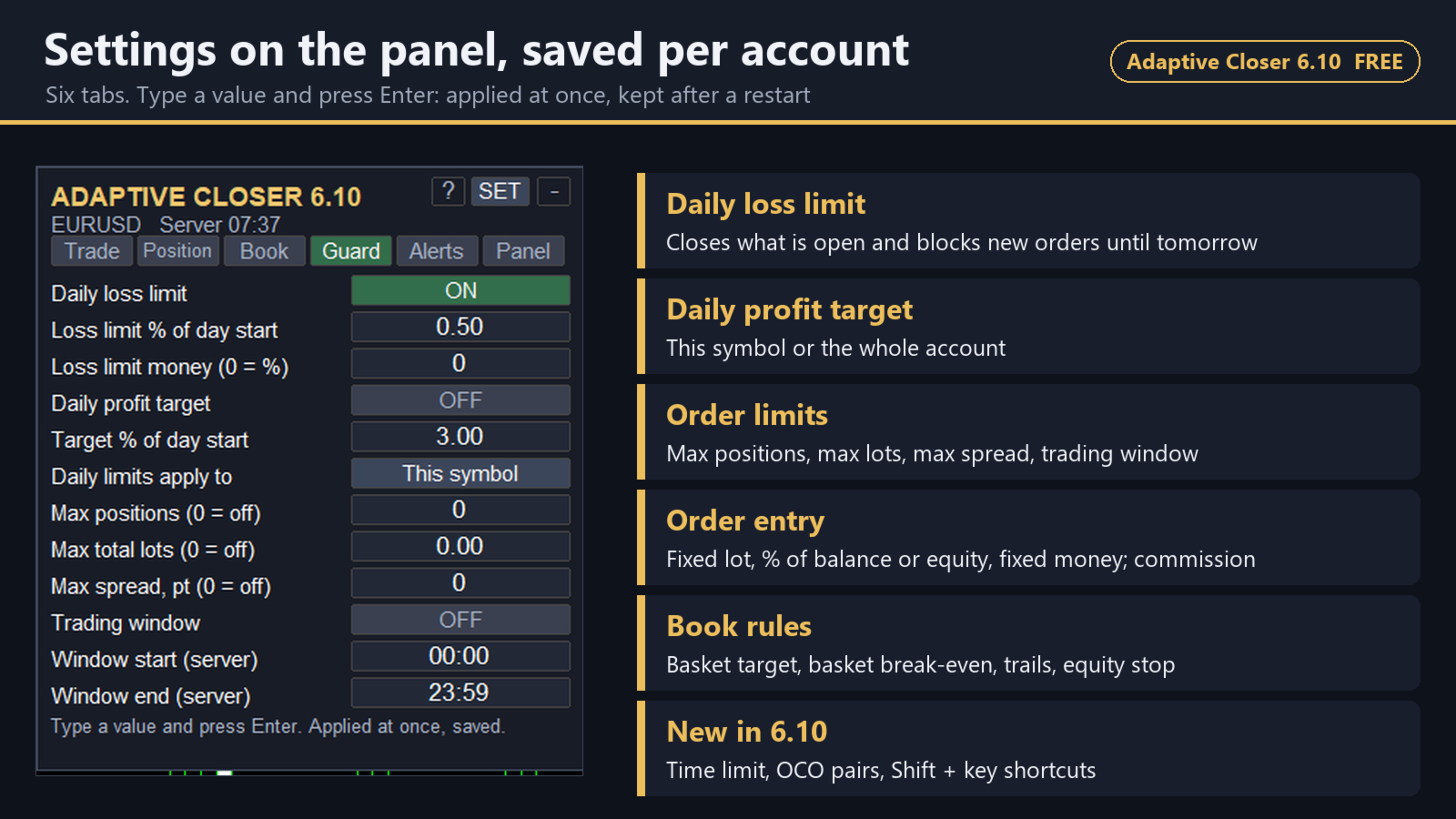
- Limite di perdita giornaliera come percentuale del saldo di inizio giornata o come importo, misurato solo sulla variazione di oggi (una posizione mantenuta oltre la mezzanotte conta dalla mezzanotte). Quando viene raggiunto chiude le posizioni ed elimina gli ordini pendenti nell'ambito scelto - questo simbolo, o l'intero conto se lo scegli - e blocca i nuovi ordini fino al giorno successivo (mezzanotte del server, regolabile). I limiti continuano a funzionare quando AUTO è disattivato.
- Obiettivo di profitto giornaliero facoltativo, con lo stesso comportamento.
- Numero massimo di posizioni aperte, lotti totali massimi, spread massimo, finestra oraria di trading: ognuno rende grigi i pulsanti di ordine invece di lasciare che il server rifiuti gli ordini.
6. È gratuito e non esiste una versione a pagamento
Tutto ciò che è descritto qui è in questo download. Nessuna edizione a pagamento, nessuna prova, nessun limite di lotto o di conto, nessuna funzione che aspetta un acquisto. Nessuna DLL, nessuna richiesta web, nessun controllo di licenza.
È gratuito perché l'ho scritto per il mio trading e regalarlo non mi costa nulla. Se qualcosa torna indietro, è che tu dia un'occhiata alle altre cose che pubblico (sezione 12) - e questo dipende interamente da te.
7. Fatto per non rallentare
Il pannello viene ridisegnato con un timer (200 ms predefinito), mai a ogni tick, e vengono toccati solo gli oggetti il cui valore è cambiato. Rimuovendo lo strumento vengono rimossi tutti gli oggetti che ha disegnato.
8. Configurazione
- Trascinalo sul grafico del simbolo da gestire. Consenti il trading algoritmico.
- Il pannello compare in alto a sinistra. Le regole del portafoglio e i limiti del conto sono disattivati finché non li attivi. Le regole per singola posizione sono attive e agiscono sulle posizioni aperte da questo pannello e su quelle aperte a mano (magic number 0); le posizioni di altri Expert Advisor non vengono toccate a meno che tu non disattivi il filtro del magic number.
- SET apre le impostazioni sul pannello: Trade, Position, Book, Guard, Alerts, Panel. Un valore digitato si applica subito ed è salvato per conto e simbolo - resiste a un cambio di timeframe e a un riavvio del terminale.
- 11 lingue del pannello, tema scuro e chiaro, dimensione 80-150%.
9. Broker e simboli
I nomi dei simboli vengono letti dal grafico, quindi GOLD, XAUUSD, XAUUSD.m o GOLDmicro funzionano tutti. Cifre decimali, modalità di esecuzione (FOK / IOC / return), livelli di stop e di freeze, passi di volume e valuta del conto vengono letti dal server, non presunti. Verificato su Exness (hedging; valuta del conto USD e JPY nello Strategy Tester) e su XM KIWAMI (hedging; conto in JPY nello Strategy Tester e a mano su un conto reale).
I conti netting non sono ancora stati testati; prova prima lo strumento su un conto demo netting. Per progettazione, quando sul simbolo c'è già una posizione aperta, un nuovo ordine modifica quella posizione invece di aprirne un'altra, quindi in quel caso il calcolo del lotto in base al rischio è disattivato (il pannello lo indica) e gli ordini a lotto fisso vengono inviati senza stop, come nelle versioni precedenti.
Il pannello indica cosa significa un pip sul simbolo (per esempio "1 pip = 10 pt (0.010)"), così una distanza in pip non è mai ambigua.
10. Domande
Apre operazioni da solo? No. Solo quando premi un pulsante. Non fa alcuna affermazione sui risultati di trading.
La commissione viene considerata? Se inserisci la tua commissione per lotto (scheda Trade), viene inclusa nel rischio e nel guadagno atteso. Anche lo spread può essere incluso.
Il mio broker chiama l'oro "GOLD". Nessun problema - vedi la sezione 9.
Funziona su un conto in JPY? Sì. Gli importi sono calcolati dal server nella valuta del conto e mostrati senza decimali.
Posso usarlo nello Strategy Tester? Sì, in modalità visuale funziona ogni pulsante. (Solo nel tester, apre un'operazione demo a lotto minimo così il test non è mai vuoto; si può disattivare e non accade mai su un conto reale o demo.)
Continua a funzionare quando il terminale è chiuso? Lo stop loss e il take profit che inserisce sono ordini reali sul server, quindi sì. Le regole che agiscono sul momento - chiusure a scaglioni, trailing, regole del portafoglio, limiti giornalieri - richiedono il terminale in esecuzione (un VPS se il tuo computer è spento).
Hedging e netting? Hedging: sì. Netting: progettato per questo, ma non ancora testato su un conto netting - vedi la sezione 9.
In cosa è diverso dagli altri pannelli di trading gratuiti? La maggior parte dei pannelli gratuiti gestisce un'operazione alla volta. Adaptive Closer aggiunge il portafoglio: conta insieme tutte le posizioni sul simbolo e può chiuderle tutte a un obiettivo complessivo o al break-even complessivo, seguire con il trailing un intero lato dal prezzo medio di ingresso e fermare la giornata a un limite di perdita giornaliera.
Esiste una versione per MT4? No, e al momento non è prevista.
C'è qualche fregatura? No - vedi la sezione 6. Comincia comunque su un conto demo: non per il prezzo, ma perché qualsiasi strumento in grado di chiudere posizioni lo merita.
Usavo la 5.30. BUY / SELL cambieranno? Il lotto no: BUY / SELL inviano ancora il tuo lotto fisso per impostazione predefinita. Stop e obiettivo ora vengono inviati insieme all'ordine (alla distanza dello stop di protezione e a 2R), mentre la 5.30 aggiungeva lo stop un attimo dopo e chiudeva il resto a TP3 - più o meno gli stessi prezzi. Per calcolare invece il lotto in base al rischio, imposta il primo pulsante della riga TRADE su "% Bal".
11. Supporto
- I commenti di questa pagina: domande, problemi di configurazione, qualsiasi cosa si comporti diversamente sul tuo broker. Indica il nome del broker, il simbolo e le righe mostrate dal log del pannello.
- Messaggi privati MQL5 all'autore: qualsiasi cosa specifica del tuo conto.
- Ogni nuova versione viene annunciata nei commenti con le modifiche.
- Risposte in inglese e giapponese.
12. Altro dall'autore
Oro (XAUUSD), dal set completo a un singolo comportamento:
- Gold Grand Line MT5: 6 gruppi su un solo grafico, 29 facet attivi. Contiene i motori di Gold Nine Layer, Gold Swing Break e Gold Flash Scalper (stesse regole e tabelle) più tre gruppi non venduti separatamente su MQL5. Triple Trigger non ne fa parte.
- Gold Nine Layer: un gruppo di nove slot di rottura dei pivot su un solo grafico (7 slot attivi nelle tabelle predefinite).
- Triple Trigger MT5: rotture del massimo/minimo mobile a 24, 48 e 72 ore, uscite con trailing.
- Gold Swing Break MT5: una sola rottura di swing su H4, una posizione alla volta, bassa frequenza.
Linee a parte:
- Gold Flash Scalper MT5: rottura di canale a 32 ore sull'oro, una posizione, trailing stop rapido.
- OIL Surge Break MT5: rotture dei pivot su H1 sul petrolio WTI (USOIL).
- Relay Grid MT5: griglia di ritorno alla media su AUDNZD / AUDCAD / NZDCAD il cui lotto cresce a ogni livello (tipo martingala), senza stop loss per impostazione predefinita. È l'unica griglia della gamma; tutti gli altri Expert Advisor sopra usano un lotto fisso, senza mediare al ribasso e senza martingala.
Da leggere prima dell'uso
- Questo strumento gestisce le posizioni. Non decide quando entrare e non promette alcun risultato.
- Le regole che chiudono l'intero portafoglio o l'intero conto sono potenti e disattivate per impostazione predefinita. Provale su un conto demo e osservane un'attivazione prima di affidare loro denaro reale.
- L'hard stop sull'equity e il limite di perdita giornaliera non sostituiscono lo stop-out del tuo broker né la protezione dal saldo negativo.
Se ti è stato utile gratuitamente, una recensione di una riga mi aiuta a continuare a creare strumenti gratuiti. Se qualcosa non funziona, dimmelo prima nei commenti o con un messaggio privato - sono le cose che correggo per prime.