Partial Stop Loss EA
- Utilità
- Versione: 1.0
- Attivazioni: 5

Overview
Partial Trailing Stop EA is an advanced trade management Expert Advisor for MetaTrader 5 that automatically locks in profits by performing partial position closures when price retraces from its maximum favorable movement (peak profit level).
Unlike a traditional trailing stop that closes the entire position, this EA allows you to scale out gradually. When the market moves in your favor, the EA continuously tracks the highest (for Buy trades) or lowest (for Sell trades) price reached. If price retraces by a specified amount, the EA closes a percentage of the position while keeping the remainder open to capture additional gains.
The EA supports:
- Buy and Sell positions
- Fixed-point retracement
- Percentage-based retracement
- Dedicated XAUUSD retracement settings
- Multiple partial closes per trade
- Visual trigger lines on the chart
- Real-time information panel
- State recovery after timeframe changes or terminal restarts
How It Works
Buy Positions
- EA records the highest price reached since the trade became profitable.
- A trigger level is calculated below that peak.
- When price falls back to the trigger level:
- A partial close is executed.
- The remaining position stays open.
- The EA starts tracking a new peak from the current price.
Sell Positions
- EA records the lowest price reached since the trade became profitable.
- A trigger level is calculated above that low.
- When price rises back to the trigger level:
- A partial close is executed.
- The remaining position stays open.
- Peak tracking restarts.
Trading Settings
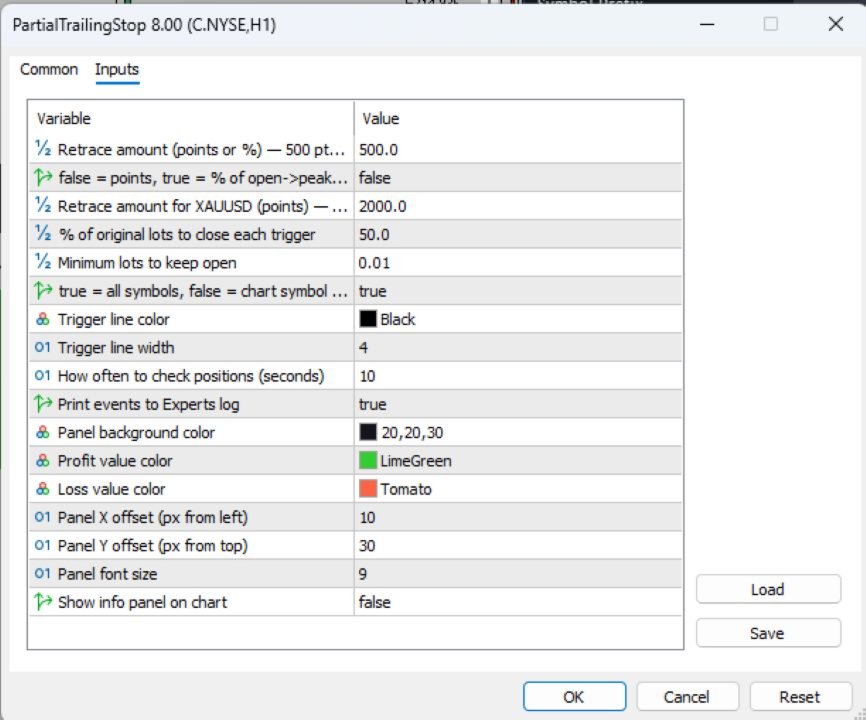
InpRetrace
Default: 500
Retracement distance used to trigger a partial close.
- When InpRetraceIsPct = false , this value is interpreted as points.
- Example:
- 500 points = 50 pips on a 5-digit broker.
- If a Buy trade peaks at 1.10500 and retrace is 500 points, the trigger is placed at 1.10000.
InpRetraceIsPct
Default: false
Determines how retracement is calculated.
| Value | Meaning |
|---|---|
| false | Fixed retracement in points |
| true | Retracement as percentage of the move from entry price to peak price |
Example:
- Entry: 1.10000
- Peak: 1.11000
- Distance: 100 pips
With:
- InpRetrace = 50
- InpRetraceIsPct = true
Trigger occurs after a 50% retracement (50 pips).
InpRetraceXAU
Default: 2000
Special retracement setting used only for XAUUSD.
This value is always interpreted in points regardless of the InpRetraceIsPct setting.
Example:
- Peak profit price reached
- Retracement of 2000 points
- Partial close is triggered
Useful because Gold often requires larger retracement values than Forex pairs.
InpClosePercent
Default: 50
Percentage of the original position size to close each time a retracement trigger is hit.
Example:
Initial position = 1.00 lot
Setting = 50%
Trigger sequence:
| Trigger | Closed | Remaining |
|---|---|---|
| 1st | 0.50 | 0.50 |
| 2nd | 0.50* | subject to minimum lot rule |
The EA calculates the closure size based on the original lot size, not the current lot size.
InpMinLots
Default: 0.01
Minimum volume that must remain open.
The EA will never reduce a position below this value.
Example:
- Current volume = 0.03
- Planned close = 0.02
- Minimum lots = 0.01
EA allows the close.
If closing would leave less than 0.01 lots, the partial close is skipped or adjusted.
InpAllSymbols
Default: false
Controls which positions are managed.
| Value | Meaning |
|---|---|
| false | Manage only positions on the current chart symbol |
| true | Manage positions on all symbols |
Example:
EA attached to EURUSD chart:
- false → manages only EURUSD trades.
- true → manages EURUSD, GBPUSD, XAUUSD, etc.
Monitoring & Logging
InpCheckSeconds
Default: 10
How often the EA checks open positions.
Lower values:
- Faster reaction
- Higher CPU usage
Higher values:
- Lower CPU usage
- Slightly delayed execution
Typical values:
- Scalping: 1–5 seconds
- Swing trading: 10–30 seconds
InpVerboseLog
Default: true
Enables detailed logging in the MT5 Experts tab.
Logged events include:
- New peak detection
- Trigger calculations
- Partial close executions
- State restoration
- Errors
| Value | Meaning |
|---|---|
| true | Detailed logs enabled |
| false | Minimal logging |
InpLineColor
Default: Dodger Blue
Color of the retracement trigger line drawn on the chart.
InpLineWidth
Default: 2
Width of the trigger line.
Typical range:
- 1 = thin
- 2–3 = normal
- 4+ = thick
The EA can display a chart panel showing projected profit and risk information.
InpShowPanel
Default: true
Displays or hides the information panel.
| Value | Meaning |
|---|---|
| true | Show panel |
| false | Hide panel |
InpPanelBg
Default: RGB(20,20,30)
Background color of the panel.
InpPanelProfit
Default: Lime Green
Color used for profit-related values.
InpPanelLoss
Default: Tomato
Color used for risk/loss-related values.
InpPanelX
Default: 10
Horizontal position of the panel.
Measured in pixels from the left edge of the chart.
InpPanelY
Default: 30
Vertical position of the panel.
Measured in pixels from the top edge of the chart.
InpFontSize
Default: 9
Font size used inside the panel.
Recommended range:
- 8–10 for normal screens
- 11–14 for high-resolution displays
Example Configuration
Conservative Profit Locking
- Retrace: 1000 points
- Close Percent: 25%
- Min Lots: 0.10
Result:
- Smaller reductions
- More room for trend continuation
Aggressive Profit Protection
- Retrace: 300 points
- Close Percent: 50%
- Min Lots: 0.01
Result:
- Faster profit capture
- More frequent partial closes
Gold Trading (XAUUSD)
- RetraceXAU: 3000–5000 points
- Close Percent: 30–50%
Result:
- Better adaptation to Gold's volatility
Key Benefits
- Locks in profits without fully exiting trades.
- Allows winners to continue running.
- Reduces emotional decision-making.
- Works with both Forex and Gold.
- Recovers tracking data after MT5 restarts or timeframe changes.
- Provides visual trigger levels and real-time trade information.