Trader Toolkit Panel
- Utilità
-
Joshy Antony
 Professional Gold trader and MQL5 developer specializing in automated trading systems for XAUUSD.
Developed Matrix Gold Pro EA — a multi-strategy system with 12 trading strategies, smart risk management, and Telegram alerts. Trading Gold since 2013. - Versione: 1.0
Trader Toolkit Panel
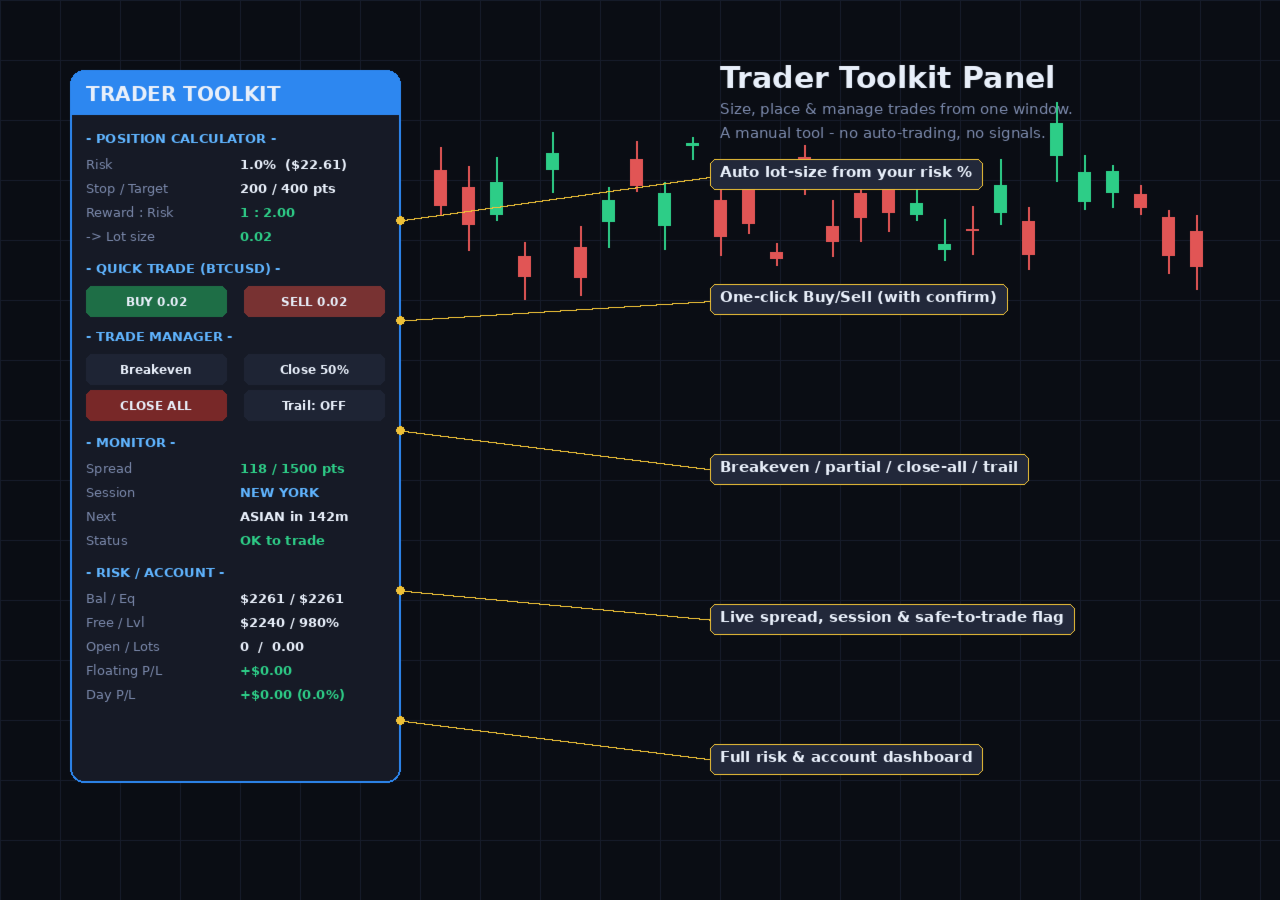
An all-in-one manual trading panel that helps you size, place, and manage your trades from a single window. It does not trade automatically and gives no buy/sell signals — you stay in full control. Think of it as a control panel for disciplined, manual trading.
What it does
Position Calculator — Enter your risk percentage and stop distance, and the panel instantly shows the correct lot size, your risk in account currency, and your reward-to-risk ratio. No more manual math or guesswork on trade size.
One-Click Trade Management — Manage open positions on the current symbol with a single click: move stop-loss to breakeven, close half the position, close everything, or toggle an automatic trailing stop. Fast, clean, and reliable.
Quick Trade with Confirmation — Open a buy or sell at your calculated lot size, with stop-loss and take-profit attached automatically. Every order requires a confirmation click first, so an accidental tap can never place a trade.
Spread & Session Monitor — See the live spread against your chosen limit, the current trading session, a countdown to the next session, and a clear "OK to trade" status flag so you avoid entering during poor conditions.
Risk & Account Dashboard — Keep an eye on balance, equity, free margin, margin level, open positions, total lots, floating profit/loss, and your profit/loss for the day — all at a glance.
Basket Backstop — Optionally close all positions automatically if your floating profit or loss reaches a level you set. A simple, manual safety net.
Why traders like it
- Everything in one panel — no switching between tools
- Accurate position sizing keeps your risk consistent
- Confirmation step protects against misclicks
- Works on any symbol and any timeframe
- No strategy, no signals, no hidden behavior — just a clean, honest tool you operate yourself
Notes
Enable Algo Trading so the panel's buttons can place and modify orders. The trade-management and quick-trade buttons act on the current chart symbol. This is a manual utility — it makes no performance promises and does not trade on its own.
Input Parameters
- RiskPct — Risk percentage of equity used to calculate lot size.
- StopPips — Stop-loss distance in points, used for lot calculation and quick-trade orders.
- TargetPips — Take-profit distance in points, used for the reward-to-risk display and quick-trade orders.
- OrderMagic — Magic number stamped on orders placed by the panel.
- SlippagePts — Maximum allowed price deviation (in points) for quick-trade orders.
- FilterMagic — Manage only positions with this magic number; set to 0 to manage all positions on the symbol.
- TrailPoints — Trailing-stop distance in points when the trailing toggle is on.
- CloseAtProfit — Close all positions when floating profit reaches this amount (account currency); 0 disables it.
- CloseAtLoss — Close all positions when floating loss reaches this amount (account currency); 0 disables it.
- MaxSpreadPts — Spread threshold for the monitor's alert and "OK to trade" flag.
- Panel_X / Panel_Y — Screen position of the panel, in pixels.
- AccentColor — Accent color of the panel.