TradeConsole

5

TradeConsole — On-Chart Trading Dashboard with Smart Alerts

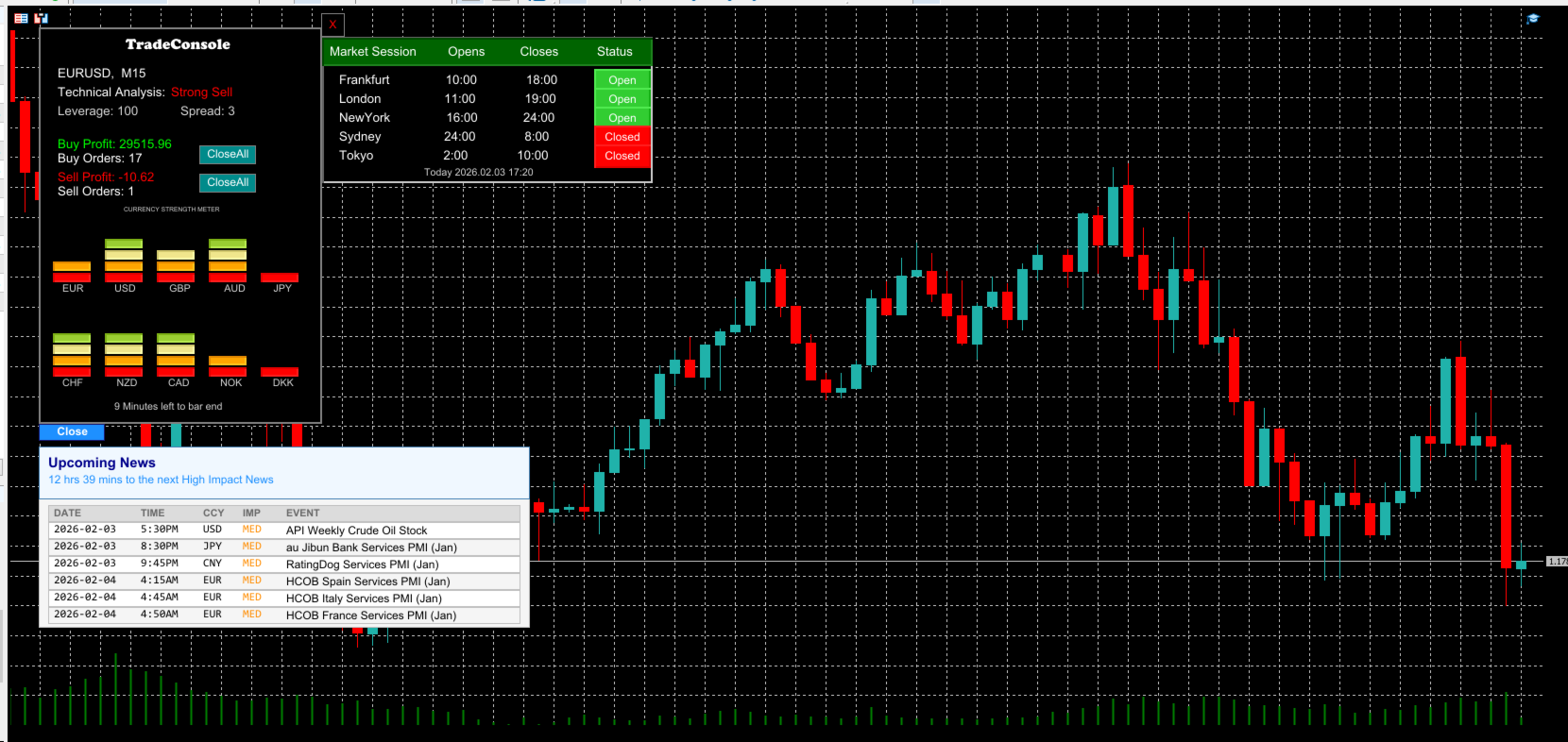
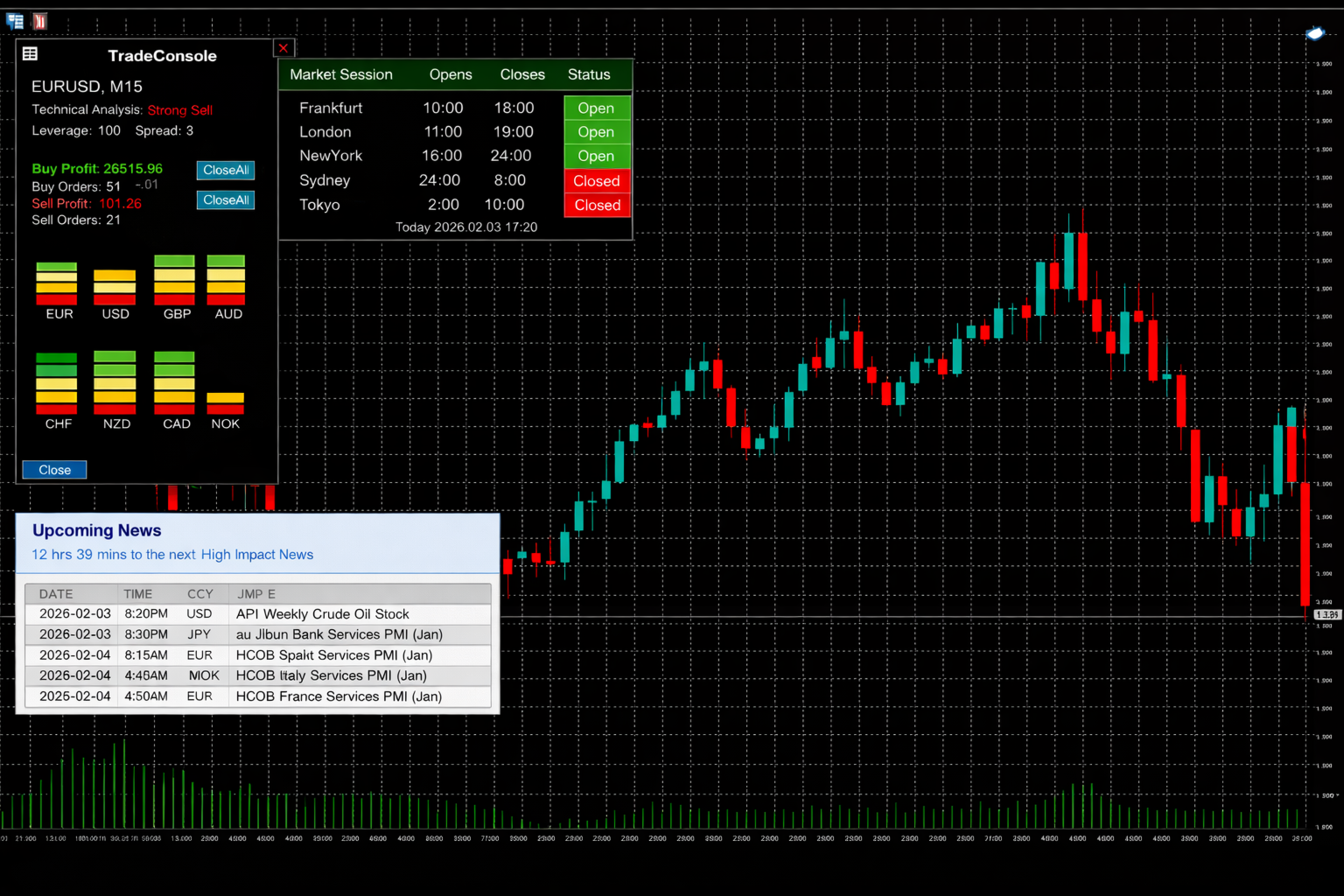
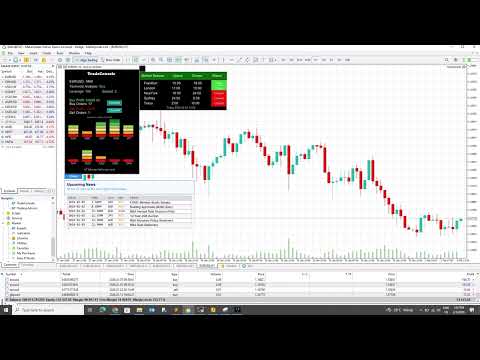
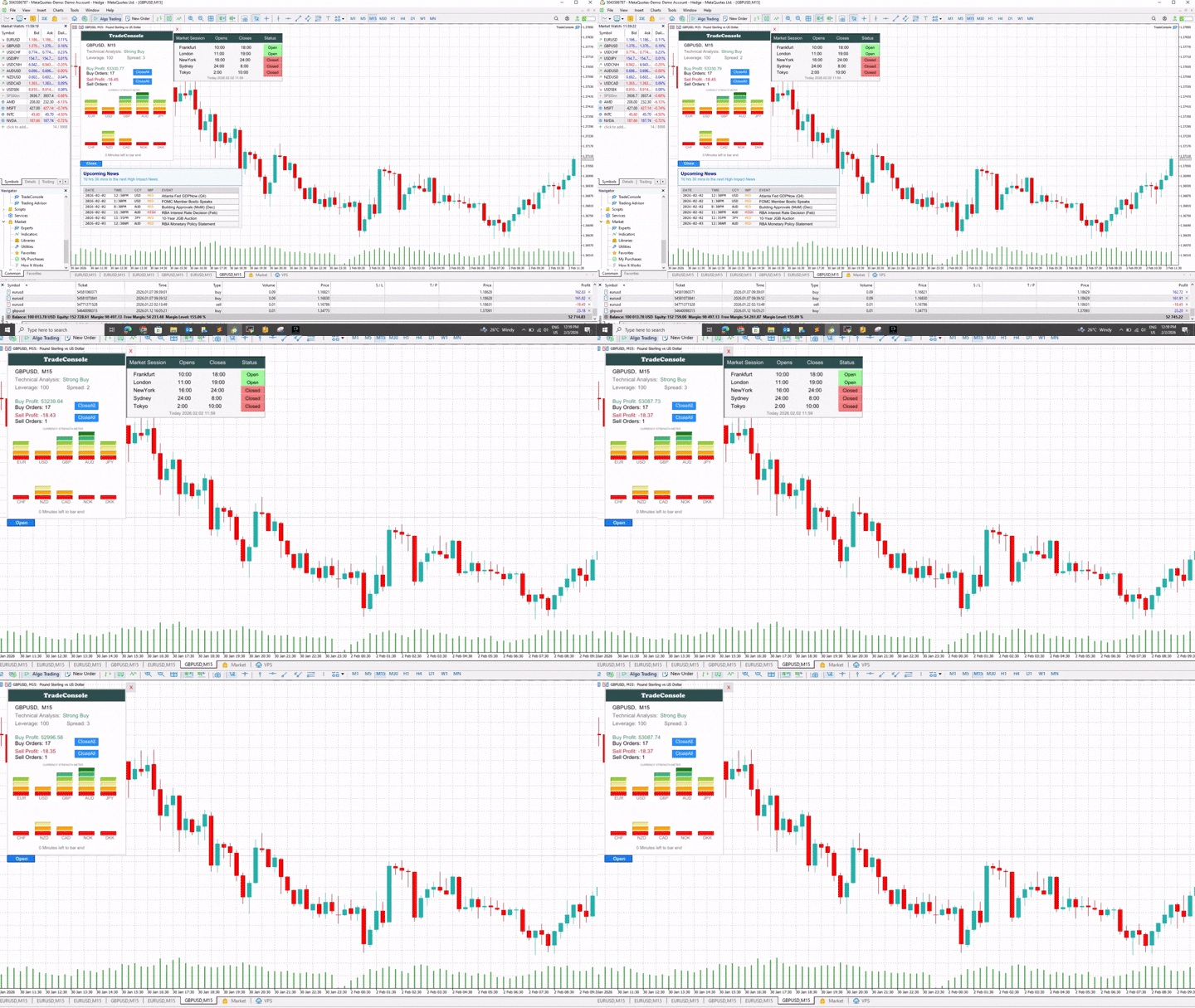
TradeConsole is a lightweight on-chart utility designed to help traders keep essential market context in one place. It combines session tracking, an upcoming economic news panel, a currency strength view, a quick technical bias summary, trade statistics, and one-click control tools. The purpose of the dashboard is to improve chart awareness, reduce screen clutter, and support faster decision-making during live trading.

Main Features

On-chart dashboard
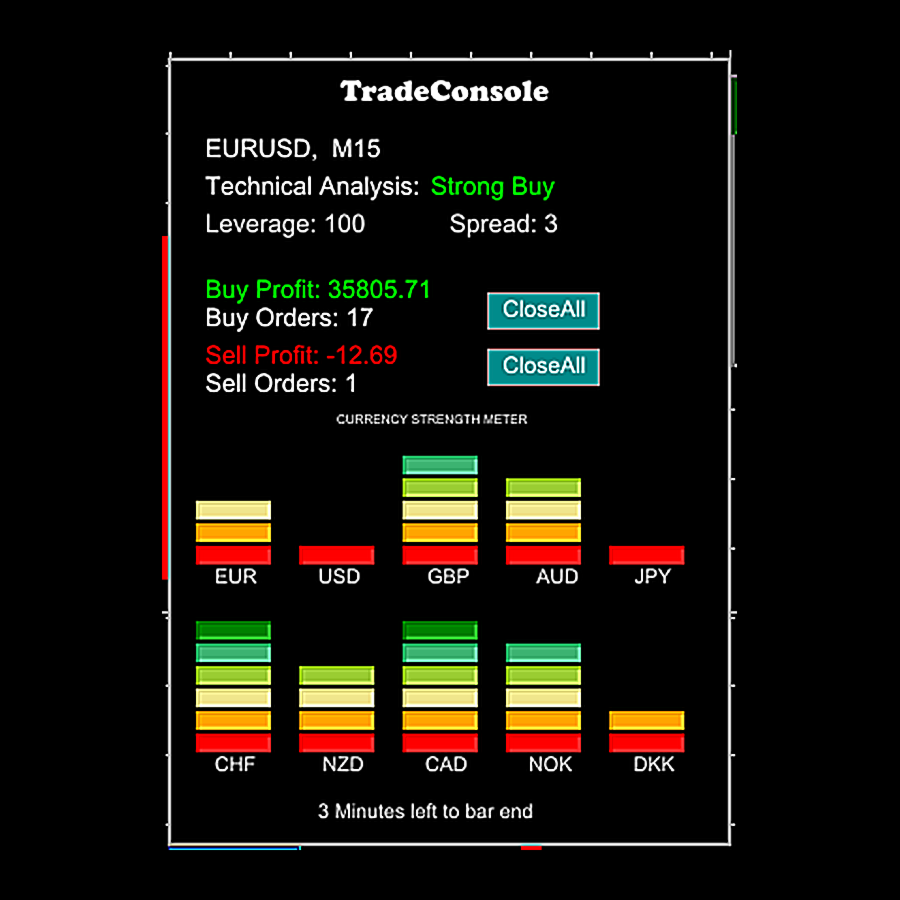
TradeConsole displays the current symbol and timeframe directly on the chart, together with key trading information such as spread and leverage, depending on what is provided by the terminal and broker. The interface is compact and designed to remain readable without obstructing price action.

Technical bias overview
The utility provides a quick directional market read, such as Strong Sell, Sell, Neutral, Buy, or Strong Buy, based on the internal logic and settings selected by the user. This can be useful when switching between pairs or timeframes and when checking overall market direction.

Market sessions panel
TradeConsole tracks the main trading sessions:

Frankfurt
London
New York
Sydney
Tokyo

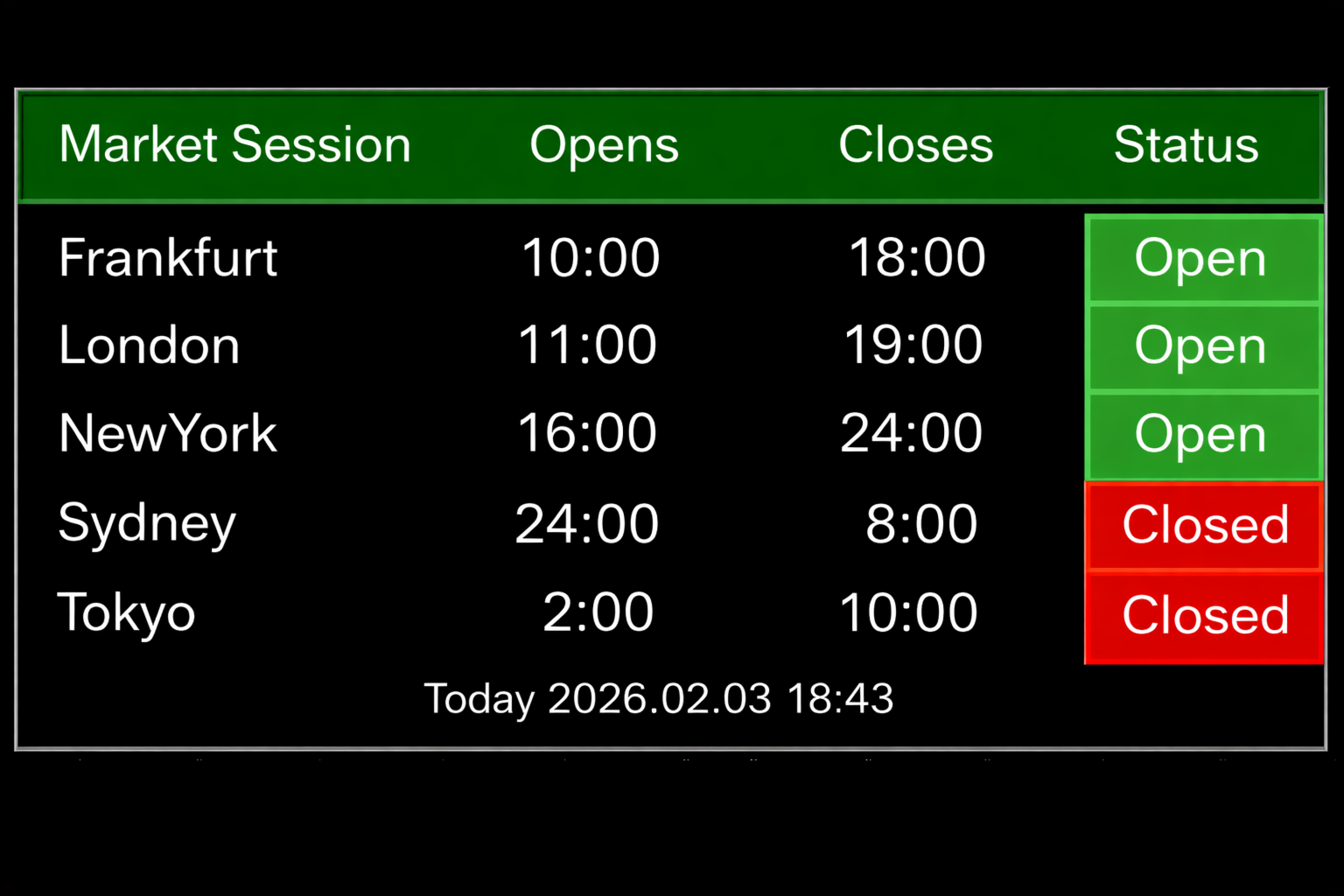
For each session, the dashboard shows open time, close time, and current status. This helps traders identify active market hours, focus on higher-liquidity periods, and avoid quieter conditions.

Upcoming economic news panel
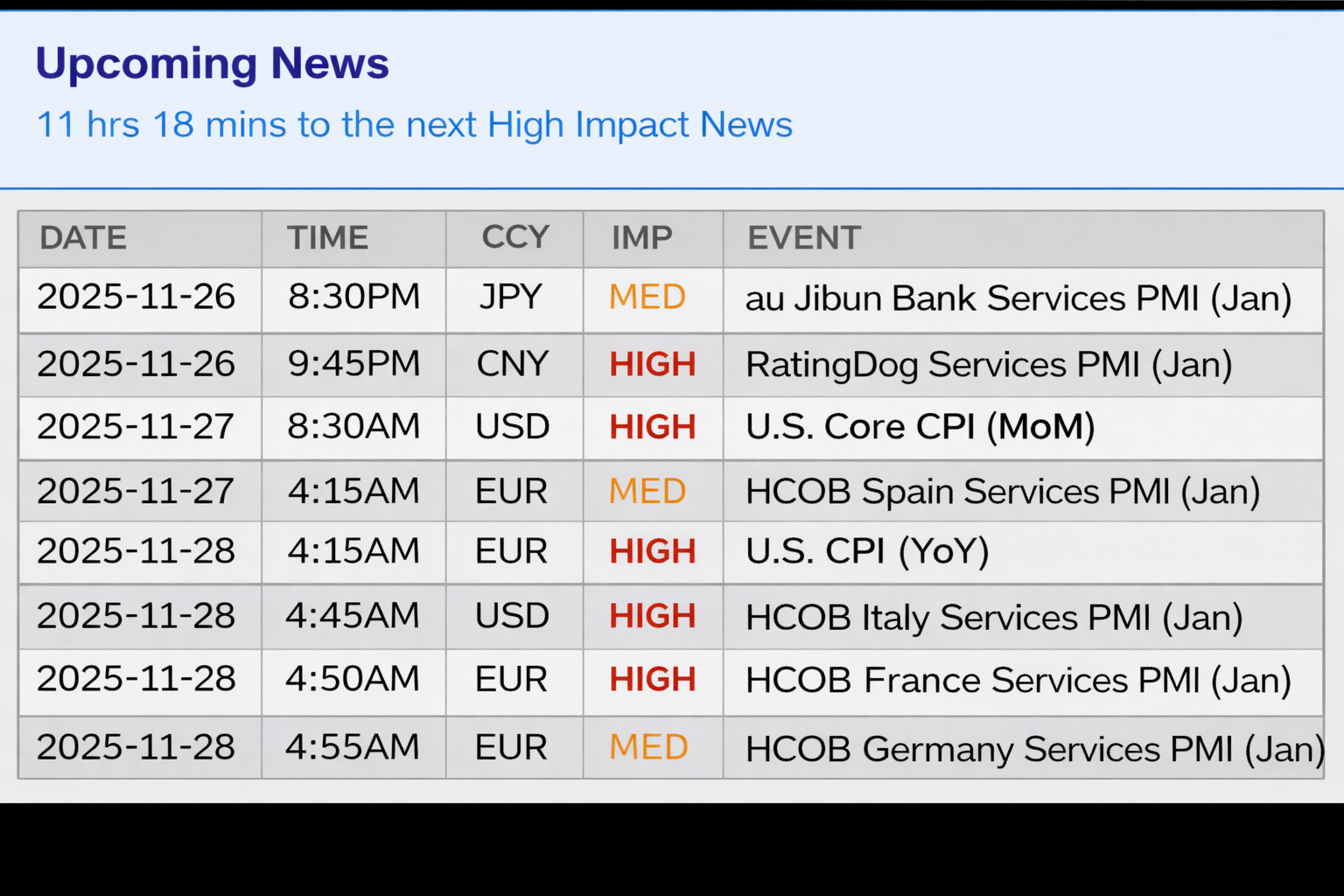
The news section presents scheduled economic events in a clear table. It includes the event date, time, currency, impact level, and event title. A countdown to the next important release is also displayed, helping traders prepare for potential volatility.

Alerts
TradeConsole includes built-in alerts for important timing events. These alerts can be used to notify the trader before scheduled news releases and around session activity, depending on the configured settings. This can be useful for managing risk, avoiding unexpected volatility, and preparing trade decisions in advance.

Currency strength meter
The strength meter provides a visual comparison of major currencies. It helps identify relatively strong and weak currencies, which can support pair selection and improve focus on stronger directional opportunities.

Trade summary and one-click controls
TradeConsole shows summary trading information such as buy profit, sell profit, buy orders, and sell orders. It also includes quick management controls such as closing all positions, allowing faster response when market conditions change.

Typical Use

TradeConsole can be useful for scalping and intraday trading by highlighting active sessions and upcoming news events. It can also support swing traders who want to monitor important releases and adjust exposure ahead of market-moving events. For traders watching multiple symbols, the combination of strength, news, and chart-side trade information can help narrow attention to the most relevant opportunities.

Important Notes

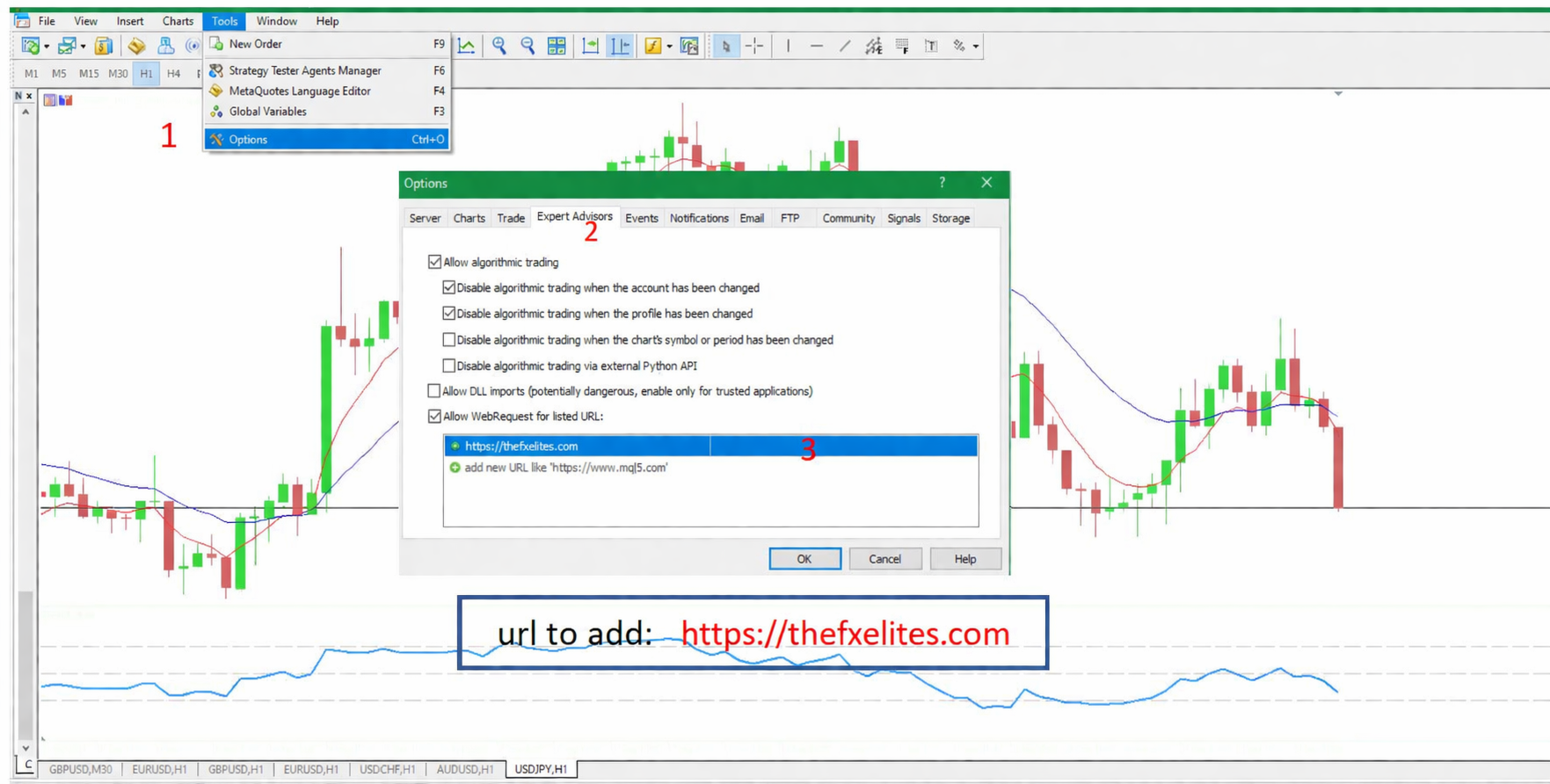
To use online news features, WebRequest must be enabled in the MetaTrader terminal settings and the required source must be added to the allowed URL list. For Market publication, it is better not to place third-party URLs directly in the product description. Such setup details should be provided in the product comments, documentation on MQL5, or in the seller’s blog section, since MQL5 rules prohibit third-party links in Market descriptions.

TradeConsole is an informational and trade-management utility. It does not guarantee profits or eliminate trading risk. Any trading decision remains the responsibility of the user. MQL5 also requires that product descriptions avoid promises of profit or misleading claims.

Here is an even more compact version you can paste directly into MQL5:

TradeConsole — On-Chart Trading Dashboard with Smart Alerts

TradeConsole is a compact on-chart utility that brings together essential trading context in one place. It includes market session tracking, an economic news panel, a currency strength meter, a technical bias summary, trade statistics, and one-click controls.

The dashboard displays the current symbol and timeframe, together with information such as spread and leverage when available from the terminal or broker. Its compact layout is designed to remain clear while preserving chart visibility.

TradeConsole tracks the Frankfurt, London, New York, Sydney, and Tokyo sessions, showing each session’s open time, close time, and current status. This helps traders focus on active trading hours and avoid low-liquidity periods.

The news panel shows scheduled economic events with date, time, currency, impact level, and event title. A countdown to the next important release is also included to help traders prepare for possible volatility.

The built-in alerts can notify the user before important news events and around session timing, depending on the selected settings. This can help with planning entries, reducing exposure, and managing risk during volatile conditions.

The currency strength meter provides a quick visual comparison of major currencies, helping identify stronger and weaker currencies for pair selection.

TradeConsole also includes a trade summary section showing buy profit, sell profit, buy orders, and sell orders, together with quick action controls such as closing all positions.

This product is intended as an informational and trade-management tool. It does not guarantee profits. Trading involves risk, and testing on a demo account is recommended before live use.
Recensioni 2
Tony
21
Tony 2026.03.05 11:59 
 

This a nice complete tool, great job

Prodotti consigliati
Introducing the "Auto Timed Close Operations", a useful utility for MetaTrader 5 traders! This utility has been developed to help traders of all levels automatically close their open positions at the exact moment they desire. With the "Auto Timed Close Operations", you gain the required control over your trades and can avoid unwanted surprises at the end of the day or at any other predefined time. We know how important it is to protect your profits and limit your losses, and that's exactly what

MarketMind AI
Perpetual Chinemerem Vincent
MarketMind AI Next-Generation Contextual Analysis for MetaTrader 5 Trade with the clarity of institutional-grade context. MarketMind AI is a professional decision-support system designed to bridge the gap between raw technical data and actionable market intelligence. Rather than generating signals or executing trades, MarketMind AI provides a structured, high-fidelity view of market conditions — enabling traders to make more informed discretionary decisions. USER GUIDE AND ANALYSIS PIPELINE AP
The Definitive Performance Testing Solution for MetaTrader Environments What This Tool Does This specialized benchmark utility measures the performance of your MetaTrader environment, providing insights that impact your trading execution. Unlike generic system benchmarks, this tool evaluates performance specifically within the MetaTrader runtime environment. For Professional Traders & Developers: Performance Metrics : Measurements of calculation throughput and memory efficiency Trading-Specific
EQUITY DRAWDOWN MONITOR   This is a simple mt5 advisor that monitors the drawdon levels Features: Easy to use Useful for money managers How to Use  Load the EA once a single chart Type the maximum drawdown desired in inputs Leave the EA alone and never close that chart The EA monitors all trades and magic numbers in your account. Input Parameter Drawdown Percent:   Maximum drawdown in percentage terms allowable in the account. When the drawdown level is surpassed, the EA will close all trades
Informer
Sergey Sapozhnikov
Informer for VPS - report on the state of your account via e-mail. Useful for controlling your Expert Advisors that run on a VPS or a dedicated computer. Information about open positions and last deals for a day, week, month or year grouped by currency pairs.  Adjustable periodicity of reports and depth of deals included in the report. A possibility to add own comment to each report. You will receive reports on e-mail with specified periodicity: from 15 minutes to once a day. The reports are sen
Ping-Monitor — Never Miss a Tick Again! Do you run EAs and worry about silent chart freezes or data feed stalls ?  This utility is your ultimate watchdog, alerting you the moment your charts stop receiving updates. Ping-Monitor is designed to detect when a chart freezes or the data feed stalls, even if MT5 still shows that the connection is active. It works by tracking the time of the last incoming tick. Every time the chart receives a new price update, the EA records the timestamp. Then, on a
PropPass Master – EA per challenge prop firm Sistema di automazione per challenge prop firm e gestione del rischio Scarica PropPass Master qui: https://www.mql5.com/en/market/product/167340 Offerta introduttiva Solo 5 licenze sono disponibili a questo prezzo. Dopo la vendita delle prime 5 copie, il prezzo aumenterà. Scopo principale Lo scopo principale di PropPass è strutturare il trading in modo che: • se la challenge fallisce in qualsiasi fase, il lato di recupero del conto reale possa ai
FREE
Quick Position Closer
Cristhian Alexander Gaibor Cuasquer
5 (1)
QUICK POSITION CLOSER - The Ultimate Trading Panel Tired of closing positions one by one? Transform your trading experience with Quick Position Closer - the most efficient and elegant solution for instant position management! WHAT DOES IT DO? Quick Position Closer is a professional control panel that allows you to close multiple positions instantly with just ONE CLICK . No more wasting precious time - protect your profits and cut losses in seconds! KEY FEATURES: INSTANT CLOSURE - All p
FREE
Position Limit Monitor: Efficient Control of Your Trading Operations Have you ever worried about having too many open trades simultaneously? Would you like precise control over the maximum number of positions in your account? Position Limit Monitor is the solution you need. Main Features: • Real-time monitoring: Constantly supervises the number of open positions in your account. • Customizable limit: Easily set the maximum number of positions you want to keep open. • Automatic closure: When the
A professional tool for real-time monitoring of the account status and the work of Expert Advisors. Information about the account status can be sent to Telegram chats automatically at a specified interval or upon request. From the screenshots of the open charts of the terminal, you receive upon request from your Telegram bot. Account information includes: 13:02 Trade monitoring by Telegram v.1.0 (headline) Account : 6802ххх RoboForex-Pro (account information) Profit start: 2661 USD (profit earne
Chart Spot Binance
Ghavamipour Mohammadreza
show live chart spot All symbol binance If you want to get this product with a 99% discount, send a message to my Telegram admin and rent this product for 1 $ per month or 10 $ per year. Even if you do not like the way the chart is displayed, you can tell the admin in Telegram how to display it so that your own expert is ready. https://t.me/Bella_ciao1997 https://t.me/Binance_to_mql5
Trader Protector Risk Manager
Yevgeniy Koshtenko
5 (1)
Trader Protector: Professional Risk Manager for MetaTrader 5 Safeguard your trading account and optimize profits with Trader Protector - an advanced risk management tool for MetaTrader 5. Key Features: Multi-level Risk Control: Daily risk limit Monthly risk limit Risk per trade Trailing stop for daily profit Flexible Settings: Customizable risk percentages Choice of order execution modes Maximum lot size restriction Excessive Loss Prevention: Limits on losing positions (daily, weekly, monthly) A
FREE
Indicatore Crypto_Forex "WPR con 2 Medie Mobili" per MT5, senza ridisegno. - WPR è uno dei migliori oscillatori per lo scalping. - L'indicatore "WPR e 2 Medie Mobili" consente di visualizzare le medie mobili veloci e lente dell'oscillatore WPR. - L'indicatore offre l'opportunità di visualizzare le correzioni di prezzo molto presto. - È molto facile impostare questo indicatore tramite parametri e può essere utilizzato su qualsiasi timeframe. - È possibile visualizzare le condizioni di ingresso
ChartSync MT5
Alfiya Fazylova
5 (4)
Indicatore di sincronizzazione del grafico: progettato per sincronizzare gli oggetti grafici nelle finestre del terminale. Può essere utilizzato come aggiunta a TradePanel . Prima dell'acquisto, puoi testare la versione Demo su un account demo. Demo qui . Per funzionare, installa l'indicatore sul grafico da cui desideri copiare gli oggetti. Gli oggetti grafici creati su questo grafico verranno automaticamente copiati su tutti i grafici con lo stesso simbolo. L'indicatore copierà anche eventuali
Telegram Sender Osw MT5
William Oswaldo Mayorga Urduy
Manuale utente: Telegram Sender Osw Telegram Sender Osw è un Expert Assistant (EA) progettato per automatizzare l'invio di segnali di trading da MetaTrader a Telegram. Ideale per i fornitori di segnali e la gestione dei conti, invia dati critici (Prezzo, Stop Loss, Take Profit, Volume) in modo istantaneo e professionale. 1. Configurazione dei parametri Generale e connettività Abilita EA: attiva (true) o mette in pausa (false) il sistema. Token Bot: codice alfanumerico ottenuto da @BotFather.
Close All Pro MT5 – Fast PnL Control is a powerful trade manager MT5 utility that gives you total control over your trades. With a single click, you can close all MT5 orders, monitor real-time profit and loss, and manage your floating PnL directly from a clean on-chart panel. The tool is lightweight, responsive, and built to help traders save time, reduce emotional stress, and maintain focus. Whether you trade manually or through an EA, this MT5 profit panel provides the visibility and precisio
Timeless Charts
Samuel Manoel De Souza
5 (3)
Timeless Charts è una soluzione di grafici avanzata, progettata per i trader professionisti che necessitano di grafici personalizzati / timeframe personalizzati – inclusi grafici a secondi / timeframe a secondi, grafici Renko / barre Renko, grafici a cluster / footprint e strumenti avanzati simili a quelli disponibili nelle piattaforme più popolari. A differenza dei tradizionali grafici offline o dei semplici indicatori personalizzati, questa soluzione crea barre completamente personalizzate con
Quick Close Pro
Tuan Nghia Phan
Quick Close Pro by one click: * Close Buy positions * Close Sell positions * Close Win positions * Close All positions * Close All pending orders * Close All by Mobile: Select true to close all positions quicky from your Mobile by closing any position on Mobile. To close all positions by one click from your Telegram, please refer  Master Close . Join my channel here for more useful EAs.  Thank you!
FREE
Orion Telegram Notifier Bot
Joao Paulo Botelho Silva
Orion Telegram Notifier Bot  allows the trader to receive trade notifications in his Telegram whenever a position is opened or closed. The EA sends notifications showing the Symbol, Magic Number, Direction, Lot (Volume), Entry Price, Exit Price, Take Profit, Stop-Loss and Profit of the position. How to setup Orion Telegram Notifier? Open Telegram and Search for “BotFather” Click or Type “/newbot” Create a nickname and username (Example: nickname: MT5trades   - username: MT5TelegramBot) *The use
Trade2Telegram
Strifor (Mauritius) Ltd
Trade2Telegram — un plugin per le notifiche automatiche di trade da MetaTrader a Telegram. Questo strumento è progettato per trader che gestiscono capitale, gestiscono canali di segnali o guidano comunità educative. Il plugin copia tutte le operazioni di trading dal terminal e le pubblica in una chat, gruppo o canale Telegram selezionato. I messaggi vengono inviati automaticamente quando le posizioni vengono aperte o chiuse, i livelli di stop-loss o take-profit vengono modificati, gli ordini pen
FREE
Input Description The indicator provides flexible options to display trading history directly on the chart, including: Days to show Profit Displays only trades executed within the last X days from the current time. Font Size Allows selecting the font size used to display trade information on the chart. Show Volume Enables or disables the display of trade volume for each position. Show Currency Enables or disables the display of the currency unit for profit values. Color for Win Trade Sets t
FREE
Session panel
Timo Mario Hoffmann
Session Panel for MT5 Session Panel is a free MT5 indicator that gives you a fast and convenient live overview of the major trading sessions directly from the chart. Monitor Tokyo, London, and New York session times, see which session is currently active, track countdowns to the next session, and view session overlap information in one compact dashboard. Built for traders who want better market timing, clearer session awareness, and a cleaner chart workflow in live market conditions. Session Pan
FREE
MT5 to Binance
Roman Zhitnik
4 (4)
The MT5 to Binance trading panel is the perfect tool for cryptocurrency traders looking to maximize their purchases on Binance and Binance US exchanges. To get started, simply input your API Key and Secret Key created in the client area of Binance and select the Enable Spot & Margin Trading and Enable Futures checkboxes and start trading Once launched, the trading panel automatically loads all Spot and Futures symbols into the Symbols section. To start trading, select your desired instrument fr
AKCAP Hotkey Tool
AK Capital Markets Limited
5 (3)
Special offer for the next 10 copies Are you tired of manually navigating through menus and inputting data every time you want to execute a trade or open an order on Meta Trader? Our hotkey tool is here to make your life easier and boost your trading efficiency. Our tool is natively coded for lightning-fast performance and comes loaded with all the features you could possibly want. From pending orders and OCO orders to trailing and multiple buckets, it has everything a scalper could need. And
It has never been so easy to manage the risk of your account until now, this tool will allow you to have full control of your capital and manage your entries in the synthetic index derivative markets, in an easy, practical and safe way. The available input and configuration parameters are as follows :  RISK MANAGEMENT 1. Value of your account: Here as its name says you will place the value corresponding to the size of your account, for example if your account is 150 dollars the corresponding val
Boleta de negociação, adiciona automáticamente as ordens Take Profit e Stop Loss quando excutada uma ordem de compra ou venda. Ao apertar as teclas de atalho (A, D, ou TAB), serão inseridas duas linhas de pre-visualização, representando as futuras ordens de take profit (azul) e stop loss (vermelho), as quais irão manter o distanciamento especificado pelo usuário. Ditas ordens só serão adicionadas ao ser executada a ordem inicial. Ao operar a mercado, as ordens pendentes de take profit, e stop lo
Smart Flow Light -  Trading Assistant Core Selling Points Smart Interval Trading   - Automated buy/sell execution with configurable millisecond intervals Visual Dashboard   - Clean, professional control panel with real-time P&L display One-Click Operations   - Instant BUY/SELL/STOP/CLOSE ALL functionality Risk Management   - Built-in lot size validation and position monitoring Key Features   Intuitive Interface   - Professional dashboard with title banner and organized controls   Preci
FREE
Trade Dashboard MT5
Fatemeh Ameri
4.94 (118)
Tired of complex order placement and manual calculations? Trade Dashboard is your solution. With its user-friendly interface, placing orders becomes effortless, by a single click, you can open trades, set stop loss and take profit levels, manage trade lot size, and calculate risk to reward ratios, allowing you to only focus on your strategy. Say goodbye to manual calculations and streamline your trading experience with Trade Dashboard. Download  Demo Version  right now. You can find  Details of
DeepInsight
Gustavo Santos Pedrosa
Title: DeepInsight: Flow and Market Context Analysis What is DeepInsight? DeepInsight is a technical analysis tool for MetaTrader 5, developed to assist in reading market dynamics. The indicator processes volume and price movement data to generate objective visual references, facilitating the identification of areas of interest on the chart. The tool functions as an auxiliary analysis dashboard, offering support for manual decision-making without performing automatic order execution. Operationa
PZ Trade Pad MT5
PZ TRADING SLU
4.41 (22)
This simple visual expert advisor allows you to trade easily from the chart. It handles risk management for you and can perform several useful tasks with your existing trades, saving time and making risk-management for each individual trade easier.  [ Installation Guide | Update Guide | Troubleshooting | FAQ | All Products ] Trade easily from the chart Trade with precise risk management, hassle free Trade pending order with drag and drop price selection Set SL and TP levels with drag and drop pr
FREE
Gli utenti di questo prodotto hanno anche acquistato
Trade Assistant MT5
Evgeniy Kravchenko
4.42 (208)
It helps to calculate the risk per trade, the easy installation of a new order, order management with partial closing functions, trailing stop of 7 types and other useful functions. Additional materials and instructions Installation instructions - Application instructions - Trial version of the application for a demo account Line function -   shows on the chart the Opening line, Stop Loss, Take Profit. With this function it is easy to set a new order and see its additional characteristics bef
Forex Trade Manager MT5
InvestSoft
4.97 (635)
Benvenuto a Trade Manager EA, lo strumento definitivo per la gestione del rischio , progettato per rendere il trading più intuitivo, preciso ed efficiente. Non è solo uno strumento per l'esecuzione degli ordini, ma una soluzione completa per la pianificazione delle operazioni, la gestione delle posizioni e il controllo del rischio. Che tu sia un principiante, un trader avanzato o uno scalper che necessita di esecuzioni rapide, Trade Manager EA si adatta alle tue esigenze, offrendo flessibilità s
Local Trade Copier EA MT5
Juvenille Emperor Limited
4.96 (131)
Sperimenta una copia di trading eccezionalmente veloce con il   Local Trade Copier EA MT5 . Con la sua facile configurazione in 1 minuto, questo copiatore di trading ti consente di copiare i trades tra diversi terminali di MetaTrader sullo stesso computer Windows o su Windows VPS con velocità di copia ultra veloci inferiori a 0.5 secondi. Che tu sia un trader principiante o professionista,   Local Trade Copier EA MT5   offre una vasta gamma di opzioni per personalizzarlo alle tue esigenze speci
TradePanel MT5
Alfiya Fazylova
4.87 (149)
Trade Panel è un assistente commerciale multifunzionale. L'applicazione contiene più di 50 funzioni di trading per il trading manuale e permette di automatizzare la maggior parte delle attività commerciali. Prima dell'acquisto, è possibile testare la versione dimostrativa su un conto demo. Scaricare la versione di prova dell'applicazione per un account dimostrativo: https://www.mql5.com/it/blogs/post/762419 . Istruzioni complete qui . Commercio. Consente di effettuare operazioni di trading con u
Versione Beta Telegram to MT5 Signal Trader è quasi pronto per il rilascio ufficiale in versione alpha. Alcune funzionalità sono ancora in fase di sviluppo e potresti riscontrare piccoli bug. Se riscontri problemi, ti preghiamo di segnalarli, il tuo feedback aiuta a migliorare il software per tutti. Telegram to MT5 Signal Trader è uno strumento potente che copia automaticamente segnali di trading da canali o gruppi Telegram al tuo account MetaTrader 5 . Supporta canali pubblici e privati e cons
FarmedHedge Pair Trading Dashboard
Tanapisit Tepawarapruek
5 (3)
VERIFIED TRADING RESULTS - Farmed Hedge Yield Axi Copy:  https://www.mql5.com/en/signals/2356376 - Farmed Hedge Yield Exn Copy:   https://www.mql5.com/en/signals/2356404 - Farmed Hedge Yield V Copy:  https://www.mql5.com/en/signals/2357156 Contact me via private message to receive the User Manual and Setup. * Thai Lauguage Support Available Farmed Hedge Yield Farming - Professional Pair Trading Dashboard (Manual - Hybrid - Semi/Automated EA) VERSION 3 - WILD HARVEST UPDATE Trading Approac
The News Filter MT5
Leolouiski Gan
4.74 (19)
Questo prodotto filtra tutti gli esperti consulenti e i grafici manuali durante il periodo delle notizie, così non dovrai preoccuparti di improvvisi picchi di prezzo che potrebbero distruggere le tue impostazioni di trading manuali o le negoziazioni effettuate da altri esperti consulenti. Questo prodotto viene fornito anche con un sistema completo di gestione degli ordini che può gestire le tue posizioni aperte e gli ordini in sospeso prima della pubblicazione di qualsiasi notizia. Una volta che
Exp COPYLOT CLIENT for MT5
Vladislav Andruschenko
3.82 (34)
Trade copyr per MT5 è un trade copyr per la piattaforma МetaТrader 5   . Copia le negoziazioni forex   tra       eventuali conti   MT5   -   MT5, MT4   -   MT5 per la versione COPYLOT MT5 (o MT4   -   MT4 MT5   -   MT4 per la versione COPYLOT MT4) Fotocopiatrice affidabile! Versione MT4 Descrizione completa   +DEMO +PDF Come comprare Come installare     Come ottenere i file di registro     Come testare e ottimizzare     Tutti i prodotti di Expforex Puoi anche copiare le operazioni nel termina
HINN Lazy Trader
ALGOFLOW OÜ
5 (2)
The core idea: using the user interface, you configure the parameters the chart must meet before entering a position (or positions), choose which entry models to use, and set the rules for when trading and planning should end. Lazy Trader takes over all the routine chart watching and execution.  Lazy Trader  handles the rest. full description  :: 3 key videos [1] ->  [2]   ->  [3] What can it do? - Understands Larry Williams market structure - Understands swing market structure by Michael Hu
Copy Cat More Trade Copier MT5 (Gatto Copiatore MT5) è un copiatore di trade locale e un framework completo di gestione del rischio ed esecuzione progettato per le sfide di trading odierne. Dalle sfide delle prop firm alla gestione di portafogli personali, si adatta a ogni situazione con una combinazione di esecuzione robusta, protezione del capitale, configurazione flessibile e gestione avanzata dei trade. Il copiatore funziona sia in modalità Master (mittente) che Slave (ricevente), con sincro
Trade copier MT5
Alfiya Fazylova
4.56 (39)
Trade Copier è un'utilità professionale progettata per copiare e sincronizzare le transazioni tra conti di trading. La copiatura avviene dal conto/terminale del fornitore al conto/terminale del destinatario, che sono installati sullo stesso computer o vps. Prima di acquistare, puoi testare la versione demo su un account demo. Versione demo qui . Istruzioni complete qui . Funzionalità e vantaggi principali: Supporta la copia degli ordini: MT5> MT5, MT4> MT5, MT5> MT4, inclusi i conti di compensaz
Smart Stop Scanner – Analisi multi-asset degli stop-loss basata sulla reale struttura di mercato Panoramica Smart Stop Scanner offre un monitoraggio professionale dei livelli di stop-loss su più mercati. Il sistema identifica automaticamente le zone di stop più rilevanti basandosi sulla reale struttura di mercato, sulle rotture significative e sulla logica del price action, presentando tutte le informazioni in un pannello chiaro, coerente e ottimizzato per schermi ad alta risoluzione (DPI-awar
HINN MagicEntry Extra
ALGOFLOW OÜ
4.71 (14)
HINN MAGIC ENTRY – the ultimate tool for entry and position management! Place orders by selecting a level directly on the chart! full description   ::  demo-version  :: 60-sec-video-description Key features: - Market, limit, and pending orders - Automatic lot size calculation - Automatic spread and commission accounting - Unlimited partitial take-profits  - Breakeven and trailing stop-loss and take-profit  functions - Invalidation leves - Intuitive, adaptive, and customizable interface - Works
Pulsar Terminal MT5
Astralys LLC
5 (3)
Pulsar Terminal è un prodotto di Pulsar Technologies, un marchio di Astralys LLC . Pulsar Terminal è un componente aggiuntivo per MetaTrader 5. È un' interfaccia visiva combinata con strumenti di esecuzione in un' applicazione companion collegata al tuo account MetaTrader 5 tramite un Expert Advisor . Utilizziamo un'applicazione companion per massimizzare le capacità dello strumento e fornire un'interfaccia visiva e un flusso di lavoro più avanzati rispetto ai pannelli standard di MT5. Pulsar T
Ultimate Extractor
Clifton Creath
5 (9)
Ultimate Extractor - Professional Trading Analytics for MT5 *****this is the local HTML version of Ultimate Extractor. For the online version please reach out to me directly****** Ultimate Extractor transforms your MetaTrader 5 trading history into actionable insights with comprehensive analytics, interactive charts, and real-time performance tracking. What It Does Automatically analyzes your MT5 trading history across all Expert Advisors and generates detailed HTML reports with interactive vi
Smart Stop Manager MT5
Daniel Stein
4.33 (3)
Smart Stop Manager – Esecuzione automatica dello stop-loss con precisione professionale Panoramica Smart Stop Manager è il livello di esecuzione della linea Smart Stop, progettato per i trader che richiedono una gestione dello stop-loss strutturata, affidabile e completamente automatizzata su più posizioni aperte. Monitora continuamente tutte le operazioni attive, calcola il livello di stop ottimale utilizzando la logica di struttura di mercato Smart Stop e aggiorna gli stop automaticamente se
Seconds Chart MT5
Boris Sedov
4.59 (17)
Seconds Chart - uno strumento unico per creare grafici in secondi su MetaTrader 5 . Con Seconds Chart , puoi generare grafici con timeframe definiti in secondi, ottenendo una flessibilità e una precisione d'analisi ideali, non disponibili nei grafici standard in minuti o ore. Ad esempio, il timeframe S15 indica un grafico con candele di 15 secondi. Puoi utilizzare qualsiasi indicatore e Expert Advisor con supporto per simboli personalizzati. Lavorare con loro è comodo quanto operare sui grafici
Advanced Dashboard Ultra
Mirel Daniel Gheonu
5 (1)
Stats Dashboard & Journal ULTRA per MT5 Il Centro di Comando di Trading Completo: Analitica, Automazione & Intelligence delle Notizie. Stats Dashboard ULTRA è l'evoluzione definitiva dello strumento di analisi Pro. Trasforma MetaTrader 5 in una stazione di trading professionale, combinando analisi delle prestazioni di livello istituzionale con protezione automatizzata dalle notizie e metriche psicologiche avanzate. Progettato per trader manuali e gestori di portafogli EA che richiedono il contro
MT5 to Telegram Signal Provider è un'utilità facile da usare e completamente personalizzabile che consente l'invio di segnali specificati a una chat, canale o gruppo Telegram, rendendo il tuo account un fornitore di segnali. A differenza della maggior parte dei prodotti concorrenti, non utilizza importazioni DLL. [ Dimostrativo ] [ Manuale ] [ Versione MT4 ] [ Versione Discord ] [ Canale Telegram ]  New: [ Telegram To MT5 ] Configurazione Una guida utente passo-passo è disponibile. Nessuna cono
AntiOverfit PRO MT5
Enrique Enguix
5 (1)
L’errore silenzioso nel Market che ti sta costando denaro (e che molti sviluppatori nemmeno vedono) Un backtest bello da vedere può costarti centinaia o perfino migliaia di dollari. La maggior parte dei trader perde denaro ancora prima di aprire la prima posizione in reale: lo perde nel momento in cui acquista un Expert Advisor basandosi unicamente su una curva verde. Siamo onesti: la maggior parte degli sviluppatori del Market non cerca di ingannarti di proposito. Passano mesi a programmare u
The product will copy all telegram signal to MT5 ( which you are member) , also it can work as remote copier.  Easy to set up, copy order instant, can work with almost signal formats, image signal,  s upport to translate other language to English Work with all type of channel or group, even channel have "Restrict Saving Content", work with  multi channel, multi MT5 Work as remote copier: with signal have ticket number, it will copy exactly via ticket number. Support to backtest signal. How to s
Anchor Trade Manager
Kalinskie Gilliam
5 (1)
Anchor: The EA Manager A coordination system for traders running multiple EAs. Anchor ensures only one EA can trade at a time, preventing conflicting positions and keeping your portfolio safer. Attach Anchor to any chart. Configure your EAs and their magic numbers. Anchor handles the rest. Built for portfolios. Built for discipline. Built for prop firms. The Problem Running multiple EAs on the same account creates risk. Two gold EAs can open opposite positions on the same candle. Three EA
Take a Break MT5
Eric Emmrich
4.75 (24)
News filter, equity guard & session control for all your EAs — one tool, full protection Take a Break has evolved from a basic news filter into a comprehensive account protection solution . It pauses your other Expert Advisors during news events or based on custom filters. When trading resumes, it automatically restores your entire chart setup , including all EA settings. Why traders choose Take a Break One news filter for all your EAs — no more relying on individual built-in filters that may o
Comprehensive on chart trade panel with the unique ability to be controllable from mobile as well. Plus has a library of downloadable configuration, e.g. exit rules, extra panel buttons, pending order setup and more. Please see our product video. Works with all symbols not just currency pairs. Features On chart panel plus controllable from free app for Windows, iPhone and Android Built-in script engine with library of downloadable configuration, e.g. add 'Close All Trades in Profit' button, exit
DrawDown Limiter
Haidar Lionel Haj Ali
5 (20)
Drawdown Limiter EA You are in the right place if you were searching for Drawdown control, Drawdown limiter, Balance protection, Equity Protection or Daily Drawdown Limit related to Prop Firm, FTMO, or Funded account trading, or if you want to protect your trading account. Have you suffered from controlling your drawdown when trading funded accounts? This EA is meant for you. Prop firms usually set a rule called “Trader Daily Drawdown”, and if it is not respected, you are disqualified.  I am an
Equity Protect Pro: Il tuo esperto di protezione del conto completo per un trading senza preoccupazioni Se stai cercando funzionalità come protezione del conto, protezione del capitale proprio, protezione del portafoglio, protezione multi-strategia, protezione dei profitti, raccolta dei profitti, sicurezza del trading, programmi di controllo del rischio, controllo automatico del rischio, liquidazione automatica, liquidazione condizionale, liquidazione programmata, liquidazione dinamica, trailin
OrderManager MT5
Lukas Roth
4.84 (25)
Presentazione del   OrderManager : un rivoluzionario strumento per MT5 Gestisci le tue operazioni come un professionista con il nuovissimo utility Order Manager per MetaTrader 5. Progettato pensando alla semplicità e alla facilità d'uso, Order Manager ti permette di definire e visualizzare senza sforzo il rischio associato a ogni operazione, consentendoti di prendere decisioni informate e ottimizzare la tua strategia di trading. Per ulteriori informazioni sull'OrderManager, si prega di consultar
Risk Manager for MT5
Sergey Batudayev
4.35 (17)
Expert Advisor Risk Manager per MT5 è un programma molto importante e secondo me necessario per ogni trader. Con questo Expert Advisor sarai in grado di controllare il rischio nel tuo conto di trading. Il controllo del rischio e del profitto può essere effettuato sia in termini monetari che in termini percentuali. Affinché l'Expert Advisor funzioni, è sufficiente allegarlo al grafico della coppia di valute e impostare i valori di rischio accettabili nella valuta del deposito o in % del saldo
Grid Manual MT5
Alfiya Fazylova
4.9 (21)
Grid Manual è un pannello di trading per lavorare con una griglia di ordini. L'utilità è universale, ha impostazioni flessibili e un'interfaccia intuitiva. Funziona con una griglia di ordini non solo nella direzione delle perdite, ma anche nella direzione dell'aumento dei profitti. Il trader non ha bisogno di creare e mantenere una griglia di ordini, lo farà l'utilità. È sufficiente aprire un ordine e il manuale di Grid creerà automaticamente una griglia di ordini per esso e lo accompagnerà fino
Telegram To MT5 Receiver
Levi Dane Benjamin
4.31 (16)
Copia i segnali da qualsiasi canale di cui sei membro (compresi quelli privati e ristretti) direttamente sul tuo MT5.  Questo strumento è stato progettato con l'utente in mente offrendo molte funzionalità necessarie per gestire e monitorare gli scambi. Questo prodotto è presentato in un'interfaccia grafica facile da usare e visivamente accattivante. Personalizza le tue impostazioni e inizia ad utilizzare il prodotto in pochi minuti! Guida per l'utente + Demo  | Versione MT4 | Versione Discord
Altri dall’autore
B lueNation is a n agile grid adviser with spec ific entry points that provide a statistical advantage, based on price action and market movement patterns. BlueNation is a mix of Trend Following and Counter Trend system.   Backtest it Now! Be Patient! It does not use stop loss , but contrary a ll trades are closed by either take profit or trailing stop. There are provisions for semiautomatic trading using buttons by which one is at liberty to block the operation of one or both trade directions
Snipper MT5
Musera Isaac
Snipper MT5 is a unique trading robot that has been in development for many years now. It uses very advanced algorithms and has numerous built control algorithms. Snipper gives few but accurate trades, with very high accuracy. It uses standard indicators of mt5 platform(Moving Average, BB), EA has a Take Profit and a Stop Loss, There are no dangerous methods of traiding such as Martingale, Grid etc. It works  perfectly on EURUSD pair. Snipper has been put in test for more than 20 years and the f
Snipper Pro
Musera Isaac
Snipper Pro MT5 Snipper Pro  MT5 is a unique trading robot that has been in development for many years now. It uses very advanced algorithms and has numerous built control algorithms. Snipper gives few but accurate trades, with very high accuracy. It uses standard indicators of mt5 platform(Moving Average, BB), EA has a Take Profit and a Stop Loss, There are no dangerous methods of traiding such as Martingale, Grid etc. It works  perfectly on EURUSD pair. Snipper has been put in test for more th
Filtro:
Tony
21
Tony 2026.03.05 11:59 
 

This a nice complete tool, great job

Victor Nzau
48
Victor Nzau 2026.02.19 11:56 
 

L'utente non ha lasciato alcun commento sulla valutazione.

Rispondi alla recensione