Magic Simulator
- Utilità
- Versione: 1.1
- Aggiornato: 22 ottobre 2025
- Attivazioni: 5

Product Name: Magic Simulator
“Find your own 'Signature Setup”
Version: 1.0
From 'I Missed It' to 'I Took It'
Transform those frustrating near misses into consistent winners. Practice each setup until your reaction becomes automatic and hesitation-free.
Full Product Description:
Become a Confident, Disciplined Trader – Risk-Free
Have you ever felt the sting of a bad trade and wished you could rewind time? Do you struggle with fear, greed, or hesitation? Ever spotted the perfect setup but missed the entry, only to watch it play out perfectly without you?
Magic Simulator is the ultimate tool for trader development. It's not just a simulator; it's a mental dojo where you can "Program Your Mind with High-Probability Setups" by practicing in realistic market conditions, completely isolated from financial risk.
We transform your MetaTrader 5 chart into a time machine. Go back to any historical date and trade the market as it happened, building the intuition and discipline that separates amateurs from pros.
The Best Part? When you spot that perfect setup on your real chart tomorrow, you won't hesitate. You'll recognize it instantly because you've traded it dozens of times in simulation. No more "I wish I had taken that trade" moments - just confident, decisive execution.
What Does It Do?
In simple terms, Magic Simulator lets you practice trading with pretend money on real, past market data.
-
Replay History: Start from any past date and watch the market move candle-by-candle at your chosen speed.
-
Place Simulated Trades: Click BUY or SELL to open positions. The EA tracks your profit/loss in real-time.
-
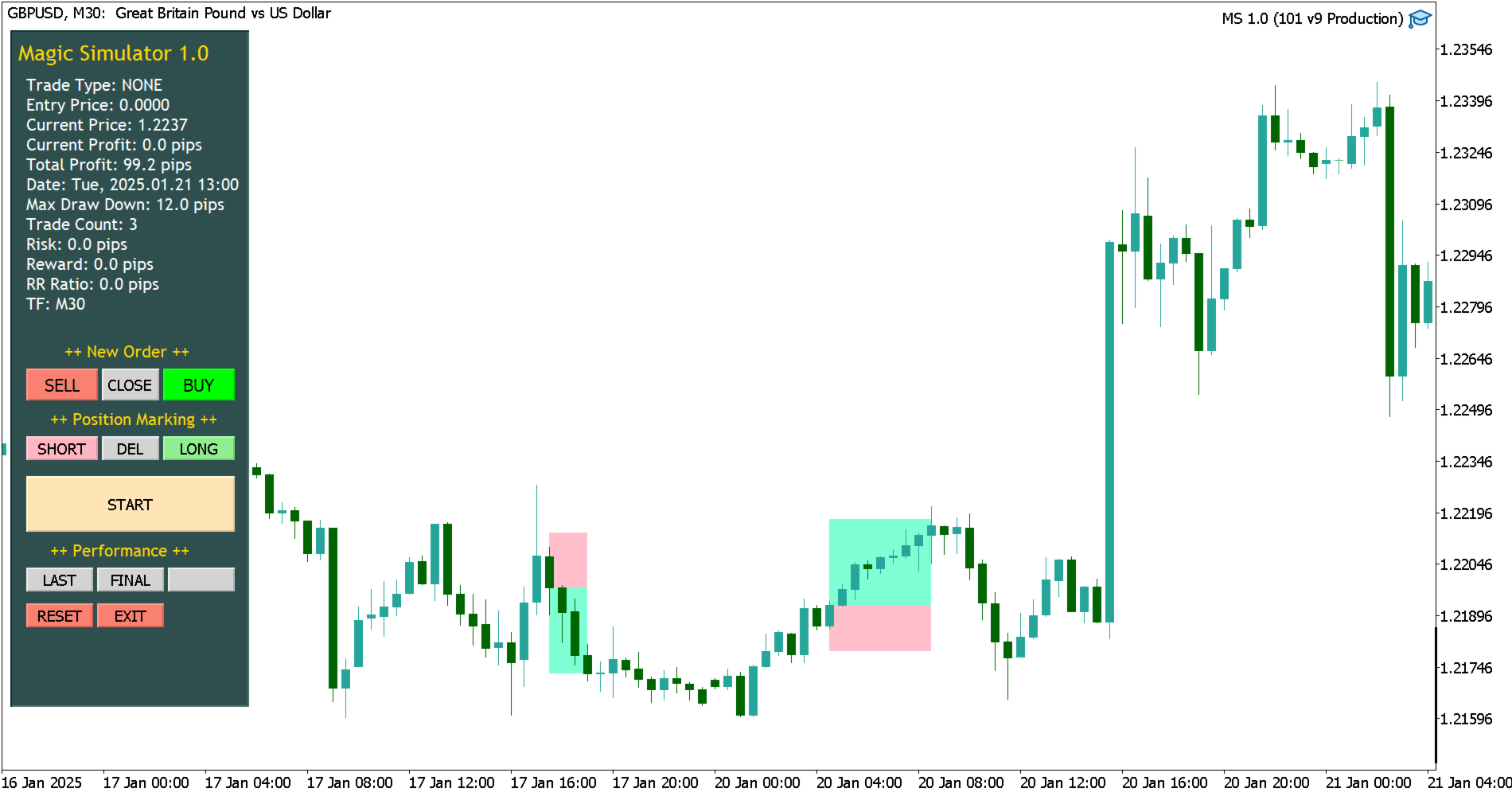
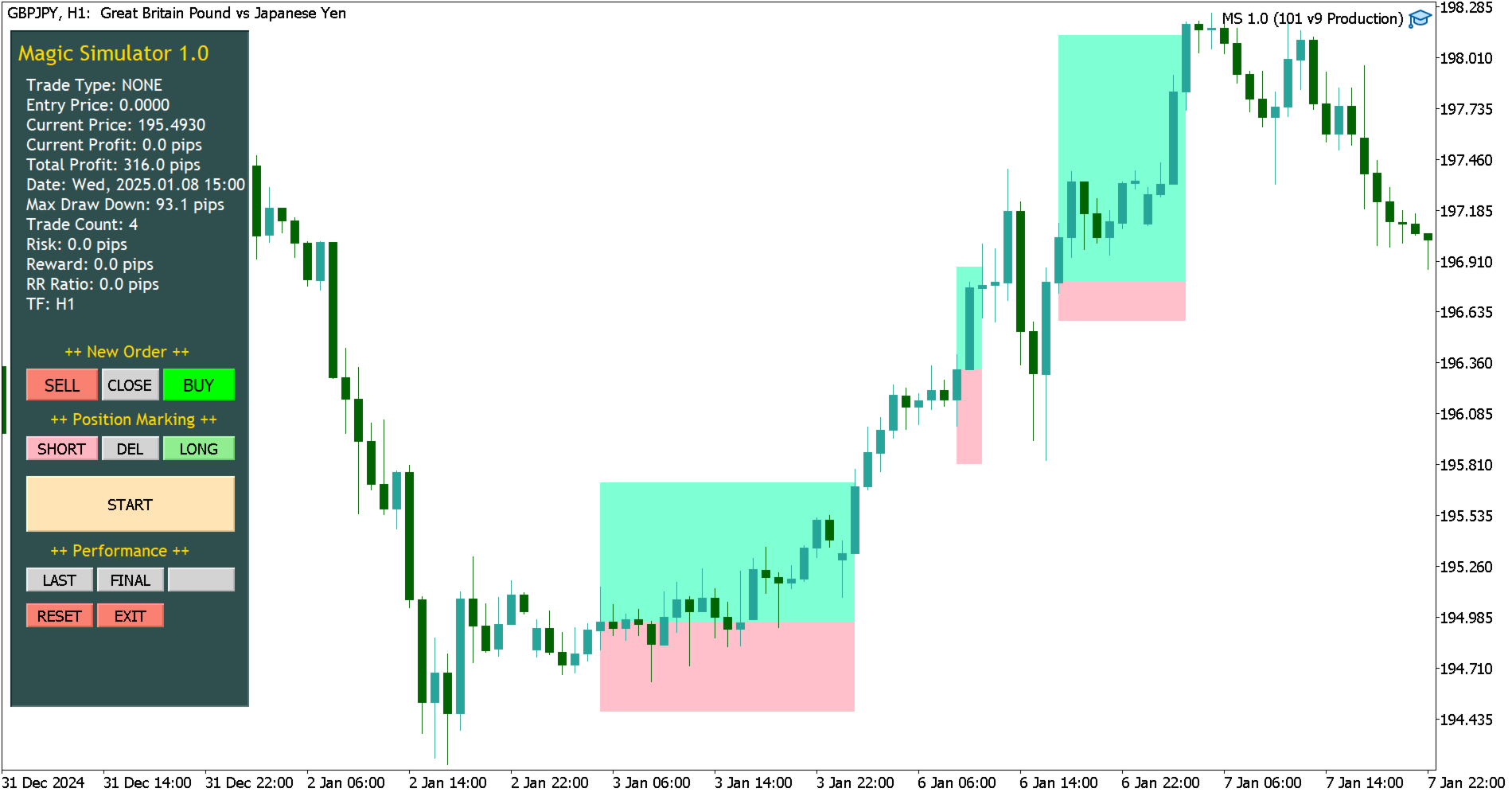
Visualize Everything: It automatically draws your entry, stop-loss (SL), and take-profit (TP) levels on the chart. See your potential risk (in red) and reward (in green) at a glance.
-
Learn from Your Results: Get instant feedback on your total profit, number of trades, and biggest drawdown.
Key Features at a Glance:
-
Risk-Free Historical Replay: Practice on real data without real money.
-
Adjustable Simulation Speed: Slow down to analyze or speed up to test more.
-
Live Performance Dashboard: See all your stats (P/L, Trade Count, Max Drawdown) in one simple panel.
-
Visual Trade Analysis: Color-coded boxes and lines make every trade easy to review and learn from.
-
Seamless Timeframe Switching: Change timeframes without losing your place! The simulation continues exactly where you left off when switching between M1, M5, M15, H1, etc.
-
Auto-Save Progress: Stop and restart anytime; your place in the simulation is saved automatically.
-
Mental Conditioning Tools:
-
Killing Zones (KZ): See shaded areas on your chart for major trading sessions (London, New York, etc.) to recognize high-probability timing.
How to Use It (In 3 Easy Steps):
1. Attach & Set Up
Drag the Magic Simulator onto your chart. Set your preferred Start Date and trading Speed.
2. Practice & Execute
-
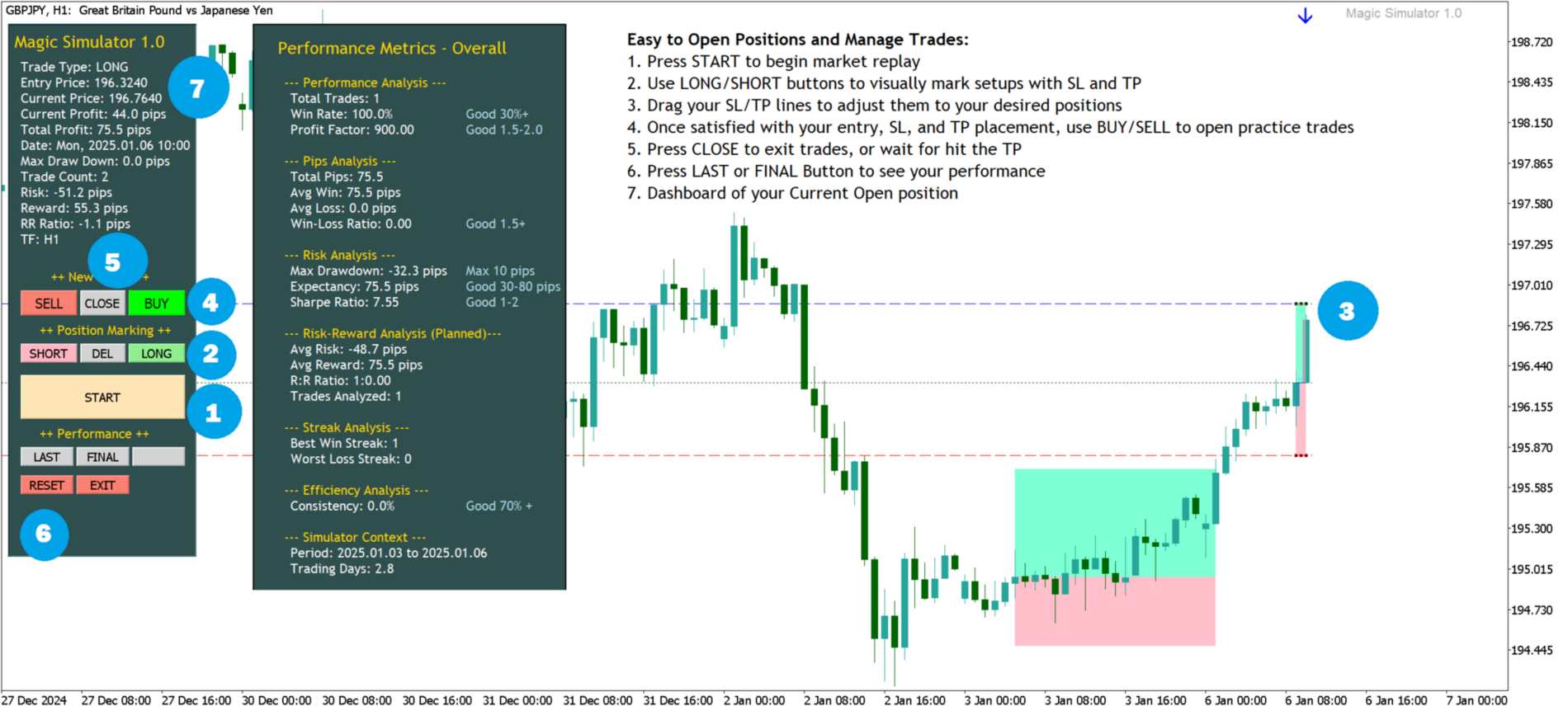
Press START to begin market replay
-
Use LONG/SHORT buttons to visually mark setups with SL and TP
-
Drag your SL/TP lines to adjust them to your desired positions
-
Once satisfied with your entry, SL, and TP placement, use BUY/SELL to open practice trades
-
Press CLOSE to exit trades, or wait for hit the TP
3. Review & Improve
After closing each trade, analyze the visual feedback. What worked well? What could be improved? Refine your approach and try again with new insights.
Simple Settings
Get started with just two inputs:
-
Start Date: Choose your historical starting point (default is 2025.01.01)
-
Time Speed: Set simulation pace in seconds per candle (lower numbers = faster)
Pro Tip: For visual setup, draw a vertical line named "VLine" on your chart - the simulator will automatically begin from that exact point!
Designed For:
-
Beginners: Build confidence without risk
-
Strategy Developers: Test ideas in realistic market conditions
-
All Traders: Build emotional discipline and consistent execution
Master your mind before risking your money. The markets will still be there tomorrow.
Disclaimer: Educational simulation tool only - no real trades are executed.
Smart Timeframe Switching
One of our most powerful features: Seamless timeframe navigation.
-
Start simulating on M15 and analyze the price action
-
Switch to H1 to see the bigger picture - the simulation continues from the same point in time
-
Jump to M5 for finer entry details - no restart needed!
-
Your progress, trades, and statistics carry over perfectly across all timeframes
This allows you to practice multi-timeframe analysis naturally, just like professional traders do, without ever breaking your flow or losing your simulated trading session.
Example: Analyze a setup on H4, then switch to M30 to fine-tune your entry, and finally to M5 for execution - all within the same continuous simulation.
Considerations:
-
Fixed position sizing across all trades for consistent risk exposure
-
Single position limitation to prevent overtrading and maintain focus
-
Full position management only (no partial closes or scaling)
-
Simplified entry/exit system to build disciplined trading habits
-
Candle-by-candle progression for clear, discrete decision points
Limitations (Technical Constraints):
-
Executes trades exclusively at candle CLOSE prices only, and does not consider intra-candle price movements (highs/lows)
-
TP/SL triggers only when candle closes beyond levels (not on touch)
-
This is candle-by-candle close simulation
-
Your performance is evaluated based on Pips, not money
-
Historical data simulation ≠ real market execution
-
Past performance doesn't guarantee future results
Product Name: Magic Simulator
Replay History: Start from any past date and watch the market move candle-by-candle at your chosen speed.
Place Simulated Trades: Click BUY or SELL to open positions. The EA tracks your profit/loss in real-time.
Visualize Everything: It automatically draws your entry, stop-loss (SL), and take-profit (TP) levels on the chart. See your potential risk (in red) and reward (in green) at a glance.
Learn from Your Results: Get instant feedback on your total profit, number of trades, and biggest drawdown.
Risk-Free Historical Replay: Practice on real data without real money.
Adjustable Simulation Speed: Slow down to analyze or speed up to test more.
Live Performance Dashboard: See all your stats (P/L, Trade Count, Max Drawdown) in one simple panel.
Visual Trade Analysis: Color-coded boxes and lines make every trade easy to review and learn from.
Seamless Timeframe Switching: Change timeframes without losing your place! The simulation continues exactly where you left off when switching between M1, M5, M15, H1, etc.
Auto-Save Progress: Stop and restart anytime; your place in the simulation is saved automatically.
Mental Conditioning Tools:
-
Killing Zones (KZ): See shaded areas on your chart for major trading sessions (London, New York, etc.) to recognize high-probability timing.
Drag the Magic Simulator onto your chart. Set your preferred Start Date and trading Speed.
Press START to begin market replay
Use LONG/SHORT buttons to visually mark setups with SL and TP
Drag your SL/TP lines to adjust them to your desired positions
Once satisfied with your entry, SL, and TP placement, use BUY/SELL to open practice trades
Press CLOSE to exit trades, or wait for hit the TP
After closing each trade, analyze the visual feedback. What worked well? What could be improved? Refine your approach and try again with new insights.
Start Date: Choose your historical starting point (default is 2025.01.01)
Time Speed: Set simulation pace in seconds per candle (lower numbers = faster)
Beginners: Build confidence without risk
Strategy Developers: Test ideas in realistic market conditions
All Traders: Build emotional discipline and consistent execution
Start simulating on M15 and analyze the price action
Switch to H1 to see the bigger picture - the simulation continues from the same point in time
Jump to M5 for finer entry details - no restart needed!
Your progress, trades, and statistics carry over perfectly across all timeframes
Fixed position sizing across all trades for consistent risk exposure
Single position limitation to prevent overtrading and maintain focus
Full position management only (no partial closes or scaling)
Simplified entry/exit system to build disciplined trading habits
Candle-by-candle progression for clear, discrete decision points
Executes trades exclusively at candle CLOSE prices only, and does not consider intra-candle price movements (highs/lows)
TP/SL triggers only when candle closes beyond levels (not on touch)
This is candle-by-candle close simulation
Your performance is evaluated based on Pips, not money
Historical data simulation ≠ real market execution
Past performance doesn't guarantee future results