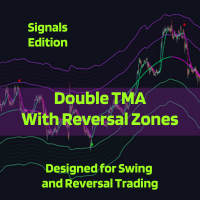
Double TMA with Reversal Bands Signals Edition
- Indicatori
-
Clayton Prickett
 I’m a Software Developer and Automation Engineer exploring the world of automated finance through the MQL language and the MetaTrader 5 platform. I will occasionally publish new Indicators and Expert Advisors here with a focus on developing high quality low-drawdown strategies, with a focus on
 - Versione: 4.0
- Aggiornato: 8 dicembre 2025
- Attivazioni: 5
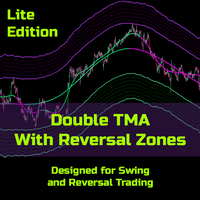
The Double TMA with Bands – Signals Edition v4.0 technical analysis tool is built for MetaTrader 5 combining two Triangular Moving Averages (TMA) with ATR-based reversal zones to help identify trend direction and potential turning points. It includes optional indicator visualization, multiple signal types, and flexible alerting to ensure you never miss the trade!
Notes from the Developer:
Bug corrections and implementation of requested features will be cataloged and applied in the next update, however, update delivery timelines will be protracted due to limited time availability.
Thank you for your patience and support.
If you are currently using the Double TMA with Bands - Signals Edition, v4.0 Beta has just been released. Read the release notes and updated description for full scope of changes.
There are a few known issues currently being tracked (see Usage Notes), and we would really like your feedback on the functionality and reliability of the tool.
Please help us improve this product by providing your feedback in the comments and consider leaving a review.
If you do not currently own the product, while v4.0 is still in beta testing, you can get it at a 70% discount ($59) from it's target price of *$199*.
v4.0 Release Notes
Major Features
- Seven signal types: (up from 4) continuation, reversal-zone, high-probability reversal, price/TMA crossover, full confluence, VolStop trend-flash, and TMA Fast/Slow crossover.
- VolStop trend engine: ATR-based trailing trend filter with its own signal family and confirmation bars.
Technical Improvements
- UI vs signal logic separated: TMA slope thresholds for line colors, epsilon bands for actual signal calculations.
- Slope sensitivity controls: per-line neutral-band epsilons plus optional hysteresis for enter vs exit thresholds.
- Anti-noise crossover engine: confirmation bars, minimum TMA separation, slope checks, and closed-bar-only options.
- ADX gating for confluence: ADX + DI+/DI− minimums for Type 5 high-probability signals.
- Per-type signal limiting: per-trend caps for each signal family with trend-based resets.
- Refined alerts and notifications: global and unit level toggles and limiters.
Core Concept
- Major Trend (TMA Slow): broad directional filter and main structure reference.
- Minor Trend (TMA Fast): responsive signal line for timing entries and minor trend shifts.
- ATR Reversal Zones: slow TMA bands (and optional extra bands) where price often reacts or exhausts.
- VolStop Trend Filter: ATR-based trailing line that defines active trend legs and flip points.
- Multi-Timeframe View: compact panels summarizing major and minor trend states across timeframes.
Key Features
- Seven entry signal families plus configurable exit / minor-trend-change signals.
- Optional Heikin Ashi and VolStop overlays for more comprehensive visual trend confirmation.
- Flexible slope controls with epsilon bands, hysteresis, and crossover persistence filters.
Input Parameters
TMA Slow Settings
| Input name | Default value | Description |
|---|---|---|
| Slow TMA Period | 200 | Major (slow) TMA period for the main trend. |
| TMA Slow Bands Smoothing Period | 300 | ATR smoothing period for slow TMA bands (higher = smoother bands, more lag). |
| ATR Multiplier of TMA Slow | 5.0 | ATR multiplier used to build the main upper/lower slow TMA bands. |
| TMA Slow Slope Adjustment | 200 | Lookback length for slow slope calculation. |
| TMA Slow Redraw | Yes | Allow slow TMA to redraw (less lag, may repaint historical values). |
| Show TMA Slow Line | Yes | Display the slow TMA line on the chart. |
TMA Fast Settings
| Input name | Default value | Description |
|---|---|---|
| TMA Fast Period | 26 | Minor (fast) TMA period; acts as the signal line. |
| TMA Fast Slope Adjustment | 26 | Lookback length for fast slope calculation. |
| TMA Fast Redraw | No | Allow fast TMA to redraw (less lag, may repaint) when enabled. |
| Show TMA Fast Line | Yes | Display the fast TMA line on the chart. |
TMA Neutral State Thresholds (UI)
| Input name | Default value | Description |
|---|---|---|
| TMA Slow Trend Threshold | 0.00 | Slow slope threshold used for UI trend state (coloring only). |
| TMA Fast Trend Threshold | 0.0 | Fast slope threshold used for UI trend state (coloring only). |
Note: TMA Slow/Fast thresholds control line colors (green/magenta/gray). Signal calculations use the epsilon values in the slope sensitivity section, not these thresholds.
Slope Sensitivity (Signal Calculations)
| Input name | Default value | Description |
|---|---|---|
| Fast Slope Neutral Band Epsilon | 0.0 | Neutral band width for fast slope; higher = fewer, cleaner signals. |
| Slow Slope Neutral Band Epsilon | 0.0 | Neutral band width for slow slope; controls trend classification. |
| Use Hysteresis Thresholds | No | Use different enter/exit thresholds to prevent signal flip-flopping. |
| Enter Trend Threshold | 0.03 | Slope must exceed this value to enter a trending state. |
| Exit to Neutral Threshold | 0.015 | Slope must drop below this value to exit a trending state. |
Extra ATR Bands
| Input name | Default value | Description |
|---|---|---|
| Show Extra ATR Bands | No | Draw additional ATR bands around the slow TMA (uses more CPU). |
| Extra Band 1 Multiplier | 1.0 | Multiplier relative to the main slow ATR band for extra band 1. |
| Extra Band 2 Multiplier | 2.0 | Multiplier relative to the main slow ATR band for extra band 2. |
| Extra Band 3 Multiplier | 3.0 | Multiplier relative to the main slow ATR band for extra band 3. |
| Extra Band 4 Multiplier | 4.0 | Multiplier relative to the main slow ATR band for extra band 4. |
| Extra Band 5 Multiplier | 5.0 | Multiplier relative to the main slow ATR band for extra band 5. |
| Extra Band 6 Multiplier | 6.0 | Multiplier relative to the main slow ATR band for extra band 6. |
| Extra Band 7 Multiplier | 7.0 | Multiplier relative to the main slow ATR band for extra band 7. |
Main Entry Signals (Global)
| Input name | Default value | Description |
|---|---|---|
| Signal Confirmation Bars | 0 | Bars to wait for signal confirmation (0 = current bar). |
| Show Buy/Sell Entry Signals | Yes | Master switch to display all entry signal arrows. |
Signal Type 1
| Input name | Default value | Description |
|---|---|---|
| Signal Type 1 Enable | No | Enable Type 1 signals: price vs. major trend + minor trend change + major trend confluence. |
| Signal Type 1 Buy Arrow Code | 241 | Wingdings arrow code for Type 1 buy signals. |
| Signal Type 1 Sell Arrow Code | 242 | Wingdings arrow code for Type 1 sell signals. |
| Max Type 1 Signals per Trend | 1 | Maximum number of Type 1 signals allowed per trend (0 = unlimited). |
Signal Type 2
| Input name | Default value | Description |
|---|---|---|
| Signal Type 2 Enable | No | Enable Type 2 signals: price closes in reversal zone + TMA Fast in reversal zone + minor trend confirmation. |
| Signal Type 2 Buy Arrow Code | 233 | Wingdings arrow code for Type 2 buy signals. |
| Signal Type 2 Sell Arrow Code | 234 | Wingdings arrow code for Type 2 sell signals. |
| Max Type 2 Signals per Trend | 1 | Maximum number of Type 2 signals allowed per trend (0 = unlimited). |
Signal Type 3
| Input name | Default value | Description |
|---|---|---|
| Signal Type 3 Enable | No | Enable Type 3 high-probability reversal signals (entry + exit on the same candle). |
| Signal Type 3 Buy Arrow Code | 177 | Wingdings arrow code for Type 3 buy signals. |
| Signal Type 3 Sell Arrow Code | 177 | Wingdings arrow code for Type 3 sell signals. |
| Max Type 3 Signals per Trend | 1 | Maximum number of Type 3 signals allowed per trend (0 = unlimited). |
Signal Type 4
| Input name | Default value | Description |
|---|---|---|
| Signal Type 4 Enable | No | Enable Type 4 signals: price opens on one side of TMA Slow and closes on the other. |
| Signal Type 4 Buy Arrow Code | 170 | Wingdings arrow code for Type 4 buy signals. |
| Signal Type 4 Sell Arrow Code | 170 | Wingdings arrow code for Type 4 sell signals. |
| Max Type 4 Signals per Trend | 1 | Maximum number of Type 4 signals allowed per trend (0 = unlimited). |
Signal Type 5
| Input name | Default value | Description |
|---|---|---|
| Signal Type 5 Enable | No | Enable Type 5 signals: TMA Fast + TMA Slow + VolStop + Heikin Ashi + ADX + DI confluence. |
| Signal Type 5 Buy Arrow Code | 200 | Wingdings arrow code for Type 5 buy signals. |
| Signal Type 5 Sell Arrow Code | 202 | Wingdings arrow code for Type 5 sell signals. |
| Max Type 5 Signals per Trend | 1 | Maximum number of Type 5 signals allowed per VolStop trend (0 = unlimited). |
| Type 5 Require Price Above/Below TMA Slow | Yes | Require price to be above/below TMA Slow in the direction of the signal. |
| Type 5 Signal Delay | 1 | Bars to delay Type 5 signal (0 = same bar, 1 = next bar, etc.). |
Signal Type 6
| Input name | Default value | Description |
|---|---|---|
| Signal Type 6 Enable | No | Enable Type 6 signals when VolStop switches trends in line with TMA Slow. |
| Signal Type 6 Buy Arrow Code | 233 | Wingdings arrow code for Type 6 buy signals. |
| Signal Type 6 Sell Arrow Code | 234 | Wingdings arrow code for Type 6 sell signals. |
| Max Type 6 Signals per Trend | 3 | Maximum number of Type 6 signals allowed per VolStop trend (0 = unlimited). |
| Type 6 Require TMA Slow Confluence | Yes | Require TMA Slow to agree with the VolStop trend for Type 6 signals. |
| Type 6 VolStop Confirmation Bars | 1 | Bars VolStop trend must persist before confirming Type 6 signals. |
Signal Type 7
| Input name | Default value | Description |
|---|---|---|
| Signal Type 7 Enable | Yes | Enable Type 7 anti-repainting crossover signals between TMA Fast and TMA Slow. |
| Signal Type 7 Buy Arrow Code | 164 | Wingdings arrow code for Type 7 buy signals. |
| Signal Type 7 Sell Arrow Code | 164 | Wingdings arrow code for Type 7 sell signals. |
| Max Type 7 Signals per Trend | 0 | Maximum number of Type 7 signals allowed per trend (0 = unlimited). |
| Type 7 Crossover Confirmation Bars | 0 | Bars crossover must remain valid before a Type 7 signal (0 = immediate). |
| Type 7 Minimum TMA Separation | 0.0001 | Minimum distance between TMA Fast and TMA Slow required for a crossover signal. |
| Type 7 Require Consistent Slopes | No | Require both TMA slopes to align with the signal direction. |
| Type 7 Closed Bar Only | Yes | Only detect crossovers on closed bars (anti-repainting). |
| Type 7 Persistence Bars | 1 | Bars the crossover must persist before confirming a Type 7 signal. |
ADX Settings (for Type 5 Signals)
| Input name | Default value | Description |
|---|---|---|
| ADX Period | 14 | Period for ADX calculation used in Type 5 confluence. |
| Minimum ADX Value | 25.0 | Minimum ADX level required to treat the market as trending. |
| Minimum DI+/DI- Difference | 5.0 | Minimum difference between DI+ and DI- to confirm directional strength. |
Exit / Minor Trend Change Signals
| Input name | Default value | Description |
|---|---|---|
| Show Exit Signals | Yes | Display minor trend change / exit arrows based on price vs. TMA Slow. |
| Exit Signal Cooldown Bars | 26 | Minimum bars between exit signals to avoid clutter. |
| Exit Buy Arrow Code | 222 | Wingdings arrow code for Bull→Bear minor trend change (buy exit). |
| Exit Sell Arrow Code | 221 | Wingdings arrow code for Bear→Bull minor trend change (sell exit). |
Notifications
| Input name | Default value | Description |
|---|---|---|
| Send Alerts | Yes | Enable platform alert pop-ups for signals. |
| Send Push Notifications | Yes | Send push notifications to the mobile app. |
| New Bar Alert | No | Trigger an alert every time a new bar opens. |
| Send Test Notification on Init | No | Send a test notification when the indicator initializes. |
Trend Panels and Visualization
| Input name | Default value | Description |
|---|---|---|
| Show Major Trend Panel | Yes | Display multi-timeframe major trend panel. |
| Show Minor Trend Panel | Yes | Display multi-timeframe minor trend panel. |
| Panel Corner Position | Bottom Left | Chart corner where the panels are anchored. |
| Major Trend Panel X Offset | 10 | Horizontal offset (pixels) for the major trend panel. |
| Major Trend Panel Y Offset | 80 | Vertical offset (pixels) for the major trend panel. |
| Minor Trend Panel X Offset | 10 | Horizontal offset (pixels) for the minor trend panel. |
| Minor Trend Panel Y Offset | 30 | Vertical offset (pixels) for the minor trend panel. |
| Bull Trend Color | Lime | Color used to show bullish trend in panels. |
| Bear Trend Color | Magenta | Color used to show bearish trend in panels. |
Heikin Ashi
| Input name | Default value | Description |
|---|---|---|
| Show Heikin Ashi Candles | Yes | Overlay Heikin Ashi candles on the main chart. |
VolStop Settings
| Input name | Default value | Description |
|---|---|---|
| Show VolStop Line | Yes | Display the VolStop trailing trend line on the chart. |
| VolStop ATR Period | 26 | ATR period used by the VolStop calculation. |
| VolStop Source Price | Close | Price type used for VolStop (e.g., close price). |
| VolStop ATR Multiplier | 3.0 | ATR multiplier controlling VolStop distance from price. |
Typical Applications
- Trend following: trade in the direction of the major trend when minor trend aligns.
- Reversal trading: focus on signals within reversal zones.
- Scalping or swing: adjust periods and confirmations to timeframe.
Technical Details
- Platform: MetaTrader 5
- Timeframes: Any
- Markets: Forex, indices, commodities, crypto
- Operation: historical and live charts
- Implementation: no DLL calls; does not use external WebRequest.
Usage Notes
Product Usage Disclaimers:
- In order to use Type 3 Signals, you must enable at least Type 2 Signals and Exit Signals for proper Type 3 Signal calculation.
Known Issues:
- Type 1 signals are not working
- Type 6 signals max signals limiter is not functioning
- UI issue when turning hikein ashi candles off (temporary fix - leave heikin ashi candles on in the Inputs tab and set the heikin ashi candle colors to None in the Colors tab)
- Type 6 alert is received but signal it is not shown on the graphic
- Price showed on alert is not the actual price (price shown in alert is relative to the signal graphic position on the chart)
- Signals of the indicator do not match on the real chart vs in the strategy tester (this is due to the way the indicator is calculated and is an inherent aspect of the tool)
Feature Requests:
- Make the Type 5 signal only show a sell signal when the TMA Slow is in downtrend and only show a buy signal when the TMA Slow is in uptrend
- Include the "angle of rise/fall" in the Trend Panel.
*There is no defined timeframe for bug fix development, but the bugs will be fixed before the price increase.*








































I want to congratulate the developer on this improved version. I highly recommend the signals edition of this great indicator. Well planned and structured product. Fully functional and user-friendly interface. Finally, it is an intuitive tool to track the market trend and its many opportunities of reversals. Great work. Hope to have soon the EA version of this indicator.