CloudEdge Gold Algo EA
- Experts
-
Jerome Osa
 I'm still thinking...
 - Versione: 1.0
- Attivazioni: 5
📈 Ichimoku + Bollinger Bands + LWMA with 3 Partial Take Profits
✅ Overview
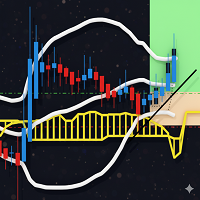
This Expert Advisor (EA) is designed for precision trading using a combination of Ichimoku Cloud, Bollinger Bands, and Linear Weighted Moving Average (LWMA) indicators. It integrates smart trade management, partial take profits, and dynamic stop-loss adjustments for optimized risk management.
💡 Key Features
-
📊 Advanced Entry Conditions: Uses Ichimoku (Tenkan-sen breakout above/below the cloud), Bollinger Bands, and LWMA confirmations.
-
🎯 Partial Take Profits: Secure profits in stages — TP1, TP2, TP3 — with customizable position sizes at each level.
-
🔐 Dynamic Stop Loss Movement: Adjusts SL based on TP hits to lock in gains and minimize risk.
-
🔁 Auto Close & Trade Reversal: Automatically closes opposite positions before opening a new trade.
-
⚖️ Risk-Reward Based TP: Calculates TP using a fixed Risk:Reward ratio.
-
📉 Lot Size Validation:
-
⏱️ Multi-Timeframe Support: Choose any timeframe for signal analysis.
-
📵 Trade Limiting: Set max open trades per symbol to avoid overexposure.
-
🧠 Self-Adjusting Stop-Loss: If SL placement is invalid or too tight, the EA recalculates it based on band width or broker minimum.
⚙️ Input Parameters
💰 Trade Settings
-
RiskRewardRatio : Sets TP based on a risk:reward ratio (e.g., 1.5 = TP is 1.5x the risk).
-
LotSize : Lot size for each trade.
-
Slippage : Maximum slippage allowed in points.
-
MaxOpenTradesPerPair : Limits the number of open trades per symbol.
🎯 Take Profit Levels
-
TP1Percent , TP2Percent , TP3Percent : Define how far each TP level is from entry (as % of full TP).
-
TP1PartialClosePercent , TP2PartialClosePercent , TP3PartialClosePercent : Portion of the position to close at each TP level.
🛡️ Stop Loss Adjustment
-
SLMoveAfterTP1Percent , SLMoveAfterTP2Percent , SLMoveAfterTP3Percent : Moves SL to a safer level once a TP is reached (as % of distance).
-
SLPercent : Sets SL as % of Bollinger Band width. Use 0 for dynamic default.
-
MinSLPoints : Minimum SL distance in points (fallback if broker limits apply).
📈 Indicator Parameters
-
TimeFrame : Chart timeframe to apply the EA (e.g., M15).
-
Tenkan , Kijun , Senkou : Periods for Ichimoku settings.
-
MAPeriod , MAShift : LWMA period and shift.
-
BBPeriod , BBDeviation , BBShift : Bollinger Bands settings.
🏆 Why Use This EA?
-
Designed for Trend Trading: Perfect for strong trending markets like XAUUSD.
-
Automated Profit Securing: You don’t need to manually close trades at profit levels.
-
Customizable & Flexible: Adapt it to your personal trading style and risk appetite.
-
Smart Risk Control: Minimizes losses and maximizes gains using dynamic SL and TP logic.
Disclaimer for CloudEdge Gold Algo EA:
Market Risk Notice: Financial markets are dynamic and subject to sudden changes due to economic, political, or global events. Past performance of this Expert Advisor (EA) is not indicative of future results. While CloudEdge EA is designed to adapt to market conditions using Ichimoku, Bollinger Bands, and LWMA strategies, there is no guarantee of profitability.
No Guarantees: This EA may perform well under certain market conditions but fail in others. Always:
-
Test strategies in a demo account before live trading.
-
Monitor performance and adjust risk settings.
-
Never invest capital you cannot afford to lose.
By using this EA, you acknowledge that trading involves risk and accept full responsibility for your financial decisions.
(Optional add-on for aggressive strategies):
"High leverage and volatile assets (e.g., XAUUSD, crypto) may amplify losses. Use at your own discretion."