Exp SafetyLock PRO

4.57

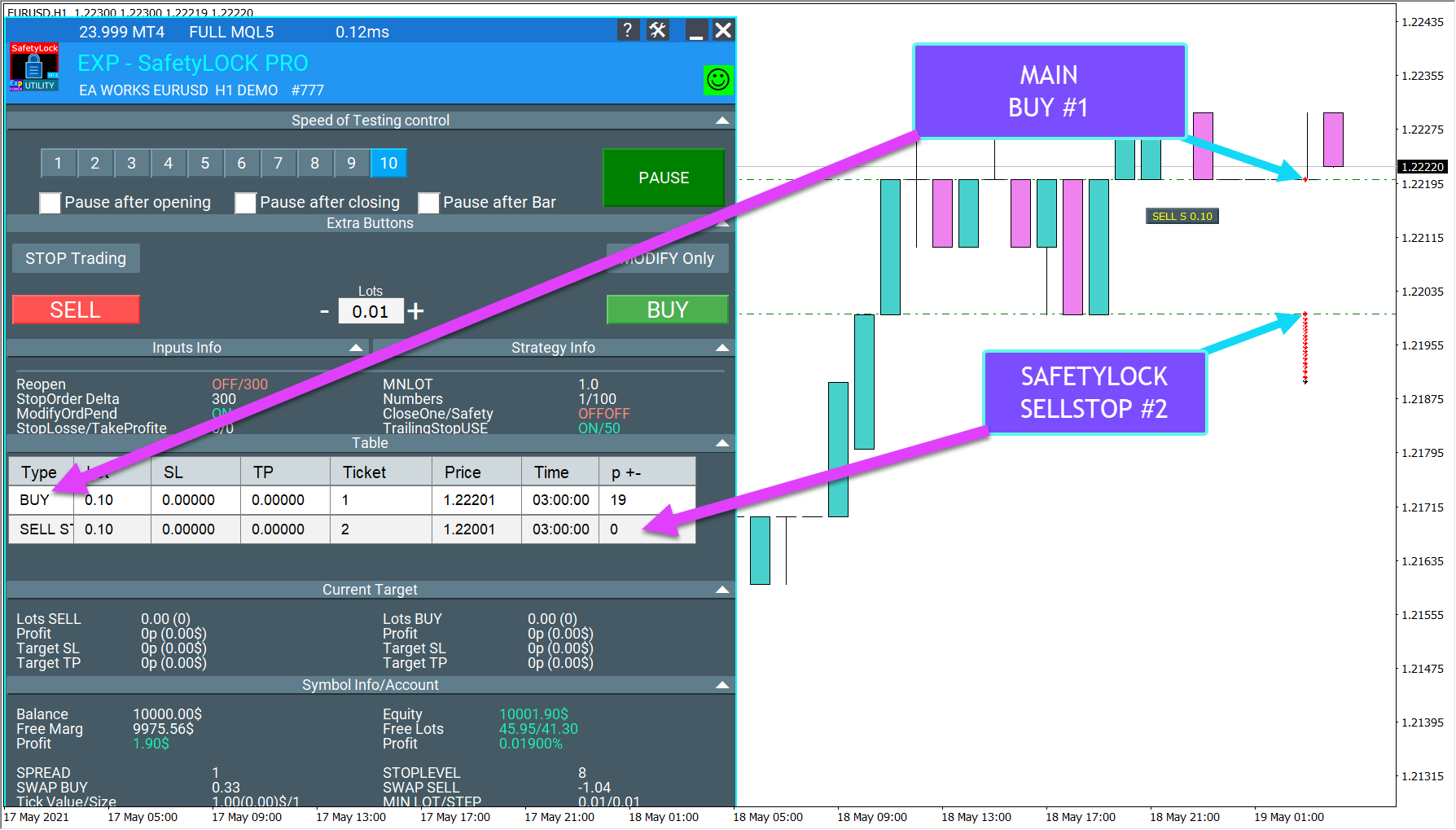
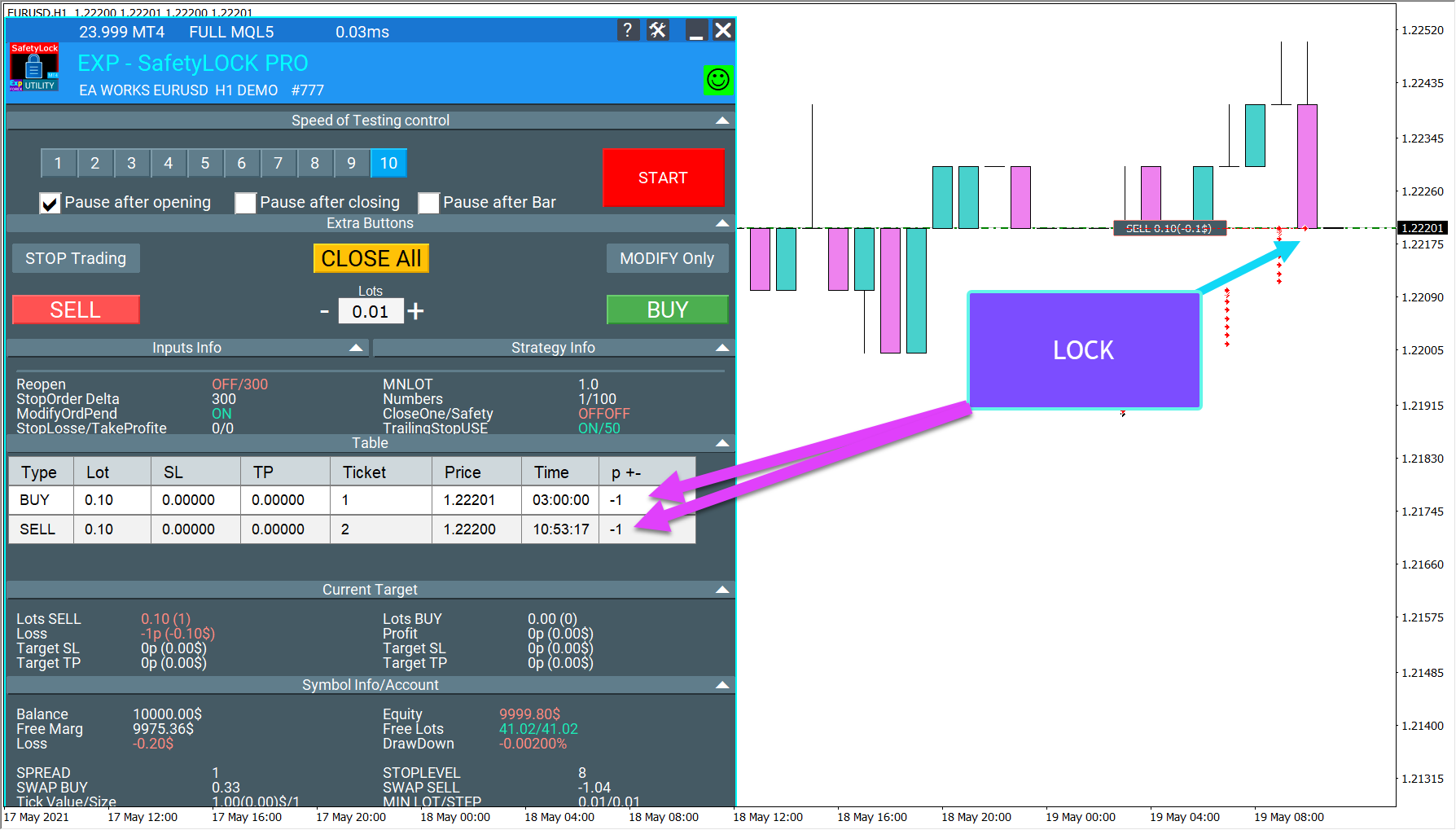
SAFETYLOCK for MetaTrader 4 è una utility premium di protezione del trading progettata per difendere le posizioni aperte dalle improvvise inversioni del mercato, posizionando automaticamente un ordine di sicurezza opposto.

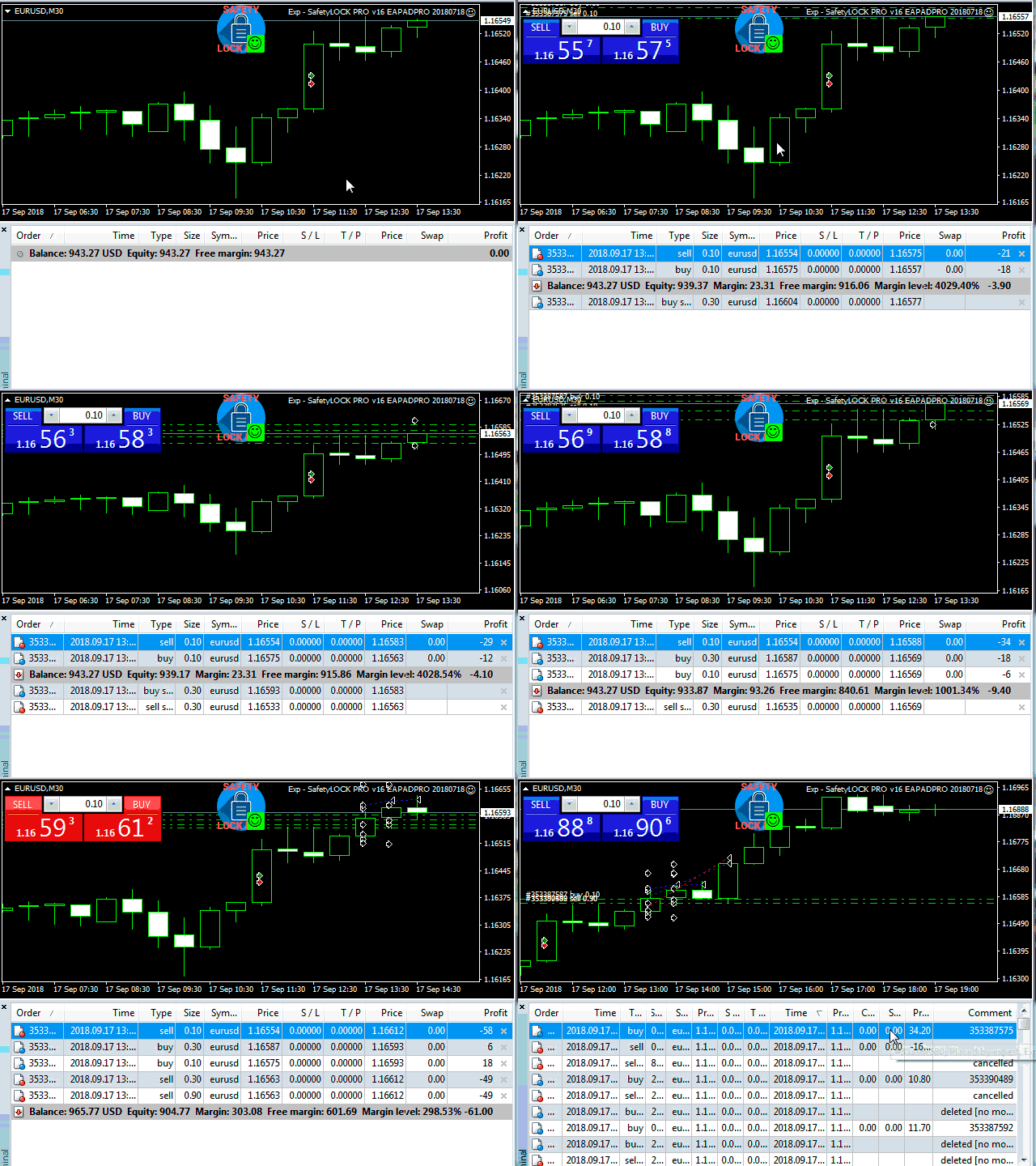
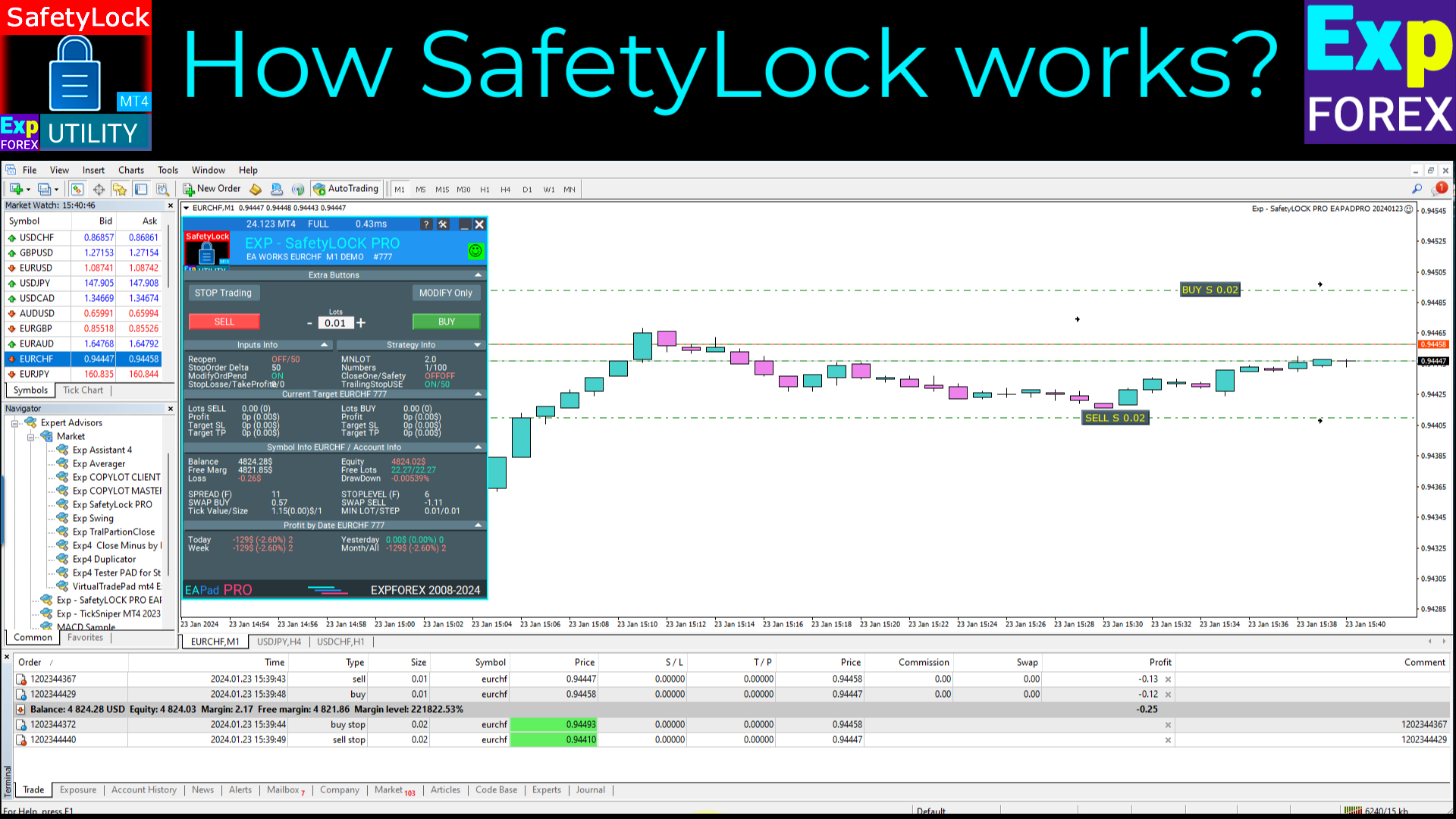
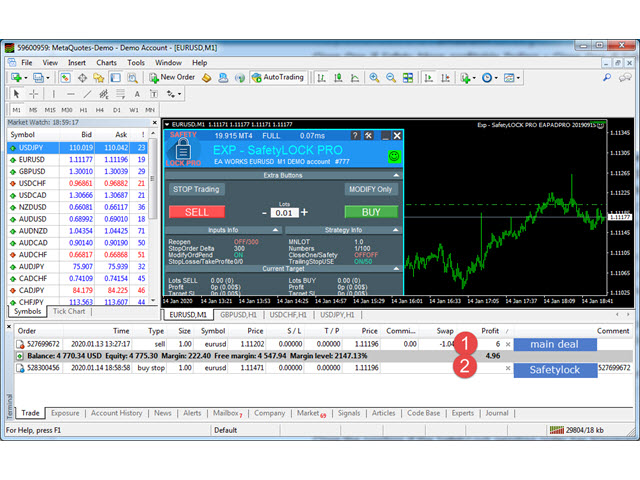
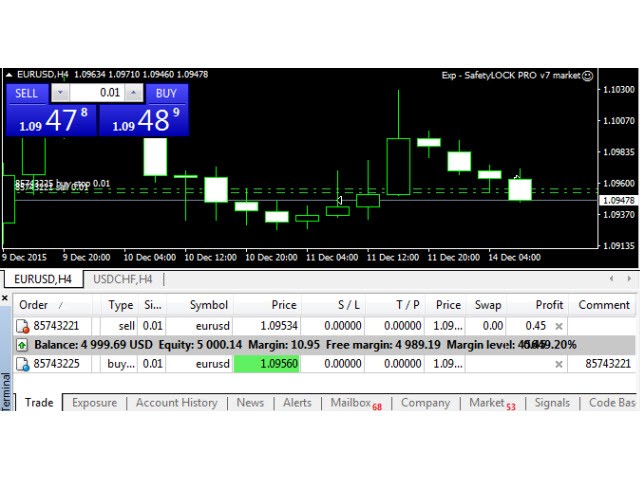
Non appena un trader o un Expert Advisor (EA) apre una posizione, SAFETYLOCK for MT4 crea un corrispondente ordine pendente (Buy Stop o Sell Stop) nella direzione opposta.

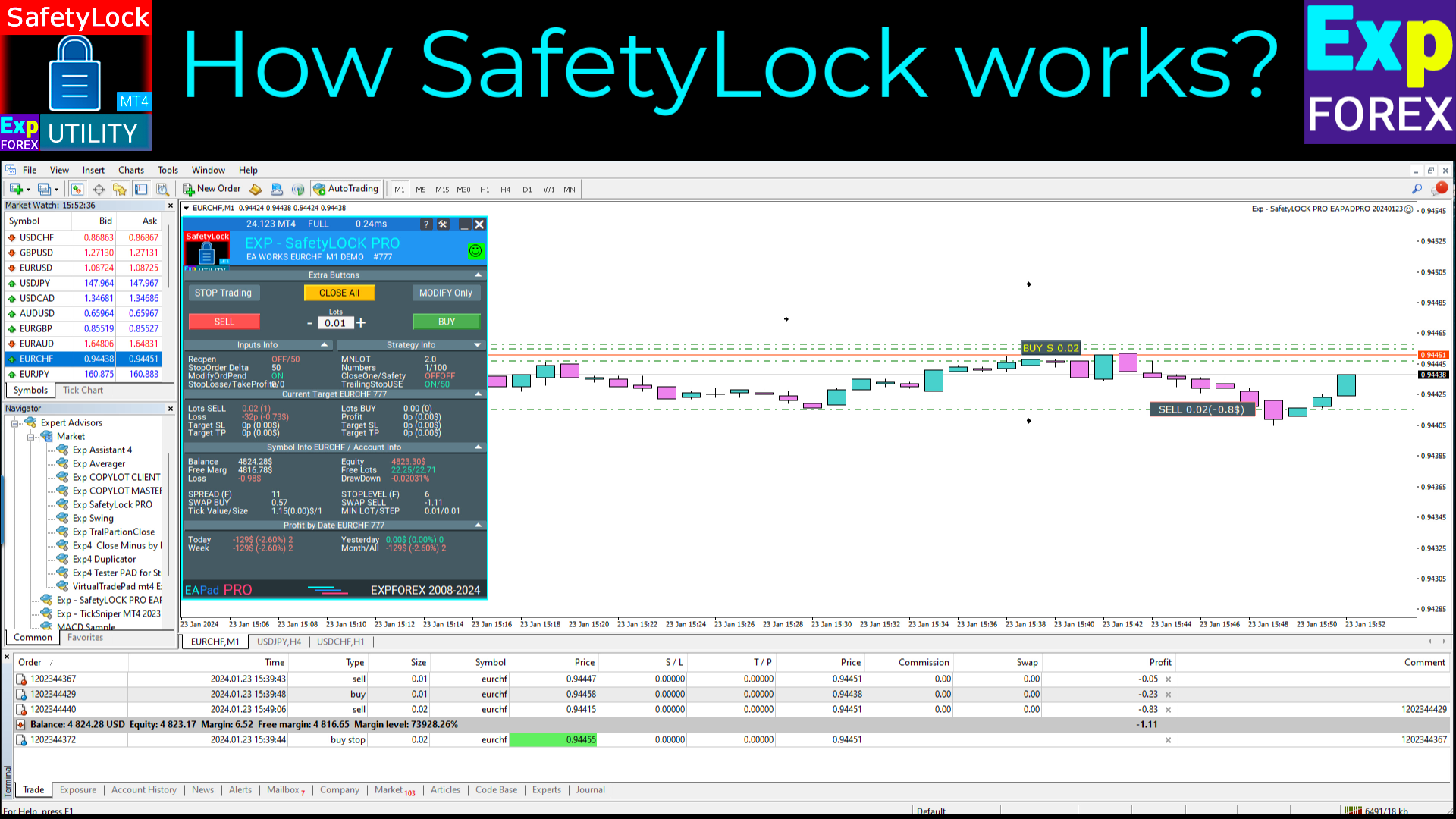
Se il mercato si muove contro il trade originale, l'ordine pendente viene attivato e crea un lock protettivo, aiutando il trader a controllare il drawdown e a organizzare la logica di recupero in modo più efficace.

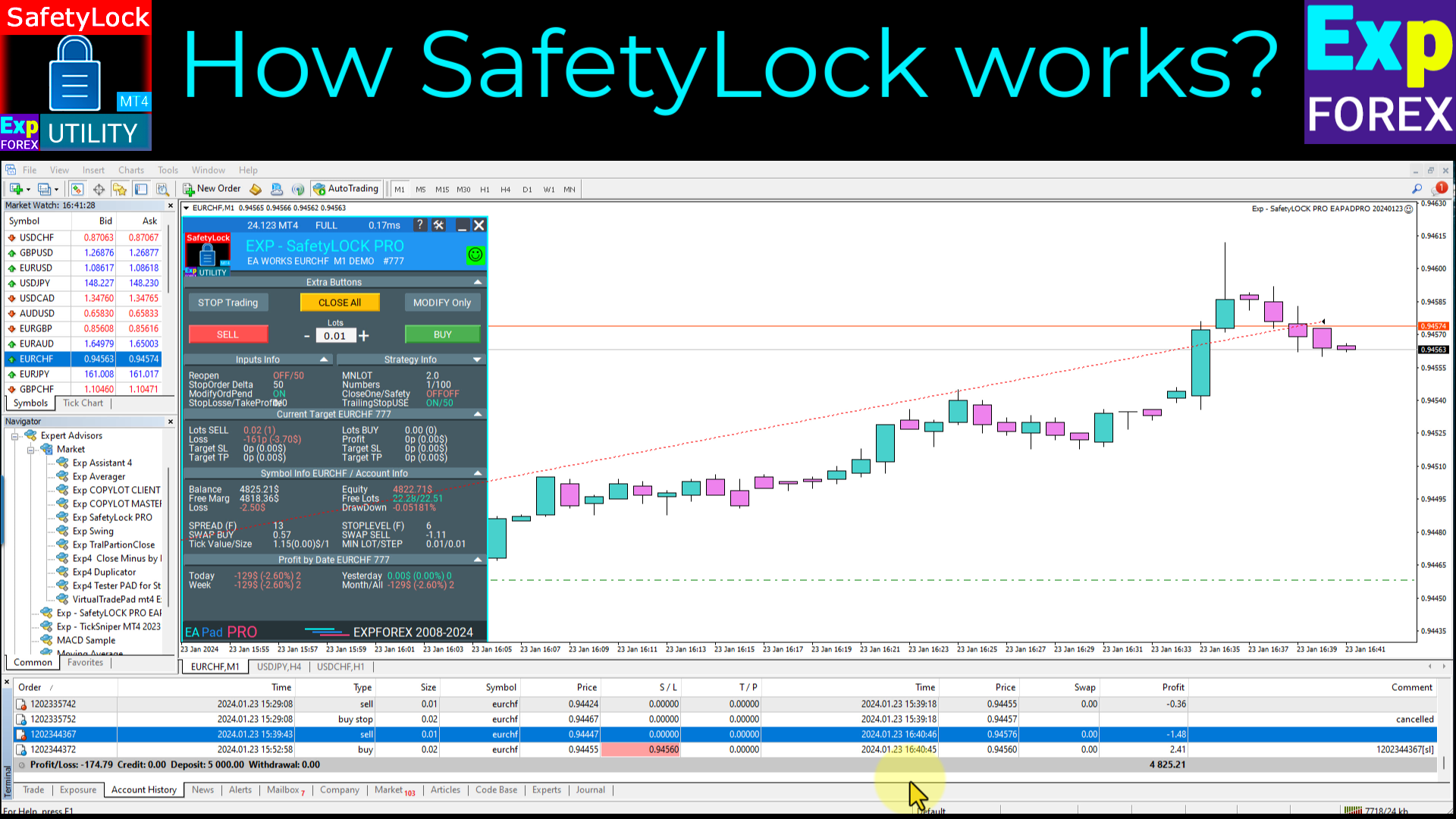
L'Expert Advisor consente di gestire la posizione con flessibilità: chiudere il trade originale, applicare il trailing alla posizione di sicurezza attivata, espandere il lock con un lotto più grande oppure combinare diversi scenari di gestione della sicurezza in base alle condizioni di mercato.

SAFETYLOCK for MT4 supporta anche lo spostamento dinamico del prezzo dell'ordine pendente, in modo che la struttura di protezione possa seguire il mercato in tempo reale e rimanere pertinente mentre l'azione del prezzo evolve.

Aggiorna la tua logica di protezione MetaTrader 4 con SAFETYLOCK — una soluzione premium 2026 per un locking più intelligente, una gestione del recupero più pulita e un controllo del trading più solido.

Parametri di base (Descrizione completa dei parametri nel nostro blog)

  • MilliSecondsTimerForMonitoring – Definisce l'intervallo di esecuzione dell'algoritmo in millisecondi (predefinito: 1000 = 1 secondo).
  • SymbolMonitoring – Se impostato su ALL_SYMBOL, l'EA monitora tutti i simboli e tutti i trade dell'account, indipendentemente dal grafico a cui è collegato.
  • Type_Monitoring – Definisce quali tipi di trade devono essere monitorati: BUY, SELL o ALL.
  • Magic_Monitoring – Specifica il magic number dei trade da monitorare. È possibile inserire più valori separati da virgole.
  • Comment_Monitoring – Filtra i trade in base al commento prima di creare un ordine di sicurezza.
  • Min_Lot_Monitoring – Imposta la dimensione minima del lotto dei trade da monitorare. Disabilitato quando impostato su 0.
  • Max_Lot_Monitoring – Imposta la dimensione massima del lotto dei trade da monitorare. Disabilitato quando impostato su 0.
  • SafetyPosMonitoring – Abilita il monitoraggio dei trade aperti in precedenza dal Expert Advisor SafetyLock.
  • StopLosse – Imposta il livello di Stop Loss per gli ordini pendenti SafetyLock.
  • TakeProfite – Imposta il livello di Take Profit per gli ordini pendenti SafetyLock.
  • MNLOT – Moltiplicatore della dimensione del lotto per gli ordini pendenti SafetyLock.
  • StopOrderDeltaifUSE – Distanza in punti per il posizionamento degli ordini pendenti SafetyLock rispetto alla posizione originale.
  • NumberofStopOrder – Numero di ordini pendenti SafetyLock da inserire per un trade monitorato.
  • DistancefromStopOrders – Distanza in punti tra gli ordini pendenti quando vengono utilizzati più ordini di sicurezza in sequenza.
  • ModifyOrdPend – Abilita la modifica dinamica dei prezzi degli ordini pendenti, così la struttura di protezione può seguire il movimento reale del mercato.
  • ModifyOrdPend_STEP – Passo in punti per modificare il prezzo dell'ordine pendente.
  • ReopenClosedSafetyOrders – Riapre gli ordini pendenti SafetyLock dopo la chiusura mentre il trade originale è ancora attivo.
  • Close_One_if_Safety_Closed_In_Profit – Chiude il trade originale se un trade SafetyLock chiuso in precedenza ha già generato abbastanza profitto da compensare la perdita attuale.
  • Close_One_if_Safety_More_profitable – Chiude il trade originale se il trade SafetyLock attivo diventa più profittevole della perdita attuale della posizione originale.
  • CloseOneifStopsActive – Chiude il trade originale quando l'ordine pendente SafetyLock viene attivato e diventa una posizione di mercato attiva.
  • CloseSafetyPositionsifclosed – Chiude automaticamente i trade SafetyLock attivi dopo che il trade originale è stato chiuso.
  • Remove_TAKEPROFIT_ofOriginalifStopsActive – Rimuove il Take Profit dal trade originale una volta che l'ordine pendente SafetyLock viene attivato.
  • Remove_STOPLOSS_ofOriginalifStopsActive – Rimuove lo Stop Loss dal trade originale una volta che l'ordine pendente SafetyLock viene attivato.
Cari amici e utenti dei nostri EA, vi preghiamo di aggiungere le vostre valutazioni nella sezione Reviews.
Tutti gli aggiornamenti del nostro forex software sono gratuiti!
Sviluppatore di forex tools: Expforex
Vladon, Expforex, Safetylock, HEDGE,Lock,Locker,Hedger,OCO,BUYSTOP,SELLSTOP
Recensioni 35
Steven Wong
77
Steven Wong 2024.10.27 11:59 

This tool is really very useful for protecting your account from bursting. You must tweak continuously to understand all it's function. Patience is the key to fully understand it. To the author, please consider making the Pending order in virtual mode as this would prevent on some brokers to flag this EA having hyperactivity due to the constant of modifying it's price due to trailing activity. Also if possible make this EA have TP and SL points all is in virtual mode and will hide from some unscrupulous broker's manipulation during high news impact. Just my 2 cents of advice.

Ir Moh Zainal Arifin
296
Ir Moh Zainal Arifin 2024.10.20 07:40 

excellent EA to use protect your capital. I am using this SafetyLock instead of Stop Loss and do something when reversal...

Joe Wolfen
45
Joe Wolfen 2024.09.22 13:24 

Good EA highly recommend, settings can be configured to suit your trading style. Takes time to backrest to get a settings to work with your trading strategy. This tool is important

Prodotti consigliati
Exp Swing
Vladislav Andruschenko
4.44 (64)
Utilizza il modello di una famosa strategia chiamata Swinger (Pendulum, Cheburashka) - posizionamento alternativo di ordini pendenti con aumento del lotto. La strategia consiste nel piazzare due ordini pendenti opposti. Quando il prezzo si muove in una determinata direzione, viene attivato un ordine pendente, mentre la dimensione del lotto dell'altro ordine viene aumentata. L'EA prevede tre tipologie di apertura degli ordini pendenti (TypeofTrade) Apertura automatica dopo il posizionamento (Ape
FREE
Angry bull Option Binary
Fabio Oliveira Magalhaes
1 (1)
Angry Bull Option Binary   This is a Binary Options robot, which contains 7 strategies, you can backtest it to check what the best strategies are Settings Initial Batch Value Dynamic Investment = If activated it will use an automatic lot according to its capital Balance ($) w/ backtest = Starting balance to backtest PorcRiscoInvestment = It will be the value of % for the automatic lot if it is activated Expiration (in minutes) = It will be the expiration time of orders in Binary Options Magic
Grid Trading
Waseem Raza
5 (3)
Grid Trading EA is a semi-automated one-click trading EA for both Normal Trading and Grid/Martingale Trading . Normal Trading Simply click Buy or Sell directly from the chart. The EA will automatically manage trades by: Setting Stop Loss and Take Profit Managing Trailing Stop Grid / Martingale Trading When Grid Trading mode is enabled, the EA will automatically open additional grid orders at specified distances while increasing the lot size based on your settings. Inputs & Settings Lots — Initia
Reverse copier is a tool that will open opposite buy/sell orders from your master account. It will help you with low profit EA's that lose consistenly and turn it to wins. Feel free to ask for new functions/features and I will add it. Now it's a simple MT5 to MT4 bridge with straightforward logic of one position open/close.  How to install: https://www.mql5.com/en/market/product/141604
FREE
"The FXPivot Clicker EA is a game-changing automated trading robot designed to simplify and enhance your Forex trading experience. Powered by advanced algorithms and cutting-edge technology, this EA takes care of all the hard work for you, executing trades with precision and efficiency. With the FXPivot Clicker EA, you can enjoy the freedom of automated trading across all currency pairs. Whether it's major, minor, or exotic pairs, the EA is equipped to analyze the market and identify profitable
Semi Auto Recovery Zone
Sirinya Pakkaman
5 (1)
Details of each condition Type 1. Set no use Hedging Martingale, to open the order by yourself only through the push button. TP and SL follow setting. Set Setting_Hedging =false;     Use_Signal =false;  Type 2. Semi Auto Recovery Zone You have to open the order by yourself only through the push button. If in the wrong direction and Set true on Hedging Martingale, EA will fix the order with the zone system by use Hedging Martingale Set Setting_Hedging =true;     Use_Signal =false;  Type 3. Use
VR Cub
Vladimir Pastushak
VR Cub è un indicatore per ottenere punti di ingresso di alta qualità. L'indicatore è stato sviluppato per facilitare i calcoli matematici e semplificare la ricerca dei punti di ingresso in una posizione. La strategia di trading per la quale è stato scritto l'indicatore ha dimostrato la sua efficacia per molti anni. La semplicità della strategia di trading è il suo grande vantaggio, che consente anche ai trader alle prime armi di commerciare con successo con essa. VR Cub calcola i punti di apert
TSim
Sergey Kruglov
Утилита  TSim   позволяет симулировать ручную торговлю в Тестере Стратегий MetaTrader 4. В панеле можно устанавливать размеры лота, тейпрофита и стоплосса. Панель имеет кнопки Sell   и Buy для выставления рыночных ордеров, а также кнопки CloseSell, CloseBuy и CloseAll для быстрого закрытия ордеров. Под панелью отображается список открытых ордеров. Внимание. Панель работает только в Визуальном режиме Тестера Стратегий MetaTrader 4.
FREE
Risk Commander
Adisorn Soodkanueng
Product Name: Risk Commander: Trade Assistant & Strategy Simulator Risk Commander is more than just a trade panel—it is a complete Manual Trading Ecosystem . It serves two powerful purposes: Live Assistant: Helps you execute trades with speed, precision, and perfect risk management in real-time markets. Training Simulator: Fully compatible with the Strategy Tester (Visual Mode) , allowing you to practice manual trading on historical data without risking a cent. NEW! Built-in Simulator Mode Stop
Be notified of every color change of Heiken Ashi (HA) candles. The indicator will trigger past and new signals every time that HA candles change their colors. Note : this tool is based on the code of Heiken Ashi indicator developed by MetaQuotes Software Corp. Features The signals are triggered at closing of last bar/opening of a new bar; Any kind of alerts can be enabled: Dialog Box, Email message, SMS notifications for smartphones and tablets, and Sound alerts; By default, up arrows are plott
Exotic Adv
Ivan Simonika
Exotic Bot   is a multi -cream multifunctional adviser working on any time frame and in any market conditions. The robot’s work is taken as a system of averaging with the non -geometric progression of the construction of a trading grid. Built -in protection systems: special filters, spreading, internal restriction of trading time. Building a trading grid, taking into account important internal levels. The ability to configure trading aggressiveness. Work postponed orders with trailing orders. T
Riko Trend
Nadiya Mirosh
The Riko Trend indicator is a revolutionary trend trading and filtering solution with all the important features of a trend tool built into one tool! The Riko Trend indicator is good for any trader, suitable for any trader for both forex and binary options. You don’t need to configure anything, everything is perfected by time and experience, it works great during a flat and in a trend. The Riko Trend indicator is a technical analysis tool for financial markets that reflects the current price f
Details of each condition Type 1. Set no use Hedging Martingale, to open the order by yourself only through the push button. TP and SL follow setting. Set Setting_Hedging =false; Set Setting_TrailingStop =false; if not use. Type 2. Semi Auto Recovery Zone You have to open the order by yourself only through the push button. If in the wrong direction and Set true on Hedging Martingale, EA will fix the order with the zone system by use Hedging Martingale Set Setting_Hedging =true; Set Setting_Tra
EARLY REMINDER: The Starting price is 65 price will rise soon up to 365$ and then 750$ after first 10 copies of sales. Grab this offer now! Introduction Hello, traders! Welcome to the demonstration of the Forex Beast Indicator , a comprehensive tool designed to assist aspiring traders in navigating the complexities of the forex market. This indicator incorporates seven essential components to provide a well-rounded trading experience: Moving Averages Colored Zones Support and Resistance Levels
Questo è un pannello comune che espone una rete di ordini di acquisto e vendita. Chiude questo consulente per l'ordine di profitto definito nelle impostazioni. Quindi, c'è un parametro e si chiama Ladder che include che la distanza tra gli ordini inizia ad aumentare di punti specificati dal parametro ladder (qui, nelle impostazioni principali è di 10 punti) significa un secondo ordine di 10 punti, un terzo ordine di 20 punti, un quarto ordine di 40 punti, ecc. Quindi, cosa c'è in questo consul
MajorAlert
Sergei Vassunov
MajorAlert - is a professional trading indicator for MetaTrader 4 that combines two distinct market analysis approaches into one powerful tool. By integrating a counter‑trend entry logic (upper block) with a trend‑following filter (lower block), the indicator generates high‑probability signals on the chart with clearly separated arrow colors. Key Features Fully self‑contained   – no external indicators required; all calculations are built‑in. Versatile inputs   – adjust all parameters to suit a
Expert Advisor for MT4 Useful utility MUST have for all traders.  With 1 click button, you're able to close all your open positions. Its come with a warning pop up notification when you click to close all your trades, to avoid an accident press the button. Just press 'Yes' to confirm or 'No' to cancel it. The expert will close all your open positions no matter what pairs you currently open or directions. Just attach the expert on 1 of your chart, and you're good to go.
Indicator for binary options arrow is easy to use and does not require configuration works on all currency pairs, cryptocurrencies buy signal blue up arrow sell signal red down arrow tips do not trade during news and 15-30 minutes before their release, as the market is too volatile and there is a lot of noise it is worth entering trades one or two candles from the current period (recommended for 1 candle) timeframe up to m 15 recommended money management fixed lot or fixed percentage of the depo
FREE UNTIL FEBRUARY 14, 2023 SPEND MORE TIME WITH YOUR FAMILY. ENJOY LIFE… DO NOTHING. This version is only auto set of Takeprofit and StopLoss Main Version  of  TropangFX:   MT4 Version  |  MT5 Version Recommended timeframe:   H1 Supported currency pairs:  GBPUSD, EURUSD, EURCHF ,   USDCAD, USDCHF ,  AUDCAD, EURCAD, EURAUD and many more... Requirements The EA requires good brokerage conditions:   low spread   and   slippage   during the rollover time. I advise using a really   good ECN brok
FREE
Top Trade Manager per MT4 - Pannello di controllo delle operazioni, calcolatore della dimensione della posizione e gestore del rischio Top Trade Manager è un gestore di trading completo per MetaTrader 4 : un pannello di controllo, un calcolatore della dimensione della posizione e un gestore del rischio, tutto in uno. Trascina il punto di ingresso, lo stop loss e il take profit sul grafico e la dimensione del lotto, il rischio e il profitto verranno calcolati istantaneamente. Quindi gestisci la p
Robot scalper per timeframe M5. Negozia sulla coppia di valute GBPUSD. Questo robot è stato sviluppato appositamente da un'azienda di trader professionisti per il trading con la sterlina. Il robot apre approssimativamente da 5 a 15 operazioni al giorno. È meglio fare trading con broker che hanno uno spread basso su GBPUSD fino a 10 pip. Il deposito minimo consigliato per iniziare è di $ 500 o più. vantaggi: non usa martingala. non una rete. ogni operazione ha uno stop loss. bot professionale s
The Arrow Scalper
Fawwaz Abdulmantaser Salim Albaker
1 (2)
Dear Friend..  I share with you this simple Expert Adviser .. it is full automatic  this Expert Adviser following the trend of the pair you install on or any stocks or indices , it is works like that: - when the trend on H4 chart show a start of up trend the expert will wait till the 15M & 1H charts show an up trend the EA will open a buy order directly , and do the same for down trend and open a sell order the buy or sell  order lot size and take profit and stop loss will measured manually  by
FREE
King Box Thor
Nguyen Cong Hoan
The product has a great combination of pending orders and trends to help investors manage capital effectively. The bot does not have a martingale, so it is always safe of capital. Run the D1 timeframe pairs. The main parameters can be installed: Lot -  Startot . Auto-Grid   -    ON/OFF AutoLot  - ON/OFF TP - Takeprofit   -pips. SL - StopLoss  - Pips. Magic -  Number magic. TralllingStop  - ON/OFF Comment  - KING Tralling - pips
This trading system requires the user to manually add Fibonacci, trend lines, horizontal lines, channel to perform semi-automatic or manual trading. The trading system can also be used in the tester. Trading panel provides: spread information margin information free marging Information The swap information to order for lots (requires your dealer support)
PyramidExpert
Joel Protusada
P Y R A M I D   E X P E R T    This Forex utility is a complex exit strategy and order management tool that executes four trading methods; scalping, pyramid style, hedging, and scaling method to close trades with a profit.           V E R Y  I M P O R T A N T     This is not a stand alone expert advisor. Use it with your own volatility-based strategy. Once you found the currency pair to trade, you can just attach this tool to the chart of the chosen pair and it will do the
TakeProfit Catcher
Mikhail Kontsevoy
It is so very disappointing when the price does not have enough points to achieve Take Profit and makes a reversal. This EA sets virtual levels near the TakeProfit levels. This EA sets virtual levels next to TakeProfit orders. If these levels are reached by price, breakeven or trailing stop is applied for an order. Features This EA does not set new orders. The aim of this EA is to manage stop losses of existing orders that are set by another EA or manually (magic number equals 0). For correct w
AlphaTrader: Your Intelligent Partner in Forex Trading AlphaTrader   is an advanced trading system that utilizes automated analysis and trading strategies to optimize decision-making in the Forex market. Built using geometric patterns and cutting-edge algorithms, this bot detects pricing patterns, providing precise signals for successful trades.   Why Choose AlphaTrader? AlphaTrader is not just a trading bot; it’s a   full-fledged partner   designed to help you manage your capital as efficien
Noize Absorption Index MT4
Ekaterina Saltykova
5 (1)
Noize Absorption Index - is the manual trading system that measures the difference of pressure between bears forces and bulls forces. Green line - is a noize free index that showing curent situation. Zero value of index shows totally choppy/flat market.Values above zero level shows how powerfull bullish wave is and values below zero measures bearish forces.Up arrow appears on bearish market when it's ready to reverse, dn arrow appears on weak bullish market, as a result of reverse expectation. S
HMA Trend Professional MT4
Pavel Zamoshnikov
4.57 (7)
Improved version of the free HMA Trend indicator (for MetaTrader 4) with statistical analysis. HMA Trend is a trend indicator based on the Hull Moving Average (HMA) with two periods. HMA with a slow period identifies the trend, while HMA with a fast period determines the short-term movements and signals in the trend direction. The main differences from the free version: Ability to predict the probability of a trend reversal using analysis of history data. Plotting statistical charts for analyzi
FlySystemEA Pro
Nikolaos Pantzos
3.23 (13)
This Expert Advisor is a pure scalping system. The expert place and manage pending orders. Runs perfect on pairs with tight spread and low commission broker (commission plus spread equal or less than 1.0 pip). Choose a broker with zero stop level and fast execution to use expert. Pairs and Time Frame Pair: eurusd Time frame: M1 Default settings are good for eurusd. Information Please test expert on demo account first, before uses it on real account. Have on your mind, all scalpers are sensiti
FREE
Gli utenti di questo prodotto hanno anche acquistato
Forex Trade Manager MT4
InvestSoft
4.98 (447)
Benvenuto a Trade Manager EA, lo strumento definitivo per la gestione del rischio , progettato per rendere il trading più intuitivo, preciso ed efficiente. Non è solo uno strumento per l'esecuzione degli ordini, ma una soluzione completa per la pianificazione delle operazioni, la gestione delle posizioni e il controllo del rischio. Che tu sia un principiante, un trader avanzato o uno scalper che necessita di esecuzioni rapide, Trade Manager EA si adatta alle tue esigenze, offrendo flessibilità s
Exp COPYLOT CLIENT for MT4
Vladislav Andruschenko
4.69 (65)
Copiatore professionale di operazioni per MetaTrader 4 Un copiatore di operazioni veloce, affidabile e professionale per MetaTrader 4 . COPYLOT consente di copiare operazioni Forex tra i terminali MetaTrader 4 e MetaTrader 5 , offrendo una sincronizzazione flessibile per diversi tipi di conto e modalità operative. La versione COPYLOT MT4 supporta: MetaTrader 4 → MetaTrader 4 MetaTrader 5 Hedge → MetaTrader 4 MetaTrader 5 Netting → MetaTrader 4   Versione MT5 Descrizione completa + DEMO + PDF Com
Trade Assistant MT4
Evgeniy Kravchenko
4.43 (197)
It helps to calculate the risk per trade, the easy installation of a new order, order management with partial closing functions, trailing stop of 7 types and other useful functions. Additional materials and instructions Installation instructions   -   Application instructions   Line function -   shows on the chart the Opening line, Stop Loss, Take Profit. With this function it is easy to set a new order and see its additional characteristics before opening.   Risk management  - The risk calcu
Local Trade Copier EA MT4
Juvenille Emperor Limited
4.96 (111)
Local Trade Copier EA MT4 è un trade copier rapido e flessibile per copiare e gestire operazioni tra più conti MetaTrader 4 sullo stesso computer Windows o Windows VPS. Combina la sincronizzazione locale delle operazioni con controlli lato Receiver per dimensione del lotto, gestione del rischio, filtraggio delle operazioni, mappatura dei simboli, gestione delle operazioni e protezione del conto. Configura i terminali Transmitter e Receiver in circa 1 minuto e copia operazioni manuali o aperte d
The product will copy all telegram signal to MT4   ( which you are member  ) , also it can work as remote copier.  Easy to set up, copy order instant, can work with almost signal formats, image signal, s upport to translate other language to English Work with all type of channel or group, even channel have "Restrict Saving Content", work with  multi channel, multi MT5 Work as remote copier: with signal have ticket number, it will copy exactly via ticket number. Support to backtest signal. How to
News Filter EA MT4
Rashed Samir
4.64 (11)
News Filter EA: Advanced Algo Trading Assistant News Filter EA is an advanced algo trading assistant designed to enhance your trading experience. By using the   News Filter EA , you can integrate a Forex economic news filter into your existing expert advisor, even if you do not have access to its source code. In addition to the news filter, you can also specify   trading days   and   hours   for your expert. The News Filter EA also includes   risk management   and   equity protection   features
Telegram to MT4 Coppy
Sergey Batudayev
4.09 (11)
Da Telegram a MT4: la soluzione definitiva per la copia del segnale Semplifica il tuo trading con   Telegram su MT4   , l'utility all'avanguardia progettata per copiare i segnali di trading direttamente dai canali e dalle chat di Telegram sulla tua piattaforma MetaTrader 4, senza bisogno di DLL. Questa soluzione affidabile garantisce un'esecuzione impeccabile dei segnali con una precisione e opzioni di personalizzazione senza pari, risparmiando tempo e aumentando la tua efficienza. [ Instruction
Trade copier MT4
Alfiya Fazylova
4.62 (37)
Trade Copier è un'utilità professionale progettata per copiare e sincronizzare le transazioni tra conti di trading. La copiatura avviene dal conto/terminale del fornitore al conto/terminale del destinatario, che sono installati sullo stesso computer o vps. Prima di acquistare, puoi testare la versione demo su un account demo. Versione demo qui . Istruzioni complete qui . Funzionalità e vantaggi principali: Supporta la copia degli ordini: MT4> MT4, MT4> MT5, MT5> MT4, inclusi i conti di compensaz
Exit Manager
Victor Christiaanse
5 (2)
Close every trade at the right moment, automatically. Most traders spend their energy on the entry and then close too early, too late, or on a feeling. Exit Manager takes the exit off your hands. Open a trade the way you always do, by hand or with any Expert Advisor, and Exit Manager watches it and closes it, fully or partly, when the indicator signal you chose appears. You can see it working on the chart. A clean panel on your chart shows, for every open trade, which rule will close it next, ho
Telegram to MT4 Multi-Channel Copier   copia automaticamente i segnali di trading dai tuoi canali Telegram e Discord direttamente su MetaTrader 4. Niente bot, niente estensioni del browser, niente copia manuale. Il segnale arriva su Telegram o Discord e l'EA apre l'operazione nel tuo terminale in pochi secondi. E prima di copiare un canale, il backtester integrato ti mostra cosa avrebbe fatto quel canale sul tuo conto. Il prodotto include due componenti: un'applicazione Windows che ascolta i tuo
TradePanel MT4
Alfiya Fazylova
4.84 (95)
Trade Panel è un assistente commerciale multifunzionale. L'applicazione contiene più di 50 funzioni di trading per il trading manuale e permette di automatizzare la maggior parte delle attività commerciali. Istruzioni per l'applicazione : https://www.mql5.com/it/blogs/post/762331 Versione di prova dell'applicazione per un conto demo: https://www.mql5.com/it/blogs/post/762419 Come installare l'applicazione: https://www.mql5.com/it/blogs/post/762362 Come testare l'applicazione in modalità visuale:
Trade Indicator Assistant is a powerful MT4 utility designed to turn indicators into automated trading systems. Its main feature is the ability to automatically detect an indicator’s   BUY and SELL signal buffers , without requiring you to know the buffer numbers, search through indicator settings, or modify the indicator source code. Bonus Indicator: After purchasing Trade Indicator Assistant, contact me to receive Trade Signal Pro completely free as a bonus indicator. [Download Demo Version]
PZ Trade Pad Pro MT4
PZ TRADING SLU
3.67 (3)
Effortlessly calculate lot sizes and manage trades to save time and avoid costly errors The Trade Pad Pro EA is a tool for the Metatrader Platform that aims to help traders manage their trades more efficiently and effectively. It has a user-friendly visual interface that allows users to easily place and manage an unlimited number of trades, helping to avoid human errors and enhance their trading activity. [ Installation Guide | Update Guide | Troubleshooting | FAQ | All Products ] One of the k
Trading History MT4
Siarhei Vashchylka
5 (9)
Trading History - A program for trading and money management on the history of quotes in stratagy tester. It can work with pending and immediate orders, and is equipped with trailing stop, breakeven and take profit functions. Very good for training and testing different strategies. Manual (Be sure to read before purchasing) Advantages 1. Allows you to test any trading strategy in the shortest possible time 2. An excellent simulator for trading training. You can gain months of trading experience
Trade Manager Pro MT4
Bryan Djoufack Nguessong
Si tratta di un'utility che semplifica il trading, mettendo a portata di clic o di pochi clic attività che richiedono molto tempo come la gestione degli ordini e la gestione del rischio. Caratteristiche Gestione del rischio  Calcola automaticamente i lotti in base al rischio specificato in % o in $ nel campo del rischio e vi permette di inserire le linee per SL TP ecc. e di visualizzare in tempo reale il Risk Reward. TrueRisk include le commissioni quando calcola la dimensione del lotto sol
Shepherd Safety EA
AW Trading Software Limited
4.92 (13)
AW Shepherd Safety EA è un Expert Advisor per la gestione delle posizioni aperte. Il primo ordine lo apre il trader dal pannello, poi l'EA gestisce il basket da solo: aggiunge ordini di recupero con filtro del trend, chiude il lato su TakeProfit, trailing o stop e mostra i livelli di chiusura sul grafico. Acquisti e vendite sono gestiti separatamente, entrambi i lati possono essere aperti contemporaneamente. L'ordine di recupero non si apre semplicemente al raggiungimento del passo di prezzo, ma
Trade Assistant Pro 36 in 1
Makarii Gubaydullin
4.76 (21)
Strumento Multifunzionale: Calcolatore di Lotti, Ordini Grid, Rapporto R/R, Gestore Trade, Zone di Domanda e Offerta, Price Action e molto altro Versione Demo   |   Manuale utente L'Assistente di Trading non funziona nel tester di strategie: puoi scaricare la Versione Demo QUI per testare l' utilità . Contattami per qualsiasi domanda / idee di miglioramento / in caso di bug trovato Se hai bisogno di una versione MT5, è disponibile qui Semplifica, accelera e automatizza il tuo processo di tradin
RS Trade Copier
Boris Sedov
5 (1)
RS Trade Copier - il local trade copier ultra-veloce con una vera interfaccia grafica. Smetti di inserire i numeri di conto manualmente. Addio alle interminabili liste di oltre 200 parametri nelle impostazioni. Uno strumento affidabile e flessibile per copiare operazioni di trading tra multipli terminali MT4 e MT5. È adatto sia a trader esperti e servizi di segnali, sia a investitori privati. Permette di sincronizzare il trading da uno o più Fornitori a uno o più Clienti con elevata precisione e
Rhino Chart Drawing Tools offre un flusso di lavoro per il disegno in stile TradingView per MetaTrader 4. Include 54 strumenti di disegno , una barra degli strumenti personalizzabile, Preferiti, stili rapidi, impostazioni degli oggetti, modelli e un gestore degli oggetti. Manuale utente: Come utilizzare il prodotto Versione demo gratuita: Scarica la demo Versione per MetaTrader 5: Rhino Drawing Tools per MT5 Strumenti di disegno Gruppo Elenco degli oggetti Linee Linea di tendenza, raggio, line
Trade Dashboard MT4
Fatemeh Ameri
4.96 (55)
Trade Dashboard simplifies how you open, manage, and control your trades, with built-in lot size calculation. It allows you to execute trades, manage risk, and control positions directly on the chart, with tools such as partial close, breakeven, and trailing stop. Designed to reduce manual work and help you stay focused on your trading decisions. A demo version is available for testing. Detailed explanations of features are provided within the MQL5 platform. Installation instructions are include
Il MT4 to Telegram Signal Provider è uno strumento facile da usare e completamente personalizzabile che consente l'invio di segnali a Telegram, trasformando il tuo account in un fornitore di segnali. Il formato dei messaggi è completamente personalizzabile! Tuttavia, per un uso semplice, puoi anche optare per un modello predefinito e abilitare o disabilitare parti specifiche del messaggio. [ Dimostrativo ]  [ Manuale ] [ Versione MT5 ] [ Versione Discord ] [ Canale Telegram ]  New: [ Telegram To
Multi Account Local Trade Copier è un copiatore locale veloce per MetaTrader: copia le operazioni tra terminali MT4/MT5 sullo stesso PC o VPS Windows, da un conto master a più conti ricevitori — i tuoi conti reali, demo o prop firm, presso lo stesso broker o presso broker diversi. Funziona a eventi : il master pubblica ogni operazione nell'istante in cui avviene, e il ricevitore misura e registra la latenza di copia reale di ogni singola operazione — tipicamente 50-150 ms . Niente DLL, niente po
Magnifier Ruler Crosshair
Taras Slobodyanik
5 (2)
The indicator has three main tools: Magnifier (Zoom chart), Ruler  ( Time and Price scales ),   and Crosshair. You can move it all around with your mouse and customize different formats for  displaying , customize   size and color of each element. The Magnifier (zoom chart) allows you to display candles from any time frame and at different scales. Hotkeys: 'Q' - higher timeframe, 'A' - lower timeframe, 'W' - decrease candle size, 'S' - increase candle size, 'Z' - show/hide zoom chart You can
Automatic Trailing Stop Based on Take Profit Percentage with Profit Lock EA MT4   Lock in your profits and "let your winners run" past your 100% take profit target with this EA.  This Expert Advisor automatically adjusts your Stop Loss based on up to 4 user-defined Take Profit Target Percentages, locking in your profit.  If price pushes past your 100% take profit target, the EA will automatically trail the price by user-defined pips, so you won't miss that runaway train again.   EA Features The
TradeMirror è uno strumento locale di copia degli ordini progettato per le piattaforme MT4/MT5, con supporto alla sincronizzazione delle operazioni in tempo reale. Tutorial Clicca sul link Tutorial di Trademirror per visualizzare altri tutorial. Vantaggi del Prodotto In linea con gli elevati standard di sicurezza, stabilità e privacy per i software finanziari, abbiamo ottimizzato tre aspetti fondamentali: Interfaccia grafica intuitiva per un utilizzo semplificato Protezione rafforzata della priv
Unlimited Trade Copier Pro
Vu Trung Kien
4.43 (7)
Unlimited Trade Copier Pro is a tool to copy trade remotely to multiple MT4, MT5 and cTrader accounts at different computers/locations over internet. This is an ideal solution for you if you are a signal provider and want to copy your trades to other receivers globally on your own rules. One provider can copy trades to multiple receivers and one receiver can get trade from multiple providers as well. The provider can even set the subscription expiry for each receiver, so that receiver will not b
The Multicharts Crosshair draws a cross hair in any linked chart. The indicator can be used for comparison of symbol price levels in different time frame or to compare candles of different instruments in the same time frame How it works: It can works from every linked charts where the indicator is installed towards the others or from the chart where is istalled towards the following linked charts . It can be shown just pressing a the key of keyboard. After installing the indicators in the char
King Trade Copier MT4
Mohammed Maher Al-sayed Mohammed Ahmed Saleh
5 (1)
King Trade Copier collega i terminali MetaTrader che girano sullo stesso computer o VPS. I trade aperti su un conto compaiono sugli altri. Il file contiene entrambi i ruoli, quindi lo stesso download diventa il mittente o un ricevente a seconda del valore che imposti in Mode. Su ogni grafico il pannello indica se questo terminale sta inviando o ricevendo, nomina il conto sull'altro lato, conta i riceventi che hanno risposto e mostra l'età dell'ultimo segnale. Un ordine che non è stato copiato l
Take a Break
Eric Emmrich
5 (31)
Take a Break pauses your Expert Advisors when trading is a bad idea: before news, after a daily loss, outside your trading hours, or when a rule you wrote yourself says so. When the pause is over, your EAs simply continue. Account protection for all your EAs in one tool: news filter, drawdown and equity protection, time filter and custom rules. One EA on one chart protects the whole account, the free indicator gives every chart its own rules on top. Free demo | What is new in 26.09 | Support Ass
Copiatrice->Interazione dell'interfaccia comoda e veloce, gli utenti possono utilizzarla subito       ->>>> Si consiglia di utilizzarlo su computer Windows o VPS Windows Caratteristiche: Impostazioni di copy trading diversificate e personalizzate: 1. È possibile impostare diverse modalità di lotto per diverse fonti di segnale 2. È possibile impostare diverse fonti di segnale per il copy trading forward e reverse 3. I segnali possono essere impostati con commenti 4. Se calibrare il lotto in base
Altri dall’autore
Exp COPYLOT CLIENT for MT5
Vladislav Andruschenko
3.97 (35)
Copiatore professionale di trade per MetaTrader 5 Un copiatore di trade veloce, professionale e affidabile per MetaTrader . COPYLOT consente di copiare operazioni Forex tra terminali MT4 e MT5 con supporto per conti Hedge e Netting . La versione MT5 di COPYLOT supporta: - MT5 Hedge → MT5 Hedge - MT5 Hedge → MT5 Netting - MT5 Netting → MT5 Hedge - MT5 Netting → MT5 Netting - MT4 → MT5 Hedge - MT4 → MT5 Netting Versione MT4 Descrizione completa + DEMO + PDF Come acquistare Come installare Come ot
Exp COPYLOT CLIENT for MT4
Vladislav Andruschenko
4.69 (65)
Copiatore professionale di operazioni per MetaTrader 4 Un copiatore di operazioni veloce, affidabile e professionale per MetaTrader 4 . COPYLOT consente di copiare operazioni Forex tra i terminali MetaTrader 4 e MetaTrader 5 , offrendo una sincronizzazione flessibile per diversi tipi di conto e modalità operative. La versione COPYLOT MT4 supporta: MetaTrader 4 → MetaTrader 4 MetaTrader 5 Hedge → MetaTrader 4 MetaTrader 5 Netting → MetaTrader 4   Versione MT5 Descrizione completa + DEMO + PDF Com
VirtualTradePad One Click Trading Panel
Vladislav Andruschenko
4.59 (74)
Pannello di trading per MetaTrader 5 — controllo professionale del trading in un clic dal grafico e dalla tastiera Un pannello di trading avanzato progettato per trader attivi, pensato per aprire, gestire e chiudere operazioni molto più velocemente rispetto all’interfaccia standard di MetaTrader. Questa soluzione è dedicata a chi desidera controllare posizioni, ordini pendenti, profitto totale ed esecuzione da un unico spazio di lavoro professionale. Non si tratta di un semplice utilitario. È u
Exp5 The xCustomEA for MT5
Vladislav Andruschenko
4.27 (11)
The xCustomEA per MetaTrader 5 — Expert Advisor universale per indicatori personalizzati Trasforma praticamente qualsiasi indicatore personalizzato in una strategia di trading automatizzata. The xCustomEA per MetaTrader 5 è un Expert Advisor universale progettato per leggere i segnali dei tuoi indicatori personalizzati ed eseguire operazioni in base alla logica che definisci. È sufficiente indicare il nome dell’indicatore, i buffer di segnale e i parametri principali, e l’EA utilizzerà queste in
Exp5 VirtualTradePad PRO SE for MT5
Vladislav Andruschenko
5 (1)
VirtualTradePad PRO SE MT5 — centro di controllo professionale per il trading su MetaTrader 5 VirtualTradePad PRO SE è un pannello di trading premium basato sul grafico e un ambiente di gestione delle operazioni per MetaTrader 5 . È progettato per i trader che desiderano esecuzione più rapida, controllo più chiaro delle posizioni, gestione strutturata delle operazioni, pianificazione visiva dei livelli e un workflow professionale direttamente dal grafico. Non è soltanto un semplice pannello BUY
CloseIfProfitorLoss with Trailing
Vladislav Andruschenko
4.88 (32)
Close If Profit or Loss with Trailing per MetaTrader 4 — chiusura automatica per profitto totale o perdita totale Un’utilità pratica per MetaTrader 4 che chiude automaticamente le posizioni quando il profitto totale o la perdita totale raggiunge il livello impostato. L’Expert Advisor monitora le operazioni aperte, calcola il risultato flottante, può usare Trailing Profit e aiuta a gestire le posizioni più rapidamente rispetto a una reazione manuale. MetaTrader 4 è ancora molto utilizzato da tra
Exp Tick Hamster MT5
Vladislav Andruschenko
3.59 (17)
Tick Hamster per MetaTrader 5 — Expert Advisor di trading completamente automatico Trading senza configurazioni complicate. Tick Hamster per MetaTrader 5 è stato creato per i trader che cercano una soluzione semplice, pronta all’uso e capace di ottimizzare automaticamente la propria logica interna per qualsiasi simbolo di trading. Questo prodotto è pensato per chi vuole iniziare rapidamente, evitare lunghi elenchi di parametri e utilizzare un sistema che si adatti in modo automatico alle condizi
Assistant EA premium per chiusura parziale e trailing stop per MetaTrader 5. Chiude automaticamente una parte di una posizione in profitto durante un rollback e continua a gestire il volume rimanente con una logica di trailing intelligente. Exp Trail Partial Close PRO for MT5 è un Expert Advisor professionale per la gestione delle operazioni, progettato per proteggere il profitto flottante passo dopo passo. L’EA monitora una posizione aperta in profitto, fissa i livelli di profitto mentre il p
Exp TickSniper PRO FULL
Vladislav Andruschenko
3.9 (58)
TickSniper per MetaTrader 5 — scalper ad alta velocità con adattamento automatico dei parametri Un Expert Advisor completamente automatico, progettato per adattare la propria logica operativa allo strumento corrente senza richiedere configurazioni manuali complesse. TickSniper per MetaTrader 5 è stato creato per i trader che cercano un sistema veloce, intelligente e quasi pronto all’uso, senza dover ottimizzare manualmente decine di parametri per ogni coppia di valute. L’Expert Advisor analizza
Profit or Loss Pad
Vladislav Andruschenko
4.27 (11)
Close If Profit or Loss with Trailing per MetaTrader 5 — chiusura automatica per profitto totale o perdita totale Un'utilità professionale di gestione del rischio per MetaTrader 5, progettata per chiudere automaticamente le posizioni quando il profitto totale o la perdita totale raggiunge il livello configurato. L'Expert Advisor monitora le posizioni aperte, calcola il risultato flottante, può applicare il trailing del profitto e chiudere le operazioni secondo le regole impostate. Non è un semp
Exp5 AI Sniper for MT5
Vladislav Andruschenko
2 (3)
AI Sniper per MetaTrader 5 — robot di trading intelligente progettato per la precisione AI Sniper è un robot di trading potente e intelligente per MetaTrader 5 , sviluppato per trader che desiderano molto più di un Expert Advisor tradizionale. Combina logica di mercato avanzata, comportamento adattivo e timing di ingresso preciso per individuare opportunità BUY e SELL ad alta probabilità in mercati dinamici e volatili. AI Sniper è un sistema di trading auto-ottimizzante per MT5, progettato per a
Exp5 Swing PRO for MT5
Vladislav Andruschenko
3 (2)
La strategia di trading basata sul modello Swing prevede l'immissione di due ordini pendenti opposti con lotti aumentati. Quando il prezzo di mercato si muove in una certa direzione, uno degli ordini viene attivato mentre la dimensione del lotto dell'altro viene aumentata. Questo approccio consente ai trader di ottenere profitti riducendo al minimo i rischi, rendendolo un modo affidabile per negoziare forex, azioni e materie prime. L’uso di questa strategia nel trading finanziario è stato ampiam
Exp4 THE X FULL Universal EA for MT4
Vladislav Andruschenko
4.06 (17)
Consulente indicatore universale per MetaTrader 4 con una vasta gamma di funzioni, lavorando su indicatori standard. Costruttore di strategie in 1 Expert Advisor. Molti indicatori di trading dal set MetaTrader standard. Possibilità di scegliere 1 segnale su 20 e 5 filtri su 20. Più di cento parametri per la personalizzazione individuale in base alle tue esigenze. Per ogni segnale è possibile personalizzare i parametri dell'indicatore, selezionare un intervallo di tempo e specificare una barra de
Lib5 EAPadPRO for MT5
Vladislav Andruschenko
4.5 (6)
EAPADPRO Library for MetaTrader 5 è una libreria professionale gratuita di interfaccia per aggiungere un pannello informativo moderno al tuo Expert Advisor. La libreria è pensata per sviluppatori MQL5 che vogliono dare ai propri programmi di trading una presentazione visiva più pulita, più informativa e più professionale direttamente sul grafico di MetaTrader 5. Gli Expert Advisors per MetaTrader 5 spesso contengono logiche più complesse, molte impostazioni, filtri per Magic number, regole di es
FREE
Averager FULL
Vladislav Andruschenko
4.64 (14)
Averager per MetaTrader 5 — sistema professionale di mediazione e gestione di serie di posizioni Un Expert Advisor potente, progettato per mediare posizioni entrate in drawdown, con la possibilità di aprire operazioni aggiuntive sia nella direzione del trend sia contro trend. Questo prodotto non è un semplice strumento di mediazione, ma una soluzione flessibile per gestire una serie di operazioni, migliorare il prezzo medio di entrata e portare l’intero paniere verso un punto di uscita comune i
Exp Assistant 5
Vladislav Andruschenko
4.77 (127)
Impostazione automatica, stop loss, take profit, trailing stop, livelli di pareggio, attivazione di stop loss e take profit   virtuali   . Exp Assistant   ti aiuterà a organizzare il mantenimento delle tue posizioni. Questo programma, l'Expert Advisor, è progettato per impostare automaticamente il   Reale o il Virtuale       Livelli   di Stop Loss e Take Profit   per le tue posizioni durante il trading. Puoi gestire facilmente tutte le operazioni dell'Expert Advisor dal pannello di controllo sul
FREE
Exp5 Tester PAD for Strategy Tester
Vladislav Andruschenko
4.53 (30)
L'utilità ti consente di testare manualmente le tue strategie nel tester di strategia. Trading con un clic sul grafico di visualizzazione. Funzionalità comode e complete per testare le abilità di trading sono ora disponibili anche nel tester di strategia. Forex Tester Pad è un simulatore di trading per tester di strategia. Trading utilizzando gli indicatori. Le principali funzioni della nostra utilità Versione MT4 Descrizione completa +DEMO +PDF Come comprare Come installare     Come ottenere
FREE
SAFETYLOCK for MetaTrader 5 — sistema premium di blocco protettivo e gestione del rischio SAFETYLOCK for MT5 è una utility professionale per MetaTrader 5 che crea automaticamente un ordine pendente protettivo opposto per una posizione già aperta. Quando un trader o un altro Expert Advisor apre una posizione, SAFETYLOCK può posizionare un Buy Stop o Sell Stop protettivo alla distanza specificata. Se il mercato si muove contro la posizione originale, questo ordine viene attivato e forma una strutt
Exp5 Duplicator
Vladislav Andruschenko
4.78 (9)
Duplicator per MetaTrader 5 — sistema professionale di duplicazione delle posizioni all'interno di un solo terminale Un Expert Advisor affidabile pensato per i trader che vogliono duplicare automaticamente posizioni già aperte in MetaTrader 5, aumentare il volume complessivo, applicare regole personalizzate sul lotto e gestire i duplicati con una logica precisa. È uno strumento pratico per il trading manuale, per i sistemi automatici e per una gestione più flessibile delle posizioni già esisten
Exp Averager
Vladislav Andruschenko
4.82 (22)
Averager per MetaTrader 4 — sistema professionale di recupero posizioni e gestione di serie di operazioni Un Expert Advisor progettato per i trader che vogliono gestire in modo intelligente posizioni in drawdown, migliorare il prezzo medio di entrata e controllare l’intero paniere di operazioni come una struttura unica e coordinata. Averager non è un semplice strumento di mediazione. È una soluzione pratica per ricostruire posizioni in perdita, riorganizzare il prezzo medio e portare l’intera s
Exp4 The xCustomEA for MT4
Vladislav Andruschenko
4 (5)
The xCustomEA per MetaTrader 4 — Expert Advisor universale per indicatori personalizzati Trasforma praticamente qualsiasi indicatore personalizzato in una strategia di trading automatizzata. The xCustomEA per MetaTrader 4 è un Expert Advisor universale progettato per ricevere segnali dai tuoi indicatori personalizzati ed eseguire operazioni secondo la logica che definisci. È sufficiente indicare il nome dell’indicatore, i buffer di segnale e i parametri principali, e l’EA utilizzerà questi dati
Exp Swing
Vladislav Andruschenko
4.44 (64)
Utilizza il modello di una famosa strategia chiamata Swinger (Pendulum, Cheburashka) - posizionamento alternativo di ordini pendenti con aumento del lotto. La strategia consiste nel piazzare due ordini pendenti opposti. Quando il prezzo si muove in una determinata direzione, viene attivato un ordine pendente, mentre la dimensione del lotto dell'altro ordine viene aumentata. L'EA prevede tre tipologie di apertura degli ordini pendenti (TypeofTrade) Apertura automatica dopo il posizionamento (Ape
FREE
Exp TickSniper
Vladislav Andruschenko
3.97 (30)
TickSniper per MetaTrader 4 — scalper ad alta velocità con adattamento automatico dei parametri Un Expert Advisor completamente automatico, progettato per adattare i propri parametri operativi a ogni coppia di valute senza richiedere configurazioni manuali complesse. TickSniper per MetaTrader 4 è stato creato per i trader che desiderano un sistema veloce, intelligente e praticamente pronto all’uso, senza perdere tempo nell’ottimizzazione manuale di decine di impostazioni per ogni strumento. L’E
Exp5 COPYLOT MASTER for MT5
Vladislav Andruschenko
4.42 (12)
Exp5 - COPYLOT MASTER è una copiatrice commerciale per МetaТrader 5 e MetaTrader 4. Copia le operazioni Forex da qualsiasi conto. Installazione Questo Expert Advisor è un master copiatore. Installa l'Expert Advisor nel terminale da cui vuoi copiare le operazioni. Specificare qualsiasi nome di etichetta di testo come pathWrite, ad esempio "COPY". Installa COPYLOT MASTER per MT5 sul terminale da cui vuoi copiare le operazioni. Quindi installa   COPYLOT Client MT4   sul   terminale MT4 su cui vuoi
FREE
Exp Tick Hamster MT4
Vladislav Andruschenko
3.62 (13)
Tick Hamster per MetaTrader 4 — Expert Advisor completamente automatico Trading senza configurazioni complicate. Tick Hamster è un Expert Advisor automatico per MetaTrader 4, progettato per i trader che cercano una soluzione semplice, pronta all’uso e con ottimizzazione interna automatica per qualsiasi simbolo di trading. Questo robot è pensato per chi desidera iniziare rapidamente, evitare impostazioni tecniche complesse e utilizzare un sistema capace di adattare automaticamente la propria logi
VirtualTradePad mt4 Extra
Vladislav Andruschenko
4.85 (61)
Pannello di trading per il trading in 1 clic.   Lavorare con posizioni e ordini!   Trading dal grafico o dalla tastiera. Utilizzando il nostro pannello di trading, puoi fare trading con un clic dal grafico ed eseguire operazioni di trading 30 volte più velocemente rispetto al controllo MetaTrader standard. Calcoli automatici di parametri e funzioni che semplificano la vita di un trader e lo aiutano a condurre le proprie attività di trading in modo molto più rapido e conveniente. Suggerimenti gra
Ind5 Extra Report Pad
Vladislav Andruschenko
4.77 (35)
Traders Diary: questo è un pannello di statistiche che fornisce l'analisi del tuo conto di trading per MetaTrader 5. I risultati dell'analisi vengono visualizzati sul grafico in tempo reale. Il trading multivaluta è molto popolare. Versione MT4 Descrizione completa +PDF Come comprare Come installare     Come ottenere i file di registro     Come testare e ottimizzare     Tutti i prodotti di Expforex Tuttavia, maggiore è la quantità di operazioni, più difficile è analizzare la redditività di
FREE
Exp COPYLOT MASTER for MT4
Vladislav Andruschenko
4.52 (27)
Copiatore commerciale per МetaТrader 4. Copia le operazioni, le posizioni e gli ordini forex da qualsiasi conto. # È una delle migliori fotocopiatrici   commerciali   МТ4   -   МТ4, МТ5   -   МТ5, МТ4   -   МТ5, МТ5   -   МТ4 oggi. #       L'algoritmo di copia unico copia esattamente tutte le operazioni dal conto principale al conto cliente. Elevata velocità di funzionamento. Difficile gestione degli errori. Un potente set di funzionalità. #       Tutte queste qualità sono combinate in un unico

FREE
Exp Assistant 4
Vladislav Andruschenko
4.88 (76)
AutoSetting stop loss, take profit, trailing stop, livelli di pareggio, abilitazione di stop virtuali. Exp Assistant   ti aiuterà a organizzare il mantenimento delle tue posizioni. Questo Expert Advisor imposterà tutti i livelli di stop loss e take profit necessari per le tue posizioni. Tutte le operazioni di Expert Advisor sono gestite dal pannello di controllo sulla carta. Se hai posizioni aperte, ma il tuo Expert Advisor non può impostare stop loss, take profit, trailing stop o pareggio e se
FREE
Ind5 InfoPad Information Panel
Vladislav Andruschenko
4.89 (9)
INFOPad è un pannello informativo che crea informazioni sulla coppia di valute selezionata nel terminale MetaTrader 5. Ci sono 5 funzioni di questo indicatore: Mostra le informazioni principali e principali sul simbolo selezionato: Ask BID, Spread, Stop Level, Swap, Tick value, Commissioni; Mostra gli obiettivi futuri del target SL e del target TP (il numero di punti dello stop loss e del take profit stabiliti, l'importo in dollari); Mostra il profitto ricevuto per i periodi: Oggi, Settimana, M
FREE
Filtro:
polgasg32
34
polgasg32 2025.06.01 02:36 

i cannot install the product in my mt4 it keeps on prompting i have to pay when i already paid for the product

Vladislav Andruschenko
313801
Risposta dello sviluppatore Vladislav Andruschenko 2025.06.01 04:25
Please attach a screenshot of this error in the comments section.
Steven Wong
77
Steven Wong 2024.10.27 11:59 

This tool is really very useful for protecting your account from bursting. You must tweak continuously to understand all it's function. Patience is the key to fully understand it. To the author, please consider making the Pending order in virtual mode as this would prevent on some brokers to flag this EA having hyperactivity due to the constant of modifying it's price due to trailing activity. Also if possible make this EA have TP and SL points all is in virtual mode and will hide from some unscrupulous broker's manipulation during high news impact. Just my 2 cents of advice.

Vladislav Andruschenko
313801
Risposta dello sviluppatore Vladislav Andruschenko 2024.10.27 12:14
Hello. Thank you for the review and suggestions. These may be virtual positions. I agree that many brokers interfere with the work of advisors. But I want to say that at the time of the news release, even a position may not open due to requotes. (This often happens with both stop loss and take profit). I have a mechanism for virtual orders. I need to think about it.
Ir Moh Zainal Arifin
296
Ir Moh Zainal Arifin 2024.10.20 07:40 

excellent EA to use protect your capital. I am using this SafetyLock instead of Stop Loss and do something when reversal...

Vladislav Andruschenko
313801
Risposta dello sviluppatore Vladislav Andruschenko 2024.10.27 12:14
Thank you
Joe Wolfen
45
Joe Wolfen 2024.09.22 13:24 

Good EA highly recommend, settings can be configured to suit your trading style. Takes time to backrest to get a settings to work with your trading strategy. This tool is important

Vladislav Andruschenko
313801
Risposta dello sviluppatore Vladislav Andruschenko 2024.10.27 12:15
Thank you
Stefan Constantinescu
977
Stefan Constantinescu 2023.05.24 15:12 

This tool is very useful. Too bad it is not created for the MT5 platform

Ricky Trader
85
Ricky Trader 2023.03.20 02:33 

NEWS?? UPGRADES?

Maik Siebel
801
Maik Siebel 2022.10.02 12:47 

One of the most important tools in my automated trading.

bigman22
20
bigman22 2021.11.01 14:32 

@Vladislav Andruschenko can we have a chat? please accept my request.

Vladislav Andruschenko
313801
Risposta dello sviluppatore Vladislav Andruschenko 2021.11.01 14:39
Hello. Yes, you can add your questions I to discussion page of this ea.
Luis Leal
1068
Luis Leal 2021.10.13 22:18 

I haven't enough experience yet with all functions, but IS A SERIOUS TOOL! If you know about lock and hedging /covering positions, you will test the cost difference between the stop loss and a well configured lock. I bet on the lock. It's all about RRR, this is the tool for you.

Vladislav Andruschenko
313801
Risposta dello sviluppatore Vladislav Andruschenko 2021.10.14 05:13
Thank you )
OALEX1
20
OALEX1 2021.04.01 04:17 

Очень плохой продукт Exp SafetyLock PRO!!! Настоящая головная боль. В тестере не работает, уж все отключил - все равно самостоятельно открывает сделки. Настроить не возможно! Купил чтобы как-то разобраться с просадкой, но это "БЕЗТАЛАННОЕ НЕДОРАЗУМЕНИЕ" вообще никак не среагировал. В общем пришлось закрывать убыток вручную + цена этой гадости. Два раза вообще просто сбрасывал свои комментарии чтобы не сопровождать убыточный ордер открытый им же, типа "я не я и лошадь не моя". ВЫВОД: "Exp SafetyLock PRO" ПОКУПАТЬ НЕЛЬЗЯ, НЕ РАБОТАЕТ КАК ЗАЯВЛЕНО В ПРЕЗЕНТАЦИИ, НИ ОДНОЙ ПОЛОЖИТЕЛЬНОЙ СДЕЛКИ ЗА 2 НЕДЕЛИ! ПРОСТО НИЧЕГО ХОРОШЕГО. ДУМАЮ, И ВСЕ ОСТАЛЬНЫЕ ПРОДУКТЫ ЭТОГО АВТОРА ТАКОГО ЖЕ ПЛОХОГО КАЧЕСТВА. ВСЕ ПОЛОЖИТЕЛЬНЫЕ ОТЗЫВЫ - ЗАКАЗНЫЕ.

Very bad product Exp SafetyLock PRO !!! A real headache. It does not work in the tester, I turned everything off - it still opens deals on its own. It is not possible to customize! I bought it to somehow deal with the drawdown, but this "UNTALKED MISUSE" did not react at all. In general, I had to close the loss manually + the price of this muck. Two times I just dumped my comments so as not to accompany the unprofitable order opened by him, like "I am not me and the horse is not mine." CONCLUSION: "Exp SafetyLock PRO" CANNOT BE BUY, DOESN'T WORK AS STATED IN THE PRESENTATION, NOT A POSITIVE DEAL IN 2 WEEKS! JUST NOTHING GOOD. I THINK ALL OTHER PRODUCTS BY THIS AUTHOR ARE THE SAME BAD QUALITY.

Vladislav Andruschenko
313801
Risposta dello sviluppatore Vladislav Andruschenko 2023.12.19 17:48
Этот советник предназначен для локирования позиций, путем установки противоположного отложенного ордера. В тестере сделаны условия, чтобы показfть: как эксперт открывает ордера. Я не видел вашего багрепорта , чтобы назвать причины вашей ошибки. Комментарии изменить нельзя. Єто невозможно в терминале Метатрейдер!!!!
Мне кажется, Ві говорите о другом советнике. Все мои отзіві реальніе. Здесь можно оставить отзів только тем, кто купил продукт!!!! This advisor is designed to lock positions by placing an opposite pending order. The tester contains conditions to show how the expert opens orders. I haven't seen your bug report to give reasons for your error. Comments cannot be changed. This is impossible in the MetaTrader terminal!!!!
It seems to me that you are talking about another adviser.
All my reviews are real. Here you can leave a review only for those who bought the product!!!!
sidneif
61
sidneif 2021.02.04 14:43 

Excellent EA! It has functions for different types of strategy and works very well. Developer is very attentive and provides the necessary support. Congratulations!

Vladislav Andruschenko
313801
Risposta dello sviluppatore Vladislav Andruschenko 2021.02.04 14:44
Thank you.
Alexandre Jean Besnard
502
Alexandre Jean Besnard 2020.12.29 20:22 

Interesting idea ,but in fact it doesnt works , ICmarkets send me emails because they wanna ban my account if i use this ea .Tried several times , but the eea seems to send to much messages .

*No ideas about the messages the server receive , i just have emails from the broker that will ban me for hyperactivity

Vladislav Andruschenko
313801
Risposta dello sviluppatore Vladislav Andruschenko 2020.12.29 20:47
Hello. What message you have ?
you would wonder what exactly the problem is. perhaps change the parameters.
Robert Torres Jr
1926
Robert Torres Jr 2020.11.14 22:57 

I would like to know how I can get some training on how to use this EA that I rented for the XAUUSD

Vladislav Andruschenko
313801
Risposta dello sviluppatore Vladislav Andruschenko 2020.11.16 07:32
Hello.
You can use the default settings to understand the principle and logic of my utility. Advisor Exp - SafetyLock PRO was written to protect such systems from misses not by blocking positions, but by installing oppositely directed pending orders.
It helps traders avoid a sharp market turn by placing an opposite pending order for an already open position.
Vasil lupanov
730
Vasil lupanov 2020.10.13 18:23 

You are great and great !!!!

Andreas Franz
439
Andreas Franz 2020.04.10 06:11 

L'utente non ha lasciato alcun commento sulla valutazione.

C4ptAwesome
92
C4ptAwesome 2019.08.21 21:21 

Absolutely great to secure your asset. Great manual and top developer!

kkonev981
89
kkonev981 2019.07.04 10:22 

Замечательная программа.

Mahen Weerakkody
265
Mahen Weerakkody 2019.04.23 12:25 

Excellent product

drnsf
1037
drnsf 2019.03.02 10:15 

The same good words for an excellent developer!

eriva
262
eriva 2019.01.13 11:08 

I use many products from Vladislav, the utilities are exceptional even if they require a bit of patience to find the right settings based on their use. Each reviewed utility is used in my real account. Vladislav is a kind and helpful person for any help required. Great Vladislav !!

12
Rispondi alla recensione