Cross Trend Line to Trade MT5

5

Questo consulente offre le seguenti funzionalità:

  • Posizione aperta: apri un ordine lungo o corto quando il prezzo attraversa la linea di tendenza.
  • Liquidazione: liquida le posizioni lunghe o corte quando il prezzo attraversa la linea di tendenza.
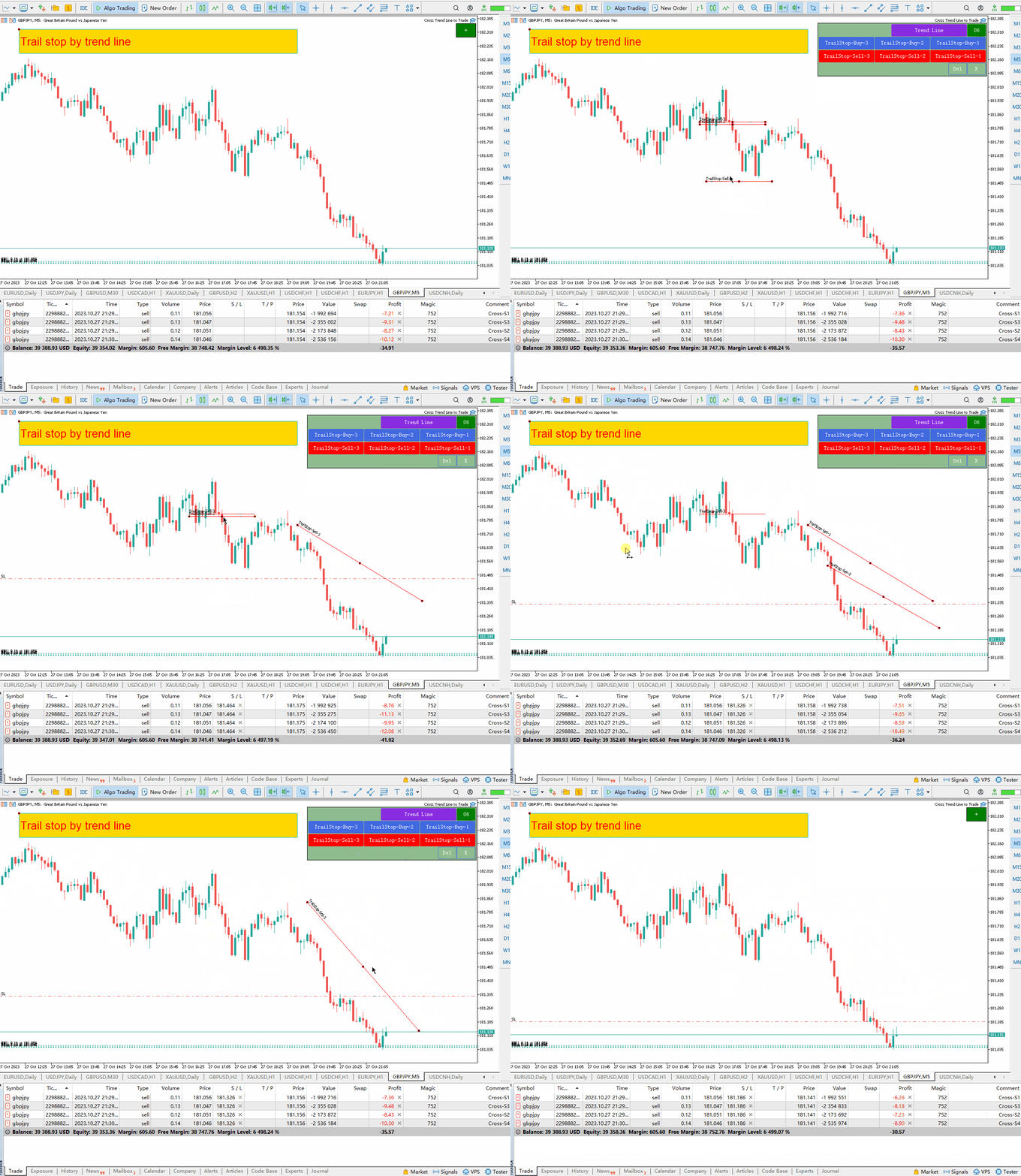
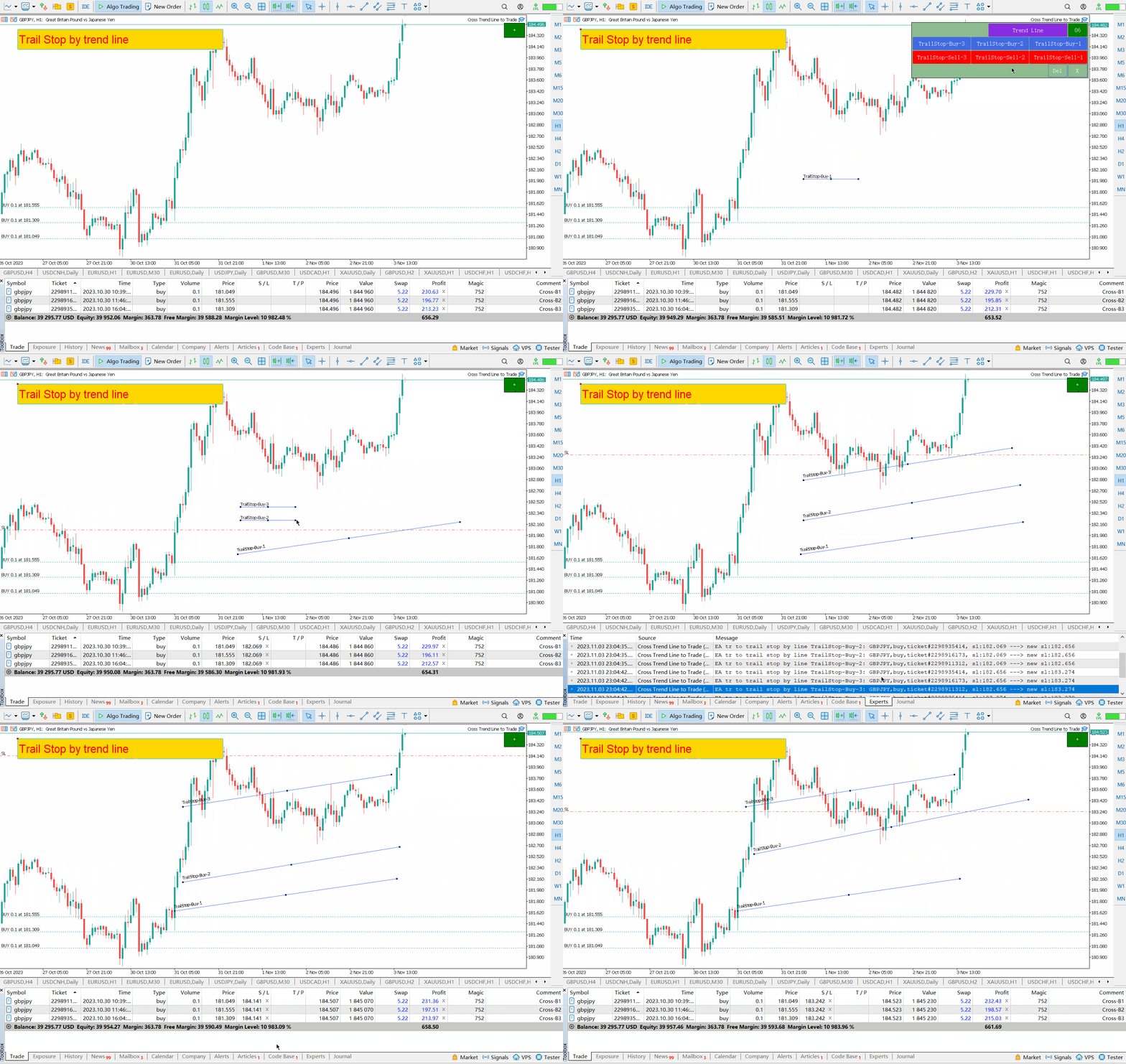
  • Trailing Stop Loss – L'EA segue la linea di tendenza e continua ad aumentare lo stop loss per gli ordini a lungo termine o a ridurre lo stop loss per gli ordini a breve termine.
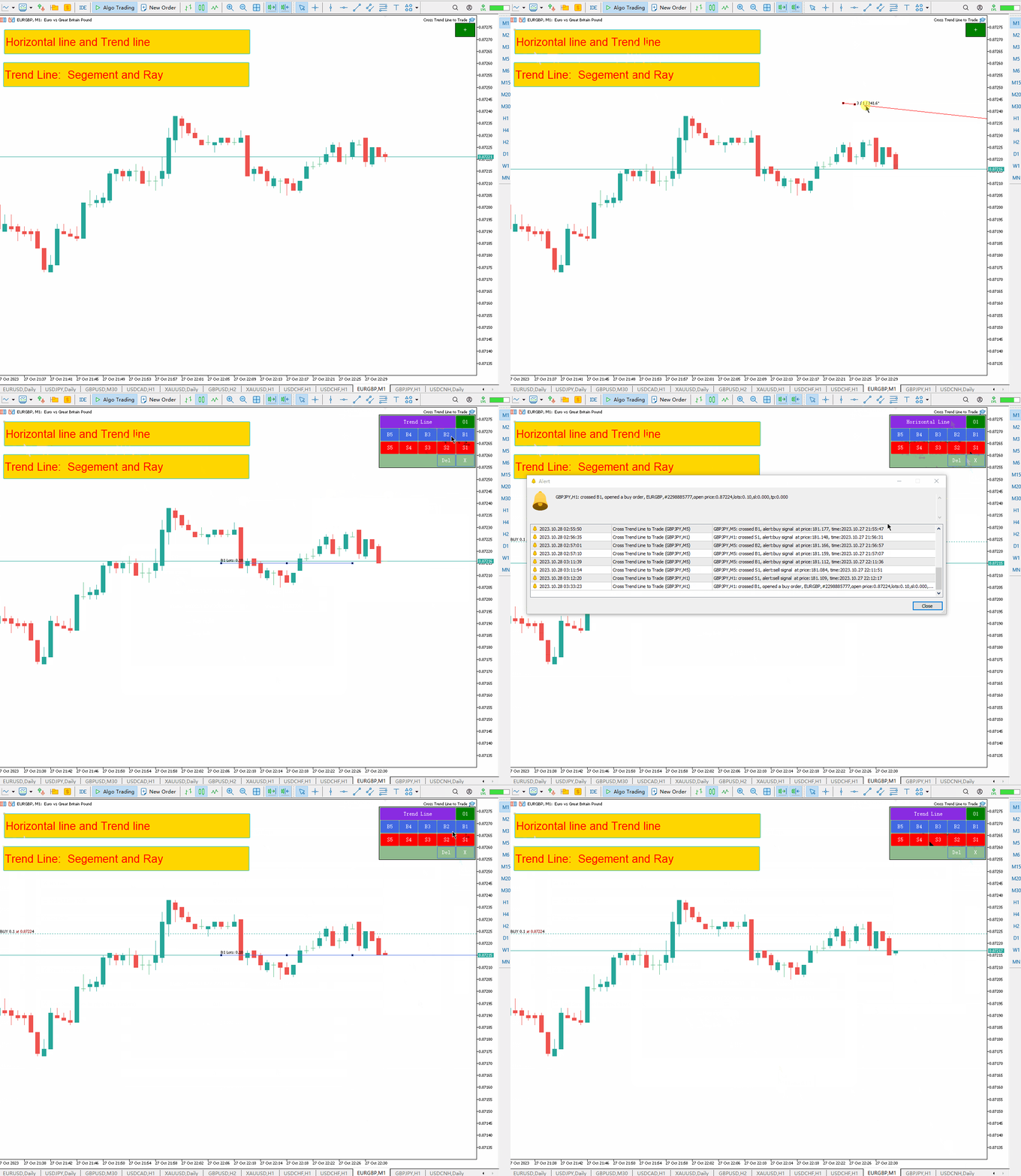
  • La linea può essere una linea di tendenza o una linea orizzontale.   Le linee di tendenza possono essere radiali o segmentali. Una linea ha la particolarità di essere negoziata solo durante il periodo in cui esiste.
  • Queste linee, su cui puoi aprire e chiudere posizioni, hanno nomi specifici. Invece di disegnare le linee manualmente, EA offre un pannello di disegno delle linee.
  • Le schermate di tutte le posizioni aperte e chiuse vengono salvate nella cartella MQL5/Files/Cross Trend Line to Trade.
L'EA funziona solo su conti di copertura

 Versione MT4: https://www.mql5.com/it/market/product/4439

Campi del disegno della linea:

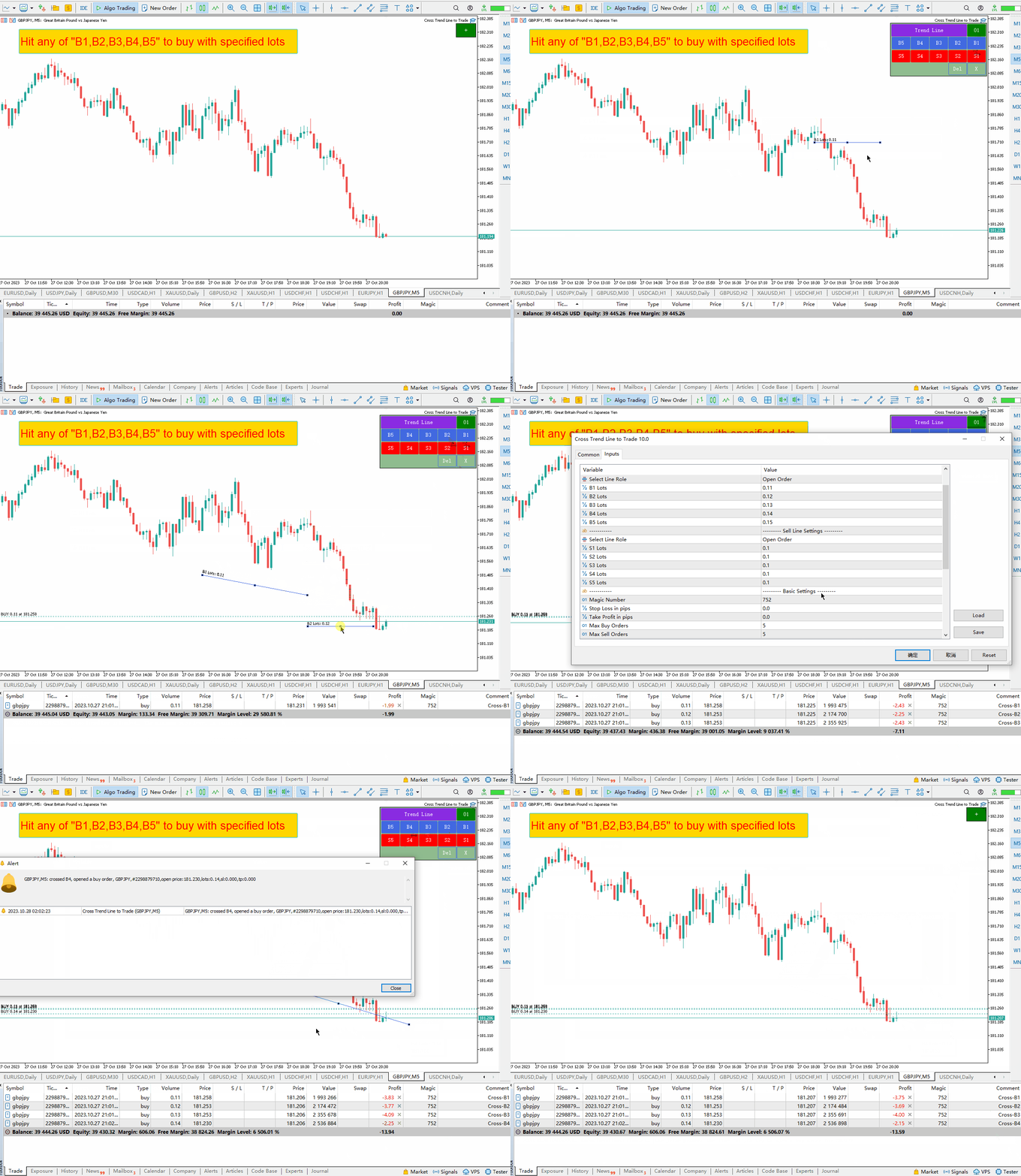
  • Quando si fa clic sul pulsante verde “+”, verranno creati sei gruppi di pannelli uno dopo l'altro. Ogni gruppo di pannelli permette di tracciare una linea di tendenza oppure una linea orizzontale cliccando sul pulsante corrispondente.
  • Fare clic sul pulsante viola per selezionare una linea di tendenza o un tipo di linea orizzontale.
  • Premendo Elimina si cancellano tutte le linee tracciate.
  • Premi X per chiudere il pannello e tornare al suo stato originale.
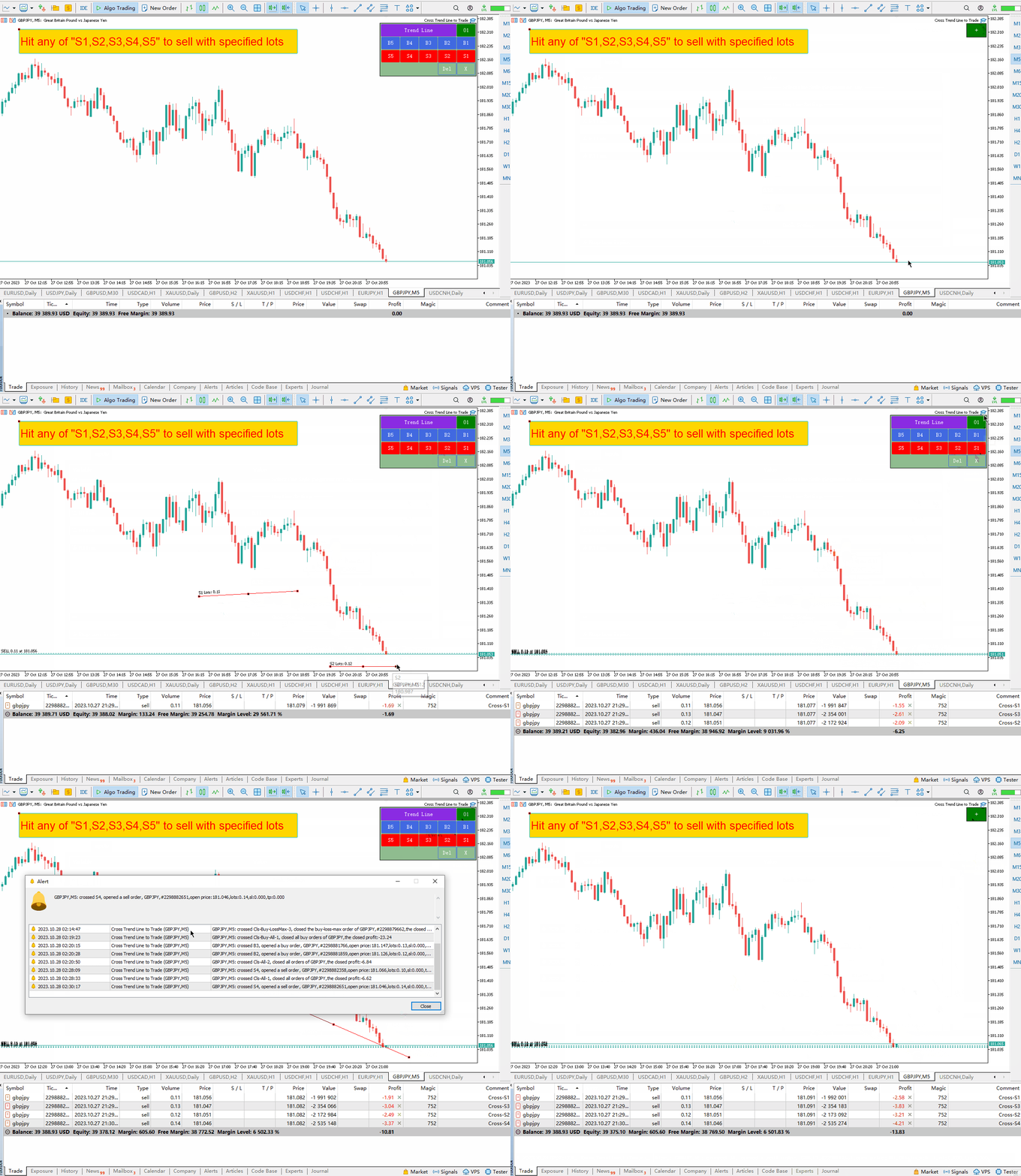
  • Premi i tasti B1, B2, B3, B4, B5 per disegnare 5 linee. Se il prezzo attraversa una di queste cinque linee, viene attivato un ordine di acquisto.
  • Premi S1, S2, S3, S4, S5 per tracciare 5 linee. Quando il prezzo raggiunge una di queste cinque righe, viene aperto un ordine vuoto.
  • Di seguito troverai descrizioni dettagliate di tutti i nomi e le funzioni delle linee di tendenza.


Nome e funzione della linea di tendenza:

  1. Posizioni di acquisto aperte: B1, B2, B3, B4, B5 -   Se il prezzo attraversa una di queste cinque linee, viene attivato un ordine di acquisto. Ogni riga può avere un solo ordine aperto. Per evitare di aprire posizioni più volte sulla stessa riga, gli ordini contengono una descrizione speciale oltre al nome della riga.
  2. Apertura di una posizione corta: S1, S2, S3, S4, S5 – Questi 5 nomi vengono utilizzati per aprire un ordine corto. Come sopra, quando si apre una posizione di acquisto, è possibile aprire un solo ordine su ciascuna riga.
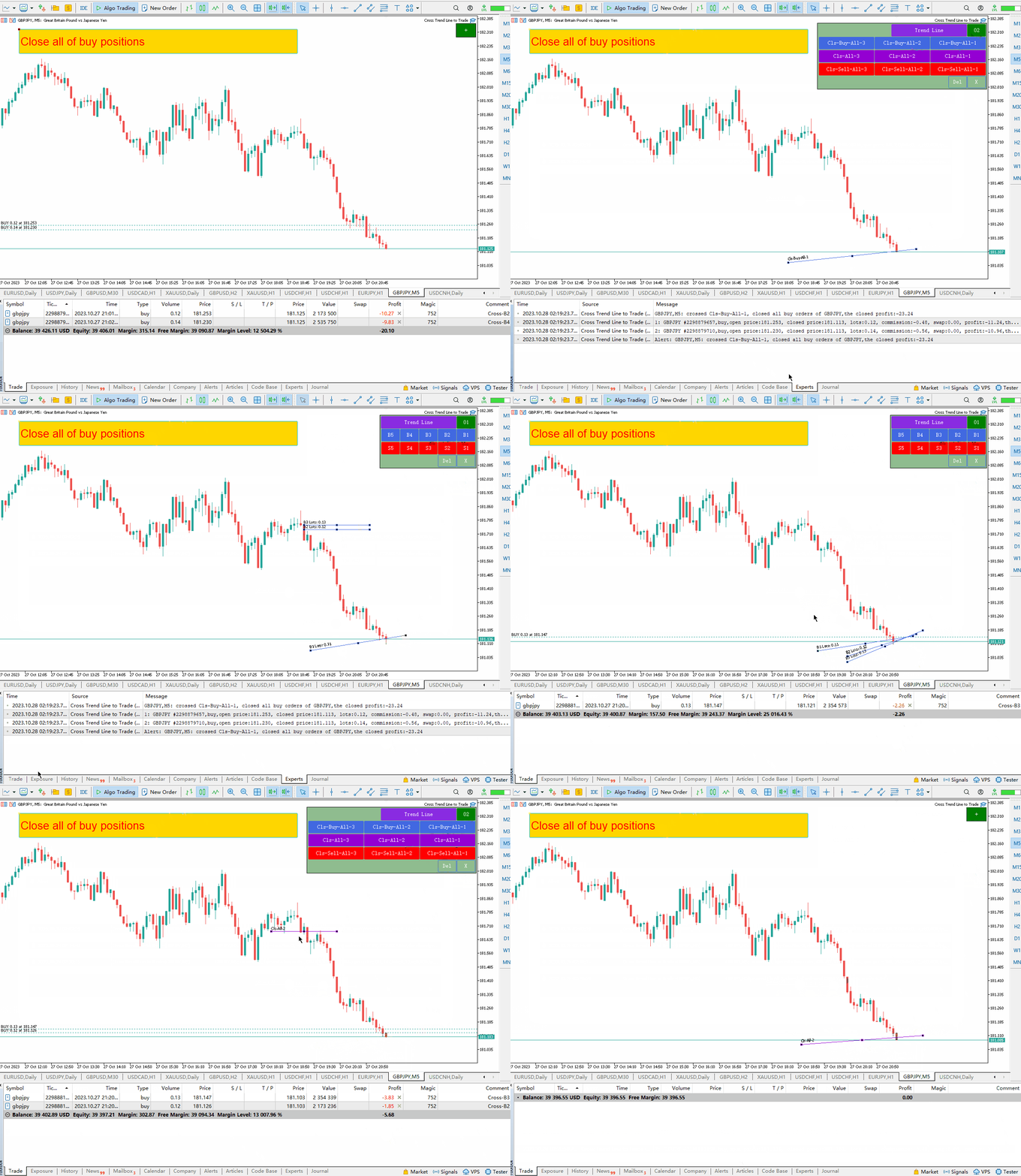
  3. Termina tutti gli ordini a lungo termine: Cls-Buy-All-1, Cls-Buy-All-2, Cls-Buy-All-3. Se il prezzo attraversa una di queste tre linee, tutti gli ordini di acquisto verranno chiusi.
  4. Liquidazione di tutti gli ordini lunghi e corti: Cls-All-1, Cls-All-2, Cls-All-3. Se il prezzo attraversa una di queste tre linee, tutti gli ordini lunghi e corti verranno chiusi.
  5. Tutti i comandi brevi terminano:   Chiavi-vendita-tutte-1;   Cls-vendi-tutto-2 ,   Cls-Sell-All-3, se il prezzo attraversa una di queste tre linee, tutte le posizioni di vendita verranno chiuse.
  6. Gli ordini redditizi a lungo termine vengono chiusi: Cls-Buy-Win-1, Cls-Buy-Win-2, Cls-Buy-Win-3. Se il prezzo attraversa una di queste tre linee, tutti gli ordini lunghi redditizi verranno terminati. suddividere.
  7. Per chiudere un ordine perdente a lungo termine:   Cls-Perdita di acquisto-1   ,   Cls-acquisto-perdita-2 ,   Cls-Buy-Loss-3, tutti gli ordini lunghi non redditizi vengono terminati quando il prezzo attraversa una di queste tre linee .
  8. Anche guadagni a breve termine:   Cls-Sale-Winner-1;   Cls-Sale-Winner-2 ,   Cls-Sell-Win-3, se il prezzo attraversa una di queste tre linee, tutte le posizioni corte redditizie verranno chiuse.
  9. Come chiudere un ordine short perdente:   Cls-Vendita-Perdita-1   ,   Cls-perdita-di-vendite-2   ,   Cls-Sell-Loss-3 : Se il prezzo attraversa una di queste tre linee, tutte le posizioni di vendita finiranno in perdita.
  10. Ordini a lungo termine più redditizi: Cls-Buy-WinMax-1;   Cls-Acquista-WinMax-2 ,   Cls-Buy-WinMax-3: Quando il prezzo attraversa una di queste tre linee, gli ordini lunghi più redditizi vengono chiusi e queste linee vengono immediatamente rimosse per evitare chiusure ripetute.
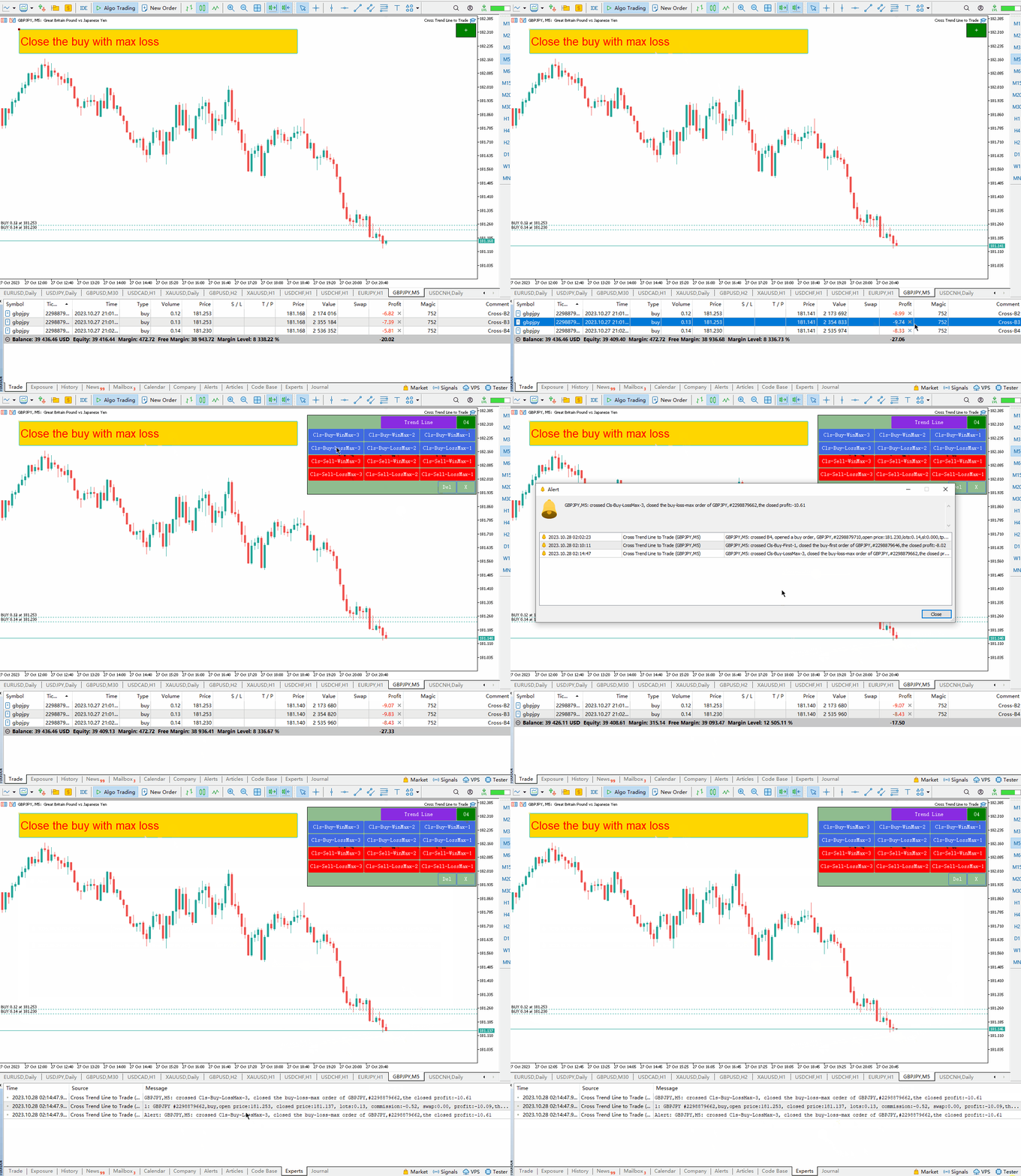
  11. Ordine lungo con la massima perdita:   Cls - perdita massima di acquisti - 1,   Cls-Buy-LossMax-2   ,   Cls-Acquisto-PerditaMax-3,   Se il prezzo attraversa una di queste tre linee, la tua posizione lunga verrà chiusa con una perdita maggiore.   , questa riga viene immediatamente cancellata per evitare che venga richiusa.
  12. Gli ordini a breve termine più redditizi:   Cls-Sales-WinMax-1,   Cls-Sales-WinMax-2   ,   Cls-Sell-WinMax-3, quando il prezzo attraversa una di queste tre linee, la posizione di vendita viene chiusa con un profitto maggiore.   , questa riga viene immediatamente cancellata per evitare che venga richiusa.
  13. Vendi posizione con la massima perdita:   Cls-Vendite-PerditaMax-1,   Cls-Sales-LossMax-2   ,   Cls-Vendite-PerditaMax-3,   Se il prezzo attraversa una di queste tre linee, la tua posizione short verrà chiusa con una perdita maggiore.     , questa riga viene immediatamente cancellata per evitare che venga richiusa.
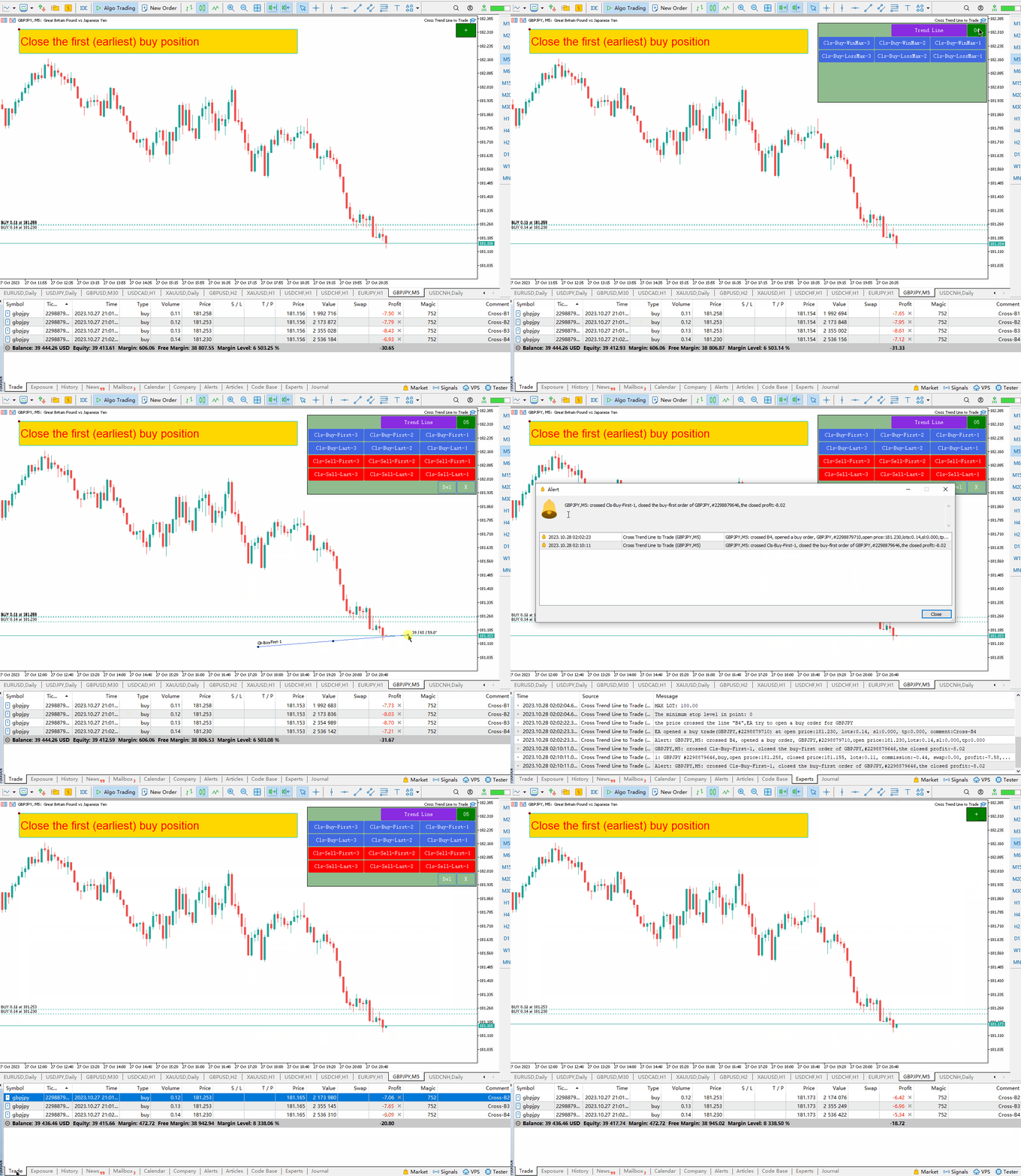
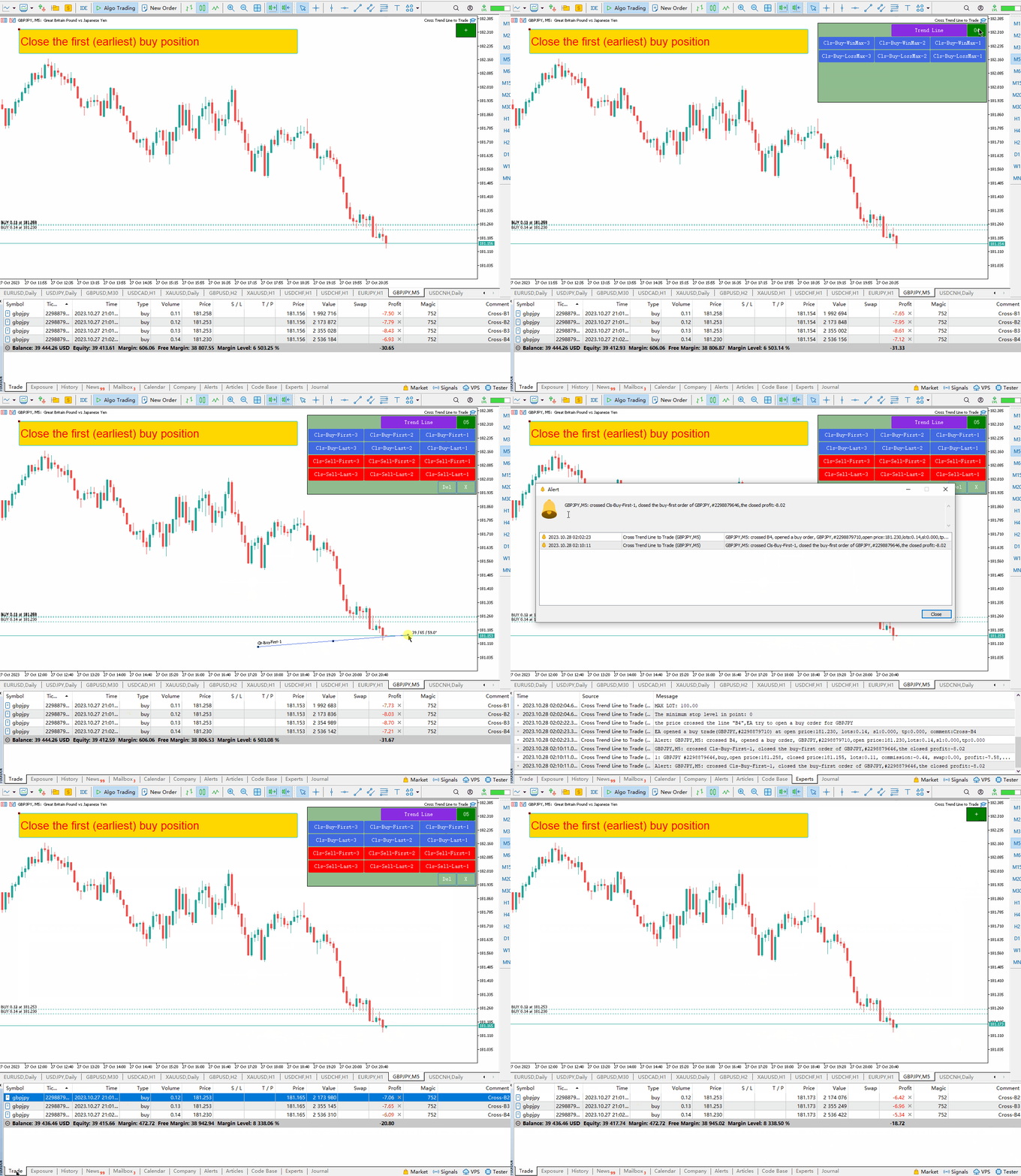
  14. Primo ordine di acquisto per chiudere la posizione: Cls-Buy-First-1, Cls-Buy-First-2,   Cls-Buy-First-3, se il prezzo attraversa una di queste tre linee, l'ordine di acquisto verrà chiuso alla prima ora di apertura.   , questa riga viene immediatamente cancellata per evitare che venga richiusa.
  15. Ultimo lungo ordine per liquidare la posizione:   Cls-Acquista-Ultimo-1, Cls-Acquista-   scorso   -due,   Cls   scorso   -First-3 Se il prezzo attraversa una di queste tre linee, l'ordine di acquisto verrà chiuso all'ultimo orario di apertura.
  16. Primo ordine breve per liquidare una posizione:   Cls-Sales-Priorità-1, Cls-Sales-Priorità-2,   Cls-Sell-First-3: Se il prezzo attraversa una di queste tre linee, la tua posizione di vendita verrà chiusa alla prima ora di apertura.   , questa riga viene immediatamente cancellata per evitare che venga richiusa.
  17. Ultimo lungo ordine per liquidare la posizione:   Vendita-Cls-ultima-1, Vendita-Cls-   scorso   -due,   Cls – Vendite – 1° – 3°   - Se il prezzo attraversa una di queste tre linee, la tua posizione di vendita verrà chiusa all'ultima ora di apertura.     , questa riga viene immediatamente cancellata per evitare che venga richiusa.
  18. Stop loss mobili per ordini lunghi: TSB1, TSB2, TSB3: linee di stop loss per ordini lunghi. Queste tre linee vengono utilizzate per spostare gli stop loss sugli ordini long. Se il prezzo di mercato è sopra la linea, lo stop loss dell'ordine di acquisto si sposterà verso la linea.
  19. Stop Loss mobile per ordini short: TSS1, TSS2, TSS3 sono linee di tracciamento dello stop loss per ordini short. Queste tre linee vengono utilizzate per spostare gli ordini di stop loss a breve termine. Se il prezzo di mercato è sotto la linea, l'interbase si muove verso la linea.


Descrizione dei parametri di input:

1. Impostazioni relative alla linea
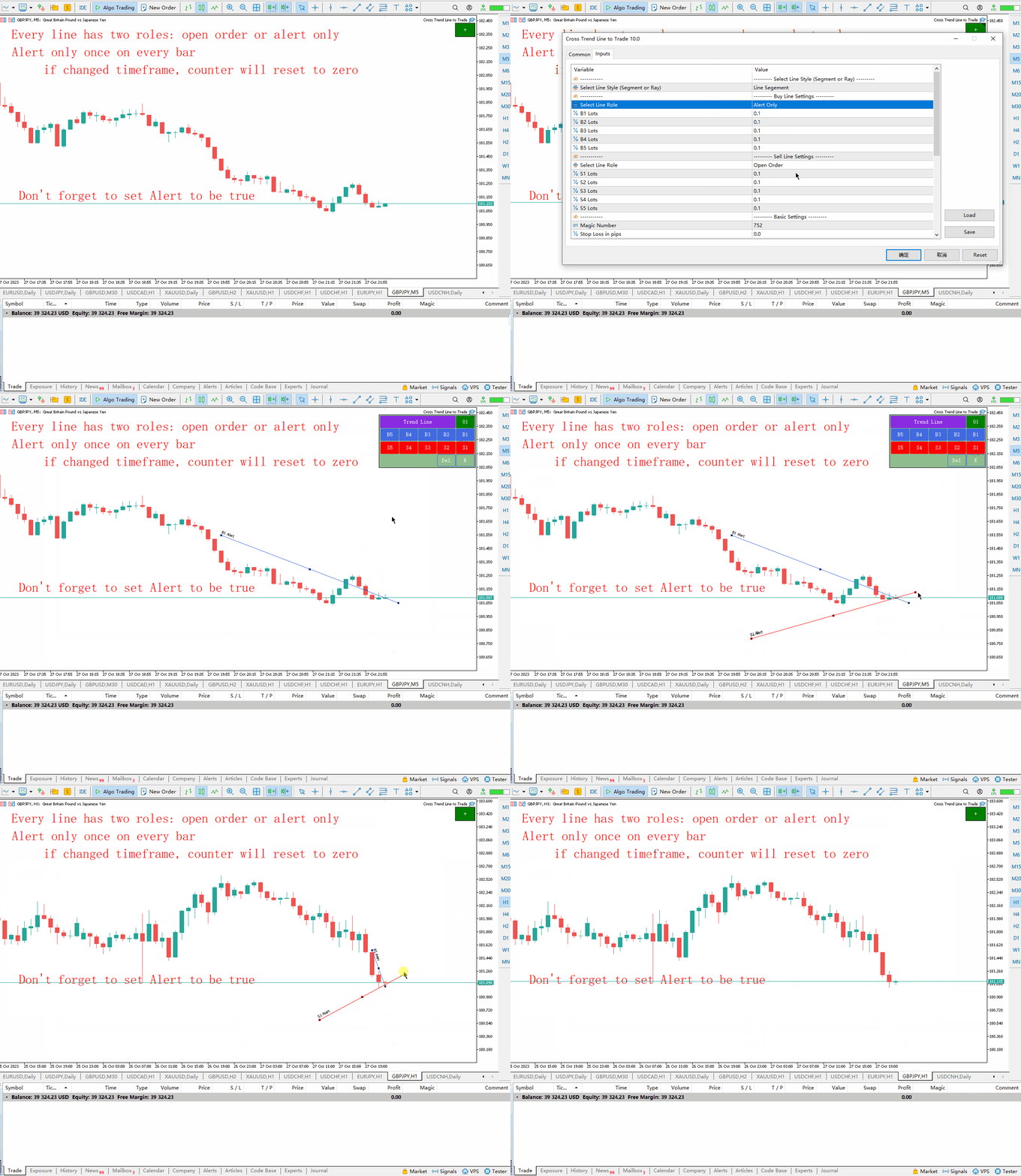
  • Trend Line Style: seleziona il tipo di linea che desideri disegnare (segmento di linea, raggio di linea).
  • Select Line Role: Seleziona la funzione da eseguire sulle linee B1, B2, B3, B4, B5. Solo posizione aperta o allarme.
  • B1 Lots: numero di lotto originale corrispondente alla riga “B1”.
  • B2 Lots: numero di lotto originale corrispondente alla riga “B2”.
  • B3 Lots: numero di lotto originale corrispondente alla riga “B3”.
  • B4 Lots: numero di lotto originale corrispondente alla riga “B4”.
  • B5 Lots: numero di lotto iniziale corrispondente alla riga “B5”.
  • Select Line Role: : Linee S1, S2, S3, S4, S5: Selezionare la funzione da eseguire solo in posizione aperta o in condizione di allarme.
  • S1 Lots: numero di lotto originale corrispondente alla riga “S1”.
  • S2 Lots: numero di lotto originale corrispondente alla riga “S2”.
  • S3 Lots: numero di lotto originale corrispondente alla riga “S3”.
  • S4 Lots: numero di lotto originale corrispondente alla riga “S4”.
  • S5 Lots: numero di lotto originale corrispondente alla riga “S5”.
2. Ricevi diverse impostazioni come pareggio, gestione dei numeri d'ordine, pop-up, email e notifiche push sul tuo cellulare.
  • Magic Number: numero magico di EA e nome in codice di EA.
  • Stop loss in pips: Quando un EA apre una posizione, imposta il prezzo di stop loss per l'ordine in base alle impostazioni in questo campo.
  • Take Profit In pips: Quando un EA apre una posizione, imposta il prezzo vincente dell'ordine in base a questi parametri pip.
  • Max Buy Orders : numero massimo di ordini a lungo termine. Infatti ci sono solo 5 linee di tendenza: B1, B2, B3, B4, B5, quindi puoi aprire fino a 5 ordini di acquisto. Supponendo che questo parametro sia impostato su 2, verranno aperti due ordini quando il prezzo incrocia due linee e nessuna posizione verrà aperta se il prezzo attraversa un'altra linea.
  • Max Sell Orders: il numero massimo di ordini di vendita allo scoperto. In realtà ci sono solo 5 linee di tendenza: B1, B2, B3, B4, B5, quindi puoi aprire fino a 5 ordini vuoti. Supponendo che questo parametro sia impostato su 2, verranno aperti due ordini quando il prezzo incrocia due linee e nessuna posizione verrà aperta se il prezzo attraversa un'altra linea.
  • Delete Line After Trade - Se impostato su true, il consulente eliminerà le linee dopo aver completato un'operazione (aprendo o chiudendo una posizione).
  • Trail Stop Level in pips (Buy Orders): un ordine di acquisto deve trarre profitto da questo pip prima di seguire lo stop loss. Se questo parametro è 0, non è necessario raggiungere il livello di profitto del pip prima di seguire lo stop loss.
  • Trail Stop Level in pips (Sell Orders): gli ordini brevi devono trarre profitto da questi pip prima di seguire un trailing stop. Se questo parametro è 0, non è necessario raggiungere il punto di profitto prima di seguire lo stop.
  • Popup Alert: una finestra pop-up apparirà quando apri o chiudi una posizione.
  • Email Alert: riceverai notifiche e-mail quando apri o chiudi una posizione.
  • Mobile Push Alert:   Quando una posizione viene aperta o chiusa, verrà inviata una notifica push al tuo telefono con una notifica.

3. Regolare la posizione del pannello e le dimensioni dei pulsanti.

  • Shift X: movimento orizzontale dell'angolo superiore destro del grafico.
  • Shift Y:: Movimento verticale basato sull'angolo in alto a destra del grafico
  • Button Width: larghezza della chiave
  • Button Height: l'altezza del pulsante.
  • Font Size: la dimensione del carattere del pulsante.
  • The Overall Scale Ratio: numero di volte in cui il pannello esegue lo zoom avanti o indietro.


Ulteriori informazioni:

  1. Ogni volta che avvii MT5 o carichi un EA su un grafico, l'EA si fermerà per 3 secondi mentre il grafico si aggiorna all'avvio di MT5. Quindi evita di fare trading durante questo periodo.
  2. Se il parametro Trailing Stop Loss è 0, lo Stop Loss segue la linea di tendenza.
  3. Se il parametro di tracking loss è maggiore di 0, solo gli ordini i cui punti di profitto sono maggiori del valore del parametro sposteranno lo stop loss lungo la linea di tendenza.
  4. Il prezzo di stop loss per gli ordini a lungo termine non scende mai.
  5. Il prezzo di stop loss per gli ordini a breve termine non aumenta mai.
  6. Per evitare operazioni inaspettate causate dal prezzo che attraversa la linea di tendenza durante l'intervallo del lunedì, si consiglia di rimuovere la linea di tendenza venerdì o spostare la linea di tendenza a sinistra del grafico.

//---


Recensioni 1
JCJ
851
JCJ 2025.01.10 01:48 
 

Great tool for trading trend & support/resistance line breaks

Prodotti consigliati
TradePilotmt5
Hossein Khalil Alishir
TradePilot Expert Advisor (EA) for MetaTrader 5 TradePilot is a professional and user-friendly Expert Advisor (EA) for MetaTrader 5 (MT5) . It simplifies automated trading , risk management , and trade execution with a smart trading panel . Perfect for beginners and experienced traders looking for a reliable trade manager EA with automated lot size calculation and smart position management. Key Advantages User-Friendly Trading Panel: Customizable panel with buttons and hotkeys for fast ex
Indicatore Crypto_Forex "WPR con 2 Medie Mobili" per MT5, senza ridisegno. - WPR è uno dei migliori oscillatori per lo scalping. - L'indicatore "WPR e 2 Medie Mobili" consente di visualizzare le medie mobili veloci e lente dell'oscillatore WPR. - L'indicatore offre l'opportunità di visualizzare le correzioni di prezzo molto presto. - È molto facile impostare questo indicatore tramite parametri e può essere utilizzato su qualsiasi timeframe. - È possibile visualizzare le condizioni di ingresso
Inverted_Chart_EA Utility Expert Advisor Inverted_Chart_EA creates and maintains a mirror-inverted chart of any symbol and timeframe. It automatically generates a custom instrument (e.g. US30_INV ) and keeps its price history updated in real time, with bars mirrored around a chosen pivot. This utility gives traders a new way to analyze the market from a different perspective by flipping the chart upside down. Why use an inverted chart? Highlight hidden patterns – price formations that look ordin
Trading Edge Scanner
Maya Roma Oberholzer
TradingEdge Scanner - Professional Multi-Market Pattern Recognition Tool OVERVIEW: TradingEdge Scanner is a sophisticated pattern recognition system designed for serious traders who need reliable inside day, breakout, and false breakout detection across both Forex and Cryptocurrency markets. KEY FEATURES: Dual Market Coverage: Separate scanning for Forex (weekdays) and Crypto (24/7) Enhanced Alert System: Separate notifications for Forex and Crypto patterns Professional Summary Table
SolarTrade Suite Financial Robot: LaunchPad Market Expert - progettato per aprire le negoziazioni! Questo è un robot di trading che utilizza speciali algoritmi innovativi e avanzati per calcolare i suoi valori, il tuo assistente nel mondo dei mercati finanziari. Utilizza il nostro set di indicatori della serie SolarTrade Suite per scegliere meglio il momento in cui lanciare questo robot. Dai un'occhiata agli altri nostri prodotti della serie SolarTrade Suite in fondo alla descrizione. Vuoi n
The Techno Deity — Dominanza Digitale su XAUUSD Promo: Ricevi l'expert Cryon X-9000 in regalo. Contattami per i dettagli. The Techno Deity è un sistema avanzato per l'oro che utilizza l'intuizione digitale per trovare squilibri di mercato e zone istituzionali, garantendo precisione e basso drawdown. Caratteristiche Liquidity Intelligence: Identifica flussi di ordini nascosti. Neural Trend Filter: Filtra i falsi segnali e il rumore. Zero-Grid: Nessuna martingala o griglia. Gestione matematica del
Strumento Daytrade Istituzionale Assistente visivo avanzato per il trading manuale. Daytrade Tool Istituzionale è un Expert Advisor di Visualizzazione professionale sviluppato per i trader manuali che utilizzano Price Action, CRT, PO3, ICT/SMC e necessitano di chiarezza istituzionale sul grafico. Daytrade Tool Istituzionale trasforma il tuo grafico in una dashboard di analisi istituzionale, consentendo al trader il controllo completo dell'esecuzione. Chiarezza visiva. Contesto professionale
Short Description Swing Timing Breakout EA is a smart Expert Advisor for MetaTrader 5 that combines trend filtering, momentum timing, and dynamic risk management to capture high-probability swing and breakout opportunities. Full Description Swing Timing Breakout EA is a professional trading robot designed for MetaTrader 5, suitable for traders who want a balance between automation, control, and disciplined risk management. This EA uses a trend-following and momentum confirmation approach ,
Bober Real MT5
Arnold Bobrinskii
4.76 (17)
Bober Real MT5 is a fully automatic Forex trading Expert Advisor. This robot was made in 2014 year and did a lot of profitbale trades during this period. So far over 7000% growth on my personal account. There was many updates but 2019 update is the best one. The robot can run on any instrument, but the results are better with EURGBP, GBPUSD, on the M5 timeframe. Robot doesn't show good results in tester or live account if you run incorrect sets. Set files for Live accounts availible only for cu
##   ONLY GOLD ##   Тiльки Золото ## **Mercaria Professional Trading Zones - Complete Guide** ## **Mercaria Professional Trading Zones - Повний посібник** ### **How Mercaria Zones Work / Як працюють зони Mercaria** **English:** Mercaria Zones is an advanced trading indicator that identifies high-probability support and resistance areas using ZigZag extremes combined with mathematical zone calculations. The indicator works on multiple timeframes simultaneously, providing a comprehensive view
It's a trading dashboard appears on strategy tester, allows you to backtest your own strategies, testing them on multiple symbols and timeframes. It is equipped with useful features such as risk management, trailing stops, breakeven points, and more, enabling you to evaluate and refine your strategies effectively. Trading panels are typically designed to facilitate real-time trading and may not function properly on a strategy tester. However, this particular trading panel is specifically designe
Mine Farm
Maryna Kauzova
Mine Farm is one of the most classic and time-tested scalping strategies based on the breakdown of strong price levels. Mine Farm is the author's modification of the system for determining entry and exit points into the market... Mine Farm - is the combination of great potential with reliability and safety. Why Mine Farm?! - each order has a short dynamic Stop Loss - the advisor does not use any risky methods (averaging, martingale, grid, locking, etc.) - the advisor tries to get the most
Tradegram Pro MT5
Florian Pierre Bonnet
TradeGram Pro MT5 – Trading Monitoring & Telegram Assistant Launch Price: 49 USD (Limited to the first 30 buyers) Regular Price: 149 USD Your 24/7 Trading Control Center TradeGram Pro connects your MetaTrader 5 to Telegram for  real‑time monitoring  and  automatic alerts when the drawdown reaches thresholds you have defined . Ideal for algorithmic trading on a VPS and for manual traders who need instant alerts on mobile. Conceived to  facilitate the monitoring of your challenge‑style account
Prop Firm Lot Size Calculator
Christian Paul Anasco
5 (1)
Now, you have your very own  PROP FIRM LOT SIZE CALCULATOR ! It now has BREAKEVEN and PARTIAL CLOSURE features! There's no need to go to other websites just to compute for the exact lot size. It also opens the trade with a click of a button. All inputs on the calculator can be edited. So if you want to change the SL or TP or the lot size, you can do so before placing an order. ========================================== INPUTS (Please see screenshot for reference): 1. SL PRICE TEXT . This is clic
Tool Auto Modify SLTP – Protect Your Trades, Optimize Your Strategy In trading, risk is always present. Just one forgotten SL/TP can turn a promising trade into a loss. Even experienced traders occasionally make mistakes. That’s why Tool Auto Modify SLTP was created – to keep you protected and let you focus on your strategy. Key Features: Manage Orders for All Symbols: Monitor and adjust SL/TP for all your trading pairs. Three Flexible Risk Modes: Point-Based: Set fixed SL/TP distances. Account
Auto SLTP Maker MT5
Oleg Remizov
5 (1)
Auto SLTP Maker MT5  is an assistant for all those who forget to set StopLoss and/or TakeProfit in deal parameters, or trade on a very fast market and fail to place them in time. This tool automatically tracks trades without StopLoss and/or TakeProfit and checks what level should be set in accordance with the settings. The tool works both with market and pending orders. The type of orders to work with can be set in the parameters. It can track either trades for the instrument it runs on, or all
Real Market Liquidity Levels This Expert Advisor for MetaTrader 5 displays real liquidity levels taken directly from the live market via an external API. The data is drawn on your broker’s MT5 chart in real time. Real market levels – independent from broker prices Liquidity levels are automatically adjusted to the current price , even if your broker has a small price offset compared to real market prices. This ensures you always see true pending orders from major market participants , not jus
Bullish EA v1.11 – A clean, powerful, and disciplined Gold-only trading robot for MetaTrader 5 (Author: Lungile Mbanjwa – built with help from ChatGPT & Grok) This EA was created from day one to trade XAUUSD (Gold) only and is used by the author himself every day with these exact settings: Signal timeframe: M5 (fast crossover detection) Trend filter timeframe: M30 (strong trend confirmation via Stop-Filter MA) How it works: Buy when Short MA > Long MA > Stop MA on the selected timeframes Sell w
Trading Assistent is a multifunctional trading panel that combines all necessary tools for professional trading. The panel provides complete control over positions, in-depth risk analysis, and fast order execution. MAIN FUNCTIONAL BLOCKS Position Management: - Real-time viewing of all open positions - Sorting by symbol, profit, volume, and type - Visual indication of profitable and losing positions - Bulk closing operations - Breakeven function for profit protection Trading Operations: - I
Perfect Trade EA Indicator 2026 for XAUUSD MT5 Премиальный многоуровневый самообучающийся индикатор с режимом автоторговли для XAUUSD Perfect Trade EA Indicator 2026 — это не просто индикатор и не обычный советник с примитивным входом по шаблону. Это премиальный торговый комплекс для MetaTrader 5, созданный для работы с XAUUSD, который объединяет в себе: - многоуровневый анализ рынка; - интеллектуальную фильтрацию сигналов; - режим автоматической торговли; - продвинутое сопровождение сделки;
Il livello Premium è un indicatore unico con una precisione superiore all'80% delle previsioni corrette! Questo indicatore è stato testato dai migliori Specialisti di Trading per più di due mesi! L'indicatore dell'autore che non troverai da nessun'altra parte! Dagli screenshot puoi vedere di persona la precisione di questo strumento! 1 è ottimo per il trading di opzioni binarie con un tempo di scadenza di 1 candela. 2 funziona su tutte le coppie di valute, azioni, materie prime, criptovalu
Hello traders! I present to you Argo Gold Edition MT5 - an expert built for gold trading, which is tailored to the specifics of gold movements on international markets. The basis of its logic is that it follows profitable patterns drawn from past periods. Mathematical algorithms are based on the correlation between the values of the indicators used and the corresponding movement of the price of gold. The expert is built on the basis of the ARGO series. It specializes in GOLD / XAUUSD trading. 2
Gold Adaptor
Serhii Doskoch
Gold Adaptor – Your Ultimate Trading Edge! Tired of missing the perfect trade? Gold Adaptor does the heavy lifting for you! This powerful, precision-driven trading advisor scans the market in real-time, executing trades with unmatched accuracy. No more guesswork—just smart, adaptive strategy designed to keep you ahead of the game! Lightning-fast execution – Get in at the right moment, every time Smart decision-making – Trades based on deep market analysis Fully automated – Set it, fo
Overview Auto Fibo Trend Signal is a comprehensive analysis tool designed to support discretionary traders in market environment recognition and trade execution. Featuring an interactive on-chart dashboard, it allows for seamless control over multiple technical indicators and dynamic drawing tools. This indicator eliminates the need to constantly open the properties window, enabling flexible, real-time analysis directly on the chart. Key Features Interactive Dashboard The dedicated control pane
FREE
"Impulses and Corrections 5" is created to help traders navigate the market situation. The indicator shows multi-time frame upward and downward "Impulses" of price movements. These impulses are the basis for determining the "Base" , which is composed of zones of corrections of price movements, as well as "Potential" zones for possible scenarios of price movement. Up and down impulses are determined based on a modified formula of Bill Williams' "Fractals" indicator. The last impulse is always "U
Vict Channel
Tatiana Savkevych
Victory Channel is a forex trend arrow indicator for identifying potential entry points. I like it, first of all, because it has a simple mechanism of work, adaptation to all time periods and trading tactics. Created on the basis of a regression channel with filters. We display the signals of the Victory Channel indicator on the chart of the price function using a mathematical approach. How it works - when the price breaks through the overbought/oversold zone (channel levels), a buy or sell si
Gold Smc Apex Scalping h1
Chaibadee Dechtanankul
Here is a breakdown of how the GOLD SMC APEX SCALPER (H1 BUY EDITION) operates specifically on the H1 (1-Hour) timeframe. This Expert Advisor (EA) uses a hybrid approach , combining Smart Money Concepts (SMC) for entry zones with a Grid & Martingale system for trade execution and recovery. 1. Execution on the H1 Timeframe (The "New Bar" Rule) Strict H1 Lock: The EA checks its environment during initialization ( OnInit ). If you attach it to any timeframe other than H1, it will trigger an alert a
ID Trade_Bot BS - an effective tool for automated trading using RSI Trade_Bot BS is an efficient solution for automated trading based on RSI, allowing flexible parameter customization and risk management. Thanks to the ability to choose a trading mode, dynamic Stop-Loss and Take-Profit levels, and trading mode adjustment (buying, selling, or both), it is suitable for various trading strategies. Key Features: Uses the RSI indicator to determine market conditions. Automatically opens an
STRICTLY FOR BOOM INDEX ONLY!!!!! Here I bring the Maximum Trend Arrows OT1.0 MT5 indicator. This indicator is made up of a combination of different trend indicators for entries and exits, for entries an orange arrow will paint on the chart below the current market and a red flag for closing of trades and it produces buy arrows only. When the orange arrow appears, it will appear along with it's sound to notify you. The 1H timeframe is recommended, don't use it anywhere else than on the 1H timefr
Live Forex Trading EA
Aryaman Shah
3.67 (3)
In trading, the Sell or Buy decision is not easy. You need to perform extensive analysis and wait for a suitable entry. Despite this, the majority of traders struggle to maintain consistency. Here comes my EAI, a bot designed to automatically evaluate and execute trades using its artificial intelligence. It is built to work effectively with or without news trading. The AI-powered bot is designed to learn from its trades, optimizing its strategy daily to enhance accuracy and target profitability
Gli utenti di questo prodotto hanno anche acquistato
Trade Assistant MT5
Evgeniy Kravchenko
4.42 (208)
It helps to calculate the risk per trade, the easy installation of a new order, order management with partial closing functions, trailing stop of 7 types and other useful functions. Additional materials and instructions Installation instructions - Application instructions - Trial version of the application for a demo account Line function -   shows on the chart the Opening line, Stop Loss, Take Profit. With this function it is easy to set a new order and see its additional characteristics bef
Forex Trade Manager MT5
InvestSoft
4.97 (627)
Benvenuto a Trade Manager EA, lo strumento definitivo per la gestione del rischio , progettato per rendere il trading più intuitivo, preciso ed efficiente. Non è solo uno strumento per l'esecuzione degli ordini, ma una soluzione completa per la pianificazione delle operazioni, la gestione delle posizioni e il controllo del rischio. Che tu sia un principiante, un trader avanzato o uno scalper che necessita di esecuzioni rapide, Trade Manager EA si adatta alle tue esigenze, offrendo flessibilità s
TradePanel MT5
Alfiya Fazylova
4.86 (148)
Trade Panel è un assistente commerciale multifunzionale. L'applicazione contiene più di 50 funzioni di trading per il trading manuale e consente di automatizzare la maggior parte delle operazioni di trading. Attenzione, l'applicazione non funziona nel tester di strategia. Prima dell'acquisto, puoi testare la versione demo su un conto demo. Versione demo qui . Istruzioni complete qui . Commercio. Ti consente di eseguire operazioni di trading con un clic: Apri ordini e posizioni pendenti con calco
Versione Beta Telegram to MT5 Signal Trader è quasi pronto per il rilascio ufficiale in versione alpha. Alcune funzionalità sono ancora in fase di sviluppo e potresti riscontrare piccoli bug. Se riscontri problemi, ti preghiamo di segnalarli, il tuo feedback aiuta a migliorare il software per tutti. Telegram to MT5 Signal Trader è uno strumento potente che copia automaticamente segnali di trading da canali o gruppi Telegram al tuo account MetaTrader 5 . Supporta canali pubblici e privati e cons
FarmedHedge Pair Trading Dashboard
Tanapisit Tepawarapruek
5 (2)
VERIFIED TRADING RESULTS - Farmed Hedge Yield Axi Copy:  https://www.mql5.com/en/signals/2356376 - Farmed Hedge Yield Exn Copy:   https://www.mql5.com/en/signals/2356404 - Farmed Hedge Yield V Copy:  https://www.mql5.com/en/signals/2357156 Contact me via private message to receive the User Manual and Setup. * Thai Lauguage Support Available Farmed Hedge Yield Farming - Professional Pair Trading Dashboard (Manual - Hybrid - Semi/Automated EA) VERSION 3 - WILD HARVEST UPDATE Trading Approac
Trade Dashboard MT5
Fatemeh Ameri
4.94 (119)
Tired of complex order placement and manual calculations? Trade Dashboard is your solution. With its user-friendly interface, placing orders becomes effortless, by a single click, you can open trades, set stop loss and take profit levels, manage trade lot size, and calculate risk to reward ratios, allowing you to only focus on your strategy. Say goodbye to manual calculations and streamline your trading experience with Trade Dashboard. Download  Demo Version  right now. You can find  Details of
Copy Cat More Trade Copier MT5 (Gatto Copiatore MT5) è un copiatore di trade locale e un framework completo di gestione del rischio ed esecuzione progettato per le sfide di trading odierne. Dalle sfide delle prop firm alla gestione di portafogli personali, si adatta a ogni situazione con una combinazione di esecuzione robusta, protezione del capitale, configurazione flessibile e gestione avanzata dei trade. Il copiatore funziona sia in modalità Master (mittente) che Slave (ricevente), con sincro
Smart Stop Manager MT5
Daniel Stein
4.33 (3)
Smart Stop Manager – Esecuzione automatica dello stop-loss con precisione professionale Panoramica Smart Stop Manager è il livello di esecuzione della linea Smart Stop, progettato per i trader che richiedono una gestione dello stop-loss strutturata, affidabile e completamente automatizzata su più posizioni aperte. Monitora continuamente tutte le operazioni attive, calcola il livello di stop ottimale utilizzando la logica di struttura di mercato Smart Stop e aggiorna gli stop automaticamente se
Telegram To MT5 Receiver
Levi Dane Benjamin
4.53 (15)
Copia i segnali da qualsiasi canale di cui sei membro (compresi quelli privati e ristretti) direttamente sul tuo MT5.  Questo strumento è stato progettato con l'utente in mente offrendo molte funzionalità necessarie per gestire e monitorare gli scambi. Questo prodotto è presentato in un'interfaccia grafica facile da usare e visivamente accattivante. Personalizza le tue impostazioni e inizia ad utilizzare il prodotto in pochi minuti! Guida per l'utente + Demo  | Versione MT4 | Versione Discord
Trade Manager DashPlus
Henry Lyubomir Wallace
5 (13)
DashPlus è uno strumento avanzato di gestione delle operazioni progettato per migliorare l'efficienza e l'efficacia del trading sulla piattaforma MetaTrader 5. Offre una suite completa di funzionalità, tra cui calcolo del rischio, gestione degli ordini, sistemi di griglia avanzati, strumenti basati su grafici e analisi delle prestazioni. Caratteristiche Principali 1. Griglia di Recupero Implementa un sistema di griglia flessibile e di media per gestire le operazioni in condizioni di mercato avve
The News Filter MT5
Leolouiski Gan
4.74 (19)
Questo prodotto filtra tutti gli esperti consulenti e i grafici manuali durante il periodo delle notizie, così non dovrai preoccuparti di improvvisi picchi di prezzo che potrebbero distruggere le tue impostazioni di trading manuali o le negoziazioni effettuate da altri esperti consulenti. Questo prodotto viene fornito anche con un sistema completo di gestione degli ordini che può gestire le tue posizioni aperte e gli ordini in sospeso prima della pubblicazione di qualsiasi notizia. Una volta che
Non testare un EA solo contro l’unico percorso di mercato che si è realmente verificato. Testalo su molti mercati plausibili e scopri se la sua logica è davvero robusta. Il backtest tradizionale ha un limite fondamentale: mostra soltanto come un sistema avrebbe funzionato in un unico passato reale . Questo è il problema. Il mercato avrebbe potuto seguire molti percorsi diversi. E un expert advisor che funziona bene sullo storico reale non necessariamente si comporterà allo stesso modo se le con
Smart Stop Scanner – Analisi multi-asset degli stop-loss basata sulla reale struttura di mercato Panoramica Smart Stop Scanner offre un monitoraggio professionale dei livelli di stop-loss su più mercati. Il sistema identifica automaticamente le zone di stop più rilevanti basandosi sulla reale struttura di mercato, sulle rotture significative e sulla logica del price action, presentando tutte le informazioni in un pannello chiaro, coerente e ottimizzato per schermi ad alta risoluzione (DPI-awar
Exp COPYLOT CLIENT for MT5
Vladislav Andruschenko
3.82 (34)
Trade copyr per MT5 è un trade copyr per la piattaforma МetaТrader 5   . Copia le negoziazioni forex   tra       eventuali conti   MT5   -   MT5, MT4   -   MT5 per la versione COPYLOT MT5 (o MT4   -   MT4 MT5   -   MT4 per la versione COPYLOT MT4) Fotocopiatrice affidabile! Versione MT4 Descrizione completa   +DEMO +PDF Come comprare Come installare     Come ottenere i file di registro     Come testare e ottimizzare     Tutti i prodotti di Expforex Puoi anche copiare le operazioni nel termina
Ultimate Extractor
Clifton Creath
5 (9)
Ultimate Extractor - Professional Trading Analytics for MT5 *****this is the local HTML version of Ultimate Extractor. Check out Ultimate Extractor Cloud on mql5 for the Cloud version****** Ultimate Extractor transforms your MetaTrader 5 trading history into actionable insights with comprehensive analytics, interactive charts, and real-time performance tracking. What It Does Automatically analyzes your MT5 trading history across all Expert Advisors and generates detailed HTML reports with inte
MT5 to Telegram Signal Provider è un'utilità facile da usare e completamente personalizzabile che consente l'invio di segnali specificati a una chat, canale o gruppo Telegram, rendendo il tuo account un fornitore di segnali. A differenza della maggior parte dei prodotti concorrenti, non utilizza importazioni DLL. [ Dimostrativo ] [ Manuale ] [ Versione MT4 ] [ Versione Discord ] [ Canale Telegram ]  New: [ Telegram To MT5 ] Configurazione Una guida utente passo-passo è disponibile. Nessuna cono
Telegram to MT5 Coppy
Sergey Batudayev
5 (8)
Da Telegram a MT5:   la soluzione definitiva per la copia del segnale Semplifica il tuo trading con Telegram su MT5, il moderno strumento che copia i segnali di trading direttamente dai canali e dalle chat di Telegram sulla tua piattaforma MetaTrader 5, senza bisogno di DLL. Questa potente soluzione garantisce un'esecuzione precisa dei segnali, ampie opzioni di personalizzazione, fa risparmiare tempo e aumenta la tua efficienza. [ Instructions and DEMO ] Caratteristiche principali Integrazione d
Risk Manager for MT5
Sergey Batudayev
4.35 (17)
Expert Advisor Risk Manager per MT5 è un programma molto importante e secondo me necessario per ogni trader. Con questo Expert Advisor sarai in grado di controllare il rischio nel tuo conto di trading. Il controllo del rischio e del profitto può essere effettuato sia in termini monetari che in termini percentuali. Affinché l'Expert Advisor funzioni, è sufficiente allegarlo al grafico della coppia di valute e impostare i valori di rischio accettabili nella valuta del deposito o in % del saldo
Unlimited Trade Copier Pro MT5 is a tool to copy trade remotely to multiple MT4, MT5 and cTrader accounts at different computers/locations over internet. This is an ideal solution for you if you are a signal provider and want to copy your trades to other receivers globally on your own rules. One provider can copy trades to multiple receivers and one receiver can get trade from multiple providers as well. The provider can even set the subscription expiry for each receiver, so that receiver will n
YuClusters
Yury Kulikov
4.93 (43)
Attention: You can view the program operation in the free version  YuClusters DEMO .  YuClusters is a professional market analysis system. The trader has unique opportunities to analyze the flow of orders, trade volumes, price movements using various charts, profiles, indicators, and graphical objects. YuClusters operates on data based on Time&Sales or ticks information, depending on what is available in the quotes of a financial instrument. YuClusters allows you to build graphs by combining da
VirtualTradePad One Click Trading Panel
Vladislav Andruschenko
4.59 (73)
Pannello di trading per il trading in 1 clic.   Lavorare con posizioni e ordini!   Trading dal grafico o dalla tastiera. Con il nostro pannello di trading, puoi eseguire operazioni con un solo clic direttamente dal grafico ed eseguire operazioni di trading 30 volte più velocemente rispetto al controllo MetaTrader standard. I calcoli automatici di parametri e funzioni rendono il trading più veloce e conveniente per i trader. Suggerimenti grafici, etichette informative e informazioni complete sugl
Trade Manager DaneTrades
Levi Dane Benjamin
4.36 (28)
Trade Manager per aiutarti a entrare e uscire rapidamente dalle operazioni calcolando automaticamente il tuo rischio. Incluse funzionalità che ti aiutano a prevenire l'eccessivo trading, il vendetta trading e il trading emotivo. Le operazioni possono essere gestite automaticamente e i parametri di performance del conto possono essere visualizzati in un grafico. Queste caratteristiche rendono questo pannello ideale per tutti i trader manuali e aiuta a migliorare la piattaforma MetaTrader 5. Suppo
The product will copy all telegram signal to MT5 ( which you are member) , also it can work as remote copier.  Easy to set up, copy order instant, can work with almost signal formats, image signal,  s upport to translate other language to English Work with all type of channel or group, even channel have "Restrict Saving Content", work with  multi channel, multi MT5 Work as remote copier: with signal have ticket number, it will copy exactly via ticket number. Support to backtest signal. How to s
Entry In The Zone with SMC Multi Timeframe is a real-time market analysis tool developed based on Smart Money Concepts (SMC). It is designed to analyze market structure, price direction, reversal points, and key zones across multiple timeframes in a systematic way. The system displays Points of Interest (POI) and real-time No Repaint signals, with instant alerts when price reaches key zones or when signals occur within those zones. It functions as both an Indicator and a Signal System (2-in-1),
Anchor: The EA Manager A coordination system for traders running multiple EAs. Anchor ensures only one EA can trade at a time, preventing conflicting positions and keeping your portfolio safer. Attach Anchor to any chart. Configure your EAs and their magic numbers. Anchor handles the rest. Built for portfolios. Built for discipline. Built for prop firms. The Problem Running multiple EAs on the same account creates risk. Two gold EAs can open opposite positions on the same candle. Three EA
Trade Assistant 38 in 1
Makarii Gubaydullin
4.91 (23)
Strumento multifunzionale: Calcolatore di Lotto, Ordini Grid, Rapporto R/R, Gestore di Trade, Zone di Domanda e Offerta, Price Action e molto altro Versione Demo   |   Manuale Utente L'Assistente di Trading   non funziona nel tester di strategie : puoi scaricare la   Versione Demo QUI  per testare l' utilità . Contattami   per qualsiasi domanda  / idee di miglioramento / in caso di bug riscontrato Se hai bisogno di una versione MT4, è disponibile qui Semplifica, accelera e automatizza il tuo  
Custom Alerts AIO: Monitora tutti i mercati — senza alcuna configurazione Panoramica Custom Alerts AIO è una soluzione di monitoraggio dei mercati pronta all’uso che non richiede alcuna configurazione. Tutti gli indicatori necessari — FX Power, FX Volume, FX Dynamic, FX Levels, IX Power — sono integrati internamente. Non vengono mostrati grafici, rendendolo ideale per generare alert in tempo reale in modo discreto ed efficiente. Supporta tutte le classi di asset offerte dal tuo broker: Forex,
DrawDown Limiter
Haidar Lionel Haj Ali
5 (20)
Drawdown Limiter EA You are in the right place if you were searching for Drawdown control, Drawdown limiter, Balance protection, Equity Protection or Daily Drawdown Limit related to Prop Firm, FTMO, or Funded account trading, or if you want to protect your trading account. Have you suffered from controlling your drawdown when trading funded accounts? This EA is meant for you. Prop firms usually set a rule called “Trader Daily Drawdown”, and if it is not respected, you are disqualified.  I am an
HINN Lazy Trader
ALGOFLOW OÜ
5 (2)
The core idea: using the user interface, you configure the parameters the chart must meet before entering a position (or positions), choose which entry models to use, and set the rules for when trading and planning should end. Lazy Trader takes over all the routine chart watching and execution.  Lazy Trader  handles the rest. full description What can it do? - Understands Larry Williams market structure - Understands swing market structure by Michael Huddleston (ICT) / Linda Raschke - Can w
EasyTrade MT5
Alain Verleyen
5 (3)
Easy Trade – Gestione Operativa Intelligente, Semplice e Potente Easy Trade è la soluzione tutto-in-uno per la gestione delle operazioni su MetaTrader, ideale per chi desidera mantenere il rischio sotto controllo e garantire un’esecuzione fluida. Progettato da zero con il feedback reale dei trader, Easy Trade rende semplice eseguire, monitorare e gestire operazioni su più simboli – senza complicare il tuo flusso di lavoro. Che tu faccia scalping manuale o gestisca un piccolo portafoglio di str
Altri dall’autore
L'indicatore comprende due parti. Parte I: Le candele colorate mostrano la tendenza principale Le candele colorate servono a identificare lo stato del mercato tramite candele colorate. Come mostrato negli screenshot, se il colore è Acqua, il mercato è in uno stato in cui dovresti piazzare ordini lunghi o uscire da ordini corti. Se il colore è Pomodoro, è il momento di effettuare ordini brevi o di uscire da ordini lunghi. Se il colore sta cambiando, è meglio attendere il suo completamento (fino a
Slippage Monitor MT5
Ziheng Zhuang
4.33 (3)
This EA is designed to monitor the slippage of opening and closing orders, and save the records in csv file. It is useful to record the slippage and evaluate brokers. The record files are saved in the folder  MT5_Data_Folder\MQL5\Files.  Go to   "File " --> "Open Data Folder"   . Warning :   Do NOT open the files directly, otherwise it will affect the exectution of EA, just copy them to another folder and open them. Usage: Open a chart and load the EA on it, just need only one EA to run, it mo
FREE
Questo consulente è una dashboard che ti consente di scambiare più coppie con un solo clic. Clicca su       aprire       Questo pulsante apre un ordine per la coppia selezionata. Clicca su       chiudere       Questo pulsante chiude l'ordine per la coppia selezionata. Il lotto dell'ordine è il numero inserito dall'utente. I numeri positivi corrispondono agli ordini di acquisto, mentre i numeri negativi corrispondono agli ordini di vendita. Fare clic   sul pulsante Chiudi   per chiudere l'intero
Slippage Monitor
Ziheng Zhuang
4.8 (5)
This EA is designed to monitor the slippage of opening and closing orders, and save the records in files. It is useful to record the slippage and evaluate brokers. The record files are saved in the folder  MT4_Data_Folder\MQL4\Files.  Go to "File " --> "Open Data Folder" . Warning : Do NOT open the files directly, otherwise it will affect the exectution of EA, just copy them to another folder and open them. Usage: Open a chart and load the EA on it, just need only one EA to run, it monitors al
FREE
Account Summary MT5
Ziheng Zhuang
5 (1)
This is a MetaTrader 5 script. It helps to summarize all trades into every symbol. Input Select Period: This is 7-option input. It includes Last Month, This Month, Last Week, This Week, Today, All History, and Date Specified. Specify Starting Date: Enter a date if you selected Date Specified in "Select Period" input. Specify Ending Date: Enter a date if you selected Date Specified in "Select Period" input. The summary is saved into a file in MQL5\Files folder. MT4 Version:   https://www.mql5.co
FREE
This is a MetaTrader 4 script. It helps to summarize all trades into every symbol. Input Select Period: This is 7-option input. It includes Last Month, This Month, Last Week, This Week, Today, All History, and Date Specified. Specify Starting Date: Enter a date if you selected Date Specified in "Select Period" input. Specify Ending Date: Enter a date if you selected Date Specified in "Select Period" input. The summary is saved into a file in MQL4\Files folder. Also, there is pop-up window for a
FREE
Account Export
Ziheng Zhuang
5 (1)
This is a MetaTrader 4 script. It helps to export all trades into a CSV file as per Symbol and selected periods. Input Select Symbol: This is 2-option input. Select current symbol or all symbols to export its orders. Select Period: This is 7-option input. It includes Last Month, This Month, Last Week, This Week, Today, All History, and Date Specified. Specify Starting Date: Enter a date if you selected Date Specified in "Select Period" input. Specify Ending Date: Enter a date if you selected Da
FREE
Questo consulente offre le seguenti funzionalità: Posizione aperta: apri un ordine lungo o corto quando il prezzo attraversa la linea di tendenza. Liquidazione: liquida le posizioni lunghe o corte quando il prezzo attraversa la linea di tendenza. Trailing Stop Loss – L'EA segue la linea di tendenza e continua ad aumentare lo stop loss per gli ordini a lungo termine o a ridurre lo stop loss per gli ordini a breve termine. La linea può essere una linea di tendenza o una linea orizzontale.       Le
L'indicateur comprend deux parties. Partie I : Les bougies colorées montrent la grande tendance Les bougies de couleur consistent à identifier l'état du marché à l'aide de chandeliers de couleur. Comme le montrent les captures d'écran, si la couleur est Aqua, le marché est dans un état dans lequel vous devez passer des ordres longs ou quitter des ordres courts. Si la couleur est Tomate, c'est le moment de passer des commandes courtes ou de sortir des commandes longues. Si la couleur change, il v
Quick Panel
Ziheng Zhuang
Questo panel è composto da consulenti esperti e offre sei gruppi di panel di trading. Versione MT5:   copertura rapida del pannello caratteristiche La maggior parte delle operazioni di trading possono essere eseguite rapidamente facendo clic sui pulsanti su questo pannello. Cambiare i pannelli è facile come fare clic sul pulsante verde. EA può essere eseguito sui grafici visivi di Strategy Tester e fornisce un modo semplice per esercitarsi nel trading basato su dati storici. Modifica lo stop lo
Quick Panel Pro
Ziheng Zhuang
5 (1)
Questo EA è uno strumento di trading professionale che integra una gestione flessibile del rischio e 6 set di pannelli di trading. Versione MT5:   Quick Panel Hedging caratteristiche I calcoli batch sono rapidi e semplici. Quando si sposta la linea di arresto, i calcoli vengono eseguiti immediatamente. La maggior parte delle transazioni commerciali può essere completata rapidamente semplicemente facendo clic su questo pannello. Puoi passare rapidamente da un pannello all'altro semplicemente face
Questo indicatore mostra la forza relativa delle otto principali valute (USD, EUR, GBP, AUD, NZD, CAD, CHF, JPY). I valori della forza sono normalizzati nell'intervallo da 0 a 100. Un valore maggiore di 60 significa forte. Un numero inferiore a 40 indica debolezza. Il principio fondamentale Date otto valute, USD, EUR, GBP, AUD, NZD, CAD, CHF, JPY, dove ciascuna coppia di due può essere combinata, per un totale di 28 coppie, viene utilizzato un algoritmo inverso per estrarre la forza delle otto v
This indicator shows the main trend on the current chart. Features This indicator includes two bands, one is the inner white bands, another is the outer blue bands. If the white dotted line crosses down the white solid line, this means that the trend has changed to be bearish. If the white dotted line crosses up the white solid line, this means that the trend has changed to be bullish. Once the crossing happened, it will not repaint. Settings ShowColorCandle: if 'true', it will show the color
Beta Bands
Ziheng Zhuang
5 (1)
This indicator shows main trend, entry zone and exit zone. This is a muti-timeframe indicator, so it is always repainting in the current period of the higher timeframe. Features Colorful Histogram: it indicates the main trend, the tomato means the market is bearish,and the sky blue means the market is bullish. Inner Blue Bands: it is entry zone for entry market, the market is relatively safe for entry. Outer Yellow Bands: it is exit zone for exit market, the market is oversold or overbought.
Questo consulente è una dashboard che ti consente di scambiare più coppie con un solo clic. Clicca su       aprire       Questo pulsante apre un ordine per la coppia selezionata. Clicca su       chiudere       Questo pulsante chiude l'ordine per la coppia selezionata. Il lotto dell'ordine è il numero inserito dall'utente. I numeri positivi corrispondono agli ordini di acquisto, mentre i numeri negativi corrispondono agli ordini di vendita. Fare clic   sul pulsante Chiudi   per chiudere l'intero
This indcator shows the trend with the color histogram. It is simple and easy to use. Usage: If the histogram changes from the aqua to the fuchsia, which means the trend is up. If the histogram changes from the fuchsia to the aqua,which means the trend is down. Inputs: MaPeriods: the periods of moving average. f1: the multiplier of inner bands f2: the multiplier of outer bands Popup Window Alert Email Alert Mobile Push Alert Alerts When the trend changes from the long trend to the short trend or
Pair Power Matrix
Ziheng Zhuang
3.67 (3)
This indicator is designed to show the pair power of the major 28 paris with RSI,Stochostic,and CCI. The power value is sorted from the weak to the strong. The weaker pairs: the pairs occurs at least 2 times in the top 3 rows The stronger pairs:   the pairs occurs at least 2 times in the bottom 3 rows Users can add another symbol, so it can calculate 28+1 symbols. My advice: https://www.mql5.com/en/blogs/post/729880 A free EA with Pair Power Matrix  ---  https://www.mql5.com/en/blogs/post/7328
The purpose of the inidcator is to identify the reversal point. The blue arrow is buy signal and the yellow star is its stop loss. The red arrow is sell signal and the yellow star is its stop loss. Alert feature: if there is a signal, the indicator will send alerts of  popup window,email or mobile push. Inputs: Popup Window Alert: it is false in default Email Alert : it is false in default Mobile Push Alert: it is false in default. MetaTrader 5 Version: Reversal Point Please note that the singal
orologio. Questo consiglio riguarda solo la copertura dell'account. Versione Meta Trader 4       Quick Panel Pro caratteristiche I calcoli batch sono rapidi e semplici. Quando si sposta la linea di arresto, i calcoli vengono eseguiti immediatamente. La maggior parte delle transazioni commerciali può essere completata rapidamente semplicemente facendo clic su questo pannello. Puoi passare rapidamente da un pannello all'altro semplicemente facendo clic sui pulsanti verdi. Modifica lo stop loss
Nota: questo EA funziona solo su account privi di rischio. Versione Metatrader 4       pannello rapido Questo panel è un gruppo di sei consulenti esperti che costituiscono un panel di negoziazione. caratteristiche La maggior parte delle attività di trading può essere completata rapidamente facendo clic sui pulsanti su questi pannelli. Passare da un pannello all'altro è facile come fare clic sul pulsante verde. EA può essere eseguito sui grafici visivi di Strategy Tester e fornisce un modo semp
Gamma Bands   This indcator shows the trend with the color histogram. It is simple and easy to use. Usage: If the histogram changes from the aqua to the fuchsia, which means the trend is up. If the histogram changes from the fuchsia to the aqua,which means the trend is down. Inputs: MaPeriods: the periods of moving average. f1: the multiplier of inner bands f2: the multiplier of outer bands   Popup Window Alert Email Alert Mobile Push Alert Alerts When the trend changes for the long trend to the
The purpose of the inidcator is to identify the reversal point. The blue arrow is buy signal and the yellow star is its stop loss. The red arrow is sell signal and the yellow star is its stop loss. Please note that the singal is against trend,it could be continual fail. Alert feature: if there is a signal, the indicator will send alerts of  popup window,email or mobile push. Inputs: Popup Window Alert: it is false in default Email Alert : it is false in default Mobile Push Alert: it is false in
Questo indicatore mostra la forza relativa delle otto principali valute (USD, EUR, GBP, AUD, NZD, CAD, CHF, JPY). I valori della forza sono normalizzati nell'intervallo da 0 a 100. Un valore maggiore di 60 significa forte. Un numero inferiore a 40 indica debolezza. biglietto Only Show Current Pair   -       Se vero, viene visualizzata solo la coppia di carte corrente. Altrimenti verranno visualizzate tutte le otto curve. Bars To Show       – Numero di barre per visualizzare la curva di forza.
Filtro:
JCJ
851
JCJ 2025.01.10 01:48 
 

Great tool for trading trend & support/resistance line breaks

Ziheng Zhuang
40420
Risposta dello sviluppatore Ziheng Zhuang 2025.01.10 09:49
Thank you for your real review.
Rispondi alla recensione