Session Timer MT4

5

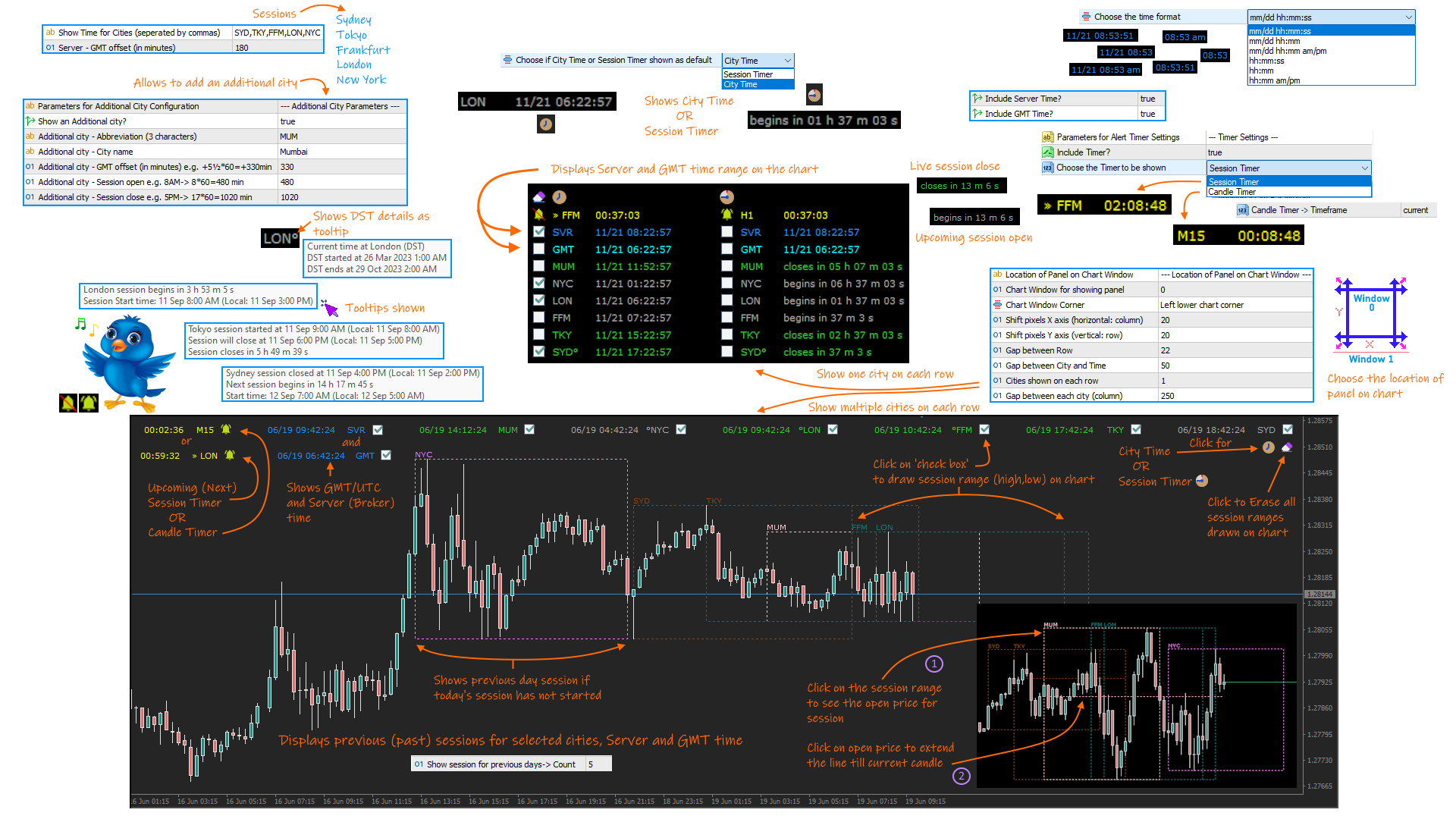
A complete Session Timer that shows the current time, session information with remaining time, chart display of range (high-low) and open price, of current and previous sessions for major markets, and option to add an additional city. A friendly user interface with clickable icons, customizable panel location and format, selection of colors and text. It automatically handles the DST (daylight saving) settings. It also shows the GMT/UTC and server (broker) time. And includes a Candle timer option.

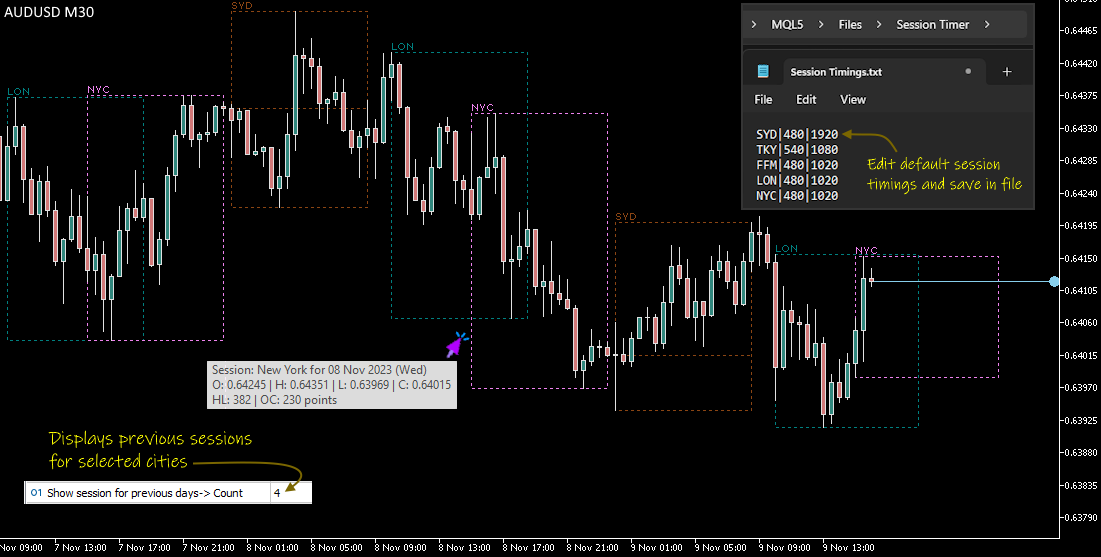
The selectable cities are Sydney, Tokyo, Frankfurt, London and New York. Although the indicator comes with a preset session (open and close) timing, it can be changed as required (please refer to the User Guide for more information).

Session Timer functionality includes:

  • Displays current time for the main markets (Sydney, Tokyo, Frankfurt, London and New York).
  • Handles Daylight savings (DST) update for above cities.
  • Allows display of an additional city with user defined settings.
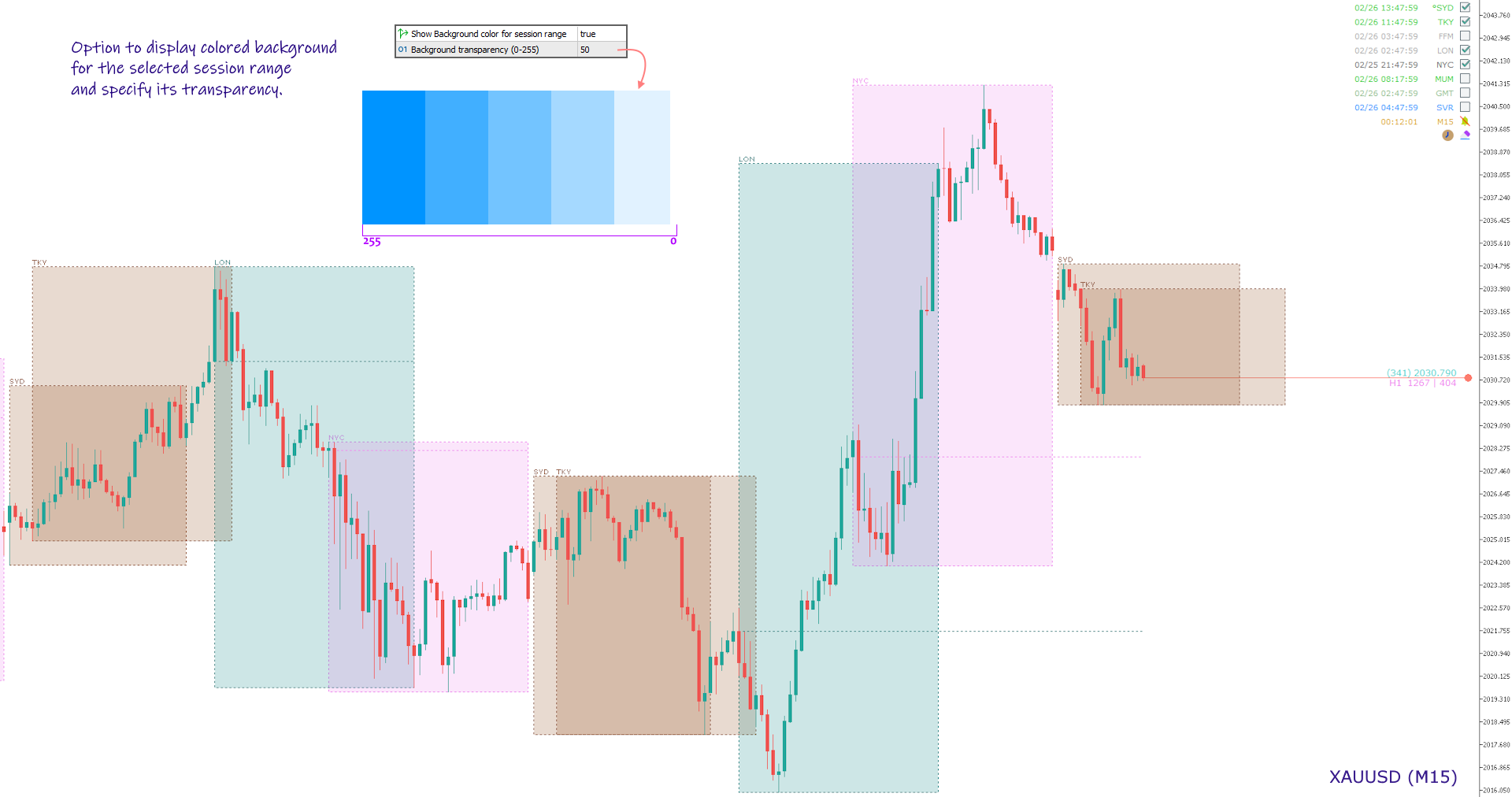
  • Shows session range (high-low price) on chart for the previous or current session with user assigned color. Also allows to view the open price for each session.
  • Displays specified number of previous session range on chart for the selected cities.
  • Option to show Server and GMT time. Also shows range for Server and GMT time for current and previous days.
  • Selection to show time or the current session status (upcoming, live or closed).
  • Option to show Candle Timer or Upcoming Session Timer with alert sound notifications.
  • Easy user interface with clickable button icons for navigating options.
  • Highlights the opening and closing of markets by user defined color.
  • Customizable font and size.
  • Position the text on any specified window or location on the chart.

NOTE:

  1. The display of session range on chart is possible only for period below or equal to H1.
  2. The indicator depends on the GMT offset for Server and its DST adjustments to draw range on chart. This will also require a change of open and close hours for session, by editing the Session Timings file (read User Guide for more information).

Product Links:
User Guide
MT5 version


Avis 8
Mj Noveiri
78
Mj Noveiri 2024.11.12 07:26 
 

nice...

yuzelei
18
yuzelei 2024.06.03 06:41 
 

感谢,帮了大忙。

Hector Manuel
446
Hector Manuel 2024.02.08 04:54 
 

En la sesión de Sidney al mirar el gráfico de una hora, aparece el valor correcto de apertura. Pero al mirar por ejemplo el gráfico de 15 minutos, aparece otro valor de apertura. Keni, no quiero ser cansón, pero me parece que a ti te gustan las cosas bien hechas. Sobre este tema es mi última observación. Me refiero al XAUUSD. Gracias.

Editar: Displicencia.

Edición 20/02/2024: Igual, obligatoriamente a través de la pestaña comentarios, y adicionalmente no sale la última fecha de edición. Volviendo al tema de esta conversación, con la actualización 3.5 no se arregló lo mencionado. Sidney abre a las8:00am hora australiana y no a las 9:00am. Gracias por la respuesta. Reitero , tu trabajo es excelente.

Edición: La diferencia horaria entre Sidney y Tokyo es de 2horas. Sigue el error en la sesión de Sidney.

Produits recommandés
Hogvid Period Separator
David Richard Hinze
5 (1)
Simple and unobtrusive utility for displaying weeks, days and hours Options to control the display of separator lines and labels allow you to customize them to your own taste Display of the separator lines either only in the main chart, or across any indicator windows Automatically reduce intensity of less relevant separator lines and labels for the chart‘s current magnification
FREE
Phone Trade Assistant
Krutik Piyushkumar Parekh
Smart Lot-Size Calculator And Trade Assistant for Mobile Trading Overview: This is the tool every trader in the market must have no matter if you are scalper, swing traders, day trader, or long term trader. This On-The-Go trading tool will help you stay disciplined and also stay free from daily trade management chores, Most traders face common problems like   1. Calculation of proper lot-size of a position to take controlled risk  2. Managing every trade and trailing stop-loss if trades goes in
FREE
LT Watermark MT4
Thiago Duarte
5 (5)
This indicator draw a watermark on the chart, with the timeframe and symbol name. You can change everything, including add a aditional watermark. Functions: Symbol watermark: Size -  text size. Font -  text font. Color -  text color. Background text -  watermark at foreground or background mode. Horizontal correction -  x correction in pixels. Vertical correction -  y correction in pixels. Separator period X symbol -  what will separate the period from symbol. Aditional watermark: Enable custom
FREE
Deal multiplier Mt4
Mikhail Mitin
4.42 (12)
The utility opens copies of open trades. It is very convenient if you use the Signals service and want to increase the volume of transactions. Settings: Symbols: all symbols only current symbol Orders: Buy Sell Magic Any Magic Input Magic Lot size Original - lot size from original order; Fix Lot - fix lot size (input); Lot X Mult - lot size X koef; Stop Loss From sender - Stop Loss from original; Without - without Stop Loss; Plus Fix - Stop Loss from original order + fix points; Fix Point - fix
FREE
Monitor by LRR
Luiz Rogerio Reine
Our EA is designed to monitor the user's account and provide useful information about the balance, net balance, and current drawdown for the day and month. Additionally, it provides detailed information about daily, previous day, weekly, monthly, and yearly performance, which helps the user evaluate the effectiveness of their trading strategy. One of the unique features of our EA is that it draws the profit at the end of each operation on the chart, allowing the user to easily visualize the prof
FREE
Swap Detector
Dustin Ricardo Pierenz
The Swap Detector is an essential MQL4 utility that displays the swap costs of any instrument when applied to a chart. It helps traders make informed decisions by visually indicating the swap value in customizable colors— green for positive (good) and red for negative (bad) by default. This tool ensures transparency in overnight holding costs, enabling better trade planning and risk management
FREE
MQLTA Support Resistance Lines is an indicator that calculates the historical levels of Support and Resistance and display them as Lines on chart. It will also Alert you if the price is in a Safe or Dangerous zone to trade and show you the distance to the next level. The indicator is ideal to be used in other Expert Advisor through the iCustom function. This DEMO only works with AUDNZD, the full product can be found at https://www.mql5.com/en/market/product/26328 How does it work? The indicator
FREE
This indicator displays two important pieces of information on the MT4 chart: Current Spread - Trading cost measured in points, helping traders assess optimal entry timing when spread is low. Time Countdown - Remaining time (minutes:seconds) until the current candle closes and a new candle forms, supporting candle-based trading strategies. Information is displayed as compact text in a chart corner (default top-right), with customizable position, color, and font size. The indicator updates in rea
FREE
Show Pips
Roman Podpora
4.26 (58)
Cet indicateur d'information sera utile pour ceux qui veulent toujours être au courant de la situation actuelle du compte. L'indicateur affiche des données telles que le profit en points, en pourcentage et en devise, ainsi que le spread pour la paire actuelle et le temps jusqu'à la fermeture de la barre sur la période actuelle. VERSIONMT5 -   Des indicateurs plus utiles Il existe plusieurs options pour placer la ligne d'information sur le graphique : À droite du prix (passe derrière le prix) ;
FREE
ExportCSV
Etsushi Ishizuka
Aperçu ExportCSVFile est un script pour MetaTrader 4 qui exporte l’historique du compte sur une période spécifiée vers un fichier CSV. Il est utile pour analyser les performances de trading, créer des rapports dans Excel ou archiver les opérations manuelles. Le script n’exécute aucune transaction et peut être utilisé en toute sécurité sur n’importe quel compte. Principales fonctionnalités Exporte l’historique du compte pour une période définie par l’utilisateur Sauvegarde au format CSV (séparé p
FREE
Pin Bars
Yury Emeliyanov
5 (4)
Objectif principal: "Pin Bars" est conçu pour détecter automatiquement les barres pin sur les graphiques des marchés financiers. Une barre d'épingle est une bougie avec un corps caractéristique et une longue queue, qui peut signaler un renversement ou une correction de tendance. Comment ça marche: L'indicateur analyse chaque bougie sur le graphique, déterminant la taille du corps, de la queue et du nez de la bougie. Lorsqu'une barre d'épingle correspondant à des paramètres prédéfinis est détec
FREE
MQLTA Support Resistance Lines
MQL4 Trading Automation
4.27 (11)
MQLTA Support Resistance Lines is an indicator that calculates the historical levels of Support and Resistance and display them as Lines on chart. It will also Alert you if the price is in a Safe or Dangerous zone to trade and show you the distance to the next level. The indicator is ideal to be used in other Expert Advisor through the iCustom function. This indicator can be tested LIVE on AUDNZD with the following DEMO https://www.mql5.com/en/market/product/26572 How does it work? The indicato
FREE
NEW :    integration with Ofir Signals to send personalized alerts Ofir Notify is a tool which send alerts on trades to Telegram Alert on any event concerning a position : Opening, Closing, modification (SL, TP) Send alerts to Chats, Groups and Channel Alert on Equity change Display Risk, Reward and progress of profit/lost for each position Customization of alerts Sending charts screenshots with alerts Send signals from your indicators or experts Multi-lingual NEW  : version 2 brings integratio
FREE
The Rayol Code Hour Interval Lines indicator was designed to assist your trading experience. It draws the range of hours chosen by the user directly on the chart, so that it enables traders to visualize price movements during their preferred trading hours, providing traders a more comprehensive view of price movements and market dynamics. This indicator allows the user to choose not only the Broker's time, but also the Local time. This way, the user no longer needs to calculate local time in re
FREE
HMA Trend
Pavel Zamoshnikov
4.54 (70)
A trend indicator based on the Hull Moving Average (HMA) with two periods. The Hull Moving Average is an improved variant of the moving average, which shows the moment of trend reversal quite accurately. It is often used as a signal filter. Combination of two types of Hull Moving Averages makes a better use of these advantages: HMA with a slow period identifies the trend, while HMA with a fast period determines the short-term movements and signals in the trend direction. Features The movement d
FREE
IceFX ProfitInfo
Norbert Mereg
4.6 (10)
The goal of this indicator is to give you a quick & comprehensive view of your current profit. IceFX’s ProfitInfo is a utility indicator which displays the profit which is calculated from the actual trades on the chart(s). The indicator displays on a daily / weekly / monthly and yearly breakdown and shows the profit in pips / currency and percentage. Main features: You can easily adjust IceFX’s ProfitInfo to display profit on the current open chart / current trade or even the profit of the enti
FREE
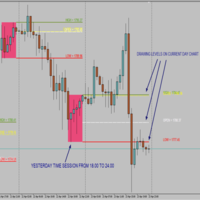
Time Session OPEN-HIGH-LOW-CLOSE This Indicator Will Draw Lines Of OHLC Levels Of Time Session Defined By User. It Will Plot Floating Lines On Current Day Chart. Time Session Can Of Current Day Or Previous Day. You Can Plot Multiple Session Lines By Giving Unique ID To Each Session. It Can Even Show Historical Levels Of Time Session Selected By User On Chart To Do Backdating Test. You Can Write Text To Describe The Lines.
FREE
This indicator help to mark the high and low of the session Asian,London,Newyork , with custom hour setting This indicator is set to count from minute candle so it will move with the current market and stop at the designated hour and create a accurate line for the day. below is the customization that you can adjust : Input Descriptions EnableAsian Enables or disables the display of Asian session high and low levels. EnableLondon Enables or disables the display of London session high and
FREE
The "InfoBox" utility is designed to display the presence of open orders, the number of lots, current profit and much more in one window. The version for the MT5 platform   is here . You've probably encountered a situation where you have an advisor that works on a currency pair, but information about its operation: - orders and their number, the size of the spread for the instrument, the volume of lots on the market, drawdown and much more - are scattered in different places of the terminal and
FREE
BoxFibo
Sergei Kiriakov
It is just an alternative fibo lines, because mt4 have is a very strange drawing of fibo lines A simple Box (Rectangle) graphic element with adjustable levels binding: it is possible to specify up to 17 custom levels, all rectangles on the chart with the given prefix in their name are processed. Levels are specified in % of the height of the rectangle. A convenient graphical element for analyzing charts by growth-correction levels. Enjoy your work!
FREE
This indicator show the candle remaining time on the chart and/or in the corner of the window. It also display notificaton (popup and push) when a new candle is formed (optional). You configure the timer on candles and at chart corner. I don't need to explain the functions because are very simple. MT5 version:  https://www.mql5.com/pt/market/product/38470 Any doubt or suggestion to a new feature please comment. Enjoy!
FREE
Chart Time
Isaac Montesinos Valdes
5 (1)
Chart Time Indicator is very simple and easy, but it can be very important to control the time before opening any manual trade. This indicator shows the time on the chart between 3 different options. Input parameters Show Time : Select all the time options that you want to see. Local Time (Personal Computer Time), Server Time (Broker Time) or GMT Time. Recommendations: Use only one Chart Time Indicator for each chart.
FREE
This indicator is one of the useful tools for traders who trade on currency pairs and based on the strength of each currency they can make a correct decision or confirmation in the positions.  It has been calculated for all the minor currency pairs supported by the broker and displays the values of the major currencies. These currencies are displayed horizontally or vertically according to the trader's config when executing the indicator. One of the trading strategies that can be used is to cho
FREE
FFx Fractals
Eric Venturi-Bloxs
4.5 (2)
The purpose of this new version of the MT4 standard indicator provided in your platform is to display in a sub-window multiple timeframes of the same indicator. See the example shown in the picture below. But the display isn’t like a simple MTF indicator. This is the real display of the indicator on its timeframe. Here's the options available in the FFx indicator: Select the timeframes to be displayed (M1 to Monthly) Define the width (number of bars) for each timeframe box Alert pop up/sound/ema
FREE
FFx Momentum
Eric Venturi-Bloxs
4 (1)
The purpose of this new version of the MT4 standard indicator provided in your platform is to display in a sub-window multiple timeframes of the same indicator. See the example shown in the picture below. But the display isn’t like a simple MTF indicator. This is the real display of the indicator on its timeframe. Here's the options available in the FFx indicator: Select the timeframes to be displayed (M1 to Monthly) Define the width (number of bars) for each timeframe box Alert pop up/sound/ema
FREE
Regua MT4
Edgar Lima Uggioni
Convenient tool for measuring the number of points between the prices directly on the chart. Displays in the measurement between points in percentage, points (financial) and time (bars ). Compatible with all graphical timeframes. When fixed on the chart is displayed in all timeframes. Press Ctrl, click the first point, move the mouse and will now display the measurement. Click again and fix. Very fast tool that does not occupy much space. Input Parameters Line Color Line Style Text Color Text S
FREE
.....................................hi....................... ................for showing high s and low s and support and resistanses .....................we have a lot of ways............................... it can be helpful for finding trends , higher highs , higher lows , lower highs , lower lows .......................today i write on of thems.......................... ........................you can enter the number of last support and resistanses .........................and it will dra
FREE
FFx ParabolicSAR
Eric Venturi-Bloxs
4.67 (3)
The purpose of this new version of the MT4 standard indicator provided in your platform is to display in a sub-window multiple timeframes of the same indicator. See the example shown in the picture below. But the display isn’t like a simple MTF indicator. This is the real display of the indicator on its timeframe. Here's the options available in the FFx indicator: Select the timeframes to be displayed (M1 to Monthly) Define the width (number of bars) for each timeframe box Alert pop up/sound/ema
FREE
Precision Candle Timer
Mauricio Valbuena
5 (1)
Precision Candle Timer is a must-have visual indicator that accurately displays the remaining time of the current candle on your chart. Perfect for traders who need precise timing for entries and exits , especially in scalping , day trading , or candle-formation-based strategies. Designed to be fully customizable, you can easily change its position, color, font, and size to match your trading layout. It adds clarity, control, and responsiveness to your trading routine. Key Features: Precise t
FREE
SwapTrader
Alexey Lopatin
3.33 (3)
SwapTrader is a simple Expert Advisor for swap trading at the end of the day. The EA scans the current chart instrument and instruments specified in the settings, looking for the currency and order with the positive swap. It opens positions with positive swaps after user-defined time and then closes these positions after user-defined time as soon as the specified profit is reached. The EA trades the current currency and instruments listed in the settings. Expert Advisor Settings SymbolsList - l
FREE
Les acheteurs de ce produit ont également acheté
Local Trade Copier EA MT4
Juvenille Emperor Limited
4.96 (108)
Découvrez une expérience exceptionnellement rapide de copie de trades avec le Local Trade Copier EA MT4 . Avec sa configuration facile en 1 minute, ce copieur de trades vous permet de copier des trades entre plusieurs terminaux MetaTrader sur le même ordinateur Windows ou Windows VPS avec des vitesses de copie ultra-rapides de moins de 0.5 seconde. Que vous soyez un trader débutant ou professionnel, le Local Trade Copier EA MT4 offre une large gamme d'options pour le personnaliser en fonction d
Trade Assistant MT4
Evgeniy Kravchenko
4.42 (193)
It helps to calculate the risk per trade, the easy installation of a new order, order management with partial closing functions, trailing stop of 7 types and other useful functions. Additional materials and instructions Installation instructions   -   Application instructions   -   Trial version of the application for a demo account Line function -   shows on the chart the Opening line, Stop Loss, Take Profit. With this function it is easy to set a new order and see its additional characteris
Bienvenue sur Trade Manager EA, l’outil ultime de gestion des risques conçu pour rendre le trading plus intuitif, précis et efficace. Ce n’est pas seulement un outil d’exécution d’ordres ; c’est une solution complète pour la planification des trades, la gestion des positions et le contrôle des risques. Que vous soyez débutant, trader expérimenté ou scalpeur ayant besoin d’une exécution rapide, Trade Manager EA s’adapte à vos besoins, offrant une flexibilité sur tous les marchés, des devises et i
Copy Cat More Trade Copier MT4 (Copie Chat MT4) n’est pas seulement un simple copieur de trades local ; c’est un cadre complet de gestion des risques et d’exécution conçu pour les défis actuels du trading. Des challenges de prop firms à la gestion de comptes personnels, il s’adapte à chaque situation grâce à une combinaison d’exécution robuste, de protection du capital, de configuration flexible et de traitement avancé des opérations. Le copieur fonctionne en mode Master (émetteur) et en mode Sl
Exp COPYLOT CLIENT for MT4
Vladislav Andruschenko
4.65 (66)
Copieur commercial pour MetaTrader 4.       Il copie les transactions de change, les positions et les ordres de tous les comptes. C'est l'un des meilleurs copieurs commerciaux       MT4 - MT4, MT5 - MT4       pour le       COPYLOTE MT4       version (ou       MT4 - MT5 MT5 - MT5       pour le       COPYLOTE MT5       version). Version MT5 Description complète   +DEMO +PDF Comment acheter Comment installer     Comment obtenir des fichiers journaux     Comment tester et optimiser     Tous les p
Trade copier MT4
Alfiya Fazylova
4.58 (33)
Trade Copier est un utilitaire professionnel conçu pour copier et synchroniser les commandesentre les comptes de trading. Les commandes sont copiées du compte/terminal du fournisseur vers le compte/terminal du destinataire, qui sont installés sur le même ordinateur ou vps. Avant d'acheter, vous pouvez tester la version démo sur un compte démo. Version démo ici . Instructions complètes ici . Principales fonctionnalités et avantages: Prend en charge la copie des commandes MT4> MT4, MT4> MT5, MT5>
TradePanel MT4
Alfiya Fazylova
4.85 (92)
Trade Panel est un assistant commercial multifonctionnel. L'application contient plus de 50 fonctions de trading pour le trading manuel et vous permet d'automatiser la plupart des opérations de trading. Version d'essai de l'application pour compte de démonstration: https://www.mql5.com/fr/blogs/post/762644 Instructions pour l'application: https://www.mql5.com/fr/blogs/post/762589 Commerce. Permet d'effectuer des opérations de trading en un clic : Ouvrez des ordres et des positions en attente av
Offre spéciale trading – 40 % de réduction Gestionnaire de transactions avancé – La solution tout-en-un par excellence pour un trading manuel plus rapide, plus intelligent et plus sûr. Transformez votre trading manuel avec NextGen Trade Manager AI – le panneau professionnel intégré au graphique qui combine exécution instantanée, planification visuelle des transactions et gestion des risques performante dans un outil intuitif. Exécutez vos ordres, gérez les risques et protégez vos profits plus
The product will copy all telegram signal to MT4   ( which you are member  ) , also it can work as remote copier.  Easy to set up, copy order instant, can work with almost signal formats, image signal, s upport to translate other language to English Work with all type of channel or group, even channel have "Restrict Saving Content", work with  multi channel, multi MT5 Work as remote copier: with signal have ticket number, it will copy exactly via ticket number. Support to backtest signal. How to
Trade Dashboard MT4
Fatemeh Ameri
4.96 (53)
Tired of complex order placement and manual calculations? Trade Dashboard is your solution. With its user-friendly interface, placing orders becomes effortless, by a single click, you can open trades, set stop loss and take profit levels, manage trade lot size, and calculate risk to reward ratios, allowing you to only focus on your strategy. Say goodbye to manual calculations and streamline your trading experience with Trade Dashboard. Download  Demo Version  right now. You can find  Details of
DrawDown Limiter MT4
Haidar Lionel Haj Ali
5 (8)
Expert Advisor "Drawdown Limiter"  Vous êtes au bon endroit si vous recherchez un contrôle de drawdown, un limiteur de drawdown, une protection du solde, une protection de l'équité ou une limite quotidienne de drawdown en rapport avec les entreprises de gestion de capitaux (Prop Firm), FTMO, My Forex Fund, ou si vous souhaitez protéger votre compte de trading. Avez-vous déjà eu du mal à contrôler votre drawdown en tradant sur des comptes financés ? Cet EA est fait pour vous. Les entreprises de
Equity Protect Pro : Votre expert en protection de compte complet pour un trading en toute sérénité Si vous recherchez des fonctionnalités telles que la protection de compte, la protection des capitaux propres, la protection de portefeuille, la protection multi-stratégies, la protection des bénéfices, la prise de bénéfices, la sécurité de trading, les programmes de contrôle des risques, le contrôle automatique des risques, la liquidation automatique, la liquidation conditionnelle, la liquidatio
Seconds Chart — un outil unique pour créer des graphiques en secondes dans MetaTrader 4 . Grâce à Seconds Chart , vous pouvez créer un graphique avec une période définie en secondes, offrant une flexibilité et une précision idéales pour l'analyse, indisponibles sur les graphiques standards en minutes ou en heures. Par exemple, la période S15 indique un graphique avec des bougies d'une durée de 15 secondes. Vous pouvez utiliser n'importe quel indicateur, expert advisor (EA) ou script. Leur utilis
Le MT4 to Telegram Signal Provider est un outil facile à utiliser et entièrement personnalisable qui permet d'envoyer des signaux à Telegram, transformant ainsi votre compte en fournisseur de signaux. Le format des messages est entièrement personnalisable ! Cependant, pour une utilisation simple, vous pouvez également opter pour un modèle prédéfini et activer ou désactiver des parties spécifiques du message. [ Démonstration ]   [ Manuel ] [ Version MT5 ] [ Version Discord ] [ Canal Telegram ]  N
Auto Grid trades
Makarii Gubaydullin
Auto Grid :  création automatisée d'ordres en grille basée sur vos trades existants. Automatisez des stratégies de trading complexes   avec des systèmes de grille sophistiqués qui détectent de nouvelles positions et créent automatiquement des tableaux d'ordres optimisés. Utilitaire multifonction : 66+ fonctionnalités, incluant l'outil Auto Grid  |   contactez-moi  pour toute question  |   Version MT5 A. Détection et Surveillance Intelligente des Trades : Scanning de symbole spécifique ou de por
Trade Assistant Pro 36 in 1
Makarii Gubaydullin
4.76 (21)
Outil Multifonction : Calculatrice de Lots, Ordres Grid, Ratio R/R, Gestionnaire de Trades, Zones d'Offre et de Demande, Price Action et bien plus Version Démo   |   Manuel d'utilisation L'Assistant de Trading ne fonctionne pas dans le testeur de stratégies : vous pouvez télécharger la Version Démo ICI pour tester l' utilitaire . Contactez-moi pour toute question / idées d'amélioration / en cas de bug trouvé Si vous avez besoin d'une version MT5, elle est disponible ici Simplifiez, accélérez et

Copy Master mt4
Evgenii Aksenov
5 (5)
Cet utilitaire vous permettra de copier toutes les transactions d'un terminal avec le paramètre maître vers d'autres terminaux avec le paramètre esclave Dans le même temps, vous pouvez choisir les paires à copier, définir la taille de l'ordre copié sur plusieurs paramètres. Définissez une limite de perte sur le retrait ou copiez uniquement les transactions rentables Vous pouvez copier des transactions de MT4 ou MT5 à MT4 ou MT5 d'autres courtiers Maintenant, il ne sera pas difficile de copie
RSI Divergence Scanner is a multi-timeframe and multi-symbol dashboard and alert that checks all timeframes and symbols to find divergences between price chart and RSI indicator. This divergence scanner is integrated with support and resistance zones so you can check the RSI divergences in the most important areas of the chart to find trend reversals in the price chart. Download demo version   (works on M 1,M5,M30,W1 timeframes) Full description of scanner parameters ->   click here . How to get
Crystal Trade Manager PRO – Système Avancé de Gestion du Risque et de Contrôle des Positions pour MT4 Version gratuite : https://www.mql5.com/en/market/product/150632 Présentation Générale Crystal Trade Manager PRO (CTM) est un utilitaire professionnel pour MetaTrader 4 dédié à la gestion du risque, au contrôle des opérations et à l’automatisation intelligente du trading. Il a été conçu pour les traders qui exigent une exécution disciplinée, une protection solide du capital et un contrôle avancé
Trend Line Optimizer
Evgenii Aksenov
4.11 (19)
Il s'agit d'un optimiseur de paramètres automatique pour l'indicateur Trend Line PRO Vous pouvez facilement et rapidement trouver les paramètres optimaux pour votre indicateur Trend Line PRO préféré.  L'optimisation ne prend que quelques secondes. L'optimiseur vous permet de trouver les meilleurs paramètres pour chaque paire et période: Amplitude, TP1-TP3, StopLoss, ainsi que les valeurs pour Time Filter et HTF Filter sur la section sélectionnée de l'histoire (Days)  Pour optimiser différents
Take a Break
Eric Emmrich
5 (31)
One tool to protect all your EAs — news filter, equity protection, time filter and more — free demo available Take a Break has evolved from a basic news filter into a comprehensive account protection solution. It pauses your other Expert Advisors during news events or based on custom filters. When trading resumes, it automatically restores your entire chart setup , including all EA settings. Typical use cases: One news filter for all your EAs. Pause trading during news or high volatility — and c
OrderManager MT4
Lukas Roth
4.73 (26)
Présentation du OrderManager : Un utilitaire révolutionnaire pour MT4 Gérez vos transactions comme un pro avec le tout nouveau utilitaire Order Manager pour MetaTrader 4. Conçu avec simplicité et facilité d'utilisation à l'esprit, l'Order Manager vous permet de définir et de visualiser sans effort le risque associé à chaque transaction, vous permettant de prendre des décisions éclairées et d'optimiser votre stratégie de trading. Pour plus d'informations sur l'OrderManager, veuillez vous référer
Exp4 Duplicator
Vladislav Andruschenko
4.5 (22)
L'Expert Advisor   répète les   transactions et les positions un nombre prédéfini de fois sur votre compte   MetaTrader 4   . Il copie toutes les transactions ouvertes manuellement ou par un autre Expert Advisor. Copie les signaux et augmente le lot des signaux   ! Augmente le lot des autres EA. Les fonctions suivantes sont prises en charge : lot personnalisé pour les transactions copiées, copie du Stop Loss, Take Profit, utilisation du stop suiveur. Version MT5 Description complète +DEMO +PDF
News Filter EA: Advanced Algo Trading Assistant News Filter EA is an advanced algo trading assistant designed to enhance your trading experience. By using the   News Filter EA , you can integrate a Forex economic news filter into your existing expert advisor, even if you do not have access to its source code. In addition to the news filter, you can also specify   trading days   and   hours   for your expert. The News Filter EA also includes   risk management   and   equity protection   features
VR Alert
Vladimir Pastushak
5 (1)
The VR Alert indicator utility is designed to inform the trader when the price reaches the given level. The signal levels can be set not only horizontally but also inclined. Thus, the trader gets the opportunity to receive notifications from the inclined trend levels. Thanks to the VR Alert utility, you will no longer need to sit near the monitor for a long time. You can calmly do about your household chores, perform your work duties and spend time with your family. Your task is simply to set th
Le Risk/Reward Tool est un Expert Advisor de niveau professionnel conçu pour révolutionner la façon dont vous planifiez, visualisez et exécutez vos trades dans MetaTrader 4. Que vous soyez un trader discrétionnaire qui valorise une gestion précise des risques ou un développeur de stratégies qui a besoin de tester visuellement des configurations de trading, cet outil fournit tout ce dont vous avez besoin dans une interface élégante et intuitive. Contrairement aux calculateurs de position basiques
Copieur ->Interaction d'interface pratique et rapide, les utilisateurs peuvent l'utiliser immédiatement       ->>>> Recommandé pour une utilisation sur des ordinateurs Windows ou VPS Windows Caractéristiques: Paramètres de copy trading diversifiés et personnalisés : 1. Différents modes de lot peuvent être définis pour différentes sources de signaux 2. Différentes sources de signaux peuvent être définies pour le copy trading avant et arrière 3. Les signaux peuvent être définis avec des commentai
AW Grids Maker
AW Trading Software Limited
4.33 (3)
AW_Grids_Maker permet de créer des grilles à partir d'ordres en attente. Cet utilitaire universel offre des paramètres flexibles et une interface intuitive. Le programme construit des réseaux à partir d'ordres STOP et LIMIT avec le pas nécessaire et utilise le multiplicateur de volume de position. Version MT5 -> ICI / Résolution des problèmes -> ICI Avantages : Utilise les commandes en attente de tous types. Configuration simple et flexible. Un panneau utilitaire bien conçu et multifonctionnel.
VirtualTradePad mt4 Extra
Vladislav Andruschenko
4.86 (59)
Panneau de trading pour trader en 1 clic.   Travailler avec des positions et des commandes!   Trading à partir du graphique ou du clavier. En utilisant notre panel de trading, vous pouvez trader en un clic à partir du graphique et effectuer des opérations de trading 30 fois plus rapidement que le contrôle MetaTrader standard. Des calculs automatiques de paramètres et de fonctions qui facilitent la vie d'un trader et aident un trader à mener ses activités de trading beaucoup plus rapidement et pl
The product will copy all  Discord  signal   to MT4   ( which you are member  ) , also it can work as remote copier.  Easy to set up. Work with almost signal formats, support to translate other language to English Work with multi channel, multi MT4. Work with Image signal. Copy order instant, auto detect symbol. Work as remote copier: with signal have ticket number, it will copy exactly via ticket number. How to setup and guide: Let read all details about setup and download Discord To MetaTrader
Plus de l'auteur
PnL Calendar
Keni Chetankumar Gajanan -
PnL Calendar ... analyse to profit PnL Calendar transforms your trading history into a clear calendar view, helping you spot profitable days, monitor risk in real time, and unify accounts with the new Multi‑Broker data export feature. Core Features Calendar Panel: Profit breakdowns by day, week, month, and year Account Panel: Balance, equity, margin alerts, multi‑timeframe summaries, overnight gap adjustments Risk Dashboard: Leverage, drawdown, profit factor, consistency ratio, holding time, ri
Session Timer
Keni Chetankumar Gajanan -
4.64 (14)
A complete Session Timer that shows the current time, session information with remaining time, chart display of range (high-low) and open price, of current and previous sessions for major markets, and option to add an additional city. A friendly user interface with clickable icons, customizable panel location and format, selection of colors and text. It automatically handles the DST (daylight saving) settings. It also shows the GMT/UTC and server (broker) time. And includes a Candle timer option
FREE
Fibonacci Dimension
Keni Chetankumar Gajanan -
4.6 (5)
'Fibonacci Dimension' indicator allows display of preset or user-defined multi-timeframe Fibonacci levels. It automatically takes the previous high and low for two user-defined timeframes and calculates their Fibonacci retracement levels. It also considers the retraced level to draw the expansions on every change of price. A complete visual dimension in multiple timeframes allows deriving profitable strategies for execution. Enhanced functionality to view and customize the default Fibonacci Rang
FREE
PnL Calendar MT4
Keni Chetankumar Gajanan -
PnL Calendar ... analyse to profit PnL Calendar transforms your trading history into a clear calendar view, helping you spot profitable days, monitor risk in real time, and unify accounts with the new Multi‑Broker data export feature. Core Features Calendar Panel: Profit breakdowns by day, week, month, and year Account Panel: Balance, equity, margin alerts, multi‑timeframe summaries, overnight gap adjustments Risk Dashboard: Leverage, drawdown, profit factor, consistency ratio, holding time, ri
Fibonacci Dimension MT4
Keni Chetankumar Gajanan -
5 (4)
'Fibonacci Dimension' indicator allows display of preset or user-defined multi-timeframe Fibonacci levels. It automatically takes the previous high and low for two user-defined timeframes and calculates their Fibonacci retracement levels. It also considers the retraced level to draw the expansions on every change of price. A complete visual dimension in multiple timeframes allows deriving profitable strategies for execution. Enhanced functionality to view and customize the default Fibonacci Rang
FREE
Price Ray
Keni Chetankumar Gajanan -
5 (7)
Price Ray indicator is a utility that will improve the way you trade. Primarily, it shows the Bid, Ask or Last price as a line ray which beams till the current candle, last visible chart candle or extended to all candle bars. The enhanced features in this indicator provide information in an area where you focus most, right next to the current candle. You can select text to be shown above or below the Price ray. The indicator is fully customizable, allowing it to fit any strategy requirements. Th
FREE
Price Ray MT4
Keni Chetankumar Gajanan -
4 (2)
Price Ray indicator is a utility that will improve the way you trade. Primarily, it shows the Bid, Ask or Last price as a line ray which beams till the current candle, last visible chart candle or extended to all candle bars. The enhanced features in this indicator provide information in an area where you focus most, right next to the current candle. You can select text to be shown above or below the Price ray. The indicator is fully customizable, allowing it to fit any strategy requirements. Th
FREE
Current Price
Keni Chetankumar Gajanan -
5 (2)
A simple and useful Current Price Panel, which displays magnified current Bid, Ask prices and spread, movable anywhere on chart window using the mouse. Also provides an option to have as text at a static location showing bid or ask price along with spread, shown at any location on the chart. Allows display as pips or points along with spread highlighted in distinct color if it crosses the threshold point for the previous 100 ticks. Includes an option to show or hide the last digit (pipette) of t
FREE
Portfolio Aggregator
Keni Chetankumar Gajanan -
Portfolio Aggregator — One dashboard, total clarity across all your trading accounts. Portfolio Aggregator unifies account data from multiple brokers and currencies into a single, transparent dashboard. It provides real‑time visibility into equity, margin, P&L, and risk metrics, helping traders maintain control and confidence across diversified strategies. Features Multi‑Currency Consolidation — Converts all values into a chosen base currency with live FX rates. Portfolio Dashboard — Displays e
FREE
Portfolio Aggregator MT4
Keni Chetankumar Gajanan -
Portfolio Aggregator — One dashboard, total clarity across all your trading accounts. Portfolio Aggregator unifies account data from multiple brokers and currencies into a single, transparent dashboard. It provides real‑time visibility into equity, margin, P&L, and risk metrics, helping traders maintain control and confidence across diversified strategies. Features Multi‑Currency Consolidation — Converts all values into a chosen base currency with live FX rates. Portfolio Dashboard — Displays e
FREE
Current Price MT4
Keni Chetankumar Gajanan -
5 (1)
A simple and useful Current Price Panel, which displays magnified current Bid, Ask prices and spread, movable anywhere on chart window using the mouse. Also provides an option to have as text at a static location showing bid or ask price along with spread, shown at any location on the chart. Allows display as pips or points along with spread highlighted in distinct color if it crosses the threshold point for the previous 100 ticks. Includes an option to show or hide the last digit (pipette) of t
FREE
Filtrer:
xlxAxlx
1493
xlxAxlx 2024.11.15 17:58 
 

L'utilisateur n'a laissé aucun commentaire sur la note

Keni Chetankumar Gajanan -
17315
Réponse du développeur Keni Chetankumar Gajanan - 2024.11.27 03:03
Hi #xlxAxlx, Thanks for the suggestion. Will keep it in the wish list for next update. Edit: Added the functionality to show and hide panel in version 3.9 (27-Nov-2024)
Mj Noveiri
78
Mj Noveiri 2024.11.12 07:26 
 

nice...

Keni Chetankumar Gajanan -
17315
Réponse du développeur Keni Chetankumar Gajanan - 2024.11.12 10:03
Thank you
yuzelei
18
yuzelei 2024.06.03 06:41 
 

感谢,帮了大忙。

Keni Chetankumar Gajanan -
17315
Réponse du développeur Keni Chetankumar Gajanan - 2024.06.03 06:56
不客气
Hector Manuel
446
Hector Manuel 2024.02.08 04:54 
 

En la sesión de Sidney al mirar el gráfico de una hora, aparece el valor correcto de apertura. Pero al mirar por ejemplo el gráfico de 15 minutos, aparece otro valor de apertura. Keni, no quiero ser cansón, pero me parece que a ti te gustan las cosas bien hechas. Sobre este tema es mi última observación. Me refiero al XAUUSD. Gracias.

Editar: Displicencia.

Edición 20/02/2024: Igual, obligatoriamente a través de la pestaña comentarios, y adicionalmente no sale la última fecha de edición. Volviendo al tema de esta conversación, con la actualización 3.5 no se arregló lo mencionado. Sidney abre a las8:00am hora australiana y no a las 9:00am. Gracias por la respuesta. Reitero , tu trabajo es excelente.

Edición: La diferencia horaria entre Sidney y Tokyo es de 2horas. Sigue el error en la sesión de Sidney.

Keni Chetankumar Gajanan -
17315
Réponse du développeur Keni Chetankumar Gajanan - 2024.03.06 04:29
Hola Héctor, El mismo día que lo planteaste (8 de febrero), respondí a tu consulta y resolví el problema actualizando a la versión 3.5 el 9 de febrero. Habíamos conversado sobre esto bajo su revisión. Has eliminado la reseña y todos mis comentarios y los has reemplazado por uno nuevo. Como Metaquotes no me alerta sobre ninguna adición realizada en la pestaña de revisión, no recibí ninguna alerta al respecto. He planteado este problema al soporte de Metaquotes. Envíe una captura de pantalla del problema que mencionó, ya que no puedo replicarlo. Puede hacerlo en la pestaña Comentarios. Gracias. Saludos,
Editar: 21/02/2024: Como mencioné en mi nota anterior (que se eliminó), para XAUUSD (oro), encontré para el servidor (GMT +2), a las 8 a. m. de Sydney, la barra de velas para el gráfico de oro era indisponible. Debido a esto, antes de la versión 3.5, el rectángulo de Sydney comenzaba una hora antes (7 a. m. de Sydney), que son las 23:00, hora del servidor, en lugar de las 00:00 a. m., hora del servidor. Este problema se corrigió en la versión 3.5, que verifica el intervalo de tiempo (vela) y, por lo tanto, el inicio del rango es a las 9 a. m., hora de Sydney, si la vela de las 8 a. m. no está disponible. De todos modos, si me envía una captura de pantalla de su gráfico XAUUSD (15 minutos y 1 hora), puedo verificar su problema nuevamente. Esto sólo se puede hacer en la pestaña Comentarios, ya que la pestaña de revisión no acepta ningún archivo adjunto. Además, recibiré una alerta sobre cada nuevo comentario que agregues. Gracias.
Edit:29-Feb-2024: Hola Héctor, Estoy totalmente de acuerdo contigo en que actualmente con el horario de verano en Sydney, la diferencia entre Sydney y Tokio es de 2 horas. Pero para XAUUSD, si la vela de las 8 a las 9 a. m. no está disponible en el gráfico (cuando comienza Sydney), entonces el rango de la sesión se basa en la primera vela disponible a las 9 am. Tokio está sorteado correctamente a las 10 a. m., hora de Sídney, para comenzar. Consulte la captura de pantalla (3) para ver la descripción general del producto y ver a qué me refiero. Le solicito que verifique el indicador con EURUSD y, dado que hay velas disponibles de 8 a 9 a. m., verá una diferencia de 2 horas entre Sydney y Tokio. Envíeme un mensaje privado o envíeme una captura de pantalla en la sección de comentarios para que pueda verificar su problema. Gracias.
Edit:06-Mar-2024: Gracias Héctor por contactarme ayer y espero que el problema se haya resuelto.
Gerald Oki
87
Gerald Oki 2023.10.08 22:48 
 

L'utilisateur n'a laissé aucun commentaire sur la note

Keni Chetankumar Gajanan -
17315
Réponse du développeur Keni Chetankumar Gajanan - 2023.10.09 07:11
Hi Gerald, Thank you for the kind words. I really appreciate your encouragement.
RUTTO2
435
RUTTO2 2023.05.17 13:54 
 

Very good and useful.

Keni Chetankumar Gajanan -
17315
Réponse du développeur Keni Chetankumar Gajanan - 2023.05.18 09:18
Thanks #RUTTO2
TI-trader
153
TI-trader 2023.03.28 13:44 
 

Thank you for your generosity to share this. It is by far the best one I have tried on here and FREE

Keni Chetankumar Gajanan -
17315
Réponse du développeur Keni Chetankumar Gajanan - 2023.03.31 18:11
Hi #chinguyen1994, Thanks for the review. 🙏
prafiano
34
prafiano 2022.11.18 02:52 
 

L'utilisateur n'a laissé aucun commentaire sur la note

Keni Chetankumar Gajanan -
17315
Réponse du développeur Keni Chetankumar Gajanan - 2022.12.01 05:11
Hi #prafiano, Thanks for the review and comment. There is a new update released today (version 1.4). You can see the updates on this product page under the ‘What’s new’ tab. You may also check from the ‘Market’ tab (Downloads) on MT4 to download when available. I suggest that you check my other utilities/indicator and also read the user guides for more information on usage and configuration. Hope you find them useful. You can access them on https://www.mql5.com/en/users/ckeni/seller I also hope you have an enjoyable experience trading forex. Cheers,
Répondre à l'avis