Trade copier MT4

4.56

Trade Copier est un utilitaire professionnel conçu pour copier et synchroniser les commandesentre les comptes de trading. Les commandes sont copiées du compte/terminal du fournisseur vers le compte/terminal du destinataire, qui sont installés sur le même ordinateur ou vps.

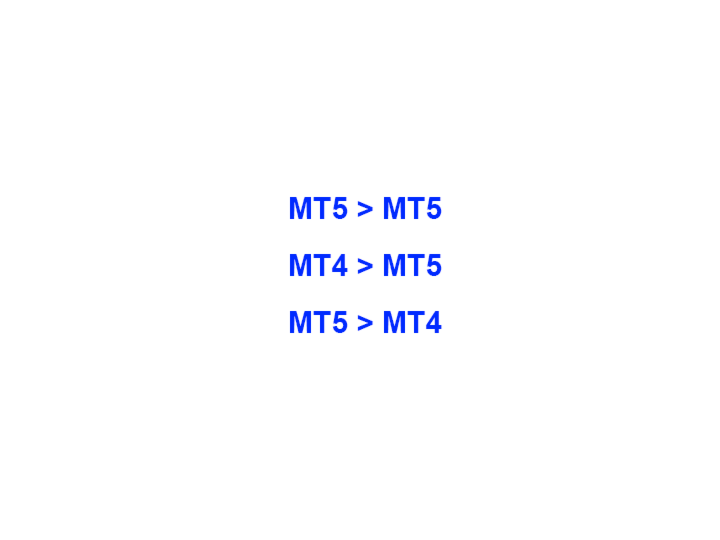
PROMOTION - Si vous avez déjà acquis le "Trade copier MT5", vous pouvez obtenir le "Trade copier MT4" gratuitement (pour la copie MT4 > MT5 et MT4 < MT5). Pour obtenir des informations plus détaillées sur les conditions, veuillez nous contacter par message privé !

Avant d'acheter, vous pouvez tester la version démo sur un compte démo. Version démo ici.

Instructions complètes ici.

Principales fonctionnalités et avantages:

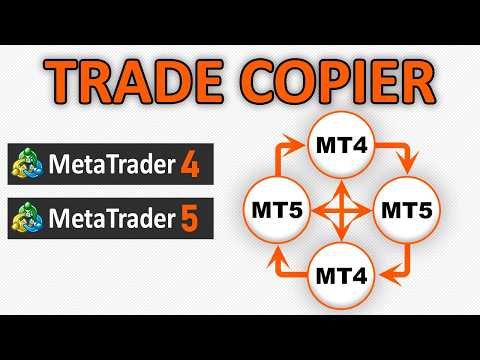
  • Prend en charge la copie des commandes MT4> MT4, MT4> MT5, MT5> MT4.
  • Prend en charge la copie de commandes à partir d'un compte de démonstration > Compte réel, compte réel > compte de démonstration, compte de démonstration > compte de démonstration et comptes réels > compte réel.
  • Prend en charge la copie à partir d'un compte d'investisseur lorsque le mot de passe en lecture seule s'applique.
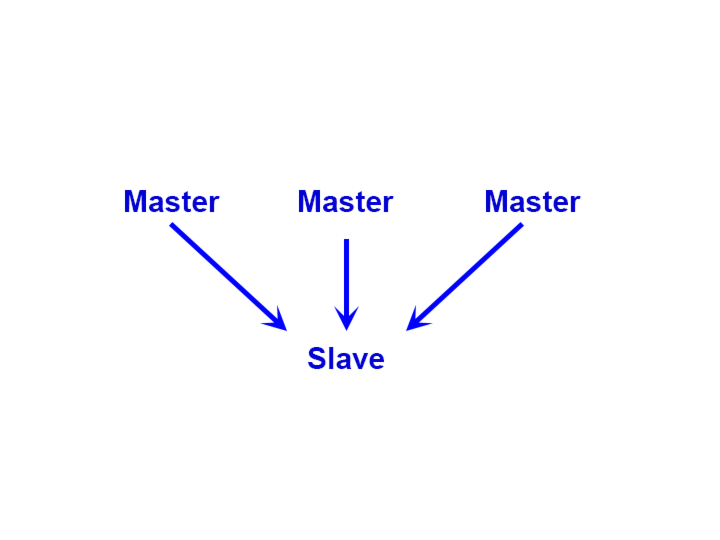
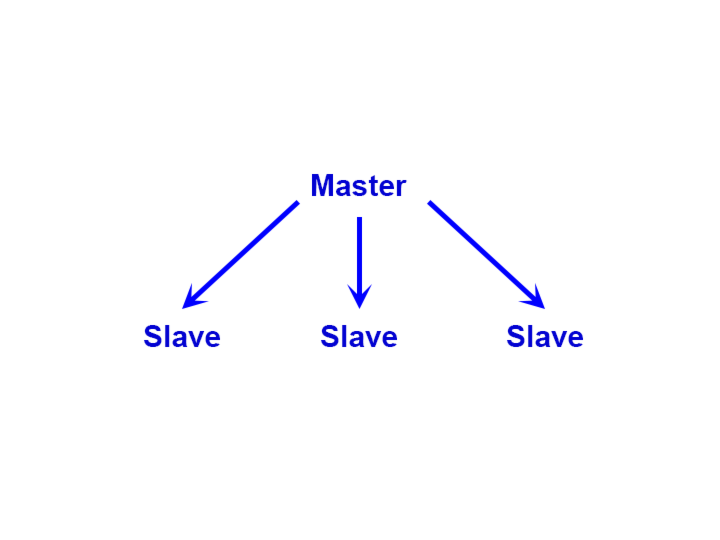
  • Un terminal fournisseur peut envoyer des commandes à plusieurs terminaux récepteurs. Un terminal récepteur peut accepter des commandes de plusieurs terminaux fournisseurs.
  • Peut travailler dans le même terminal où vous ou votre Expert Advisor négociez.
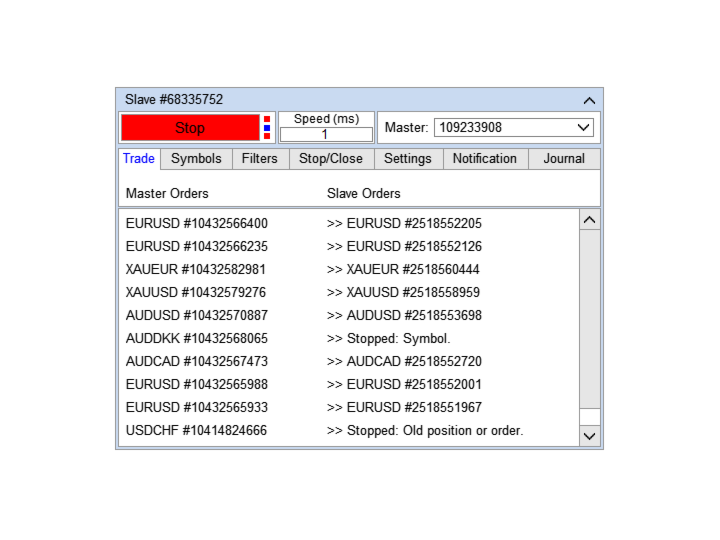
  • Comprend un panneau multifonctionnel pour une configuration facile de la copie et une vérification de l'état de la copie.
  • Ne perd pas les paramètres et les ordres de transaction lorsque la connexion est perdue ou que le terminal de trading est redémarré.
  • Permet de sélectionner les symboles à copier, et de modifier leur nom. Vous permet de copier des ordres pour différents symboles, par exemple GBPUSD> NZDCHF.
  • Prend en charge la copie en retour.
  • Filtrage des copies par types de commandes.
  • Filtrage des copies par commentaire de commande.
  • Permet de définir l'écart maximum des prix d'ouverture des commandes et le délai maximum.
  • Copie correctement la fermeture partielle.
  • Plusieurs façons de calculer le lot copié.
  • Synchronise SL et TP, a plusieurs façons de calculer leur emplacement.
  • Prend en charge le travail sur les comptes avec exécution du marché, où SL / TP est défini uniquement après l'ouverture d'une position.
  • Peut arrêter la copie lorsque l'équité minimale est atteinte.
  • Peut arrêter la copie lorsque le drawdown maximum est atteint.

Comment copier des commandes avec des paramètres simples

  1. Installez le terminal vendeur et le terminal destinataire sur le même ordinateur ou VPS.
  2. Installez le copieur en mode "Maître" sur le terminal du fournisseur et cliquez sur le bouton "Démarrer".
  3. Installer le copieur en mode "Esclave" sur le terminal du destinataire.
  4. Sélectionnez le compte de trading "Maître" dans la liste déroulante du copieur "Esclave" et cliquez sur le bouton "Démarrer".

#Tags: copy trades, copy orders, trade copier, order copier, fast copier.

Avis 43
robert_chen
223
robert_chen 2026.01.16 05:35 
 

I bought MT5 earlier & very satisfied with its intuitive interface, simplest & user-friendly setup. I bought further the MT4 type and amazingly, its works like a champ for MT4 to MT4, and to my surprise, it works excellently and seamlessly to copy orders from MT5 to MT4 & vice-versa. Thanks seller and a superb programmer and make everything easy for me. I ever tried others but they are too complicated to be used. I'm glad that I found this one that really suit my requirements & expectations

Michael Schuster
1649
Michael Schuster 2025.09.30 22:52 
 

Trade copier is a very good Utility and very stable. I am using it very intensive since a long time without any problems. Clearly ⭐⭐⭐⭐⭐ 👍

Sergey Timokhin
422
Sergey Timokhin 2025.05.10 14:40 
 

Great copier. I recommend that those who buy it first set everything up on demo accounts, so you won't find yourself in awkward situations with deposit losses. Everything works like clockwork. I advise contacting Alfiya for any questions; she responds quickly, thoughtfully, and thoroughly. Good luck in trading, colleagues!

Produits recommandés
Purpose: IF you are apart of a signal group or have a losing strategy this tool is perfect for you. This Expert Adviser is a Trade Copier which Copies Trades on the same account, It takes trades in the same direction or opposite direction. You can set 100% for same trade size or 200% to double up, while the same percentage rule also work for the stop-loss and take profit distances. input: Copy All or By Magic Take only new trades = False; Take same direction of existing trade or counter_direct
Auto Trade Copier
Vu Trung Kien
4.76 (85)
Auto Trade Copier is designed to copy trades to multiple MT4, MT5 and cTrader accounts/terminals with 100% accuracy. The provider and receiver accounts must be on the same PC/VPS. With this tool, you can copy trades to receiver accounts on the same PC/VPS. All trading actions will be copied from provider to receiver perfectly. This version can be used on MT4 accounts only. For MT5 accounts, you must use Auto Trade Copier for MT5 . Reference: - For MT4 receiver, please download Trade Receiver Fre
Trade Assistant Pro 36 in 1
Makarii Gubaydullin
4.76 (21)
Outil Multifonction : Calculatrice de Lots, Ordres Grid, Ratio R/R, Gestionnaire de Trades, Zones d'Offre et de Demande, Price Action et bien plus Version Démo   |   Manuel d'utilisation L'Assistant de Trading ne fonctionne pas dans le testeur de stratégies : vous pouvez télécharger la Version Démo ICI pour tester l' utilitaire . Contactez-moi pour toute question / idées d'amélioration / en cas de bug trouvé Si vous avez besoin d'une version MT5, elle est disponible ici Simplifiez, accélérez et
Copier4Fee Advanced
Vladimir Tkach
4.75 (16)
The utility copies trades from the signal provider accounts (master accounts, one or multiple providers) to unlimited number of receiver accounts (slave accounts).  Attention! Y ou need to use identifiers (Provider number) of the same length if you use several master copiers. For example. 1, 2, 3 or 11, 13, 22. The copying can be set in the opposite direction. The comments with all the recently performed actions are displayed on the screen to monitor the utility actions in slave mode. To avoid p
Trade Copier Professional — Solution de Copie Locale   Trade Copier Professional est un système fiable de copie locale des transactions pour MetaTrader 4/5. Il permet aux traders de répliquer instantanément des positions sur plusieurs comptes d’un même ordinateur, avec des contrôles de sécurité intégrés et un tableau de bord professionnel.   Aperçu   L’EA fonctionne en modes Master et Slave à partir d’un seul fichier, avec bascule fluide. Les transactions peuvent être copiées entre terminaux MT
Niveaux automatiques de seuil de rentabilité En   utilisant   cet   outil ,   v ous pouvez activer le déplacement automatique du SL, lorsque le trade atteint un profit souhaité.  Particulièrement   important   pour   les   traders   à   court terme   .   L'option de décalage est également disponible: une partie du profit peut être protégée. Outil multifonction : 66+ fonctionnalités, incluant cet outil  |   Contactez-moi  si vous avez des questions  |   Version MT5 Processus d'activation de la f
ONECLICK COPIER EA – UNIFIED VERSION 1.0 Category: Trade Utility | Type: Local Trade Copier for MT4 Created by fxdancer (Hani Mabad) Version: 1.0 – May 2025 OVERVIEW OneClick Copier EA is a local trade copying utility, not a trading strategy. It is designed for manual traders, fund managers, or multi-account users who want to mirror trades across MT4 terminals running on the same computer. This EA does not generate signals or place trades by itself. Instead, it acts as a bridge between accou
Magic Curves
Aleksey Usachev
Indicator shows balance curves based on magic number for portfolio analysis. It allows to visually estimate different strategies performance on a single symbol. Any of magic number can be hidden by clicking on the value in legend. Parameters: HideAllOnStart - all magics are hidden and can be activated by clicking on its value; MAMode - shows average profit from trades; MAPeriod - Moving average period; Magics - a string with magic numbers separated by comma like "1,2,123". If this field is empty
Fast copier for sending trades to multiple MT4 / MT5 accounts. Perfect for copying trades from MT4 to MT5 accounts. MT4 Trade Copier Master EA sends trades instantly from your master account to one or multiple slave accounts. Supports copying to: • MT5 accounts • MT4 accounts Perfect for: • Multi-account traders • Signal providers • Account managers • Personal account mirroring Main Features • Fast local trade copying • Low latency execution • Multiple slave accounts support • Copy open position
EA Risk Manager is a professional risk‑management Expert Advisor designed to protect your trading account and enforce disciplined money management. The EA does not open trades by itself – it only monitors and manages all existing positions (manual and automated) on the account. It is especially useful for traders who want to: Hard‑limit daily / weekly / monthly losses and profits. Restrict lot size and the number of open trades. Trade a basket of G7‑related Forex pairs using one centralized

Copy MT4 simply
VLADIMIR SHEVCHENKO
4 (1)
A free program for copying orders between terminals on the same computer. Any orders are copied in any direction, between any accounts. The principle of operation: On the terminal from which you want to copy, the "Server" parameter is set. On the terminal or terminals where the copied positions need to be opened, the "Client" parameter is set. It is also necessary to enter the account number of the "Server" terminal on the client. In the future, it is planned to increase the functionality
FREE
Supported copying directions MetaTrader 4 → MetaTrader 4 MetaTrader 4 → MetaTrader 5 MetaTrader 5 → MetaTrader 4 MetaTrader 5 → MetaTrader 5 ️ For MT4 ↔ MT5 copying you need both versions (MT4 + MT5). Working modes Master mode -  The terminal is the source of trades (orders are sent from it). Slave mode -  The terminal receives and copies trades from the Master. “From myself” mode -  Deal multiplier mode (useful if you trade via Signals). What can be copied Buy / Sell trades All symbols or onl
The program is use to copy trading from MT4   to MT4 and MT5  on local PC or copy  over the Internet.   Now you can easy copy trades to any where or share to friends. Only run one Flash Server on VPS, also need allow the apps if you turn on Windows Firewall. Can not add more than 20 account copier to server, include both  MT4 and MT5 Get free Copier EA for MT4 and MT5 (only  receive signal),   download here Instants copy, speed smaller 0.1 seconds, easy to setup How to setup and guide Let read a
We present you the indicator "Candle closing counter", which will become your indispensable assistant in the world of trading. That’s why knowing when the candle will close can help: If you like to trade using candle patterns, you will know when the candle will be closed. This indicator will allow you to check if a known pattern has formed and if there is a possibility of trading. The indicator will help you to prepare for market opening and market closure. You can set a timer to create a pre
It is so very disappointing when the price does not have enough points to achieve Take Profit and makes a reversal. This EA sets virtual levels near the TakeProfit levels. This EA sets virtual levels next to TakeProfit orders. If these levels are reached by price, breakeven or trailing stop is applied for an order. Features This EA does not set new orders. The aim of this EA is to manage stop losses of existing orders that are set by another EA or manually (magic number equals 0). For correct w
Risk Commander
Adisorn Soodkanueng
Product Name: Risk Commander: Trade Assistant & Strategy Simulator Risk Commander is more than just a trade panel—it is a complete Manual Trading Ecosystem . It serves two powerful purposes: Live Assistant: Helps you execute trades with speed, precision, and perfect risk management in real-time markets. Training Simulator: Fully compatible with the Strategy Tester (Visual Mode) , allowing you to practice manual trading on historical data without risking a cent. NEW! Built-in Simulator Mode Stop
CoPilot dashboard MT4
Frederic Jacques Collomb
CoPilot — Tableau de bord de trading journalier Connaissez vos chiffres. Tradez avec clarté. MT5 version Qu'est-ce que CoPilot ? CoPilot est un assistant de trading de niveau professionnel qui affiche en temps réel toutes vos statistiques de performance journalière directement sur le graphique — avec une courbe d'équité live qui se met à jour trade par trade. Conçu pour les traders actifs qui ont besoin d'une visibilité instantanée sur leur session sans quitter le graphique, CoPilot agrège chaqu
Trade Copier Agent est conçu pour copier des transactions entre plusieurs comptes/terminaux MetaTrader(4/5). Avec cet outil, vous pouvez agir en tant que fournisseur (source) ou récepteur (destination). Toutes les actions de trading seront copiées du fournisseur vers le récepteur sans délai. Cet outil vous permet de copier des transactions entre plusieurs terminaux MetaTrader sur le même ordinateur avec des vitesses de copie ultra-rapides inférieures à 0,5 seconde. Guide d'installation et d'ent
AnyChart MT4
Irek Gilmutdinov
AnyChart is a multifunctional tool allowing you to work with non-standard charts in MetaTrader 4. It includes collector of ticks and generator of charts for trading (hst files) and testing (fxt files). Supported chart types are second, tick and renko ones. Settings Starting Date - start date for chart plotting. Ending Date - end date for chart plotting. Chart Type - chart type: Time - time chart, each bar contains a certain time interval; Tick - volume chart, each bar contains a certain number
Indicateur unique qui met en œuvre une approche professionnelle et quantitative pour signifier le trading de réversion. Il capitalise sur le fait que le prix dévie et revient à la moyenne de manière prévisible et mesurable, ce qui permet des règles d'entrée et de sortie claires qui surpassent largement les stratégies de trading non quantitatives. [ Installation Guide | Update Guide | Troubleshooting | FAQ | All Products ] Des signaux de trading clairs Étonnamment facile à échanger Couleurs et t
CopierMT4
Dmitry Fedoseev
Copier for the MetaTrader4 terminal. Designed to copy trade from one terminal to another. Compatible with the version for the MetaTrader5 terminal; if available, copying can be performed between different terminals (regardless of the type of accounts: hedging or netting). The number of accounts to which copying is possible is not limited (depends only on the computing power of your computer). Directions for copying the version for MetaTrader 4 together with the version for MetaTrader 5: MT5 Net
Local Trade Copier EA MT4
Juvenille Emperor Limited
4.96 (110)
Découvrez une expérience exceptionnellement rapide de copie de trades avec le Local Trade Copier EA MT4 . Avec sa configuration facile en 1 minute, ce copieur de trades vous permet de copier des trades entre plusieurs terminaux MetaTrader sur le même ordinateur Windows ou Windows VPS avec des vitesses de copie ultra-rapides de moins de 0.5 seconde. Que vous soyez un trader débutant ou professionnel, le Local Trade Copier EA MT4 offre une large gamme d'options pour le personnaliser en fonction d
Noize Absorption Index MT4
Ekaterina Saltykova
5 (1)
Noize Absorption Index - is the manual trading system that measures the difference of pressure between bears forces and bulls forces. Green line - is a noize free index that showing curent situation. Zero value of index shows totally choppy/flat market.Values above zero level shows how powerfull bullish wave is and values below zero measures bearish forces.Up arrow appears on bearish market when it's ready to reverse, dn arrow appears on weak bullish market, as a result of reverse expectation. S
Smartility
Syed Oarasul Islam
This utility is designed to help you with your Manual Trading. It allows different ways of closing trades. It can display total number of BUY and SELL orders individually and also their individual profits. It can enter trades without stopl loss and take profits. However upon selecting UseStopLossTakeProfit from the settings it can use best possible stop loss and take profits based on the market conditions. Upon selecting the CloseOppositeTrades  from the settings it can close opposite trades. Fo
Just Copier MT4
Agung Imaduddin
5 (5)
"Just copier" is designed to copy trading without any complicated settings. The copy can be done in one PC. One EA can be set as master (provider) or slave (receiver). The receiver lot can be set to multiple providers lots. Please also check this product at fxina.hostingerapp.com.  Any type of copy is available. MT4 -> MT5 MT4 -> MT4 MT5 -> MT5 MT5 -> MT4 If you want to copy MT4 -> MT5 or MT5 -> MT4, please purchase "Just copier" for MT4 and "Just copier" for MT5 separately. Just Copier can copy
Night Trader EURUSD
Ugur Oezcan
4.21 (29)
The EA can trade multiple currencies. Please check our signals ( https://www.mql5.com/en/users/ugur-edin/seller ) for detailed information. No grid or martingale! No manual configuration or adjustment needed! Every trade is protected by stop loss. This Expert Advisor only trades for a short time frame at night, during the ending of the New York session. It uses low volatility moments and enters trades based on indicators. It then manages those trades with dynamic stop losses and take profits als
Forex Gump

Andrey Kozak
2.4 (5)
Forex Gump is a fully finished semi-automatic trading system. In the form of arrows, signals are displayed on the screen for opening and closing deals. All you need is to follow the instructions of the indicator. When the indicator shows a blue arrow, you need to open a buy order. When the indicator shows a red arrow, you need to open a sell order. Close orders when the indicator draws a yellow cross. In order to get the most effective result, we recommend using the timeframes H1, H4, D1. There

Copy MT4
Denis Vasyutin
Утилита предназначена для копирования ордеров с одного счета на другой. Поддерживается копирование с множителем, копирование с реверсом позиции, копирование с префиксами и суффиксами. Отложенные ордера, TakeProfit и StopLoss не копируются. Поддерживается копирование на несколько счетов. Входные параметры: Mode - Режим копирования, master, slave NumMaster - Номер файла обмена данных в общей папке timer1 - Частота обмена данных между master и slave счетом, в секундах Настройки для режима копирован
VR Cub
Vladimir Pastushak
VR Cub est un indicateur permettant d'obtenir des points d'entrée de haute qualité. L'indicateur a été développé pour faciliter les calculs mathématiques et simplifier la recherche de points d'entrée dans un poste. La stratégie de trading pour laquelle l'indicateur a été rédigé prouve son efficacité depuis de nombreuses années. La simplicité de la stratégie de trading est son grand avantage, qui permet même aux traders débutants de négocier avec succès avec elle. VR Cub calcule les points d'ouve

This tool will perform Trailing stop loss and Break even management for orders. Helps you limit or reduce the time spend watching orders on the screen, especially when you need to go to sleep. Just add this EA to 1 chart, you can manage all pairs. You can filter orders by comment, magic number, symbol, and order ticket number. When Breakeven it can add shift/offset pips (to cover the commission...). You can try in strategy tester before purchase. The EA will add Buy and Sell alternately, so yo
Les acheteurs de ce produit ont également acheté
Bienvenue sur Trade Manager EA, l’outil ultime de gestion des risques conçu pour rendre le trading plus intuitif, précis et efficace. Ce n’est pas seulement un outil d’exécution d’ordres ; c’est une solution complète pour la planification des trades, la gestion des positions et le contrôle des risques. Que vous soyez débutant, trader expérimenté ou scalpeur ayant besoin d’une exécution rapide, Trade Manager EA s’adapte à vos besoins, offrant une flexibilité sur tous les marchés, des devises et i
Unlimited Trade Copier Pro is a tool to copy trade remotely to multiple MT4, MT5 and cTrader accounts at different computers/locations over internet. This is an ideal solution for you if you are a signal provider and want to copy your trades to other receivers globally on your own rules. One provider can copy trades to multiple receivers and one receiver can get trade from multiple providers as well. The provider can even set the subscription expiry for each receiver, so that receiver will not b
Trade Assistant MT4
Evgeniy Kravchenko
4.43 (197)
It helps to calculate the risk per trade, the easy installation of a new order, order management with partial closing functions, trailing stop of 7 types and other useful functions. Additional materials and instructions Installation instructions   -   Application instructions   -   Trial version of the application for a demo account Line function -   shows on the chart the Opening line, Stop Loss, Take Profit. With this function it is easy to set a new order and see its additional characteris
Négociez automatiquement les zones de support et de résistance ou d'offre et de demande une fois que vous avez identifié les zones clés à partir desquelles vous souhaitez négocier. Cet EA vous permet de dessiner des zones d'achat et de vente en un seul clic, puis de les placer exactement là où vous vous attendez à ce que le prix change. L'EA surveille ensuite ces zones et effectuera automatiquement des transactions en fonction de l'action des prix que vous spécifiez pour les zones. Une fois la
News Filter EA MT4
Rashed Samir
5 (10)
News Filter EA: Advanced Algo Trading Assistant News Filter EA is an advanced algo trading assistant designed to enhance your trading experience. By using the   News Filter EA , you can integrate a Forex economic news filter into your existing expert advisor, even if you do not have access to its source code. In addition to the news filter, you can also specify   trading days   and   hours   for your expert. The News Filter EA also includes   risk management   and   equity protection   features
DrawDown Limiter MT4
Haidar Lionel Haj Ali
5 (8)
Expert Advisor "Drawdown Limiter"  Vous êtes au bon endroit si vous recherchez un contrôle de drawdown, un limiteur de drawdown, une protection du solde, une protection de l'équité ou une limite quotidienne de drawdown en rapport avec les entreprises de gestion de capitaux (Prop Firm), FTMO, My Forex Fund, ou si vous souhaitez protéger votre compte de trading. Avez-vous déjà eu du mal à contrôler votre drawdown en tradant sur des comptes financés ? Cet EA est fait pour vous. Les entreprises de
Support and Resistance Dashboard for MT4 is a multi-timeframe and multi-symbol scanner and alert system that finds S/R zones and pivot points for all timeframes and symbols and alerts when price has interaction with them. If you are using support and resistance (or supply and demand) zones in your trading strategy, this dashboard and its alert and filtering system is a big time saver for you. Download demo version   (works on M 1,M5,M30,W1   timeframes) Full description of scanner parameters ->
Télécharger la version d'essai fonctionnelle Copy Cat More (Chat Copieur) — Copieur de Trades (Trade Copier) MT4 n'est pas un simple copieur de trades local ; c'est un cadre complet de gestion du risque et d'exécution (risk management and execution framework) conçu pour les défis du trading d'aujourd'hui. Des challenges de prop firm à la gestion de portefeuille personnel, il s'adapte à chaque situation grâce à sa combinaison d' exécution robuste, de protection du capital, de configuration fle
Telegram to MT4 Multi-Channel Copier copie automatiquement les signaux de trading de vos canaux Telegram directement vers MetaTrader 4. Pas de bots, pas d'extensions de navigateur, pas de copie manuelle. Vous recevez un signal sur Telegram et l'EA ouvre l'opération sur votre terminal en quelques secondes. Le produit comprend deux composants : une application Windows qui écoute vos canaux Telegram, et cet Expert Advisor qui exécute les signaux sur votre terminal MT4. Une version MT5 est également
Master Close via Telegram can help you perform some management tasks on MT4/MT5 remotely via your Telegram by one click, easy to set up & use. Demo here (see more Master Notify   Master Control  ) ************************************************************************************ LIST OF COMMANDS: info_acc -  Get account info info_pen -   Get pending orders details info_pos -   Get positions details info_pos_sum -   Get positions summary close_pen -   Delete all pending orders close_pos_all -
Strategy Builder offers an incredible amount of functionality. It combines a trade panel with configurable automation (covert indicators into an EA), real-time statistics (profit & draw down) plus automatic optimization of SL, TP/exit, trading hours, indicator inputs. Multiple indicators can be combined into an single alert/trade signal and can include custom indicators, even if just have ex4 file or purchased from Market. The system is easily configured via a CONFIG button and associated pop-up
PZ Trade Pad Pro MT4
PZ TRADING SLU
3.67 (3)
Effortlessly calculate lot sizes and manage trades to save time and avoid costly errors The Trade Pad Pro EA is a tool for the Metatrader Platform that aims to help traders manage their trades more efficiently and effectively. It has a user-friendly visual interface that allows users to easily place and manage an unlimited number of trades, helping to avoid human errors and enhance their trading activity. [ Installation Guide | Update Guide | Troubleshooting | FAQ | All Products ] One of the k
Le MT4 to Telegram Signal Provider est un outil facile à utiliser et entièrement personnalisable qui permet d'envoyer des signaux à Telegram, transformant ainsi votre compte en fournisseur de signaux. Le format des messages est entièrement personnalisable ! Cependant, pour une utilisation simple, vous pouvez également opter pour un modèle prédéfini et activer ou désactiver des parties spécifiques du message. [ Démonstration ]   [ Manuel ] [ Version MT5 ] [ Version Discord ] [ Canal Telegram ]  N
The product will copy all telegram signal to MT4   ( which you are member  ) , also it can work as remote copier.  Easy to set up, copy order instant, can work with almost signal formats, image signal, s upport to translate other language to English Work with all type of channel or group, even channel have "Restrict Saving Content", work with  multi channel, multi MT5 Work as remote copier: with signal have ticket number, it will copy exactly via ticket number. Support to backtest signal. How to
Un panneau professionnel pour le trading manuel qui réunit tout le cycle d'une opération dans une seule fenêtre sur le graphique, de l'entrée précise à la protection du compte. Calibrez chaque position au plus près du risque que vous fixez, dessinez votre trade avec des lignes directement sur le graphique grâce au RR Tool, et passez des ordres au marché et en attente, des grilles et de l'OCO. Le panneau prend en charge le suivi de la position : clôture partielle jusqu'à cinq niveaux, six types d
TradePanel MT4
Alfiya Fazylova
4.84 (95)
Trade Panel est un assistant commercial multifonction. L'application contient plus de 50 fonctions de trading pour le trading manuel et permet d'automatiser la plupart des tâches commerciales. Avant l'achat, vous pouvez tester la version de démonstration sur un compte de démonstration. Télécharger la version d'essai de l'application pour un compte de démonstration : https://www.mql5.com/fr/blogs/post/762644 . Instructions complètes ici . Commerce. Permet d'effectuer des opérations commerciales e
Verrouillage automatique des bénéfices lors de l'atteinte du bénéfice cible EquityTargetCloser   — est un conseiller expert utilitaire pour MetaTrader 5 qui ferme automatiquement toutes les positions de marché et supprime les ordres en attente dès que   les capitaux propres (Equity) dépassent le solde actuel du montant de bénéfice spécifié . Après la fermeture de toutes les positions, l'objectif est automatiquement relevé : le nouveau seuil = nouveau solde + bénéfice spécifié. L'EA n'ouvre pas d
Copieur ->Interaction d'interface pratique et rapide, les utilisateurs peuvent l'utiliser immédiatement       ->>>> Recommandé pour une utilisation sur des ordinateurs Windows ou VPS Windows Caractéristiques: Paramètres de copy trading diversifiés et personnalisés : 1. Différents modes de lot peuvent être définis pour différentes sources de signaux 2. Différentes sources de signaux peuvent être définies pour le copy trading avant et arrière 3. Les signaux peuvent être définis avec des commentai
Trade Copier Global
Laszlo Tormasi
5 (15)
Trade Copier Global: The name speaks for itself. This copier allows you to copy orders between MT4 terminals even if they are not installed on the same computer. Features Copying trades between MT4 terminals around the world with a short delay. Automatically recognizes symbol prefixes. Can connect many Slaves to the same Master. Supports pending and market orders. Supports partial order close (with limitations, see below) Can send messages and notifications to the Slaves from the Master Several
Telegram to MT4 Coppy
Sergey Batudayev
4.09 (11)
Télégramme vers MT4 :   la solution ultime pour copier des signaux Simplifiez votre trading avec   Telegram vers MT4   , l'utilitaire de pointe conçu pour copier les signaux de trading directement depuis les canaux et chats Telegram vers votre plateforme MetaTrader 4, sans DLL. Cette solution robuste garantit une exécution fluide des signaux avec une précision et des options de personnalisation inégalées, vous faisant gagner du temps et optimisant votre efficacité. [ Instructions and DEMO ] Cara
Trading History MT4
Siarhei Vashchylka
5 (9)
Trading History - A program for trading and money management on the history of quotes in stratagy tester. It can work with pending and immediate orders, and is equipped with trailing stop, breakeven and take profit functions. Very good for training and testing different strategies. Manual (Be sure to read before purchasing) Advantages 1. Allows you to test any trading strategy in the shortest possible time 2. An excellent simulator for trading training. You can gain months of trading experience
Custom Alerts AIO : Surveillez tous les marchés à la fois — sans aucune configuration Présentation Custom Alerts AIO est une solution de surveillance du marché prête à l’emploi, sans configuration nécessaire. Tous les indicateurs requis — FX Power, FX Volume, FX Dynamic, FX Levels, IX Power — sont directement intégrés. Aucun graphique n’est affiché, ce qui rend cet outil idéal pour la génération d’alertes en temps réel. Il prend en charge toutes les classes d’actifs proposées par votre courtie
MACD Divergence Scanner is a multi-timeframe and multi-symbol dashboard and alert that checks all timeframes and symbols to find regular and hidden divergences between price chart and MACD indicator. This divergence scanner is integrated with support and resistance zones so you can check the MACD divergences in the most important areas of the chart to find trend reversals in the price chart. Download demo version   (works on M 1,M5,M30,W1   timeframes) Full description of scanner parameters ->  
King Trade Copier MT4
Mohammed Maher Al-sayed Mohammed Ahmed Saleh
King Trade Copier MT4 – Lightning-Fast Local Trade Copier (Master + Slave in ONE file) King Trade Copier is a professional local trade copier that mirrors every trading action from one Master account to unlimited Slave accounts on the same PC or VPS — with an internal copy latency of just a few milliseconds. It was built by a real trader for daily real-money use, with one goal: whatever happens on the Master must happen on the Slave, instantly and without exceptions. Watch the demo video to s
Telegram to MT4 Pro란 무엇인가요? Telegram to MT4 Pro 는 비공개, 공개 및 제한된 Telegram 채널과 그룹의 신호를 사용자의 MetaTrader 4 계정으로 자동 복사합니다. Telegram to MT4 Pro 는 모든 Telegram 채널 또는 그룹의 트레이딩 신호를 사용자의 MetaTrader 4 계정으로 실시간 자동 복사하는 전문 신호 복사기이며, 각 거래를 완전히 제어할 수 있습니다. 이 시스템은 함께 작동하는 두 부분으로 구성됩니다: 이 Expert Advisor — 거래 실행을 위해 MT4 차트에 설치됩니다 보조 데스크톱 앱 — TelegramMT4Pro.exe — Telegram에 연결하고 신호를 EA로 전달합니다 여러 Telegram 제공자를 여러 MT4 계정에 동시에 연결할 수 있습니다. 모든 설정은 계정별, 제공자별로 구성할 수 있습니다. 참고: 시스템은 자동으로 작동합니다. MetaTrader 내부에서 수동 연결 설정이 필요하지
SmartFastTrade AI
Muhammad Faisal Sagala
Transform Your Trading with SmartFastTrade AI: Speed and Ease at Your Fingertips! Introduction Are you a trader struggling with slow order execution? Do you want a tool that can assist you in making quick and accurate trading decisions? If yes, then SmartFastTrade AI is the answer to all your trading needs. With its unique combination of speed, user-friendliness, and advanced features, SmartFastTrade AI will help you unlock your full trading potential. Let's delve deeper into why this innovativ
RSI Divergence Scanner is a multi-timeframe and multi-symbol dashboard and alert that checks all timeframes and symbols to find divergences between price chart and RSI indicator. This divergence scanner is integrated with support and resistance zones so you can check the RSI divergences in the most important areas of the chart to find trend reversals in the price chart. Download demo version   (works on M 1,M5,M30,W1 timeframes) Full description of scanner parameters ->   click here . How to get
The News Filter
Leolouiski Gan
5 (25)
Ce produit filtre tous les conseillers experts et les graphiques manuels pendant les heures de publication des actualités, de sorte que vous n'avez pas à vous soucier des pics de prix soudains qui pourraient détruire vos configurations de trading manuelles ou les transactions entrées par d'autres conseillers experts. Ce produit est également livré avec un système de gestion des ordres complet qui peut gérer vos positions ouvertes et vos ordres en attente avant la publication de toute actualité.
Coppy Master MT4
Sergey Batudayev
4 (3)
Copieur Master MT4       est un outil de copie de transactions pour les terminaux MetaTrader 4 et MetaTrader 5. Il prend en charge la copie dans les deux sens : de MT4 à MT5, de MT5 à MT4, ainsi qu'entre comptes du même type MT4 à MT4. Pour fonctionner correctement, tous les terminaux doivent fonctionner sur le même PC ou VPS. [ Instruction  and Demo ]  Pour copier vers MetaTrader 4, une version séparée —       Copieur Master MT5       — est requis. Caractéristiques principales : Modes de copie
Grid Manual MT4
Alfiya Fazylova
4.71 (17)
Grid Manual est un panneau de trading permettant de travailler avec une grille d'ordres. L'utilitaire est universel, possède des paramètres flexibles et une interface intuitive. Il fonctionne avec une grille d'ordres non seulement dans le sens des pertes, mais aussi dans le sens de l'augmentation des profits. Le commerçant n'a pas besoin de créer et de maintenir une grille d'ordres, l'utilitaire le fera. Il suffit d'ouvrir une ordre et "Grid Manual" créera automatiquement une grille de ordres po
Plus de l'auteur
TradePanel MT5
Alfiya Fazylova
4.88 (163)
Trade Panel est un assistant commercial multifonction. L'application contient plus de 50 fonctions de trading pour le trading manuel et permet d'automatiser la plupart des tâches commerciales. Avant l'achat, vous pouvez tester la version de démonstration sur un compte de démonstration. Télécharger la version d'essai de l'application pour un compte de démonstration : https://www.mql5.com/fr/blogs/post/762644 . Instructions complètes ici . Commerce. Permet d'effectuer des opérations commerciales e
Trade copier MT5
Alfiya Fazylova
4.56 (50)
Trade Copier est un utilitaire professionnel conçu pour copier et synchroniser les commandesentre les comptes de trading. Les commandes sont copiées du compte/terminal du fournisseur vers le compte/terminal du destinataire, qui sont installés sur le même ordinateur ou vps. PROMOTION - Si vous avez déjà acquis le "Trade copier MT5", vous pouvez obtenir le "Trade copier MT4" gratuitement (pour la copie MT4 > MT5 et MT4 < MT5). Pour obtenir des informations plus détaillées sur les conditions, veuil
Grid Manual MT5
Alfiya Fazylova
4.73 (22)
Grid Manual est un panneau de trading permettant de travailler avec une grille d'ordres. L'utilitaire est universel, possède des paramètres flexibles et une interface intuitive. Il fonctionne avec une grille d'ordres non seulement dans le sens des pertes, mais aussi dans le sens de l'augmentation des profits. Le commerçant n'a pas besoin de créer et de maintenir une grille d'ordres, l'utilitaire le fera. Il suffit d'ouvrir une ordre et "Grid Manual" créera automatiquement une grille de ordres po
TradePanel MT4
Alfiya Fazylova
4.84 (95)
Trade Panel est un assistant commercial multifonction. L'application contient plus de 50 fonctions de trading pour le trading manuel et permet d'automatiser la plupart des tâches commerciales. Avant l'achat, vous pouvez tester la version de démonstration sur un compte de démonstration. Télécharger la version d'essai de l'application pour un compte de démonstration : https://www.mql5.com/fr/blogs/post/762644 . Instructions complètes ici . Commerce. Permet d'effectuer des opérations commerciales e
ChartSync MT5
Alfiya Fazylova
5 (4)
Indicateur Chart Sync - conçu pour synchroniser les objets graphiques dans les fenêtres de terminal. Peut être utilisé en complément de TradePanel . OFFRE - Si vous avez déjà acheté TradePanel, vous pouvez obtenir Chart Sync gratuitement. Pour plus d'informations sur les conditions, veuillez nous contacter par message privé. Avant d'acheter, vous pouvez tester la version Démo sur un compte démo. Démo ici . Pour travailler, installez l'indicateur sur le graphique à partir duquel vous souhaitez co
Grid Manual MT4
Alfiya Fazylova
4.71 (17)
Grid Manual est un panneau de trading permettant de travailler avec une grille d'ordres. L'utilitaire est universel, possède des paramètres flexibles et une interface intuitive. Il fonctionne avec une grille d'ordres non seulement dans le sens des pertes, mais aussi dans le sens de l'augmentation des profits. Le commerçant n'a pas besoin de créer et de maintenir une grille d'ordres, l'utilitaire le fera. Il suffit d'ouvrir une ordre et "Grid Manual" créera automatiquement une grille de ordres po
Trend Scanner MT5
Alfiya Fazylova
4 (3)
Trend Scanner is a trend indicator that helps to determine the current and forecast market direction using an advanced algorithm. Thanks to flexible alert settings, the indicator will promptly warn you about a trend reversal. The indicator is intuitive and easy to use, and will be an excellent filter in your trending trading strategies. The lines of this indicator are also an excellent dynamic level for stop loss, and is used as one of the types of trailing stop in Trading Panel . To fine-tune t
Indicateur Chart Sync - conçu pour synchroniser les objets graphiques dans les fenêtres de terminal. Peut être utilisé en complément de TradePanel . Avant d'acheter, vous pouvez tester la version Démo sur un compte démo. Démo ici . Pour travailler, installez l'indicateur sur le graphique à partir duquel vous souhaitez copier les objets. Les objets graphiques créés sur ce graphique seront automatiquement copiés par l'indicateur sur tous les graphiques portant le même symbole. L'indicateur copiera
Filtrer:
robert_chen
223
robert_chen 2026.01.16 05:35 
 

I bought MT5 earlier & very satisfied with its intuitive interface, simplest & user-friendly setup. I bought further the MT4 type and amazingly, its works like a champ for MT4 to MT4, and to my surprise, it works excellently and seamlessly to copy orders from MT5 to MT4 & vice-versa. Thanks seller and a superb programmer and make everything easy for me. I ever tried others but they are too complicated to be used. I'm glad that I found this one that really suit my requirements & expectations

Michael Schuster
1649
Michael Schuster 2025.09.30 22:52 
 

Trade copier is a very good Utility and very stable. I am using it very intensive since a long time without any problems. Clearly ⭐⭐⭐⭐⭐ 👍

Sergey Timokhin
422
Sergey Timokhin 2025.05.10 14:40 
 

Great copier. I recommend that those who buy it first set everything up on demo accounts, so you won't find yourself in awkward situations with deposit losses. Everything works like clockwork. I advise contacting Alfiya for any questions; she responds quickly, thoughtfully, and thoroughly. Good luck in trading, colleagues!

Evren Caglar
7971
Evren Caglar 2024.07.31 07:32 
 

Update: Opening too many positions than the original account. Add positions from itself. Like a joke! Not advised. I am prop trader and I am also a developer and I know the efforts we put in developing expert advisors. However I should make a note here as it created a serious trouble for me and someday it can create trouble for others. There are stability issues. Before, in some occasions, it closed some positions in some terminals and not in other terminals. I noticed this some days later and I had to manually close them. But yesterday, kept opening positions overnight without stopping in a prop account. It blew 100k prop account. The developer should add some self-checking mechanisms or review the one if there is....

Alfiya Fazylova
47905
Réponse du développeur Alfiya Fazylova 2025.07.20 04:48
1) Make sure that only one copier is running on this account, make sure that several copiers that duplicate orders are not mistakenly installed on the trading account. Check all terminals connected to this trading account, installed on the VPS and home computer.
2) Use the terminal downloaded from the website of the broker with whom you opened the account. If the terminal and the trading account belong to different brokers, this can lead to errors in trading, since each broker configures terminals for the parameters of their trading accounts.
3) Use only the latest version of Trade Copier. The Master and Slave versions must be the same version.
4) Start the copying process correctly, according to this instruction - https://www.mql5.com/en/blogs/post/762027
5) Make sure that the trading sessions on the provider and recipient accounts match, so that it does not turn out that at the time of opening an order on the provider, the market is closed on the recipient.
6) for support you can write to me how to do it see here - https://www.mql5.com/en/blogs/post/762104#19
Politec
46
Politec 2024.05.21 12:33 
 

Работает без нареканий. Функционал избыточный. Многие функции к копированию отношения не имеют. Настройки занимают больше времени, чем хотелось бы.

Dhaval Jayswal
68
Dhaval Jayswal 2024.03.28 23:08 
 

Hi! I was able to use this succesfully in demo accounts. However, after purchasing, I can not locate it under the purchase tab in Toolbox. You help will be greatly appreciated! Thanks!

Hasan Shakir Murtadha Murtadha
238
Hasan Shakir Murtadha Murtadha 2024.01.25 20:42 
 

L'utilisateur n'a laissé aucun commentaire sur la note

monopolo
24
monopolo 2023.07.27 20:12 
 

I am seeing the error "Master file is empty (9)". I am missing out something

LockProfit
32
LockProfit 2023.06.23 09:47 
 

Worth it for the price...👍👍👍

Corne Rademan
208
Corne Rademan 2023.05.03 12:26 
 

Works very well!

Albert Begushev
153
Albert Begushev 2023.04.20 10:23 
 

L'utilisateur n'a laissé aucun commentaire sur la note

DNRY Music
250
DNRY Music 2023.03.27 13:20 
 

Extremely worth it for the price! Alfiya is also very responsive to questions and is very helpful in tricky situations. I bought MT5 and MT4 versions

roali
115
roali 2023.02.18 00:01 
 

não consigo copiar do mt5!

Jean Philippe Groleau
1030
Jean Philippe Groleau 2023.02.16 02:16 
 

i tested the demo version and than i knew thats what i wanted. Works pretty well.

Wolfgang Rockert
2455
Wolfgang Rockert 2023.02.11 21:09 
 

Works good, important for me is, i can copy the original comment from my EAs.. Its possible to copy the original Magics also?

Great , i copy original Comment and Magics, perfect for my Portfolio...

eduardo jose dilone arias
26
eduardo jose dilone arias 2023.01.31 15:42 
 

Veri good

MIKHAIL GVOZDIKOV
143
MIKHAIL GVOZDIKOV 2023.01.12 13:41 
 

Отличный копировщик! В своей торговле я пробовал многие копировщики. Те, кто пишет негативные комментарии, просто не разобрались в нём. На самом деле очень простой, доступный и удобный копировщик как в настройках, так и в использовании. Благодарю разработчика Альфию за отличный копировщик!

Larry E Liddiard
689
Larry E Liddiard 2022.10.19 17:19 
 

This copier is garbage... Author says it remembers settings and orders even when terminal is closed or restarted yet it randomly closes orders during swap on startup. When you show him the evidence of this he constantly denies culpability or that there are any problems with his copier instead of trying to fix the bugs... instead he tells you to make sure the ea terminal does not get restarted because this is a known problem (which goes completely against what he says it can do on this website). Don't waste your time or money on this. Stay away!

Alfiya Fazylova
47905
Réponse du développeur Alfiya Fazylova 2025.04.30 03:57
You can always contact me for support. But it is not enough to simply say "It does not work". You need to provide a minimum set of data by which I can understand whether you are using the copier correctly, whether the copier with your settings will do what you expect from it. What data is needed, see here - https://www.mql5.com/en/blogs/post/762104#19
Agent86
1450
Agent86 2022.08.19 22:59 
 

Simple and easy to use for what I wanted to do. I am using on local PC and I setup 1 master, and 3 slaves. MT4 or MT5 mobile is not good for me because I want fixed lot sizes, and fixed stop loss and profit levels. I use FXTRADE mobile with Oanda for this part. This allows me to set the lot size, and set stop loss and profit in my mobile app settings.

So any trade on mobile will appear on my master PC that is running the MT4 Trade Copier. The slave accounts running on MT4 will then copy the MT4 master account also on the PC. This things works well for what I am doing and of course I can use the master on desktop too if I wan but mostly I wanted to be able to one click trade from mobile which really works well.

FYI- It took me a little while to understand that I needed to use the marketplace located within the MT4 platform in order to install these EA's that I purchased. Another thing I was unaware of was that I could use a trade panel or trade buttons on a different chart while another EA can run on another chart of the same symbol. I never actually knew about this and thought only one EA could run on a terminal at a time. So any noobs that want this trade copier this might help you with it. Use EA's on one chart, and Trade Copier EA on another open chart in the same terminal. Easy after I actually figured this out.

It's works good especially with prop firm accounts if you have many. I just wish MT4 and MT5 mobile will let you set fixed lot, sl, tp sizes etc.

ANYHOW......Good Copy Trade app and I am happy with my purchase. Happy Trading all.

idrees1
106
idrees1 2022.07.23 23:10 
 

MASHA ALLHA Gri8

123
Répondre à l'avis