Correlation for SH

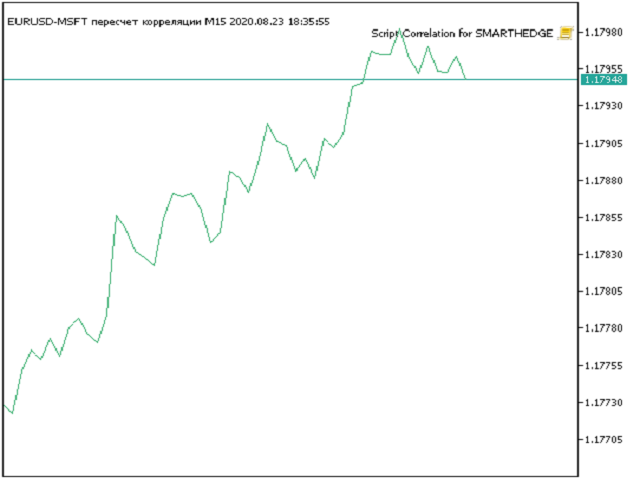
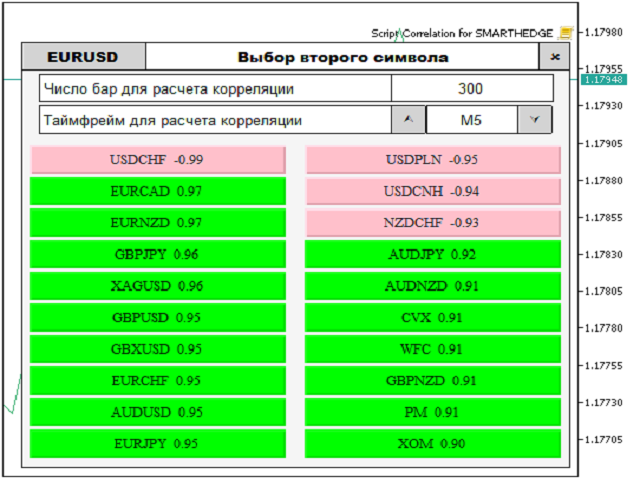
Script for quickly selecting a tool with high correlation.
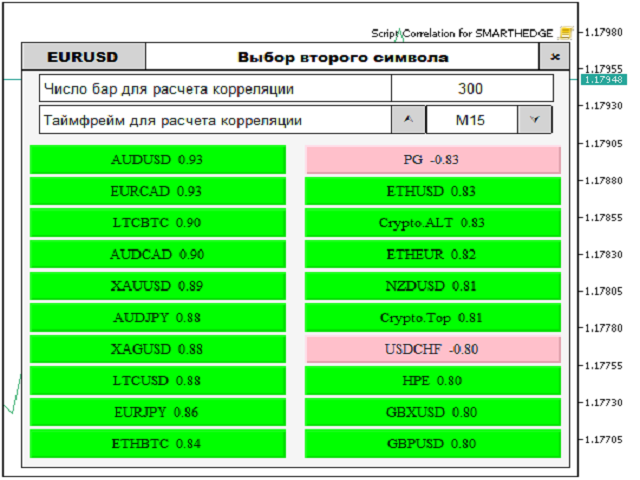
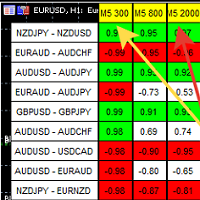
The script is placed on the tool to which you need to select the second correlating one. Then you can change the number of bars to calculate and the timeframe. The script iterates through all available symbols in the market overview and returns the 20 most correlated ones. You can use the selected pairs to trade with THE new SH expert Advisor
Produits recommandés
Reverse
Konstantin Chernov
1 (1)
A script for quick reversing positions and/or orders. If you need to reverse a position with the same volume, open an opposite position of a different volume, this script will save you from routine! Allow AutoTrading before running the script. Instructions: Run the script on the chart. This script is a limited version of the market product https://www.mql5.com/en/market/product/638 and allows reversing only positions. Input parameters are not required. Parameters such as changing the type of exi
FREE
Breakeven Bot
Gabriel Paul Ange Perrin
Optimize your trading management with Breakeven Bot, the essential tool for active traders managing multiple positions at once. No more wasting time manually adjusting your stops—one click is all it takes to secure your profits! Main Feature: ️ "BREAKEVEN" Button – Instantly set all profitable positions to breakeven and protect your gains quickly. ️ Customization Options: Set breakeven in pips or currency, depending on your preference. Choose whether breakeven should be at the entr
FREE
MultiTradeNews
Leeank Andres Fernandez Molano
This script is designed for traders who need to quickly place trades across multiple currency pairs during critical news releases, where every second counts. With this tool, you can pre-select your desired currency pairs and assign independent volumes for each one. When a major news event hits, such as Non-Farm Payroll (NFP) or PMI data releases, the script allows you to execute all your trades instantly without the need to open each pair manually. Key Features: Customizable Pairs : Choose from
FREE
Deal multiplier Mt5
Mikhail Mitin
4.5 (8)
The utility opens copies of open trades. It is very convenient if you use the   Signals   service and want to increase the volume of transactions. Settings: Symbols: all symbols only current symbol Orders: Buy Sell Magic Any Magic Input Magic Lot size Original - lot size from original order; Fix Lot - fix lot size (input); Lot X Mult - lot size X koef; Stop Loss From sender - Stop Loss from original; Without - without Stop Loss; Plus Fix - Stop Loss from original order + fix points; Fix Point -
FREE
Script Name: Close All Positions Language: MQL5 Type: Utility Script Primary Function: Instantly close all open positions on the current trading account Purpose The “Close All Positions” script is a lightweight and efficient tool designed for traders using MetaTrader 5. Its main purpose is to help users quickly exit all active trades with a single click, especially during volatile market conditions or when risk management requires immediate action. Instead of manually closing each position on
FREE
NEW :  integration with Ofir Signals to send personalized alerts Ofir Notify is a tool which send alerts on trades to Telegram Alert on any event concerning a position : Opening, Closing, modification (SL, TP) Send alerts to Chats, Groups and Channel Alert on Equity change Display Risk, Reward and progress of profit/lost for each position Customization of alerts Sending charts screenshots with alerts Send signals from your indicators or experts Multi-lingual NEW  : version 2 brings integration
FREE
L'utilitaire Close All Charts est conçu pour fermer rapidement et facilement tous les graphiques ouverts dans la plateforme MetaTrader 5 (MT5). Il sera particulièrement utile pour les traders qui travaillent avec un grand nombre d'instruments et de graphiques simultanément, ainsi que pour ceux qui préfèrent maintenir l'ordre dans leur espace de travail. Lors du test de conseillers dans le testeur de stratégies avec différents paramètres, de nombreux graphiques sont souvent ouverts. L'utilitaire
FREE
Count Lots
Hui Xian Sarah Seow
This MT5 script calculates and displays the total lot sizes traded on your account. This is useful as a quick visual summary for VPS promotions from brokers. The script outputs directly onto the chart. This is broken down by symbol and by three customisable time periods: today this week this month Font sizes can be adjusted The summary will appear in your chart To update the display after new trades, simply run the script again.
FREE
Effacer Tous les Stop Loss et Take Profit — Une solution simple pour supprimer instantanément les niveaux SL/TP Supprimez tous les niveaux de Stop Loss et de Take Profit en un seul clic ! Effacer Tous les Stop Loss et Take Profit est un script pratique conçu pour les traders qui souhaitent supprimer rapidement et efficacement les niveaux de SL et TP sur toutes les positions ouvertes. Sa simplicité d'utilisation et son exécution instantanée en font un outil indispensable pour les conditions de ma
FREE
The GRat_OrderExport EA exports trades made in the MT5 (manual or any other Expert Advisor), which can later be imported    by: GRat_BinanceImpor t  or  GRat_BybitImport or  GRat_Crypto   tool in order to copy trades to the crypto exchange; using the GRat Order Exchange library (in particular, by the GRat_OrderImport EA) in order to copy trades to another MT5 terminal or to another correlating symbol of the same MT5 terminal; using GRat_OrderImport (MT4)   in order to copy trades to MT4 termina
FREE
Telecontrol MT5
MIKHAIL VINOGRADOV
Telegram Controls (Telecontrol) — assure la communication entre le bot Telegram et le terminal MetaTrader 5 . Il aide à agréger les données de plusieurs terminaux et à les gérer à l'aide d'un bot sur Telegram . Ce service est pratique pour travailler sur plusieurs terminaux MT5, permettant de configurer individuellement chaque terminal pour un affichage et une perception optimaux des informations. Toutes les données des terminaux sont collectées dans un seul canal Telegram, et le panneau de conf
FREE
Script for Metatrader 5. One click to Delete the background grid and object, all objects on the chart such as Trend lines you have drawn or created by another program arrows text Fibonacci lines removes the background grid making a clearer clean chart horizontal and vertical lines Easy for clearing a chart or when opening new charts. Please leave a review on how its working.
FREE
Features The Expert Advisor (EA) is a semi-automated trading system that blends user-initiated entries with algorithmic trend management. Trade entries are triggered manually, while scaling, trailing stops, and risk control are handled automatically by the EA. Functional Specifications 1. Trading Modes Manual Execution Mode Trades initiated via on-chart control panel User selects Buy or Sell direction EA applies predefined Stop Loss and Take Profit values Trend management logic activates after
FREE
Product Overview The Simple Telegram Copy Trader is a FREE unified Expert Advisor that combines both Master and Slave functionality in a single EA with easy mode switching. This simplified version focuses on OPEN TRADES ONLY , making it perfect for basic copy trading setups without the complexity of advanced features. Get professional-grade copy trading with complete lifecycle management: Telegram Signal Broadcaster MT5 (Master)   Telegram Signal Subscriber MT5 (Slave) Key Features Unified Des
FREE
CloseAllPosition
Konstantin Chernov
4 (2)
A script for closing positions If you need to quickly close several positions, this script will make all the routine for you! The script does not have any input parameters. Allow AutoTrading before running the script. Usage: Run the script on a chart. If you need to specify the maximal deviation and the number of attempts to close positions, use the script with input parameters https://www.mql5.com/en/market/product/625 You can download MetaTrader 4 version here: https://www.mql5.com/en/market/
FREE
TradingTimeControl is a utility implemented as an Expert Advisor for MetaTrader 5. It automatically closes all open positions and deletes pending orders at a specified time each day. This tool is designed for traders who need to automate position management with flexible settings. Key Features Closes positions and orders at the specified time ( CloseHour , CloseMinute ) daily. Allows you to change the closing time at any moment, applying new settings immediately. Supports MagicNumber : 0 for al
FREE
Bneu Trade Manager
Marvinson Salavia Caballero
**Bneu Trade Manager** is a trading utility Expert Advisor for MetaTrader 5 designed to assist traders in managing their trading operations through a visual panel interface. This free version provides essential trade management tools suitable for manual traders who want to manage trades efficiently using a graphical interface. **Main Functionality** **Visual Trade Management:** The utility provides drag-and-drop horizontal lines on the chart for stop loss and take profit placement. Users can
FREE
Fermer les Positions sur le Symbole Actuel Un script simple et fiable pour fermer toutes les positions sur le symbole actuel. Il élimine les tâches répétitives et vous fait gagner un temps précieux. Avantages : Ciblé sur l’actif actuel : Le script ferme uniquement les positions sur le symbole sélectionné, sans affecter les autres. Rapide et pratique : Une seule exécution, et toutes les positions sont fermées en quelques secondes. Parfait pour toute stratégie : Convient aussi bien pour les positi
FREE
Aegis Gold Dashboard
Ayman Ishaq Jundi Tawadros
Aegis Gold Dashboard is a free, lightweight visual indicator created to help traders monitor key market conditions in a clean and professional way. This indicator is designed as a visual companion to automated or discretionary trading systems and does not execute any trades. Features: • Informational signal overview (non-executable) • ATR-based volatility display • Market session open / closed status • Real-time spread monitoring • Last closed trade overview • Simple market condition tips De
FREE
Quick Style MT5
Maxim Polishchuk
4.75 (12)
The Quick Style utility is designed for facilitation and acceleration of working with the properties of graphical objects. Left-click a graphical object while holding the Shift key to open the quick access window for configuring the object properties. In the window, you can change the color, style and line width with one click, including those of other graphical objects. All changes are displayed immediately. To close the Quick Style , simply click the free space on the chart. The utility is eas
FREE
The Trade Manager Interface is a free utility designed to simplify manual trading in MetaTrader. MT4 Version Available Please leave a review, if you like the trade manager. It allows traders to visualize trades directly on the chart, calculate position size automatically, and manage orders with advanced features such as partial take profits, automatic breakeven, and trailing stops. For more advanced features check out: ManHedger This tool focuses on risk control and execution precision, making
FREE
The script is intended for synchronization and loading into the Terminal of the desired (or maximum possible) history of quotes of the timeframes specified by the user for the symbols in the "Market Watch" window. The first download of the full history for one "new" symbol takes approximately one and a half to two minutes. Input parameters for running the script: 1. Desired history length (bars) - here we indicate the number of bars in the quote history that we would like to receive from t
FREE
DBS Last
Dmitriy Burlachenko
5 (1)
A small utility displays the value of the last price (Last) to the right of the chart. The Last price is the price at which the last deal was executed. Utility is convenient to use for screens with small print, for visual observation of the price level (value) or for people with poor eyesight. You can customize: Growth color Fall color Text font Font size Offset text
FREE
Time Scale for MT5
Taras Slobodyanik
4.76 (29)
The indicator draws the time scale on the chart. You can specify the time offset, adjust the size and font to display on the chart ( it is displaying your local time on your chart instead of MT time ). You can also select the desired format for displaying the date and time. You may be interested in my other product , which contains a more advanced version of the Time Scale . You can also find my other products here . Parameters Hours (time shift) — time shift (hours); Minutes (time shift) — tim
FREE
“One-Click Flatten — Fast, Clean, Reliable”      Close all orders and positions in your account with a single click — no hassle, no fumbling through tabs.      Time-saving tool for traders needing instant exit from the market—especially during volatile moves or news events.      Emotion-free execution reduces human errors and hesitation—just click and it's done.      Easy to use: load the EA in MT5 and let it handle the rest. Perfect for both beginners and seasoned traders.      Fu
FREE
Strifor SmartTrade Expert
Strifor (Mauritius) Ltd
5 (1)
Strifor SmartTrade Expert — solution pour trader professionnel qui automatise les étapes clés de l’ouverture de position : Paramètre immédiatement le stop-loss et le take-profit Fixe le risque par trade (défini dans les paramètres de l’expert) Gagne du temps et évite les erreurs manuelles Fonctionne parfaitement avec Strifor Lot Calculator (le lot est calculé par le calculateur et le même risque est appliqué dans l’expert) Raccourci clavier ALT+F4 — ouverture rapide d’ordre. Un seul clic ouvre
FREE
AutoGrid Assistant - Outil de Placement Automatique d'Ordres en Grille ASSISTANT GRATUIT pour les traders utilisant des stratégies de trading en grille ! CE QU'IL FAIT : AutoGrid Assistant place automatiquement une grille d'ordres en attente (Buy Stop/Sell Stop ou Buy Limit/Sell Limit) en une seule exécution. Aucun clic manuel requis ! FONCTIONNALITÉS PRINCIPALES : Placement automatique de grille en un clic Support des ordres Stop et Limit Paramètres de grille flexibles (distance initiale, pas e
FREE
Cet utilitaire de trading est une solution universelle pour les traders actifs, permettant de simplifier et d'automatiser au maximum le processus de travail sur le graphique. Ses principales fonctionnalités incluent : Configuration préalable des TP et SL : Avant de placer une opération sur le graphique, vous pouvez définir à l'avance les paramètres de Take Profit et de Stop Loss. Cela permet de déterminer les niveaux de sortie à l'avance et de protéger votre capital contre les mouvements imprév
FREE
Chart Handler
Gediminas Rucinskas
5 (2)
Have you ever been in a situation when you could not control the chart conveniently or had to make additional clicks to be able to scroll the history or set the scale fix numbers manually to be able to stretch the chart?  Features: Chart centering. Automatic scale fix. Automatic scroll control. This tool is one of many features included in "Trading Essentials" utility application, which can be found on mql5.com
FREE
ZoomIN MT5
Maxim Polishchuk
The ZoomIN MT5 indicator is designed for quickly viewing the selected bar on the smaller timeframes in a pop-up window. Once launched, the indicator works in the background, does not take up space on the chart and does not consume system resources. When the indicator is activated by the Shift + i combination (can be changed in the settings), a pop-up window with a chart of a smaller timeframe is created. The displayed timeframe can be changed by a left-click on the magnifying glass icon. To hide
FREE
Les acheteurs de ce produit ont également acheté
Trade Assistant MT5
Evgeniy Kravchenko
4.42 (208)
It helps to calculate the risk per trade, the easy installation of a new order, order management with partial closing functions, trailing stop of 7 types and other useful functions. Additional materials and instructions Installation instructions - Application instructions - Trial version of the application for a demo account Line function -   shows on the chart the Opening line, Stop Loss, Take Profit. With this function it is easy to set a new order and see its additional characteristics bef
Bienvenue sur Trade Manager EA, l’outil ultime de gestion des risques conçu pour rendre le trading plus intuitif, précis et efficace. Ce n’est pas seulement un outil d’exécution d’ordres ; c’est une solution complète pour la planification des trades, la gestion des positions et le contrôle des risques. Que vous soyez débutant, trader expérimenté ou scalpeur ayant besoin d’une exécution rapide, Trade Manager EA s’adapte à vos besoins, offrant une flexibilité sur tous les marchés, des devises et i
Local Trade Copier EA MT5
Juvenille Emperor Limited
4.96 (129)
Découvrez une expérience exceptionnellement rapide de copie de trades avec le   Local Trade Copier EA MT5 . Avec sa configuration facile en 1 minute, ce copieur de trades vous permet de copier des trades entre plusieurs terminaux MetaTrader sur le même ordinateur Windows ou Windows VPS avec des vitesses de copie ultra-rapides de moins de 0.5 seconde. Que vous soyez un trader débutant ou professionnel, le   Local Trade Copier EA MT5   offre une large gamme d'options pour le personnaliser en fonc
TradePanel MT5
Alfiya Fazylova
4.86 (148)
Trade Panel est un assistant commercial multifonctionnel. L'application contient plus de 50 fonctions de trading pour le trading manuel et vous permet d'automatiser la plupart des opérations de trading. Attention, l'application ne fonctionne pas dans le testeur de stratégie. Avant d'acheter, vous pouvez tester la version démo sur un compte démo. Version démo ici . Instructions complètes ici . Commerce. Permet d'effectuer des opérations de trading en un clic : Ouvrez des ordres et des positions e
Version Bêta Le Telegram to MT5 Signal Trader est presque prêt pour la sortie officielle en version alpha. Certaines fonctionnalités sont encore en développement et vous pourriez rencontrer de petits bugs. Si vous rencontrez des problèmes, merci de les signaler, vos retours aident à améliorer le logiciel pour tout le monde. Telegram to MT5 Signal Trader est un outil puissant qui copie automatiquement les signaux de trading depuis des chaînes ou groupes Telegram vers votre compte MetaTrader 5 .
Trade Dashboard MT5
Fatemeh Ameri
4.97 (117)
Tired of complex order placement and manual calculations? Trade Dashboard is your solution. With its user-friendly interface, placing orders becomes effortless, by a single click, you can open trades, set stop loss and take profit levels, manage trade lot size, and calculate risk to reward ratios, allowing you to only focus on your strategy. Say goodbye to manual calculations and streamline your trading experience with Trade Dashboard. Download  Demo Version  right now. You can find  Details of
Farmed Hedge Yield Farming - Professional Pair Trading Dashboard (Manual - Hybrid - Semi/Automated EA) VERSION 3 - WILD HARVEST UPDATE Trading Approach: - Manual Trading: Primary focus - Auto Pilot: Optional supplementary feature - Full Automation: Not the main purpose Recommended Timeframe: H1-H4 DEMO VERSION Download the free demo to test functionality. Use Strategy Tester with Visual Mode to see how it works. VERSION 3 - NEW FEATURES Summary Dashboard (SRA Panel) - Quick pair selection w
Copy Cat More Trade Copier MT5 (Chat Copieur MT5) est un copieur de trades local et un framework complet de gestion des risques et d'exécution conçu pour les défis commerciaux d'aujourd'hui. Des défis de prop firms à la gestion de portefeuille personnel, il s'adapte à chaque situation avec une combinaison d'exécution robuste, de protection du capital, de configuration flexible et de gestion avancée des trades. Le copieur fonctionne à la fois en mode Master (expéditeur) et Slave (récepteur), avec
Exp COPYLOT CLIENT for MT5
Vladislav Andruschenko
3.82 (34)
Le copieur commercial pour MT5 est un copieur commercial pour la plate-forme МetaТrader 5   . Il copie les transactions de change   entre       tous les comptes   MT5   -   MT5, MT4   -   MT5 pour la version COPYLOT MT5 (ou MT4   -   MT4 MT5   -   MT4 pour la version COPYLOT MT4) Copieur fiable ! Version MT4 Description complète   +DEMO +PDF Comment acheter Comment installer     Comment obtenir des fichiers journaux     Comment tester et optimiser     Tous les produits de Expforex Vous pouvez
HINN MagicEntry Extra
ALGOFLOW OÜ
4.69 (13)
HINN MAGIC ENTRY – the ultimate tool for entry and position management! Place orders by selecting a level directly on the chart! full description   ::  demo-version  :: 60-sec-video-description Key features: - Market, limit, and pending orders - Automatic lot size calculation - Automatic spread and commission accounting - Unlimited partitial take-profits  - Breakeven and trailing stop-loss and take-profit  functions - Invalidation leves - Intuitive, adaptive, and customizable interface - Works
Ultimate Extractor
Clifton Creath
5 (9)
Ultimate Extractor - Professional Trading Analytics for MT5 *****this is the local HTML version of Ultimate Extractor. Check out Ultimate Extractor Cloud on mql5 for the Cloud version****** Ultimate Extractor transforms your MetaTrader 5 trading history into actionable insights with comprehensive analytics, interactive charts, and real-time performance tracking. What It Does Automatically analyzes your MT5 trading history across all Expert Advisors and generates detailed HTML reports with inte
Trade Manager DaneTrades
Levi Dane Benjamin
4.36 (28)
Trade Manager pour vous aider à entrer et sortir rapidement des transactions tout en calculant automatiquement votre risque. Y compris des fonctionnalités pour vous aider à éviter le sur-trading, le trading de vengeance et le trading émotionnel. Les transactions peuvent être gérées automatiquement et les mesures de performances du compte peuvent être visualisées dans un graphique. Ces fonctionnalités rendent ce panneau idéal pour tous les traders manuels et contribuent à améliorer la plateforme
MT5 to Telegram Signal Provider est un utilitaire facile à utiliser et entièrement personnalisable qui permet l'envoi de signaux spécifiés vers un chat, un canal ou un groupe Telegram, transformant ainsi votre compte en fournisseur de signaux. Contrairement à la plupart des produits concurrents, il n'utilise pas d'importations DLL. [ Démonstration ] [ Manuel ] [ Version MT4 ] [ Version Discord ] [ Canal Telegram ]  New: [ Telegram To MT5 ] Configuration Un guide utilisateur étape par étape est
Trade copier MT5
Alfiya Fazylova
4.63 (38)
Trade Copier est un utilitaire professionnel conçu pour copier et synchroniser les commandesentre les comptes de trading. Les commandes sont copiées du compte/terminal du fournisseur vers le compte/terminal du destinataire, qui sont installés sur le même ordinateur ou vps. Avant d'acheter, vous pouvez tester la version démo sur un compte démo. Version démo ici . Instructions complètes ici . Principales fonctionnalités et avantages: Prend en charge la copie des commandes MT5> MT5, MT4> MT5, MT5>
Smart Stop Manager – Exécution automatique du stop-loss avec une précision professionnelle Présentation Smart Stop Manager est la couche d’exécution de la gamme Smart Stop, conçue pour les traders qui recherchent une gestion du stop-loss structurée, fiable et entièrement automatisée sur plusieurs positions ouvertes. Il surveille en continu toutes les opérations actives, calcule le niveau de stop optimal à l’aide de la logique de structure de marché Smart Stop, puis met à jour les stops automat
Smart Stop Scanner – Analyse multi-actifs des stop-loss basée sur la structure réelle du marché Vue d’ensemble Smart Stop Scanner offre une surveillance professionnelle des niveaux de stop-loss sur de nombreux marchés. Le système identifie automatiquement les zones de stop les plus pertinentes à partir de la structure réelle du marché, des ruptures importantes et de la logique du price action, puis affiche toutes les informations dans un panneau clair, cohérent et optimisé pour les écrans haut
Advanced Dashboard Ultra
Mirel Daniel Gheonu
5 (1)
Stats Dashboard & Journal ULTRA pour MT5 Le Centre de Commandement de Trading Complet : Analytique, Automatisation & Intelligence des Actualités. Stats Dashboard ULTRA est l'évolution ultime de l'outil d'analyse Pro. Il transforme MetaTrader 5 en une station de trading professionnelle, combinant une analyse de performance de niveau institutionnel avec une protection automatisée contre les actualités et des métriques psychologiques avancées. Conçu pour les traders manuels et les gestionnaires de
Equity Protect Pro : Votre expert en protection de compte complet pour un trading en toute sérénité Si vous recherchez des fonctionnalités telles que la protection de compte, la protection des capitaux propres, la protection de portefeuille, la protection multi-stratégies, la protection des bénéfices, la prise de bénéfices, la sécurité de trading, les programmes de contrôle des risques, le contrôle automatique des risques, la liquidation automatique, la liquidation conditionnelle, la liquidatio
Pulsar Terminal est un produit de Pulsar Technologies, une marque d' Astralys LLC . Pulsar Terminal est un utilitaire complémentaire pour MetaTrader 5. C'est une interface visuelle combinée à des outils d'exécution dans une application compagnon connectée à votre compte MetaTrader 5 via un Expert Advisor . Nous utilisons une application compagnon pour maximiser les capacités de l'outil et fournir une interface visuelle et un flux de travail plus avancés que les panneaux MT5 standard. Pulsar Ter
Trade Manager DashPlus
Henry Lyubomir Wallace
5 (13)
DashPlus est un outil de gestion de trading avancé conçu pour améliorer l'efficacité et la performance de vos transactions sur la plateforme MetaTrader 5. Il offre un ensemble complet de fonctionnalités, incluant le calcul des risques, la gestion des ordres, des systèmes de grilles avancés, des outils basés sur les graphiques et des analyses de performance. Fonctionnalités principales 1. Grille de récupération Implémente un système de grille flexible et de moyenne pour gérer les transactions dan
The product will copy all telegram signal to MT5 ( which you are member) , also it can work as remote copier.  Easy to set up, copy order instant, can work with almost signal formats, image signal,  s upport to translate other language to English Work with all type of channel or group, even channel have "Restrict Saving Content", work with  multi channel, multi MT5 Work as remote copier: with signal have ticket number, it will copy exactly via ticket number. Support to backtest signal. How to s
Telegram to MT5 Coppy
Sergey Batudayev
5 (8)
Télégramme vers MT5 :   la solution ultime pour copier des signaux Simplifiez votre trading avec Telegram vers MT5, l'outil moderne qui copie les signaux de trading directement des canaux et chats Telegram vers votre plateforme MetaTrader 5, sans DLL. Cette solution puissante garantit une exécution précise des signaux, de nombreuses options de personnalisation, un gain de temps et une efficacité accrue. [ Instructions and DEMO ] Caractéristiques principales Intégration directe de l'API Telegram
Guide d'installation :    Cliquez ici ! Analyser simultanément plusieurs conseillers experts Comparer les résultats des EA par numéro magique Suivi de la rentabilité et des pertes Filtrer les résultats par plage de dates Courbe d'équité visuelle et indicateurs détaillés Prêt à l'emploi en moins d'une minute EA Portfolio Analyzer EA Portfolio Analyzer est un   outil d'analyse professionnel   conçu pour suivre   en temps réel les performances de plusieurs Expert Advisors   de manière claire et st
Custom Alerts AIO : Surveillez tous les marchés à la fois — sans aucune configuration Présentation Custom Alerts AIO est une solution de surveillance du marché prête à l’emploi, sans configuration nécessaire. Tous les indicateurs requis — FX Power, FX Volume, FX Dynamic, FX Levels, IX Power — sont directement intégrés. Aucun graphique n’est affiché, ce qui rend cet outil idéal pour la génération d’alertes en temps réel. Il prend en charge toutes les classes d’actifs proposées par votre courtie
Anchor: The EA Manager A coordination system for traders running multiple EAs. Anchor ensures only one EA can trade at a time, preventing conflicting positions and keeping your portfolio safer. Attach Anchor to any chart. Configure your EAs and their magic numbers. Anchor handles the rest. Built for portfolios. Built for discipline. Built for prop firms. The Problem Running multiple EAs on the same account creates risk. Two gold EAs can open opposite positions on the same candle. Three EA
Seconds Chart MT5
Boris Sedov
4.59 (17)
Seconds Chart — un outil unique pour créer des graphiques en secondes dans MetaTrader 5 . Grâce à Seconds Chart , vous pouvez créer un graphique avec une période définie en secondes, offrant une flexibilité et une précision idéales pour l'analyse, indisponibles sur les graphiques standards en minutes ou en heures. Par exemple, la période S15 indique un graphique avec des bougies d'une durée de 15 secondes. Vous pouvez utiliser n'importe quels indicateurs et experts advisors compatibles avec les
Timeless Charts
Samuel Manoel De Souza
5 (3)
Timeless Charts est une solution de graphiques avancée conçue pour les traders professionnels qui ont besoin de graphiques personnalisés / unités de temps personnalisées – y compris les graphiques en secondes / unités de temps en secondes, les graphiques Renko / barres Renko, les graphiques en clusters / footprints et des outils avancés similaires à ceux disponibles sur les plateformes les plus populaires. Contrairement aux graphiques hors ligne traditionnels ou aux simples indicateurs personnal
YuClusters
Yury Kulikov
4.93 (43)
Attention: You can view the program operation in the free version  YuClusters DEMO .  YuClusters is a professional market analysis system. The trader has unique opportunities to analyze the flow of orders, trade volumes, price movements using various charts, profiles, indicators, and graphical objects. YuClusters operates on data based on Time&Sales or ticks information, depending on what is available in the quotes of a financial instrument. YuClusters allows you to build graphs by combining da
Take a Break MT5
Eric Emmrich
4.75 (24)
One tool to protect all your EAs — news filter, equity protection, time filter and more — free demo available Take a Break has evolved from a basic news filter into a comprehensive account protection solution. It pauses your other Expert Advisors during news events or based on custom filters. When trading resumes, it automatically restores your entire chart setup , including all EA settings. Typical use cases: One news filter for all your EAs. Pause trading during news or high volatility — and c
The News Filter MT5
Leolouiski Gan
4.74 (19)
Ce produit filtre tous les conseillers experts et les graphiques manuels pendant les heures de publication des actualités, de sorte que vous n'avez pas à vous soucier des pics de prix soudains qui pourraient détruire vos configurations de trading manuelles ou les transactions entrées par d'autres conseillers experts. Ce produit est également livré avec un système de gestion des ordres complet qui peut gérer vos positions ouvertes et vos ordres en attente avant la publication de toute actualité.
Plus de l'auteur
The algorithm of the adviser's work: When the Expert Advisor is launched at a specified distance from the price (first_step), BuyStop and SellStop orders are placed. Further, depending on which way the price went, one of them becomes market, and the other begins to crawl after the price. When the price rolls back, it also becomes market. If we have reached a set profit in some direction, the order is closed and a creeping pending order of the same direction is placed again. If the profit is no
Triangular network
Vladimir Khlystov
A strategy based on triangular arbitration. At the same time, we open positions on three currency pairs. For example, EURUSD – USDJPY – EURJPY, i.e. we buy all three currencies so that the circle is closed. Thanks to this, wherever the price goes, open positions insure each other. Due to this, you can open quite large lots. The adviser will provide you with triangle options himself from all open pairs in the market overview. The Expert Advisor opens triangles simultaneously in two directions a
Best Correlation
Vladimir Khlystov
5 (1)
A script showing the correlation for three selected zones at once (TF-bar) In the parameters, select 3 options The data is displayed sorted by the first zone The script also creates a file in which it writes all the data without sorting. In this way, you can expand the number of zones to any number and perform the analysis in exsel Parameters: TF_Trade1 =PERIOD_M5; BarsCor1  = 300; TF_Trade2 =PERIOD_M5; BarsCor2  = 800; TF_Trade3 =PERIOD_M5; BarsCor3  = 2000; K             = 0.8; WindSize   
FREE
Indicator panel
Vladimir Khlystov
The panel shows 6 indicators and their signals for all timeframes. You can enable or disable various signals, entire timeframes, and individual indicators. if the alert button is pressed and all signals match, the indicator sends a message to the alert window. You can disable and enable both individual signals and the entire indicator for all timeframes, or disable individual timeframes for all indicators
FREE
Hourglass
Vladimir Khlystov
4 (1)
Logarithmic Network - cm-hourglass Expert Advisor The Expert Advisor places orders with a decreasing lot and step in the direction of the trend and with an increasing lot and step in the counter-trend direction. It sets Take Profit for every direction to avoid breakeven of the entire series. The farthest order in the direction of the trend is closed with a farthest counter-order so as to get the positive total, thus pulling the entire network to the price without letting it expand. Parameters Lo
Offset
Vladimir Khlystov
The indicator identifies the direction and strength of the trend. Bearish trend areas are marked with red color, bullish areas are marked with blue color. A thin blue line indicates that a bearish trend is about to end, and it is necessary to prepare for a bullish one. The strongest signals are at the points when the filled areas start expanding. The indicator has only two parameters: period - period; offset - offset. The greater the period, the more accurate the trend identification, but with a
Matematik
Vladimir Khlystov
The Expert Advisor is based on simple mathematics. The EA places two opposite-directed orders. Wherever the price goes, one order will always have a positive result, the second one will have negative. If we average it, then on the return movement of the price (only a few spreads) the averaged orders are closed and there is only profitable order left! The EA trades through its profit. Of course, the averaging positions also add profit due to MinProfit , especially if you use rebate programs to re
Fishing PRO
Vladimir Khlystov
Советник имеет несколько режимов торговли. Режимы открытия позиций и отложенных ордеров. Открытие позиций через заданный шаг. После прохождения ценой заданного расстояния 1 шаг вверх — продает, 1 шаг вниз — покупает. Таким образом, появляется сеть, которую Вы закрываете руками с помощью кнопок советника или отдаете прибыль на усмотрение самого советника, нажав кнопки автоторговли. Открытие сети отложенных ордеров Ордера открываются в зависимости от настроек. Можно задавать любые сочетания из buy
SmartHedge
Vladimir Khlystov
3 (2)
The EA compares two instruments and opens opposite positions when these instruments diverge. Further, when the instruments converge, the EA closes positions on the total profit. The EA works on any instruments. Select couples can be on the table. Advisor enough to put on one pair of bundles. For example, for trading on GBPUSD — EURUSD, it is enough to put the EA on GBPUSD or EURUSD. On the chart, the EA draws both currencies and the bars indicate the distance between them. The parameters of the
Bancomat MT4
Vladimir Khlystov
4 (4)
Bancomat   The Expert Advisor does not require setting and optimization of parameters. At the same time, the advisor trades on 20 currency pairs. The principle of trading is hedging (transaction insurance). Thanks to this principle, the EA does not go into large drawdowns. Regulation of profitability is achieved by changing the lot. The minimum recommended deposit is from 500 usd with a lot of 0.01. At the same time, the expected profit will be 7-15% per month. The rest of the parameters can be
The EA opens trades using the indicator's graphical arrows. If the indicator needle does not have a binding buffers, it is possible to test this indicator with the help of dagnogo adviser. Specify the arrow codes in the parameters and the EA will trade on them. You can find out the arrow codes by opening the arrow properties. following values are set by default: 225; //Up arrow code 226; //Down arrow code
Rul PRO
Vladimir Khlystov
The main task of the expert Advisor is to reduce the drawdown and close all orders that are opened by other expert advisors or manually. But it also added the functions of regular trading, so now the expert Advisor can be used as the main tool for earning money. The principle behind its strategy: All the actions performed by the Expert Advisor are controlled by built-in trend indicators, but, as practice has shown, many users disable these indicators to accelerate a process of “settlement” (i.

Rul Hedge MT4
Vladimir Khlystov
3.67 (3)
Description of strategy: The EA trades on 2 pairs with a positive correlation. On one, he trades only for buying, on the second only for selling. If the position goes to a loss, the adviser begins to resolve it by opening deals much smaller in volume than the original one and biting off small pieces on price rollbacks. The opposite trade, which is in the black, will not be closed until the unprofitable one is resolved or until they reach the specified profit in total. Clearing (averaging) trades
Manual Grid CM
Vladimir Khlystov
The expert Advisor helps you set a network of pending orders and collect profit from any price movement. You can use it to trade many grid strategies. You can also use it to track open positions. "Buy Stop — - open a network of pending stop orders for sale "Sell Stop" - open a network of pending stop orders for purchase "Buy Limit" - open a network of pending limit orders for sale "Sell Limit" - open a network of pending limit orders for purchase "Close Buy" - button for closing the entire net
Velosity
Vladimir Khlystov
The Expert Advisor analyzes the rate of price change and opens positions in the direction of price movement when the speed sign changes. Then it accompanies the positions with a trawl, which also depends on the speed. That is, when the price growth SL SL is pressed closer, when the speed increases, respectively, further, allowing the price to gain weight and prevents from closing when the market noise. tp also moves higher when the speed changes. If necessary, you can enable the transfer func

Description of the Expert Advisor: You can trade with any strategies and any Expert Advisors, but there comes a time when trading comes to a standstill. All dogmas and rules are violated and you do not know what to do next. My hands drop and I want to take a break, but there are several thousand dollars at stake, which is so insulting to leave to the mercy of fate. You can of course just put a lock, go on vacation and then calmly sort everything out, and you can entrust all this to the adviser
Cm limit
Vladimir Khlystov
Strategy: A grid Expert Advisor that collects profit in any direction of price movement! We catch the initial price movement with stop orders. The exact guidance of the order is carried out by a trawl (pulling it up behind the price). Next, a grid of limit orders is placed at a specified distance (Step) from each other. Moreover, the distance is dynamic and can adjust to the market. The lot is set as a fixed or as a percentage (RiskPercent) of available funds.  The essence of the strategy is t
The Expert Advisor cannot be tested in the MT4 Strategy Tester! Only on MT5, so put it on a demo account and test it in real time or download the same version for MT5. The Expert Advisor trades on instruments with a high correlation. At the same time, it insures (hedges) each transaction is made at the expense of another instrument. The principle of insurance is that we buy one instrument, and sell the opposite one. Since pairs with a positive correlation always follow in the same direction, th

SL Stop Orders
Vladimir Khlystov
При старте советник выставляет два отложенных стоп ордера образовывая канал. Если один ордер срабатывает то второй переустанавливаем на его SL с увеличением лота. При срабатывании ТП советник начинает цикл с ноля. Оптимизируемые параметры: Объем ордеров (   Lot   ) нам нет смысла оптимизировать. Его проще сразу установить в соответствии с размером вашего депозита. Например для депозита менее 500 usd ставим минимальный лот 0,01 Размер прибавки лота (   Plus_Lot   ) ставим в зависимости от перво
News 21
Vladimir Khlystov
The Expert Advisor trades on market surges, while not using any indicators. The Expert Advisor analyzes the speed of price movement and if the price starts moving faster than the set one, opens a position in the direction of price movement. Trades are closed by SL TP and trailing stop. If the averaging is set to greater than 0, then the stop loss is not set, but new deals are opened with an increased lot and averaged. Parameters: Lot = 0.1; LevelNewse = 50; strength of the news (price jumps i

ExpertTradePanel
Vladimir Khlystov
It shows signals for all timeframes, and calculates the total percentage of the probability of price movement based on 63 signals. You can enable and disable various signals, entire timeframes and individual indicators. You can configure at what percentage the adviser will open positions himself. Or just trade in manual mode using it as an indicator. If the Trade button is pressed and the percentage in some direction has reached the set value, the Expert Advisor will open the corresponding posi
Expert BDT MT4
Vladimir Khlystov
Advisor based on triangular arbitrage. The Expert Advisor analyzes the prices of all trading instruments on the entire account opened in the market overview.   The analysis takes place at the expense of other currency pairs linked by a single currency.   (currency triangles). Examples of triangles: EURUSD – USDJPY – EURJPY USDCAD – CADCHF – USDCHF EURGBP – GBPUSD – EURUSD AUDUSD – USDCAD – AUDCAD GBPAUD – AUDUSD – GBPUSD The Expert Advisor analyzes each currency through the other two and calcu

Cm Equity Tral
Vladimir Khlystov
5 (1)
Это очень удобный и нужный инструмент для тех, кому некогда сидеть за монитором или если вы просто хотите при получении определенной прибыли, зафиксировать ее и закрыть все открытые ордера на счете. Советник полностью автоматический, но если Вы захотите вмешаться в его работу, то для этого есть кнопка Close. Кнопка «Close» позволяет закрыть все открытые на данный момент позиции. Настройки: Total_Profit_Start = 5000; //Сумма в USD от которой стартовать трал по Профиту Profit_Percent = 1; //% Пр
Expert NEWS
Vladimir Khlystov
The Expert Advisor trades on market surges, while not using any indicators. The Expert Advisor analyzes the speed of price movement and if the price starts moving faster than the set one, opens a position in the direction of price movement. Trades are closed by SL TP and trailing stop. If the averaging is set to greater than 0, then the stop loss is not set, but new deals are opened with an increased lot and averaged. Parameters: Lot = 0.1; LevelNewse = 50; strength of the news (price jumps in
EA Hedging for MT5
Vladimir Khlystov
5 (1)
A trading robot based on the correlation of instruments is the safest strategy on the market! Advisor's Strategy:  We know that highly correlated currencies almost always behave in a mirror way. But there are moments of deviation (divergence of currencies) from the normal value. The Expert Advisor opens orders in the direction of currency convergence.  Further, when the total profit reaches CloseProfit (the value in the deposit currency at which all positions are closed), the ADVISER closes the
New Smarthedge
Vladimir Khlystov
5 (2)
The EA has the same trading principle as   SMARTHEDGE . We trade simultaneously on drum instruments with high correlation. Transactions made on one instrument compensate for the drawdown of transactions on the other instrument. Thus, we can trade fairly large volumes with relatively low risk. The principle of operation is clearly visible in the video below. In this expert Advisor, I tried to simplify the settings as much as possible, but left all the main functions from the early development. (
Bancomat
Vladimir Khlystov
4 (12)
The expert Advisor does not require configuration and optimization of parameters. At the same time, the expert Advisor trades on 20 currency pairs. The trading principle is hedging (insurance of transactions). Thanks to this principle, the EA does not enter large drawdowns. The regulation of profitability is achieved through changes in the lot. The minimum recommended Deposit is from 500 usd with a lot of 0.01. At the same time, the expected profit will be 7-15% per month. You can leave the oth

Rul MT5
Vladimir Khlystov
The expert Advisor is designed for dealing with complex situations, including Loka. In addition, the expert Advisor can successfully trade itself. To do this, it provides auto-trading functions. Parameters BUY   – allow to resolve sales SELL   – allow to resolve purchases Step   = 60; – step between averaging positions ProfitClose   – closing profit in currency Lot   = 0.01; – the first lot of averaging K_Lot   = 1.5; – averaging coefficient Max_Lot   = 10.0; – maximum possible volume StartLot  

Rul HEDGE
Vladimir Khlystov
Description of strategy: The EA trades on 2 pairs with a positive correlation. On one, he trades only for buying, on the second only for selling. If the position goes to a loss, the adviser begins to resolve it by opening deals much smaller in volume than the original one and biting off small pieces on price rollbacks. The opposite trade, which is in the black, will not be closed until the unprofitable one is resolved or until they reach the specified profit in total. Clearing (averaging) trades
Matematiks
Vladimir Khlystov
Matematiks The expert Advisor is based on simple math. The expert Advisor puts 2 multidirectional orders further, wherever the price goes, it turns out that one order is always in the plus, the second in the minus. If we average it, then on the reverse price movement (only a few spreads), the averaged orders are closed and only the profitable one remains! It is thanks to his profit that the trade goes on. Of course, the averaging positions themselves also add profit to the piggy Bank at the ex

Filtrer:
Hozan Ahmad
239
Hozan Ahmad 2020.09.20 16:33 
 

L'utilisateur n'a laissé aucun commentaire sur la note

Répondre à l'avis