Ofir Notify for Telegram Light edition MT5

4.67

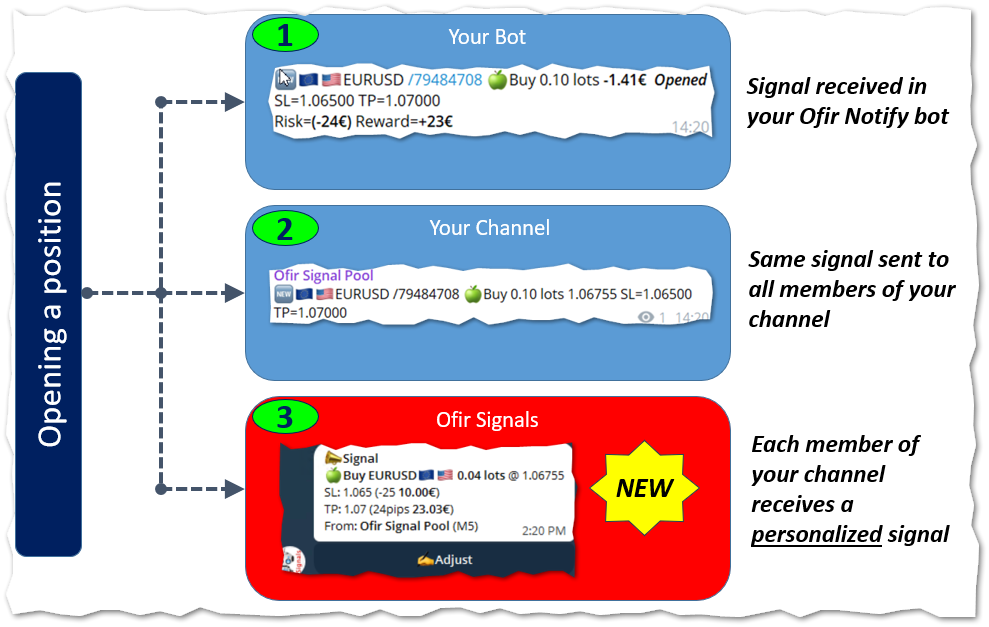
NEW :  integration with Ofir Signals to send personalized alerts


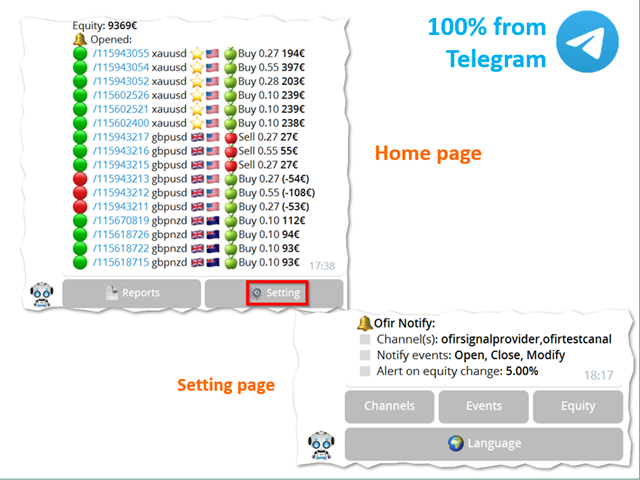
Ofir Notify is a tool which send alerts on trades to Telegram

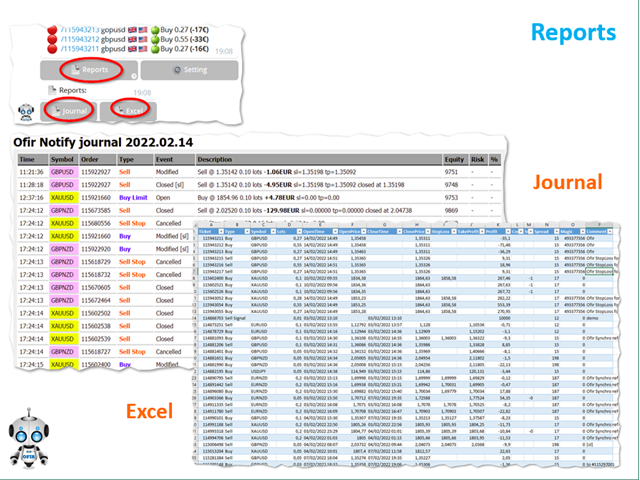
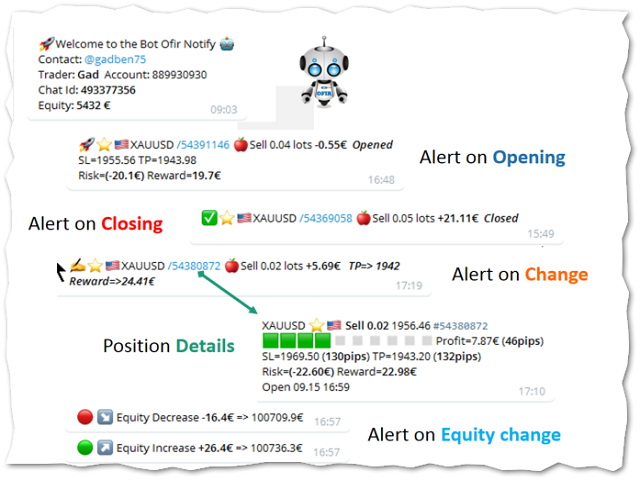
  1. Alert on any event concerning a position : Opening, Closing, modification (SL, TP)
  2. Send alerts to Chats, Groups and Channel
  3. Alert on Equity change
  4. Display Risk, Reward and progress of profit/lost for each position
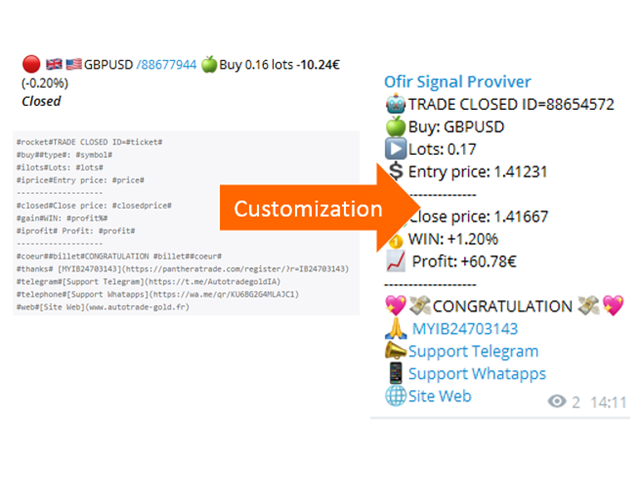
  5. Customization of alerts
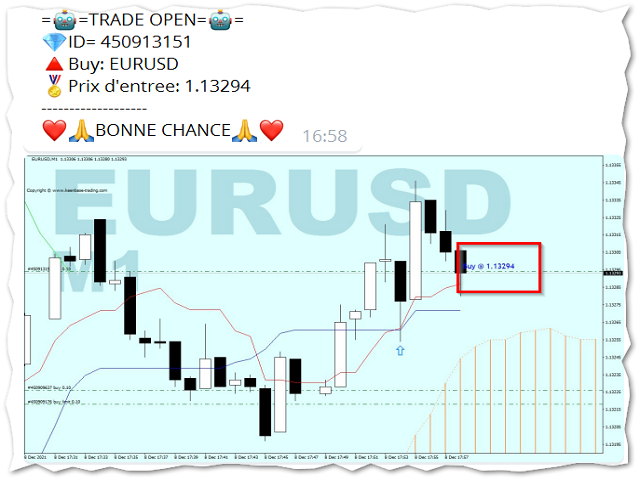
  6. Sending charts screenshots with alerts
  7. Send signals from your indicators or experts
  8. Multi-lingual
  9. NEW : version 2 brings integration with Ofir Signals to send personalized alerts to your channel subscribers. Position sizes are calculated for each user, taking into account its level of risk. read more 

More info in my Blog


Ofir Notify Setup instruction

  1. Open Telegram and search for "BotFather"
  2. Type /start and click/type /newbot to create a new bot
  3. Give your bot a nickname and username (e.g., nickname: MyNameAlerts and username: MyNameAlertsBot <-- username has to be ended by 'bot')
  4. Congratulations! You have created your Telegram bot.
  5. Save your bot API token (e.g. 1324115883:AAH2Z9PlxKX3Fce1e_m_w3AB7vA2EZZ_GAD)
  6. Back in MetaTrader 4, go to Tools > Options > Expert Advisors > tick 'Allowed WebRequest for listed URL' and add https://api.telegram.org.
  7. Attach the utility into your MetaTrader 4 chart and enter the Telegram Bot Token (from step 5)
  8. In Telegram open the Bot (search Bot username and start a chat with it)
  9. Press Start or enter /start
  10. You should get a message that the Chat Id is not correct. This message shows your Chat ID
  11. In Metatrader, open the utility properties and enter the Chat ID with the correct ID. This makes sure you are the only one who can use the Bot
  12. Back to Telegram, type /start . You should get information on your trading account number and equity
  13. Ofir Notify is ready to work for you

Properties

  1. Bot Api Token: The unique token of your bot. Do not share this information.
  2. Chat ID: Your Telegram Chat ID
All other settings are made directly by using the application from Telegram. More info in my Blog

Customization

Ofir Notify enables to customize the alerts sent to Chats or Channel.
This is based on using text files as templates.

Example of customization file:

#rocket#TRADE CLOSED ID=#ticket#
#buy##type#: #symbol#
#ilots#Lots: #lots#
#iprice#Entry price: #price#
-------------------
#closed#Close price: #closedprice#
#gain#WIN: #profit%#
#iprofit# Profit: #profit#
-------------------
#coeur##billet#CONGRATULATION #billet##coeur#
#thanks# [MYIB24703143](https://panthe....)
#telegram#[Support Telegram](https://t.me/....)

List of keywords to be used in template files
Keyword Description Example
#ticket# ticket numer 123456789
#symbol# symbol EURUSD
#flag# symbol flag
....AND MUCH MORE (Blog)


Sending screenshots

This feature enables to send chart screenshots with an alert in order to show Opening or Closing positions in a chart.

Integration with your own indicators and experts

This utility can be used by your own indicators and EA to send signals to Telegram. They just have to create a text file, containing the signal, to the following directory:
<Data Folder>/OfirNotify/<Your trading account Number/Inbox
You can use the following code in your indicator or EA:

string directory="Ofir Notify/"+IntegerToString(AccountInfoInteger(ACCOUNT_LOGIN))+"/Inbox";
string filename="Test.txt";
string signal="BUY EURUSD 1.20202 SL=1.201 TP=1.203";
saveStringFile(signal,directory+"/"+filename);
bool saveStringFile(string s,string fileName)
  {
   int handle=FileOpen(fileName,FILE_WRITE|FILE_TXT);
   if(handle==INVALID_HANDLE)
      return(false);
   FileWriteString(handle,s);
   FileClose(handle);
   return(true);
  }


Avis 8
Chua Wee Kiat
2972
Chua Wee Kiat 2024.04.01 13:44 
 

Many thanks for the contribution!

Ya Peng Cheng
293
Ya Peng Cheng 2023.04.20 14:43 
 

really great tools for telegram communication. And the team is supportive, patient and helpful for solving issues. 5/5 starts!

Piotr Drozdek
1107
Piotr Drozdek 2022.08.12 11:59 
 

5/5 stars. Excellent product. Thanks!

Produits recommandés
Reverse
Konstantin Chernov
1 (1)
A script for quick reversing positions and/or orders. If you need to reverse a position with the same volume, open an opposite position of a different volume, this script will save you from routine! Allow AutoTrading before running the script. Instructions: Run the script on the chart. This script is a limited version of the market product https://www.mql5.com/en/market/product/638 and allows reversing only positions. Input parameters are not required. Parameters such as changing the type of exi
FREE
MultiTradeNews
Leeank Andres Fernandez Molano
This script is designed for traders who need to quickly place trades across multiple currency pairs during critical news releases, where every second counts. With this tool, you can pre-select your desired currency pairs and assign independent volumes for each one. When a major news event hits, such as Non-Farm Payroll (NFP) or PMI data releases, the script allows you to execute all your trades instantly without the need to open each pair manually. Key Features: Customizable Pairs : Choose from
FREE
Script for quickly selecting a tool with high correlation. The script is placed on the tool to which you need to select the second correlating one. Then you can change the number of bars to calculate and the timeframe. The script iterates through all available symbols in the market overview and returns the 20 most correlated ones. You can use the selected pairs to trade with THE new SH expert Advisor
FREE
Deal multiplier Mt5
Mikhail Mitin
4.5 (8)
The utility opens copies of open trades. It is very convenient if you use the   Signals   service and want to increase the volume of transactions. Settings: Symbols: all symbols only current symbol Orders: Buy Sell Magic Any Magic Input Magic Lot size Original - lot size from original order; Fix Lot - fix lot size (input); Lot X Mult - lot size X koef; Stop Loss From sender - Stop Loss from original; Without - without Stop Loss; Plus Fix - Stop Loss from original order + fix points; Fix Point -
FREE
Script Name: Close All Positions Language: MQL5 Type: Utility Script Primary Function: Instantly close all open positions on the current trading account Purpose The “Close All Positions” script is a lightweight and efficient tool designed for traders using MetaTrader 5. Its main purpose is to help users quickly exit all active trades with a single click, especially during volatile market conditions or when risk management requires immediate action. Instead of manually closing each position on
FREE
Breakeven Bot
Gabriel Paul Ange Perrin
Optimize your trading management with Breakeven Bot, the essential tool for active traders managing multiple positions at once. No more wasting time manually adjusting your stops—one click is all it takes to secure your profits! Main Feature: ️ "BREAKEVEN" Button – Instantly set all profitable positions to breakeven and protect your gains quickly. ️ Customization Options: Set breakeven in pips or currency, depending on your preference. Choose whether breakeven should be at the entr
FREE
Candle Momentum Alert R13 Free Candle Momentum Alert Utility for MetaTrader 5 Candle Momentum Alert R13 is a lightweight utility for MetaTrader 5 designed to help traders monitor candles with significant price movement based on a user-defined candle body size threshold. This tool is intended for monitoring and awareness purposes only and does not place, manage, or modify any trades. Key Features Candle momentum monitoring based on candle body size Multi-symbol monitoring (main chart + opti
FREE
Fermer les Positions sur le Symbole Actuel Un script simple et fiable pour fermer toutes les positions sur le symbole actuel. Il élimine les tâches répétitives et vous fait gagner un temps précieux. Avantages : Ciblé sur l’actif actuel : Le script ferme uniquement les positions sur le symbole sélectionné, sans affecter les autres. Rapide et pratique : Une seule exécution, et toutes les positions sont fermées en quelques secondes. Parfait pour toute stratégie : Convient aussi bien pour les positi
FREE
The script is intended for synchronization and loading into the Terminal of the desired (or maximum possible) history of quotes of the timeframes specified by the user for the symbols in the "Market Watch" window. The first download of the full history for one "new" symbol takes approximately one and a half to two minutes. Input parameters for running the script: 1. Desired history length (bars) - here we indicate the number of bars in the quote history that we would like to receive from t
FREE
JVH Trading Information Panel – Professional Account Dashboard (MT5) The JVH Trading Information Panel is a clean, accurate, and professional account monitoring dashboard for MetaTrader 5. It gives traders full control and insight into account performance, risk, drawdown, and trading statistics — all in real time , directly on the chart. Designed for manual traders, funded traders, scalpers, and algorithmic traders , this panel focuses on clarity, correctness, and stability . What This Indic
FREE
SG InfoBox MT5
Hleb Smoliar
3.5 (2)
The   "InfoBox"   utility is designed to display the presence of open orders, the number of lots, current profit and much more in one window. The version for the MT4 platform is here . You've probably encountered a situation where you have an advisor that works on a currency pair, but information about its operation: - orders and their number, the size of the spread for the instrument, the volume of lots on the market, drawdown and much more - are scattered in different places of the terminal an
FREE
TradeHistoryParsing
MetaQuotes Ltd.
2 (1)
The TradeHistoryParsing is a utility for working with the trade history obtained from the MetaTrader 5 terminal. The product is based on the " RegularExpressions in MQL5 " library. It allows to quickly get the required data on your trading history. The filtering results are displayed as a table, a summary of mathematical statistics is provided below the table. Working with the tool Export the trade report as an html file and place it into the "sandbox". After that, when launching the EA, specif
FREE
CloseAllPosition
Konstantin Chernov
4 (2)
A script for closing positions If you need to quickly close several positions, this script will make all the routine for you! The script does not have any input parameters. Allow AutoTrading before running the script. Usage: Run the script on a chart. If you need to specify the maximal deviation and the number of attempts to close positions, use the script with input parameters https://www.mql5.com/en/market/product/625 You can download MetaTrader 4 version here: https://www.mql5.com/en/market/
FREE
Telecontrol MT5
MIKHAIL VINOGRADOV
Telegram Controls (Telecontrol) — assure la communication entre le bot Telegram et le terminal MetaTrader 5 . Il aide à agréger les données de plusieurs terminaux et à les gérer à l'aide d'un bot sur Telegram . Ce service est pratique pour travailler sur plusieurs terminaux MT5, permettant de configurer individuellement chaque terminal pour un affichage et une perception optimaux des informations. Toutes les données des terminaux sont collectées dans un seul canal Telegram, et le panneau de conf
FREE
Product Overview The Simple Telegram Copy Trader is a FREE unified Expert Advisor that combines both Master and Slave functionality in a single EA with easy mode switching. This simplified version focuses on OPEN TRADES ONLY , making it perfect for basic copy trading setups without the complexity of advanced features. Get professional-grade copy trading with complete lifecycle management: Telegram Signal Broadcaster MT5 (Master)   Telegram Signal Subscriber MT5 (Slave) Key Features Unified Des
FREE
Total Closed Trades – MT5 Indicator The Total Closed Trades indicator for MetaTrader 5 provides a quick, visual overview of your trading performance by displaying a simple and intuitive 3-value breakdown : Total Trades – The total number of closed trades. Winning Trades – Number of profitable trades. Losing Trades – Number of losing trades. Instead of digging through reports, traders can instantly monitor their historical performance with a compact and elegant pie chart-style widget. Key
FREE
The utility draws pivot levels based on a selection from day week month The previous candlestick of the selected timeframe is taken and the values for the levels are calculated using the following formulas: Pivot = (high + close + low) / 3 R1 = ( 2 * Pivot) - low S1 = ( 2 * Pivot) - high R2 = Pivot + (R1 -S1) R3 = high + ( 2 * (Pivot - low)) S2 = Pivot - (R1 - S1) S3 = low - ( 2 * (high - Pivot)); The style and thickness for all lines are adjusted. The colors for the R, Pivot and S lines ar
FREE
Lumos
Diego Arribas Lopez
Lumos Lumos is a multifunctional trading assistant. It gives an overview of the current market situation for a better decision making. The strategy tester only provides a visualization of the application. Lumos is highly customizable and gives you information in multiple timeframes about: MAs, price structure, RSI, RSI MA and an overview of the price distance to possible SLs.
FREE
ZoomIN MT5
Maxim Polishchuk
The ZoomIN MT5 indicator is designed for quickly viewing the selected bar on the smaller timeframes in a pop-up window. Once launched, the indicator works in the background, does not take up space on the chart and does not consume system resources. When the indicator is activated by the Shift + i combination (can be changed in the settings), a pop-up window with a chart of a smaller timeframe is created. The displayed timeframe can be changed by a left-click on the magnifying glass icon. To hide
FREE
Big Price on Chart
Christian Paul Anasco
You can now have a BIG price showing on chart. ========================================== INPUTS: BID or ASK:   Choose which price you'd like to show on the chart, bid or ask. Default is Bid. Font size:   Set the font size for the price. Default is 200. Font color:   Set the font color for the price. Default is White. Base corner:   Choose which of the 4 corners you want to price to be in. Default is the upper right hand corner of the chart. X distance from chosen corner:   Distance of the price
FREE
DBS Last
Dmitriy Burlachenko
5 (1)
A small utility displays the value of the last price (Last) to the right of the chart. The Last price is the price at which the last deal was executed. Utility is convenient to use for screens with small print, for visual observation of the price level (value) or for people with poor eyesight. You can customize: Growth color Fall color Text font Font size Offset text
FREE
MT5toTLGRM
Fernando Morales
4.2 (5)
Do not use Windows 7 with this EA MT5toTLGRM EA only sends text messages to a Telegram group or channel of your choice. The messages are customizable to show information about any trading activity in the account. Also it shows a daily PnL report. Several instances of this EA can be used simultaneously in the same MT5 terminal for sending messages to different Telegram group/channel but ensure that each one has a different number in [B13] setting. Following are the features of MT5toTLGRM EA send
FREE
Time to Close Candle
German David Nino Cifuentes
TimeToClose The "TimeToClose" indicator is an essential tool for traders who need to monitor the remaining time before a candle closes. This indicator displays the remaining time directly on the BID line, providing a clear and precise reference during real-time trading. Key Features: Displays the remaining time for the current candle to close. Direct integration on the BID line for better visualization. Simple and user-friendly configuration. Ideal for all types of traders, from beginners to pro
FREE
Price live on the Chart Description: The Real-Time Price Display is a powerful tool for MetaTrader 5 users that provides continuous updates of the current bid (SELL) and ask (BUY) prices directly on your trading chart. This script is ideal for traders who need to stay updated on market prices at a glance. Key Features: Live Price Updates : Displays the latest bid and ask prices for your selected trading symbol in real-time. Customizable Display : Adjust the horizontal and vertical position of th
FREE
SphereSample
MetaQuotes Ltd.
The script SphereSample.mq5 illustrates control of graphic objects using the classes from the Standard Library (Base class of objects array CArrayObj , CChartObjectText ).
FREE
Cet utilitaire de trading est une solution universelle pour les traders actifs, permettant de simplifier et d'automatiser au maximum le processus de travail sur le graphique. Ses principales fonctionnalités incluent : Configuration préalable des TP et SL : Avant de placer une opération sur le graphique, vous pouvez définir à l'avance les paramètres de Take Profit et de Stop Loss. Cela permet de déterminer les niveaux de sortie à l'avance et de protéger votre capital contre les mouvements imprév
FREE
Phone Trade Manager
Krutik Piyushkumar Parekh
Smart Lot-Size Calculator And Trade Assistant for Mobile Trading Overview: This is the tool every trader in the market must have no matter if you are scalper, swing traders, day trader, or long term trader. This On-The-Go trading tool will help you stay disciplined and also stay free from daily trade management chores, Most traders face common problems like   1. Calculation of proper lot-size of a position to take controlled risk  2. Managing every trade and trailing stop-loss if trades goes in
FREE
L'utilitaire Close All Charts est conçu pour fermer rapidement et facilement tous les graphiques ouverts dans la plateforme MetaTrader 5 (MT5). Il sera particulièrement utile pour les traders qui travaillent avec un grand nombre d'instruments et de graphiques simultanément, ainsi que pour ceux qui préfèrent maintenir l'ordre dans leur espace de travail. Lors du test de conseillers dans le testeur de stratégies avec différents paramètres, de nombreux graphiques sont souvent ouverts. L'utilitaire
FREE
Golden Local Trade Copier MT5 – a straightforward, powerful utility designed to make trade copying between MT5 accounts effortless and secure. Whether you're scaling your strategies across multiple accounts, managing a prop firm portfolio, or simply duplicating your master signals without the hassle, this EA has you covered. Golden Remote Trade Copier MT5 :  https://www.mql5.com/en/market/product/166092 Why Golden Local Trade Copier? In today's fast-paced forex world, precision and protection ar
FREE
SynchroObjects MT5
Maxim Polishchuk
4.44 (16)
The SynchroObjects utility is designed to facilitate and speed up the work with graphic constructions on different charts of one symbol. The SynchroObjects utility clones the created objects to all charts on which the utility is running and which have the same symbol. And also synchronously changes their properties. The utility is easy to use and requires no configuration. Tip: If you view the history frequently - we also recommend you to also install the free Smart AutoScroll utility. It automa
FREE
Les acheteurs de ce produit ont également acheté
Trade Assistant MT5
Evgeniy Kravchenko
4.42 (207)
It helps to calculate the risk per trade, the easy installation of a new order, order management with partial closing functions, trailing stop of 7 types and other useful functions. Additional materials and instructions Installation instructions - Application instructions - Trial version of the application for a demo account Line function -   shows on the chart the Opening line, Stop Loss, Take Profit. With this function it is easy to set a new order and see its additional characteristics bef
Bienvenue sur Trade Manager EA, l’outil ultime de gestion des risques conçu pour rendre le trading plus intuitif, précis et efficace. Ce n’est pas seulement un outil d’exécution d’ordres ; c’est une solution complète pour la planification des trades, la gestion des positions et le contrôle des risques. Que vous soyez débutant, trader expérimenté ou scalpeur ayant besoin d’une exécution rapide, Trade Manager EA s’adapte à vos besoins, offrant une flexibilité sur tous les marchés, des devises et i
Local Trade Copier EA MT5
Juvenille Emperor Limited
4.96 (133)
Découvrez une expérience exceptionnellement rapide de copie de trades avec le   Local Trade Copier EA MT5 . Avec sa configuration facile en 1 minute, ce copieur de trades vous permet de copier des trades entre plusieurs terminaux MetaTrader sur le même ordinateur Windows ou Windows VPS avec des vitesses de copie ultra-rapides de moins de 0.5 seconde. Que vous soyez un trader débutant ou professionnel, le   Local Trade Copier EA MT5   offre une large gamme d'options pour le personnaliser en fonc
TradePanel MT5
Alfiya Fazylova
4.87 (149)
Trade Panel est un assistant commercial multifonction. L'application contient plus de 50 fonctions de trading pour le trading manuel et permet d'automatiser la plupart des tâches commerciales. Attention ! Les réductions sont limitées dans le temps, chaque mardi le prix augmentera de 5$ (jusqu'à 100$). Avant l'achat, vous pouvez tester la version de démonstration sur un compte de démonstration. Télécharger la version d'essai de l'application pour un compte de démonstration : https://www.mql5.com/
VERIFIED TRADING RESULTS - Farmed Hedge Yield Axi Copy:  https://www.mql5.com/en/signals/2356376 - Farmed Hedge Yield Exn Copy:   https://www.mql5.com/en/signals/2356404 - Farmed Hedge Yield V Copy:  https://www.mql5.com/en/signals/2357156 Contact me via private message to receive the User Manual and Setup. * Thai Lauguage Support Available Farmed Hedge Yield Farming - Professional Pair Trading Dashboard (Manual - Hybrid - Semi/Automated EA) VERSION 3 - WILD HARVEST UPDATE Trading Approac
Version Bêta Le Telegram to MT5 Signal Trader est presque prêt pour la sortie officielle en version alpha. Certaines fonctionnalités sont encore en développement et vous pourriez rencontrer de petits bugs. Si vous rencontrez des problèmes, merci de les signaler, vos retours aident à améliorer le logiciel pour tout le monde. Telegram to MT5 Signal Trader est un outil puissant qui copie automatiquement les signaux de trading depuis des chaînes ou groupes Telegram vers votre compte MetaTrader 5 .
Trade Dashboard MT5
Fatemeh Ameri
4.94 (120)
Tired of complex order placement and manual calculations? Trade Dashboard is your solution. With its user-friendly interface, placing orders becomes effortless, by a single click, you can open trades, set stop loss and take profit levels, manage trade lot size, and calculate risk to reward ratios, allowing you to only focus on your strategy. Say goodbye to manual calculations and streamline your trading experience with Trade Dashboard. Download  Demo Version  right now. You can find  Details of
Exp COPYLOT CLIENT for MT5
Vladislav Andruschenko
3.82 (34)
Le copieur commercial pour MT5 est un copieur commercial pour la plate-forme МetaТrader 5   . Il copie les transactions de change   entre       tous les comptes   MT5   -   MT5, MT4   -   MT5 pour la version COPYLOT MT5 (ou MT4   -   MT4 MT5   -   MT4 pour la version COPYLOT MT4) Copieur fiable ! Version MT4 Description complète   +DEMO +PDF Comment acheter Comment installer     Comment obtenir des fichiers journaux     Comment tester et optimiser     Tous les produits de Expforex Vous pouvez
Timeless Charts
Samuel Manoel De Souza
5 (3)
Timeless Charts est une solution de graphiques avancée conçue pour les traders professionnels qui ont besoin de graphiques personnalisés / unités de temps personnalisées – y compris les graphiques en secondes / unités de temps en secondes, les graphiques Renko / barres Renko, les graphiques en clusters / footprints et des outils avancés similaires à ceux disponibles sur les plateformes les plus populaires. Contrairement aux graphiques hors ligne traditionnels ou aux simples indicateurs personnal
Trade copier MT5
Alfiya Fazylova
4.56 (39)
Trade Copier est un utilitaire professionnel conçu pour copier et synchroniser les commandesentre les comptes de trading. Les commandes sont copiées du compte/terminal du fournisseur vers le compte/terminal du destinataire, qui sont installés sur le même ordinateur ou vps. Avant d'acheter, vous pouvez tester la version démo sur un compte démo. Version démo ici . Instructions complètes ici . Principales fonctionnalités et avantages: Prend en charge la copie des commandes MT5> MT5, MT4> MT5, MT5>
MT5 to Telegram Signal Provider est un utilitaire facile à utiliser et entièrement personnalisable qui permet l'envoi de signaux spécifiés vers un chat, un canal ou un groupe Telegram, transformant ainsi votre compte en fournisseur de signaux. Contrairement à la plupart des produits concurrents, il n'utilise pas d'importations DLL. [ Démonstration ] [ Manuel ] [ Version MT4 ] [ Version Discord ] [ Canal Telegram ]  New: [ Telegram To MT5 ] Configuration Un guide utilisateur étape par étape est
AntiOverfit PRO MT5
Enrique Enguix
5 (3)
La plupart des traders commettent la même erreur sans même s’en rendre compte : ils font confiance à un Expert Advisor simplement parce qu’il a bien fonctionné sur un seul historique. Mais un seul historique ne prouve pas la robustesse. Il montre seulement que cette logique a fonctionné sur un parcours de marché bien précis. Et ce parcours, le marché réel ne l’a montré qu’une seule fois. C’est précisément là qu’intervient AntiOverfit PRO. AntiOverfit PRO est un outil conçu pour vous aider à év
HINN MagicEntry Extra
ALGOFLOW OÜ
4.71 (14)
HINN MAGIC ENTRY – the ultimate tool for entry and position management! Place orders by selecting a level directly on the chart! full description   ::  demo-version  :: 60-sec-video-description Key features: - Market, limit, and pending orders - Automatic lot size calculation - Automatic spread and commission accounting - Unlimited partitial take-profits  - Breakeven and trailing stop-loss and take-profit  functions - Invalidation leves - Intuitive, adaptive, and customizable interface - Works
Copy Cat More Trade Copier MT5 (Chat Copieur MT5) est un copieur de trades local et un framework complet de gestion des risques et d'exécution conçu pour les défis commerciaux d'aujourd'hui. Des défis de prop firms à la gestion de portefeuille personnel, il s'adapte à chaque situation avec une combinaison d'exécution robuste, de protection du capital, de configuration flexible et de gestion avancée des trades. Le copieur fonctionne à la fois en mode Master (expéditeur) et Slave (récepteur), avec
EasyTrade MT5
Alain Verleyen
5 (3)
Easy Trade – Gestion des transactions intelligente, simple et puissante Easy Trade est la solution tout-en-un pour la gestion des transactions destinée aux utilisateurs de MetaTrader souhaitant garder le contrôle du risque et assurer une exécution fluide. Conçu dès le départ avec les retours des traders, Easy Trade facilite l'exécution, la surveillance et la gestion des transactions sur plusieurs symboles – sans complexifier votre flux de travail. Que vous pratiquiez le scalping manuel ou que
The News Filter MT5
Leolouiski Gan
4.75 (20)
Ce produit filtre tous les conseillers experts et les graphiques manuels pendant les heures de publication des actualités, de sorte que vous n'avez pas à vous soucier des pics de prix soudains qui pourraient détruire vos configurations de trading manuelles ou les transactions entrées par d'autres conseillers experts. Ce produit est également livré avec un système de gestion des ordres complet qui peut gérer vos positions ouvertes et vos ordres en attente avant la publication de toute actualité.
Scannez toute votre liste de surveillance pour les barres extremes - en temps reel. Power Bar Scanner surveille tous vos symboles simultanement et vous alerte des qu'une barre de prix extreme apparait. Plus besoin de parcourir vos graphiques. Voyez chaque opportunite dans un seul panneau. Fonctionne sur tous les timeframes. Forex, Indices, Or, Crypto - tout dans une seule vue. Comment ca fonctionne Le scanner verifie chaque symbole de votre Market Watch pour les barres dont le corps depasse N x
HINN Lazy Trader
ALGOFLOW OÜ
5 (2)
The core idea: using the user interface, you configure the parameters the chart must meet before entering a position (or positions), choose which entry models to use, and set the rules for when trading and planning should end. Lazy Trader  handles the rest: it  takes over all the routine chart watching and execution! full description  :: 3 key videos [1] ->  [2]   ->  [3] What can it do? - Understands Larry Williams market structure - Understands swing market structure by Michael Huddleston
Trade Manager DaneTrades
Levi Dane Benjamin
4.36 (28)
Trade Manager pour vous aider à entrer et sortir rapidement des transactions tout en calculant automatiquement votre risque. Y compris des fonctionnalités pour vous aider à éviter le sur-trading, le trading de vengeance et le trading émotionnel. Les transactions peuvent être gérées automatiquement et les mesures de performances du compte peuvent être visualisées dans un graphique. Ces fonctionnalités rendent ce panneau idéal pour tous les traders manuels et contribuent à améliorer la plateforme
The product will copy all telegram signal to MT5 ( which you are member) , also it can work as remote copier.  Easy to set up, copy order instant, can work with almost signal formats, image signal,  s upport to translate other language to English Work with all type of channel or group, even channel have "Restrict Saving Content", work with  multi channel, multi MT5 Work as remote copier: with signal have ticket number, it will copy exactly via ticket number. Support to backtest signal. How to s
Crypto Charting
Rajesh Kumar Nait
5 (5)
Crypto Charting for MT5 – Intégration des graphiques cryptos dans MetaTrader 5 Présentation Crypto Charting for MT5 fournit des graphiques OHLC en temps réel via WebSocket. Il prend en charge plusieurs plateformes d’échange avec une synchronisation automatique dans MT5. Fonctionnalités Données en temps réel via WebSocket Mise à jour automatique des données historiques Synchronisation programmée après perte de connexion Compatibilité avec tous les intervalles de temps MT5 Données OHLCV complètes
Footprint Chart Pro — Professional OrderFlow EA for MetaTrader 5 Version 6.34 | Professional tool for real traders | Institutional-Grade Visualization DEMO USERS - PLEASE SELECT EVERY TICK / REAL TICK WHEN TESTING AND YOU HAVE DOWNLOADED HISTORICAL DATA. IF YOU SEE A WAITING SCREEN AND IT IS NOT DOWNLOADING, IT MEANS YOU HAVE LOW HISTORICAL DATA. TRY 1 MIN AND 5 MIN FIRST ON 1 DAY DATA. ONE DAY DATA SHOULD BE THE NEWEST AND MOST CURRENT DATE. PLEASE WAIT UNTIL THE MARKET HAS ROLLED OVER PERIOD.
Panneau de trading pour trader en 1 clic.   Travailler avec des positions et des commandes!   Trading à partir du graphique ou du clavier. Avec notre panneau de trading, vous pouvez exécuter des transactions en un seul clic directement depuis le graphique et effectuer des opérations de trading 30 fois plus rapidement qu'avec le contrôle MetaTrader standard. Les calculs automatiques des paramètres et des fonctions rendent le trading plus rapide et plus pratique pour les traders. Des conseils grap
Telegram to MT5 Coppy
Sergey Batudayev
5 (8)
Télégramme vers MT5 :   la solution ultime pour copier des signaux Simplifiez votre trading avec Telegram vers MT5, l'outil moderne qui copie les signaux de trading directement des canaux et chats Telegram vers votre plateforme MetaTrader 5, sans DLL. Cette solution puissante garantit une exécution précise des signaux, de nombreuses options de personnalisation, un gain de temps et une efficacité accrue. [ Instructions and DEMO ] Caractéristiques principales Intégration directe de l'API Telegram
Trade Assistant 38 in 1
Makarii Gubaydullin
4.91 (23)
Outil multifonctionnel : Calculateur de Lot, Ordres Grid, Ratio R/R, Gestionnaire de Trades, Zones d'Offre et de Demande, Price Action et bien plus Version Démo   |   Manuel d'Utilisation L'Assistant de Trading   ne fonctionne pas dans le testeur de stratégies : vous pouvez télécharger la   Version Démo ICI  pour tester l' utilitaire . Contactez-moi   pour toute question  / idée d'amélioration / en cas de bug détecté Si vous avez besoin d'une version MT4, elle est disponible ici Simplifiez, acc
Advanced Dashboard Ultra
Mirel Daniel Gheonu
5 (1)
Stats Dashboard & Journal ULTRA pour MT5 Le Centre de Commandement de Trading Complet : Analytique, Automatisation & Intelligence des Actualités. Stats Dashboard ULTRA est l'évolution ultime de l'outil d'analyse Pro. Il transforme MetaTrader 5 en une station de trading professionnelle, combinant une analyse de performance de niveau institutionnel avec une protection automatisée contre les actualités et des métriques psychologiques avancées. Conçu pour les traders manuels et les gestionnaires de
OrderManager MT5
Lukas Roth
4.84 (25)
Présentation du   OrderManager   : Un utilitaire révolutionnaire pour MT5 Gérez vos transactions comme un pro avec le tout nouveau utilitaire Order Manager pour MetaTrader 5. Conçu avec simplicité et facilité d'utilisation à l'esprit, l'Order Manager vous permet de définir et de visualiser sans effort le risque associé à chaque transaction, vous permettant de prendre des décisions éclairées et d'optimiser votre stratégie de trading. Pour plus d'informations sur l'OrderManager, veuillez vous réfé
EA Auditor
Stephen J Martret
EA AUDITOR - VERIFY EA'S BEFORE YOU BUY The Only Independent EA & Signal Verification Tool for MetaTrader 5 MAKE SMARTER EA PURCHASES. EVERY TIME. The MQL5 market is home to some genuinely outstanding Expert Advisors built by talented developers — strategies that can transform your trading. But it can also include EAs with history readers coded in to produce fake backtest results, curve-fitted strategies, manipulated signals, and EAs falsely marketed as "AI-powered" or "machine learning" when th
Smart Stop Manager – Exécution automatique du stop-loss avec une précision professionnelle Présentation Smart Stop Manager est la couche d’exécution de la gamme Smart Stop, conçue pour les traders qui recherchent une gestion du stop-loss structurée, fiable et entièrement automatisée sur plusieurs positions ouvertes. Il surveille en continu toutes les opérations actives, calcule le niveau de stop optimal à l’aide de la logique de structure de marché Smart Stop, puis met à jour les stops automat
Custom Alerts MT5
Daniel Stein
5 (8)
Custom Alerts : Surveillez plusieurs marchés sans jamais manquer une configuration clé Présentation Custom Alerts est une solution dynamique pour les traders qui souhaitent surveiller plusieurs instruments de manière centralisée. En intégrant les données de nos outils phares — comme FX Power, FX Volume, FX Dynamic, FX Levels et IX Power — Custom Alerts vous alerte automatiquement des mouvements importants du marché sans avoir à surveiller plusieurs graphiques ou risquer de manquer des opportun
Plus de l'auteur
This application is now replaced by Ofir Notify Light Edition (Free) or Ofir Notify (paid). Thank all for your positive feedbacks. Telegram Alerts is a tool which send alerts on trades to Telegram Alert on any event concerning a position : Opening, Closing, modification (SL, TP) Alert on Equity change Display Risk, Reward and progress of profit/lost for each position Send signals from your indicators or experts Multi-lingual If you are facing any issue using this utility, please contact me to
FREE
Telegram Alerts
Gad Benisty
4.72 (18)
This application is now replaced by Ofir Notify Light Edition (Free) or Ofir Notify (paid). Thank all for your positive feedbacks. Ofir Notify is a tool which send alerts on trades to Telegram Alert on any event concerning a position : Opening, Closing, modification (SL, TP) Send alerts to Chats, Groups and Channel Alert on Equity change Display Risk, Reward and progress of profit/lost for each position Customization of alerts ( only in full edition ) Sending charts screenshots with alerts   
FREE
NEW :    integration with Ofir Signals to send personalized alerts Ofir Notify is a tool which send alerts on trades to Telegram Alert on any event concerning a position : Opening, Closing, modification (SL, TP) Send alerts to Chats, Groups and Channel Alert on Equity change Display Risk, Reward and progress of profit/lost for each position Customization of alerts Sending charts screenshots with alerts Send signals from your indicators or experts Multi-lingual NEW  : version 2 brings integratio
FREE
This free utility is a must to manage your risk. Very easy to calculate a new position size (number of lots), based on: Your equity Your risk per trade (% of equity) Your entry price Your stop loss This utility gives the right information to enter the market. A paid version is also available, Ofir Calculator+, to open the trade by a single click. Telegram Setup instruction Open your Telegram APP and search for "BotFather" Type  /start  and click/type  /newbot  to create a new bot Give your bot
FREE
Ofir blue is the first full trading application for Telegram. It is proposed in 2 versions : OfirBlueLite (without trading) and OfirBluePro (with trading). The Pro version is still in beta (available on request).  To access Ofir Blue Lite, go to Telegram and open the bot @OfirBlueLite. All demos, tutorials and docs are available in Telegram. Join the Telegram group @OfirBlueUserGroup to get updated information and support. Features: Dashboard  ️ Account summary ️» Profit of the day ️» Eq
FREE
Ofir Blue exporter is a handy utility to export your orders history to a JSON file . You'll need it if you want to back-test Ofir blue or Ofir Hedging , using your own trading history. How it works: Install the indicator on a chart Press export all or export <current symbol> (for example GBPUSD) The indicator will create the json file in the directory files/ofirblue/export. This directory is in the common file area. The file will be automatically taken in charge by Ofir blue strategy tester
FREE
NEW :    integration with Ofir Signals to send personalized alerts Ofir Notify is a tool which send alerts on trades to Telegram Alert on any event concerning a position : Opening, Closing, modification (SL, TP) Send alerts to Chats, Groups and Channel Alert on Equity change Display Risk, Reward and progress of profit/lost for each position Customization of alerts Sending charts screenshots with alerts Send signals from your indicators or experts Daily, weekly and monthly summaries Reply mode:
Ofir Dashboard is the first level of the Ofir trading solutions. We are building the first full trading application from Telegram. The Dashboard is focused on giving you the best information about your account, positions, risk,... when you are away from keyboard. Everything is accessible from Telegram. More info in my Blog Enjoy! Ofir Notify, our very successful application for sending Notifications to Telegram (chat, channels, groups) is included in Ofir Dashboard.
MQL Tool "Ofir Email to Telegram": Never Miss a Trading Alert Again! Tired of missing important alerts from your indicators and Expert Advisors (EAs)? Ofir Email to Telegram   is the solution you've been waiting for!   This revolutionary MQL tool automatically forwards all email alerts from your indicators and EAs directly to your Telegram account. Never again will you miss a trading opportunity or important notification! Here are just a few of the benefits of Ofir Email to Telegram: Quick and e
NEW :    integration with Ofir Signals to send personalized alerts Ofir Notify is a tool which send alerts on trades to Telegram Alert on any event concerning a position : Opening, Closing, modification (SL, TP) Send alerts to Chats, Groups and Channel Alert on Equity change Display Risk, Reward and progress of profit/lost for each position Customization of alerts Sending charts screenshots with alerts Send signals from your indicators or experts Multi-lingual  NEW  : version 2 brings integrati
MQL Tool "Ofir Email to Telegram": Never Miss a Trading Alert Again! Tired of missing important alerts from your indicators and Expert Advisors (EAs)? Ofir Email to Telegram is the solution you've been waiting for! This revolutionary MQL tool automatically forwards all email alerts from your indicators and EAs directly to your Telegram account. Never again will you miss a trading opportunity or important notification! Here are just a few of the benefits of Ofir Email to Telegram: Quick and easy
Filtrer:
halityilmaz
107
halityilmaz 2025.05.11 21:19 
 

There seem to be a delay in the notifications. Is it normal? Sometimes 5 minutes or so...

Gad Benisty
11818
Réponse du développeur Gad Benisty 2025.05.12 08:20
It should be immediate. Contact me in Telegram for support (https://t.me/GadBenisty or https://t.me/OfirBlueUserGroup)
joarsa
29
joarsa 2024.06.11 22:28 
 

Hello, I have the free version of the EA but I only get notifications to the bot that I created for this EA, I don't know what else to configure so that it is replicated in a group or in a chat, I checked your blog but that part of the configuration does not appear If you can help me with that please

Gad Benisty
11818
Réponse du développeur Gad Benisty 2024.06.11 23:55
Hello, contact me in Telegram to solve your problem @GadBenisty
You can also have a look on the user guide https://ofir.blue/docs Un saludo
Chua Wee Kiat
2972
Chua Wee Kiat 2024.04.01 13:44 
 

Many thanks for the contribution!

Ya Peng Cheng
293
Ya Peng Cheng 2023.04.20 14:43 
 

really great tools for telegram communication. And the team is supportive, patient and helpful for solving issues. 5/5 starts!

Joao Paulo Botelho Silva
916
Joao Paulo Botelho Silva 2023.03.20 16:44 
 

L'utilisateur n'a laissé aucun commentaire sur la note

Piotr Drozdek
1107
Piotr Drozdek 2022.08.12 11:59 
 

5/5 stars. Excellent product. Thanks!

1528133
18
1528133 2022.04.13 12:07 
 

I love this 😍😍

Đức Tiến
20
Đức Tiến 2022.03.30 15:53 
 

Best of Free!

Gad Benisty
11818
Réponse du développeur Gad Benisty 2024.06.12 00:00
Thanks for the review.
I think that the full version (https://www.mql5.com/en/market/product/78043) deserves "Best of Paid!"
Répondre à l'avis