Dashboard Alligator Mt5

Excellent dashboard for analytics.

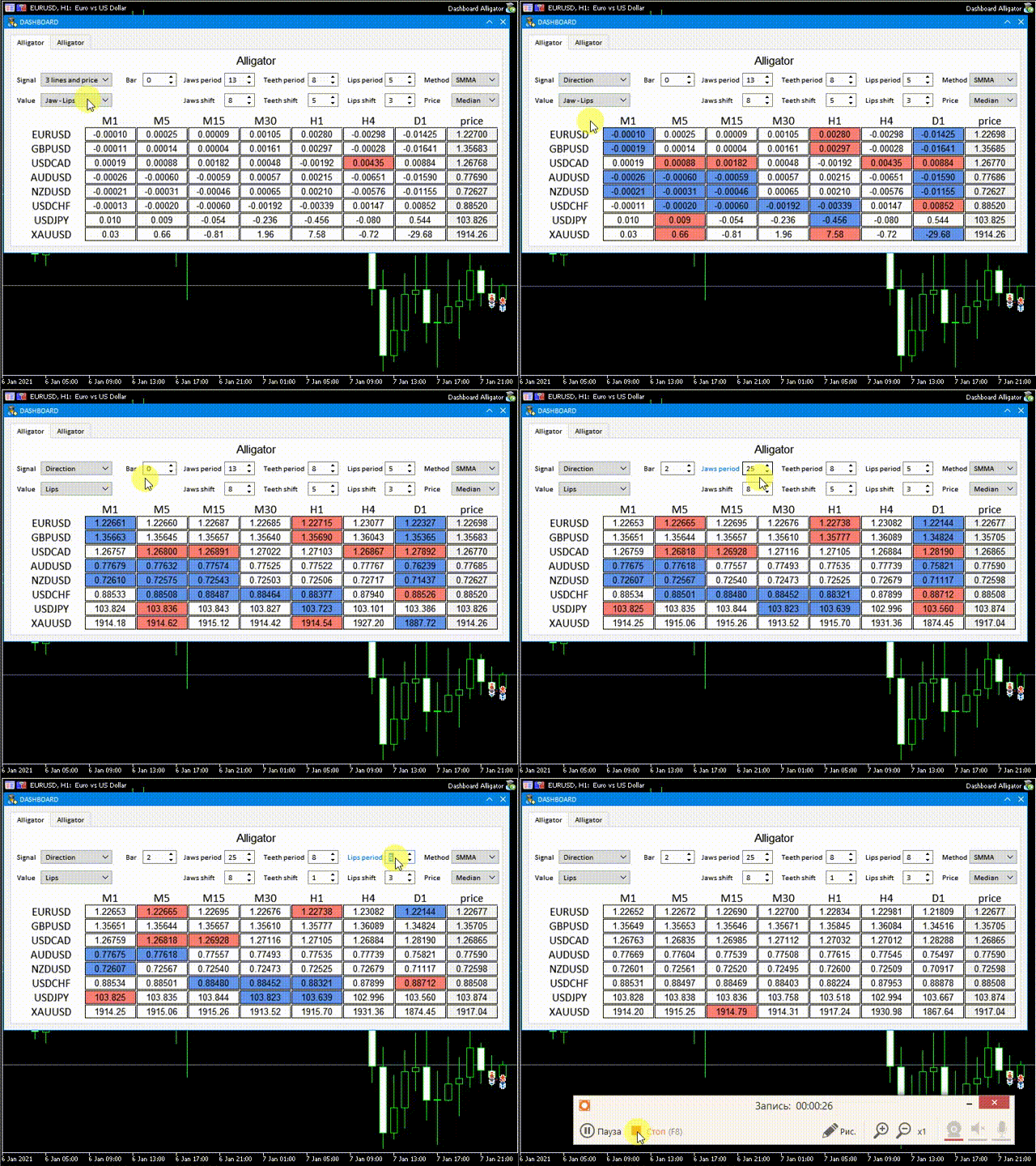
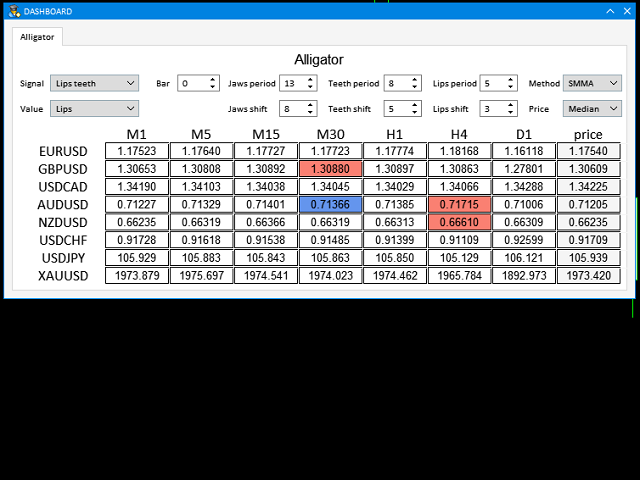
The panel helps to analyze the values of the Alligator indicator and its signals.


With this panel you can:
  • watch the current signal from Alligator on all timeframes;
  • watch the current signal from Alligator for different symbols;
  • watch the current Alligator value;
  • several types of signals for analytics.

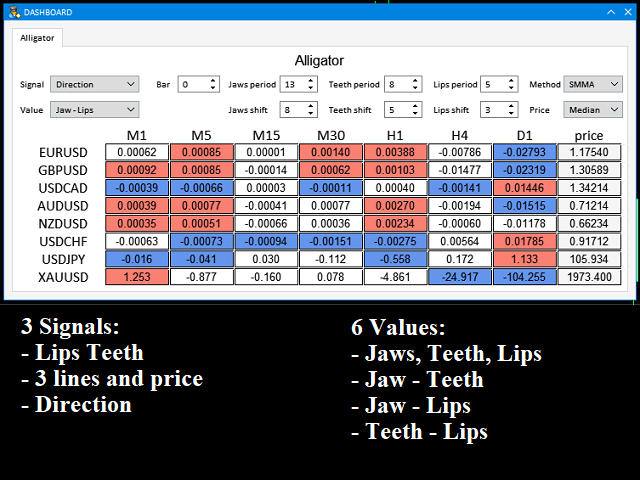
Values in a table cell:

  • Jaw
  • Teeths
  • Lips
  • Jaw - Teeth
  • Jaw - Lips
  • Teeth - Lips


Signal type:

  • Lips - Teeth - green line (lips) crosses red line (teeth)
  • 3 lines and price - Jaw, teeth, lips in this order and price crosses green line
  • Direction - Jaw, teeth, lips and price in this order


Work option:
  • all symbols added to the "Market Watch";
  • only the current character;
  • characters from the list.

Colour:
  • if the background of the cell is "blue", then this is a buy signal
  • if the cell background is "red", then this is a sell signal


Notification about new signal:

  • Alert to Terminal
  • Print to Terminal
  • Push to Mobile app
  • E-mail

Parameters:
  • type_symbols - selection of a work option: ALL SYMBOLS MARKET WATCH - all symbols from the "Market Watch"; ONLY CURRENT SYMBOL - only the current symbol; INPUT SYMBOLS - symbols from the list;
  • input_symbols - a list of symbols to work with (used if the work option is INPUT SYMBOLS);
  • Parameters of indicator
After use, please write your comment, this will help us make the product better.



Produits recommandés
You already have positions open. The question is whether the episode is still under control. Floating P/L tells you the result. It does not tell you the condition. A position group can still show a small gain while inventory load, hold time, adverse drift, weakening recovery, and spread expansion are already building pressure in the background. By the time the P/L number turns negative, the episode is already stressed. Episode Health Monitor was built to surface those conditions before they beco
Most bad gold trades don't start with a bad strategy. They start with a bad moment - spread sitting at 35 points, London session not yet open, structure that hasn't confirmed anything, or a setup that was fine on paper but wrong in context. The strategy was fine. The timing wasn't. Gold Decision Assistant MT5 is built for XAUUSD traders who have been there. The tool doesn't try to generate more signals. It does the opposite: it helps you slow down, check the current context, and decide whether c
Utilitaire de gestion automatique des commandes et des risques. Permet de tirer le maximum des bénéfices et de limiter vos pertes. Créé par un commerçant pratiquant pour les commerçants. L'utilitaire est facile à utiliser, fonctionne avec tous les ordres de marché ouverts manuellement par un trader ou avec l'aide de conseillers. Peut filtrer les transactions par nombre magique. L'utilitaire peut fonctionner avec n'importe quel nombre de commandes en même temps. A les fonctions suivantes : 1
Margin Call Shield – Defend Your Margin on Your Terms Margin Call Shield is a tool for MetaTrader 5 traders who want to decide for themselves which open positions are closed during margin call situations before the platform does so automatically based on its internal rules. By default, the broker or platform decides which positions to close, often using undisclosed algorithms. Margin Call Shield lets you set this order according to your own strategy. Why Was Margin Call Shield Created? In a mar
Excellent dashboard for analytics. The panel helps to analyze the values of the   Momentum  indicator and its signals. With this panel you can: watch the current signal from  Momentum  on all timeframes; watch the current signal from  Momentum  for different symbols; watch the current Momentum   value; several types of signals for analytics. Values in a table cell: value of Momentum Signal type: Momentum crosses "100" line Momentum upper/lower "100" line Momentum direction Work option: all
Smart TP SL Manager MT5 is a position management utility for MetaTrader 5. It is designed to work with positions that are already open and to help manage protection rules directly from the chart. Many trading problems happen after the entry. A position may be opened correctly, but then left without Stop Loss, moved to breakeven too late, or managed inconsistently when several trades are open. This tool is built for that part of the workflow. The utility does not search for entries, generate trad
Exclusive Imperium MT5 — Système de Trading Automatisé Exclusive Imperium MT5 est un Expert Advisor pour MetaTrader 5, basé sur des algorithmes d’analyse de marché et de gestion des risques. L’EA fonctionne en mode entièrement automatique et nécessite une intervention minimale du trader. Attention ! Contactez-moi immédiatement après l’achat afin de recevoir les instructions de configuration ! IMPORTANT : Tous les exemples, captures d’écran et tests sont fournis uniquement à titre de démonstratio
You can change the time period of the chart at the touch of a button. You can also change multiple charts at the touch of a button. You can also change multiple charts at the touch of a button,   saving you the trouble of changing time periods. We are live-streaming the actual operation of the system. Please check for yourself if it is usable. Please check it out for yourself. https://www.youtube.com/@ganesha_forex We do not guarantee your investment results. Investments should be made at you
Auto SLTP Maker MT5  is an assistant for all those who forget to set StopLoss and/or TakeProfit in deal parameters, or trade on a very fast market and fail to place them in time. This tool automatically tracks trades without StopLoss and/or TakeProfit and checks what level should be set in accordance with the settings. The tool works both with market and pending orders. The type of orders to work with can be set in the parameters. It can track either trades for the instrument it runs on, or all
Tool Auto Modify SLTP – Protect Your Trades, Optimize Your Strategy In trading, risk is always present. Just one forgotten SL/TP can turn a promising trade into a loss. Even experienced traders occasionally make mistakes. That’s why Tool Auto Modify SLTP was created – to keep you protected and let you focus on your strategy. Key Features: Manage Orders for All Symbols: Monitor and adjust SL/TP for all your trading pairs. Three Flexible Risk Modes: Point-Based: Set fixed SL/TP distances. Account
Reverse TradeCopier for Followers   can copy trades from an account that is running Reverse TradeCopier Source . Features: Copies trades from one source (master) account to multiple following (slave) accounts. Allows investor (read only) password for source (master) account. There are no complicated settings and input parameters, everything is easy. Works with different brokers. Works with different quotes symbols (EURUSD_FX, eurusd_m, etc.). Can copy orders from 4-digit quotes platform to 5-dig
Fast copier for sending trades to multiple MT4 / MT5 accounts. MT5 Trade Copier Master EA sends trades instantly from your master account to one or multiple slave accounts. Supports copying to: • MT5 accounts • MT4 accounts Perfect for: • Multi-account traders • Signal providers • Account managers • Personal account mirroring Main Features • Fast local trade copying • Low latency execution • Multiple slave accounts support • Copy open positions on startup • Stable file-based communication • Easy
Bober Real MT5
Arnold Bobrinskii
4.88 (16)
Bober Real MT5 is a fully automatic Forex trading Expert Advisor. This robot was made in 2014 year and did a lot of profitbale trades during this period. So far over 7000% growth on my personal account. There was many updates but 2019 update is the best one. The robot can run on any instrument, but the results are better with EURGBP, GBPUSD, on the M5 timeframe. Robot doesn't show good results in tester or live account if you run incorrect sets. Set files for Live accounts availible only for cu
Easy Trade Executor est un outil de calcul rapide de la taille de position, d’exécution des ordres et de gestion des trades pour MT5. Placez les niveaux Open Price, Stop Loss et Take Profit directement sur le graphique, obtenez automatiquement la taille de position appropriée et ouvrez des trades avec un risque maîtrisé en seulement quelques clics. Pourquoi choisir Easy Trade Executor ? Easy Trade Executor a été conçu pour les traders qui veulent aller au-delà du simple calcul du risque et gére
# Equity Monitor Pro  ## Short Description Equity Monitor Pro is a professional equity p**Equity Monitor Pro** is a powerful risk management tool that automatically protects your trading account by monitoring equity levels and enforcing prop firm style rules. Whether you're taking an FTMO challenge, trading a funded account, or just want to protect your capital, this EA runs silently alongside your trading strategy and takes action when it matters most. Protection tool designed for prop firm
BulkOp Trade Manager
Ahmed Jumaa Saif Ali Almheiri
BulkOp Trade Manager Trade faster. Manage smarter. Close with confidence. BulkOp Trade Manager is a powerful MT5 utility EA built for traders who need speed, control, and clean execution directly from the chart. It is designed for active manual traders, scalpers, gold traders, and anyone who wants to manage multiple positions with less delay and fewer clicks. Why BulkOp? Ultra-fast Buy and Sell execution One-click Bulk Close Profit One-click Bulk Close Loss Keyboard trading control Bulk order e

Introducing Neural Bitcoin Impulse - an innovative trading bot created using neural network training technology on voluminous market data sets. The built-in mathematical model of artificial intelligence searches for the potential impulse of each next market bar and uses the resulting patterns of divergence and convergence between the predictive indicators and the price to form high-precision reversal points for opening trading positions. The trading robot is based on the Neural Bar Impulse ind
Trade Copier Professional — Solution de Copie Locale   Trade Copier Professional est un système fiable de copie locale des transactions pour MetaTrader 4/5. Il permet aux traders de répliquer instantanément des positions sur plusieurs comptes d’un même ordinateur, avec des contrôles de sécurité intégrés et un tableau de bord professionnel.   Aperçu   L’EA fonctionne en modes Master et Slave à partir d’un seul fichier, avec bascule fluide. Les transactions peuvent être copiées entre terminaux M
DDKiller Pro
Njaratahiry Michael Randrianiaina
Arrête de faire sauter ton compte. Une bonne fois pour toutes. DDKiller Pro est le gardien du risque MT5 qui tourne silencieusement sur ton graphique et coupe le trading dès qu'une limite est atteinte — que tu passes un challenge prop firm ou que tu gères ton propre compte CFD. Le problème que tout trader connaît : Tu fixes tes règles. Tu les enfreins quand même. Un trade de vengeance. Une position surleviéragée. Une session qui efface un mois de gains. DDKiller Pro retire cette décision de tes
Le niveau Premium est un indicateur unique avec une précision de plus de 80 % des prédictions correctes ! Cet indicateur a été testé par les meilleurs Trading Specialists depuis plus de deux mois ! L'indicateur de l'auteur que vous ne trouverez nulle part ailleurs ! À partir des captures d'écran, vous pouvez constater par vous-même la précision de cet outil ! 1 est idéal pour le trading d'options binaires avec un délai d'expiration de 1 bougie. 2 fonctionne sur toutes les paires de devises
TradePilotmt5
Hossein Khalil Alishir
TradePilot Expert Advisor (EA) for MetaTrader 5 TradePilot is a professional and user-friendly Expert Advisor (EA) for MetaTrader 5 (MT5) . It simplifies automated trading , risk management , and trade execution with a smart trading panel . Perfect for beginners and experienced traders looking for a reliable trade manager EA with automated lot size calculation and smart position management. Key Advantages User-Friendly Trading Panel: Customizable panel with buttons and hotkeys for fast ex
Daily Bias
Barend Paul Stander
Daily Bias Indicator with Statistics and Dashboard Unlock the power of market bias analysis with the Multi-Timeframe Bias Indicator, a versatile tool designed for traders seeking a clear edge in the markets. This indicator provides actionable insights by displaying Daily Bias, Weekly Bias, and Custom Period Bias, enabling you to align your trades with the prevailing market direction across multiple timeframes and symbols. Key Features: Daily Bias Analysis: Identify the bullish, bearish, or neutr
MT5 To Telegram Copier
Levi Dane Benjamin
3 (2)
Envoyez des signaux entièrement personnalisables de MT5 à Telegram et devenez un fournisseur de signaux ! Ce produit est présenté dans une interface graphique conviviale et visuellement attrayante. Personnalisez vos paramètres et commencez à utiliser le produit en quelques minutes seulement ! Guide de l'utilisateur + Démo  | Version MT4  | Version Discord Si vous souhaitez essayer une démo, veuillez consulter le Guide de l'utilisateur. L'émetteur de MT5 vers Telegram NE fonctionne PAS dans le t
Monitor Dashboard
Johann Dominique Carnevali
Clear EA & Internal Strategy Performance Separation The core purpose of MONIT Dashboard MT5 is to help traders clearly identify where their real performance comes from . On a MetaTrader 5 account, the global balance result is often not enough. A profitable account can hide a weak EA, an overactive strategy, a manual trading loss, or one specific Magic Number group generating most of the drawdown. This becomes even more important when several Expert Advisors are running on the same account, or w
Headline ShikaaTraders Gold Grid Pro is a high-performance trade management utility designed specifically for XAUUSD (Gold) and high-volatility pairs. It allows traders to execute complex grid-layering strategies with a single click, ensuring you never miss an entry during fast market moves. Why Choose Gold Grid Pro? Manual trading on Gold requires speed. Manually calculating distances and opening multiple positions takes too much time. This utility automates the "Scaling-In" process, allowing y
Advanced Trading Chaos  The main purpose of the indicator is to help the trader detect the signals described by Bill Williams in his books to make a quick and correct trading decision. 1)Bullish/Bearish Reversal Bar(BDB) 2) Divergent Bar(DB) 3) Second Sage Signal — the third consecutive Awesome Oscillator bar  4) Working fractals (Fractals that worked above/below the red forehead  5) Three bar coloring modes 5.1) Coloring of bars according to the AO indicator (Including the squatting bar) 5.2
ArcTrader
Syed Oarasul Islam
ArcTrader is designed to trade any markets (Stocks, Forex, Commodities, Futures, Cryptos). The strategies are developed based on various Price Actions that will be observed on different Fibonacci Arc Levels. Product Home Page:  https://www.mql5.com/en/market/product/51336 ADVANTAGES: Works on any market and time frames Multiple Strategies in 4 categories:  Retracement, Breakout, Trend Follow, Reversal Trades simultaneously on any number of markets under the same account  Display Fibonacci Arc
!! BLACK FRIDAY !!  FOR LIFETIME !! ================== == 35$ ONLY !! == ================== BOOK YOURS NOW !! The Position Manager Contains A Lot of Functions such as; (How to Operate) 1. Adjustable Volume per Trade (You could change the volume as you wish per trade). 2. Adjustable Risk : Reward Ratio (1RR means sacrifice 1 Risk : 1 Reward, 1.5RR, 2RR etc. as you wish) 3. Adjustable Stop Loss Points (Calculated Points as Stop Loss and Automatically adjusted the Risk Reward Ratio) 4. Buy Button
Grid Builder 5
Oleg Remizov
5 (1)
The   Grid Builder MT5   utility is designed for placing a grid of pending orders of any complexity and will be an excellent tool in the hands of a trader who trades grid trading strategies. The tool has numerous settings that allow you to quickly and easily build a grid of orders with the specified parameters. All types of pending orders are supported: Buy Stop; Buy Limit; Sell Stop; Sell Limit. The script also allows you to delete a previously placed grid of orders in one click. If the "Delete
Verrouillage automatique des bénéfices lors de l'atteinte du bénéfice cible EquityTargetCloser   — est un conseiller expert utilitaire pour MetaTrader 5 qui ferme automatiquement toutes les positions de marché et supprime les ordres en attente dès que   les capitaux propres (Equity) dépassent le solde actuel du montant de bénéfice spécifié . Après la fermeture de toutes les positions, l'objectif est automatiquement relevé : le nouveau seuil = nouveau solde + bénéfice spécifié. L'EA n'ouvre pas d
Les acheteurs de ce produit ont également acheté
Trade Assistant MT5
Evgeniy Kravchenko
4.43 (211)
It helps to calculate the risk per trade, the easy installation of a new order, order management with partial closing functions, trailing stop of 7 types and other useful functions. Additional materials and instructions Installation instructions - Application instructions - Trial version of the application for a demo account Line function -   shows on the chart the Opening line, Stop Loss, Take Profit. With this function it is easy to set a new order and see its additional characteristics bef
Bienvenue sur Trade Manager EA, l’outil ultime de gestion des risques conçu pour rendre le trading plus intuitif, précis et efficace. Ce n’est pas seulement un outil d’exécution d’ordres ; c’est une solution complète pour la planification des trades, la gestion des positions et le contrôle des risques. Que vous soyez débutant, trader expérimenté ou scalpeur ayant besoin d’une exécution rapide, Trade Manager EA s’adapte à vos besoins, offrant une flexibilité sur tous les marchés, des devises et i
Local Trade Copier EA MT5
Juvenille Emperor Limited
4.96 (139)
Découvrez une expérience exceptionnellement rapide de copie de trades avec le   Local Trade Copier EA MT5 . Avec sa configuration facile en 1 minute, ce copieur de trades vous permet de copier des trades entre plusieurs terminaux MetaTrader sur le même ordinateur Windows ou Windows VPS avec des vitesses de copie ultra-rapides de moins de 0.5 seconde. Que vous soyez un trader débutant ou professionnel, le   Local Trade Copier EA MT5   offre une large gamme d'options pour le personnaliser en fonc
TradePanel MT5
Alfiya Fazylova
4.87 (156)
Trade Panel est un assistant commercial multifonction. L'application contient plus de 50 fonctions de trading pour le trading manuel et permet d'automatiser la plupart des tâches commerciales. Avant l'achat, vous pouvez tester la version de démonstration sur un compte de démonstration. Télécharger la version d'essai de l'application pour un compte de démonstration : https://www.mql5.com/fr/blogs/post/762644 . Instructions complètes ici . Commerce. Permet d'effectuer des opérations commerciales e
Version Bêta Le Telegram to MT5 Signal Trader est presque prêt pour la sortie officielle en version alpha. Certaines fonctionnalités sont encore en développement et vous pourriez rencontrer de petits bugs. Si vous rencontrez des problèmes, merci de les signaler, vos retours aident à améliorer le logiciel pour tout le monde. Telegram to MT5 Signal Trader est un outil puissant qui copie automatiquement les signaux de trading depuis des chaînes ou groupes Telegram vers votre compte MetaTrader 5 .
AI Agent Supervisor is NOT an Expert Advisor. AI Agent Supervisor   is a   multi-agent AI risk & portfolio supervisor   that watches every EA on your account and intervenes in real time.  WANT AN AI PORTFOLIO MANAGER WATCHING YOUR FLEET 24/7?   Run your fleet on the same brokers I do:   IC MARKETS , IC TRADING   .  Unlike the centralized stock market, Forex has no single, unified price feed.  Every broker sources liquidity from different providers, creating unique data streams. The Supervisor r
Quant AI Agents
Ho Tuan Thang
5 (1)
Quant AI Agents are independent trading Expert Advisors. Instead of trading using a fixed strategy like other conventional EAs, Quant AI Agents   is a   multi-agent AI trading framework   that turns natural-language strategy prompts into live.  WANT THE SAME RESULTS AS MY LIVE SIGNAL?   Use the exact same brokers I do:   IC MARKETS , IC TRADING   .  Unlike the centralized stock market, Forex has no single, unified price feed.  Every broker sources liquidity from different providers, creating un
Trade Dashboard MT5
Fatemeh Ameri
4.94 (126)
Trade Dashboard simplifies how you open, manage, and control your trades, with built-in lot size calculation. It allows you to execute trades, manage risk, and control positions directly on the chart, with tools such as partial close, breakeven, and trailing stop. Designed to reduce manual work and help you stay focused on your trading decisions. A demo version is available for testing. Detailed explanations of features are provided within the MQL5 platform. Installation instructions are include
Exp COPYLOT CLIENT for MT5
Vladislav Andruschenko
3.91 (33)
Copieur professionnel de trades pour MetaTrader 5 Un copieur de trades rapide, professionnel et fiable pour MetaTrader . COPYLOT permet de copier des trades Forex entre les terminaux MT4 et MT5 avec prise en charge des comptes Hedge et Netting . La version MT5 de COPYLOT prend en charge : - MT5 Hedge → MT5 Hedge - MT5 Hedge → MT5 Netting - MT5 Netting → MT5 Hedge - MT5 Netting → MT5 Netting - MT4 → MT5 Hedge - MT4 → MT5 Netting Version MT4 Description complète + DEMO + PDF Comment acheter Comme
Farmed Hedge Yield Farming | All Markets (Manual - Hybrid - Semi/Automated EA) MULTI-ASSET SUPPORT Trade any asset available on your broker - Forex: Major, Minor, Exotic pairs - Crypto: BTC, ETH, XRP, SOL, BNB - Stocks: Apple, Tesla, Amazon, Google, etc. - Commodities: Gold, Silver, Oil, Gas - Indices: US30, NAS100, SPX500, DAX40 - Any CFD your broker offers VERIFIED TRADING RESULTS - Farmed Hedge Yield Axi Copy:  https://www.mql5.com/en/signals/2356376 - Farmed Hedge Yield Exn Copy:   https:/
The News Filter MT5
Leolouiski Gan
4.78 (23)
Ce produit filtre tous les conseillers experts et les graphiques manuels pendant les heures de publication des actualités, de sorte que vous n'avez pas à vous soucier des pics de prix soudains qui pourraient détruire vos configurations de trading manuelles ou les transactions entrées par d'autres conseillers experts. Ce produit est également livré avec un système de gestion des ordres complet qui peut gérer vos positions ouvertes et vos ordres en attente avant la publication de toute actualité.
Footprint Chart Pro — Professional OrderFlow EA for MetaTrader 5 Version 6.34 | Professional tool for real traders | Institutional-Grade Visualization DEMO USERS - PLEASE SELECT EVERY TICK / REAL TICK WHEN TESTING AND YOU HAVE DOWNLOADED HISTORICAL DATA. IF YOU SEE A WAITING SCREEN AND IT IS NOT DOWNLOADING, IT MEANS YOU HAVE LOW HISTORICAL DATA. TRY 1 MIN AND 5 MIN FIRST ON 1 DAY DATA. ONE DAY DATA SHOULD BE THE NEWEST AND MOST CURRENT DATE. PLEASE WAIT UNTIL THE MARKET HAS ROLLED OVER PERIOD.
Premium Trade Manager - Gestion de trades rapide et disciplinée pour MetaTrader 5 Premium Trade Manager est fait pour les traders qui veulent garder leur attention sur la décision pendant que le panneau prend en charge la routine : dimensionnement, placement, partiels, trailing, actualités et limites de prop firm, traités de la même façon disciplinée à chaque trade. C'est un panneau rapide sur le graphique pour MetaTrader 5 qui supprime le travail mécanique de chaque trade. Vous décidez de la di
Prop Firm Os
Gayathiri Gopalakrishnan
5 (1)
PROP FIRM OS Structured Trading Assistant for MetaTrader 5 PROP FIRM OS is a structured trading assistant designed for MetaTrader 5 users who prefer rule-based market analysis and organized trading workflows. The Expert Advisor combines market analysis tools, scanner functions, dashboard monitoring, alerts, risk-control settings, and trade management features inside one system. PROP FIRM OS is designed to help traders follow selected rules, filters, and monitoring conditions during trading activ
Power Candles Strategy Scanner - Outil de recherche de configurations multi-symboles à optimisation automatique Le Power Candles Strategy Scanner utilise le même moteur d'auto-optimisation que celui qui alimente l'indicateur Power Candles, pour chaque symbole de votre Market Watch, en parallèle. Un panneau vous indique quels symboles sont statistiquement négociables à l'instant, quelle stratégie est la plus performante pour chacun, la paire Stop Loss / Take Profit optimale, et vous alerte dès qu
The product will copy all telegram signal to MT5 ( which you are member) , also it can work as remote copier.  Easy to set up, copy order instant, can work with almost signal formats, image signal,  s upport to translate other language to English Work with all type of channel or group, even channel have "Restrict Saving Content", work with  multi channel, multi MT5 Work as remote copier: with signal have ticket number, it will copy exactly via ticket number. Support to backtest signal. How to s
Trade copier MT5
Alfiya Fazylova
4.55 (44)
Trade Copier est un utilitaire professionnel conçu pour copier et synchroniser les commandesentre les comptes de trading. Les commandes sont copiées du compte/terminal du fournisseur vers le compte/terminal du destinataire, qui sont installés sur le même ordinateur ou vps. PROMOTION - Si vous avez déjà acquis le "Trade copier MT5", vous pouvez obtenir le "Trade copier MT4" gratuitement (pour la copie MT4 > MT5 et MT4 < MT5). Pour obtenir des informations plus détaillées sur les conditions, veuil
SMC Trade Pilot MT5 Assistant de trading semi-automatique pour les traders Smart Money Concepts. Recevez les signaux directement sur Telegram avec capture du graphique, puis placez le trade en un seul appui. Gérez vos positions depuis votre téléphone, même loin de votre ordinateur. Le problème résolu Les setups Smart Money n'attendent pas. Les Order Blocks et les Liquidity Sweeps se forment pendant l'ouverture de Londres, de New York ou en plein milieu de la session asiatique, souvent quand vous
Custom Alerts AIO : Surveillez tous les marchés à la fois — sans aucune configuration Présentation Custom Alerts AIO est une solution de surveillance du marché prête à l’emploi, sans configuration nécessaire. Tous les indicateurs requis — FX Power, FX Volume, FX Dynamic, FX Levels, IX Power — sont directement intégrés. Aucun graphique n’est affiché, ce qui rend cet outil idéal pour la génération d’alertes en temps réel. Il prend en charge toutes les classes d’actifs proposées par votre courtie
AntiOverfit PRO MT5
Enrique Enguix
5 (6)
Avant d’acheter un EA, vérifiez s’il tient vraiment la route ou s’il a simplement eu de la chance en backtest. La plupart des robots se vendent avec un beau backtest. Une courbe qui monte. Un bon profit factor. Très peu de doutes. Et pourtant, beaucoup de ces EA s’effondrent dès que le marché cesse de se comporter comme dans cet historique précis. Pourquoi ? Parce qu’un backtest ne prouve qu’une seule chose : que cette stratégie a fonctionné sur un parcours de prix bien précis. Il ne prouve pas
MT5 to Telegram Signal Provider est un utilitaire facile à utiliser et entièrement personnalisable qui permet l'envoi de signaux spécifiés vers un chat, un canal ou un groupe Telegram, transformant ainsi votre compte en fournisseur de signaux. Contrairement à la plupart des produits concurrents, il n'utilise pas d'importations DLL. [ Démonstration ] [ Manuel ] [ Version MT4 ] [ Version Discord ] [ Canal Telegram ]  New: [ Telegram To MT5 ] Configuration Un guide utilisateur étape par étape est
YuClusters
Yury Kulikov
4.93 (42)
Attention: You can view the program operation in the free version  YuClusters DEMO .  YuClusters is a professional market analysis system. The trader has unique opportunities to analyze the flow of orders, trade volumes, price movements using various charts, profiles, indicators, and graphical objects. YuClusters operates on data based on Time&Sales or ticks information, depending on what is available in the quotes of a financial instrument. YuClusters allows you to build graphs by combining da
Trade Manager DaneTrades
Levi Dane Benjamin
4.28 (29)
Trade Manager pour vous aider à entrer et sortir rapidement des transactions tout en calculant automatiquement votre risque. Y compris des fonctionnalités pour vous aider à éviter le sur-trading, le trading de vengeance et le trading émotionnel. Les transactions peuvent être gérées automatiquement et les mesures de performances du compte peuvent être visualisées dans un graphique. Ces fonctionnalités rendent ce panneau idéal pour tous les traders manuels et contribuent à améliorer la plateforme
Copy Cat More Trade Copier MT5 (Chat Copieur MT5) est un copieur de trades local et un framework complet de gestion des risques et d'exécution conçu pour les défis commerciaux d'aujourd'hui. Des défis de prop firms à la gestion de portefeuille personnel, il s'adapte à chaque situation avec une combinaison d'exécution robuste, de protection du capital, de configuration flexible et de gestion avancée des trades. Le copieur fonctionne à la fois en mode Master (expéditeur) et Slave (récepteur), avec
HINN MagicEntry Extra
ALGOFLOW OÜ
4.73 (15)
HINN MAGIC ENTRY – the ultimate tool for entry and position management! Place orders by selecting a level directly on the chart! full description   ::  demo-version  :: 60-sec-video-description Key features: - Market, limit, and pending orders - Automatic lot size calculation - Automatic spread and commission accounting - Unlimited partitial take-profits  - Breakeven and trailing stop-loss and take-profit  functions - Invalidation leves - Intuitive, adaptive, and customizable interface - Works
Signal TradingView to MT5 Pro Automator Exécution professionnelle instantanée entre TradingView et MetaTrader 5 Automatisez votre stratégie de trading avec le pont de communication le plus robuste entre les alertes TradingView et l'exécution réelle sur MT5. Conçu pour les traders qui exigent vitesse, flexibilité et une gestion des risques impeccable, cet Expert Advisor transforme tout message d'alerte en un ordre au marché ou à cours limité précis. POINTS FORTS ET AVANTAGES Moteur d'analyse univ
Telegram to MT5 Multi-Channel Copier copie automatiquement les signaux de trading de vos canaux Telegram directement dans MetaTrader 5. Pas de bots, pas d'extensions de navigateur, pas de copie manuelle. Vous recevez un signal sur Telegram et l'EA ouvre la position sur votre terminal en quelques secondes. Le produit comprend deux composants : une application Windows qui écoute vos canaux Telegram, et cet Expert Advisor qui exécute les signaux sur votre terminal MT5. Une version MT4 est également
Trading View ToMT5
Mirel Daniel Gheonu
The Ultimate TradingView to MT5 Bridge Automation Arrêtez le trading manuel et les problèmes de latence. TradingView to MT5 Copier PRO est la passerelle (bridge) la plus rapide et la plus fiable pour exécuter vos alertes TradingView directement sur MetaTrader 5. Que vous utilisiez des indicateurs personnalisés, des scripts du Testeur de Stratégie ou des dessins manuels, cet Expert Advisor (EA) exécute vos trades instantanément grâce à la technologie WebSocket Haute Vitesse . Contrairement aux co
Telegram To MT5 Receiver
Levi Dane Benjamin
4.31 (16)
Copiez les signaux de n'importe quel canal dont vous êtes membre (y compris les canaux privés et restreints) directement sur votre MT5.  Cet outil a été conçu en pensant à l'utilisateur et offre de nombreuses fonctionnalités nécessaires pour gérer et surveiller les trades. Ce produit est présenté dans une interface graphique conviviale et attrayante. Personnalisez vos paramètres et commencez à utiliser le produit en quelques minutes ! Guide de l'utilisateur + Démo  | Version MT4 | Version Disc
Seconds Chart MT5
Boris Sedov
4.59 (17)
Seconds Chart - un outil unique pour créer des graphiques en secondes dans MetaTrader 5 . Grâce à Seconds Chart , vous pouvez créer un graphique avec une période définie en secondes, offrant une flexibilité et une précision idéales pour l'analyse, indisponibles sur les graphiques standards en minutes ou en heures. Par exemple, la période S15 indique un graphique avec des bougies d'une durée de 15 secondes. Vous pouvez utiliser n'importe quels indicateurs et experts advisors compatibles avec les
Plus de l'auteur
Excellent dashboard for analytics. The panel helps to analyze the values of the   Momentum  indicator and its signals. With this panel you can: watch the current signal from  Momentum  on all timeframes; watch the current signal from  Momentum  for different symbols; watch the current Momentum   value; several types of signals for analytics. Values in a table cell: value of Momentum Signal type: Momentum crosses "100" line Momentum upper/lower "100" line Momentum direction Work option: all
Why use virtual SL / TP? Broker stop/freeze level limitations Hidden exits for scalping strategies Advanced trailing logic not available in standard MT tools Additional safety layer for EAs and manual trading Stop Loss modes (4 types): Fixed Stop Loss -  Classic fixed SL defined in points. Trailing Stop Loss -  Standard trailing following the price. Trailing to Breakeven -  Stop Loss moves to the trade open price once profit conditions are met. Trailing by jumps (advanced mode) -  A multi-step t
Lusaka mt5
Mikhail Mitin
4 (3)
Main: Not martingale, not a grid; Working on all symbols; Signals: There is a good rational algorithm. Work of two indicators: Envelopes and Moving Average (you can set a separate Timeframe for each indicator) Stop Loss/Take Profit: There is a good money management system (there are several type for trailing stop loss); There is virtual levels of Stop Loss / Take Profit; There is smart lot (percent by risk) or fix lot Important: EA can work on closed candles, and on current candles; Quickly
FREE
Jakarta mt5
Mikhail Mitin
3 (2)
Main: Not martingale, not a grid; Working on all symbols; Signals: There is a good rational algorithm. Work of two indicators:  Stochastic   and  OsMA  (you can set a separate Timeframe for each indicator) Stop Loss/Take Profit: There is a good money management system (there are several type for trailing stop loss); There is virtual levels of Stop Loss / Take Profit; There is smart lot (percent by risk) or fix lot Important: EA can work on closed candles, and on current candles; Quickly opti
FREE
Lusaka
Mikhail Mitin
4.5 (2)
Main: Not martingale, not a grid; Working on all symbols; Signals: There is a good rational algorithm. Work of two indicators: Envelopes and Moving Average (you can set a separate Timeframe for each indicator) Stop Loss/Take Profit: There is a good money management system (there are several type for trailing stop loss); There is virtual levels of Stop Loss / Take Profit; There is smart lot (percent by risk) or fix lot Important: EA can work on closed candles, and on current candles; Quickly
FREE
Great   smart dashboard   for market analytics. Using this dashboard you can: find signals from different indicators from   all timeframes ; find signals from the Moving Average from   all symbols ; Include: 9 indicators (10 in Mt5 version); 27 signals (29 in Mt5 version); "Total" page. Indicators and signals: MOVING AVERAGE MA cross Price  - MA crosses Price; MA more/less Price  - MA higher/lower Price; BOLLINGER BANDS BB crosses Price (in) - Price crosses Bollinger (upper/lower line) insid
Dashboard Signals Mt5
Mikhail Mitin
4.5 (2)
Great   smart dashboard   for market analytics. Using this dashboard you can: find signals from different indicators from     all timeframes ; find signals from the Moving Average from     all symbols ; Include: 9 indicators (10 in Mt5 version); 27 signals (29 in Mt5 version); "Total" page. Indicators and signals: MOVING AVERAGE MA cross Price  - MA crosses Price; MA more/less Price  - MA higher/lower Price; BOLLINGER BANDS BB crosses Price (in) - Price crosses Bollinger (upper/lower line) i
Jakarta
Mikhail Mitin
4.5 (2)
Main: Not martingale, not a grid; Working on all symbols; Signals: There is a good rational algorithm. Work of two indicators:  Stochastic   and  OsMA  (you can set a separate Timeframe for each indicator) Stop Loss/Take Profit: There is a good money management system (there are several type for trailing stop loss); There is virtual levels of Stop Loss / Take Profit; There is smart lot (percent by risk) or fix lot Important: EA can work on closed candles, and on current candles; Quickly opti
FREE
Great dashboard for market analytics. Help you to analyze the values ​​of the Moving Average indicator and prices. Using this dashboard you can: find signals from the Moving Average from all timeframes; find signals from the Moving Average from all symbols; check - how far the Moving Average is from the price; check - the Moving Average value has changed; 2 types of signal. Modes of operation (switched by a button on the graph): current value of Moving Average; the difference between the curr
FREE
You can: observe the price chart inside the chart of a different price evaluate correlation and relationships observe the difference in charts in the form of a histogram Opportunities: "Auto" mode - auto-adjust the chart for another chart "multiplier" - you can multiply the chart by any number shift up / down the chart by value shift the chart to the left "invert" - mirror flip of the chart Important: only charts added to MarketWatch are used Version for MetaTrader 4 -  https://www.mql5.com/e
Panel of MA Mt5
Mikhail Mitin
5 (1)
This panel shows the price position and the selected MAs for the selected timeframes and symbols. You can control up to 3 symbols; up to 6 timeframes; up to 10 different Moving Averages. Version for MetaTrader 4: https://www.mql5.com/ru/market/product/28281 Version for MetaTrader 5: https://www.mql5.com/ru/market/product/28096 Parameters NUM_BAR - bar number for analysis; timeframe_1....timeframe_6 - names of used timeframes (if set to "current", the timeframe will not be used); symbol_1 ....
FREE
Excellent dashboard for market analytics. The panel helps to analyze the values of the  RSI  indicator and its signals. With this panel you can: watch the current signal from RSI on all timeframes; watch the current signal from  RSI   by different symbols; watch the current   RSI   value; several types of signals for analytics. Values in a table cell: RIS value. Signal type: RSI crosses level buy out/level sell out (outside); RSI crosses level buy out/level sell out (inside);   RSI is upper
Great dashboard for market analytics. The panel helps to analyze the values of the   Envelopes   indicator and prices. Using this panel you can: watch the current signal from Envelopes for all time frames; watch the current signal from Envelopes by different symbols; look at how far Envelopes is from the price; look at how much the value of Envelopes has changed; several types of signals for analytics. Values in the table cell: Envelopes value upper line; Envelopes value lower line; "the cor
"All in One" panel. You can simultaneously control: up to 3 symbols; up to 6 periods; up to 31 popular signals. You can see the sum for all signals taking into account the weight of the signal Version for MetaTrader 4: https://www.mql5.com/ru/market/product/27880 Version for MetaTrader 5: https://www.mql5.com/ru/market/product/27830 Parameters NUM_BAR - number of the bar to analyze (set a value greater than 0 to work on closed bars). timeframe_1....timeframe_6 - working timeframes (if set to "c
FREE
"All in One" panel. You can simultaneously control: up to 3 symbols; up to 6 periods; up to 31 popular signals. You can see the sum for all signals taking into account the weight of the signal Version for MetaTrader 4: https://www.mql5.com/ru/market/product/27880 Version for MetaTrader 5: https://www.mql5.com/ru/market/product/27830 Parameters NUM_BAR - number of the bar to analyze (set a value greater than 0 to work on closed bars). timeframe_1....timeframe_6 - working timeframes (if set to "c
FREE
Medellin
Mikhail Mitin
4 (1)
Genaral: Not martingale, not a grid; Use on EURUSD Use on M5 Signals: There is a good rational algorithm. Work of two indicators:   2 DeMarker (from 2 timeframes)   (you can set a separate Timeframe for each indicator) Stop Loss/Take Profit: There is a good money management system (there are several type for trailing stop loss); There is virtual levels of Stop Loss / Take Profit; There is smart lot (percent by risk) or fix lot Important: EA can work on closed candles, and on current candles;
FREE
Great dashboard for market analytics. Help you to analyze the values ​​of the   Moving Average   indicator and prices. Using this dashboard you can: find signals from the Moving Average from all timeframes; find signals from the Moving Average from all symbols; check - how far the Moving Average is from the price; check - the Moving Average value has changed; 2 types of signal. Modes of operation (switched by a button on the graph): current value of Moving Average; the difference between the
FREE
"All in One" Expert Advisor. The EA collects information from different signals (listed below) on the selected timeframes. Each signal has its own weight. The weight of all signals is summed. If the total weight of signals for a timeframe is greater than the minimum weight, a deal is opened. Operation on each selected timeframe is performed independently. After that, the deal is managed according to the Money Management conditions. It can work simultaneously on: up to 6 periods; up to 31 popula
FREE
Conversion of ".set" files created in the MT5 terminal for use in the MT4 terminal. The script is great for cross platform experts. How to work: place the source files ".set" in the local terminal folder\MQL5\Files run the script the ".set" files for the MT4 terminal appeared in the local terminal folder (the end of the file name "* -MT4.set") Created on MT5 build 1755 from 18/01/18 Please leave your feedback after using.
FREE
The panel shows the relative position of the price and the selected moving averages (MA) for the selected timeframes and symbols. You can simultaneously control: up to 3 symbols; up to 6 periods; up to 10 different Moving Averages. Version for MetaTrader 4: https://www.mql5.com/ru/market/product/28281 Version for MetaTrader 5: https://www.mql5.com/ru/market/product/28096 Parameters NUM_BAR - number of the bar to analyze (set a value greater than 0 to work on closed bars). timeframe_1....timefr
FREE
Why use virtual SL / TP? Broker stop/freeze level limitations Hidden exits for scalping strategies Advanced trailing logic not available in standard MT tools Additional safety layer for EAs and manual trading Stop Loss modes (4 types): Fixed Stop Loss -  Classic fixed SL defined in points. Trailing Stop Loss -  Standard trailing following the price. Trailing to Breakeven -  Stop Loss moves to the trade open price once profit conditions are met. Trailing by jumps (advanced mode) -  A multi-step
Raptor MT4
Mikhail Mitin
use on EURUSD use on M5 price and indicator analysis. Deals is in the direction of the trend. analysis 4 TimeFrame. Price and MovingAvarage (MA) are analyzed at TF EA. Market conditions in each TF are analyzed separately, then the overall picture. The algorithm shown in the screenshot below Sets is in Comments Advantages Advisor is optimized well for any instrument Can work on accounts with any spread, commissions, delays in the execution of orders Flexible settings specifically for your needs
How the EA works (simple explanation) Trades on   M5   timeframe Uses   H1 timeframe   to analyze global market context Analyzes   2 or 3 timeframes simultaneously On each timeframe: Checks price position relative to one or two Moving Averages Evaluates MA angle and distance between price and MA Entry logic is based on   trend + volatility conditions , not on random signals The full algorithm is illustrated in the screenshots. Recommended usage Symbol:   EURUSD Timeframe:   M5 Trading
Strong Levels — Support & Resistance Indicator Idicator for automatic detection of strong price consolidation levels. Designed to help traders identify important   support and resistance zones   on the chart.This indicator is intended for   market analysis , not for generating trade signals. How it works Strong Levels analyzes price behavior using: 2 Moving Averages 1 MACD a proprietary multi-factor algorithm The same algorithm is used by the author in personal trading. The indicator detec
Main: Not martingale, not a grid, working on all symbols; a good rational algorithm; Work of two indicators:  Parabolic Sar  and  Moving Average  (you can set a separate Timeframe for each indicator); There is a good money management system (there are several type for trailing stop loss); EA can work on closed candles, and on current candles; Quickly optimized (the work is maximally accelerated). Very well optimized for  EURUSD . Current sets after optimization are in comments. was optimized on
Main: Not martingale, not a grid, working on all symbols; a good rational algorithm; Work of two indicators:  RSI (from older timeframe - it works as a signal filter) and RSI (from junior timeframe - it works as a signal) ; There is a good money management system (there are several type for trailing stop loss); EA can work on closed candles, and on current candles; Quickly optimized (the work is maximally accelerated). Current sets after optimization are in comments. MetaTrader 4:  https://www.m
Create your own trading expert without programming skills! It is easy and simple. This panel is a    designer of Expert Advisors (like Wizard). This Wizard contains: 57 signals (regularly add new) several Trailing Stop systems (including Trailing by Bollinger Bands) How create EA easy: Choose 1 signal Choose no more than 3 filters Choose the Trailing system Save the ".set" file - by one button Ready. Run this expert with the desired set. Interesting: "invisible" (virtual) levels StopLoss and
You can: observe the price chart inside the chart of a different price evaluate correlation and relationships observe the difference in charts in the form of a histogram Opportunities: "Auto" mode - auto-adjust the chart for another chart "multiplier" - you can multiply the chart by any number shift up / down the chart by value shift the chart to the left "invert" - mirror flip of the chart Important: only charts added to MarketWatch are used Version for MetaTrader 5 -  https://www.mql5.com/e
Nairobi
Mikhail Mitin
Main: Not martingale, not a grid; Working on all symbols; Use on EURUSD Use on M5 Signals: There is a good rational algorithm. Work of two indicators: Bollinger Bands and Moving Average (you can set a separate Timeframe for each indicator) Stop Loss/Take Profit: There is a good money management system (there are several type for trailing stop loss); There is virtual levels of Stop Loss / Take Profit; There is smart lot (percent by risk) or fix lot Important: EA can work on closed candles, an
Makkasar
Mikhail Mitin
Main: Not martingale, not a grid; Use on EURUSD; Use on M5. Signals: There is a good rational algorithm. Work of two indicators: Moving Avarage and Parabolic SAR (you can set a separate Timeframe for each indicator) Stop Loss/Take Profit: There is a good money management system (there are several type for trailing stop loss); There is virtual levels of Stop Loss / Take Profit; There is smart lot (percent by risk) or fix lot Important: EA can work on closed candles, and on current candles; Qu
Filtrer:
Aucun avis
Répondre à l'avis