Hull Pro MTF Indicator
- Indicateurs
-
Elias Mtwenge
 Elias Mtwenge is an Entrepreneur, Innovator and A philanthropist. He is a founder and CEO of Piptera Digital Solutions.
He is creative in nature and probably a genius of our generation! - Version: 1.0
- Activations: 5
🔹 Overview
The Hull Pro MTF Indicator is a next-generation Heiken-Ashi-based multi-timeframe visual tool designed for top-down market analysis.
It blends the power of Hull Moving Average (HMA) logic and multi-level Heiken-Ashi smoothing to reveal directional bias, volatility ranges, and price symmetry across hourly, daily, weekly, monthly, and yearly structures — all in a single chart.
This indicator is ideal for traders who value precision trend confirmation, timeframe alignment, and real-time visual clarity.
🧭 Core Concept
Hull Pro MTF processes five synchronized timeframes (H1, D1, W1, MN1, and Y1) and calculates multi-layer Heiken Ashi representations for each.
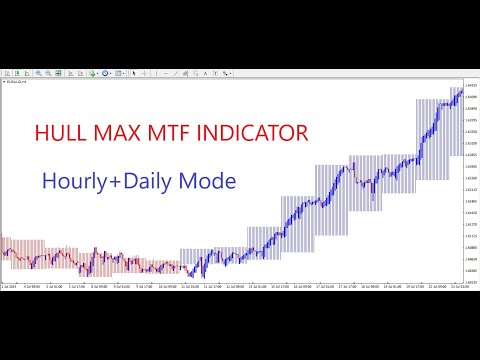
Each timeframe paints its own color-coded bar overlays (red/blue) directly onto the main chart, allowing traders to see trend correlations instantly — without changing chart periods.
⚙️ Key Features
✅ 5-Tier Multi-Timeframe Display
Each chart updates dynamically across hourly, daily, weekly, monthly, and yearly data layers.
✅ 24 Buffer Framework for Precision
Internally structured with 24 indicator buffers (4 per timeframe × 6 layers) for ultra-smooth rendering and zero lag updates.
✅ Heiken Ashi Engine Integration
All timeframe overlays are calculated using standard Heiken Ashi formulas, visually representing true smoothed momentum transitions.
✅ Dynamic Visual Styles (4 Themes)
Choose how the indicator looks on your chart:
-
Standard: Default balanced visualization
-
Light: Minimal and chart-friendly
-
Solid: Thick, contrast-heavy display
-
Carbon: Dark mode-optimized with transparent layering
✅ Full Multi-Mode Forecast Control
Select combinations of forecast modes such as:
-
Hourly
-
Daily
-
Weekly
-
Monthly
-
Yearly
-
Or combine them (e.g., Hourly + Daily + Weekly + Monthly + Yearly) for complete structural analysis.
✅ Adaptive Histogram Visualization
Automatic width and color mapping per timeframe ensures clean alignment and easy pattern recognition across multiple layers.
✅ Zero-Lag Architecture
Because Hull Pro MTF uses internal buffer synchronization instead of recursive calls, performance is fast and resource-efficient even on high-load charts.
🎯 Practical Use Cases
🔸 Top-Down Confirmation
Easily confirm if intraday structure aligns with higher timeframe bias (e.g., weekly or monthly).
🔸 Market Regime Recognition
Detect when markets transition from consolidation to trending phases by observing histogram contractions and color shifts.
🔸 Trend Continuity Forecasting
Blue = bullish strength. Red = bearish continuation. Neutral zones = trend exhaustion signals.
🔸 Swing & Position Entry Alignment
Combine with your favorite oscillators or moving averages to time entries with the macro trend.
⚡ Visual Layout Example
| Timeframe | Color | Meaning |
|---|---|---|
| Hourly | 🔵 Blue / 🔴 Red | Intraday momentum |
| Daily | 🔵 Blue / 🔴 Red | Short-term direction |
| Weekly | 🔵 Blue / 🔴 Red | Swing bias |
| Monthly | 🔵 Blue / 🔴 Red | Trend phase |
| Yearly | 🔵 Blue / 🔴 Red | Macro structure |
Each band overlays in a subtle layered pattern — giving the chart a professional market-profile-like structure with visual precision.
🧩 Settings Overview
| Input | Description |
|---|---|
| ForecastMode | Choose active timeframe combinations (Hourly, Daily, Weekly, Monthly, Yearly, or Mix) |
| VisualStyle | Select chart style (Standard, Light, Solid, Carbon) |
| Auto Width/Color Logic | Automatically adjusts histogram width and colors for clarity |
| HeikenAshi Engine | Built-in for smoother representation of OHLC data per timeframe |
🧠 How It Works (Simplified)
1️⃣ The indicator reads raw OHLC data from each higher timeframe using the iBars() and iTime() series.
2️⃣ It calculates Heiken-Ashi open, close, high, and low for each bar per timeframe.
3️⃣ The results are stored in 24 independent buffers, updating live as new bars form.
4️⃣ Depending on the Visual Style, buffer widths and colors adjust dynamically for best contrast.
5️⃣ The combined effect produces a real-time top-down market trend overlay.
💡 Why Traders Choose Hull Pro MTF
⭐ All-in-one multi-timeframe clarity
⭐ Professional visual design with carbon or solid modes
⭐ In-chart trend compression insight (hourly → yearly)
⭐ Lightweight performance
⭐ Perfect companion for any trading strategy
⚠️ Risk Notice
This indicator is a technical analysis tool, not a buy/sell signal generator.
Forex, CFD, and leveraged trading involve significant risk.
Always test on a demo account before live deployment.
Past performance is not a guarantee of future results.
🏁 Installation Guide
1️⃣ Download Hull Pro MTF Indicator.ex4
2️⃣ Place the file into your MQL4/Indicators/ directory
3️⃣ Restart MetaTrader 4
4️⃣ Open any chart and attach the indicator
5️⃣ Adjust Forecast Mode and Visual Style as desired
6️⃣ Observe synchronized multi-timeframe overlays in real-time
🌟 Final Words
The Hull Pro MTF Indicator is built for clarity, confidence, and control.
It provides a full-spectrum view of market structure — from micro to macro — so you can trade with precision and certainty.
Analyze Smarter. Trade Stronger. Master the Market with Hull Pro MTF.
In case of any help needed Please Private message me and I will assist shortly.