Trade Manager Rocket

4.88

Trade Manager Rocket

MetaTrader 5, reinvented.

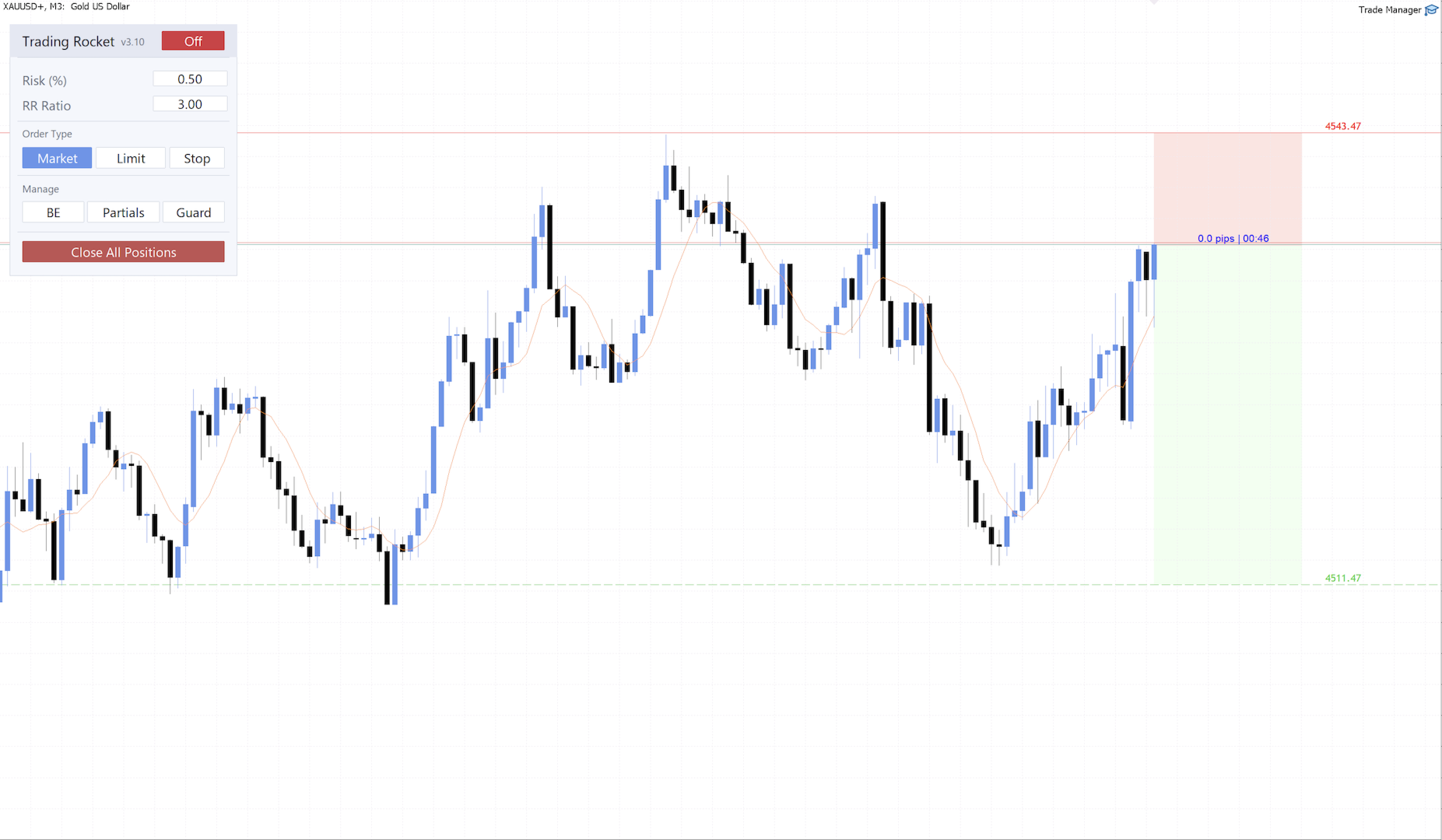
Press one key and your cursor becomes your stop loss. Trade Manager Rocket calculates the exact lot size for your risk and places the order in one click. Then it moves your stop to break even, closes partials at the lines you draw, and locks trading for the day when you hit your daily loss limit.

Built with an active trader community
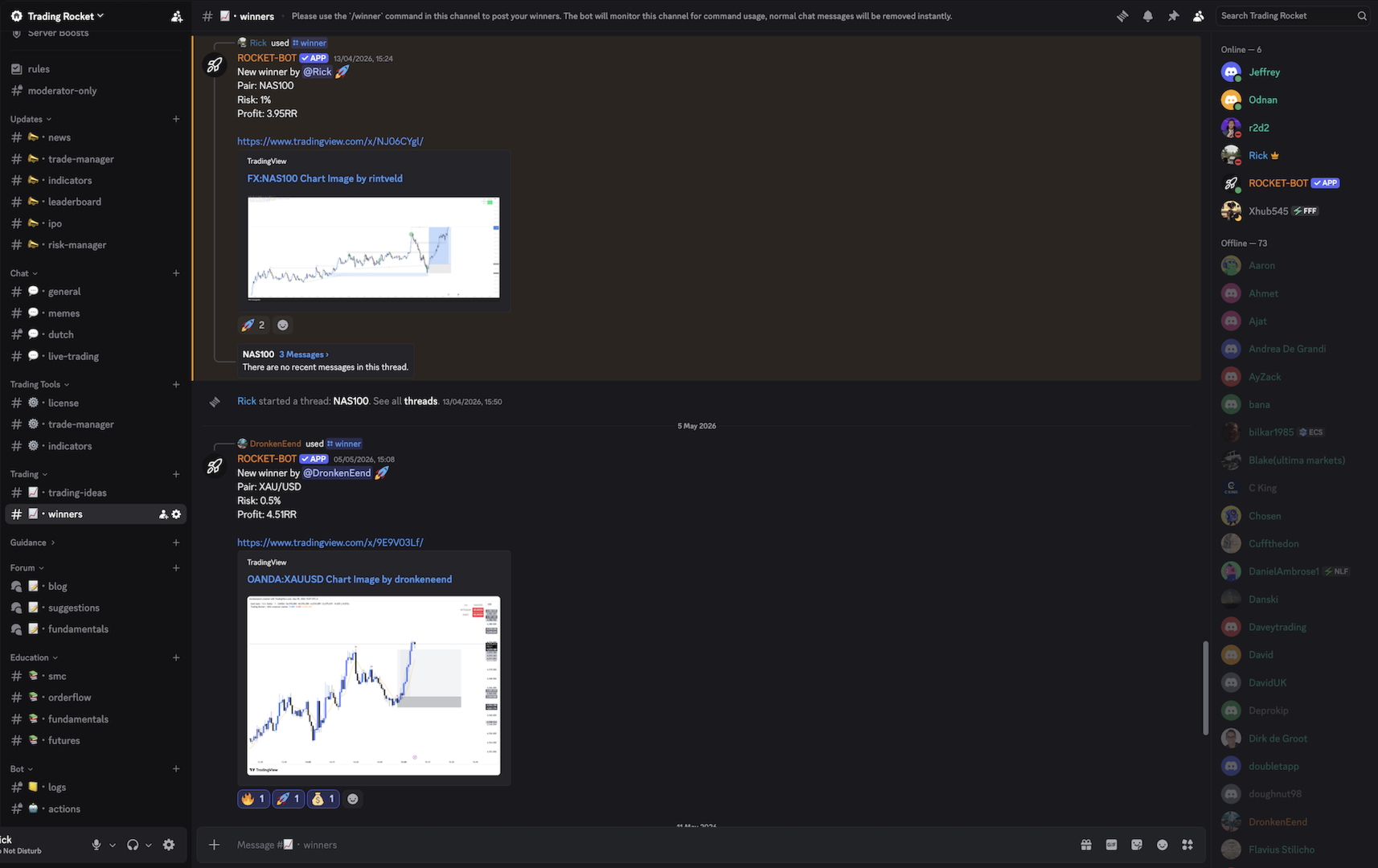
New features start as requests in our Discord. Join at TRADING-ROCKET.NL to get setup help, ask for the feature you want next, or report a bug straight to the developer.

What It Does

Instant Lot Sizing
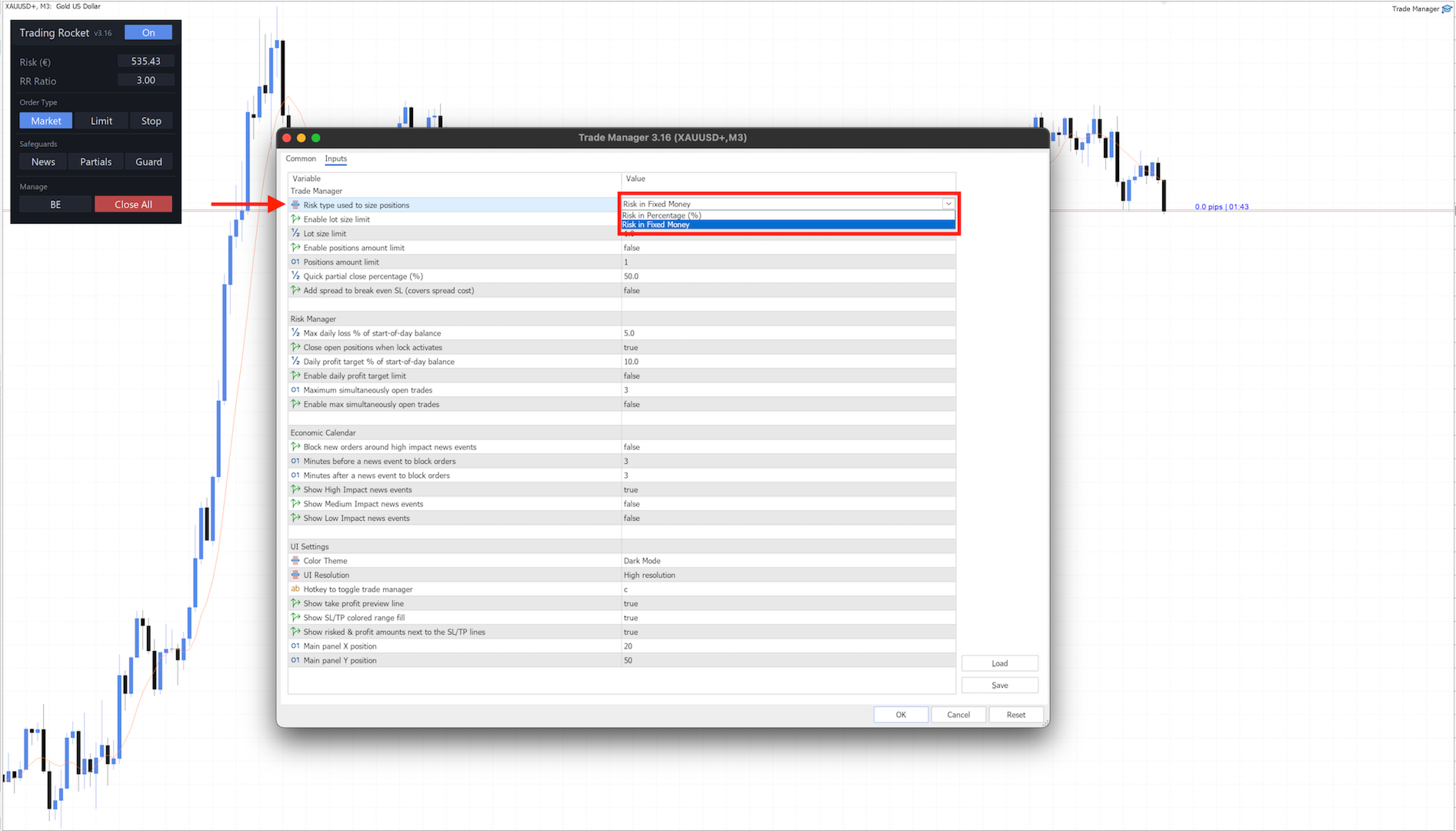
Set your risk as a percentage of equity or a fixed cash amount, place your stop. Correct lot size calculated in real time — no spreadsheets, no mental math. Commission is factored in automatically, read straight from your broker's own commission rules, so your sizing is accurate from the very first trade on a symbol — even one you've never traded before.
Risk & Reward on the Chart
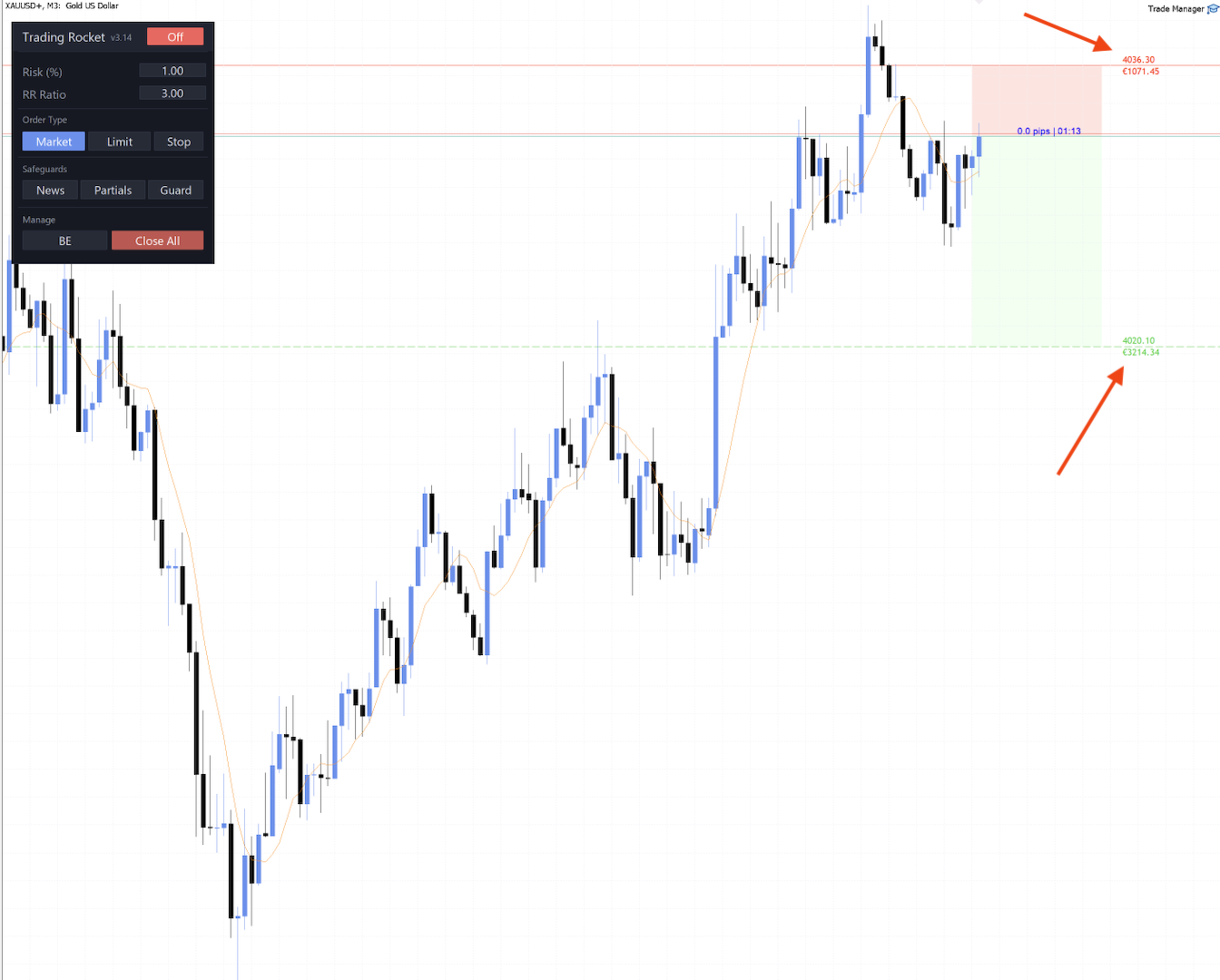
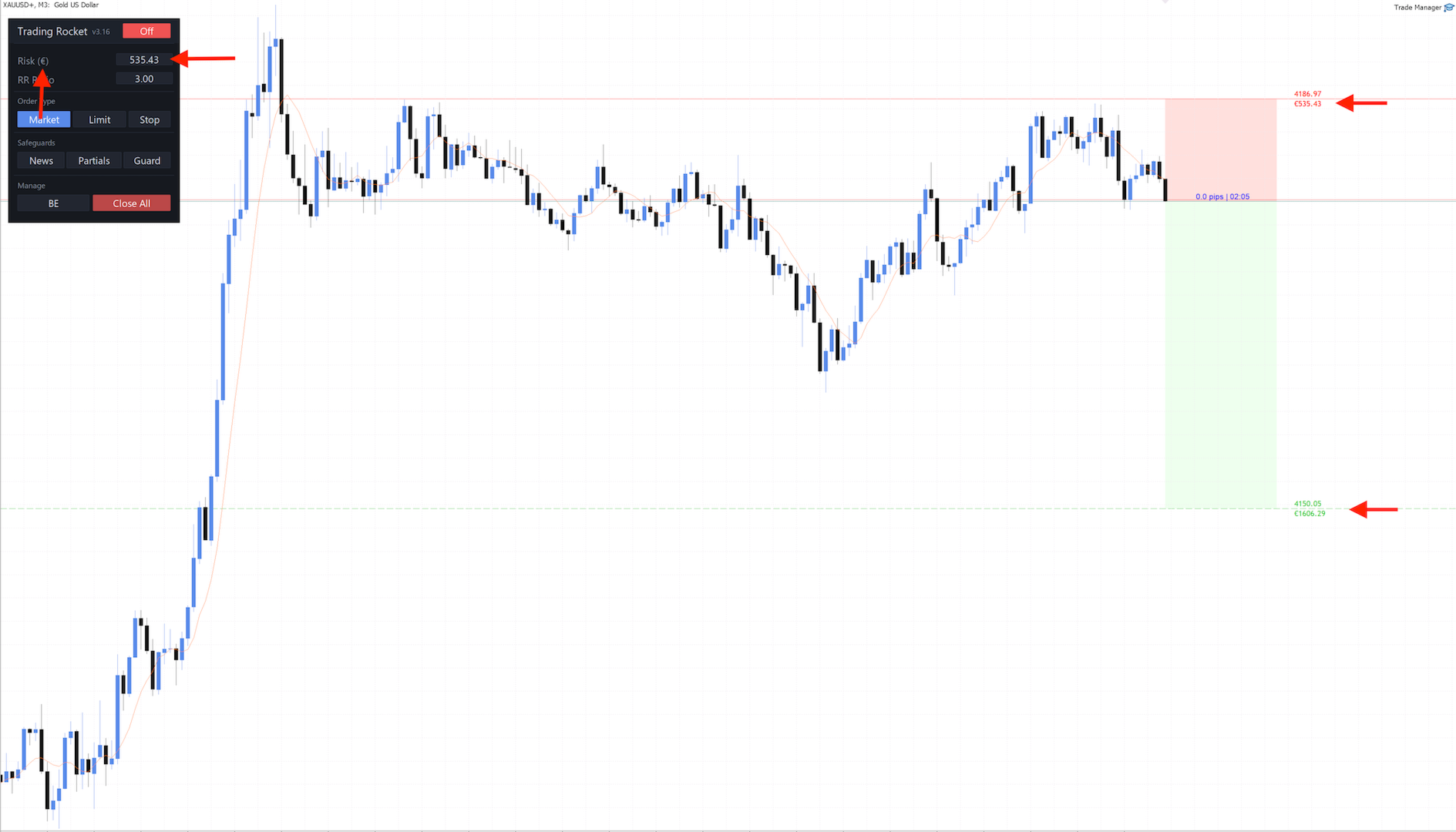
Place your stop-loss line and the exact cash amount at risk appears on it in red. Place your take-profit line and the projected cash reward appears in green. Both figures update in real time using your account currency ($, €, £, ¥). You see what you stand to lose and what you stand to gain before you place the trade — not after. Toggle it on or off with a single input setting.
Daily Risk Manager
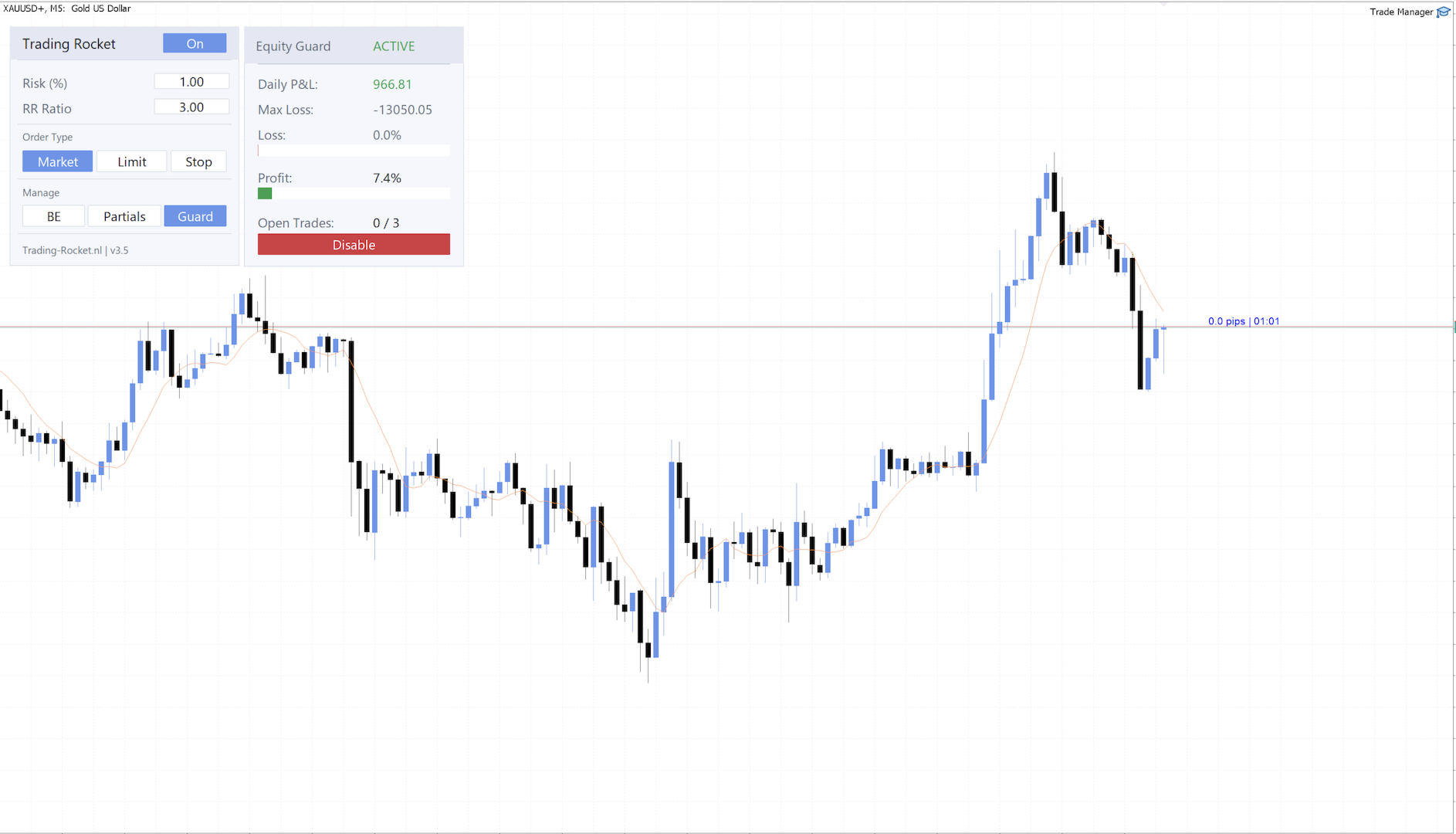
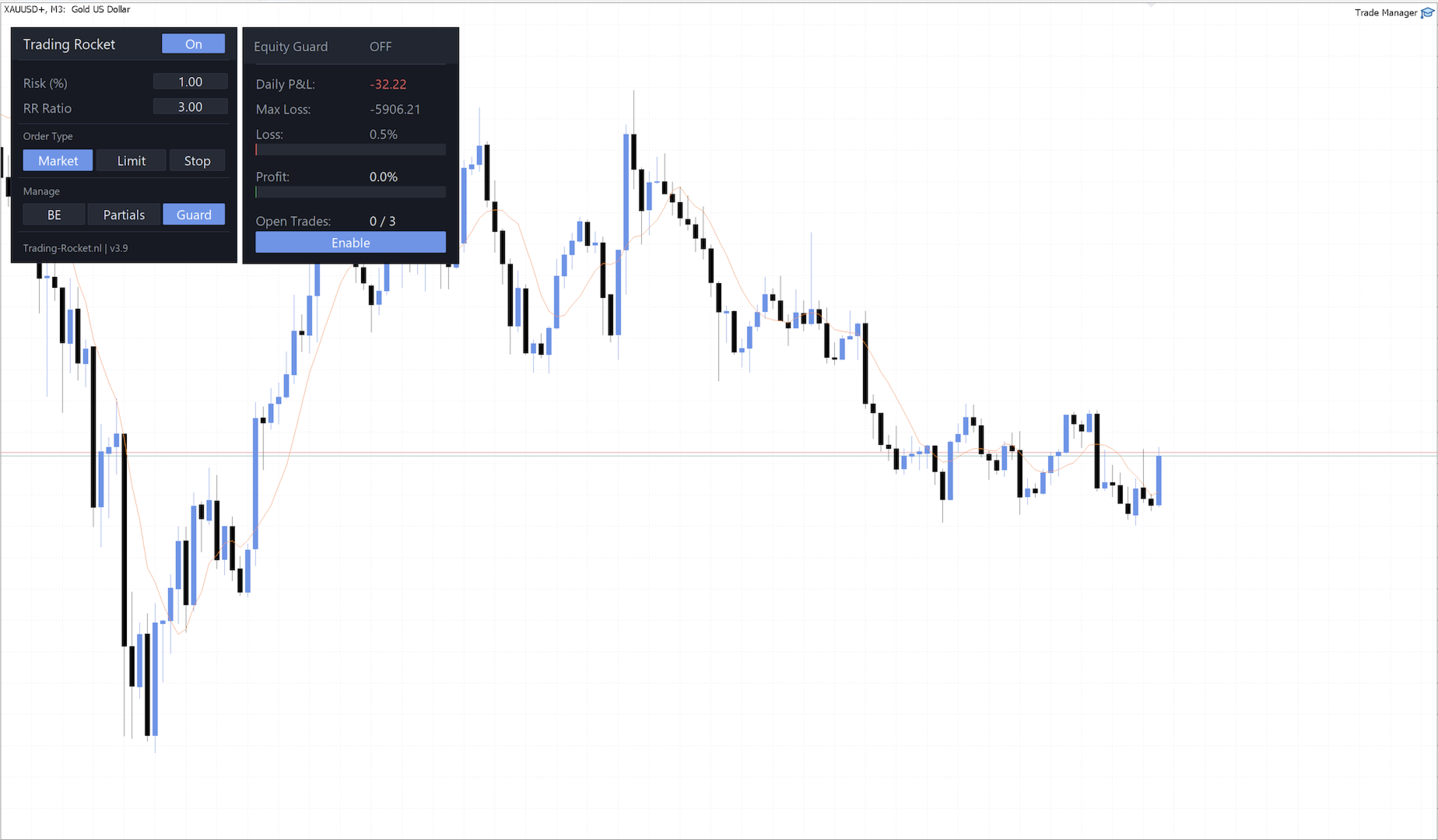
Set a maximum daily loss and profit target. Trading locks automatically when limits are hit — the profit target only counts realized gains, so a brief price spike can't trigger it early. Built for prop firm rules, with its own magic number: the max-open-trades limit manages only your Trade Manager Rocket trades, while the daily lock stays account-wide and closes everything, regardless of magic number. Your guard settings freeze for the day the moment you take a position: tightening a limit still applies immediately, loosening one waits for the next 00:00 UTC reset. Haven't taken a position yet today? Then it's still a clean trading day and everything stays freely editable.
Auto Partial Take Profits
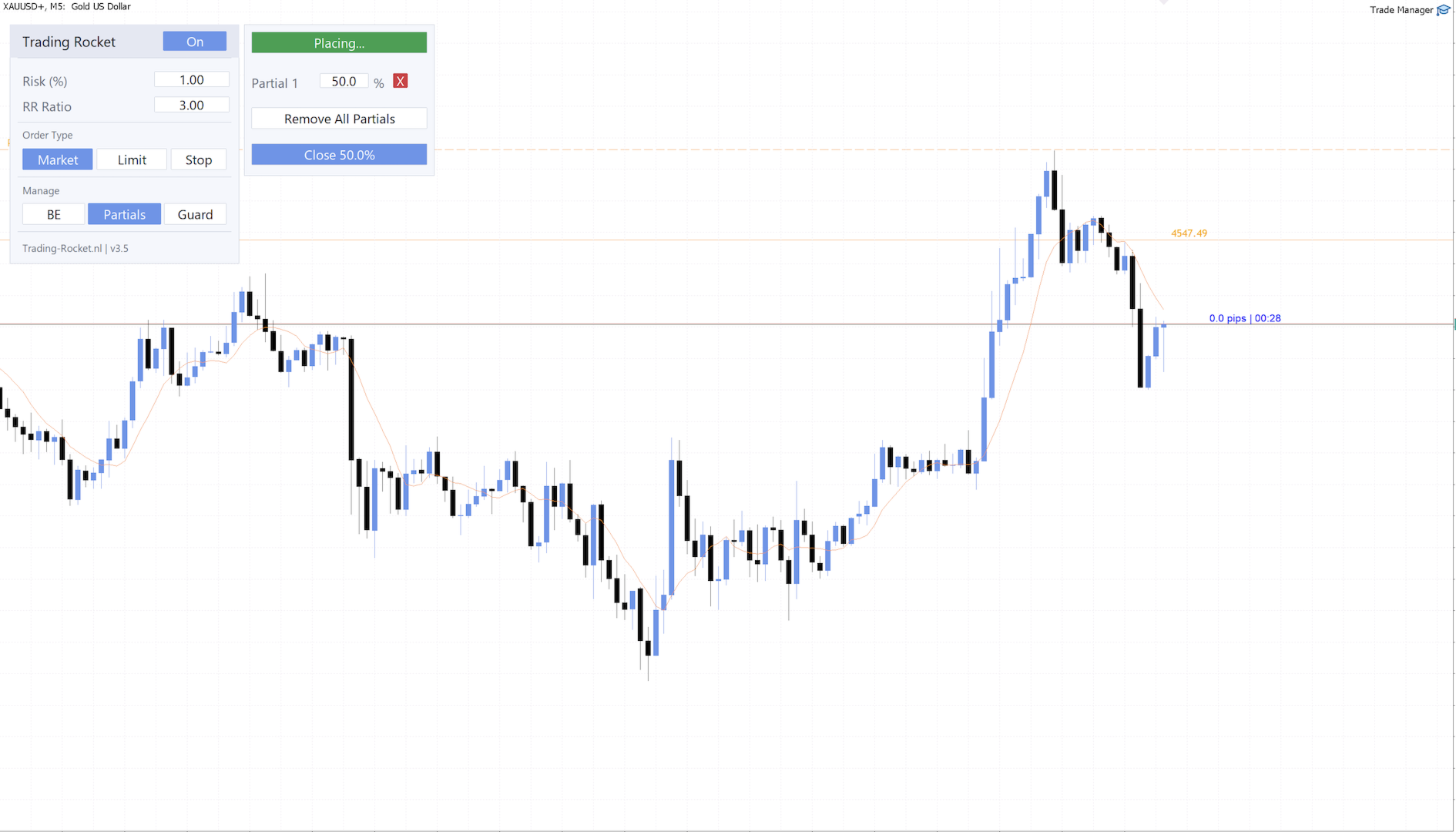
Draw horizontal lines on your chart, define the close percentage per line. The EA closes your position automatically when price hits it. Flag any line with BE to move all positions to break even the moment that partial fires — lock in your stop without watching the screen.
Break Even in One Click
Move your stop loss to entry the moment your trade is in profit. Enable the spread buffer option to offset the stop slightly past entry and cover spread cost. Adding to a winner? Turn on the group option in the EA inputs and Break Even moves every stop on the symbol to the entry of your least-profitable position, so your earlier entries lock in profit. Stops only tighten.
Quick Partial Close Hotkey
Bank half a winning trade without opening the Partials panel — press your hotkey (p by default) to fire the same quick partial close as the panel button, at your quick partial percentage. Holding the key down still gives you one partial, not a stream of them. Like the button, it switches the trade manager off when it fires, so pick your own single letter, different from your toggle hotkey.
One-Click Order Execution
Market orders, limit orders, stop orders. Placed directly from the panel in seconds, not minutes.
Large Trade Splitting
Lot size exceeds broker limits? The EA splits it into equal sub-trades automatically. Total exposure unchanged.
Tilt Protection
Set a maximum number of winning and losing trades per day. Hit either limit and new entries lock — market and pending — until the next UTC reset, independently of the Daily Risk Manager, so it keeps working even with that monitoring switched off. A lock cancels every pending order on your account, on any symbol; the stop-loss and take-profit already attached to your open positions are left alone, and those positions keep running to their own exit. Off by default — turn it on once you've taken a position today and you're committed until the next day, since loosening the settings only takes effect after the UTC reset.
Close All in One Click
One button closes every open position and cancels every pending order on the current symbol instantly. Useful when you need to exit cleanly without hunting through the terminal.
Settings Saved Automatically
Your risk %, reward ratio, and order type are saved to disk. They load back exactly as you left them after a restart, a crash, or a terminal update — no reconfiguring.
Strict Lock
For the trader who knows they override their own lockout when they're frustrated enough to want to. Off by default, this optional setting closes any position you open once the Equity Guard has locked you for the day — whatever the reason: daily loss, daily profit target, or a tilt limit. It doesn't matter which symbol, which EA opened it, or whether you clicked it in yourself through MetaTrader's one-click trading. The position opens and then closes again within about a second, and you get one alert the first time it happens, not one per trade. It reaches beyond Trade Manager Rocket's own trades on purpose, so leave it off if you run another EA or a manual book alongside it. Positions you already held before the lock are never touched — that stays the separate job of the "Close open positions when lock activates" setting. Like every guard setting, switching it off waits for the next UTC reset; switching it on is immediate. The Equity Guard window shows its state — Disabled, Armed, ENFORCING, or Armed - see log — in a read-only row with no button, by design.
Block Raising Risk After Today's First Trade
For the trader who raises risk after a loss to win it back. Off by default, this optional Equity Guard setting lets you lower your Risk once you've traded today, but not raise it above today's maximum. That maximum is the risk of the last order Trade Manager Rocket sent before your first trade. If you try, you get an alert and the field goes back to its previous value. It's checked again right before every order is sent, so a hotkey or another chart can't get around it. It resets at 00:00 UTC and never closes or changes your open positions. Turn it on in every chart you trade.
Minimize the Panel
Press your minimize hotkey (m by default) and the panel folds down to its header — the name, the version and the ON/OFF button. Your chart is clear, and you can still arm and disarm the trade manager from that strip. Any open Partials, Guard, News or Help panel closes with it. Press it again to get the full panel back, with your risk, reward ratio and order type exactly as you left them. The EA remembers whether you left it folded, so a timeframe switch or a restart brings it back the way you had it.
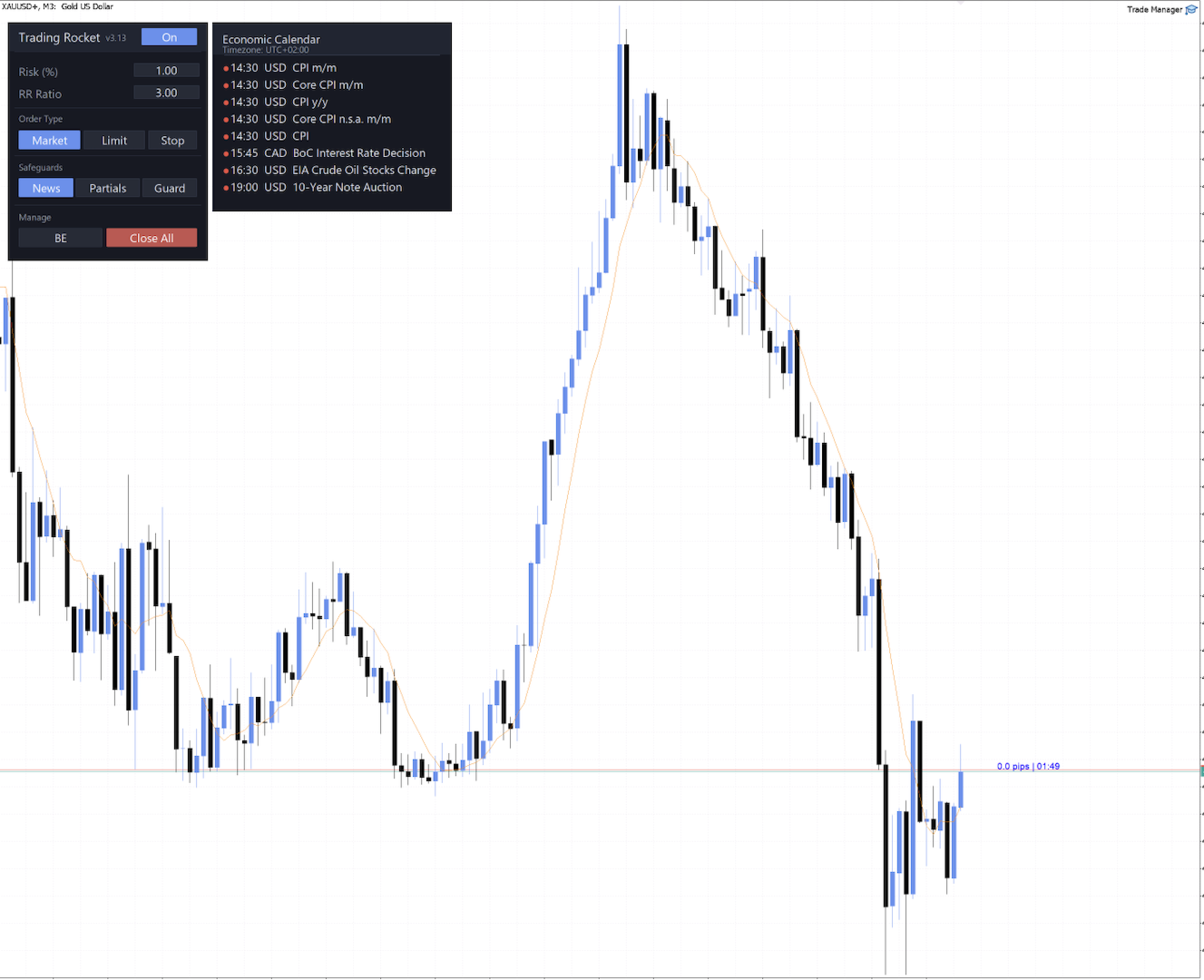
Economic Calendar
Built-in economic calendar showing today's upcoming news events. Choose which impact levels to display — low, medium, and high — with high impact enabled by default. When the news filter is enabled, the EA blocks order placement around any high-impact event for a configurable window before and after — both default to 3 minutes. Set them independently to match your broker's or prop firm's requirements.

Works with any MT5 broker. Automatic detection of FOK, IOC, and RETURN filling modes. Requires MetaTrader 5 build 6060 or newer for automatic commission handling — on older builds the EA prompts you to update and sizes as commission-free until you do.


Built for Every Serious MT5 Trader

Prop firm challengers
Enforce daily loss limits automatically. Never blow a challenge on a sizing mistake again. Cap your wins and losses per day too, so revenge trading can't do the same. Strict Lock closes anything you open by hand the moment you're locked, for the days discipline alone isn't enough. Block Raising Risk After Today's First Trade stops you from sizing up to win a loss back. Ready-made presets for the most common prop firm rules are free to download in the Discord community.
Scalpers
Enter and exit in seconds. Speed is your edge — don't lose it to manual calculations. Bank a partial with a keystroke, no reaching for the panel mid-move.
Swing & day traders
Consistent risk per trade, every single time, regardless of session or volatility.
Beginners
Learn correct execution from day one. Build habits that most traders spend years trying to fix.

The Community Makes It Better.

Trade Manager Rocket is built by traders, for traders — and the Discord community is where that loop happens. Every update, every feature, every fix starts there. When you join, you're not just getting a tool. You're getting the people behind it.

Always on the Latest Version
Updates ship frequently, driven by real trader feedback. Community members are the first to know — and the first to benefit.
Built for Your Trading Style
Scalper, swing trader, prop firm challenger or beginner — we share tips, setups, and insights matched to how you actually trade.
Your Features, Built In
Missing something? Request it directly. Trader feedback shapes every release — this tool evolves because of the people using it.
Setup Help When You Need It
Stuck on configuration or getting started? The community and the developer are active and ready to help you get up and running.
Real Trades. Honest Discussion.
Winners, losses, setups, fundamentals, and market news — shared openly. No signal selling, no hype. Just traders talking trading.
And Much More
Education, market breakdowns, prop firm strategies, and a growing group of serious MT5 traders who care about execution as much as you do.
Ready-Made Prop Firm Presets
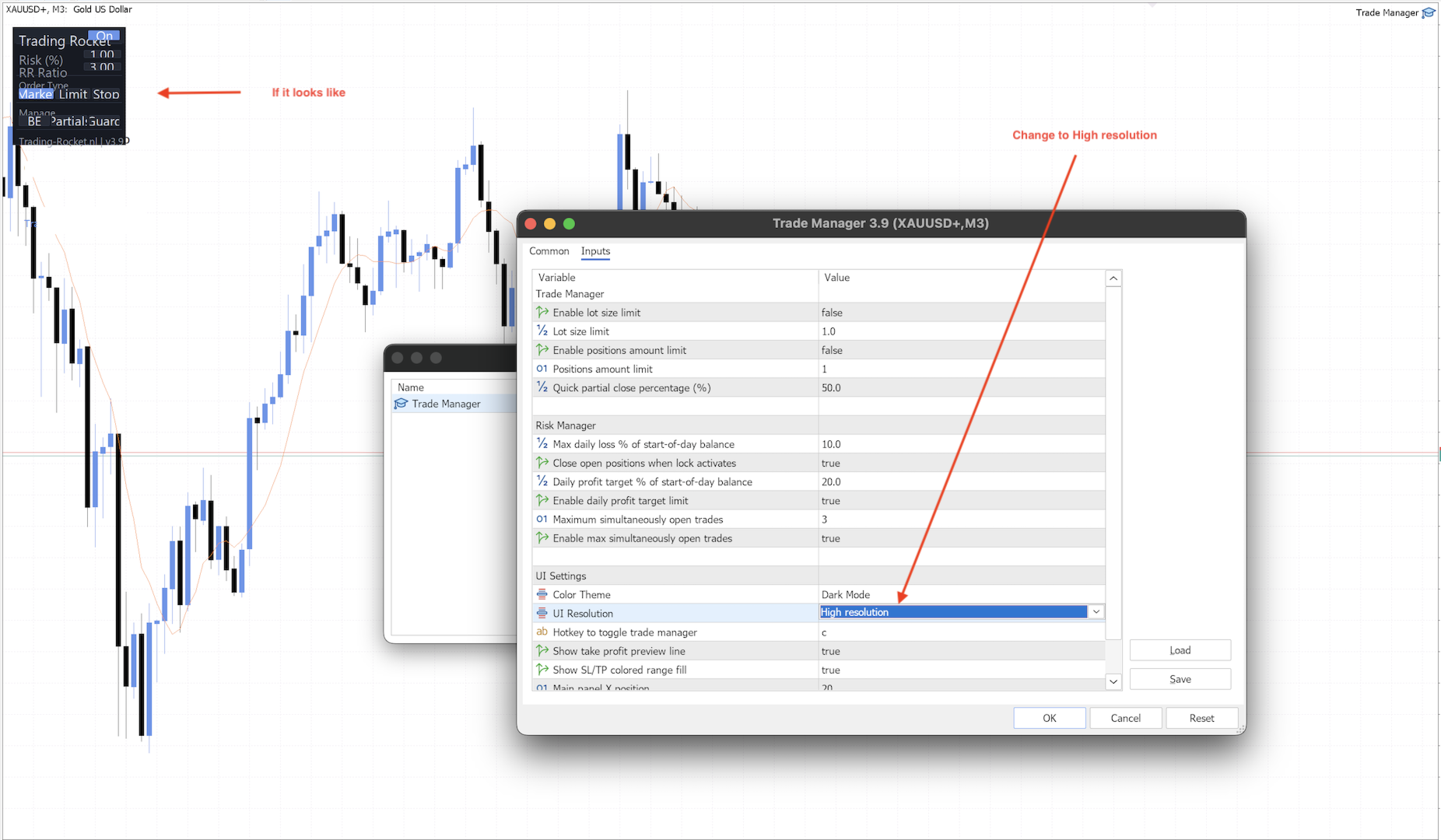
Download input sets built for the three most common prop firm rule sets — 2-Step Challenge and Funded, 1-Step Challenge, and Instant Funding. Each one is pre-configured for that firm's daily loss and profit limits, trade count, and news filter timing, with the loss lock set below the firm's limit to leave room for slippage and the different daily reset time. Available in dark and light mode, standard and high resolution. Load one from the Trade Manager's Inputs tab.

Come Trade With Us — Free at TRADING-ROCKET.NL
Watch live trades unfold with the community, pitch the feature you want built next, or send a bug straight to the developer — no ticket queue, just a fast reply.
The invite is on the homepage. See you inside.

Trusted by Traders Worldwide

Don't just take our word for it.
Explore the Reviews tab above to see why traders worldwide rely on Trade Manager Rocket to sharpen their execution and gain an edge. If the tool has earned a place in your own trading, leaving a review takes a minute — and it helps the next trader find it too. Ready to experience it for yourself?

This tool does not provide signals or automated strategies. It is execution infrastructure — the layer between your decision and the market. Your edge stays yours. The execution just gets sharper.

Avis 11
U.... K...
18
U.... K... 2026.09.14 02:48 

Trade fast and this keeps up with me. No pausing to calculate lot size mid-move, and the quick partial hotkey lets me bank half a trade without ever leaving the chart. Break-even in one click has saved a few trades I'd have been too slow to manage manually. Runs quietly in the background — barely notice it's there, which is exactly what I want. Great for quickly trade excecution with your risk and money management.

weepnotchild
472
weepnotchild 2026.09.03 15:34 

This guy is the GOAT!

MACDave
60
MACDave 2026.08.19 18:50 

Rick this rocket is a real time saver and proper trade manager , cant believe its free !! Only one thing I would love is when Im setting a stop order if price takes out my stoploss before getting into the trade then that trade gets cancelled. That would be a beauty........... and then there is the the trade copier add on , I wonder ......

Produits recommandés
ClickDesk Trader
Tommy De Jesus Rosario Santiago
ClickDesk Trader is a fast, manual trade-management desk for MetaTrader 5. Open, close and protect your trades in one click — or with keyboard hotkeys — while a clean HUD keeps your P&L, risk and market pressure in view. It does not decide for you; you stay in full control. One-click desk & hotkeys - Buy / Sell, Close All, Close Buys, Close Sells — buttons and hotkeys   (B, S, C, Q, W). - Lot stepping on the fly (L / K) with a hard lot cap. Glowing toggle tools (press again to undo) - SL/T
FREE
"Manage multiple positions as a single unit with hidden targets." The Virtual Basket TP SL Manager is a professional MetaTrader 5 utility designed to automate the closing of positions based on the total profit or loss of a group of orders (a "basket"). By utilizing Virtual Levels , all Take Profit (TP) and Stop Loss (SL) targets are stored locally within the EA's memory and are not sent to the broker's server, keeping your strategy safe from stop-hunting and price manipulation. Key Features Virt
FREE
Vous aide à rester dans les limites de votre compte financé ou de votre challenge. Prop Firm Risk Guardian est un panneau de discipline qui montre, en temps réel, à quelle distance exacte vous êtes de la violation des règles — et le lot maximal que vos propres règles autorisent à l'instant. Il suit les trois chiffres qui mettent fin aux challenges : votre perte journalière face à la limite (avec la marge restante et un compte à rebours jusqu'au reset), votre drawdown maximal sur base high-water
FREE
Risk calculator for MetaTrader 5. Precision Position Calculator is a MetaTrader 5 utility that helps calculate trade volume based on the risk configured by the user. The panel allows the user to work with Entry, Stop Loss and up to three Take Profit levels directly on the chart. Main description Precision Position Calculator is a utility for MetaTrader 5 designed to help calculate the volume of a trade before opening it. The panel allows the user to configure risk, select the order type, set th
FREE
Trade assistant pro v8
Ahmed Mohammed Bakr Bakr
2 (1)
FREE FREE FREE Trade Assistant MT5 – Professional Trading & Risk Management Panel Trade Assistant MT5 is an advanced trading panel designed to help traders execute orders faster, safer, and more professionally . It simplifies manual trading by combining smart order management , precise risk control , and one-click execution , making it ideal for both beginners and advanced traders. This tool does not trade automatically . Instead, it empowers you with full control while applying professional-gra
FREE
Lot by Risk MT5
Sergey Vasilev
4.88 (16)
La barre de trading Lot by Risk est conçue pour le trading manuel. C'est un moyen alternatif d'envoyer des ordres. La première caractéristique du panneau est l'affichage pratique des ordres à l'aide de lignes de contrôle. La deuxième caractéristique est le calcul du volume de la transaction à un risque donné en présence d'une ligne stop loss. Les lignes de contrôle sont affichées à l'aide de raccourcis clavier: take profit-touche T Par défaut; price-touche P par Défaut; stop loss – touche s p
FREE
Very often there are situations when you need to quickly close all open positions or close only under a certain condition... The Positions Close script closes open positions according to the selected settings. You can choose to close All positions , only Buy, only Sell You can also choose by which symbols to close positions: by all symbols or only by the current one, on the chart of which the script was thrown There is a filter for closing profitable or unprofitable positions, as well as bo
FREE
Keep your stop loss and take profit hidden from the broker server. The utility closes the position at market when a hidden level is reached. How it works For every position that matches your filters, the utility creates a hidden stop loss and take profit from the open price (or the current price) using your point distances. Levels are stored per ticket as terminal global variables, so they survive a restart, and are checked on every tick and on a fast timer. A hidden break-even and a hidden trai

FREE
Close Manager
ELITE FOREX TRADERS LLC
One-Click Trade Manager for MetaTrader 5 The Close Manager Buttons EA is a powerful utility designed to give you full control of your open positions and pending orders with just one click. Forget about manually closing trades one by one during fast market moves—this EA does it instantly, safely, and efficiently. Key Features Close All Trades – instantly close every open position Close Only Buy Trades – exit only BUY positions while keeping SELL trades running Close Only Sell Trades – exit only
FREE
Bundle Risk Manager Pro EA "Risk Manager Pro EA is an all-in-one trading utility that combines advanced risk management tools, ensuring full control over your trading account while protecting your capital and complying with trading regulations. By bundling Limit Positions , Concurrent Risk Capital , and the newly added Limit Profit , this EA is the ultimate solution for disciplined trading and achieving evaluation goals. Key Features: 1. Limit Positions : Enforces a maximum number of open posi
FREE
QuickTrade Control (Free Version) The QuickTrade Control is a powerful and flexible Expert Advisor designed to give you complete control over your trades in MetaTrader 5. This free version includes a comprehensive set of tools and features that simplify decision-making and trade management. You can find more   free   products   HERE . If you're looking for a  low risk   EA   , check the   Silent Pressure EA  . Features: Instant closure of all open positions: Close all active positions with a si
FREE
Risk Manager - Equity and Trade Protection Risk Manager is a utility Expert Advisor for MetaTrader 5 that monitors open positions and account equity and closes trades when predefined risk limits are reached. The EA does not open trades. It can run alongside manual trading, signal services, or other Expert Advisors and manages risk by closing positions when defined thresholds are reached. The program operates using two independent modules. Per-trade profit and loss monitoring Account equity monit
FREE
Manage all trades
Timo Mario Hoffmann
Manage All Trades for MT5 Manage All Trades is a free MT5 utility that gives you fast and convenient control over open positions directly from the chart. Close all trades, BUY trades, SELL trades, profitable trades, losing trades, or positions on the current symbol with one click. Built for traders who want speed, simplicity, and better trade management in live market conditions. Manage All Trades is a lightweight and practical trade management utility for MetaTrader 5 that helps you close open
FREE
Close All – Fast Trade Manager for MetaTrader 5 Close All is a fast, simple trade manager built for scalpers, news traders, and manual traders. Instead of closing trades one by one, it sends close orders to your broker all at the same time in milliseconds. What It Does Close ALL: Closes every open trade immediately with one click. Winners Only: Closes only profitable trades so you can bank your profit instantly. Losers Only: Closes only trades in loss to cut drawdown and protect your accou
FREE
Important! Demo version will work only on EURGBP. One Click Trader  is a tool designed for MetaTrader 4 platform, which enables you to take your trading to the next level. It enables you to open, manage and close your trades in simple an efficient way by just one click of your mouse button. "-"   ,  "+"  change OCT window size  Up arrow minimizes the OCT panel Down arrow maximizes the OCT panel Right arrow displays the next panel with additional features Left arrow hides the panel with additiona
FREE
Free Global Stop Loss and Take Profit Setter with Break Even Free one click Stop Loss and Take Profit tool for manual trading. Apply a fixed SL and TP to every open position on the symbol, or move them all to break even, with a single button. It only modifies Stop Loss and Take Profit levels — it never opens or closes a trade. Set your SL and TP distance in points, click once, and every position on the current symbol is protected. The break even button moves stops to entry (or a configurable num
FREE
TradeStats Pro – Lot & Risk Analytics Panel for MT5 TradeStats Pro is an analytics panel for MetaTrader 5 that displays trading history and account statistics in a structured, readable format directly on the chart. Account Overview The panel shows real-time account data including balance, equity, margin, free margin, floating profit/loss, win rate, profit factor, and maximum drawdown in both value and percentage. Lot Exposure Tracking Total buy lot, sell lot, and net lot exposure from open posi
FREE
JVH Trading Information Panel – Professional Account Dashboard (MT5) The JVH Trading Information Panel is a clean, accurate, and professional account monitoring dashboard for MetaTrader 5. It gives traders full control and insight into account performance, risk, drawdown, and trading statistics — all in real time , directly on the chart. Designed for manual traders, funded traders, scalpers, and algorithmic traders , this panel focuses on clarity, correctness, and stability . What This Indic
FREE
Noetrix Partial Entry
Julien Jeremy Rodrigue Gazagnaire
Noetrix Partial Entry Noetrix Partial Entry est un utilitaire visuel de planification d’entrées fractionnées pour MetaTrader 5. Il aide les traders discrétionnaires à construire et gérer un plan d’ordres en attente directement sur le graphique. L’utilitaire ne génère aucun signal de trading et ne place aucun ordre automatiquement. Le plan est envoyé uniquement après un clic explicite sur PLACE ALL puis, par défaut, une fenêtre de confirmation. FONCTIONS PRINCIPALES • Créez de 1 à 5 ordres Bu
FREE
Burning Teko Trade Panel is a free on-chart trading panel for MetaTrader 5. It lets you trade by hand inside the Strategy Tester (visual mode): click BUY, SELL, HEDGE or CLOSE while the backtest runs, exactly like on a live chart. It also works on live and demo charts. This is the free edition of Burning Teko Trading Companion. Full version: https://www.mql5.com/en/market/product/197966 User guide: https://www.mql5.com/en/blogs/post/776375 FEATURES - BUY / SELL at market with the lot, SL and T
FREE
WAP TP Stealth EA – Intelligent Basket Management for Precision Exits WAP TP Stealth EA is a specialized trade management expert advisor designed for traders who rely on basket strategies, recovery systems, and multi-position workflows. Instead of closing trades individually, the EA dynamically calculates the Weighted Average Price (WAP) of all open positions and executes a coordinated closure once your defined profit target is reached. This approach enables efficient drawdown management, smooth
FREE
TradeBuddy Smart Trade & Breakeven Manager — One-Click Trading, Breakeven Lines & TP/SL Assistant Tired of opening the order modification dialogue over and over just to tweak Stop Loss and Take Profit? Wondering where your exact zero-profit Breakeven price is when managing multiple grid or scalping positions?  TradeBuddy Smart Trade & Breakeven Manager is an institutional-grade on-chart utility engineered specifically for manual traders, prop firm challengers, and scalpers. Designed with a sl
FREE
FiT Panel Pro
Thonglak Janyakorn
Overview FiT Panel Pro is a professional-grade trade management panel designed for MetaTrader 5 traders who demand speed, precision, and full control over their trades. Built with a modern dark-theme UI, it combines one-click execution with advanced risk management, visual SL/TP drag lines, automatic Fibonacci-based levels, and comprehensive order management — all in a single, compact panel. Whether you are a scalper, day trader, or swing trader, FiT Panel Pro gives you the edge you need to exec
FREE
Manuel de l'utilisateur de Quick Lines Mastery Lite v1.85 Éditeur : Forex Noob Tube Site web : forexnoobtube.com 1. Vue d'ensemble Quick Lines Mastery Lite est un utilitaire de graphiques professionnel et rationalisé pour les traders MT5 qui exigent vitesse, précision et une interface épurée. Il vous permet de déployer instantanément des lignes horizontales, des lignes verticales, des rayons et des lignes de tendance par glisser-déposer en un seul clic à partir d'un panneau de contrôle flottant
FREE
这款专为MetaTrader 5设计的EA(Expert Advisor),能够在加载后自动关闭所有图表,并立即从当前图表中自行移除。它适合那些希望快速清理所有图表,并避免手动关闭每个图表的用户。 功能特点: 一次性清理: 加载后立即关闭所有打开的图表。 自动移除: 执行完毕后,EA自动从当前图表中移除,无需手动操作。 快速高效: 适用于快速清理交易环境,特别适合在需要快速重置或结束交易日的情境。 使用说明: 只需将此EA添加到任何一个图表上,它将自动执行关闭所有图表的操作并自行移除。使用前,请确保已保存所有重要的图表数据和设置。 风险提示: 请谨慎使用此EA,以防不小心关闭重要图表。 适用于MetaTrader 5平台。 技术支持: 如有任何技术问题或需求,请联系我以获得帮助。
FREE
Простая торговая панель, позволяет открывать и закрывать сделки в тестере стратегий МТ5, устанавливать stoploss и takeprofit, а так же управлять ими с помощью кнопок на панели. Панель находится в правом верхнем углу, что при включенном правом отступе графика позволяет удобное использование не перекрывая график. так же имеется возможность устанавливать количеством лотов/контрактов в сделках.
FREE
J2T Hot Keys
Ivan Pyatkov
5 (4)
Утилита Горячие Клавиши. Работает только на неттинговых типах счетов. Позволяет совершать торговые операции без мыши. Удобно использовать для акций, фьючерсов, валютных пар, криптовалют. В совокупности со стаканом получается полноценный скальперский привод. Реализованные команды : ·          покупка по рынку; ·          продажа по рынку; ·          выставление лимитного ордера на покупку с заданным отступом (может быть отрицательным) от цены Бид; ·          выставление лимитного ордера на прода
FREE
Backtest Lab
Antonello Belgrano
BacktestLab: a complete review of your Strategy Tester report, in one panel BacktestLab reads the HTML report exported by the MetaTrader 5 Strategy Tester and turns it into a full analysis dashboard, so you can judge a strategy the way an experienced trader would, not just look at profit and drawdown. It's organized into six panels, each answering one question: Summary : Is the strategy worth it? An overall 0 to 10 score built from five pillars (edge, risk, stability, robustness, reliability), t
FREE
Panneau professionnel de planification des positions et de contrôle du volume pour MetaTrader 5 Position Control Suite est un panneau visuel professionnel de planification des ordres pour MetaTrader 5. Il est conçu pour les traders qui souhaitent préparer leurs ordres directement sur le graphique, définir précisément le niveau de Stop Loss et calculer automatiquement le volume de position à partir d’un montant de risque en devise du compte. Le principe est simple: définissez le montant que vous
FREE
Stop journaling trades manually. Let your terminal do it. Chart Reporter is a free Expert Advisor that turns MetaTrader 5 into a fully automated trading journal. Every position you open, scale, or close is captured in real time — complete with a chart screenshot at the moment of execution — and pushed to a private cloud dashboard you can review from any browser. No spreadsheets. No screenshots dragged into folders. No "I'll log it later" debt at the end of the week. What it does Auto-journals ev
FREE
Les acheteurs de ce produit ont également acheté
Trade Assistant MT5
Evgeniy Kravchenko
4.43 (216)
It helps to calculate the risk per trade, the easy installation of a new order, order management with partial closing functions, trailing stop of 7 types and other useful functions. Additional materials and instructions Installation instructions - Application instructions Line function -   shows on the chart the Opening line, Stop Loss, Take Profit. With this function it is easy to set a new order and see its additional characteristics before opening.   Risk management  - The risk calculation
Bienvenue sur Trade Manager EA, l’outil ultime de gestion des risques conçu pour rendre le trading plus intuitif, précis et efficace. Ce n’est pas seulement un outil d’exécution d’ordres ; c’est une solution complète pour la planification des trades, la gestion des positions et le contrôle des risques. Que vous soyez débutant, trader expérimenté ou scalpeur ayant besoin d’une exécution rapide, Trade Manager EA s’adapte à vos besoins, offrant une flexibilité sur tous les marchés, des devises et i
Local Trade Copier EA MT5
Juvenille Emperor Limited
4.94 (149)
Local Trade Copier EA MT5 est un copieur de trades rapide et flexible permettant de copier et de gérer des trades entre plusieurs comptes MetaTrader 5 sur le même ordinateur Windows ou Windows VPS. Il combine la synchronisation locale des trades avec des contrôles côté Receiver pour la taille des lots, la gestion du risque, le filtrage des trades, le mappage des symboles, la gestion des trades et la protection du compte. Configurez vos terminaux Transmitter et Receiver en environ 1 minute et co
Telegram to MT5 Multi-Channel Copier   copie automatiquement les signaux de trading de vos canaux Telegram et Discord directement vers MetaTrader 5. Pas de bots, pas d'extensions de navigateur, pas de copie manuelle. Un signal arrive sur Telegram ou Discord et l'EA ouvre le trade dans votre terminal en quelques secondes. Et avant de copier un canal, le backtester intégré vous montre ce que ce canal aurait fait sur votre compte. Le produit comprend deux composants : une application Windows qui éc
Farmed Hedge Yield Farming | All Markets (Manual - Hybrid - Semi/Automated EA) VERIFIED TRADING RESULTS - Farmed Hedge Yield Axi Copy:  https://www.mql5.com/en/signals/2356376 - Farmed Hedge Yield Exn Copy:   https://www.mql5.com/en/signals/2356404 - Farmed Hedge Yield V Copy:  https://www.mql5.com/en/signals/2357156 IMPORTANT NOTICE: FarmedHedge is a MANUAL-FOCUSED TRADING UTILITY ,not a fully automated EA. Results shown on this Signal include manual trades and overall strategic management.
Copiez les signaux Telegram avec vos propres règles de trading Telegram to MT5 Signal Trader copie automatiquement les signaux de trading au format texte provenant de canaux et de groupes Telegram publics et privés vers MetaTrader 5. Gérez plusieurs fournisseurs et comptes MT5 depuis une seule application de bureau, avec des paramètres de risque et de trading propres à chaque fournisseur . Aucun bot Telegram ni configuration d'API n'est nécessaire pour copier les signaux. Connectez-vous simpleme
News Trade EA MT5
Konstantin Kulikov
4.55 (11)
Je voudrais vous présenter un robot efficace que j'utilise depuis plusieurs années. Il peut être utilisé en mode semi-automatique, comme en mode totalement automatique. >>> Chat <<< Le programme comporte des paramètres souples pour le commerce sur les nouvelles du calendrier économique. Il est impossible de le vérifier dans le testeur des stratégies. Ce qu’il faut, c’est le travail réel. Il faut ajouter à la liste des URL autorisées, dans les paramètres du terminal, un site d'actualités. Cliqu
================================================================================ POC BREAKOUT - V20.72. Full Professional Grade Toolkit ================================================================================ POC Breakout is a full MetaTrader 5 trading dashboard for discretionary traders who want breakout signals, Point of Control (POC) context, volume profiles, order flow, market structure, news, alerts, and advanced trade planning in one professional workspace. Attached directly to you
TradePanel MT5
Alfiya Fazylova
4.88 (170)
Trade Panel est un assistant commercial multifonction. L'application contient plus de 50 fonctions de trading pour le trading manuel et permet d'automatiser la plupart des tâches commerciales. Instructions d'utilisation : https://www.mql5.com/fr/blogs/post/762589 Version d'essai de l'application pour un compte démo : https://www.mql5.com/fr/blogs/post/762644 Comment installer l'application : https://www.mql5.com/fr/blogs/post/762645 Comment tester l'application en mode visuel : https://www.mql5.
Strategy Ledger Pro
Abdullah Uygar Tuna
5 (12)
Désormais disponible en français. Strategy Ledger Pro est un panneau d'analyse de compte en lecture seule pour MetaTrader 5. Il sépare les résultats du compte par Expert Advisor, stratégie, symbole et numéro magic, pour que vous voyiez ce que chacun apporte réellement. Le panneau est disponible en 11 langues : English, Français, Deutsch, Español, Italiano, Português, Русский, Türkçe, 中文, 日本語 et 한국어. Avant de télécharger la démo. Le Market exécute la démo de tout produit payant uniquement dans l
Master Your Trading Discipline   Stop losing your hard-earned gains to overtrading and emotional decisions. The Discipline Tool is your ultimate trading assistant, ensuring strict risk management in real-time. Key Protection Features: Advanced Drawdown Defense : Automatically halts trading if your daily drawdown exceeds a preset threshold (percentage or dollar amount). Real-Time Equity Lock : Safeguard profits by referencing peak equity, ensuring drawdown stays within control. Hard Profit Target
Dealer Panel
Mian Rameez Ali
Dealer's Panel No signal decides anything here — a hand does. One click, and the panel calculates what's underneath: lot size from risk, target from a 30-step balance ladder that remembers exactly how far an account has climbed. Toggle between market and pending without touching an input field. Set a stop, and the take-profit can write itself — a fixed share of the balance, translated into price with no arithmetic left for the trader to get wrong. One trade live at a time; it won't let a seco
Exp COPYLOT CLIENT for MT5
Vladislav Andruschenko
3.97 (35)
Copieur professionnel de trades pour MetaTrader 5 Un copieur de trades rapide, professionnel et fiable pour MetaTrader . COPYLOT permet de copier des trades Forex entre les terminaux MT4 et MT5 avec prise en charge des comptes Hedge et Netting . La version MT5 de COPYLOT prend en charge : - MT5 Hedge → MT5 Hedge - MT5 Hedge → MT5 Netting - MT5 Netting → MT5 Hedge - MT5 Netting → MT5 Netting - MT4 → MT5 Hedge - MT4 → MT5 Netting Version MT4 Description complète + DEMO + PDF Comment acheter Comme
HINN MagicEntry Extra
ALGOFLOW OÜ
4.74 (19)
HINN MAGIC ENTRY – the ultimate tool for entry and position management! SIMPLE. FASTEST. INTUITIVE. MAX AUTOMATED. Place orders by selecting a level directly on the chart! full description   ::  demo-version  :: 60-sec-video-description Key features: - Market, limit, and pending orders - Automatic lot size calculation - Automatic spread and commission accounting - Unlimited partitial take-profits  - Breakeven and trailing stop-loss and take-profit  functions - Invalidation leves - Intuitive, a
The product will copy all telegram signal to MT5 ( which you are member) , also it can work as remote copier.  Easy to set up, copy order instant, can work with almost signal formats, image signal,  s upport to translate other language to English Work with all type of channel or group, even channel have "Restrict Saving Content", work with  multi channel, multi MT5 Work as remote copier: with signal have ticket number, it will copy exactly via ticket number. Support to backtest signal. How to s
RETAILBERG FOOTPRINT CHART PRO — Order-Flow Workspace for MetaTrader 5 Version 7.00  |  Professional System  |  31 tools  |  One chart A full 150-page illustrated User Manual is included. Please read the full manual to understand this feature packed footprint chart elements and ui. https://www.mql5.com/en/blogs/post/777982 DEMO / STRATEGY TESTER — PLEASE READ FIRST
Prochaine mise à jour — Version 2.52 bientôt disponible ! [NOUVEAU] Préparez-vous à découvrir 4 nouvelles fonctionnalités majeures conçues pour améliorer votre analyse du marché et votre flux de travail de trading Nous faisons passer l’analyse du marché au niveau supérieur avec 4 nouvelles fonctionnalités conçues pour répondre à vos besoins en trading. Découvrez : 1. TRADE OVERVIEW DASHBOARD 2. CONFLUENCE AT ZONE 3. STRONG & WEAK HIGH/LOW 4. OTE 1. TRADE OVERVIEW DASHBOARD Un tableau de bord qu
EasyInsight AIO MT5
Alain Verleyen
4.92 (12)
EASY Insight AIO – La solution tout-en-un pour un trading intelligent et sans effort Présentation Imaginez pouvoir analyser l’ensemble du marché — Forex, Or, Crypto, Indices et même Actions — en quelques secondes, sans aucune analyse manuelle de graphiques, sans installation complexe ni configuration d’indicateurs. EASY Insight AIO est votre outil d’exportation ultime, prêt à l’emploi, pour un trading alimenté par l’IA. Il fournit une vue d’ensemble du marché dans un fichier CSV propre — prêt
Telegram To MT5 Ultra
Mirel Daniel Gheonu
5 (5)
Telegram To MT5 — Copieur de signaux Transformez les appels de trading de vos canaux Telegram en véritables ordres MT5 — automatiquement, sur autant de comptes que vous le souhaitez, avec le risque et les règles entièrement sous votre contrôle. Telegram To MT5 relie les canaux VIP / de signaux que vous suivez déjà sur Telegram à votre terminal MetaTrader 5. Une application de bureau compagnon gratuite lit les messages (même des canaux qui bloquent les bots), et cet Expert Advisor les exécute sur
MT5 to Telegram Signal Provider est un utilitaire facile à utiliser et entièrement personnalisable qui permet l'envoi de signaux spécifiés vers un chat, un canal ou un groupe Telegram, transformant ainsi votre compte en fournisseur de signaux. Contrairement à la plupart des produits concurrents, il n'utilise pas d'importations DLL. [ Démonstration ] [ Manuel ] [ Version MT4 ] [ Version Discord ] [ Canal Telegram ]  New: [ Telegram To MT5 ] Configuration Un guide utilisateur étape par étape est
The Patch
Mian Rameez Ali
The Patch It never opens a trade. It walks behind the ones that did. Every open position, every pending order — checked twice a second for the one thing that's easy to forget: a stop, a target. Found bare, it doesn't ask. It writes the missing number in, measured in points from wherever the position began, and moves on to the next. No strategy, no opinion on direction. Just the quiet assumption that nothing should ever sit on the market unprotected — not because someone decided it shouldn't,
Trade copier MT5
Alfiya Fazylova
4.61 (57)
Trade Copier est un utilitaire professionnel conçu pour copier et synchroniser les commandesentre les comptes de trading. Les commandes sont copiées du compte/terminal du fournisseur vers le compte/terminal du destinataire, qui sont installés sur le même ordinateur ou vps. Avant d'acheter, vous pouvez tester la version démo sur un compte démo. Version démo ici . Instructions complètes ici . Principales fonctionnalités et avantages: Prend en charge la copie des commandes MT5> MT5, MT4> MT5, MT5>
Grid Manual MT5
Alfiya Fazylova
4.73 (22)
Grid Manual est un panneau de trading permettant de travailler avec une grille d'ordres. L'utilitaire est universel, possède des paramètres flexibles et une interface intuitive. Il fonctionne avec une grille d'ordres non seulement dans le sens des pertes, mais aussi dans le sens de l'augmentation des profits. Le commerçant n'a pas besoin de créer et de maintenir une grille d'ordres, l'utilitaire le fera. Il suffit d'ouvrir une ordre et "Grid Manual" créera automatiquement une grille de ordres po
Signal Trading View to MT5 Pro
Mirel Daniel Gheonu
4.5 (2)
Signal TradingView to MT5 Pro Automator Exécution professionnelle instantanée entre TradingView et MetaTrader 5 Automatisez votre stratégie de trading avec le pont de communication le plus robuste entre les alertes TradingView et l'exécution réelle sur MT5. Conçu pour les traders qui exigent vitesse, flexibilité et une gestion des risques impeccable, cet Expert Advisor transforme tout message d'alerte en un ordre au marché ou à cours limité précis. POINTS FORTS ET AVANTAGES Moteur d'analyse univ
Power Candles Strategy Scanner - Outil de recherche de configurations multi-symboles à optimisation automatique Le Power Candles Strategy Scanner utilise le même moteur d'auto-optimisation que celui qui alimente l'indicateur Power Candles, pour chaque symbole de votre Market Watch, en parallèle. Un panneau vous indique quels symboles sont statistiquement négociables à l'instant, quelle stratégie est la plus performante pour chacun, la paire Stop Loss / Take Profit optimale, et vous alerte dès qu
Anchor Trade Manager
Kalinskie Gilliam
5 (9)
Your EAs cannot see each other, but Anchor can. Anchor gives you one place to coordinate your EAs, manage risk, and decide when trading is allowed. It works alongside the trading bots you already use without any changes to them. The Problem One EA opens a trade. Then another starts trading. The next thing you know, you wake up to multiple grids built across your account. Each EA may be doing exactly what it was designed to do, but together they can place far more risk on your account than you in
VirtualTradePad PRO SE MT5 — centre de contrôle de trading professionnel pour MetaTrader 5 VirtualTradePad PRO SE est un panneau de trading premium basé sur le graphique et un espace de gestion des trades pour MetaTrader 5 . Il est conçu pour les traders qui souhaitent une exécution plus rapide, un contrôle plus clair des positions, une gestion structurée des trades, une planification visuelle des niveaux et un flux de travail professionnel directement depuis le graphique. Ce n’est pas seulement
The News Filter MT5
Leolouiski Gan
4.79 (24)
Ce produit filtre tous les conseillers experts et les graphiques manuels pendant les heures de publication des actualités, de sorte que vous n'avez pas à vous soucier des pics de prix soudains qui pourraient détruire vos configurations de trading manuelles ou les transactions entrées par d'autres conseillers experts. Ce produit est également livré avec un système de gestion des ordres complet qui peut gérer vos positions ouvertes et vos ordres en attente avant la publication de toute actualité.
Panneau de trading pour MetaTrader 5 — contrôle professionnel du trading en un clic depuis le graphique et le clavier Un panneau de trading avancé conçu pour les traders actifs, afin d’ouvrir, gérer et clôturer des positions bien plus rapidement qu’avec l’interface standard de MetaTrader. Cette solution s’adresse à ceux qui veulent contrôler positions, ordres en attente, profit global et exécution depuis un seul espace de travail professionnel. Il ne s’agit pas d’un simple utilitaire. C’est un
Floor Watch
Syed Tauqeer Hussain Shah
Floor Watch One number, watched every thirty seconds: how far equity has fallen since the day began — or since its highest point, if it's told to trail the peak instead of the open. Cross the line and it doesn't argue. Every open position closes, every pending order vanishes, and anything that slips through afterward gets shut the moment it appears. Not asked. Removed. The floor holds until the clock turns 5 AM Pakistan time — then, and only then, does the day start over. One rule. No except
Plus de l'auteur
Market Structure Fractals The structure layer MetaTrader 5 was missing Most traders stare at candles and draw structure manually — imprecisely, inconsistently, and always too late. You know what a fractal high and low look like. The question is whether you can spot every one, mark it cleanly, and track it the moment price breaks through. You can't. Market Structure Fractals can. MetaTrader 5 shows you price. It doesn't show you structure. That gap — between a candle pattern and a confirmed bre
FREE
Risk Manager Rocket
Rick in t Veld
5 (1)
Risk Manager Rocket – MT5 Daily Loss Limit & Drawdown Protection EA Take full control of your trading risk with Risk Manager Rocket , a professional-grade MetaTrader 5 Expert Advisor designed to protect your account from excessive losses and enforce strict risk discipline. Whether you are trading manually or using automated strategies, this EA acts as a risk firewall , ensuring you never exceed your predefined daily loss limit. Core Features Daily Loss Limit (Hard Protection) Automatically track
FREE
Filtrer:
UrbanImage Fongwe
18
UrbanImage Fongwe 2026.10.14 19:24 

great EA very fast, i have not been able to place a trade with it, it keeps poping error that lot size of 0.0 does not meet the 0.01 minimum required by broker, but i have not seen where to adjust lot size. or any imput on how to fix this. ok got it wprking, thanks a million. will definitely donate.

Rick in t Veld
3319
Réponse du développeur Rick in t Veld 2026.10.14 19:30
Every position is calculated either by a percentage of your capital or a fixed amount of your currency. So please elaborate how you’re trying to use the trade manager and fail to open a position. On my website there is a discord invite link, it’s easier to help you from there -> trading-rocket.nl
Teguh Deka Prahara
7007
Teguh Deka Prahara 2026.09.29 09:29 

L'utilisateur n'a laissé aucun commentaire sur la note

Rick in t Veld
3319
Réponse du développeur Rick in t Veld 2026.09.29 13:53
The purpose of the tool is speed and precision, why don't you just simply wait for your confirmation and open the position through the market execution method when the confirmation is actually there.
Or just use pending orders to plan in advance where you want to enter the position and where you want to get out.
U.... K...
18
U.... K... 2026.09.14 02:48 

Trade fast and this keeps up with me. No pausing to calculate lot size mid-move, and the quick partial hotkey lets me bank half a trade without ever leaving the chart. Break-even in one click has saved a few trades I'd have been too slow to manage manually. Runs quietly in the background — barely notice it's there, which is exactly what I want. Great for quickly trade excecution with your risk and money management.

Rick in t Veld
3319
Réponse du développeur Rick in t Veld 2026.09.14 06:38
Really appreciate the review, hope it helps you become more consistently profitable.
weepnotchild
472
weepnotchild 2026.09.03 15:34 

This guy is the GOAT!

Rick in t Veld
3319
Réponse du développeur Rick in t Veld 2026.09.03 19:20
Thanks a lot! Hope you’re killing it in markets with the trade manager.
MACDave
60
MACDave 2026.08.19 18:50 

Rick this rocket is a real time saver and proper trade manager , cant believe its free !! Only one thing I would love is when Im setting a stop order if price takes out my stoploss before getting into the trade then that trade gets cancelled. That would be a beauty........... and then there is the the trade copier add on , I wonder ......

Rick in t Veld
3319
Réponse du développeur Rick in t Veld 2026.08.19 19:02
Appreciate the review and the feature request! Didn't have anything on the planning for this weeks release so I'll add removing the pending orders when being invalidated. Update releases are posted in the Discord community, a better way of staying up to date than what MQL5 provides as update messages.
argavani
14
argavani 2026.08.17 21:27 

L'utilisateur n'a laissé aucun commentaire sur la note

Rick in t Veld
3319
Réponse du développeur Rick in t Veld 2026.08.18 06:41
Thank you for your review! Trading is expensive already, lets make free tools the industry standard.
Sizolwethu Dlodlo
484
Sizolwethu Dlodlo 2026.05.18 07:57 

This trade manager is light weight, does not use up PC resources. It is easy to apply and use. Features are easy to setup and use.

Rick in t Veld
3319
Réponse du développeur Rick in t Veld 2026.05.18 08:28
Appreciate the review! Happy to hear the setup and performance meet your expectations.
David Bennett
40
David Bennett 2025.06.18 13:25 

The best Trade Manager I have seen by a long way in the 11 years I have been trading.

Rick in t Veld
3319
Réponse du développeur Rick in t Veld 2025.06.20 12:38
Thank you, good to hear you like the tool.
Deleting the entire close button doesn't feel right, so I've adjusted the default behaviour of the button. When minimised, the close button no longer works.
This will be available in V1.16
Md Ashfaqur Rahman
21
Md Ashfaqur Rahman 2025.04.30 20:50 

Game-Changer for Trade Execution – TR Trade Manager I've tried multiple trade managers over the years, but TR Trade Manager stands out by far. It's incredibly well-designed, fast, and reliable — everything you want when every second counts in the market.

casperino7
14
casperino7 2025.01.06 16:09 

Very easy to use. It also has frequent updates and a Discord where you can request features.

Rob.th
24
Rob.th 2025.01.06 15:54 

L'utilisateur n'a laissé aucun commentaire sur la note

Répondre à l'avis