Quantum Grid Pro MT5
- Experts
- Version: 6.6
- Activations: 5

Adaptive Grid • Dynamic Take Profit • Risk Control
🥇 GOLD • 📊 INDICES • 💱 FOREX
Recommended Deposit: $500–$1,000+
Launch Price: $99
Rental: from $29/month
Months Rental — $59
Adaptive Grid • Dynamic Take Profit • Risk Control
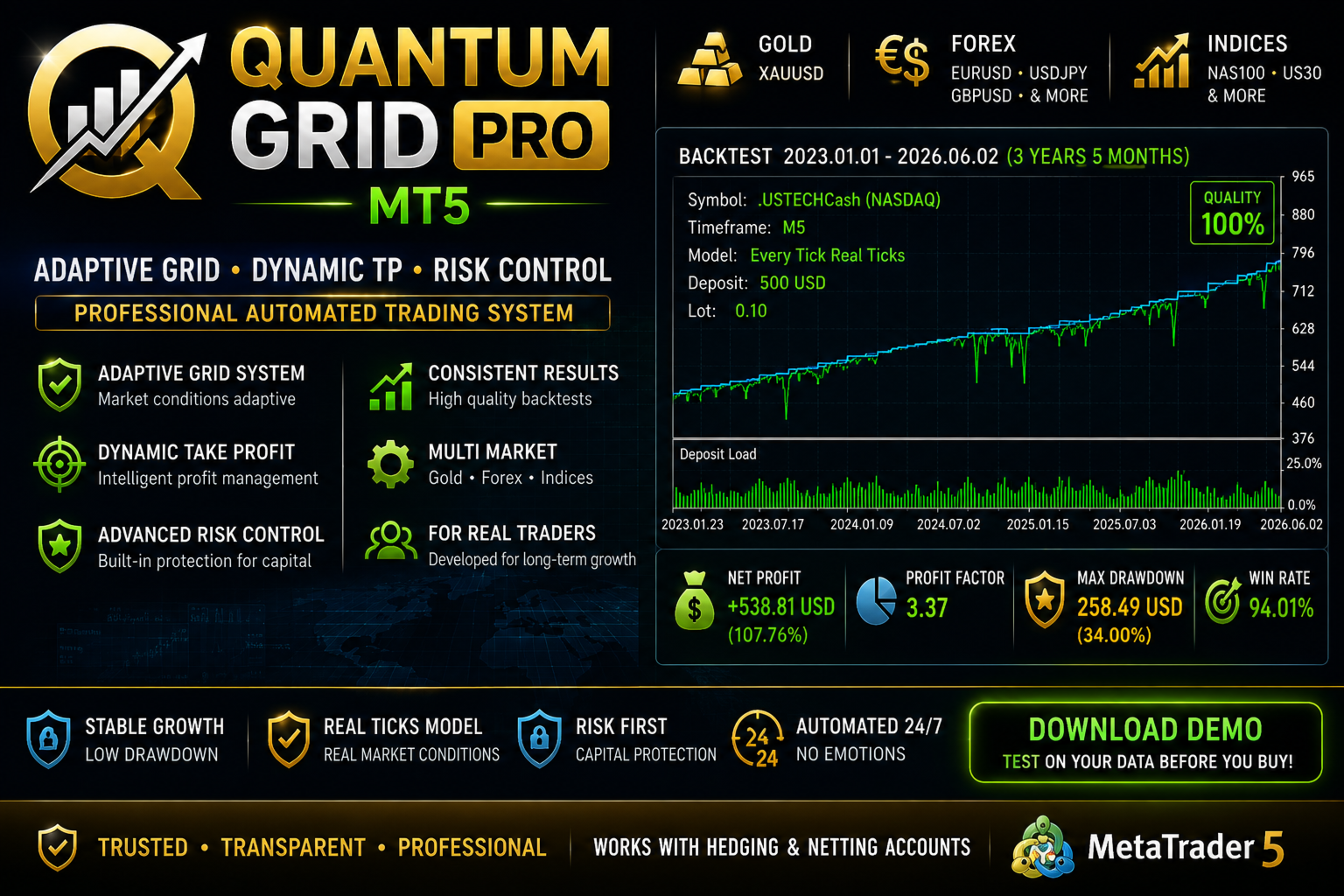
Quantum Grid Pro MT5 is an automated Expert Advisor for MetaTrader 5 based on adaptive grid position management, Dynamic Take Profit, multiple entry systems and integrated risk-control mechanisms.
Unlike a basic fixed grid, Quantum Grid Pro manages the entire trading sequence as one system. The EA considers the average entry price, total position volume, number of grid levels, market volatility, available margin and predefined risk limits.
Primary markets for testing and optimization:
🥇 GOLD • 📊 INDICES • 💱 FOREX
⭐ KEY FEATURES
- Fully automated trading
- Adaptive Grid Management
- Dynamic Take Profit
- Fixed or ATR-based Grid Step
- Volume-weighted Average Entry Price
- Automatic basket TP adjustment
- Trailing Stop
- Global Take Profit
- Pullback-based grid entry logic
- Maximum Grid Length control
- Maximum Lot protection
- Floating Drawdown control
- Daily Loss Limit
- Total Drawdown Limit
- Maximum Grid Range based on ATR
- Maximum Spread filter
- Trading Time filter
- Friday filter
- Fixed or risk-based position sizing
- Free Margin control
- Broker volume-limit protection
- Stops Level / Freeze Level protection
- BUY / SELL / BOTH modes
- Netting and Hedging support
📊 HOW QUANTUM GRID PRO WORKS
Quantum Grid Pro first analyzes the market using the selected signal system.
When a valid trading signal appears, the EA opens the initial position.
If price moves against the initial position, additional grid entries may be opened according to Grid Step, Pullback conditions, ATR limits, maximum grid size, available margin and configured risk restrictions.
When several positions form a trading basket, Quantum Grid Pro calculates their volume-weighted average entry price.
The trading sequence is then managed relative to this average price rather than treating every entry as a completely independent trade.
🧠 MULTIPLE ENTRY SYSTEMS
Quantum Grid Pro includes several selectable signal systems:
- RSI
- CCI
- MACD
- Stochastic
- Bollinger Bands
- Moving Average Cross
- ADX
- Bollinger Bands + CCI
- Bollinger Bands + RSI
- Bollinger Bands + MACD
- Bollinger Bands + OBV
- Bollinger Bands + DeMarker
- Bollinger Bands + MFI
- Bollinger Bands + Chaikin
This allows separate configurations to be developed for different markets.
Settings optimized for XAUUSD, for example, do not necessarily have to be optimal for NAS100 or EURUSD.
🎯 DYNAMIC TAKE PROFIT
One of the core features of Quantum Grid Pro is its Dynamic Take Profit system.
When several positions are active, the algorithm considers:
- entry prices;
- volume of each position;
- total basket volume;
- volume-weighted average price;
- current basket result;
- configured target distance.
As the trading basket develops, the target Take Profit can be dynamically adjusted relative to the average entry price.
This allows the grid to be managed as one trading structure.
⚙️ ADAPTIVE GRID
Two Grid Step modes are available.
Fixed Grid Step
The distance between grid entries is specified manually in points.
ATR Grid Step
The distance is calculated according to current market volatility using Average True Range.
ATR mode allows the grid structure to adapt to changing market conditions.
🔄 PULLBACK LOGIC
The next grid position does not necessarily have to be opened immediately after price reaches the required distance.
Quantum Grid Pro can wait for a price pullback before adding another position.
The sensitivity of this mechanism can be controlled through the Pullback Factor.
🛡️ INTEGRATED RISK MANAGEMENT
Grid trading requires careful risk control. Quantum Grid Pro therefore includes several independent protection mechanisms.
Maximum Grid Length — limits the number of grid levels.
Maximum Lot — limits maximum trading volume.
Maximum Floating Drawdown — restricts further grid expansion after reaching the configured floating drawdown.
Maximum Daily Loss — daily loss restriction.
Maximum Total Drawdown — additional account drawdown control.
Maximum Grid Range ATR — prevents excessive grid expansion during unusually large market movements.
Spread Filter — blocks new entries when spread exceeds the configured limit.
Margin Control — checks available margin before submitting a trading request.
Volume Protection — respects minimum volume, maximum volume, volume step and symbol directional volume limits.
💰 MONEY MANAGEMENT
Two initial position-sizing modes are available.
Fixed Lot
The initial trading volume is selected manually.
Risk Based Lot
The EA calculates position size according to account balance and the selected risk percentage.
Additional grid positions can use a configurable Lot Multiplier.
Maximum position size is additionally restricted by Max Lot and the trading specification of the selected instrument.
💵 RECOMMENDED STARTING BALANCE$500–$1,000 USD or more
This is a suggested starting range for testing conservative configurations and is not a guarantee that this amount will be sufficient under all market conditions.
Capital requirements depend on:
- Trading instrument
- Initial Lot
- Lot Multiplier
- Maximum Grid Length
- Grid Step
- Account leverage
- Contract specifications
- Maximum Lot
- Selected risk limits
For accounts around $500, minimum trading volumes and conservative grid settings are recommended.
Gold and stock indices may require substantially different margin depending on broker specifications.
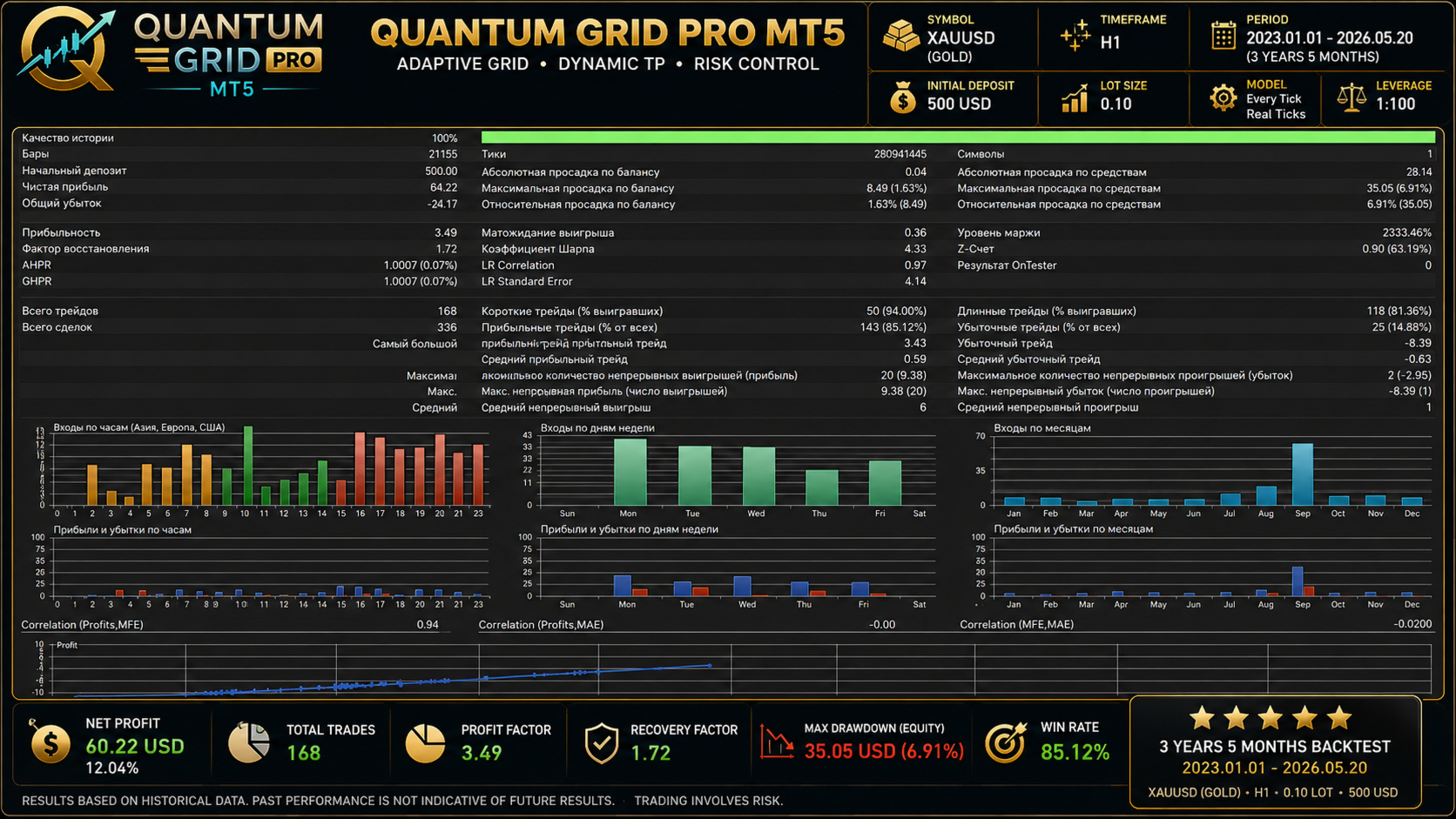
🥇 GOLDOne of the primary instruments showing interesting results during strategy development and testing is:
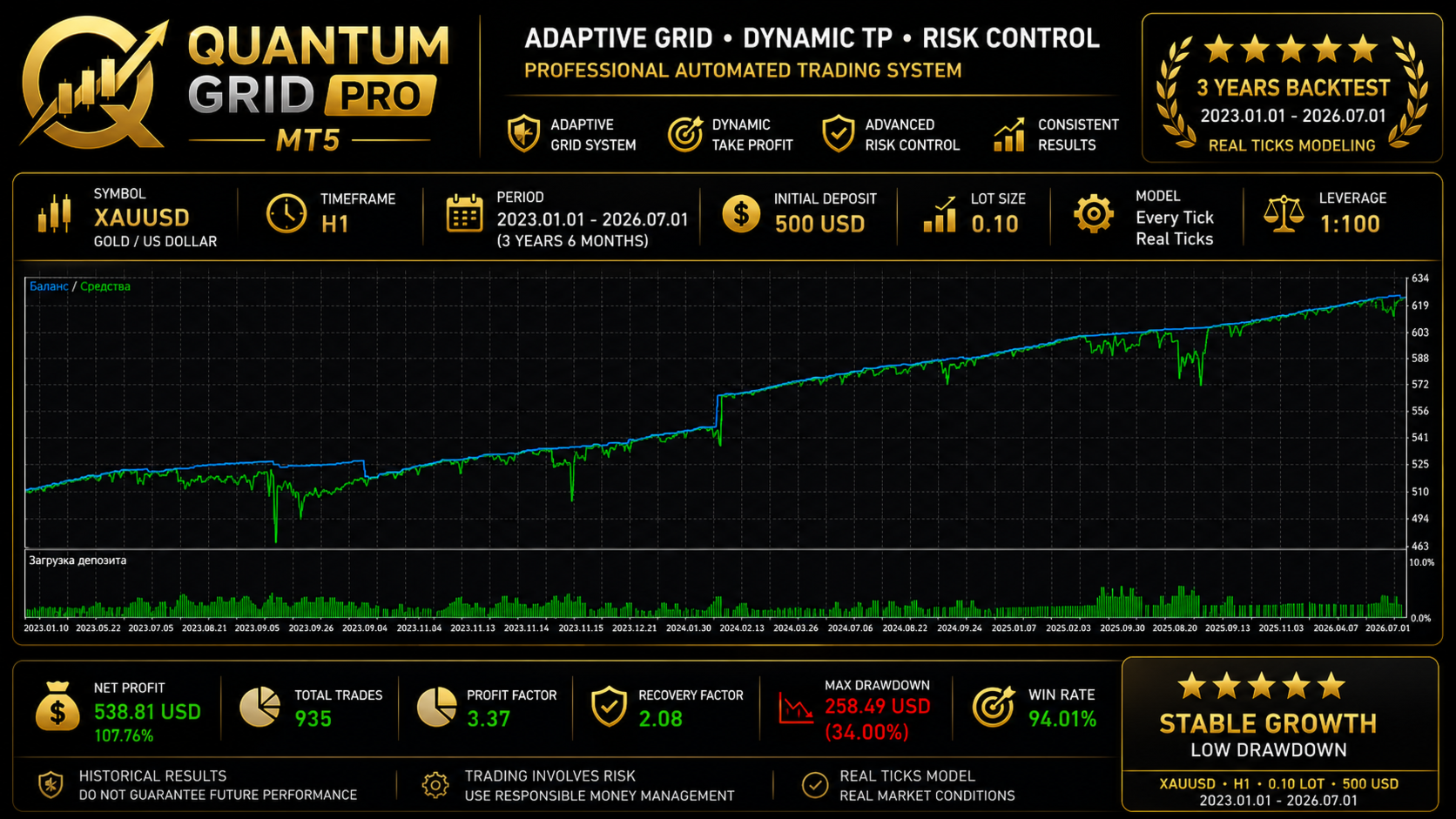
XAUUSD — GOLD
Gold should be optimized independently for:
- Grid Step
- ATR parameters
- Take Profit
- Initial Lot
- Lot Multiplier
- Maximum Grid Length
XAGUSD — Silver can also be tested, but requires a separate parameter configuration.
📊 STOCK INDICESQuantum Grid Pro can also be tested on major stock index CFDs:
- NAS100 / US100 / USTEC
- US30 / DJ30
- SPX500 / US500
- GER40 / DAX40
- UK100
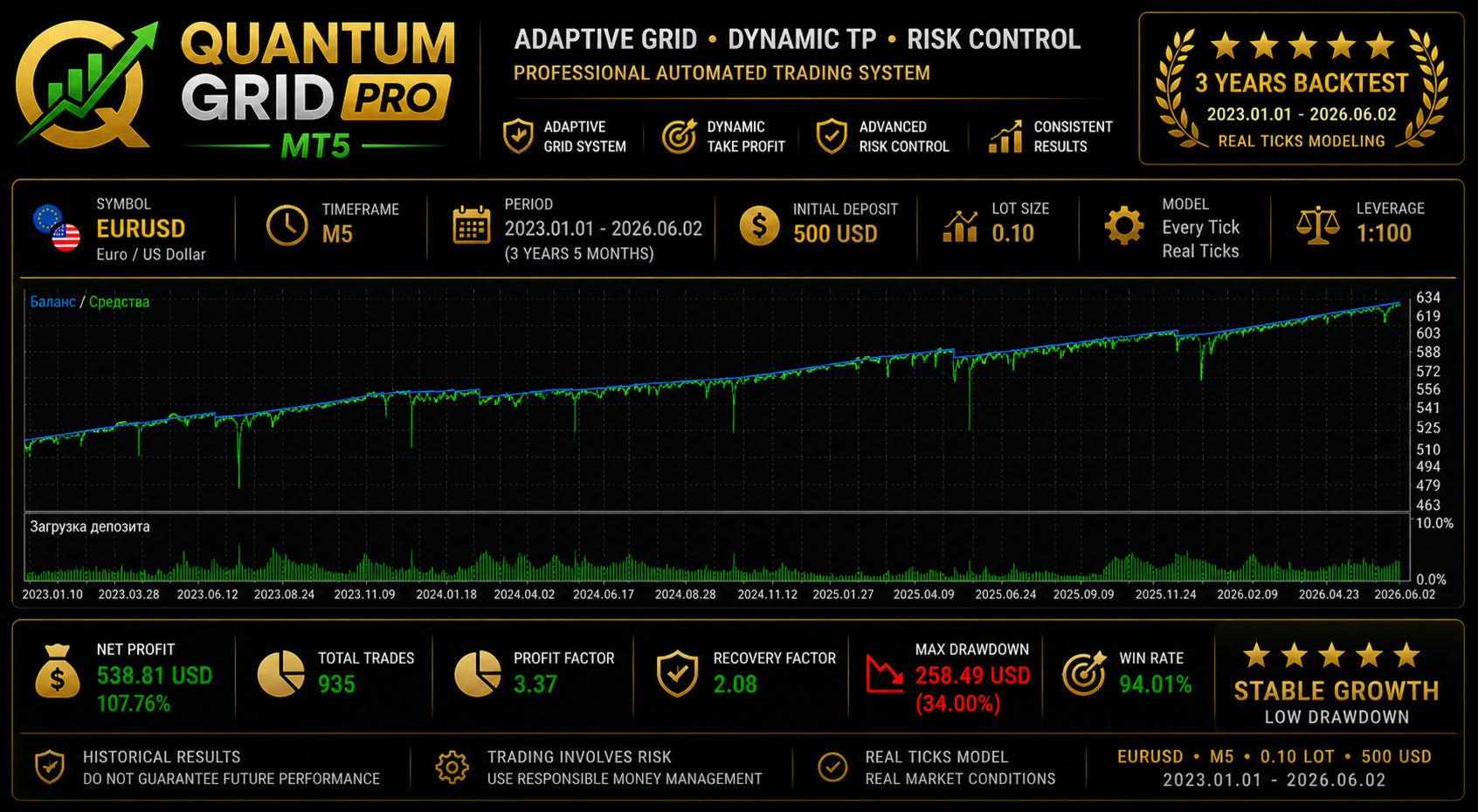
Development testing produced particularly interesting results on Gold and selected indices.
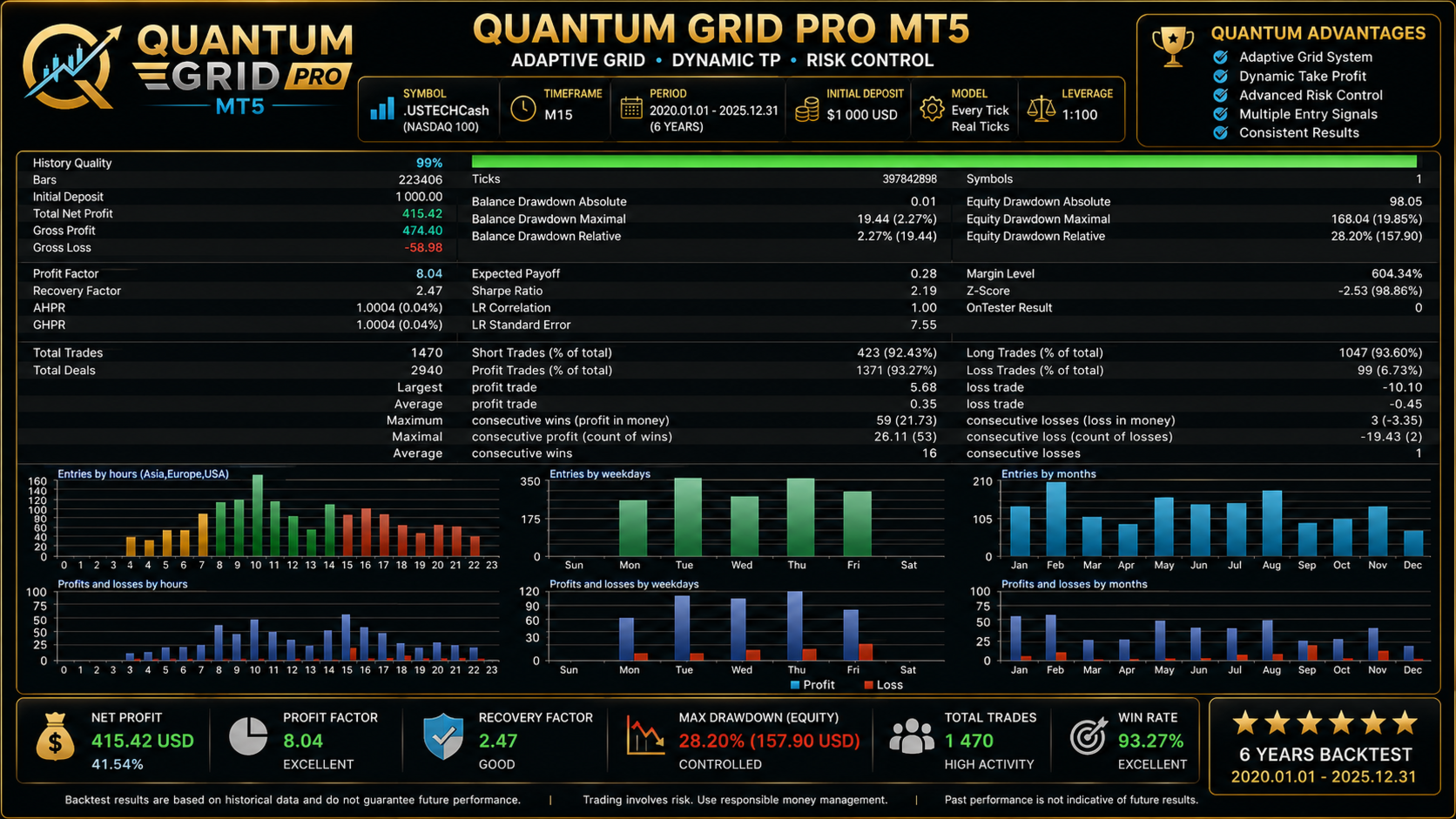
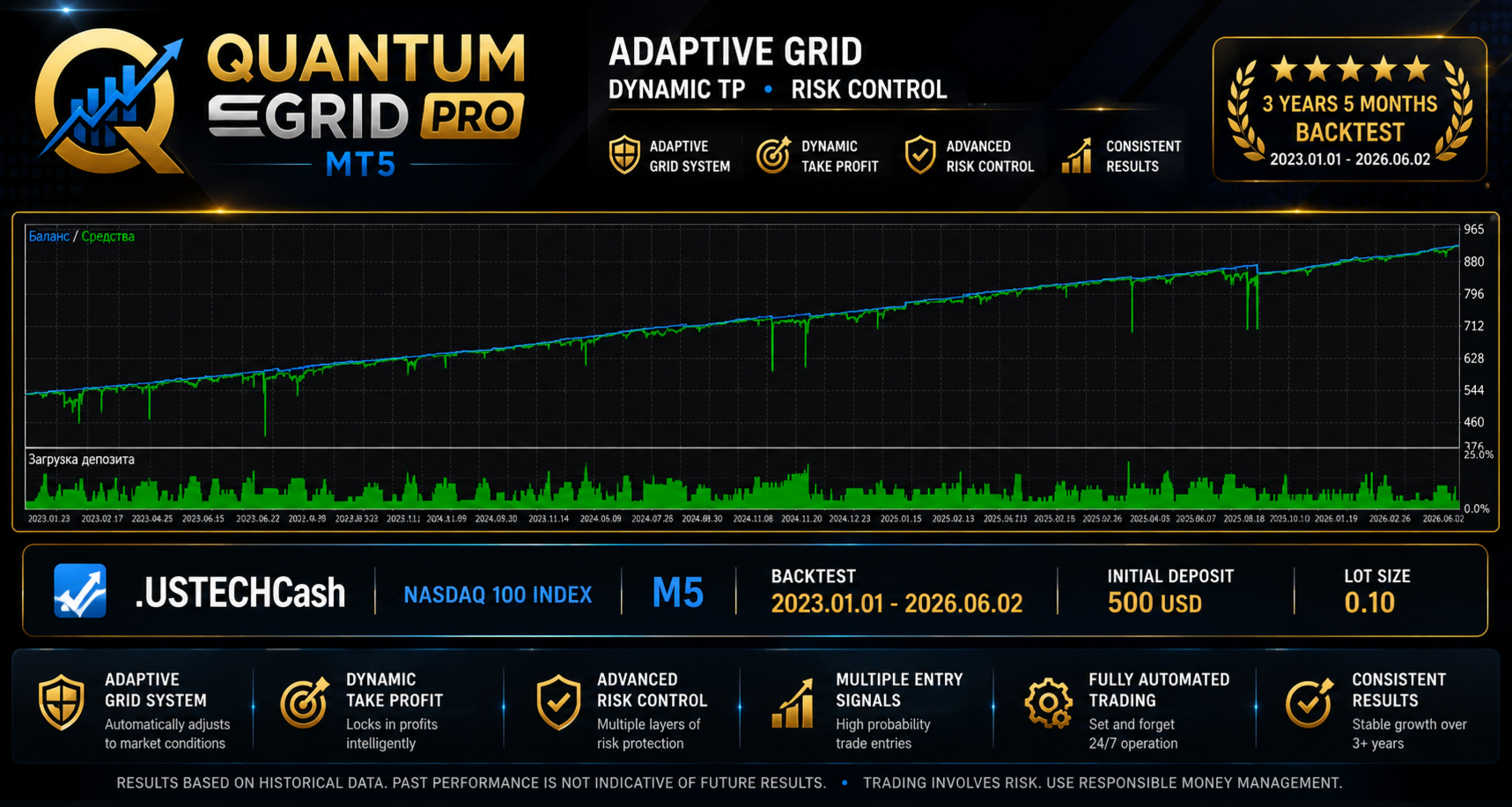
Symbol names vary between brokers. NASDAQ, for example, may be listed as NAS100 , US100 , USTEC , .USTECHCash , or another broker-specific symbol.
Each index should be tested and optimized independently.
💱 FOREXSelected liquid Forex pairs can also be considered for testing:
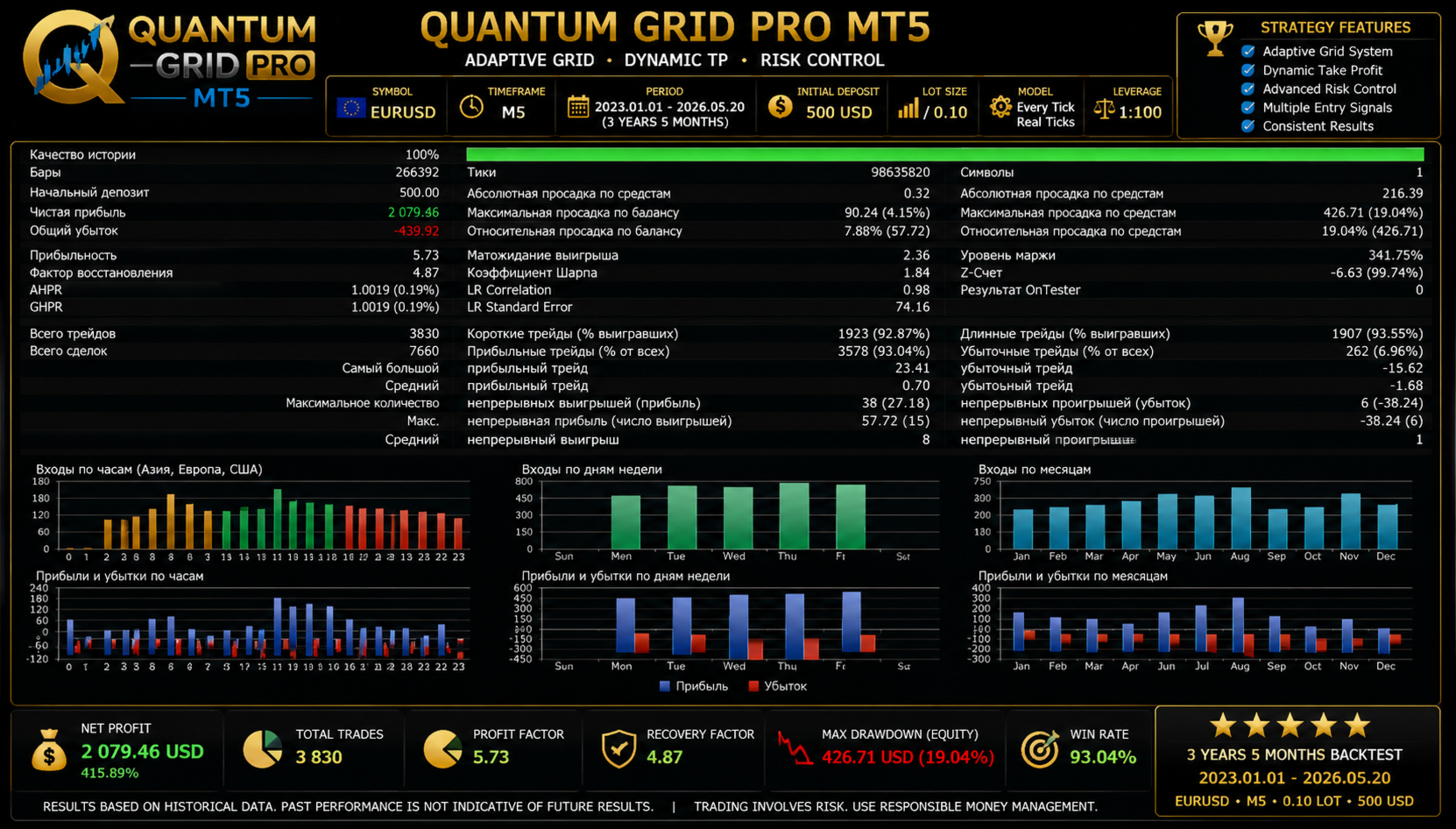
- EURUSD
- GBPUSD
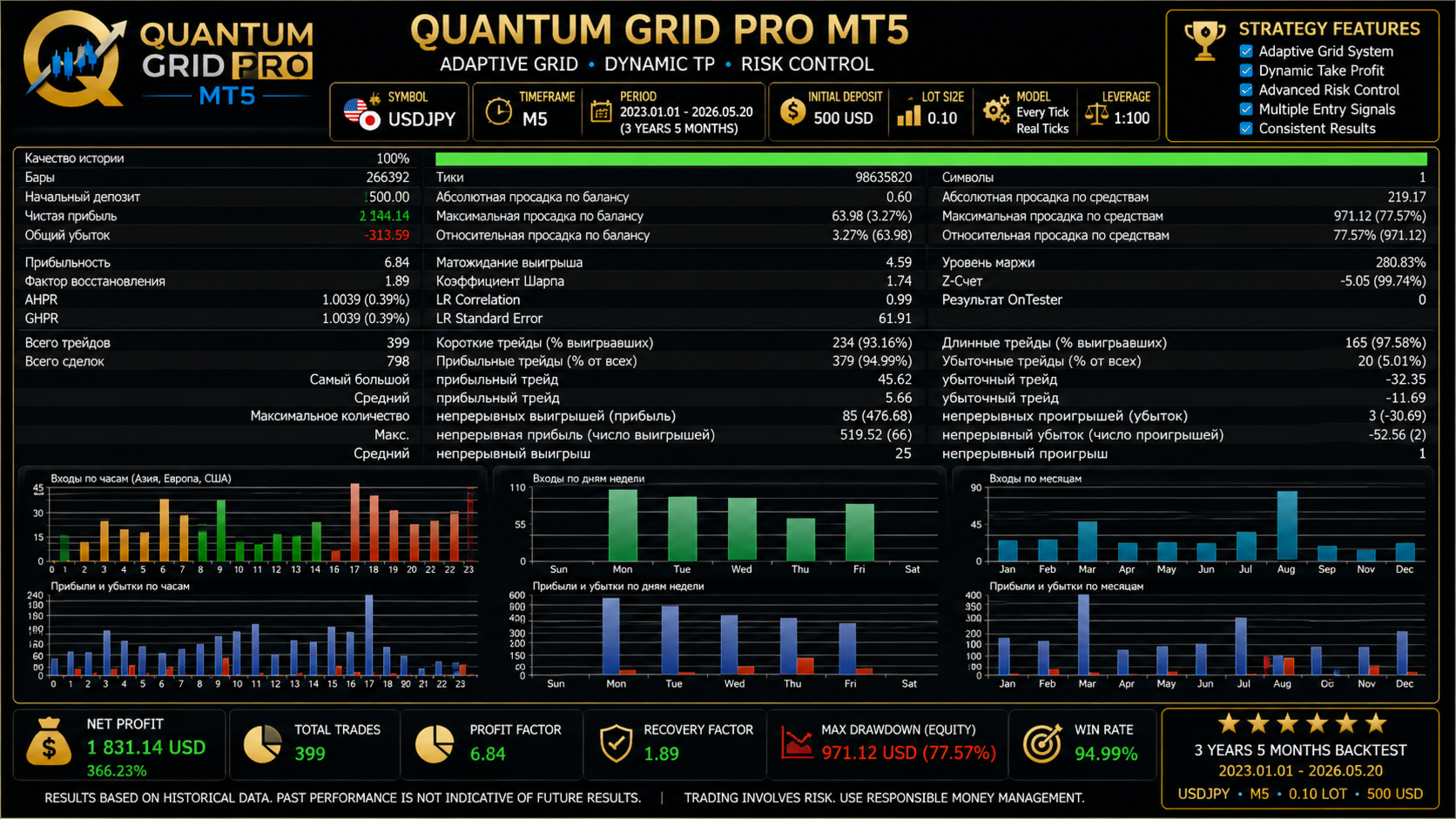
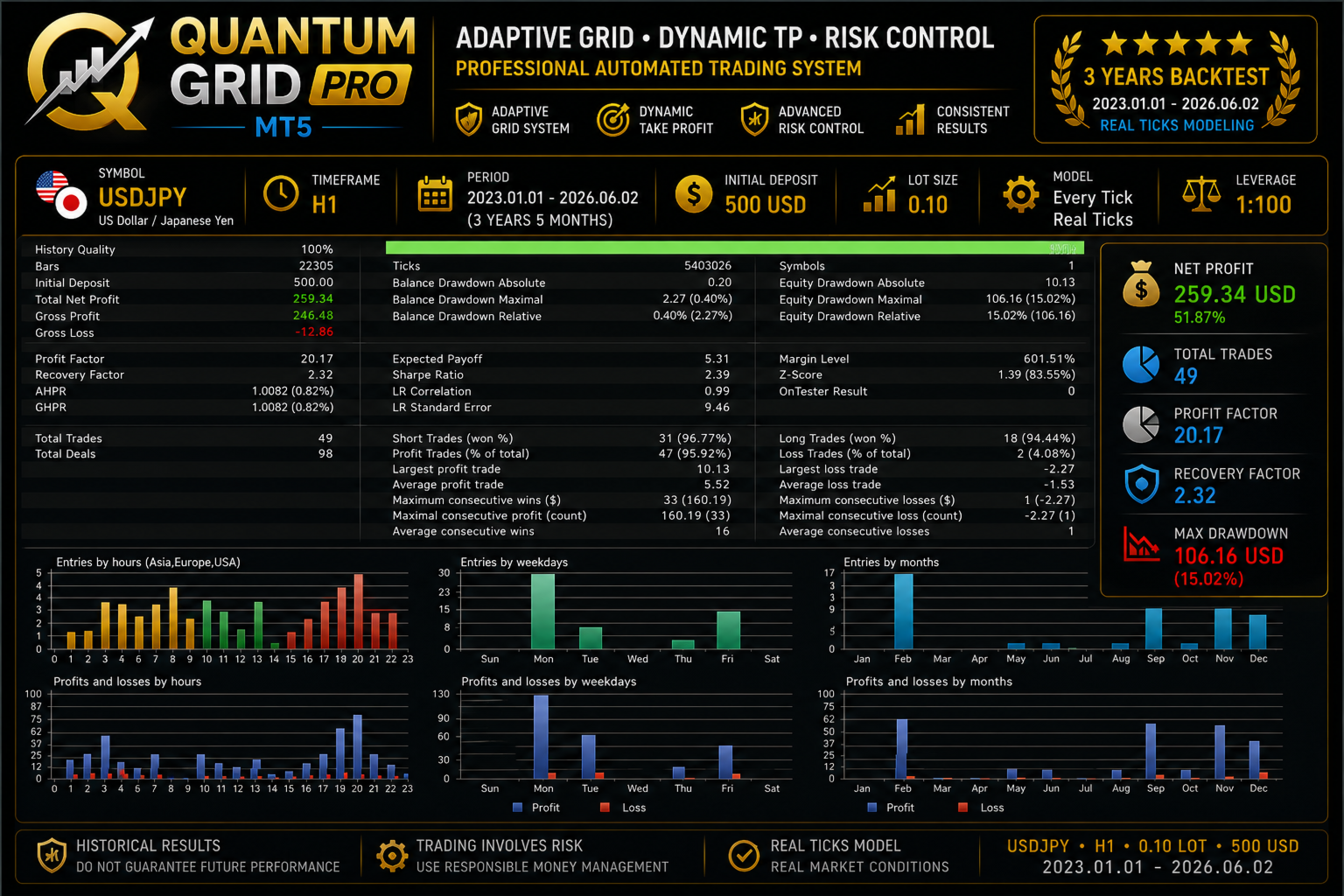
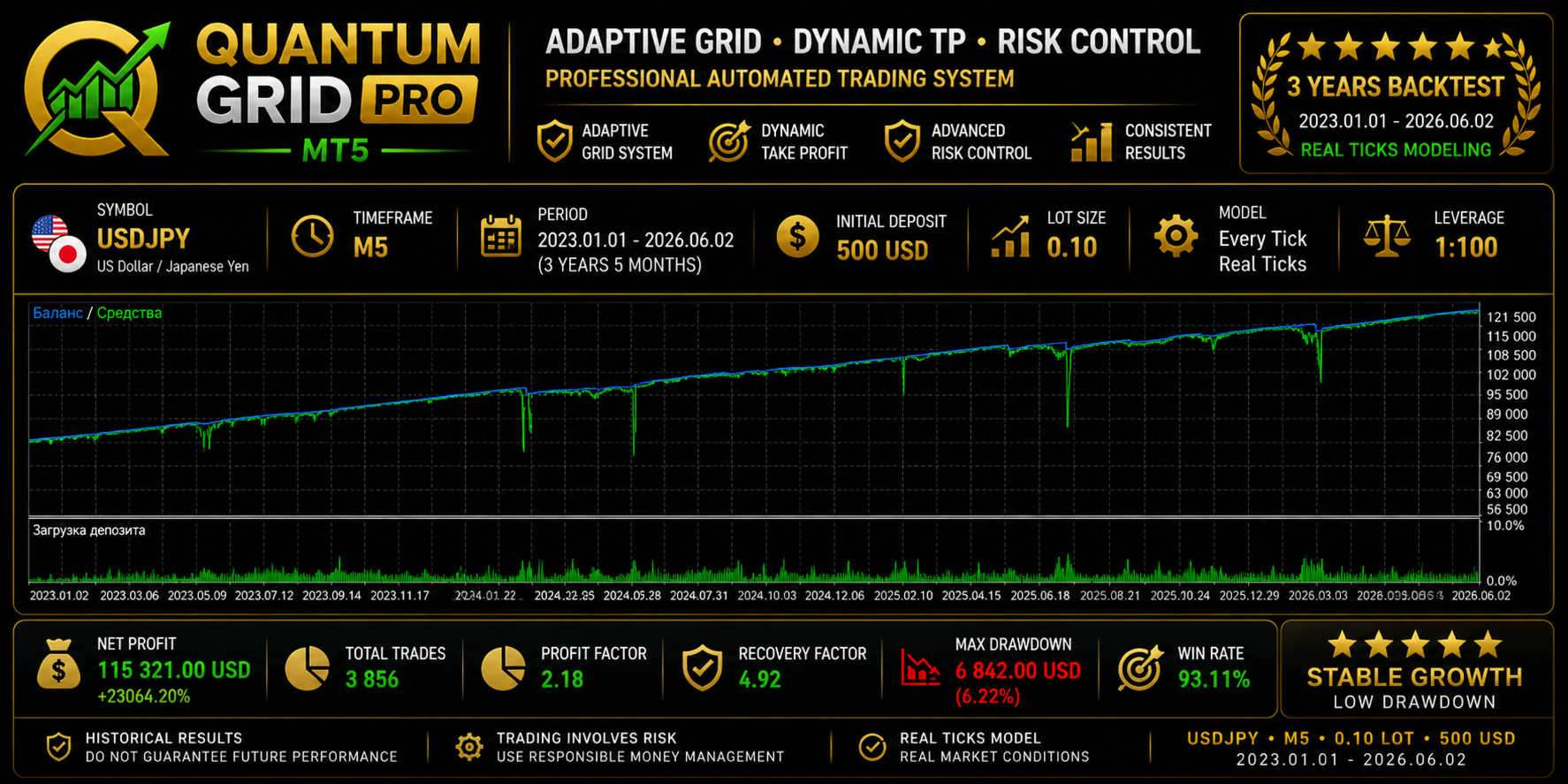
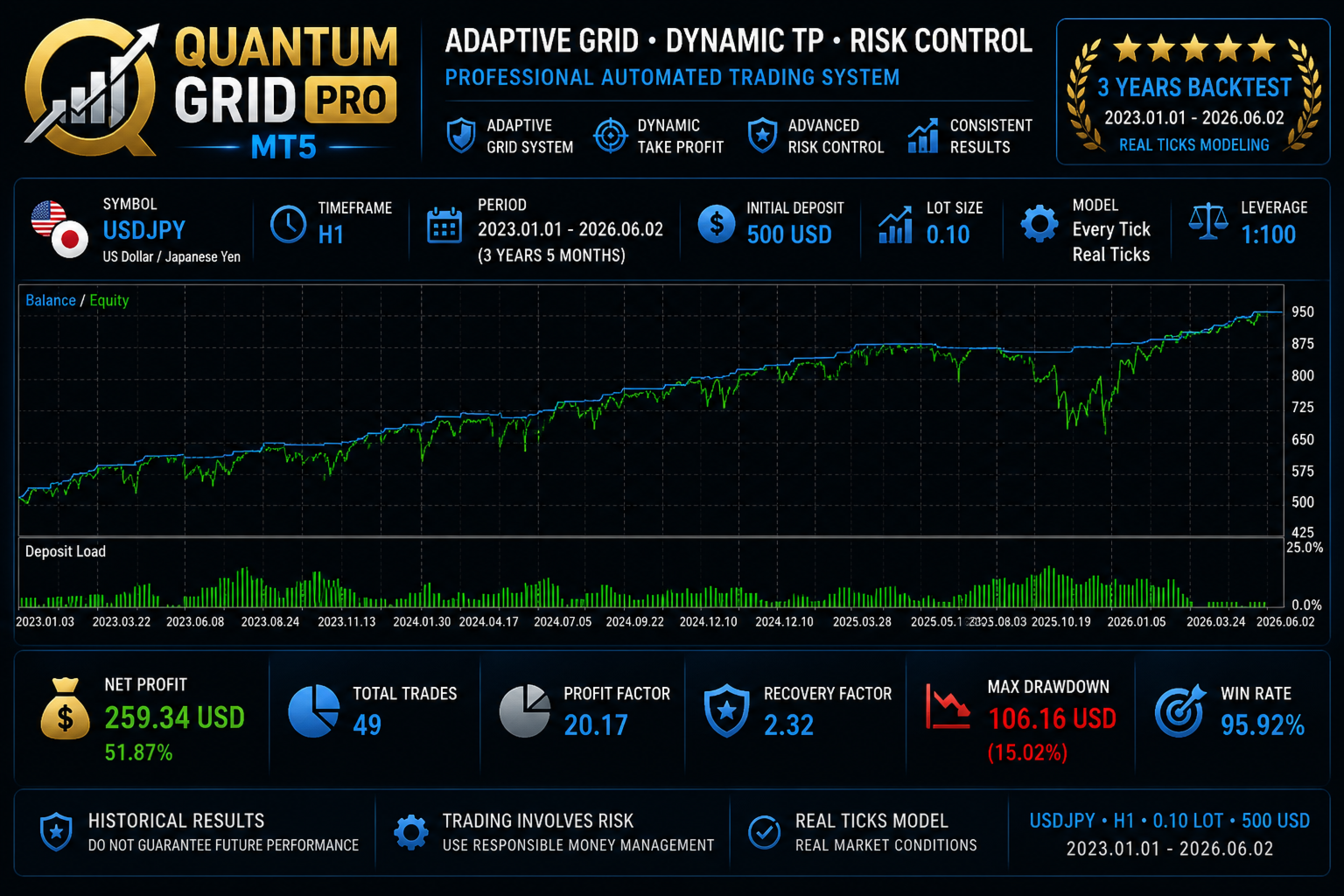
- USDJPY
- AUDUSD
- USDCAD
Do not automatically apply one parameter set to every currency pair.
Separate backtesting, optimization and forward testing are recommended for each instrument.
🏦 SUPPORTED ACCOUNT TYPESQuantum Grid Pro supports both major MetaTrader 5 position-accounting systems:
✓ Hedging Accounts
✓ Netting Accounts
The EA can also be used with common MT5 account configurations such as:
- Standard
- ECN
- Raw Spread
- Low Spread
Relatively low spreads, stable execution and reasonable commissions are preferable.
⏱️ TIMEFRAMESRecommended timeframes for initial testing:
M5 • M15 • H1
The optimal timeframe depends on the selected market and parameters.
An optimized SET file should not be transferred to another timeframe without additional testing.
↕️ TRADING DIRECTIONThree modes are available:
BOTH — BUY + SELL
LONG — BUY only
SHORT — SELL only
This allows Long and Short behavior to be optimized separately.
📟 INFORMATION PANELThe built-in chart panel displays key information about the trading system:
- EA status
- Number of grid levels
- Total trading volume
- Average entry price
- Current basket result
- Balance
- Equity
- Drawdown
- Spread
- Selected signal
- Take Profit mode
Grid levels and average position price can also be displayed directly on the chart.
🧪 TRY BEFORE YOU BUYBefore purchasing, users are encouraged to evaluate the Demo version using the MetaTrader 5 Strategy Tester.
Recommended procedure:
- Select the trading instrument.
- Select the timeframe.
- Run a historical backtest.
- Optimize the main parameters.
- Verify settings on out-of-sample historical data.
- Perform a forward test.
- Test the EA on a Demo account.
- Only then select settings for live trading.
Do not evaluate only net profit. Also consider:
- Maximum Drawdown
- Maximum grid depth
- Maximum position volume
- Profit Factor
- Recovery Factor
- Stability across different historical periods
🚀 Launch Price: $99
Special introductory price for the first users of Quantum Grid Pro MT5.
As the product develops, receives updates and builds a user history, the full-license price may increase.
Planned Regular Price: $149
License Options
Full License — $99
Full product license.
1 Month Rental — $29
Suitable for extended evaluation before purchasing the full version.
3 Months Rental — $59
Suitable for longer forward testing and use.
💻 VPS RECOMMENDEDFor continuous automated trading, a reliable VPS running MetaTrader 5 is recommended.
This is particularly important when a trading basket is already open because the EA should remain active to continue managing positions.
⚠️ IMPORTANT INFORMATION ABOUT GRID TRADINGQuantum Grid Pro uses grid-based position management.
During a prolonged market movement against the initial trading direction, multiple positions may accumulate.
Increasing:
- Initial Lot
- Lot Multiplier
- Maximum Grid Length
increases market exposure and potential drawdown.
Conservative Money Management is particularly important for accounts in the $500–$1,000 range.
⚠️ RISK WARNINGQuantum Grid Pro MT5 is an automated trading tool and does not guarantee profitability.
Historical backtests, optimization results and previous trading performance do not guarantee future results.
Actual results may vary depending on market conditions, broker execution, spreads, commissions, slippage, leverage, account balance and selected settings.
Always test the EA before using it on a live account and select a level of risk appropriate for your capital.
⭐ QUANTUM GRID PRO MT5Adaptive Grid • Dynamic Take Profit • Risk Control
🥇 GOLD • 📊 INDICES • 💱 FOREX
Recommended Starting Balance: $500–$1,000+
Launch Price: $99
Rental: from $29/month