SPAs

Программу можно использовать как советник для ручной и полуавтоматической торговли.

Или как индикатор для выявления структуры рынка.

В торговой части программы отсутствуют ордера Sell, Buy. А также лимитные и стоповые ордера.

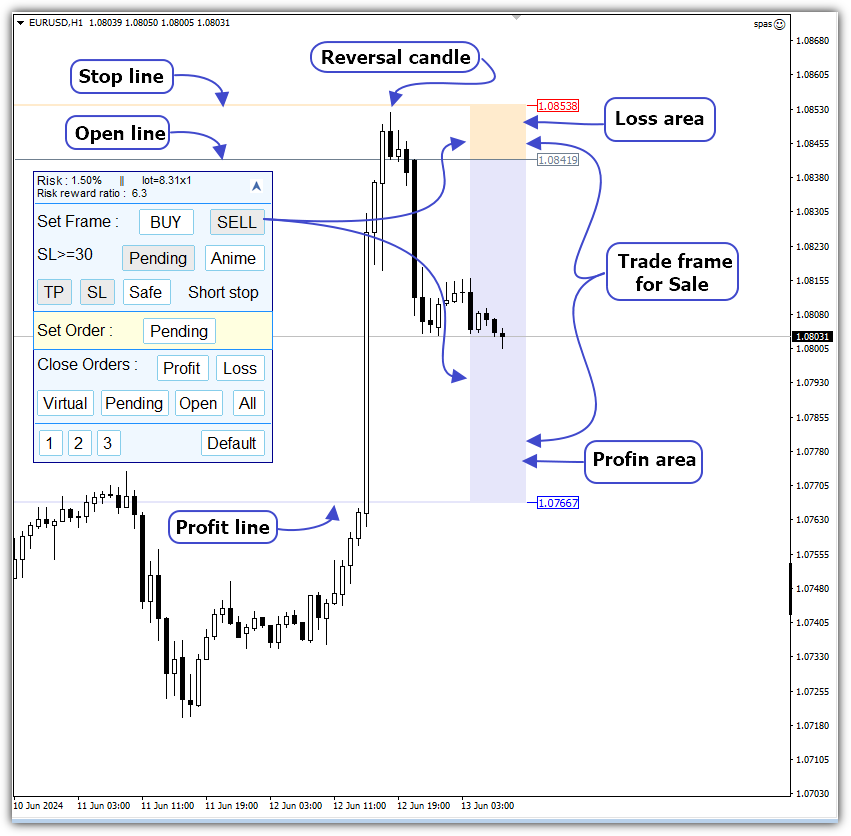
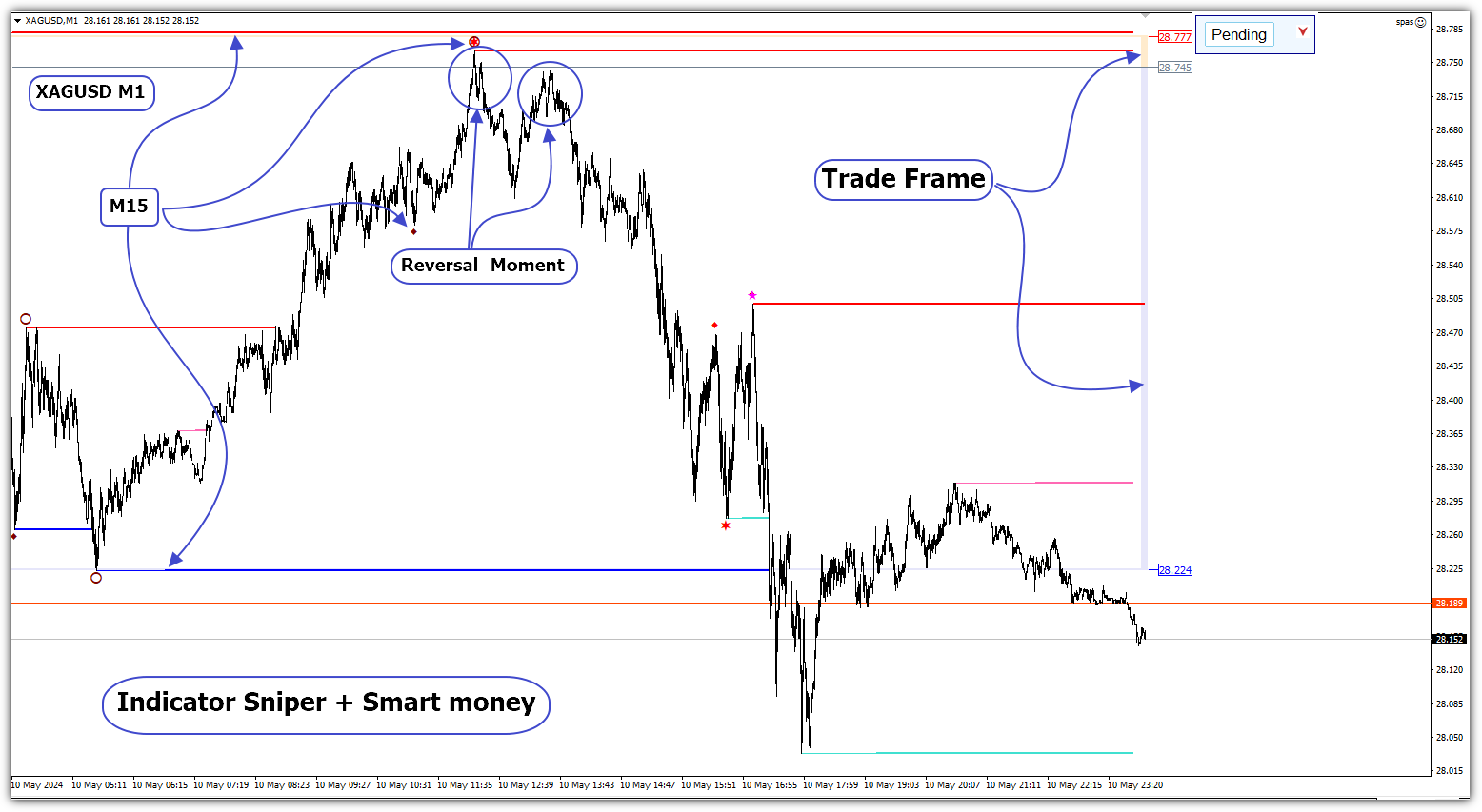
Вместо этого на график выводится торговая рамка для сделок на продажу -  SELL или на покупку - BUY.

У торговой рамки имеются три уровня. Уровень открытия будущего ордера. Уровень стопа и уровень профита.

Влево от торговой рамки выводятся три линии. Перемещая данные линии с помощью мыши, можно изменить значения открытия, стопа и профита будущего ордера.

Для ручной торговли используются ордера двух типов.

Рыночный - Market. Заменяет ордера Sell и Buy. Например, если торговая рамка SELL, то Market ордер будет соответствовать ордеру Sell.

Отложенный - Pending. Заменяет лимитные и стоповые ордера.

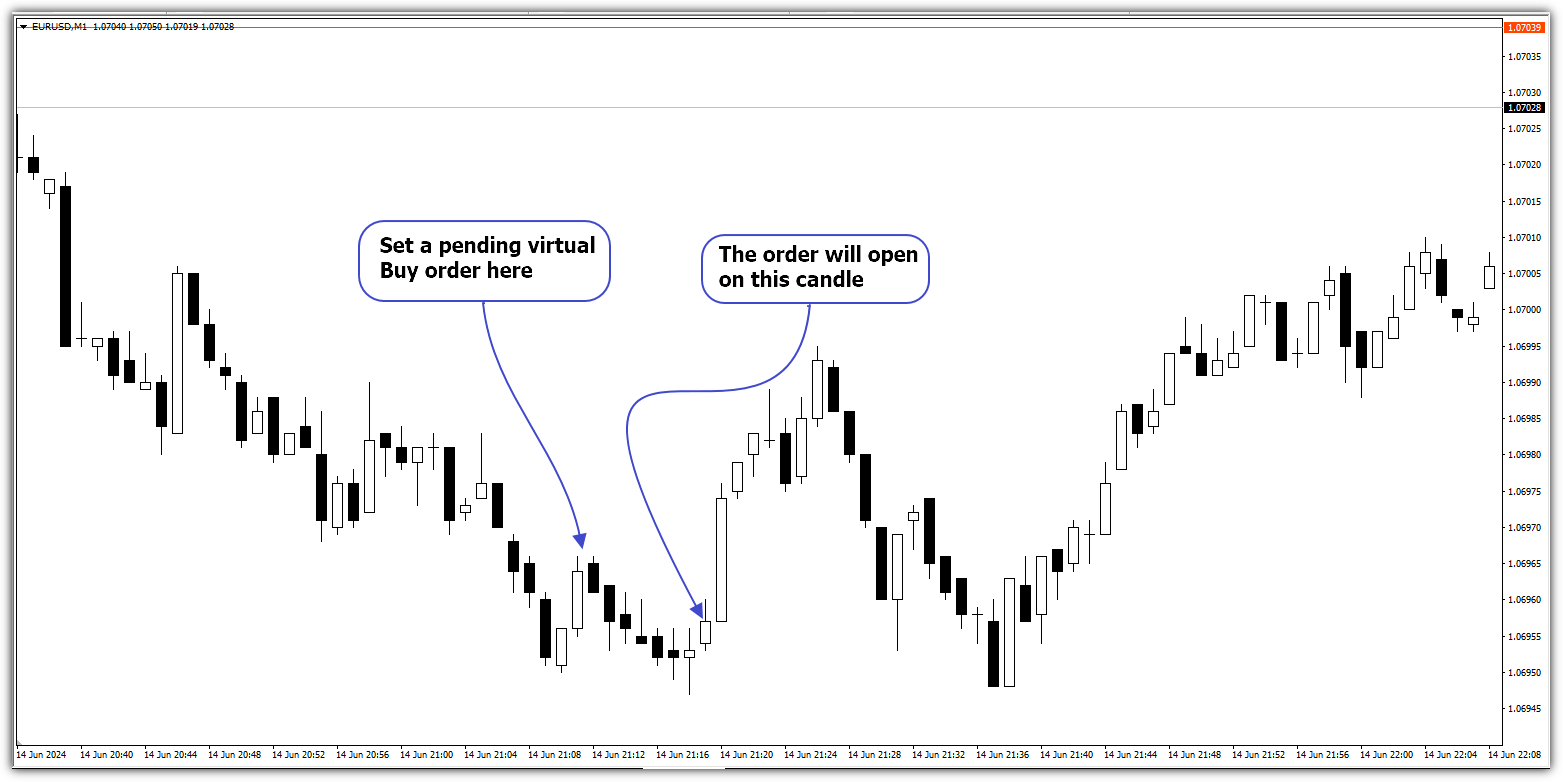
Для полуавтоматической торговли используется виртуальный отложенный ордер - Virtual. Заменяет стоповые ордера. "Включение" этого ордера переводит программу в режим автоматической торговли для проведения одной сделки.

Использование  виртуального торгового ордера оправдано тех случаях, когда есть вероятность движения цены против сделки, открытой по рынку с помощью ордера Market.  

Одна сделка может включать открытие одного или нескольких ордеров одновременно. 

Торговая часть программы оптимизирована для торговых систем на основе Price Action - систем следования за рынком.

Размер торгового лота для одного ордера можно задать явно или задать процент риска на один ордер.

Если задать процент риска, то размер торгового лота будет рассчитан автоматически в зависимости от заданного риска и расположения линий открытия и стопа торговой рамки. Это исключает необходимость расчета размера лота, ввода рассчитанного значения во вспомогательные торговые программы. При торговле на минутном таймфрейме, часто используемом для точности входа в сделку, автоматический расчет избавляет от рутинных операций. Дает возможность сосредоточиться на проведении торговой операции.

Для виртуальных отложенных ордеров не известно заранее, когда будет физически открыт ордер. Заранее не известно место открытия ордера и расстояние до стопа. Поэтому размер торгового лота вычисляется в момент открытия сделки с соблюдением заданного риска. Для виртуального ордера лучше использовать задание процента риска. Если для данного ордера задать размер лота, то при маленьких значениях расстояния до стопа при открытии ордера, риск может быть значительным.

В программу встроены три индикатора для выявления структуры рынка. Применение этих индикаторов закладывает основу для построения эффективных торговых стратегий.

Индикаторы имеют условные названия:

1. Sniper X6;

2. Sniper;

3. Smart money.

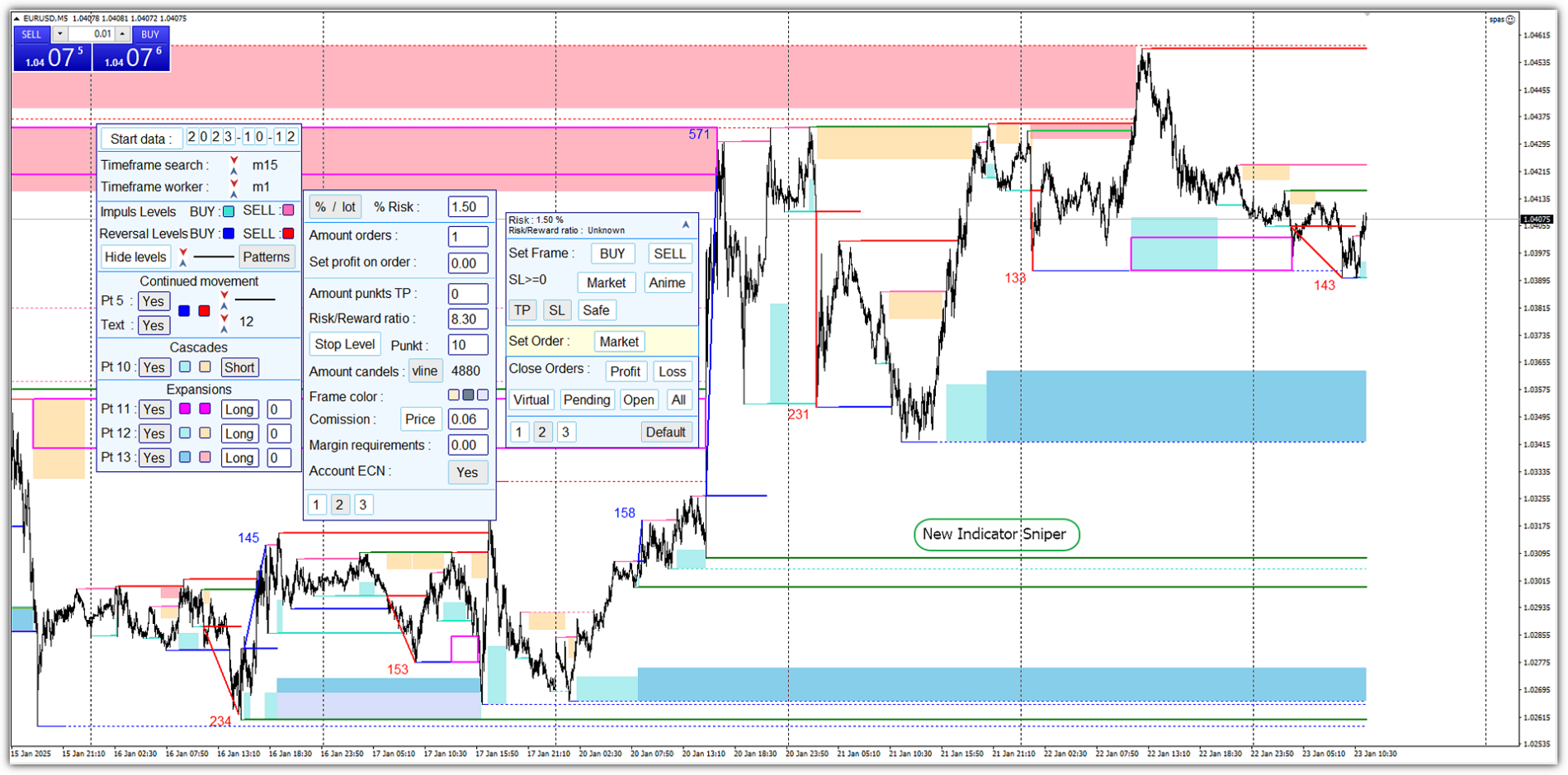
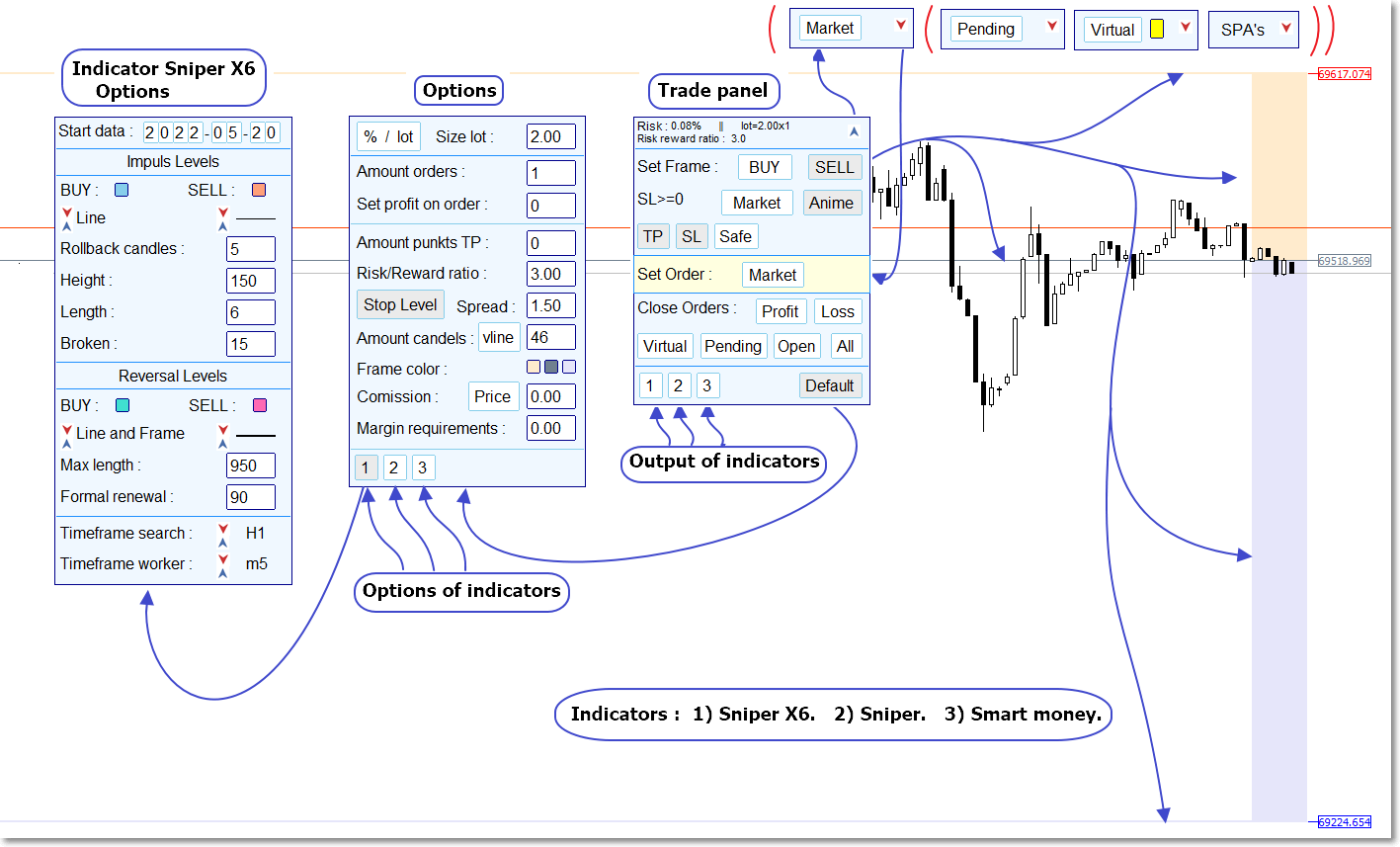
Управление программой осуществляется через графический интерфейс с помощью девяти панелек.

А также с помощью торговой рамки. 

Панельки можно перемещать по окну с графиком с помощью мыши.

Значения некоторых параметров, а также количество и структура элементов управления программой зависят от контекста.

Одновременно на график можно вывести три панельки.

Торговая панелька выводится при запуске программы.

При нажатии на кнопку Default вызывается вторая панелька для задания или корректировки параметров.

При нажатии на кнопки 1-2-3 первой панельки на график выводятся встроенные индикаторы по отдельности или все вместе. В любом сочетании.

На второй панельке нажатием на кнопки 1-2-3 можно вызвать по очереди одну из трех панелек для настройки параметров индикаторов.

Все панельки можно убрать с графика. Для этого в правом верхнем углу торговой панельки необходимо нажать на синюю стрелку.

В зависимости от режима работы в верхней части окна с графиком появится одна из четырех панелек. На ней может быть кнопка для вывода одного из трех типов ордеров:  Market, Pending или Virtual в зависимости от настроек.

Справа находится красная стрелка. При нажатии на красную стрелку на график выводятся все ранее свернутые панельки.

Описание управляющих элементов

  • Торговая панелька.
Торговая панелька состоит из пяти частей

Первая часть - информационная. Расположена вверху.

Здесь выводится информация о риске, размере и количестве открываемых ордеров. Ниже выводится значение Risk/Reward ratio - соотношение риска к. 


Во второй части производится настройка торговой рамки. Задается режим торговли - ручной или полуавтоматический. А также можно задать вывод ордера Сейф.

Кнопкой BUY на график выводится торговая рамка для покупки. Кнопкой SELL выводится торговая рамка для продажи.

После вывода торговой рамки мышью можно скорректировать положение линий Стопа, Открытия и Профита.

Ниже в строке SL>=... выводится информация об уровне Stop Level, заданном торговым сервером. Этот уровень определяет минимальное расстояние от уровня открытия ордера до уровней стопа и профита. 

Кнопкой Pending/Market выбирается тип открываемого ордера. По умолчанию задан отложенный ордер - Pending . Задание типа ордера влияет на расположение торговой рамки.

По умолчанию торговая рамка не перемещается при поступлении новой свечи на график. Для перемещения торговой рамки при поступлении новой свечи или при изменении котировки необходимо нажать на кнопку Anime. После этого начнет осуществляться примитивная анимация - перемещение торговой рамки вслед за изменением котировок. При этом размер области прибыли и убытка торговой рамки будет изменяться в соответствиями с заданными настройками. Если же кнопка Anime отжата, то области прибыли и убытка торговой рамки можно изменить с помощью мыши. И эти области не будут изменяться.

При одновременно нажатых кнопках Pending и  Anime включается режим полуавтоматической торговли. Появляется возможность задания ордера Virtual.Также включается Светофор рядом с кнопкой Virtual

Светофор позволяет  включить виртуальный отложенный ордер. О светофоре будет сказано чуть ниже.

Кнопками TP и SL включается задание уровней профита и стопа. 

Кнопка Safe задает возможность создания ордера сейф. Ордер сейф может быть задан при достаточности свободных средств и если в настройках второй панельки задан одновременно один ордер для открытия сделки.

Если задан для открытия отложенный ордер - Pending , выводится информация, что ордер будет открыт с коротким стопом - Short stop. Но уровень стопа можно скорректировать мышью Смещая линию открытия торговой рамки.

Если же включен режим задания виртуальных отложенных ордеров, появляется кнопка  Short stop/Long stop вместо надписи  Short stop .


В третьей части торговой панельки располагается единственная кнопка. Этой кнопкой создается торговый ордер.

Цвет фона третьей части торговой рамки отличается. Это как бы предупреждает: ВНИМАНИЕ, нажатие на расположенную здесь кнопку вызывает торговую операцию.

В зависимости от включенных кнопок во второй части может выводиться:

  1. Кнопка  Pending  - нажатие на эту кнопку открывает отложенный ордер с уровнями открытия, стопа и профита, совпадающими с соответствующими линиями торговой рамки.
  2. Кнопка  Market    - нажатие на эту кнопку открывает рыночный ордер по текущей рыночной цене. Уровни стопа и профита совпадают с  соответствующими линиями торговой рамки.
  3. Кнопка  Virtual.

Правее кнопки  Virtual  включается Светофор. 

Цвета Светофора и порядок работы с виртуальным отложенным ордером.

Серый цвет - не нажаты кнопки BUY или SELL. То есть не выведена торговая рамка.

После вывода торговой рамки Светофор подает сигналы.

Желтый цвет - режим ожидания.

Зеленый цвет - можно задать виртуальный отложенный ордер. Нажатие на кнопку  Virtual при зеленом цвете Светофора переводит программу в режим робота. При этом Светофор загорается красным цветом.

Красный цвет - виртуальный отложенный ордер отслеживает движение рынка в поисках оптимальной точки входа.

Программа переходит в автоматический режим. Отслеживается положение рыночной цены относительно максимума или минимума свечи. В зависимости от типа торговой рамки - рамка на продажу или на покупку. В некоторых случаях данный алгоритм позволяет открыть ордер по более выгодной цене. Положение торговой рамки в момент открытия реального ордера  может сильно отличаться от того, который был в момент нажатия на кнопку Virtual. Но ордер будет открыт с заданным риском или с другими заданными параметрами, о которых будет сказано немного позже.

Если в течение двух часов виртуальный ордер не сработает, Светофор сменит красный цвет на желтый или зеленый. То есть отключится виртуальный отложенный ордер. И далее при зеленом цвете можно снова в подходящий момент, по мнению трейдера, нажать на кнопку Virtual. Тем самым снова активировать новый виртуальный отложенный ордер.

Режим автоматической работы чувствителен к изменениям настроек программы. Нажатие на кнопки торговой панельки может отключить автоматический режим. Прежде чем использовать этот режим рекомендуется потренироваться на демо счете.


В четвертой части расположены кнопки закрытия ордеров.

Profit - закрывает все открытые ордера с прибылью.

Loss - закрывает все ордера с убытком.

Virtual - отключает виртуальный отложенный ордер. Отключается автоматический режим.

Pending - закрывает все отложенные ордера и виртуальный отложенный ордер. 

Open - закрывает все открытые ордера и виртуальный отложенный ордер .

ALL - закрывает все ордера и виртуальный отложенный ордер .


Кнопками в пятой части вызываются:

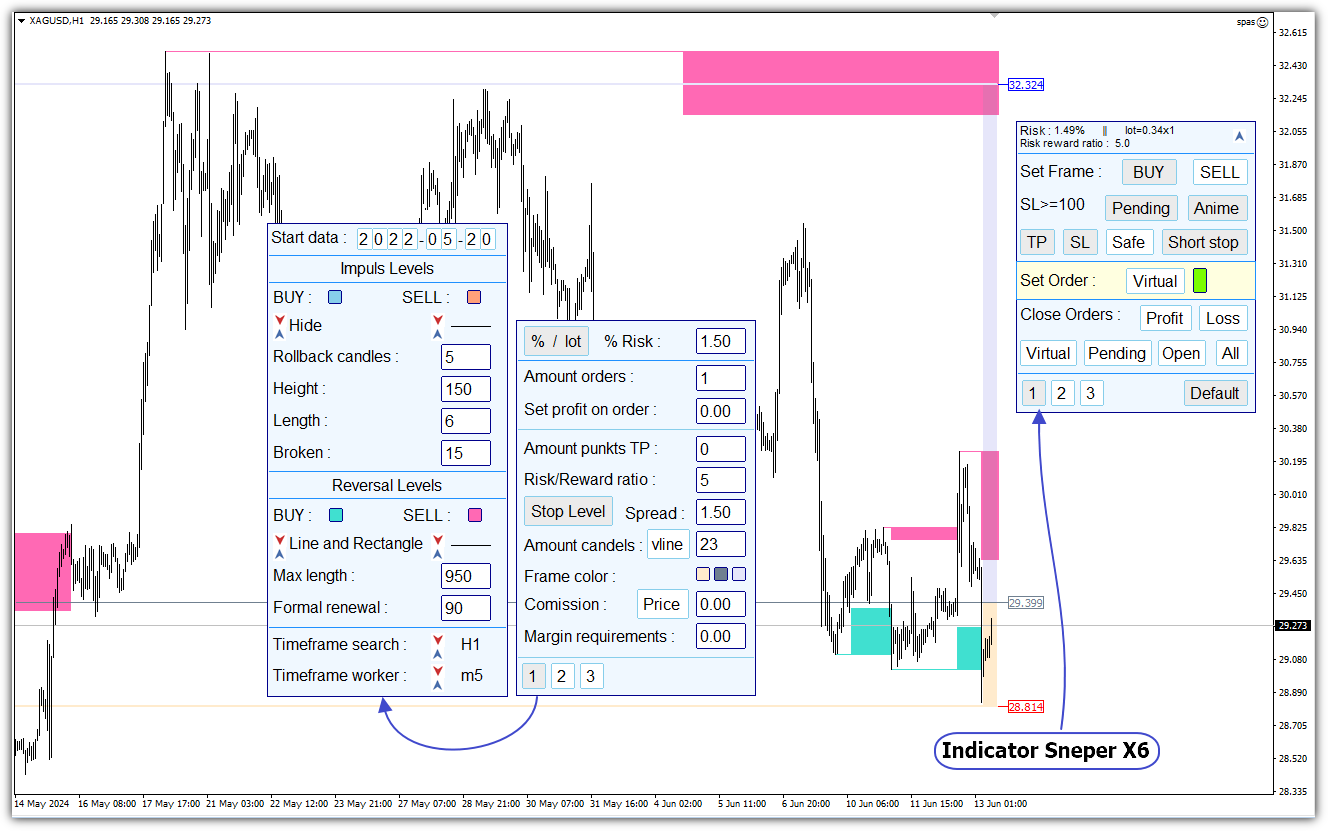
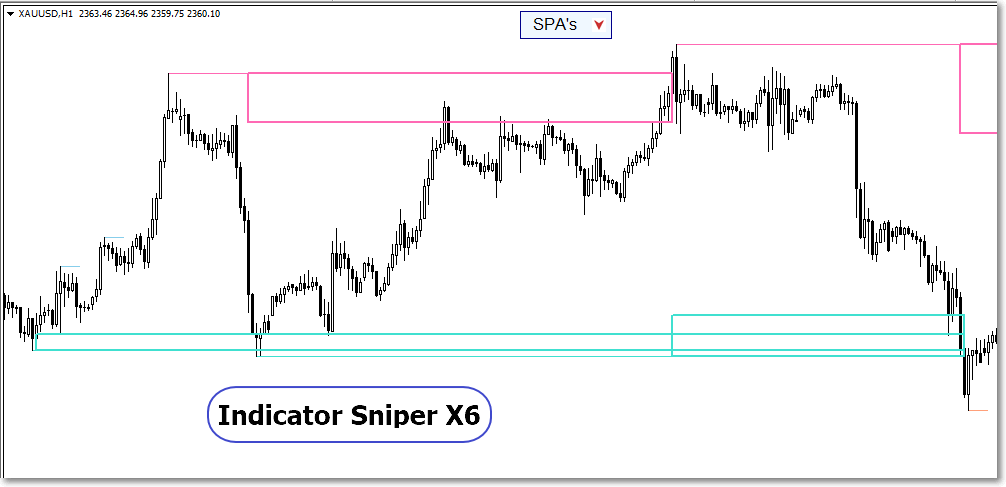
1 - выводится на график индикатор Sniper X6.

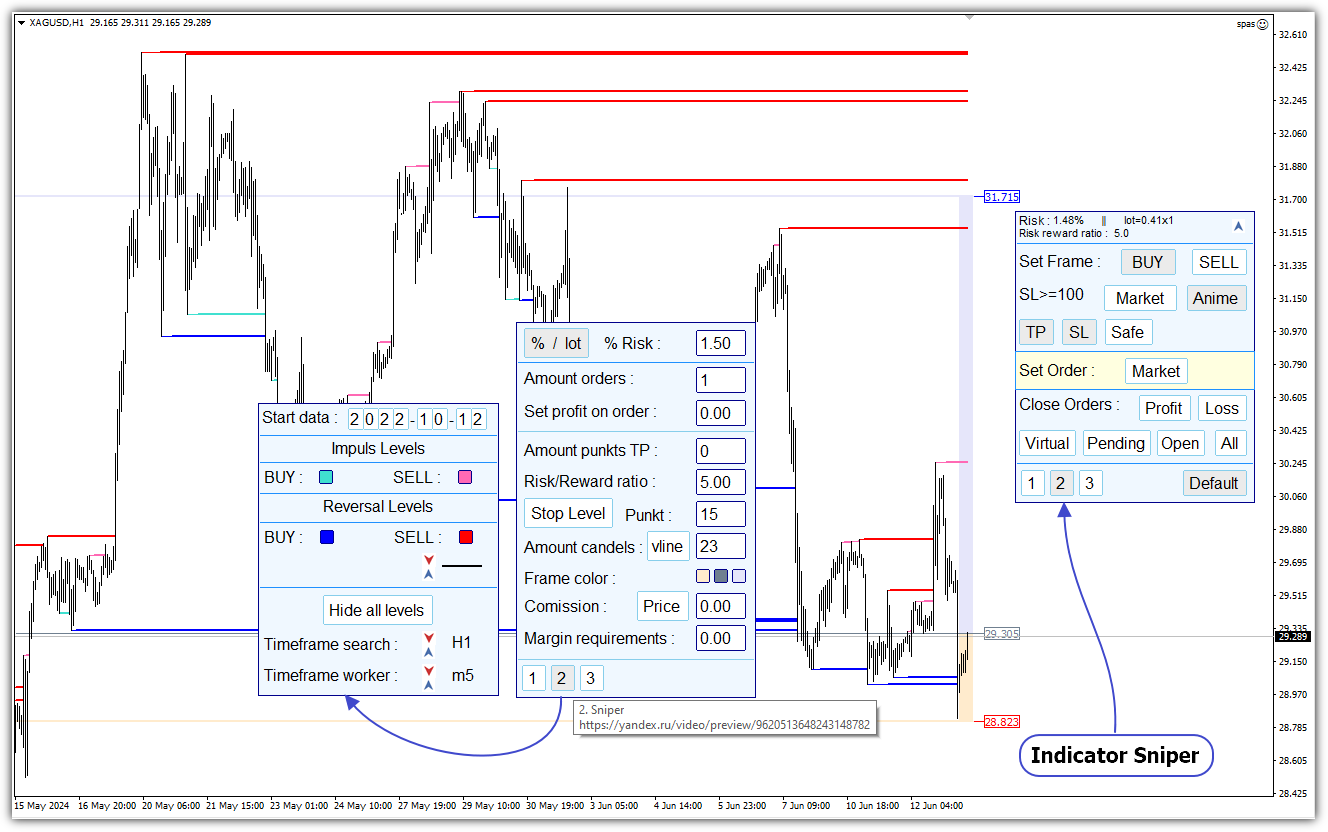
2 выводится на график индикатор Sniper.

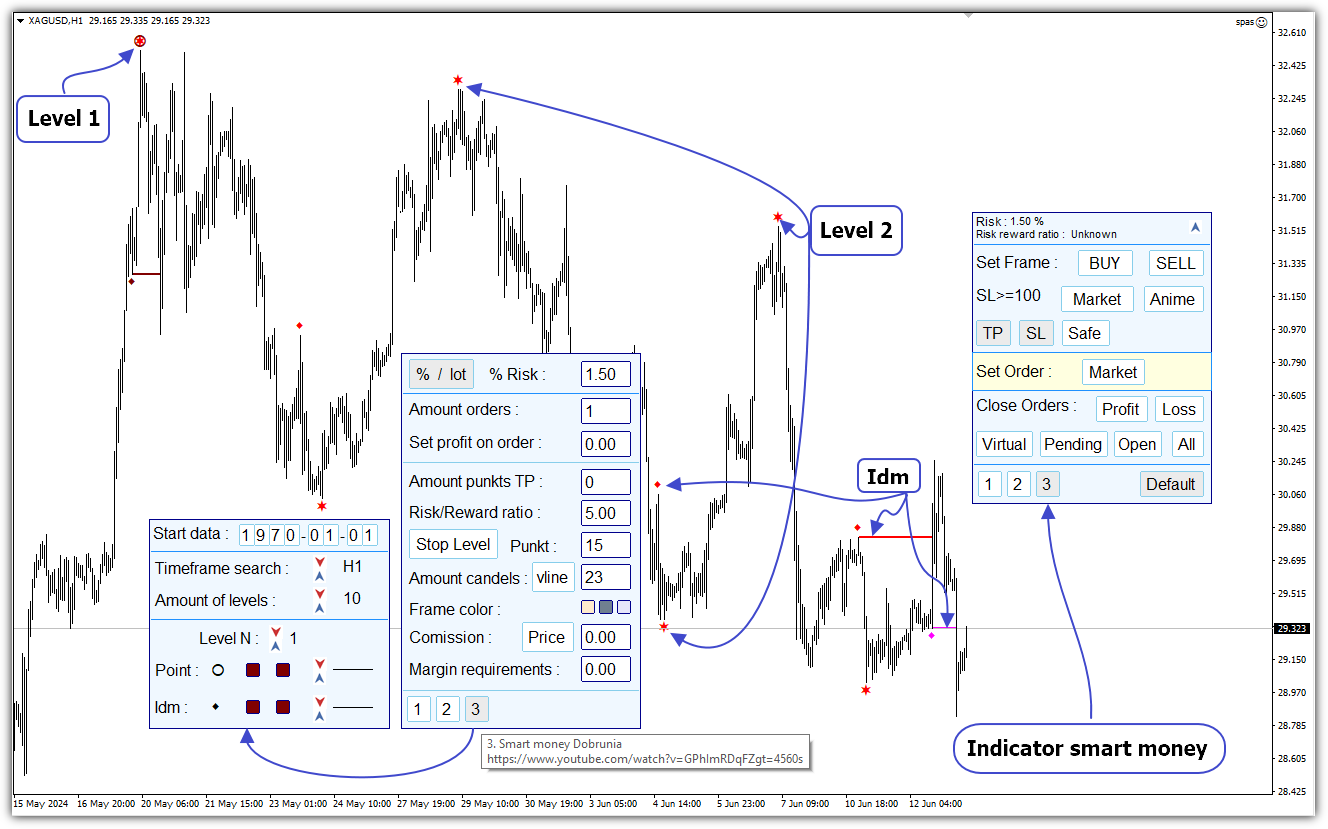
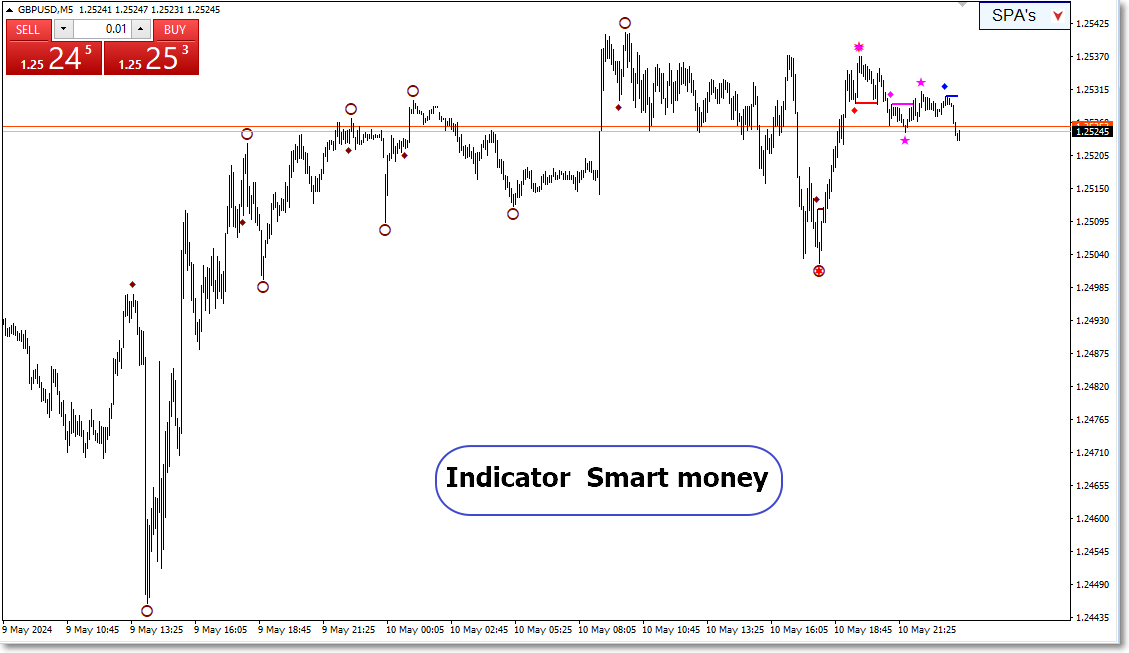
3 выводится на график индикатор Smart money.

Default - выводится панелька с настройками параметров программы.

  • Панелька  настройки параметров торговой части программы.

Вызывается на график после нажатия на клавишу Default торговой панельки.

Кнопкой % / lot можно задать процент риска на сделку или размер торгового лота. Правее в поле ввода редактируется соответствующее значение. Размер лота по умолчанию выводится минимальным для выбранного торгового инструмента. При изменении размера торгового лота программа корректирует вводимое значение с учетом разрешенного шага изменения лота и минимальным значением. 

В строке Amount orders : в поле ввода задается количество ордеров, которые можно открыть одновременно в одной сделке. Если задать более одного ордера, то на первой торговой панельке исчезнет кнопка Safe. Ордер "сейф" можно задать только для одного выводимого ордера. Количество одновременно открываемых ордеров ограничено размером депозита и настройками торгового сервера. При тестировании программы в одной сделке открывалось 500 ордеров.

В строке Set profit on order : в поле ввода можно задать минимальное значение получаемого профита в сделке в расчете на один ордер.

В поле ввода в строке Amount punkts TP : можно задать количество пунктов профита в расчете на один ордер. Под пунктом в данной программе принимается минимальный шаг изменения цены торгового инструмента. Например, текущая цена валютной пары GBPUSD равна 1.26745. Один пункт равен 0.00001.

В поле ввода в строке Risk/Reward ratio : вводится значение отношения прибыли к убыткам проектируемой сделки.

Кнопкой Stop Level можно задать редактирование в поле ввода значение отступа уровня стопа относительно выбранного экстремума. Можно задать количество пунктов или процент от текущего спрэда.

Далее в строке Amount candles : задается метод выбора экстремума, относительно которого проектируется стоп. При отжатой кнопке vline в поле ввода можно ввести номер свечи. Программа на участке от последней свечи до свечи с заданным номером выбирает максимум или минимум. Если в первой - торговой панельке - выведена торговая рамка на SELL, то программа ищет максимум. Если торговая рамка BUY, программа ищет минимум. Относительно свечи с найденным экстремумом торговая рамка выводит уровень стопа. Стоп будет выведен с учетом значения в строке с кнопкой  Stop Level. Также при вычислении уровня стопа учитывается значение StopLevel, заданное торговым сервером.

Если же кнопка vline нажата, на график выводится вертикальная пунктирная линия. Перемещение с помощью мышки этой линии также задает свечу, до которой программа ищет экстремум для стопа.

При отжатой кнопке vline используется текущее значение номера свечи. При появлении новой свечи свеча с заданным номером смещается вправо. Если кнопка vline нажата, то свеча, на которой находится вертикальная линия, не смещается. 

В строке Frame color : находятся три цветных квадратика. После нажатия мышкой по выбранному квадратику можно задать цвет торговой рамки. Первый квадратик задает цвет области убытков торговой рамки и линии loss. Второй квадратик задает цвет линии open. Третий квадратик задает цвет зоны прибыли торговой рамки и линии profit.

В строке Comission : кнопкой Price / % в поле редактирования можно задать значение комиссии на сделку. Комиссия задается в виде цены в расчете на минимальный торговый лот. Или в виде процента от сделки. Эти значения берутся из спецификации торговых инструментов на сайте брокера.

Значение комиссии используется для более точного расчета параметров сделки - риска и Risk/Reward ratio.

В поле ввода в строке Margin requirements : вводится значение маржинальных требований. Это значение берется из спецификации торговых инструментов на сайте брокера. В некоторых случаях этот параметр помогает правильно рассчитать максимальное количество одновременно открываемых ордеров.

В строке Account ECN : кнопкой задается ECN счет. Если торговля ведется на ECN счете. В некоторых случаях это позволяет правильно рассчитать значение стопа. 

Кнопками 1-2-3 вызываются панельки настройки параметров встроенных индикаторов:

1 - выводится на график панелька настройки параметров индикатора Sniper X6.

2 выводится на график панелька настройки параметров индикатора  Sniper.

3  выводится на график панелька настройки параметров индикатора  Smart money.

  • Панелька настройки параметров индикатора Sniper X6.

    Состоит из четырех частей.

    1 часть. Задание или корректировка даты начала разметки графика.

    Для корректировки даты необходимо подвести курсор мыши к выбранной цифре даты и щелкнуть левой кнопкой мыши. Все цифры даты являются кнопками. После этого последовательно вводить требуемые цифры даты. Программа контролирует правильность ввода значения цифр даты.

    Окончание корректировки даты можно осуществить тремя способами. Щелкнуть левой кнопкой мыши по последней подсвеченной цифре даты. Нажатием на клавишу ESC. После изменения последней цифры даты. 

    2 часть. Параметры для импульсных уровней.

    В строке, следующей за выбором цвета импульсных уровней, слева стрелками можно выбрать стиль вывода импульсных уровней. 

    Стиль может быть в виде рамки - Frame, закрашенного прямоугольника - Rectangle, отрезка горизонтальной линии - Line. Также можно скрыть уровни - Hide.

    Справа стрелками выбирается толщина линии импульсного уровня.

    В строке Rollback candles : в поле ввода можно задать количество откатных свечей. Чем больше значение этого параметра, тем меньшее количество импульсных уровней будет выявлено.

    В строке Height задается высота прямоугольника импульсного уровня в виде количества пунктов. Этот параметр также влияет на количество выявленных уровней.

    В строке Length задается длина прямоугольника уровня. Параметр используется только для визуализации. Он ни на что не влияет. Импульсные уровни необходимы для построения на основе их разворотных уровней.

    В строке Broken : задается количество пунктов, регулирующих пробитие уровня ценой. Это важный параметр.

    Допустим, строились повышающие импульсные уровни при движении рынка вверх. Потом происходит разворот рынка. После пробития определенного уровня на заданное количество пунктов и закрепления ниже фиксируется разворот. После этого начинают строиться понижающие уровни. Самый верхний уровень будет являться разворотным.

    3 часть. Параметры для разворотных уровней и разворотных зон.

    Построение разворотных зон, прилегающих к разворотным уровням, происходит сложным образом.

    Алгоритм построения разворотных зон отличается от алгоритма построения импульсных уровней. Высота разворотных зон зависит от состояния рынка перед возникновением разворотного уровня.

    Разворотный уровень выводится в виде линии. Разворотная зона выводится в виде прямоугольника.

    В блоке редактирования разворотных уровней можно задать цвет, толщину и стиль уровней.

    Стили выбираются стрелками. Всего 5 стилей. 

    В виде рамки - Frame.

    В виде закрашенного прямоугольника - Rectangle.

    В виде линии - Line.

    В виде линии и рамки - Line and  Frame.

    В виде линии и закрашенного прямоугольника - Line and Rectangle.

    Скрыть все уровни - Hide .

    В последних двух стилях линия соединяет разворотную зону с экстремумом, который фактически стал разворотным. При этом тело разворотной зоны в виде рамки или прямоугольника начинается по времени в момент появления разворотной зоны.  Заканчивается разворотная зона после пробития разворотного уровня ценой. Пробитие как и для импульсных уровней задается параметром Broken.

    Если уровень не пробивается длительное время, то параметром Max length задается количество свечей максимальной длительности разворотного уровня. Если в данный параметр внести значение 0, то уровень будет продлеваться до тех пор, пока не будет пробит рынком.

    В строке Formal renewal вводится количество пунктов для так называемого формального обновления. Этот параметр влияет на выявление разворотных уровней. Когда рынок входит в тело потенциального разворотного прямоугольника импульсного уровня, но не доходит до противоположной стенки этого прямоугольника на указанное число пунктов, рынок разворачивается. В дальнейшем от этого места может быть построен разворотный уровень.

    4 часть. Выбор таймфреймов.

    Отдельно выбирается таймфрейм для поиска разворотных уровней и рабочий таймфрейм. На рабочем таймфрейме ведется торговля.


    • Панелька настройки параметров индикатора Sniper.

    Никаких новых параметров по сравнению с индикатором Sniper X6 здесь не добавлено. Единственная новая кнопка Hide all levels скрывает все уровни.


    • Панелька настройки параметров индикатора Smart money.

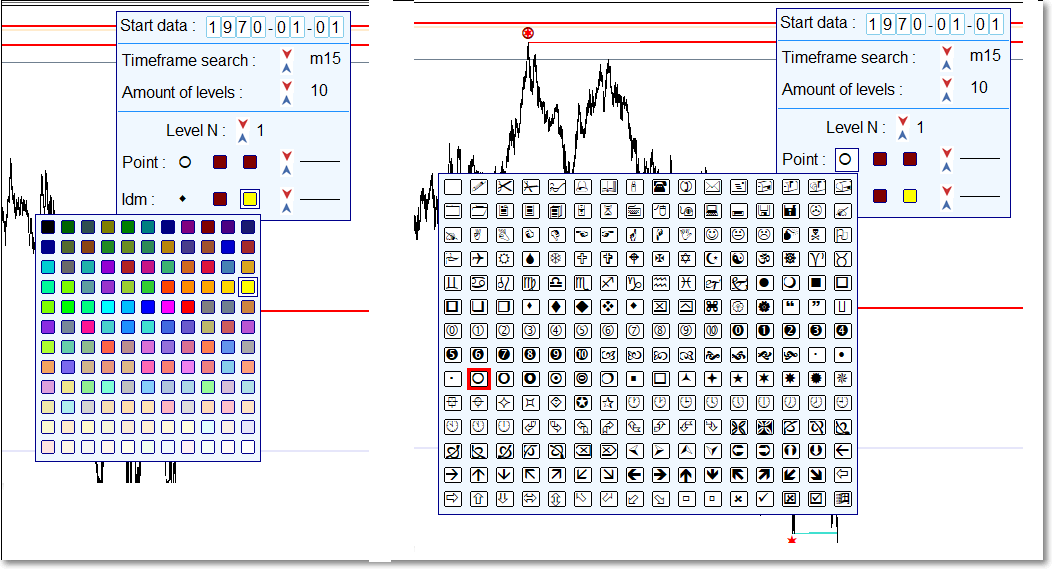
    В строке Amount of levels стрелками выбирается количество структурных уровней, которые может вывести на график индикатор. Всего 10 структурных уровней.

    Стрелками в строке Level N выбирается номер структурного уровня. После этого можно отредактировать символ точек Point и idm выбранного структeрного уровня.

    Для структурных точек Point и Idm можно выбрать из таблицы другие символы. Для этого необходимо мышкой кликнуть по имеющемуся символу. Из таблицы выбрать новый символ. Вторичное нажатие по символу или по клавише ESC закроет таблицу. Аналогично как в таблице с выбором цвета.


    Заключение.

    Прежде чем использовать торговую часть программы, желательно проверить работу программы на демо счете.

    При торговле лотами большого размера выявил у отдельных брокеров следующее. Открытие сделок на покупку может осуществляться по цене Ask + еще несколько пунктов. А в сделках по продаже по цене Bid минус несколько пунктов. Это приводит к тому, что риск фактически будет больше заданного, а значение Risk reward ratio, соответственно, меньше заданного. 

    Также при больших значениях суммарной залоговой маржи брокер может менять размер плеча.

    Чтобы не было неожиданностей подобного рода, необходимо тщательно изучить спецификации торговых инструментов и другие документы брокера.


    Индикаторы не пересчитываются на каждом поступающем тике. По этой причине после выключения компьютера и последующего включения через достаточно большой промежуток времени уровни могут прорисовываться неправильно. Это происходит при неравномерной подкачке недостающей истории. Сначала выводится самая последняя котировка. Потом подкачивается недостающая история. Неправильная прорисовка уровней чаще бывает для второго индикатора. В программе предусмотрена корректировка прорисовки второго индикатора. Но это не всегда помогает. Для исправления прорисовки второго и третьего индикаторов предусмотрено сочетание клавиш SHIFT-R. Другой вариант исправления. В панельках настройки параметров индикаторов изменять таймфрейм поиска уровней. Третий вариант - переустановить программу. Четвертый вариант - отключить вывод индикатора. Потом включить вывод индикатора.

    Ситуации с неправильной прорисовкой бывают редко. 


    Produits recommandés
    Free automatic Fibonacci is an indicator that automatically plots a Fibonacci retracement based on the number of bars you select on the BarsToScan setting in the indicator. The Fibonacci is automatically updated in real time as new highest and lowest values appears amongst the selected bars. You can select which level values to be displayed in the indicator settings. You can also select the color of the levels thus enabling the trader to be able to attach the indicator several times with differe

    FREE
    Follow The Line
    Oliver Gideon Amofa Appiah
    3.94 (16)
    FOLLOW THE LINE GET THE FULL VERSION HERE: https://www.mql5.com/en/market/product/36024 This indicator obeys the popular maxim that: "THE TREND IS YOUR FRIEND" It paints a GREEN line for BUY and also paints a RED line for SELL.  It gives alarms and alerts of all kinds. IT DOES NOT REPAINT and can be used for all currency pairs and timeframes. Yes, as easy and simple as that. Even a newbie can use it to make great and reliable trades. NB: For best results, get my other premium indicators for more
    FREE
    High Low Open Close MT4
    Alexandre Borela
    4.81 (21)
    Si vous aimez ce projet, laissez un examen 5 étoiles. Cet indicateur tire les prix ouverts, élevés, bas et de fermeture pour les prix spécifiés période et il peut être ajusté pour un fuseau horaire spécifique. Il s ' agit là d ' un niveau important qui s ' intéresse à de nombreux domaines institutionnels et professionnels. traders et peut être utile pour vous de connaître les endroits où ils pourraient être plus active. Les périodes disponibles sont les suivantes : Jour précédent. Semaine pré
    FREE
    Double HMA lines MTF
    Pavel Zamoshnikov
    5 (1)
    This is a multi-timeframe version of the popular Hull Moving Average (HMA). The Double HMA MTF Light indicator combines two timeframes on a single chart. The HMA of the higher timeframe defines the trend, and the HMA of the current timeframe defines short-term price movements. The indicator is freely distributed and hasn't audio signals or messages. Its main function is the visualization of price movements. If you need advanced functionality of the HMA multi-timeframe indicator (information ab
    FREE
    Trendline indicator
    David Muriithi
    2 (1)
    Are you tired of drawing trendlines every time you're analyzing charts? Or perhaps you would like more consistency in your technical analysis. Then this is for you. This indicator will draw trend lines automatically when dropped on a chart. How it works Works similar to standard deviation channel found on mt4 and mt5. It has 2 parameters: 1. Starting Bar 2. Number of bars for calculation The   starting bar   is the bar which drawing of the trend lines will begin, while the   number of bars for c
    FREE
    PZ Penta O MT4
    PZ TRADING SLU
    2.33 (3)
    The Penta-O is a 6-point retracement harmonacci pattern which usually precedes big market movements. Penta-O patterns can expand and repaint quite a bit. To make things easier this indicator implements a twist: it waits for a donchian breakout in the right direction before signaling the trade. The end result is an otherwise repainting indicator with a very reliable trading signal. The donchian breakout period is entered as an input. [ Installation Guide | Update Guide | Troubleshooting | FAQ | A
    FREE
    Rainbow MT4
    Jamal El Alama
    Rainbow MT4 is a technical indicator based on Moving average with period 34 and very easy to use. When price crosses above MA and MA changes color to green, it’s a signal to buy. When price crosses below MA and MA changes color to red, it’s a signal to sell. The Expert advisor ( Rainbow EA MT4) based on Rainbow MT4 indicator, as you can see in the short video below is now available here .
    FREE
    SMA Indicator
    Nitu Brijesh Yadav
    Arrow Indicator (Buy/Sell Alerts) – Simple Yet Powerful Tool!             Product Version: 1.01           Indicator Type: Trend Reversal Signals           Timeframes Supported: All (Recommended: H1, H4, D1)           Key Features: Buy Signal: Green upward arrow () appears below the candle  Sell Signal : Red downward arrow () appears above the candle Accurate Trend Reversal Detection – Based on tried and tested SMA strategy. ️ Clean Chart View – Minimalist, non-i
    FREE
    Traditional MACD MT4
    Daniel Lewis
    4.58 (55)
    MACD indicator in MetaTrader 4/5 looks different than MACD does in most other charting software. That is because the MetaTrader 4/5 version of MACD displays the MACD line as a histogram when it is traditionally displayed as a line. Additionally, the MetaTrader 4/5 version computes the Signal line using an SMA, while according to MACD definition it is supposed to be an EMA. The MetaTrader 4/5 version also does not compute a true MACD Histogram (the difference between the MACD/Signal lines). This
    FREE
    Cet indicateur innovant de mesure de la force des devises de INFINITY est une aide indispensable pour les scalpers et les commerçants qui négocient à long terme. Le système d'analyse De la force/faiblesse des devises est connu depuis longtemps et utilisé sur le marché par les principaux traders du monde. Tout commerce d'arbitrage n'est pas complet sans cette analyse. Notre indicateur détermine facilement la force des devises sous-jacentes les unes par rapport aux autres. Il affiche des graphiqu
    FREE
    Sm Ichimoku Scanner
    Steeve Christian Martol
    5 (5)
    Multi Time Frame Indicator acts as a Scanner based on the Ichimoku Trading System. The outcome is displayed on a board. This helps you to make "at a glance" a mental picture of the System without having to open the chart. Up to 10 Currencies can be watched. Scanned elements And Legend "KUMO Futur" - Green : The Kumo Futur is Bullish. "KUMO Futur" - Red : The Kumo Futur is Bearish. "PRICE Cross KJ" - Green : The Price is Above the Kijun Sen.  "PRICE Cross KJ" - Red : The Price is Below the Kijun
    FREE
    Trend Filter Pro
    Aleksandr Makarov
    5 (1)
    Special offer in honor of the New Year and Christmas!! https://www.mql5.com/ru/users/bossik2810 Trend Filter Pro Trend filter indicator. Very good filter for your trading system, I recommend to use it together with - System Trend Pro   or  Quantum Entry PRO The indicator no repaint!!! Settings: Change the Period parameter for better filtering ( default is 90) Any questions? Need help?, I am always happy to help, write me in private messages or In Telegram: https://t.me/Trader35_Admin
    FREE
    R 2EMA Color
    Rwy Ksyby
    5 (2)
    L'indicateur R 2EMA Color pour MT4 fournit des signaux de trading solides basés sur le croisement de 2 EMA. Points clés Lorsque le prix croise et clôture au-dessus des deux EMA vertes, cela crée un signal d'achat. Lorsque le prix croise et clôture au-dessus des deux EMA rouges, cela crée un signal commercial de vente. L'indicateur R 2EMA Color Forex permet de déterminer encore plus facilement quand il est temps d'acheter et de vendre Un signal d'achat se produit lorsque les 2 lignes EMA devie
    FREE
    Wise Men Indicator demo
    Bohdan Kasyanenko
    3 (2)
    The indicator displays signals according to the strategy of Bill Williams on the chart. Demo version of the indicator has the same features as the paid, except that it can work only on a demo account . Signal "First Wise Man" is formed when there is a divergent bar with angulation.  Bullish divergent bar - with lower minimum and closing price in the upper half. Bearish divergent bar - higher maximum and the closing price at the bottom half. Angulation is formed when all three lines of Alligator
    FREE
    SC MTF Rsi MT4
    Krisztian Kenedi
    5 (1)
    Indicateur d'Indice de Force Relative (RSI) avec support multi-timeframe, signaux visuels personnalisables et système d'alertes configurable. Services de programmation freelance, mises à jour et autres produits TrueTL sont disponibles sur mon profil MQL5 . Les retours et avis sont très appréciés ! Qu'est-ce que le RSI ? L'Indice de Force Relative (RSI) est un oscillateur de momentum qui mesure la vitesse et l'ampleur des variations de prix. L'indicateur oscille entre 0 et 100, comparant l'amp
    FREE
    DF Fib Trader Pro DF Fib Trader Pro est un système de trading automatisé conçu pour MetaTrader 4. Il utilise les niveaux de prix basés sur Fibonacci, combinés à une analyse des tendances et des structures, pour définir les points d'entrée et de sortie. L'EA prend en charge les positions longues et courtes et intègre des paramètres de gestion des risques. Fonctionnalités principales : • Utilise la logique de retracement et d'extension de Fibonacci pour tracer les points d'entrée, SL et TP. • Ta
    FREE
    Email Drawdown Alert
    Roman Starostin
    5 (12)
    Free informative Indicator-helper. It'll be usefull for traders who trade many symbols or using grid systems (Averaging or Martingale). Indicator counts drawdown as percent and currency separate. It has a number of settings: Count deposite drawdown according equity value and send e-mail or notifications to user if DD more than set; Sending e-mail when max open orders reached; Shows price and remaining pips amount before MarginCall on current chart and Account generally; Display summary trade lot
    FREE
    Candle Countdown — Temps précis jusqu’à la clôture de la bougie pour MT4 Candle Countdown est un outil simple et précis qui affiche le temps restant avant la clôture de la bougie actuelle directement sur le graphique. Lorsque l’entrée dépend de la clôture de la bougie, même quelques secondes peuvent faire la différence. Cet indicateur vous permet de voir l’heure exacte et de prendre des décisions sans précipitation ni suppositions. Un indicateur pour un contrôle précis de la clôture des bougies
    FREE
    SX Supply Demand Zones accurately identifies and draws high-probability Supply and Demand zones using a sophisticated algorithm. Unlike traditional indicators that clutter your chart, this indicator is designed with a focus on performance and a clean user experience. New Unique Feature: Interactive Legend System What truly sets this indicator apart from everything else is the Interactive Control Legend. You have a professional dashboard directly on your chart that allows you to: Show/Hide: Ins
    FREE
    Smart FVG Indicator MT4 – Détection avancée des Fair Value Gaps pour MetaTrader 4 Smart FVG Indicator MT4 offre une détection, un suivi et des alertes professionnelles de Fair Value Gap (FVG) directement sur vos graphiques MetaTrader 4. Il combine un filtrage basé sur l’ATR avec une logique consciente de la structure du marché afin de réduire le bruit, de s’adapter à la liquidité et de ne conserver que les déséquilibres les plus pertinents pour des décisions de trading précises. Atouts princip
    FREE
    OrderBlock TS Roman
    Vladislav Vlastovskii
    3.8 (5)
    Индикатор строит блоки заказов (БЗ) по торговой системе (ТС) Романа. Поиск блоков осуществляется одновременно на двух таймфремах: текущем и старшем (определяемым в настройках). Для оптимизации и игнорирования устаревших блоков в настройках задается ограничение количества дней в пределах которых осуществляется поиск блоков. Блоки строятся по правилам ТС состоящем из трех шагов: какую свечу вынесли (что?); какой свечой вынесли (чем?); правило отрисовки (как?).
    FREE
    A simple button to completely close   all existing open trades   (both Buy and Sell) on the   current chart . Warning : Once the button is pressed, all open trades on the current chart will be deleted immediately without any more questions or dialogue. Use this utility very carefully. We recommend that you do a trial of removing open trades on a demo account first, before trying to use this utility on a real account.
    FREE
    Extremum Reverse Bar
    Yurij Izyumov
    2.8 (5)
    This indicator has been created for finding the probable reversal points of the symbol price. A small candlestick reversal pattern is used it its operation in conjunction with a filter of extremums. The indicator is not redrawn! If the extremum filter is disabled, the indicator shows all points that have a pattern. If the extremum filter is enabled, the condition works – if the history Previous bars 1 candles back contains higher candles and they are farther than the Previous bars 2 candle, such
    FREE
    SX Theme Setter MT4
    Mojtaba Sarikhani
    5 (1)
    SX Theme Setter is intended for changing chart appearance in 2 modes: - Gradient background mode: In this mode, the indicator creates a gradient background for your chart. Colors, steps and gradient type can be selected by user. - Color theme: Color theme mode provides more than 50 built-in different color themes which can be selected from a list. Most of these themes are converted from official color themes of real trading platforms of the past and present. Try them out and see if they suit
    FREE
    Universal TradingView to MT4 Webhook Connector Automatically execute your TradingView alerts inside MetaTrader 4 — fast, reliable, and hands-free. This connector bridges TradingView and MT4, allowing BUY, SELL, and CLOSE alerts from any TradingView indicator or strategy to be converted into real MT4 trades with advanced risk management . Stop fighting with complex python scripts or unreliable copiers. This tool pulls signals directly from any webhook server you choose and executes them with lig
    FREE
    SuperTrend V
    Muhammad Hassaan
    *This is TradingView indicator converted to mql4* The SuperTrend V indicator is a popular technical analysis tool used to identify trends and potential trend reversals in financial markets. It is based on the concept of the SuperTrend indicator but incorporates additional features and variations. The SuperTrend V indicator uses a combination of price action and volatility to determine the trend direction and generate trading signals. Here are the key components and features of the indicator: Ca
    一键平仓小工具,可以针对买单、卖单和挂单进行批量操作,可以操作当前图表订单和所有订单,简单高效。 第一行第一个按钮是关闭当前图表 品种 所有买单,第二个按钮是关闭当前图表品种的所有卖单,第三个按钮是关闭当前图表 品种 的所有订单; 第二行 第一个按钮是删除当前图表 品种 所有买单挂单,第二个按钮是 删除 当前图表品种的所有卖单 挂单 ,第三个按钮是 删除 当前图表 品种 的所有 挂单 ; 第三行第一个按钮是关闭所有 品种的全部买单,第二个按钮是关闭所有 品种的全 卖单,第三个按钮是关闭所有 品种的全部订单; 第四行第一个按钮是删除所有 品种全部买单挂单 ,第二个按钮是 删除 全部品种 的全部卖单挂单 ,第三个按钮是删除 全部品种 的全部挂单 。 希望此程序能对您有用
    FREE
    Market Profile 3
    Hussien Abdeltwab Hussien Ryad
    3 (2)
    Market Profile 3 MetaTrader 4 indicator  — is a classic Market Profile implementation that can show the price density over time, outlining the most important price levels, value area, and control value of a given trading session. This indicator can be attached to timeframes between M1 and D1 and will show the Market Profile for daily, weekly, monthly, or even intraday sessions. Lower timeframes offer higher precision. Higher timeframes are recommended for better visibility. It is also possible t
    FREE
    This indicator alerts you when/before new 1 or 5 minute bar candle formed. In other words,this indicator alerts you every 1/5 minutes. This indicator is especially useful for traders who trade when new bars formed. *This indicator don't work propery in strategy tester.Use this in live trading to check functionality. There is more powerful Pro version .In Pro version,you can choose more timeframe and so on. Input Parameters Alert_Or_Sound =Sound ----- Choose alert or sound or both to notify y
    FREE
    This indicator show the candle remaining time on the chart and/or in the corner of the window. It also display notificaton (popup and push) when a new candle is formed (optional). You configure the timer on candles and at chart corner. I don't need to explain the functions because are very simple. MT5 version:  https://www.mql5.com/pt/market/product/38470 Any doubt or suggestion to a new feature please comment. Enjoy!
    FREE
    Les acheteurs de ce produit ont également acheté
    Local Trade Copier EA MT4
    Juvenille Emperor Limited
    4.96 (109)
    Découvrez une expérience exceptionnellement rapide de copie de trades avec le Local Trade Copier EA MT4 . Avec sa configuration facile en 1 minute, ce copieur de trades vous permet de copier des trades entre plusieurs terminaux MetaTrader sur le même ordinateur Windows ou Windows VPS avec des vitesses de copie ultra-rapides de moins de 0.5 seconde. Que vous soyez un trader débutant ou professionnel, le Local Trade Copier EA MT4 offre une large gamme d'options pour le personnaliser en fonction d
    Bienvenue sur Trade Manager EA, l’outil ultime de gestion des risques conçu pour rendre le trading plus intuitif, précis et efficace. Ce n’est pas seulement un outil d’exécution d’ordres ; c’est une solution complète pour la planification des trades, la gestion des positions et le contrôle des risques. Que vous soyez débutant, trader expérimenté ou scalpeur ayant besoin d’une exécution rapide, Trade Manager EA s’adapte à vos besoins, offrant une flexibilité sur tous les marchés, des devises et i
    Trade Assistant MT4
    Evgeniy Kravchenko
    4.43 (195)
    It helps to calculate the risk per trade, the easy installation of a new order, order management with partial closing functions, trailing stop of 7 types and other useful functions. Additional materials and instructions Installation instructions   -   Application instructions   -   Trial version of the application for a demo account Line function -   shows on the chart the Opening line, Stop Loss, Take Profit. With this function it is easy to set a new order and see its additional characteris
    Copy Cat More Trade Copier MT4 (Copie Chat MT4) n’est pas seulement un simple copieur de trades local ; c’est un cadre complet de gestion des risques et d’exécution conçu pour les défis actuels du trading. Des challenges de prop firms à la gestion de comptes personnels, il s’adapte à chaque situation grâce à une combinaison d’exécution robuste, de protection du capital, de configuration flexible et de traitement avancé des opérations. Le copieur fonctionne en mode Master (émetteur) et en mode Sl
    TradePanel MT4
    Alfiya Fazylova
    4.84 (94)
    Trade Panel est un assistant commercial multifonction. L'application contient plus de 50 fonctions de trading pour le trading manuel et permet d'automatiser la plupart des tâches commerciales. Attention ! Les réductions sont limitées dans le temps, chaque mardi le prix augmentera de 5$ (jusqu'à 90$). Avant l'achat, vous pouvez tester la version de démonstration sur un compte de démonstration. Télécharger la version d'essai de l'application pour un compte de démonstration : https://www.mql5.com/f
    Trade copier MT4
    Alfiya Fazylova
    4.58 (33)
    Trade Copier est un utilitaire professionnel conçu pour copier et synchroniser les commandesentre les comptes de trading. Les commandes sont copiées du compte/terminal du fournisseur vers le compte/terminal du destinataire, qui sont installés sur le même ordinateur ou vps. PROMOTION - Si vous avez déjà acquis le "Trade copier MT5", vous pouvez obtenir le "Trade copier MT4" gratuitement (pour la copie MT4 > MT5 et MT4 < MT5). Pour obtenir des informations plus détaillées sur les conditions, veuil
    Exp COPYLOT CLIENT for MT4
    Vladislav Andruschenko
    4.65 (66)
    Copieur de trades professionnel pour MetaTrader 4 Un copieur de trades rapide, fiable et professionnel pour MetaTrader 4 . COPYLOT permet de copier des opérations Forex entre les terminaux MetaTrader 4 et MetaTrader 5 , avec une synchronisation flexible adaptée à différents types de comptes et styles de trading. La version COPYLOT MT4 prend en charge : MetaTrader 4 → MetaTrader 4 MetaTrader 5 Hedge → MetaTrader 4 MetaTrader 5 Netting → MetaTrader 4   Version MT5 Description complète + DEMO + PDF
    The product will copy all telegram signal to MT4   ( which you are member  ) , also it can work as remote copier.  Easy to set up, copy order instant, can work with almost signal formats, image signal, s upport to translate other language to English Work with all type of channel or group, even channel have "Restrict Saving Content", work with  multi channel, multi MT5 Work as remote copier: with signal have ticket number, it will copy exactly via ticket number. Support to backtest signal. How to
    Telegram to MT4 Coppy
    Sergey Batudayev
    3.89 (9)
    Télégramme vers MT4 :   la solution ultime pour copier des signaux Simplifiez votre trading avec   Telegram vers MT4   , l'utilitaire de pointe conçu pour copier les signaux de trading directement depuis les canaux et chats Telegram vers votre plateforme MetaTrader 4, sans DLL. Cette solution robuste garantit une exécution fluide des signaux avec une précision et des options de personnalisation inégalées, vous faisant gagner du temps et optimisant votre efficacité. [ Instructions and DEMO ] Cara
    Edge Zone EA
    FXsolutions
    5 (1)
    With this Expert Advisor you will follow the sound trading principle Buy Low and Sell High by default ! And you can do that even with a normal day job . You will be even able to trade on lower timeframes which you could never do without such an Expert Advisor. And the best thing is that you are in control! You can tell the Edge Zone EA where it has to enter and where it has to exit. And you can do that even many hours before the trade will occur . This EA is therefore an excellent assistant for
    Telegram to MT4 Multi-Channel Copier   copie automatiquement les signaux de trading de vos canaux Telegram directement dans MetaTrader 4. Sans bots, sans extensions de navigateur, sans copie manuelle. Vous recevez un signal sur Telegram et l'EA ouvre le trade sur votre terminal en quelques secondes. Le produit comprend deux composants : une application Windows qui écoute vos canaux Telegram, et cet Expert Advisor qui exécute les signaux sur votre terminal MT4. Consultez le guide pour télécharger
    Grid Manual MT4
    Alfiya Fazylova
    4.71 (17)
    Grid Manual est un panneau de trading permettant de travailler avec une grille d'ordres. L'utilitaire est universel, possède des paramètres flexibles et une interface intuitive. Il fonctionne avec une grille d'ordres non seulement dans le sens des pertes, mais aussi dans le sens de l'augmentation des profits. Le commerçant n'a pas besoin de créer et de maintenir une grille d'ordres, l'utilitaire le fera. Il suffit d'ouvrir une ordre et "Grid Manual" créera automatiquement une grille de ordres po
    Exp4 Duplicator
    Vladislav Andruschenko
    4.5 (22)
    Duplicator pour MetaTrader 4 — système professionnel de duplication de trades et d’ordres dans un seul terminal Un Expert Advisor puissant conçu pour les traders qui veulent dupliquer automatiquement des transactions déjà ouvertes, amplifier le volume, appliquer leur propre logique de lot et gérer les duplicatas selon des règles précises. C’est un outil pratique pour le trading manuel, pour les systèmes automatisés et pour la gestion flexible de positions déjà présentes dans le terminal. Duplic
    The News Filter
    Leolouiski Gan
    5 (25)
    Ce produit filtre tous les conseillers experts et les graphiques manuels pendant les heures de publication des actualités, de sorte que vous n'avez pas à vous soucier des pics de prix soudains qui pourraient détruire vos configurations de trading manuelles ou les transactions entrées par d'autres conseillers experts. Ce produit est également livré avec un système de gestion des ordres complet qui peut gérer vos positions ouvertes et vos ordres en attente avant la publication de toute actualité.
    Trading History MT4
    Siarhei Vashchylka
    5 (9)
    Trading History - A program for trading and money management on the history of quotes in stratagy tester. It can work with pending and immediate orders, and is equipped with trailing stop, breakeven and take profit functions. Very good for training and testing different strategies. Manual (Be sure to read before purchasing) Advantages 1. Allows you to test any trading strategy in the shortest possible time 2. An excellent simulator for trading training. You can gain months of trading experience
    Work with gold and Japanese yen. Now working without pips! While you are trading,  Auto StopLoss Defender  doing all the routine work. "Must have" for scalping. Best way to save account balance in case of force majeure.(Internet connection loss, power outage, sharp change in price direction) The Utilite automatically adds a stop loss to open and pending orders that have no stoploss set. The anti-requote system is built into the Utilite. That means  the stop loss will be registered anyway! In the
    VirtualTradePad mt4 Extra
    Vladislav Andruschenko
    4.85 (61)
    Panneau de trading pour trader en 1 clic.   Travailler avec des positions et des commandes!   Trading à partir du graphique ou du clavier. En utilisant notre panel de trading, vous pouvez trader en un clic à partir du graphique et effectuer des opérations de trading 30 fois plus rapidement que le contrôle MetaTrader standard. Des calculs automatiques de paramètres et de fonctions qui facilitent la vie d'un trader et aident un trader à mener ses activités de trading beaucoup plus rapidement et pl
    Exit Manager
    Victor Christiaanse
    5 (2)
    Enhance Your Trading with the Exit Manager Elevate your trading strategy with the Exit Manager, designed to ensure optimal closure of your trades at precisely the right moments. Once you've placed an order, our Exit Manager steps in and starts monitoring the order based on YOUR predetermined conditions, and can even trail your stop loss to mitigate risk. Key Features: Set & Forget Functionality With the Exit Manager, simply place your trade and let the tool do the rest. It continuously monitor
    MT4 Local Trade Copier Pro
    Biswarup Banerjee
    3.82 (11)
    Présentation de Local Trade Copier Pro MT4, l'outil ultime pour les traders cherchant à copier efficacement des trades entre différents MT4 comptes. Cet outil puissant est conçu pour les traders qui souhaitent automatiser leur stratégie de trading et améliorer leurs performances en tirant parti de plusieurs comptes de manière fluide. Découvrez les avantages de la copie de trades en temps réel avec un délai minimal, garantissant que vous ne manquiez jamais une opportunité rentable. Que vous gérie
    Crystal Trade Manager PRO – Système Avancé de Gestion du Risque et de Contrôle des Positions pour MT4 Version gratuite : https://www.mql5.com/en/market/product/150632 Présentation Générale Crystal Trade Manager PRO (CTM) est un utilitaire professionnel pour MetaTrader 4 dédié à la gestion du risque, au contrôle des opérations et à l’automatisation intelligente du trading. Il a été conçu pour les traders qui exigent une exécution disciplinée, une protection solide du capital et un contrôle avancé
    Drawdown Manager MT4 est un outil essentiel pour les traders utilisant MetaTrader 4, conçu pour protéger votre capital de trading en gérant activement les baisses et en sauvegardant vos investissements. Idéal pour les traders individuels et les sociétés de trading propriétaires, cet outil offre une solution robuste pour maintenir l'intégrité de votre stratégie de trading et la sécurité de votre capital. Avec des fonctionnalités avancées comme des alertes en temps réel et des paramètres de risque
    Custom Alerts AIO : Surveillez tous les marchés à la fois — sans aucune configuration Présentation Custom Alerts AIO est une solution de surveillance du marché prête à l’emploi, sans configuration nécessaire. Tous les indicateurs requis — FX Power, FX Volume, FX Dynamic, FX Levels, IX Power — sont directement intégrés. Aucun graphique n’est affiché, ce qui rend cet outil idéal pour la génération d’alertes en temps réel. Il prend en charge toutes les classes d’actifs proposées par votre courtie
    Currency Strength Trade Panel EA MT4
    Juvenille Emperor Limited
    5 (1)
    Currency Strength Trade Panel EA MT4 porte le concept de force monétaire à un tout autre niveau, car il le combine avec l'action des prix et peut être appliqué sur n'importe quel symbole/paire, à l'exception des 28 combinaisons habituelles des 8 principales devises. Cela signifie que vous pouvez échanger la force ou la faiblesse de n'importe quelle paire, y compris toutes les devises, matières premières et cryptos (pas les indices). C'est un véritable produit révolutionnaire qui vous donne un a
    Fast copier for sending trades to multiple MT4 / MT5 accounts. MT4 Trade Copier Master EA sends trades instantly from your master account to one or multiple slave accounts. Supports copying to: • MT5 accounts • MT4 accounts Perfect for: • Multi-account traders • Signal providers • Account managers • Personal account mirroring Main Features • Fast local trade copying • Low latency execution • Multiple slave accounts support • Copy open positions on startup • Stable file-based communication • Easy
    The professional indicator of Trading Sessions is now available in MetaTrader4. Also the professional   BROWSER of the NEWS  and Trading Sessions is now available in MetaTrader5. One dial shows the time of the 18 largest stock exchanges in the world. This makes it possible to trace the characteristic movement of the market at the appropriate time of day. Thanks to sound and Push notifications, you will never miss the start of trading on the next exchange! The operating time of each exchange
    Le MT4 to Telegram Signal Provider est un outil facile à utiliser et entièrement personnalisable qui permet d'envoyer des signaux à Telegram, transformant ainsi votre compte en fournisseur de signaux. Le format des messages est entièrement personnalisable ! Cependant, pour une utilisation simple, vous pouvez également opter pour un modèle prédéfini et activer ou désactiver des parties spécifiques du message. [ Démonstration ]   [ Manuel ] [ Version MT5 ] [ Version Discord ] [ Canal Telegram ]  N
    News Filter EA: Advanced Algo Trading Assistant News Filter EA is an advanced algo trading assistant designed to enhance your trading experience. By using the   News Filter EA , you can integrate a Forex economic news filter into your existing expert advisor, even if you do not have access to its source code. In addition to the news filter, you can also specify   trading days   and   hours   for your expert. The News Filter EA also includes   risk management   and   equity protection   features
    Riskless Pyramid
    Snapdragon Systems Ltd
    5 (1)
    Introduction This powerful MT4 trade mangement EA offers a way potentially to aggressively multiply trade profits in a riskfree manner. Once a trade has been entered with a defined stoploss and take profit target then the EA will add three pyramid add-on trades in order to increase the overall level of profit. The user sets the total combined profit target to be gained if everything works out. This can be specified either as a multiple of the original trade profit or as a total dollar amount. Fo
    ManHedger MT4
    Peter Mueller
    5 (2)
    THIS EA IS A SEMI-AUTO EA, IT NEEDS USER INPUT. Manual & Test Version Please TEST this product before   BUYING  and watch my video about it. Contact me for user support or bug reports, or if you want the MT5 version! MT5 Version I do not guarantee any profits or financial success using this EA. With this Expert Advisor, you can: Implement your own   Zone Recovery   strategy to capitalize on trending markets. Create   Grid   trading strategies, to profit from ranging markets. Place orders easil
    Trade Manager MT4 DaneTrades
    Levi Dane Benjamin
    4.09 (11)
    Trade Manager pour vous aider à entrer et sortir rapidement des transactions tout en calculant automatiquement votre risque. Y compris des fonctionnalités pour vous aider à éviter le sur-trading, le trading de vengeance et le trading émotionnel. Les transactions peuvent être gérées automatiquement et les mesures de performances du compte peuvent être visualisées dans un graphique. Ces fonctionnalités rendent ce panneau idéal pour tous les traders manuels et contribuent à améliorer la plateforme
    Plus de l'auteur
    The ZUP is based on two ideas. Idea 1 - combine a variety of methods for identifying extremums (minimums and maximums) on the market price charts in a single indicator. Idea 2 - make it possible to easily bind various graphical tools, which allow to analyze the market behavior, to the identified extremums. To implement the first idea , the following has been made in the indicator. Included multiple ZigZag algorithms. Standard ZIGZAG algorithm. The basis of this algorithm is taken from the ZigZag
    FREE
    Filtrer:
    Aucun avis
    Répondre à l'avis