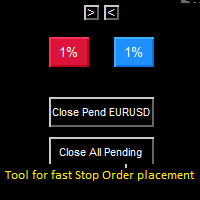
Stop Order Button for last bar break

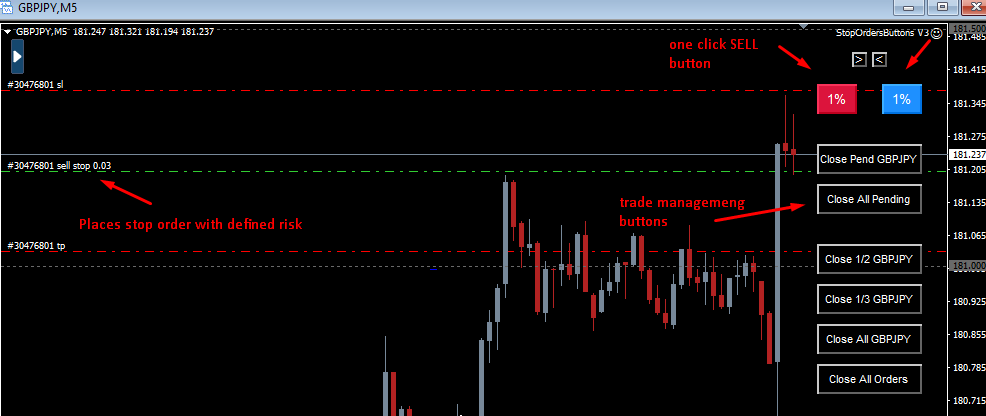
Stop Order placement tool (single click buttons) for faster trading. It places Stop Entry Order on the last bar possible break and places stop loss on the opposite side of that bar.

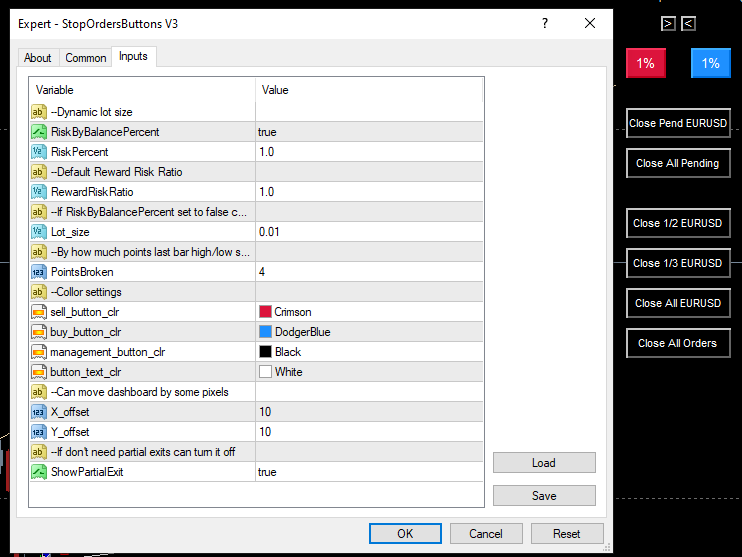
Who knows Al Brooks or other price action traders, they enter on last bars high/low break, so when watching low timeframe and multiple pairs this tool speeds up stop order placement and helps to avoid mistakes. You get your setup candle and press buy or sell button and EA places stop order on setup candle with some customizable break points. EA calculates lot sizing by your risk settings and places SL after setup bar. Also there are open position partial exit buttons, stop order cancelation button, open order close buttons...

Futures:

1. Places Buy or Sell stop entry orders on LAST BAR break

2. Automated lot sizing by percent of account or fixed lot calculations

3. Places SL and TP

4. Places TP by RR setting

5. Partial exit buttons

6. Cancelation or closing open trade buttons

7. Show - hide future

Please first learn tool with demo account. 
추천 제품
Three 3TP Easy Trade Pad Expert for MT4 – Download The 3TP Easy Trade Pad Expert is an advanced tool designed for capital management, risk control, and streamlined trading within the MetaTrader 4 (MT4) platform. With its functional and specialized interface, this expert advisor allows traders to effortlessly set and manage Stop Loss (SL) and Take Profit (TP) levels. In addition to simplifying trade execution, the tool provides features for defining acceptable risk, expected profit (R/R), and adv
This script is designed to automatically open charts for all available forex pairs on the MetaTrader 4 platform, as well as the gold (XAUUSD) chart. The script iterates through all symbols available on the platform, determines which of them are forex pairs, and opens their charts on the M1 (one minute) timeframe. Key Features: Gold Chart Opening: The script automatically opens the XAUUSD (gold/dollar) chart if this symbol is available from your broker. If the gold symbol is not found, an error m
BreakEven Grid Utility for MT4 BreakEven Grid is a powerful utility for manual trade management on the MetaTrader 4 platform. It provides a convenient on-screen panel with buttons to help you manage your open positions with a single click.  Features: Set BE+Profit: Automatically sets Take Profit to breakeven + desired profit in pips or money. Close BUY/SELL: Instantly close all Buy or Sell orders for the current symbol. Close +$/-$/Old/New: Close only profitable, losing, oldest or newest tra
The analyzer panel allows traders to add the pending order grid (Buy Limit, Sell Limit, Buy Stop, Sell Stop) quickly and efficiently.   Parameters stop mode - select stop setting mode every order - stop levels are set for each order separately position as - common stop levels for all orders order type - select pending order type Buy Limit Sell Limit Buy Stop Sell Stop magic - set a magic number for open orders if necessary. If position as mode is enabled, stop levels are corrected for all orders
It is so very disappointing when the price does not have enough points to achieve Take Profit and makes a reversal. This EA sets virtual levels near the TakeProfit levels. This EA sets virtual levels next to TakeProfit orders. If these levels are reached by price, breakeven or trailing stop is applied for an order. Features This EA does not set new orders. The aim of this EA is to manage stop losses of existing orders that are set by another EA or manually (magic number equals 0). For correct w
Trade Manager EA에 오신 것을 환영합니다. 이 도구는 거래를 보다 직관적이고 정확하며 효율적으로 만들기 위해 설계된 궁극적인 리스크 관리 도구 입니다. 단순한 주문 실행 도구가 아닌, 원활한 거래 계획, 포지션 관리 및 리스크 제어를 위한 종합 솔루션입니다. 초보자부터 고급 트레이더, 빠른 실행이 필요한 스캘퍼에 이르기까지 Trade Manager EA는 외환, 지수, 상품, 암호화폐 등 다양한 시장에서 유연성을 제공합니다. Trade Manager EA를 사용하면 복잡한 계산은 이제 과거의 일이 됩니다. 시장을 분석하고 진입, 손절 및 익절 수준을 차트의 수평선으로 표시한 후 리스크를 설정하면, Trade Manager가 이상적인 포지션 크기를 즉시 계산하고 SL 및 TP 값을 실시간으로 표시합니다. 모든 거래가 간편하게 관리됩니다. 주요 기능: 포지션 크기 계산기 : 정의된 리스크에 따라 거래 크기를 즉시 결정합니다. 간단한 거래 계획 : 진입, 손절, 익절을 위한
VN Trade Panel II
Vyacheslav Nekipelov
4 (1)
The new version of the trading panel, which now has the ability to separately close Buy and Sell orders, display targets for all orders on the chart, as well as the ability to use the panel to trade with brokers working on the FIFO rule. Also, the new version adds option buttons for separate management of open orders. It has a convenient visualized interface and intuitive control without a lot of additional tabs to which traders have to be distracted and switch their attention. Thanks to this,
This EA utility does not trade on its own, but it only modifies the open  trades  to add take profit and stop loss that was  opened manually or by any other expert advisors.  The distance is based on Average True Range Indicator(ATR). How Does It Work? If Symbol to modify is set to "All Symbol" simply attach it to one chart, and all open trades in the entire terminal will set the take profit and stop loss with the distance of Average True Range value of their corresponding symbol.  If  Symbol
이것은 구매 및 판매 주문 네트워크를 배치하는 일반 패널입니다. 이 전문가 고문은 설정에 정의 된 이익 순서를 닫습니다. 그런 다음 사다리라는 매개 변수가 있습니다.이 매개 변수에는 사다리 매개 변수에 의해 표시된 점(여기서 주요 설정에서는 10 점)으로 주문 사이의 거리가 증가하기 시작하므로 두 번째 순서는 10 점,세 번째 순서는 20 점,네 번째 순서는 40 점 등이 포함됩니다. 그런 다음 설정에 있지 않기 때문에 이 고문에 무엇이 있는지 알아야 하지만 이 고문이 제안한 전략의 논리에 영향을 미칩니다.. 의이 고문이 다섯 개 주문을 엽니 다 여기 설정에서 가정 해 봅시다... 또는 구매... 또는 판매... 좋아.. 그러나,주문을 열 때,그것은 이전에 열린 주문의 절반으로 다음 오픈 주문의 로트를 증가시킬 것입니다. 즉,설정에서 0.1 로트를 설정하면 계획에 따라 5 개의 주문이 열리고 현재 가격에 가까운 첫 번째 주문은 0.1 로트의 가격으로 열립니다. 두 번째는 주어진
News Scalping Executor Pro is an utility which helps to trade high impact and huge volatility   news . This utility helps to create two opposite orders with risk management and profit protection. It moves automatically stop loss level to avoid losses as much as possible by using many different algorithms. It helps to avoid trading the news if spread suddenly becomes very huge. It can lock profit by moving stop loss or partially closing of orders. To be profitable with this type of trading you
숫자 시퀀스 중 하나를 "산불 시퀀스"라고 합니다. 가장 아름다운 새로운 시퀀스 중 하나로 인식되었습니다. 주요 특징은 이 시퀀스가 ​​가장 짧은 경우에도 선형 추세를 피한다는 것입니다. 이 지표의 기초를 형성한 것은 이 속성입니다. 금융 시계열을 분석할 때 이 지표는 가능한 모든 추세 옵션을 거부하려고 합니다. 그리고 그가 실패하는 경우에만 그는 추세의 존재를 인식하고 적절한 신호를 제공합니다. 이 접근 방식을 통해 새로운 트렌드가 시작되는 순간을 정확하게 결정할 수 있습니다. 그러나 거짓 긍정도 가능합니다. 숫자를 줄이기 위해 이 표시기에 추가 필터가 추가되었습니다. 새 막대가 열리면 신호가 생성됩니다. 어떤 경우에도 다시 그리기가 발생하지 않습니다. 표시 매개변수: Applied Price - 적용된 가격 상수. Period Main - 표시기의 기본 기간, 유효한 값은 5 - 60 이내입니다. Period Additional - 추가 기간, 이 매개변수의 유효한 값은 5 -
Virtual OCO Pending
Kenneth Parling
5 (1)
소개 '가상 OCO 보류' - 위험 평가 기능이 있는 반자동 주문 관리 유틸리티 도구(전문가 고문)로 OCO 보류 규칙(One Cancel 다른). 시각적으로 쉽게 확인할 수 있도록 차트에 시각적 수준을 표시합니다. 하나의 차트에서 이 유틸리티를 사용하여 원하는 다른 기호에 대해 주문을 보낼 수 있습니다. 메뉴 설정에서 주문할 기호를 지정할 때 해당 차트(선택 사항)에 첨부할 필요가 없습니다. 시각적 가상 레벨 이는 연결된 현재 공개 차트 유틸리티에만 그려지며 '거래 기호' 설정과 일치해야 합니다. 즉, 'EURUSD'를 설정하고 유틸리티를 차트 EURUSD에 첨부하면 이 수준은 시각적이지 않습니다. 전략 테스터 전략 테스터에서 이 유틸리티를 실행하면 목적을 보여주기 위해 무작위로 주문을 엽니다. 유틸리티 이점 동적 위험 평가 또는 고정 로트 동적(ATR) 또는 고정 이익 및 손절매 수준 가상 주문 관리 끄기 가능성 - 경고, 이 모드는 가상 손절매를 설정하거나 모니터링하거나
Smartility
Syed Oarasul Islam
This utility is designed to help you with your Manual Trading. It allows different ways of closing trades. It can display total number of BUY and SELL orders individually and also their individual profits. It can enter trades without stopl loss and take profits. However upon selecting UseStopLossTakeProfit from the settings it can use best possible stop loss and take profits based on the market conditions. Upon selecting the CloseOppositeTrades  from the settings it can close opposite trades. Fo
Symbol Manager
Taras Slobodyanik
5 (4)
Symbol Manager or Grid Manager, designed to group orders into one position (by Symbol or by Magic Number). This utility will be useful to multi-currency traders (many EAs), who can have multiple orders on several pairs. You will be able to see the total number of lots, the total profit, and set virtual stop loss and virtual take profit. To set a real TP (or SL), you must first set the virtual value, and then enter the command in this cell: "set". If you want to set real TP/SL for all orders at
Hedge Martin
Andrey Kornishkin
Hedge Martin Expert Advisor restores loss-making positions making them profitable by opening an opposite position with an increased lot. Trading strategy The EA works on a trend market selecting the appropriate curency pairs. The robot trades depending on the previous candle direction. The first order is set according to the following rules: If the previous candle is bullish, the EA opens a buy order; If the previous candle is bearish, the EA opens a sell order; If the price goes in unfavorable
本エキスパートアドバイザ(EA)は、以下の条件をすべて満たした注文が決済された場合に、自動的に同一内容の注文を再設定します。 対象となるのは指値注文または逆指値注文で、必ずテイクプロフィット(TP)とストップロス(SL)が設定されているものです。 そして、その注文がTPまたはSLによって決済された際、同じロット数・価格・TP・SL・有効期限などの条件を引き継いだ注文を自動で再発注します。 これにより、一度設定した戦略を継続的に適用でき、裁量判断なしに取引を繰り返すことが可能となります。 ただし、ブローカーによっては再注文時にスリッページが発生する場合がありますので、必ずご利用環境をご確認の上、自己責任でお使いください。
This EA represents an interactive panel with adjustable parameters destined for installation and deletion of pending orders (orders grid generator). You can place the panel anywhere on the screen or hide it into a dot clicking on the button in the upper left part of the chart (it will be shown after clicking on it for the second time). Number and step of orders, lot size, vertical shift for limit orders - all these things make your work easier. There are functions for restoring according to pend
SL TP Manager Utility
AL MOOSAWI ABDULLAH JAFFER BAQER
SL-TP Manager Utility for MT4 - Professional Risk Management Tool Advanced Position Protection & Profit Management SL-TP Manager Utility is a powerful, intuitive tool designed for traders who want precise control over their risk management. This utility provides a sleek interface for setting, modifying, and managing your Stop Loss, Take Profit, and Trailing Stop levels with just a few clicks. Key Features: Dual Mode Operation: Set values in pips or absolute price with a simple toggle Independent
Closing Orders At Specified Time is a utility which helps you to close opened orders and delete pending orders at a specified time - especially when you cannot be online and do it by yourself at that time. You can schedule a specific time for closing orders, and additionally you can choose what type of orders should be closed (all, only opened or only pending), what symbols (all or you can enter names of three symbols) and with what Magic Number. You can also select to close only profitable or o
Pomo Panel
Jermias Perkasa
Pomo Panel is a simple panel to help trader using grid strategy. It is designed with grid strategy in mind.  Its features: Open standard transactions Set up pending transactions Delete all pending transactions Modify multiple Stop-Loss and Target-Profit Calculate Lots of all opened transactions Calculate average Open-Close, High-Low Close All Opened Orders
Auto SLTP Maker MT4  is an assistant for all those who forget to set StopLoss and/or TakeProfit in deal parameters, or trade on a very fast market and fail to place them in time. This tool automatically tracks trades without StopLoss and/or TakeProfit and checks what level should be set in accordance with the settings. The tool works both with market and pending orders. The type of orders to work with can be set in the parameters. It can track either trades for the instrument it runs on, or all
Gold Titan King Scalper
Dodong Christian Arnon
Indicator Description GOLD TITAN KING SIGNAL INDICATOR High-Precision Gold Scalping Buy/Sell Signals – Manual Trading Assistant Overview The Gold Titan King Signal Indicator is a manual trading assistant tool designed for high-frequency scalping on Gold (XAUUSD) and other major pairs. It generates clear BUY/SELL signals with precise entry levels, along with adjustable Stop Loss and Take Profit levels displayed directly on the chart. ️ This tool is NOT an EA. It does not execute trades
About The Secret of Dow The Secret of Dow  is an unique system running on a complex set of algorithms and advanced machine learning computation mechanism to analyze massive sets of data from the neural network, and combines with a special set of price action movement analysis to optimize the trading decision, and it will then predicts the next best possible and potential moves of the Dow Jones (US30) prices. The advantages of The Secret of Dow:- Easy plug and play, worry free with easy param
Candleinfo
Igor Karchevsky
The script is designed to retrieve parameters for the specified number of candles from the current one (the current candle - the working candle, i.e., the one that hasn't closed yet - is not taken into account). The obtained parameters are exported to a text file in an understandable format. These data can then be fed to any AI for analysis. To perform the analysis, you need to make a request and insert the data. The request might look like this: "ANALYZE JAPANESE CANDLES, PROBABILITIES, AND TAR
Universal TP SL Pips
Genesis Hafalla
5 (1)
This EA utility does not trade on its own, but it only modifies the   open  trades    to add   take profit   and   stop loss   that was  opened manually or by any other expert advisors.  The distance is based on Pips . How Does It Work? If   Symbol to modify   is set to   "All Symbol"   simply attach it to one chart, and all   open trades   in the entire terminal will set the   take profit   and   stop loss   .  If  Symbol to modify   is set to   "Local Symbol"   , it will only set the   ta
거래 시작 및 종료를 간소화하고 고급 위험 관리 도구를 제공하도록 설계된   포괄적인 거래 관리 및 정보 패널입니다   . 거래 실행을 위한 제어 허브이자 계좌를 모니터링하고 위험을 관리하는 정보 패널 역할을 합니다. 정보 패널의 특징.   차트에서 패널의 크기와 위치는 자유롭게 사용자 정의가 가능하여   사용자의 취향에 따라 작업 공간을 구성할 수 있습니다. 정보 패널은 잔액, 자본금, 변동 손익을 포함하여 거래 계좌에 대한 자세한 개요를 제공합니다. 주요 기능은 다음과 같습니다. 손실 관리   – 사용자는 설정에서 일일 최대 손실률을 설정할 수 있습니다. 정보 패널에는 선택한 손실률, 해당 금액, 그리고 청산된 포지션의 손실률(있는 경우)이 표시됩니다. 이 기능은 특히 자산 운용 회사 계좌용으로 설계되었습니다. 재설정 버튼을 클릭하면 현재 잔액부터 손실률을 다시 계산합니다. 총 위험   – 열려 있는 포지션과 보류 중인 포지션을 모두 합친 계정의 총 위험을 보여줍니다. 심볼
Торговая панель для быстрой и удобной торговли. Панель позволяет быстро открывать и закрывать ордера. Отдельное закрытие ордеров по позиции Sell и Buy. Так же  есть возможность закрыть полностью все ордера. Торговая панель выводит информацию о прибыли, общего объема и количестве ордеров по позициям    Sell и Buy. Иногда некоторые позиции могут не закрыться это связанно из-за волатильности рынка. В таком случае повторно нажмите закрыть позицию. Для работы панели необходимо разрешить автоторговлю.
Trading Helper
Siarhei Vashchylka
Trading Helper - Program for trading and money management. It works with pending and immediate orders, and is equipped with trailing stop, breakeven and take profit functions. Manual (Be sure to read before purchasing) Advantages 1. Comfortable trading in a few clicks. Immediate and pending orders are available in the panel 2. Fixed percent method. The panel can select the lot size based on a predetermined risk 3. Trading with a fixed lot. In a few clicks, select a lot and open a Trade 4. Posi
프리셋 주문 및 자동 로트 계산이 가능한 트레이딩 패널. 트레이딩 패널은 전략 테스터에서 작동하지 않습니다(추적손절 테스트만 가능). 매뉴얼, 설명, 라이트 데모 다운로드. 성공적인 거래자는 자기 훈련과 유능한 자금 관리로 구별됩니다. 고정 된 롯을 사용하는 경우,당신은 위험에 처해 있습니다. 결국,다른 시간대에 다른 거리가 있으며 하나의 수익성이없는 거래는 여러 수익성있는 거래를 커버 할 수 있습니다. 각 트랜잭션에 대한 정지 손실이 보증금의 1%를 초과하지 않도록 자동 로트를 사용하는 경우,당신은이 문제를 해결한다. 또한 거래자는 부분 폐쇄,거래 이전을 손익분기 점,후행 정지,차트 상의 과거 거래 분석을 사용합니다. 이 충분한 뉘앙스,그래서 나는 거래 패널을 작성하기로 결정했다. 내 취향을 위해,그것은 매우 기능적이고 편안한 것으로 밝혀졌습니다. 거래 패널 기능. 모든 계정 및 통화로 작업. 로트 계산을 위한 주문의 시각적 사전 설정. 로트 계산을 위한 보류 중인 주문의 시각적
Make grid trading safe again | Built by a grid trader >> for grid traders.    Walkthrough Video  <== Get Grid Rescue up and running in 5 minutes  This is MT4 version, click  here  for  BlueSwift GridRescue MT5  (settings and logics are same in both versions) BlueSwift Grid Rescue MT4  is a risk management utility  EA  (used together with other grid trading experts) that can help you trade aggressive grid systems with manageable drawdown, therefore reduce substanstially margin call risk as we
이 제품의 구매자들이 또한 구매함
Copy Cat More Trade Copier MT4 (복사 고양이 MT4) 는 단순한 로컬 트레이드 카피어가 아니라, 오늘날의 거래 환경을 위해 설계된 완전한 리스크 관리 및 실행 프레임워크입니다. Prop Firm 챌린지부터 개인 계좌 관리까지, 강력한 실행력, 자본 보호, 유연한 설정, 고급 거래 처리 기능을 통해 모든 상황에 적응합니다. 이 카피어는 Master(송신자) 와 Slave(수신자) 모드 모두에서 작동하며, 실시간으로 시장가/지정가 주문, 거래 수정, 부분 청산, Close By 작업을 동기화합니다. 데모 및 실계좌 모두 호환되며, 거래용 비밀번호 또는 투자자 비밀번호로도 사용할 수 있습니다. Persistent Trade Memory 기술을 통해 EA, 터미널, VPS가 재시작되더라도 거래가 복원됩니다. 여러 Master와 Slave를 동시에 관리할 수 있으며, 브로커 간 차이는 접두사/접미사 자동 감지 또는 심볼 매핑으로 처리됩니다. 매뉴얼/설정: Copy C
The product will copy all telegram signal to MT4   ( which you are member  ) , also it can work as remote copier.  Easy to set up, copy order instant, can work with almost signal formats, image signal, s upport to translate other language to English Work with all type of channel or group, even channel have "Restrict Saving Content", work with  multi channel, multi MT5 Work as remote copier: with signal have ticket number, it will copy exactly via ticket number. Support to backtest signal. How to
News Filter EA: Advanced Algo Trading Assistant News Filter EA is an advanced algo trading assistant designed to enhance your trading experience. By using the   News Filter EA , you can integrate a Forex economic news filter into your existing expert advisor, even if you do not have access to its source code. In addition to the news filter, you can also specify   trading days   and   hours   for your expert. The News Filter EA also includes   risk management   and   equity protection   features
Exp COPYLOT CLIENT for MT4
Vladislav Andruschenko
4.69 (64)
MetaTrader 4용 트레이드 복사기.       모든 계정의 외환 거래, 포지션, 주문을 복사합니다. 그것은 최고의 무역 복사기 중 하나입니다       MT4 - MT4, MT5 - MT4       위해       카피롯 MT4       버전(또는       MT4 -  MT5   MT5 - MT5       위해       카피롯 MT5       버전). MT5 버전 전체 설명   +DEMO +PDF 구입 방법 설치하는 방법     로그 파일을 얻는 방법     테스트 및 최적화 방법     Expforex의 모든 제품 복사기   버전         MetaTrader 5   터미널 (   МТ5 - МТ5, МТ4 - МТ5   ) -   Copylot Client MT5 고유한 복사 알고리즘은 마스터 계정에서 고객 계정으로 모든 거래를 정확하게 복사합니다. 이 제품은 또한 높은 작동 속도에서 높은 오류 처리로 유명합니다. 강력한 기능 세트. 프로그램은 여러 터
TradePanel MT4
Alfiya Fazylova
4.84 (89)
Trade Panel은 다기능 거래 보조원입니다. 이 애플리케이션에는 수동 거래를 위한 50개 이상의 거래 기능이 포함되어 있으며 대부분의 거래 작업을 자동화할 수 있습니다. 전략 테스터에서는 애플리케이션이 작동하지 않습니다. 구매하기 전에 데모 계정에서 데모 버전을 테스트할 수 있습니다. 데모 버전 여기 . 전체 지침 여기 . 거래. 한 번의 클릭으로 거래 작업을 수행할 수 있습니다: 자동 위험 계산을 통해 지정가 주문 및 포지션을 엽니다. 한 번의 클릭으로 여러 주문과 포지션을 열 수 있습니다. 주문 그리드를 엽니다. 그룹별 대기 주문 및 포지션을 마감합니다. 포지션 반전(매수 청산 후 매도 개시 또는 매도 청산 후 매수 개시). 포지션 고정(매수 포지션과 매도 포지션의 양을 동일하게 하는 추가 포지션 개설). 한 번의 클릭으로 모든 포지션을 부분 청산합니다. 모든 포지션의 이익실현과 손절매를 동일한 가격 수준으로 설정합니다. 모든 포지션에 대한 손절매를 해당 포지션의 손익 분기
Take a Break
Eric Emmrich
5 (29)
The most advanced news filter on MQL market - free demo available Take a Break has transformed from a basic news filter into a comprehensive account protection solution. It seamlessly pauses any other Expert Advisors during news events or based on your custom filters, all while safeguarding your EA settings - restoring them automatically when trading resumes for complete peace of mind. Typical use cases: A single news filter for all your EAs. Stop trading during news/high volatility (+ close all
Telegram to MT4 Coppy
Sergey Batudayev
3.57 (7)
Telegram에서 MT4로:   최고의 신호 복사 솔루션 최첨단 유틸리티인   Telegram to MT4를   사용하여 거래를 간소화하세요. DLL 없이도 Telegram 채널과 채팅에서 MetaTrader 4 플랫폼으로 거래 신호를 직접 복사할 수 있습니다. 이 강력한 솔루션은 탁월한 정밀도와 맞춤 설정 옵션을 통해 원활한 신호 실행을 보장하여 시간을 절약하고 효율성을 높여줍니다. [ Instructions and DEMO ] 주요 특징 직접 Telegram API 통합 전화번호와 보안 코드를 통해 인증하세요. 사용자 친화적인 EXE 브리지를 사용하여 채팅 ID를 손쉽게 가져오고 관리하세요. 여러 채널/채팅을 추가, 삭제, 새로 고침하여 동시에 신호를 복사합니다. 고급 필터를 사용한 신호 파싱 사용자 정의 예외 단어(예: "보고서", "요약")가 포함된 원치 않는 신호를 건너뜁니다. 유연한 SL 및 TP 형식을 지원합니다: 가격, 핍 또는 포인트. 신호가 가격 대신 지점을 지정
Click and Go Trade Manager
Victor Christiaanse
5 (8)
Click and Go Trade Manager, the ultimate solution for seamless trading execution. With a simple click on the chart, you can effortlessly define your stop loss, entry price, and target levels. No more hassle of inputting values manually - it's made incredibly intuitive and easy. Embedded risk management is a key feature of our Trade Manager. We understand the importance of protecting your investments, which is why the Click and Go Trade Manager incorporates risk management. When placing orders,
BLACK FRIDAY – 50% OFF NOW! Advanced Trade Manager – The Ultimate All-in-One Solution for Faster, Smarter, and Safer Manual Trading. Transform your manual trading with NextGen Trade Manager AI – the professional on-chart panel that combines instant execution, visual trade planning, and powerful risk management into one intuitive tool. Execute orders, manage risk, and protect profits faster than ever before, all without leaving your chart. Perfect for all traders looking to enhance their precis
VirtualTradePad mt4 Extra
Vladislav Andruschenko
4.86 (58)
한 번의 클릭으로 거래할 수 있는 거래 패널.   위치 및 주문 작업!   차트 또는 키보드에서 거래. 거래 패널을 사용하면 차트에서 클릭 한 번으로 거래하고 표준 MetaTrader 컨트롤보다 30배 빠르게 거래 작업을 수행할 수 있습니다. 거래자의 삶을 더 쉽게 만들고 거래자가 훨씬 빠르고 편리하게 거래 활동을 수행할 수 있도록 도와주는 매개변수 및 기능의 자동 계산. 차트의 무역 거래에 대한 그래픽 팁 및 전체 정보. MT5 버전 전체 설명   +DEMO +PDF 구입 방법 설치하는 방법     로그 파일을 얻는 방법     테스트 및 최적화 방법     Expforex의 모든 제품 열기 및 닫기, 반전 및 잠금, 부분 닫기/오토로트. 가상/실제 손절매/이익 실현/후행 정지/손익분기점, 주문 그리드 .... MetaТrader 4   의 주요 요청 거래 제어판   : 구매, 판매, 구매 중지, 구매 제한, 판매 중지, 판매 제한, 닫기, 삭제, 수정, 후행 중지, 손절매,
The News Filter
Leolouiski Gan
5 (24)
이 제품은 뉴스 시간 동안 모든 전문가 어드바이저 및 수동 차트를 필터링하여 수동 거래 설정이나 다른 전문가 어드바이저가 입력한 거래가 파괴될 수 있는 급격한 가격 상승으로부터 걱정하지 않아도 됩니다. 이 제품은 또한 뉴스 발표 전에 열린 포지션과 대기 주문을 처리할 수 있는 완전한 주문 관리 시스템이 함께 제공됩니다. The News Filter  를 구매하면 더 이상 내장 뉴스 필터에 의존할 필요가 없으며 이제부터 모든 전문가 어드바이저를 여기서 필터링할 수 있습니다. 뉴스 선택 뉴스 소스는 Forex Factory의 경제 캘린더에서 얻어집니다. USD, EUR, GBP, JPY, AUD, CAD, CHF, NZD 및 CNY와 같은 어떤 통화 기준으로 선택할 수 있습니다. Non-Farm (NFP), FOMC, CPI 등과 같은 키워드 식별을 기준으로 선택할 수도 있습니다. 저, 중, 고 영향을 가지는 뉴스를 필터링할 수 있도록 선택할 수 있습니다. 차트와 관련된 뉴스만 선택하
Advanced trading tool: One click smart orders that execute under your conditions Developed by trader for trading community:  position size calculator (lot size), open position after price action, strategy builder, set and forget trading, mobile notifications Risk Management -  Risk percentage position size calculator, gain percentage, target risk reward ratio, spread and commissions are included in calculations 7 Advanced order types   - Set and forget trading with price action automation (OCO,
Auto Trade Copier
Vu Trung Kien
4.76 (84)
Auto Trade Copier is designed to copy trades to multiple MT4, MT5 and cTrader accounts/terminals with 100% accuracy. The provider and receiver accounts must be on the same PC/VPS. With this tool, you can copy trades to receiver accounts on the same PC/VPS. All trading actions will be copied from provider to receiver perfectly. This version can be used on MT4 accounts only. For MT5 accounts, you must use Auto Trade Copier for MT5 . Reference: - For MT4 receiver, please download Trade Receiver Fre
Trade Reverse Copie4
Chukwuemeka Kingsley Anyanwu
Feel free to contact me for any extra features :) [SEE MT5 VERSION  https://www.mql5.com/en/market/product/128846 The Local Reverse Copier is an Expert Advisor designed to synchronize positions between a Master account and a Slave account with a twist: it reverses the trades. When a buy position is opened on the Master account, the EA opens a sell position on the Slave account, and vice versa. This allows for a unique form of trade copying where positions are mirrored in opposite directions bet
Everything for chart Technical Analysis indicator MT4 in one tool Draw your supply demand zone with rectangle and support resistance with trendline and get alerts to mobile phone or email alert -  Risk reward indicator Video tutorials, manuals, DEMO download   here .  Find contacts on my   profile . 1.   Extended rectangles and trendlines Object will be extended to the right edge of the chart when price will draw new candles on chart. This is rectangle extender or trendline extender. 2. Price to
거래하고자 하는 주요 영역을 파악한 후 자동으로 거래 지원 및 저항 또는 공급 및 수요 구역을 설정합니다. 이 EA를 사용하면 한 번의 클릭으로 매수 및 매도 구역을 그린 다음 가격이 바뀔 것으로 예상되는 정확한 위치에 배치할 수 있습니다. 그런 다음 EA는 해당 구역을 모니터링하고 구역에 대해 지정한 가격 액션에 따라 자동으로 거래를 수행합니다. 초기 거래가 수행되면 EA는 대상 구역이 되는 반대 구역에서 이익을 얻습니다. 그런 다음 거래를 종료하고 진입할 새 구역을 그리거나 이익을 얻고 즉시 반대 방향으로 거래를 역전하여 "항상 시장" 스타일 전략을 만드는 두 가지 선택이 있습니다. 입력 및 전략이 포함된 전체 매뉴얼은 여기에 있습니다: https://www.mql5.com/en/blogs/post/760256 이 EA는 시장에서 고정 또는 하드 스톱 로스를 사용하지 않는 포지션 트레이더 또는 달러 비용 평균 거래 전략을 위해 설계되었습니다. 대신, 다음에 가능한 지지 또는
Candlestick Pattern Scanner is a multi-timeframe and multi-symbol dashboard and alert system that checks all timeframes and currency pairs for different candlestick patterns that are formed in them. Scanner is integrated with support and resistance zones so you can check the candlestick patterns in the most important areas of the chart to find breakout and reversal patterns in the price chart. Download demo version   (works on M30,D1,W1 timeframes and 20 symbols of Market Watch window) Read the
Custom Alerts: 여러 시장을 동시에 모니터링하고 중요한 기회를 놓치지 마세요 개요 Custom Alerts 는 여러 종목에 걸쳐 잠재적 트레이딩 기회를 한눈에 파악하고자 하는 트레이더를 위한 동적인 솔루션입니다. FX Power, FX Volume, FX Dynamic, FX Levels, IX Power와 같은 Stein Investments의 주요 도구들과 통합되어, 여러 차트를 오가거나 기회를 놓치는 일 없이 중요한 시장 변화를 자동으로 알림으로 제공합니다. 이제 브로커가 제공하는 모든 자산군을 지원하며, 기호를 입력할 필요 없이 자산 유형만 선택하면 설정이 완료됩니다. 1. Custom Alerts가 트레이더에게 매우 유용한 이유 올인원 시장 모니터링 • Custom Alerts 는 외환, 금속, 암호화폐, 지수, 주식(브로커가 지원하는 경우)까지 다양한 자산군의 신호를 수집하고 통합합니다. • 여러 차트를 전환할 필요 없이 하나의 창에서 명확한 알림을 받아보
ManHedger MT4
Peter Mueller
5 (1)
THIS EA IS A SEMI-AUTO EA, IT NEEDS USER INPUT. Manual & Test Version Please   DON'T BUY   this product before   TESTING  and watching my video about it. Contact me for user support or bug reports, or if you want the MT5 version! MT5 Version I do not guarantee any profits or financial success using this EA. With this Expert Advisor, you can: Implement your own   Zone Recovery   strategy to capitalize on trending markets. Create   Grid   trading strategies, to profit from ranging markets. Place
The Expert Advisor will help you forward all pop-up alert with screenshot from  MetaTrader 4 to Telegram channel/ group, also forward all notifications to Telegram. Parameters  -  Telegram Bot Token - create bot on Telegram and get token.  -  Telegram Chat ID  - input your Telegram user ID,  group / channel ID  -  Forward Alert - default true, to forward alert.  -  Send message as caption of Screenshot - default false, set true to send message below Screenshot  How to setup and guide  - Telegram
Effortlessly calculate lot sizes and manage trades to save time and avoid costly errors The Trade Pad Pro EA is a tool for the Metatrader Platform that aims to help traders manage their trades more efficiently and effectively. It has a user-friendly visual interface that allows users to easily place and manage an unlimited number of trades, helping to avoid human errors and enhance their trading activity. One of the key features of the Trade Pad Pro EA is its focus on risk and position manageme
EasyInsight AIO MT4
Alain Verleyen
4 (2)
EASY Insight AIO – 스마트하고 손쉬운 트레이딩을 위한 올인원 솔루션 개요 외환, 금, 암호화폐, 지수, 심지어 주식까지 — 전 시장을 몇 초 만에, 수동 차트 확인이나 복잡한 설치, 인디케이터 설정 없이 스캔할 수 있다고 상상해 보세요. EASY Insight AIO 는 AI 기반 트레이딩을 위한 궁극의 플러그 앤 플레이(Plug & Play) 데이터 내보내기 도구입니다. 단 하나의 깔끔한 CSV 파일로 전체 시장 스냅샷을 제공하며, ChatGPT, Claude, Gemini, Perplexity 등 다양한 AI 플랫폼에서 즉시 분석할 수 있습니다. 창 전환, 복잡함, 차트 오버레이는 더 이상 필요 없습니다. 자동으로 내보내지는 순수하고 구조화된 데이터 인사이트만으로, 반복적인 차트 감시 대신 데이터 기반의 스마트한 의사결정에 집중할 수 있습니다. 왜 EASY Insight AIO인가요? 진정한 올인원 • 별도의 설정, 인디케이터 설치, 차트 오버레이가 필요 없습
Grid Manual MT4
Alfiya Fazylova
4.71 (17)
"Grid Manual"은 주문 그리드 작업을 위한 거래 패널입니다. 이 유틸리티는 보편적이며 유연한 설정과 직관적인 인터페이스를 제공합니다. 그것은 손실을 평균화하는 방향뿐만 아니라 이익을 증가시키는 방향으로 주문 그리드와 함께 작동합니다. 거래자는 주문 그리드를 만들고 유지할 필요가 없으며 유틸리티에서 수행합니다. 거래자가 주문을 시작하는 것으로 충분하며 "Grid Manual"는 자동으로 그를 위한 주문 그리드를 생성하고 거래가 마감될 때까지 그와 동행할 것입니다. 전체 설명 및 데모 버전 여기 . 유틸리티의 주요 기능: 모바일 터미널을 포함하여 어떤 방식으로든 열린 주문과 함께 작동합니다. "제한" 및 "중지"의 두 가지 유형의 그리드와 함께 작동합니다. 고정 및 동적(ATR 표시기 기반)의 두 가지 유형의 그리드 간격 계산과 함께 작동합니다. 오픈 오더 그리드의 설정을 변경할 수 있습니다. 차트에서 각 주문 그리드의 손익분기점 수준을 표시합니다. 각 주문 그리드에 대한 이익
Trade Manager MT4 DaneTrades
Levi Dane Benjamin
4.09 (11)
거래 관리자는 위험을 자동으로 계산하는 동시에 거래를 빠르게 시작하고 종료하는 데 도움을 줍니다. 과잉 거래, 복수 거래 및 감정 거래를 방지하는 데 도움이 되는 기능이 포함되어 있습니다. 거래를 자동으로 관리할 수 있으며 계정 성과 지표를 그래프로 시각화할 수 있습니다. 이러한 기능은 이 패널을 모든 수동 거래자에게 이상적으로 만들고 MetaTrader 4 플랫폼을 향상시키는 데 도움이 됩니다. 다중 언어 지원. MT5 버전  |  사용자 가이드 + 데모 트레이드 매니저는 전략 테스터에서 작동하지 않습니다. 데모를 보려면 사용자 가이드로 이동하세요. 위기 관리 % 또는 $를 기준으로 위험 자동 조정 고정 로트 크기 또는 거래량과 핍을 기반으로 한 자동 로트 크기 계산을 사용하는 옵션 RR, Pips 또는 Price를 사용한 손익분기점 손실 설정 추적 중지 손실 설정 목표 달성 시 모든 거래를 자동으로 마감하는 최대 일일 손실률(%)입니다. 과도한 손실로부터 계정을 보호하고 과도한
Telegram To MT4 Receiver
Levi Dane Benjamin
4.2 (5)
당신이 멤버인 어떤 채널에서든(비공개 및 제한된 채널 포함) 신호를 직접 MT4로 복사하세요.  이 도구는 사용자를 고려하여 설계되었으며 거래를 관리하고 모니터하는 데 필요한 많은 기능을 제공합니다. 이 제품은 사용하기 쉽고 시각적으로 매력적인 그래픽 인터페이스로 제공됩니다. 설정을 사용자 정의하고 제품을 몇 분 안에 사용하십시오! 사용자 가이드 + 데모  | MT5 버전 | Discord 버전 데모를 시도하려면 사용자 가이드로 이동하십시오. Telegram To MT5 수신기는 전략 테스터에서 작동하지 않습니다! Telegram To MT4 특징 한 번에 여러 채널에서 신호를 복사합니다. 비공개 및 제한된 채널에서 신호를 복사합니다. Bot 토큰이나 채팅 ID가 필요하지 않습니다(필요한 경우 계속 사용할 수 있음). 위험 % 또는 고정된 로트를 사용하여 거래합니다. 특정 심볼을 제외합니다. 모든 신호를 복사할지 복사할 신호를 사용자 정의할지 선택합니다. 모든 신호를 인식하기
EchoTrade Telegram to MT4 Copier
Perpetual Chinemerem Vincent
5 (2)
EchoTrade Telegram to MT5 Copier Seamless, Instant, and Reliable Signal Copying - Direct from Telegram to MetaTrader 4! The product does not run in the strategy tester but you can get free trial version   here  for testing before purchase. Tired of manually executing trades from Telegram signals? EchoTrade automates the process, instantly copying trades from any Telegram channel or group directly into your MT5 account—accurately, efficiently, and without delay. Key Features: Universal Compatib
Ultimate MT4 to Telegram (UMT) sends controlled trades (via symbol, magic, comment) to your telegram channel. It sends open and closed trades, including pending orders and TP/SL modifications, along with chart screenshots, to any telegram channel. Additionally, you can send trade reports of open trades and summary profit/pip reports for day, week, or month. You can customize the design of the trade actions or reports with variables and emoticons.  A beautiful panel allows you to visualize all t
Risk Manager for MT4
Sergey Batudayev
4.6 (10)
MT4의 Expert Advisor Risk Manager는 매우 중요하며 제 생각에는 모든 거래자에게 필요한 프로그램입니다. 이 Expert Advisor를 사용하면 거래 계정의 위험을 제어할 수 있습니다. 위험 및 이익 통제는 금전적 측면과 백분율 측면에서 모두 수행될 수 있습니다. Expert Advisor가 작동하려면 통화 쌍 차트에 첨부하고 예금 통화 또는 현재 잔액의 %로 허용되는 위험 값을 설정하기만 하면 됩니다. 어드바이저 기능 이 위험 관리자는 위험을 제어하는 ​​데 도움이 됩니다. - 거래를 위해 - 하루 - 일주일 동안 - 한 달 동안 당신은 또한 제어할 수 있습니다 1) 거래 시 최대 허용 랏 2) 1일 최대 주문 수 3) 하루 최대 수익 4) 지분 인수 이익 설정 그게 다가 아닙니다. 설정에서 자동 설정을 지정하면 고문이 기본 SL 및 TP를 설정할 수도 있습니다. 상담원은 각 이벤트에 경고와 함께 동행하며 주문을 삭제하는 이유를 설명합니다.
FiboPlusMultiTF
Sergey Malysh
5 (1)
A ready-made multitimeframe trading system based on automatic plotting and tracking of Fibonacci levels for buying and selling any symbol. Advantages Determines the trend direction based on a complex of 14 indicators ( Cx ), extremums of ZigZag ( Z ), RSI ( R ), Impulse ( I ) Displaying the values of 14 indicators comprising the trend direction ( Cx ) Plotting horizontal levels, support and resistance lines, channels View the plotting option of Fibonacci levels on any timeframe, with the abilit
The Risk and Reward calculator is designed to place market and pending orders. You only need to set the risk size you are willing to risk in one trade and the Stop Loss level. The calculator will calculate the required lot size for this. And by setting the Risk Reward size, you can set the ratio of expected profit to risk in one position. For example, you are willing to risk one dollar in one trade and, if the market moves in your favor, you want to make a profit of 2 times more. Then you need
제작자의 제품 더 보기
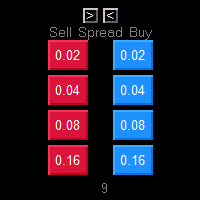
One Click market orders with different lot sizes, partial closing and break even line. Also it shows current setups profit or loss, with partial exits included in total setups PnL.  Great tool for manual trading, when different lot sizes needed as per grid or martingale strategies.  Major future is different symbol category detection. Due different instruments categories there is a need to use different pre determined lot sizes for different risk profiles. So EA  has auto detection of different
필터:
리뷰 없음
리뷰 답변