Join our fan page
Quantora Trading Clock MT5 - Professional Global Market Time Dashboard - indicator for MetaTrader 5
- Views:
- 49
- Published:
-
Need a robot or indicator based on this code? Order it on Freelance Go to Freelance
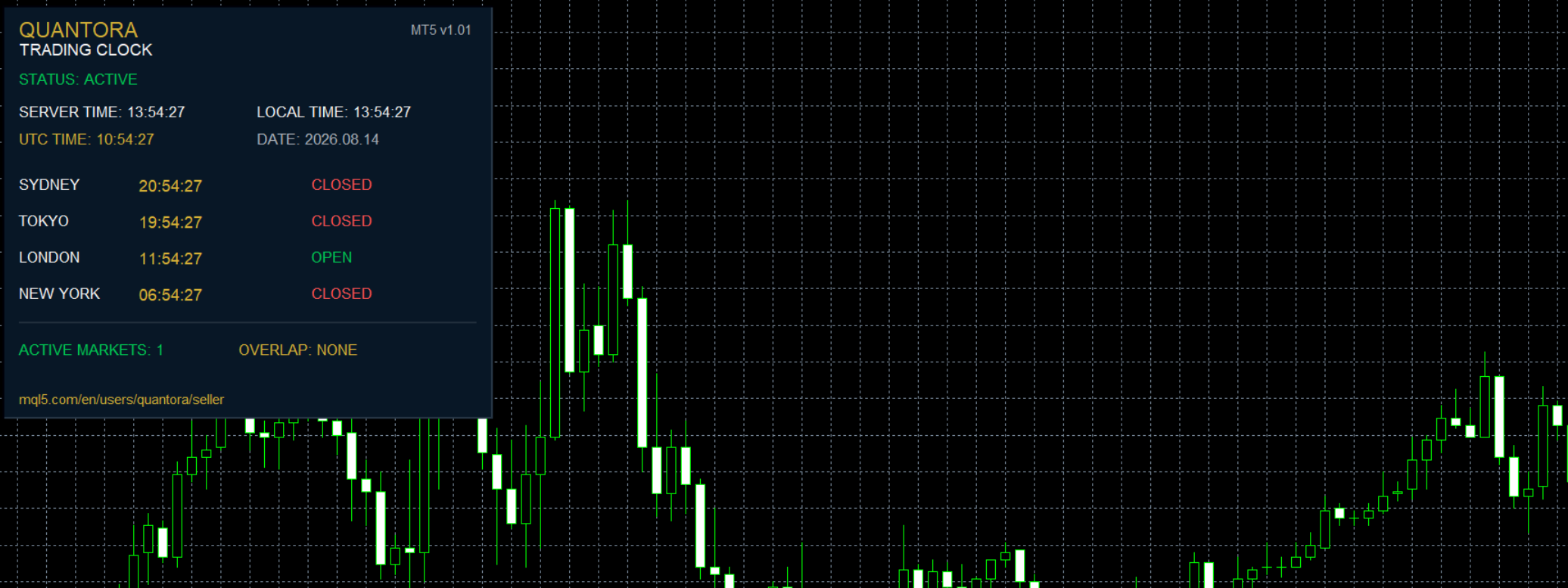
Quantora Trading Clock MT5 is a professional global market time dashboard designed for MetaTrader 5 traders.
Financial markets operate across different time zones, and understanding which major trading centers are currently active can be important when planning trades.
Quantora Trading Clock provides the most important global trading times directly on the MetaTrader 5 chart in a clean and easy-to-read dashboard.
The indicator simultaneously displays Broker Server Time, Local Computer Time, UTC Time and the current time in Sydney, Tokyo, London and New York.
It also automatically identifies which major market sessions are currently open.
Main Features
- Broker Server Time
- Local Computer Time
- UTC Time
- Sydney Time
- Tokyo Time
- London Time
- New York Time
- Sydney OPEN / CLOSED status
- Tokyo OPEN / CLOSED status
- London OPEN / CLOSED status
- New York OPEN / CLOSED status
- Active Markets counter
- Session Overlap detection
- London DST support
- New York DST support
- Adjustable UTC offsets
- Adjustable session opening hours
- Adjustable session closing hours
- Automatic real-time clock updates
- Professional Quantora dashboard
- Low CPU usage
- Works on all chart timeframes
- Works with all MT5 symbols
- Free and open-source MQ5 code
Global Trading Clock
The dashboard provides three primary time references:
SERVER TIME
Displays the current MetaTrader 5 broker server time.
LOCAL TIME
Displays the current time of the computer running MetaTrader 5.
UTC TIME
Provides a universal reference time that can be used to compare international trading sessions.
Major Financial Centers
The indicator monitors four major global trading centers:
Sydney
Tokyo
London
New York
Each market displays its own local time together with its current session status.
For example:
SYDNEY 09:35:22 OPEN
TOKYO 08:35:22 OPEN
LONDON 00:35:22 CLOSED
NEW YORK 19:35:22 CLOSED
This allows traders to quickly understand which global markets are currently active.
Session Status
Each trading center is automatically classified as:
OPEN — The configured trading session is currently active.
CLOSED — The current local time is outside the configured trading session.
Session opening and closing hours can be changed from the indicator inputs.
This makes the dashboard adaptable to different trading schedules and user preferences.
Active Markets
The dashboard automatically counts how many configured major markets are currently open.
For example:
ACTIVE MARKETS: 3
This provides a quick overview of global market activity.
Periods when multiple major financial centers are active can often coincide with increased liquidity and market participation.
Session Overlap
Quantora Trading Clock automatically detects when multiple configured trading sessions are active simultaneously.
Possible overlaps can include combinations such as:
Sydney + Tokyo
Tokyo + London
London + New York
The dashboard displays the currently active markets when an overlap occurs.
If fewer than two configured sessions are active, the overlap status displays:
OVERLAP: NONE
Daylight Saving Time
Daylight-saving changes can affect international trading session times.
Quantora Trading Clock includes optional DST handling for:
London
and
New York
These options can be enabled or disabled from the indicator settings.
UTC offsets are also configurable, allowing users to adjust the clock if required.
Configurable Session Hours
Users can customize the local opening and closing hours for:
- Sydney
- Tokyo
- London
- New York
This is useful because trading-session definitions can vary between brokers, instruments and trading methodologies.
Supported Markets
Quantora Trading Clock is symbol-independent and can be attached to charts including:
Forex • Gold • Metals • Indices • Commodities • Crypto
The clock itself does not depend on the selected trading instrument.
Installation
Place:
Quantora_Trading_Clock_MT5.mq5
inside:
MQL5 → Indicators
Compile the source code using MetaEditor.
Then attach Quantora Trading Clock MT5 to any MetaTrader 5 chart.
The dashboard will immediately begin displaying the available time and session information.
Important Note
Trading session hours are informational and configurable.
Actual exchange hours, broker trading schedules, holidays, daylight-saving changes and instrument availability may differ.
Users should verify the applicable trading hours with their broker or exchange when exact market opening and closing times are required.
This indicator is an informational trading utility and does not open, close or manage trading positions.
Product Information
Version: 1.00
Platform: MetaTrader 5
Program Type: Indicator
Category: Trading Utilities / Trading Sessions
License: Free / Open Source
Developed by QUANTORA
Professional MetaTrader 5 Trading Tools, Indicators and Expert Advisors.
More Professional Quantora Trading Products
Explore Quantora's professional MetaTrader 5 Expert Advisors, premium indicators and trading tools on the official MQL5 Market:
Quantora Market Status Dashboard MT5 - Professional Real-Time Market Analysis Pan
Professional open-source Market Status Dashboard for MetaTrader 5. Monitor spread, ATR volatility, volume activity, daily range, ADR usage, trading sessions and overall market conditions in real time.
Quantora Symbol Information Panel MT5 - Professional Trading Specifications Dashboard
Quantora Trading Journal Panel MT5 - Professional Daily Trading Performance Analyzer
Professional open-source Trading Journal Panel for MetaTrader 5. Analyzes closed trades and displays win rate, profit factor, net profit, average results and account performance in a real-time dashboard.
Quantora Drawdown Monitor MT5 - Professional Account Risk and Equity Drawdown Monitor
Professional open-source Drawdown Monitor for MetaTrader 5. Monitors balance, equity, floating P/L, current drawdown, daily performance, peak equity and maximum drawdown with configurable risk levels.
