 MetaTrader 5
 Experts
 Indicators
 Scripts
 Libraries
 Storage
Join our fan page

Input_Struct - library for MetaTrader 5

- Views:
- 1554
- Rating:
- Published:
- Updated:
-
 You are missing trading opportunities:
- Free trading apps
- Over 8,000 signals for copying
- Economic news for exploring financial markets
Registration Log inYou agree to website policy and terms of use
If you do not have an account, please register -
 Need a robot or indicator based on this code? Order it on Freelance
Go to Freelance
Need a robot or indicator based on this code? Order it on Freelance
Go to Freelance
This library reduces routine actions when working with input parameters.
OOP.
As an example of use, let's take a trading advisor. It is reasonable to use OOP-approach when writing trading logic, because it makes it easier to embed EA into more complex systems.
Architecturally, the OOP-advisor for the Tester looks like this.
class SYSTEM
{
public:
  virtual void OnTick() {}

  // The input data is output as a string.
  virtual string ToString( void ) const = NULL;

  // The input data is specified by a string.
  virtual int FromString( const string Str ) = NULL;
};

SYSTEM* System = NULL;

void OnInit()
{
  System = new SYSTEM;
}

void OnTick()
{
  System.OnTick();
}

void OnDeinit( const int )
{
  delete System;
}
This EA does not do anything. But when it comes not to trading logic, but only to working with input parameters, the code grows seriously, which worsens readability and increases the probability of error. In fact, you are required to perform unpleasant routine work.
All input parameters as a string.
.
Let's divert a little bit to the lines highlighted in the code.
Trade practice shows that it is convenient to save/read input parameters in string form, so that you can quickly and clearly see the sets of input parameters you are interested in (found).
Amount = 1, Count = 2, Period = 3, Koef = 4.5, Log = 6.7, Flag = true
Amount = 2, Count = 3, Period = 4, Koef = 4.56, Log = 7.89, Flag = false
For example, there are two sets of input parameters in the text above.
OOP-classics of working with input parameters.
input int inAmount = 1;
input int inCount = 2;
input int inPeriod = 3;

input double inKoef = 4.56;
input double inLog = 7.89;

input bool inFlag = true;

struct INPUT_STRUCT
{
  int Amount;
  int Count;
  int Period;

  double Koef;
  double Log;

  bool Flag;

  string ToString( void ) const
  {
    string Str = NULL;

  #define  TOSTRING(A) Str += (::StringLen(Str) ? ", " : NULL ) + #A + " = " + (string)(this.A);
    TOSTRING(Amount);
    TOSTRING(Count);
    TOSTRING(Period);

    TOSTRING(Koef);
    TOSTRING(Log);

    TOSTRING(Flag);
  #undef  TOSTRING

    return(Str);
  }

  // Didn't start writing.
  int FromString( const string Str )
  {
    return(0);
  }
} inInputs = {inAmount, inCount, inPeriod, inKoef, inLog, inFlag};

#include <fxsaber\Input_Struct\Example_OnTick.mqh>

void EXAMPLE::OnTick( void )
{
  // System Code...
 // this.Inputs contains input parameters.
}
The above cumbersome code is the same empty EA, but only with the addition (highlighted text) of working with input parameters. The code is unpleasant, and even without implementation of the important INPUT_STRUCT::FromString method.
If you want to add/remove one input parameter, you will have to make corresponding changes in five places of this code. And so it is every time!
OOP-alternative of working with input parameters.
.
#include <fxsaber\Input_Struct\Input_Struct.mqh> // Structure of input parameters.
INPUT_STRUCT inInputs;

MACROS_INPUT(int, Amount, 1);
MACROS_INPUT(int, Count, 2);
MACROS_INPUT(int, Period, 3);

MACROS_INPUT(double, Koef, 4.56);
MACROS_INPUT(double, Log, 7.89);

MACROS_INPUT(bool, Flag, true);

#include <fxsaber\Input_Struct\Example_OnTick.mqh>

void EXAMPLE::OnTick( void )
{
  // System Code...
 // this.Inputs contains input parameters.
}
There is noticeably less highlighted text. At the same time, all methods are implemented.
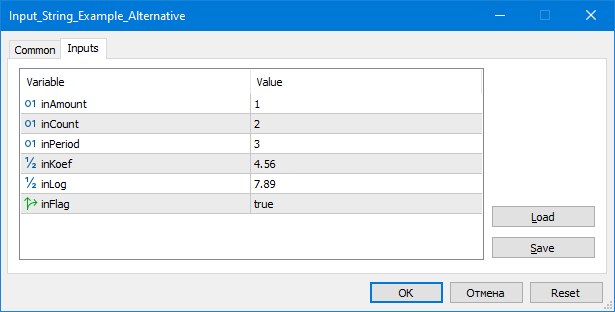
Usage scenarios.
- Minimal time and error probability when changing a set of input parameters.
- More time devoted to trade logic rather than technical features.
- Saving/reading input parameter sets via string.
- Significant simplification of writing complex systems (portfolios, etc.).
- Easy connection of custom optimisation algorithms.
Note that with the OOP approach, a lot of repetitive text can be hidden in mqh files - as is done in both examples above. OOP can also be concise.
Features.
- The proposed input parameter structure is simple, which greatly extends the applicability.
- "Modified" structures can be passed into each other via the assignment operator. And always have the same size.
- The library is cross-platform.
Translated from Russian by MetaQuotes Ltd.
Original code: https://www.mql5.com/ru/code/47932
 Simple_Pending_Orders_Time
The Expert Advisor works with pending orders Buy Stop and Sell Stop according to the time specified in its input parameters.
Simple_Price_EA
The simplest Expert Advisor that analyses the price movement on a given number of bars and opens a corresponding position.
 MA Price display
The indicator is written by request on the forum.
Coloured Bollinger Bands Indicating Narrowing and Widenning Phases
A simple indicator based on Bollinger Bands showing its narrowing and widening phases with red/green colours.