
Version 1.00 | Talenta Trading LLC
Introduction
Talenta Risk Guard for MT5 is a read-only risk monitoring utility for MetaTrader 5.
It helps traders understand the potential exposure of their open positions, identify missing stop-loss protection, and review risk information through an interactive dashboard.
Important: Talenta Risk Guard does not execute, close, modify, or block trades. It provides information and warnings only.
1. Installing Talenta Risk Guard
-
Open MetaTrader 5 on your computer.
-
Sign in to your MQL5.community account using the credentials associated with your purchase.
-
Open the Market or My Purchases section in MetaTrader 5.
-
Locate Talenta Risk Guard for MT5.
-
Click Install if the product is not already installed.
-
Open the Navigator panel (Ctrl+N).
-
Locate Talenta Risk Guard under the installed Market applications. Depending on your terminal layout, it may appear under Expert Advisors → Market.
-
Drag Talenta Risk Guard onto a chart and review its settings.
-
Click OK to attach the utility.
The dashboard should appear on the chart.
Because Talenta Risk Guard operates as a read-only monitoring utility, it does not require permission to place or modify trades. It will never execute trading orders.
2. Understanding the Dashboard
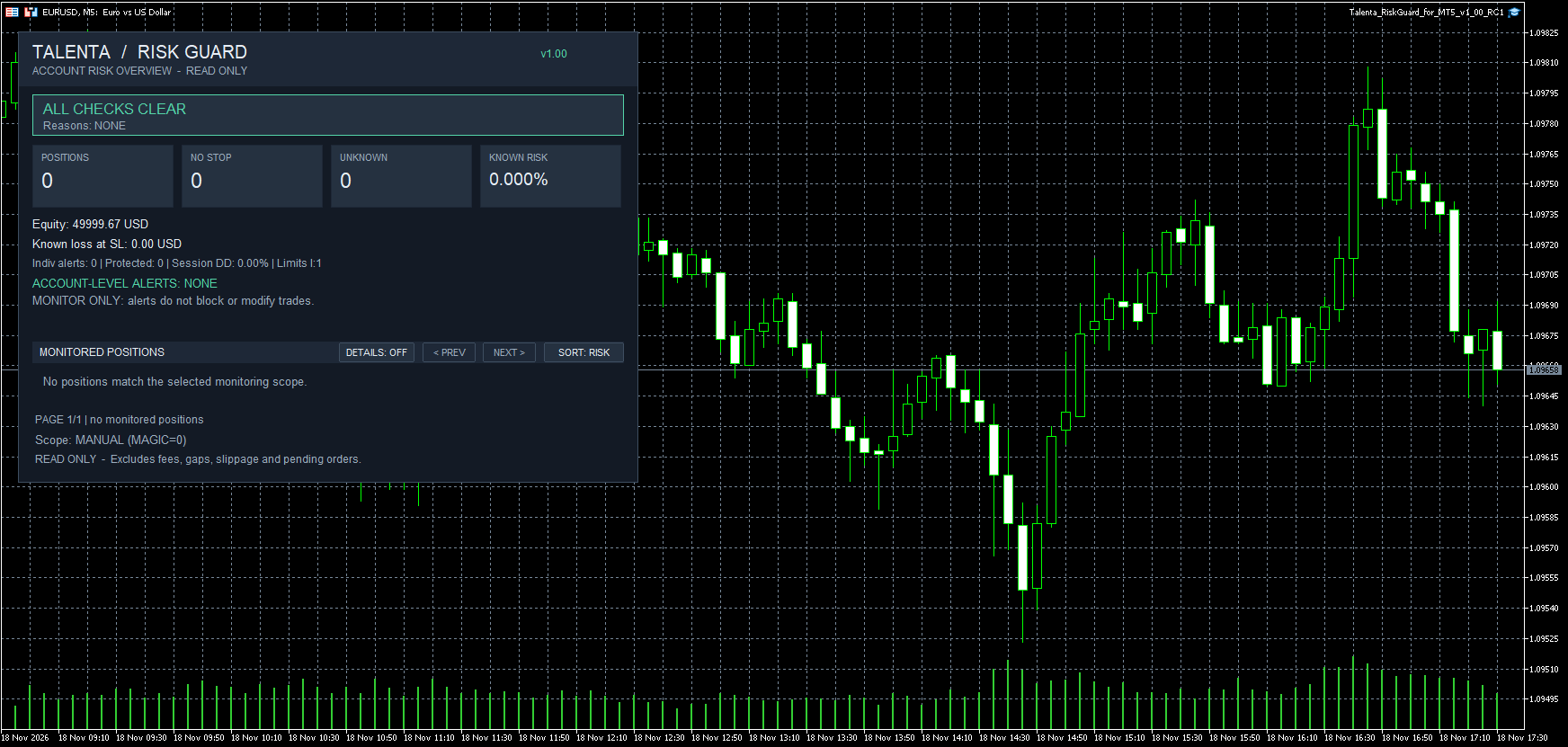
The dashboard provides an overview of the risk associated with positions in the selected monitoring scope.
Main Indicators
POSITIONS
The number of open positions currently being monitored.
NO STOP
The number of monitored positions without a stop-loss.
UNKNOWN
The number of positions whose risk cannot be calculated reliably using the available information.
KNOWN RISK
The estimated potential stop-loss loss expressed as a percentage of account equity.
Additional Information
The dashboard also displays:
-
Current account equity.
-
Estimated total known loss at stop-loss levels.
-
Individual alert information.
-
Account-level risk alerts.
-
Session drawdown information.
-
Risk-limit information.
The dashboard's calculations are estimates and should not be interpreted as guarantees of maximum loss.
3. Monitoring Positions
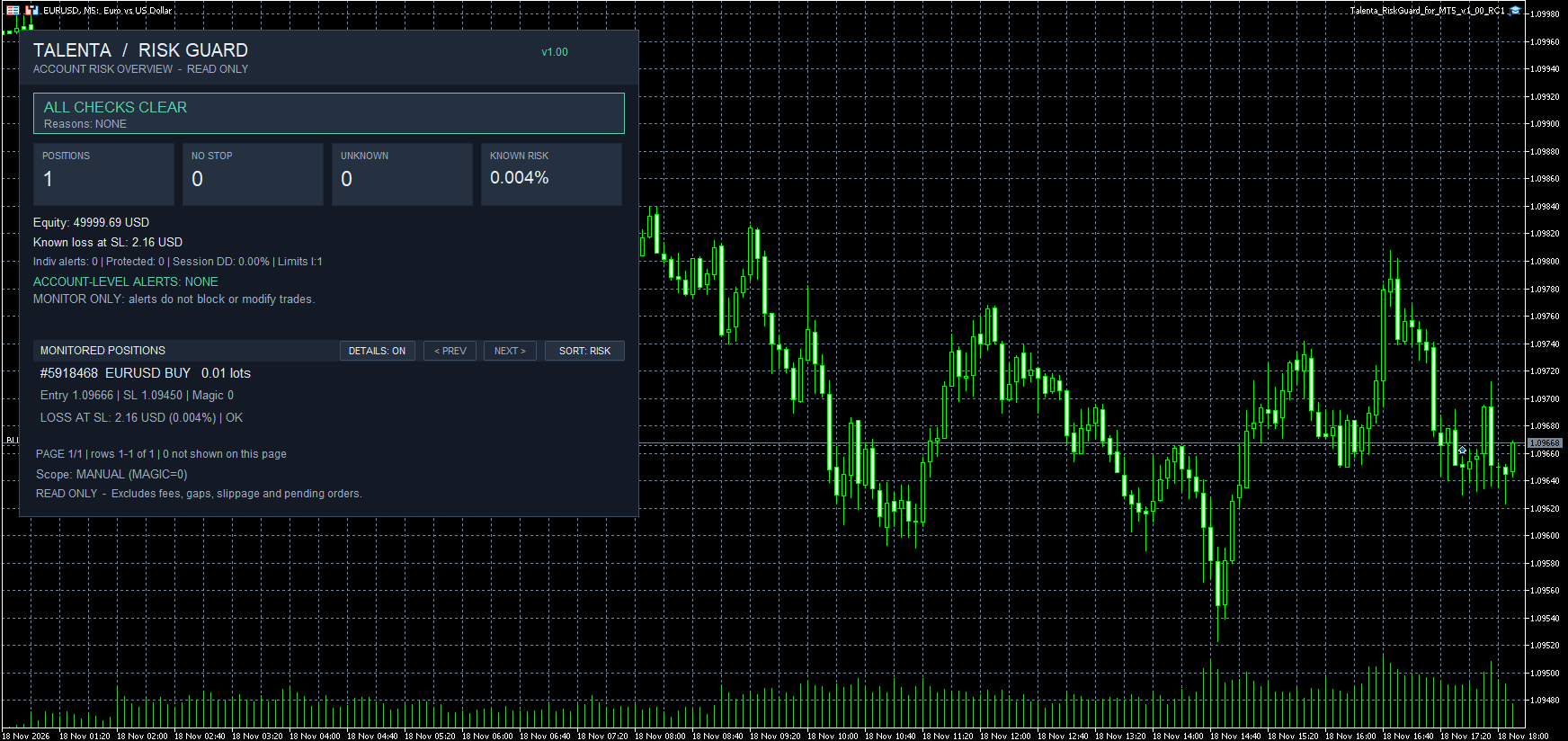
Talenta Risk Guard displays information about individual open positions.
Depending on the selected display mode, position information may include:
-
Position ticket.
-
Trading symbol.
-
Buy or sell direction.
-
Position volume.
-
Entry price.
-
Stop-loss level.
-
Magic number.
-
Estimated loss at stop-loss.
-
Risk percentage.
-
Position warning status.
Monitoring Scope
The monitoring scope determines which positions are included.
For example, MANUAL (MAGIC=0) monitors positions identified with Magic number zero.
If an expected position does not appear, verify that the selected monitoring scope includes it.
The scope should be chosen according to the positions you intend to supervise.
4. Using the Position Controls
The monitored positions section includes several interactive controls.
DETAILS: ON / OFF
Switches between compact and expanded position information.
PREV / NEXT
Allows navigation between pages of monitored positions when applicable.
SORT: RISK
Identifies the risk-oriented sorting option for the displayed positions.
These controls help traders review individual positions without modifying their trades.
5. Understanding Risk Warnings
One of Talenta Risk Guard's primary functions is identifying potential risk-management concerns.
All Checks Clear
When no monitored warning condition is active, the dashboard displays:
ALL CHECKS CLEAR
This indicates that no configured warning condition is currently being reported. It does not guarantee that trading is safe or free from risk.
Missing Stop-Loss Warning
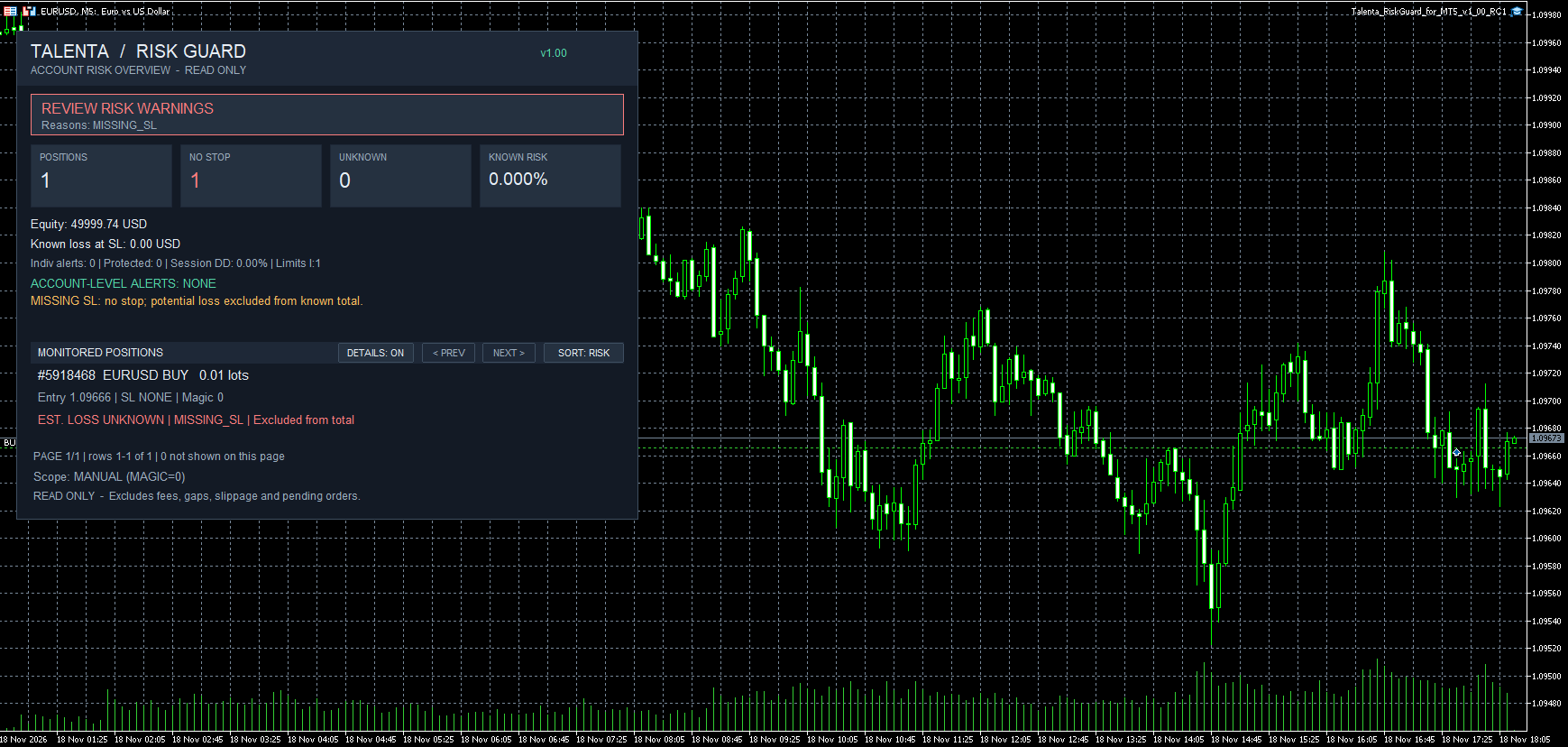
When a monitored position has no stop-loss, the dashboard may display:
REVIEW RISK WARNINGS
Reason: MISSING_SL
The position is identified with a missing-stop warning.
Because there is no defined stop-loss price, the utility cannot calculate that position's potential loss at stop-loss.
The position is therefore excluded from the known stop-loss loss total, and a warning is displayed.
A known-risk reading of 0.000% does not mean that an unprotected position has zero risk.
Responding to a Warning
When a warning appears:
-
Review the affected position.
-
Confirm the position's current stop-loss and other trade settings in MetaTrader 5.
-
Evaluate the risk according to your trading plan.
-
Make any appropriate changes manually through MetaTrader 5.
Talenta Risk Guard will not make these changes on your behalf.
6. Example: Calculating Position Risk
Consider a hypothetical EURUSD buy position with:
-
Position size: 0.01 lots.
-
Entry price: 1.09666.
-
Stop-loss: 1.09450.
-
Stop distance: 21.6 pips.
-
Account equity: approximately $50,000.
Using an approximate EURUSD pip value of $0.10 for 0.01 lots in a USD-denominated account:
Estimated loss at stop-loss = 21.6 × $0.10 = $2.16.
Estimated risk percentage = $2.16 ÷ $50,000 × 100 = approximately 0.0043%.
The dashboard displays the rounded value of 0.004%.
This example illustrates the calculation. Actual values depend on the instrument, contract specifications, account currency, and execution conditions.
7. Important Limitations
Talenta Risk Guard is not a trade-management or loss-prevention system.
It does not:
-
Open new trades.
-
Close existing positions.
-
Automatically establish stop-losses.
-
Change stop-loss or take-profit prices.
-
Prevent trades from being executed.
-
Automatically reduce position sizes or account exposure.
Risk estimates may exclude commissions, market gaps, slippage, and other execution-related costs.
Pending orders are excluded from the displayed open-position risk calculations.
Traders remain responsible for managing their own accounts and positions.
8. Troubleshooting
The dashboard does not appear
Confirm that the utility is installed, attached to a chart, and initialized successfully. Check the MetaTrader 5 Experts and Journal tabs for messages.
No positions are displayed
Confirm that you have an open position and that its Magic number falls within the selected monitoring scope.
Known risk displays 0.000%
This can occur when there are no monitored positions with calculable stop-loss risk. Check the NO STOP counter and any warnings before concluding that there is no exposure.
A position has a missing-stop warning
Review the position in the MetaTrader 5 Trade tab. A missing stop-loss requires the trader to assess and address the exposure manually.
The estimated loss differs from the final realized loss
Actual realized losses may differ because of execution prices, commissions, slippage, and other costs.
9. Support and Updates
For product questions or technical assistance, contact Talenta Trading LLC through the MQL5 product's Comments section or MQL5's internal messaging system.
Updates are distributed through the MQL5 Market. Customers can check the purchased product listing in MetaTrader 5 for available updates.
Product: Talenta Risk Guard for MT5
Developer: Talenta Trading LLC
Version: 1.00
Product page: https://www.mql5.com/en/market/product/209585




