

This post contains the setting files for FlowBias Trader, an Expert Advisor for MetaTrader 5. The files are attached at the bottom of this post, together with the user manual (PDF).
FlowBias Trader on the MQL5 Market: https://www.mql5.com/en/market/product/197273
Three configurations, five files
There are three different configurations. Two of them are offered at two levels of exposure: the lower exposure version uses a smaller lot per unit of balance and a lower loss limit. The settings that form the strategy are identical within each pair.
- EURUSD M2, RSI 12 (65/35), 2 extremes, trend filter on (exposure: single version)
File: FlowBiasTrader_EURUSD_M2_RSI_Trend_SL40.set
Lot per balance: 0.03 per 1,000
Loss limit: 40%
Max positions: 6 - EURUSD M5, RSI 12 (65/35), 4 extremes (exposure: lower)
File: FlowBiasTrader_EURUSD_M5_RSI_N4_SL25.set
Lot per balance: 0.15 per 4,000
Loss limit: 25%
Max positions: 7 - EURUSD M5, RSI 12 (65/35), 4 extremes (exposure: higher)
File: FlowBiasTrader_EURUSD_M5_RSI_N4_SL40.set
Lot per balance: 0.25 per 4,000
Loss limit: 40%
Max positions: 7 - GBPUSD M2, MFI 12 (80/20), 2 extremes, dual MA on (exposure: lower)
File: FlowBiasTrader_GBPUSD_M2_MFI_SL25.set
Lot per balance: 0.003 per 1,000
Loss limit: 25%
Max positions: 10 - GBPUSD M2, MFI 12 (80/20), 2 extremes, dual MA on (exposure: higher)
File: FlowBiasTrader_GBPUSD_M2_MFI_SL40.set
Lot per balance: 0.004 per 1,000
Loss limit: 40%
Max positions: 10
What the loss limit means
The loss limit is the point at which the EA closes the whole basket. It is calculated as a percentage of the account balance at the moment the basket opens, but it only covers the positions of that basket, long and short together. It does not watch your account as a whole.
Each file you run has its own limit. Running more than one of these files on the same account means their drawdowns can occur at the same time, so the combined drawdown can be considerably larger than the figure in any single file.
The limit is a trigger, not a guarantee. The basket is closed at market, so spread, slippage and execution speed can make the realised loss larger than the percentage set.
A limit of 40 per cent is wide. Decide for yourself whether it suits your account.
About the lot sizes
All five files scale the lot size to the account. The lot figures above are the volume opened per unit of balance.
These lot sizes were chosen for a portfolio in which several of these configurations run together on one account. Running a single file on its own at the lot size shown is not the same risk as running it as part of that portfolio.
Do not assume the configurations cover for one another. In testing, the deepest drawdown of the portfolio occurred at the same moment across configurations, during the market turmoil of early 2020. EURUSD and GBPUSD can move against you at the same time. Set your own lot size against your own account and your own tolerance for drawdown.
None of these files switches on the optional broker-side stop loss. It loads at its default, which is off. You can enable it yourself once you have decided on your own lot size.
Historical tests per configuration
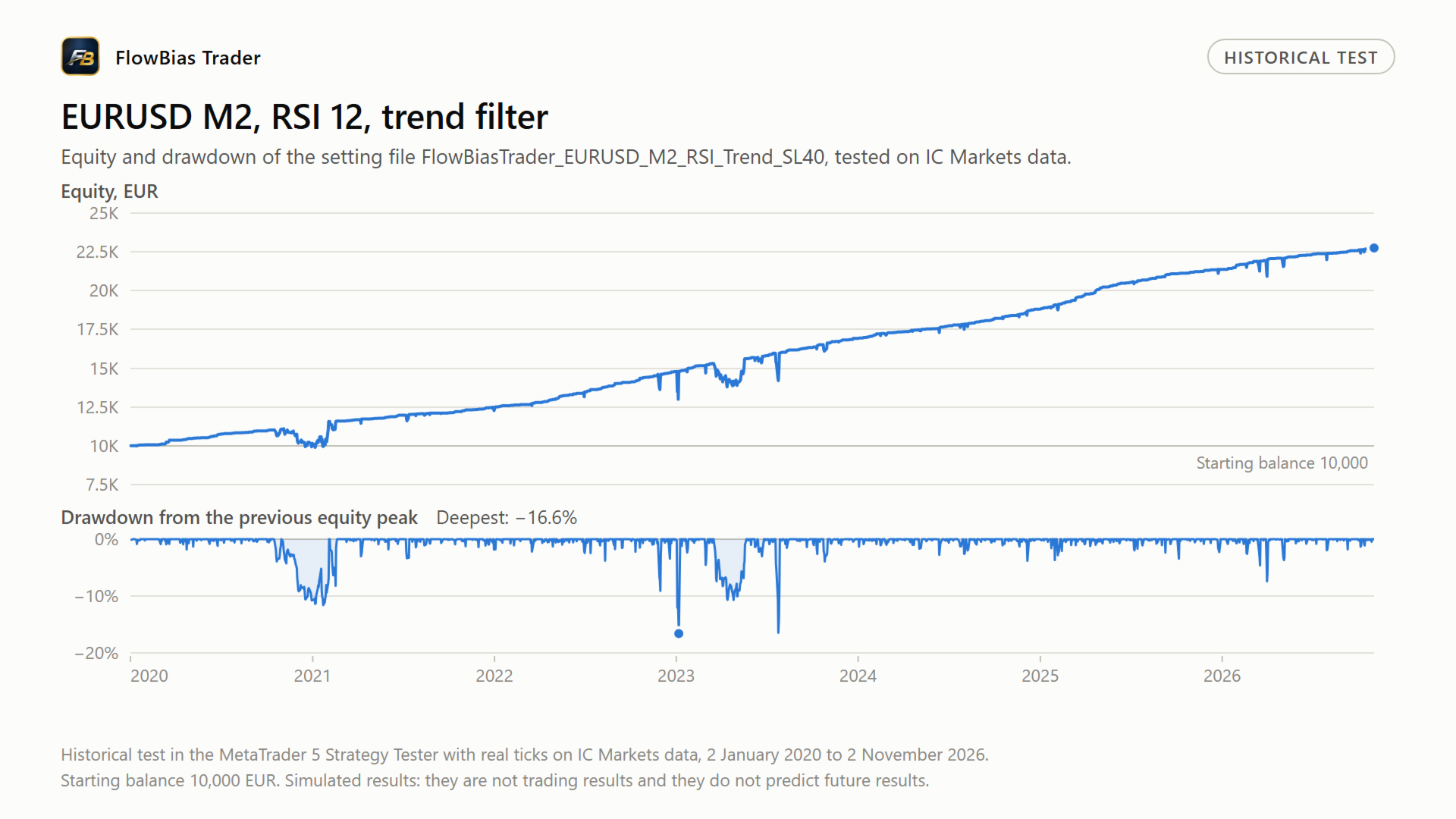
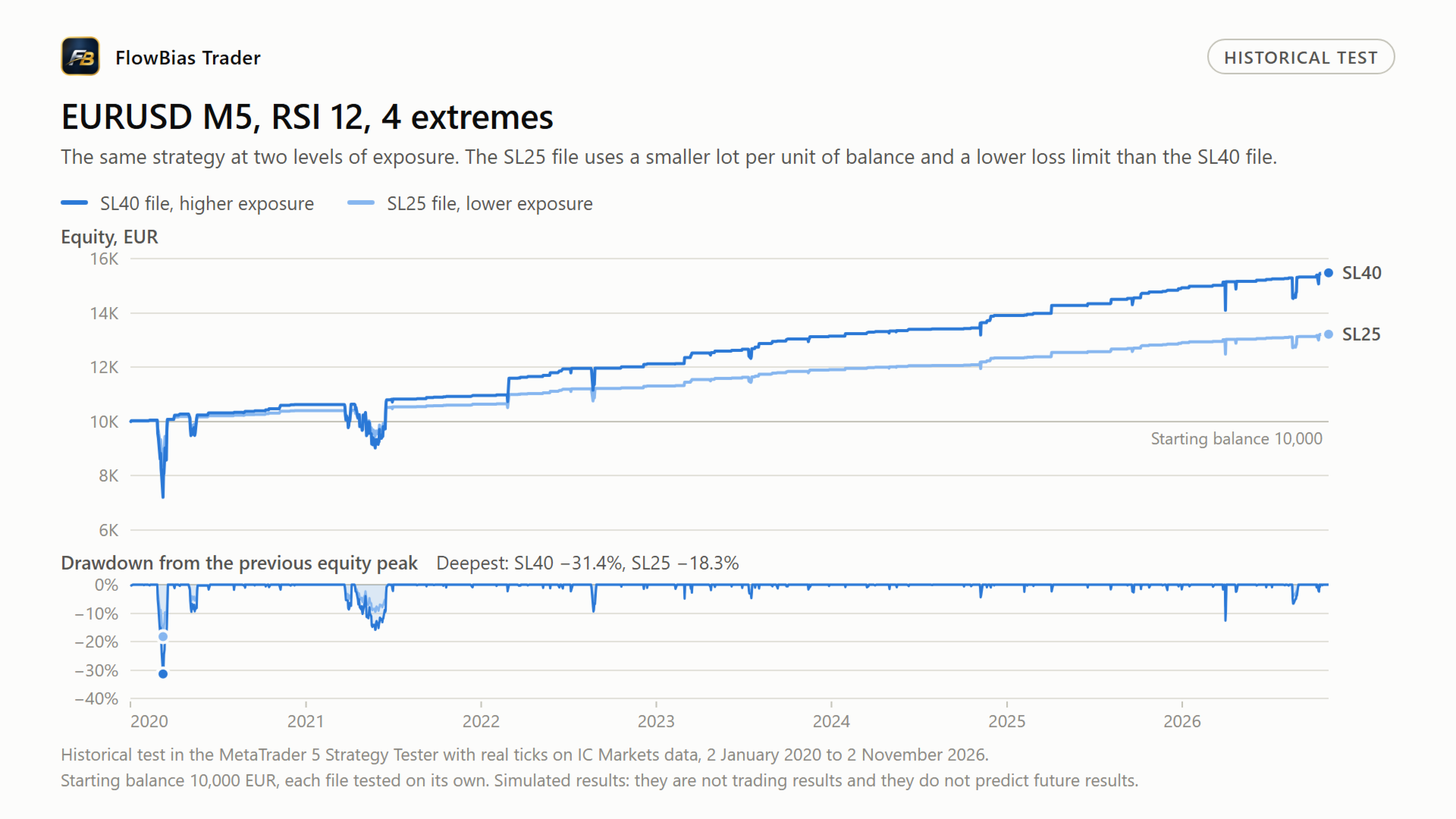
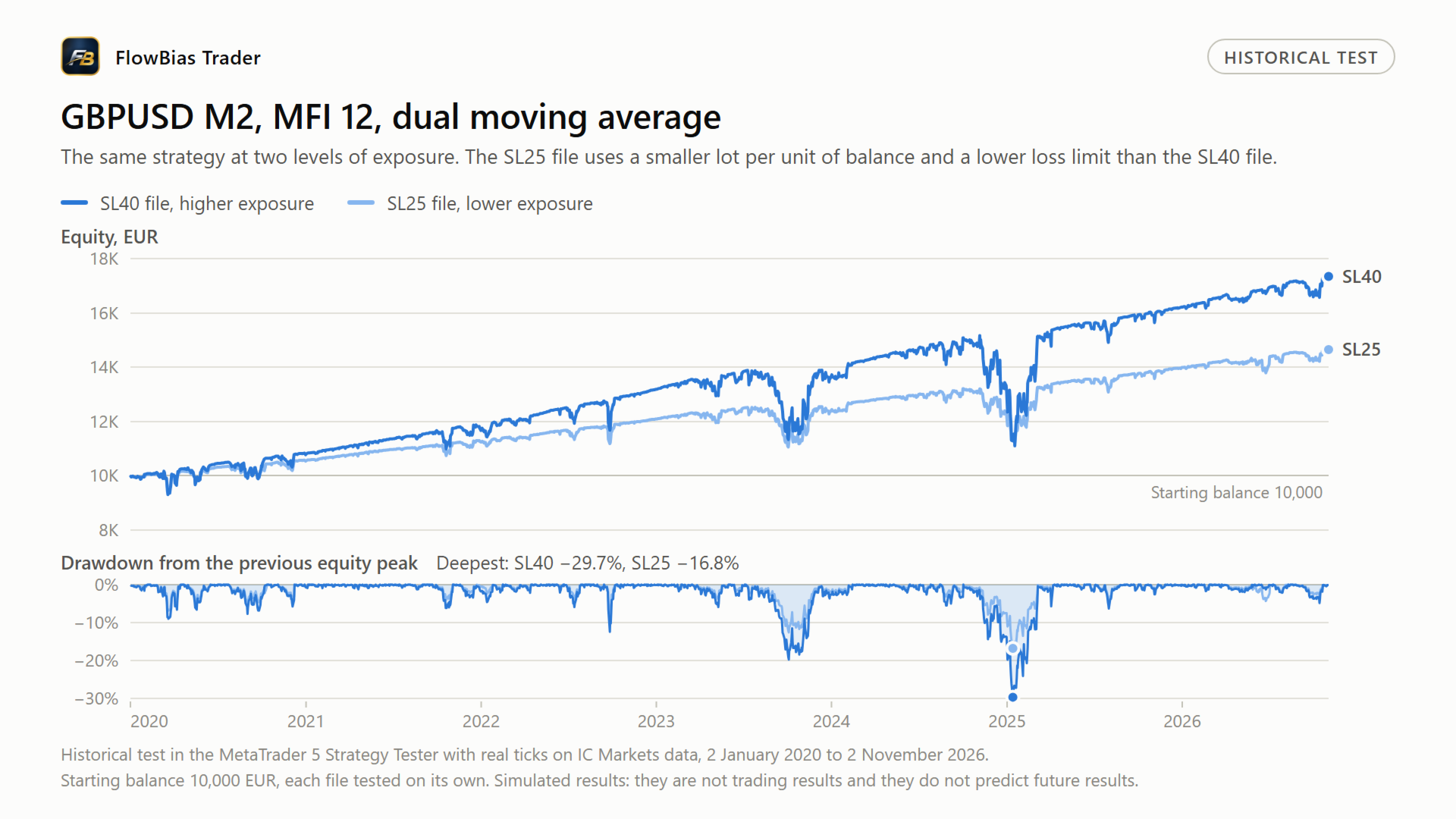
The charts below show the equity and the drawdown of each file in the MetaTrader 5 Strategy Tester, with real ticks on IC Markets data from January 2020 to November 2026 and a starting balance of 10,000 EUR. Each file was tested on its own. These are simulations, not trading results.
Checked on two brokers
Every broker builds its own candles. The feed comes from different liquidity providers, the bar opens and closes at a different moment because the server time offset differs, and the spread is not the same. Two brokers therefore produce two slightly different charts for the same pair over the same period. An oscillator value read at the close of a bar is not identical between them, and neither are the highs and lows the EA counts as extremes.
This matters when you judge a setting file. If a configuration only performs on one broker feed, that points to the settings being fitted to that feed rather than to the behaviour of the market.
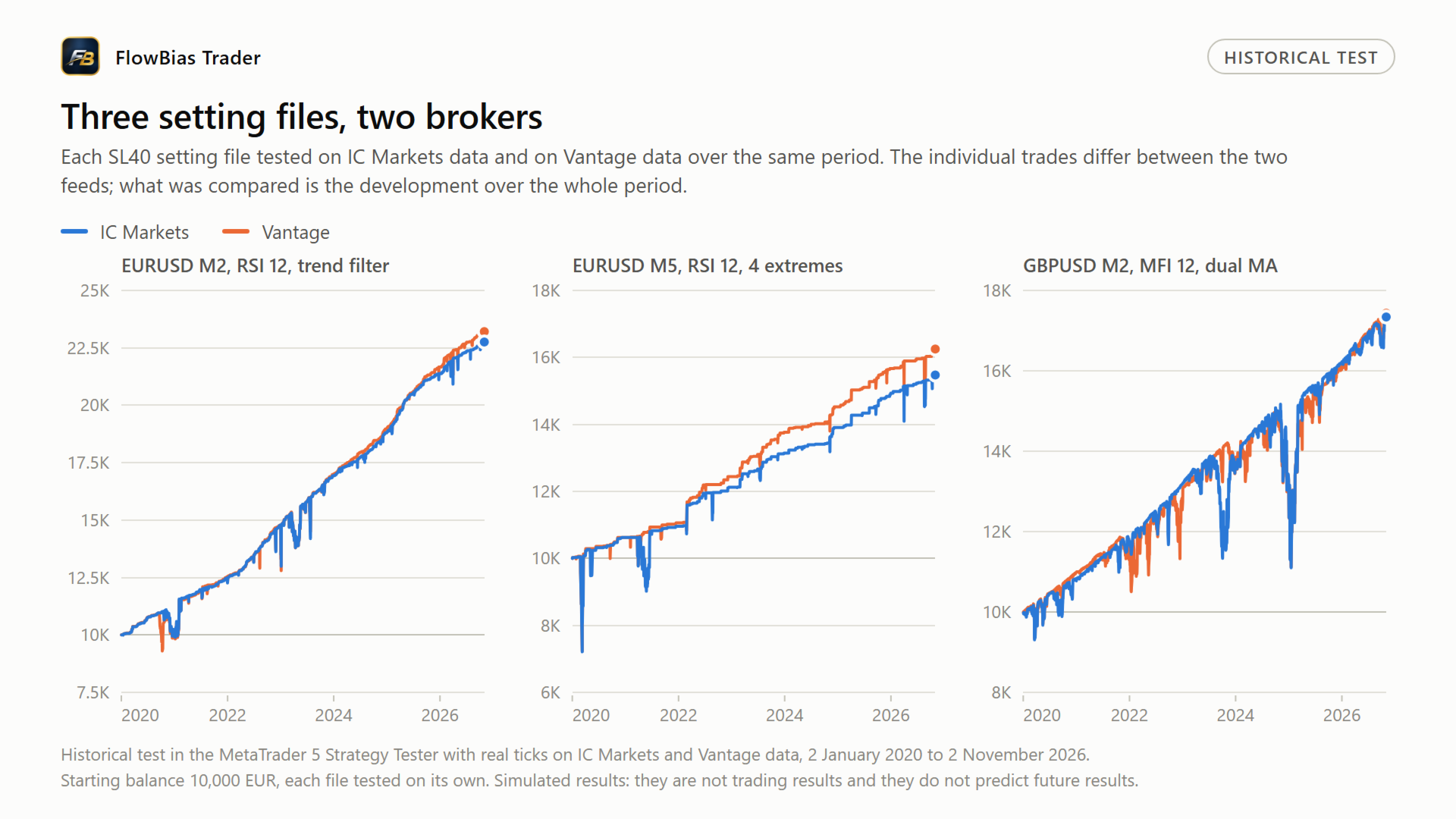
Each of these files was therefore run on data from two brokers with different feeds, IC Markets and Vantage, over the same period, from January 2020 to November 2026, using real ticks. What was compared is the number of baskets, the development of the result over that period, and whether any single year carried the outcome. The individual trades are not the same on both feeds, and they are not expected to be.
This is one check among several. It says nothing about future results.
The EA contains no hard-coded dates, so these files can be tested over any period you choose, including periods outside the one used here.
Vantage adds a suffix to its symbol names, for example GBPUSD+. Make sure you have selected the right symbol before you load a file.
What still differs on your own broker
Testing on two feeds does not make a file universal. Four items remain broker-dependent.
- Server time. The session window is set in broker time. Brokers use different GMT offsets and handle daylight saving differently. A window that is correct on one server can be an hour out on another.
- Spread and commission. The profit target is a money target, so higher costs move the point at which a basket closes.
- Contract size and quote digits. Settings expressed in points depend on both.
- Symbol name. Besides the Vantage suffix above, other brokers use their own, for example EURUSD.r or EURUSDm.
The EURUSD M2 file
The EURUSD M2 file with the trend filter does not contain every setting of the EA. The settings it does not contain load with their default values, which leaves the features concerned switched off. Load this file onto a freshly attached EA so that no values from an earlier configuration remain.
How to load a file
- In the Strategy Tester, open the Inputs tab, right click and choose Load.
- On a chart, open the properties of the EA, go to Inputs and use Load.
Risk
Trading on financial markets carries substantial risk, including the loss of invested capital. These settings are a starting point for your own testing. They are not advice and they do not guarantee a result. Test them on the data of your own broker first.
Questions can be left in the comments below.




