Prop Firm Rules as Code: Building a Daily-Loss and Max-Drawdown Guard for MQL5 Expert Advisors

Introduction
Prop firm challenges and funded accounts are rarely lost because a strategy has no edge. They are lost because of one bad day. A single sequence of losing trades pushes equity through the daily loss limit, or a slow bleed crosses the maximum drawdown line, and the account is closed. The rule is broken in seconds, but the money and the time spent on the challenge are gone.
Most Expert Advisors know nothing about these rules. They size positions from a fixed lot or a percentage of balance, and they keep trading after a limit is already close. Adding the check yourself looks simple, yet the details catch many traders out:
- Is the daily loss measured from the balance at the start of the day, or from the higher of balance and equity?
- When does the "day" start? Midnight server time is common, but not universal.
- Does floating loss count? On almost every firm it does, so equity is what matters, not balance.
- Is the maximum drawdown static (a fixed floor below the starting balance) or trailing (a floor that rises with the highest balance or equity reached)?
- What happens when the terminal restarts in the middle of the day? A guard that forgets the day's starting balance is worse than no guard at all.
In this article we turn these rules into code. We build a small, self-contained class, CPropRules, that any Expert Advisor can include. It remembers its state between terminal restarts, calculates the remaining room against each limit on every tick, blocks orders that would not fit in that room, and closes positions when a safety buffer is reached. At the end we connect it to a deliberately reckless test EA and show how to confirm in the Strategy Tester that the limits hold.
How prop firms define the two limits
Each firm writes its rules a little differently, but nearly all of them use two numbers: a daily loss limit and a maximum (overall) loss limit. Before writing any code we need exact definitions.
Daily loss limit
The daily loss limit is a percentage of a reference value taken at the start of each trading day. The two common references are:
- Day-start balance. The account balance at the reset time.
- Higher of balance and equity at the reset. If you carry a profitable open position over the reset, the reference is the larger equity figure, which makes the rule stricter.
The limit is checked against equity, so open losses count immediately. Example: a 100,000 account with a 5% daily limit and a day-start balance of 102,000. The limit is 5,100, so equity must stay above 96,900 for the whole day. If equity touches 96,899.99 at any moment, even for one tick, the rule is broken.
Maximum drawdown
The maximum loss limit is a percentage of either the initial account size or the highest value the account has reached:
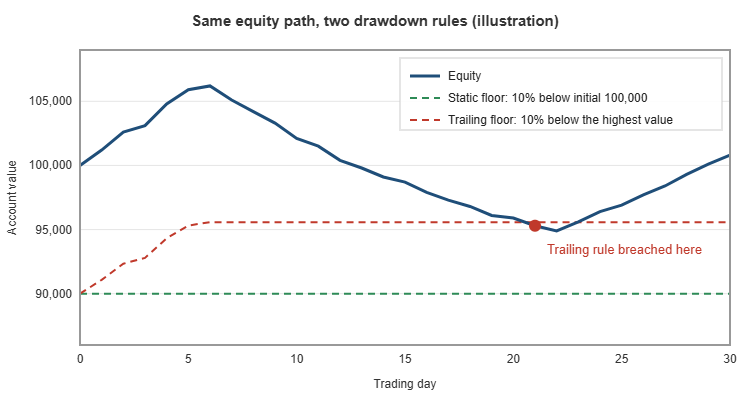
- Static drawdown. The floor is fixed. A 100,000 account with a 10% limit can never have equity below 90,000, no matter how much profit is made first.
- Trailing drawdown. The floor follows the peak. If the account reaches 106,000, a 10% trailing limit moves the floor to 95,400. Many firms stop trailing once the floor reaches the initial balance; we will note where to add that rule.
The figure below shows the same equity path checked against a static and a trailing floor. On the static rule the account survives; on the trailing rule the same path is a breach. This is why a guard must know which type it is protecting.
Which limit is closer?
At any moment there are two distances: equity minus the daily floor, and equity minus the drawdown floor. The one that matters is the smaller. Late in a losing week the drawdown floor may be much closer than the daily one, even on a quiet day. Our class will always work with the minimum of the two.
Designing the CPropRules class
The class has three jobs:
- Track state: the initial account size, the start of the current trading day, the day's base value, the highest balance or equity seen, and whether trading is locked.
- Enforce limits: on every tick, compare equity with both floors. When the remaining room falls inside a safety buffer, lock trading and close positions.
- Check orders before they are sent: calculate how much a new order would lose at its stop loss and reject it if the loss does not fit in the remaining room.
Here is the public interface:
class CPropRules
  {
public:
   bool              Init(const double daily_pct,const double dd_pct,const double initial_balance,
                          const int reset_hour,const ENUM_PROP_DAY_BASE day_base,
                          const ENUM_PROP_DD_TYPE dd_type,const double buffer_pct=10.0,
                          const ulong magic=0);
   void              OnTick(void);
   bool              CanOpen(const ENUM_ORDER_TYPE type,const string symbol,const double volume,
                             const double price,const double sl);
   void              CloseAll(void);
   void              ClearLock(void);

   double            DailyRoom(void) const;
   double            DrawdownRoom(void) const;
   double            Room(void) const;
   bool              IsLocked(void) const;
  };
The settings are described by two enumerations, so they appear as readable drop-down lists in the EA inputs:
enum ENUM_PROP_DAY_BASE
  {
   PROP_DAY_BALANCE = 0,   // balance at the daily reset
   PROP_DAY_HIGHER  = 1    // higher of balance and equity at the reset
  };

enum ENUM_PROP_DD_TYPE
  {
   PROP_DD_STATIC   = 0,   // fixed floor below the initial balance
   PROP_DD_TRAILING = 1    // floor follows the highest balance/equity reached
  };
Surviving a terminal restart
The most common bug in home-made guards is keeping the day's base value in an ordinary variable. When the terminal restarts, the EA is re-initialised and records the current balance as the new base, which may already be thousands below the real day-start value. The guard then allows a second full daily loss.
We store every value that must survive in terminal global variables. They are kept by the terminal between sessions and are separate for each account, because the account number is part of the name:
m_prefix="PR_"+IntegerToString(AccountInfoInteger(ACCOUNT_LOGIN))+"_";

double CPropRules::GVGet(const string key,const double def) const
  {
   string name=GVName(key);
   return(GlobalVariableCheck(name) ? GlobalVariableGet(name) : def);
  }

void CPropRules::GVSet(const string key,const double value) const
  {
   GlobalVariableSet(GVName(key),value);
  }
In Init() the class restores the initial size, the peak, the day start, the day base and the lock state. Only if nothing has been saved does it fall back to the current balance.
Finding the start of the trading day
Firms reset the daily limit at a fixed server hour. The start of the current day is the most recent occurrence of that hour. We use TimeTradeServer(), which keeps running between ticks, and fall back to TimeCurrent() if it is not available:
datetime CPropRules::CurrentDayStart(void) const
  {
   datetime now=TimeTradeServer();
   if(now==0)
      now=TimeCurrent();
   MqlDateTime t;
   TimeToStruct(now,t);
   t.hour=m_reset_hour;
   t.min=0;
   t.sec=0;
   datetime start=StructToTime(t);
   if(start>now)
      start-=86400;
   return(start);
  }
When this value changes, RollDay() records a new day base according to the chosen rule and clears a daily lock. A lock caused by the maximum drawdown is not cleared, because that limit does not reset.
void CPropRules::RollDay(void)
  {
   datetime start=CurrentDayStart();
   if(start==m_day_start && m_day_base>0.0)
      return;
   double balance=AccountInfoDouble(ACCOUNT_BALANCE);
   double equity =AccountInfoDouble(ACCOUNT_EQUITY);
   m_day_start=start;
   m_day_base =(m_day_base_mode==PROP_DAY_HIGHER) ? MathMax(balance,equity) : balance;
   GVSet("day",(double)m_day_start);
   GVSet("daybase",m_day_base);
   if(m_lock==PROP_LOCK_DAILY)
     {
      m_lock=PROP_LOCK_NONE;
      GVSet("lock",(double)m_lock);
     }
  }
Calculating the remaining room on every tick
With the state in place, the limits are simple expressions. Equity already includes floating profit and loss, swaps and commissions of open positions, so no extra work is needed for them:
double DailyLimit(void) const    { return m_day_base*m_daily_pct/100.0; }
double DailyFloor(void) const    { return m_day_base-DailyLimit(); }
double DrawdownBase(void) const  { return m_dd_type==PROP_DD_TRAILING ? m_peak : m_initial; }
double DrawdownLimit(void) const { return DrawdownBase()*m_dd_pct/100.0; }
double DrawdownFloor(void) const { return DrawdownBase()-DrawdownLimit(); }
double DailyRoom(void) const     { return AccountInfoDouble(ACCOUNT_EQUITY)-DailyFloor(); }
double DrawdownRoom(void) const  { return AccountInfoDouble(ACCOUNT_EQUITY)-DrawdownFloor(); }
double Room(void) const          { return MathMin(DailyRoom(),DrawdownRoom()); }
For a trailing drawdown the peak must be updated on every tick. We track the higher of balance and equity, which is the strictest common definition:
double high=MathMax(AccountInfoDouble(ACCOUNT_BALANCE),AccountInfoDouble(ACCOUNT_EQUITY));
if(high>m_peak)
  {
   m_peak=high;
   GVSet("peak",m_peak);
  }
If your firm trails on closed balance only, replace the line with AccountInfoDouble(ACCOUNT_BALANCE). If the floor stops trailing at the initial balance, cap it with MathMin(DrawdownFloor(), m_initial).
Enforcing the limits
There are two lines of defence. The first stops an order that would break a limit at its stop loss. The second reacts when equity moves towards a floor anyway, for example after a gap, slippage, or a position opened manually.
The safety buffer
Closing a position takes time and the price keeps moving. If we wait until equity actually touches the floor, the closing price will often be beyond it. We therefore act when the remaining room falls below a buffer, expressed as a percentage of each limit. With a 5,000 daily limit and a 10% buffer, the guard acts when 500 of room is left.
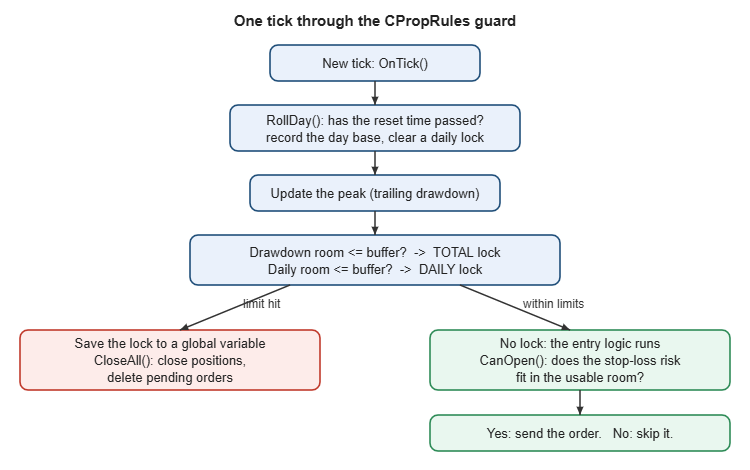
void CPropRules::OnTick(void)
  {
   RollDay();
   // ... peak update shown above ...
   double daily_buffer=DailyLimit()*m_buffer_pct/100.0;
   double dd_buffer   =DrawdownLimit()*m_buffer_pct/100.0;
   ENUM_PROP_LOCK hit=PROP_LOCK_NONE;
   if(DrawdownRoom()<=dd_buffer)
      hit=PROP_LOCK_TOTAL;
   else
      if(DailyRoom()<=daily_buffer)
         hit=PROP_LOCK_DAILY;
   if(hit==PROP_LOCK_NONE)
      return;
   if(hit>m_lock)
     {
      m_lock=hit;
      GVSet("lock",(double)m_lock);
     }
   CloseAll();
  }
The lock is saved immediately, so a restart cannot unlock trading. A daily lock ends at the next reset; a total lock stays until ClearLock() is called, for example when the firm issues a new account.
The pre-trade check
To know whether an order fits, we need its loss at the stop loss in account currency. Calculating this from tick values works for most symbols but is easy to get wrong for metals, indices and cross rates. The terminal already has a function for it, OrderCalcProfit(), which returns the profit of a hypothetical trade from one price to another. Passing the entry price and the stop loss gives the exact loss, including currency conversion:
bool CPropRules::CanOpen(const ENUM_ORDER_TYPE type,const string symbol,const double volume,
                         const double price,const double sl)
  {
   if(IsLocked())
      return(false);
   if(sl<=0.0)
     {
      Print("PropRules: order blocked, a stop loss is required to measure the risk");
      return(false);
     }
   double profit=0.0;
   if(!OrderCalcProfit(type,symbol,volume,price,sl,profit))
      return(false);
   double risk=-profit;
   double usable=MathMin(DailyRoom()-DailyLimit()*m_buffer_pct/100.0,
                         DrawdownRoom()-DrawdownLimit()*m_buffer_pct/100.0);
   if(risk>usable)
     {
      PrintFormat("PropRules: order blocked, risk %.2f exceeds usable room %.2f",risk,usable);
      return(false);
     }
   return(true);
  }
Orders without a stop loss are rejected on purpose. Without a stop, the potential loss of an order is unknown, and an unknown loss cannot be checked against a limit. Note that the check covers the new order only; the loss of positions that are already open is accounted for through equity, which is what the room is measured from.
Closing positions
CloseAll() uses the standard CTrade class. When the guard is created with a magic number, only that EA's positions and pending orders are touched. With magic 0 it manages the whole account, which is the safer choice when an account is traded by several EAs or by hand.
void CPropRules::CloseAll(void)
  {
   for(int i=PositionsTotal()-1; i>=0; i--)
     {
      ulong ticket=PositionGetTicket(i);
      if(ticket==0 || !Owns(ticket))
         continue;
      if(!m_trade.PositionClose(ticket))
         PrintFormat("PropRules: failed to close #%I64u, retcode %u",ticket,m_trade.ResultRetcode());
     }
   // pending orders are deleted in the same way
  }
The figure below summarises the flow of one tick through the guard.
Adding the guard to any Expert Advisor
Integration takes three calls: one in OnInit(), one at the top of OnTick(), and one before each order is sent.
#include "PropRules.mqh"

input double             InpDailyPct  = 5.0;              // Daily loss limit (%)
input double             InpMaxDDPct  = 10.0;             // Maximum drawdown (%)
input double             InpInitial   = 0.0;              // Initial account size (0 = current balance)
input int                InpResetHour = 0;                // Daily reset hour (server time)
input ENUM_PROP_DAY_BASE InpDayBase   = PROP_DAY_BALANCE; // Daily loss measured from
input ENUM_PROP_DD_TYPE  InpDDType    = PROP_DD_STATIC;   // Drawdown type
input double             InpBufferPct = 10.0;             // Safety buffer (% of each limit)
input ulong              InpMagic     = 2611;             // Magic number (0 = guard the whole account)

CPropRules g_rules;

int OnInit()
  {
   if(!g_rules.Init(InpDailyPct,InpMaxDDPct,InpInitial,InpResetHour,
                    InpDayBase,InpDDType,InpBufferPct,InpMagic))
      return(INIT_PARAMETERS_INCORRECT);
   return(INIT_SUCCEEDED);
  }

void OnTick()
  {
   g_rules.OnTick();             // 1. update state and enforce limits
   if(g_rules.IsLocked())
      return;
   // ... your entry logic calculates type, volume, price and sl ...
   if(!g_rules.CanOpen(type,_Symbol,volume,price,sl))   // 2. pre-trade check
      return;
   // 3. send the order as usual
  }
Set InpInitial to the account size the firm gave you. If it is left at zero, the balance at the first start is used and saved, which is correct only when the EA is attached on a fresh account.
Testing the guard in the Strategy Tester
A guard you have never seen working is not a guard. The attached PropGuardDemo.mq5 is a test EA that trades badly on purpose: it opens one position per hour with a large fixed lot, alternating between buy and sell, so losses accumulate quickly. Every order goes through CanOpen() and every tick through OnTick().
To test it:
- Copy PropRules.mqh and PropGuardDemo.mq5 into the same folder under MQL5/Experts and compile the EA.
- Open the Strategy Tester, select PropGuardDemo, a volatile symbol such as XAUUSD or a major index, and a period of one to three months with "Every tick based on real ticks".
- Set the deposit to 100,000, InpLots large enough that two or three losing trades approach the daily limit, and keep the 5% / 10% limits.
- Run the test and open the Journal tab.
You should see three kinds of messages (your values will differ). When a new order would risk more than the usable room, the order is refused:
PropRules: order blocked, risk 4350.00 exceeds usable room 3120.55
When equity falls into the buffer, the guard locks trading and closes the position:
PropRules: daily limit buffer reached. Equity 95512.40, daily room 498.20, drawdown room 5512.40
At the next reset the daily lock is cleared and trading resumes:
PropRules: new day, daily lock cleared. Day base 95480.10
On the equity graph the effect is clear: losing days stop at the buffer instead of running through the floor. Repeat the test with InpDDType set to trailing and you will see the account locked permanently earlier, because the floor has moved up with the peak. Comparing the two runs is also a quick way to find out whether a strategy is suitable for a firm that uses trailing drawdown.
Two points to keep in mind when reading tester results. First, the tester's global variables are separate from the terminal's, so each test starts from a clean state. Second, the tester cannot reproduce every live condition: a weekend gap or a fast news spike can still move equity beyond a floor before a closing order is filled. The buffer reduces this risk; it cannot remove it. Choose it according to the volatility of the symbols you trade.
Possible extensions
- Daily profit lock. Some traders also stop for the day after reaching a profit target, to protect a good day. This is one more comparison in OnTick().
- Consistency rules. Several firms limit how much of the total profit can come from a single day. The class already knows the day base, so the day's profit is available.
- Notifications. Add SendNotification() when a lock is set, so you learn about it on your phone.
- Visual panel. Displaying DailyRoom() and DrawdownRoom() on the chart with coloured bars makes the state visible at a glance.
Conclusion
Prop firm rules are simple to state and easy to break. Encoding them in a class turns them from something the trader has to remember into something the EA cannot ignore. The CPropRules class presented here:
- supports balance-based and higher-of-balance-and-equity daily limits with a configurable reset hour;
- supports static and trailing maximum drawdown;
- keeps its state in terminal global variables, so restarts do not reset the day;
- refuses orders whose stop-loss risk does not fit in the remaining room, using OrderCalcProfit() for an exact figure;
- closes positions and locks trading when a safety buffer is reached.
Both files are attached. Include PropRules.mqh in your own EA with the three calls shown above, run it through the Strategy Tester with the demo EA first, and check the journal before using it on a funded account.
| File | Description |
|---|---|
| PropRules.mqh | The CPropRules class: state, limits, pre-trade check and position closing. |
| PropGuardDemo.mq5 | Test Expert Advisor that opens oversized trades so that the guard can be observed in the Strategy Tester. |
Source code and ready-made tools
The full source files (PropRules.mqh and PropGuardDemo.mq5) are attached to this post.
If you would rather use a finished tool than build your own, the same protection is available ready to use: PropGuardian Prop Firm Risk Guard and Prop Firm Risk Calculator.




