MultiFXbot MT5: a multi-currency grid EA with risk set in advance

Grid Expert Advisors are usually sold with a smooth balance curve, while nobody talks about what happens to open positions. With MultiFXbot MT5 I did the opposite: the risk of a grid is set in advance and visible in the inputs.
What the robot does
- Multi-currency EA: trades up to 11 symbols from one EURUSD H1 chart.
- RSI entries on a new bar, then an averaging grid if the price moves against the position.
- Take profit is calculated from the weighted average price of the grid.
- Hedging accounts only.
How grid risk is limited
- Basket loss limit — a total stop in % of balance for all symbols of one magic number. The grid is closed as a whole instead of being held forever.
- Broker-side stop loss. With the limit set, every order is sent with a physical stop loss that works even if the terminal or VPS goes offline.
- Grid size and multiplier. You set the maximum positions per symbol and the lot multiplier. Multiplier 1 keeps the lot constant; a maximum of 1 position disables averaging completely.
- Position age. Positions older than the set number of days are closed, so a stuck grid does not pay swaps for weeks.
- Manage-only mode. The EA keeps managing open grids but starts no new ones — useful before news and weekends.
Automatic lot
The starting lot of a new grid is calculated from balance, for example 0.01 for every 5000 units of account currency. A cent account works well for a small deposit.
Chart panels
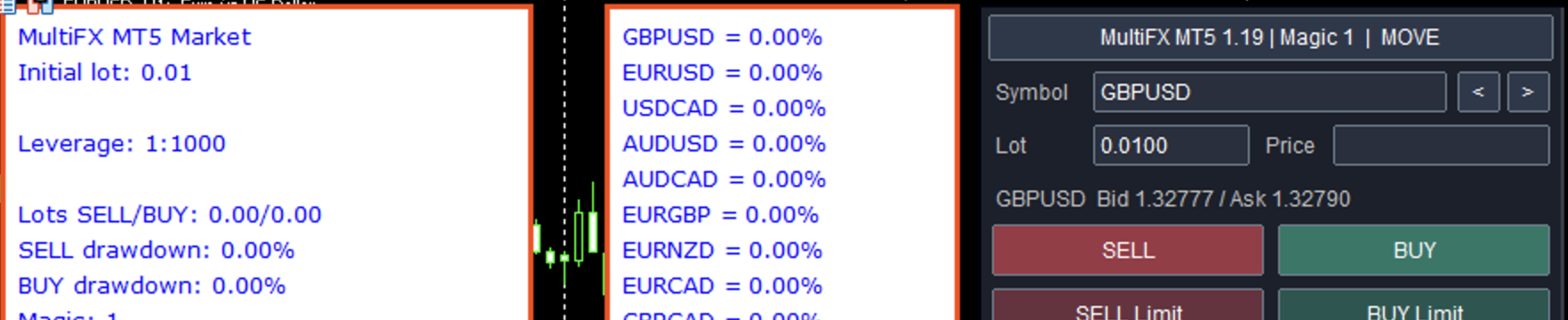
- Trading panel: switch symbols, set lot, open market and pending orders, close all, losing or profitable positions of a symbol.
- Information panel: BUY/SELL lots and drawdown, profit for today, 7 days and total.
- Drawdown by symbol — see which currency is loading the account right now.
Monitoring
The robot has been trading my real cent account since August 2024, with a verified Myfxbook track record. Maximum drawdown over this period is about 49%. I state this number upfront: an averaging EA always has drawdown, the question is whether it is limited. Set the basket loss limit to the loss you are ready to accept rather than leaving the default.
How to check it before buying
- Download the free demo and run it in the MT5 Strategy Tester on real ticks over several years.
- Repeat the test with a wider spread.
- Start on a cent account with the minimum lot. A 1-month rental lets you test the robot on a live account without a full purchase.
Product page and free demo: MultiFXbot MT5 on the MQL5 Market. Questions about settings are welcome in the product comments.