Overtrading and daily loss limits: a discipline routine for MetaTrader

Overtrading and the lack of a daily loss limit are two of the quiet causes of a damaged account. Neither feels dramatic in the moment: one more trade, one more chance to make the day green. Together they turn a normal red day into a large one. This article sets out a simple trading discipline routine for MetaTrader built on two numbers, a maximum number of trades and a daily loss limit, and shows where DuoFX Trading Psychology (user guide) keeps count for you.
DuoFX Trading Psychology is free for MT5 and MT4, and it will stay free.
What overtrading is, and what it is not
Overtrading is trading more than your trading plan calls for. It is not the same as trading often: a scalper with a tested plan may take twenty trades a day and still trade with discipline. The signs of overtrading are about the reason for the trade:
- trades taken because the session is quiet and you are bored,
- trades taken to recover a loss,
- trades on symbols that are not in your plan,
- trades taken late in the day, when focus is low,
- a falling win rate as the trade count rises.
Look at your own history. Count trades per day for the last month and put the daily result next to each count. Many traders find that their best days have a modest number of trades, and that the days with the most trades are also the days with the largest losses.
Why a daily loss limit works
A daily loss limit is the most widely used rule in risk management for a reason: it puts a ceiling on the worst day before the day starts. Prop firms use it because one large day is what usually ends an account. A personal limit does the same job for your own money.
Some practical points:
- Express it as a percentage of the balance at the start of the day, so it scales with the account. Common choices are between 1% and 3%.
- Count open trades too. A day with a large open loss is already a large day.
- Stop at the limit, not after it. The limit is the point where you stop, not a target you check after the fact.
- Decide what stopping means: close the platform, close the charts, or keep watching without trading. Write it down.
The routine
- 1. Before the session: write your maximum trades for the day and your daily loss limit in money. Set a trading day start hour that matches when your day really starts.
- 2. During the session: after every trade, note the count and the day's result. At one trade before your maximum, slow down: only an A setup qualifies.
- 3. At 75% of the limit: halve your size or stop. This is the point where most traders still have the presence of mind to decide well.
- 4. At the limit: stop for the day. No exceptions for "a sure thing".
- 5. After the session: one line in a journal: number of trades, result, and whether you kept both rules.
Keeping score by hand works, but it is exactly the job that is easy to skip on a bad day.
Where DuoFX Trading Psychology helps
DuoFX Trading Psychology keeps the score live for every trade on your account, phone trades included, as long as the terminal runs:
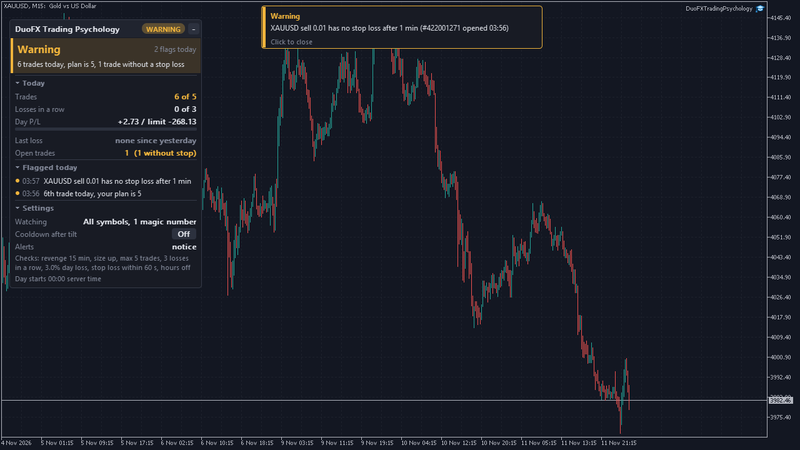
- Trades: today's count against your plan. The first trade over the maximum turns the meter to Warning with a line like "6th trade today, your plan is 5".
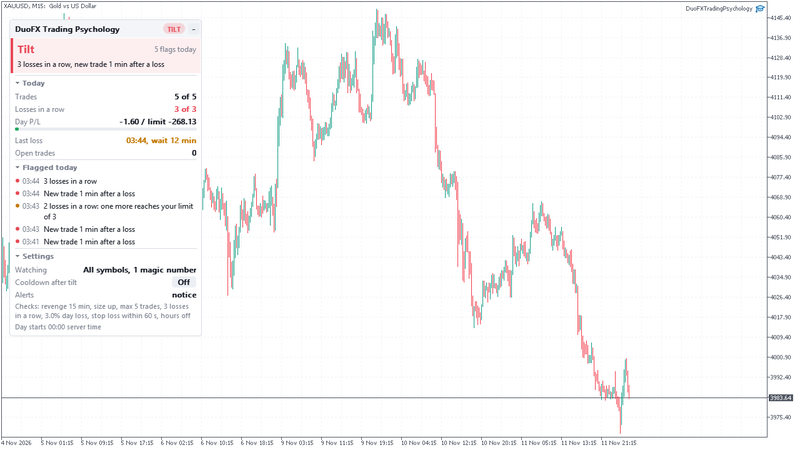
- Day P/L with a bar against your daily loss limit, open trades included. At 75% you get a Warning, at 100% the meter shows Tilt for the rest of the day.
- Losses in a row against your losing streak limit, with a Warning one loss before.
- A stop loss check: a trade without a stop after the grace time is flagged, because overtrading and missing stops often come together.
- The trading day starts at the hour you set, so counters and the limit reset when your day starts, not at an arbitrary midnight.
If you want the limit to have teeth, switch on the optional cooldown in its close mode while you are calm. When the daily loss limit is reached, it closes any trade you open afterwards for the minutes you set, or until the next trading day. It never touches trades that were open when it began, and you can end it early with a confirmed click. A closed trade still costs its spread and commission: the point is to stop the day, not to save that trade.
Setting it up
- 1. Max trades a day: your plan's number. If you do not have one yet, use the median of your last month's daily counts.
- 2. Daily loss limit %: your number, for example 2%.
- 3. Trading day starts at: the server hour your day starts.
- 4. Cooldown after tilt: Warn only to start, Close new trades once you trust your numbers. Length "until the next trading day" suits a daily loss limit.
- 5. Alerts: the on-chart notice, plus push if you trade from the phone.
FAQ
- Does the daily loss limit include open trades? Yes, the day's closed results plus open trades in your scope.
- What counts as one trade? One order opening a position. Partial fills of one order count once, and a partial close is part of its trade.
- I trade with an EA as well. Will it count those trades? Only if you want it to. Choose manual trades only, all trades, or a list of magic numbers.
Try it free: DuoFX Trading Psychology for MT5 and DuoFX Trading Psychology for MT4. Free now and free for good, with a step by step user guide.
Risk note: trading carries a high risk of loss. This article and the tool are for education and information, not financial advice, and they do not promise results.