DuoFX Trading Psychology user guide: a trading discipline watch for MT5 and MT4

This is the user guide for DuoFX Trading Psychology for MT5 and MT4, a trading discipline tool that watches every trade on your account for revenge trading, overtrading, losing streaks, the daily loss limit, trades without a stop loss and trades outside your planned hours. More about it is on duofxlabs.com.
How-tos and articles: How to stop revenge trading in MT5, Overtrading and daily loss limits: a discipline routine for MetaTrader, Trader burnout and exhaustion: signs to watch for and how to set limits and Tilt and FOMO in trading: what happens after a loss and how to build a cooldown habit.
Why it is free
We trade too, and we know how it feels at the end of a bad day: tired, frustrated, tempted to win it back. Mental health and exhaustion are part of trading that nobody talks about. This tool is our contribution, free now and free for good.
What it is
- An Expert Advisor that never opens or changes a trade. With the cooldown off (the default) it only reads your account.
- It watches every position on the account, from every device. A trade placed on the phone app or the web terminal shows up in the account like any other, so the EA sees it as long as the terminal it runs in is on. A VPS is a good home for it.
- It shows a discipline meter with one word, Calm, Warning or Tilt, and the reason in plain words.
- It warns with an on-chart notice that closes by itself, and optionally with sound, a push notification to your phone and email. It never shows a pop-up box you must click, and it never stops the terminal.
- An optional cooldown, which you choose while calm, can flag or close new trades for a while after a tilt.
Install and first run
- 1. Install it from the Market (Ctrl+T, Market tab, Purchased, Install).
- 2. Open one chart, any symbol. The EA watches the whole account from there, so one chart is enough.
- 3. Drag DuoFX Trading Psychology onto the chart. On the Common tab, Algo Trading is only needed if you plan to use the cooldown's close mode.
- 4. On the Inputs tab, check What to watch: manual trades only (the default, which includes phone and web trades), all trades, or a list of magic numbers; all symbols or only this chart's symbol.
- 5. Set your trading day start hour to match how you think of your day (server time). Counters, the daily loss and the list reset then.
- 6. Press OK. The panel appears at the top left. If you already traded today, it reads today's history at once and lists anything it would have flagged, marked as found in the history, without alerting.
On MT4, set the Account History tab to "All history" or at least the last few days, because MT4 only shows the EA the history that tab shows.
The checks
- Revenge trade: a new trade within the revenge window (default 15 minutes) after a losing trade closed. With bigger lots as well, the text says so, for example "2nd trade 4 min after a loss, lots up 2x". This is a Tilt.
- Size up after a loss: a trade with bigger lots than the losing trade before it, on the same symbol and magic number. A Warning on its own, part of the Tilt when it comes with a revenge trade.
- Overtrading: more trades today than your plan (default 5). Partial fills of one order count once.
- Losing streak: losses in a row today (default 3). One loss before the limit you get a Warning, at the limit a Tilt. A winning trade resets the count. Partial closes are added to their trade, so a trade closed in three parts counts once.
- Daily loss limit: today's closed results plus open trades, against a percentage of the balance at the start of the day (default 3%). A Warning at 75%, a Tilt at 100% that stays for the rest of the day.
- No stop loss: a trade that still has no stop loss after the grace time (default 60 seconds). If you add the stop a few seconds after the fill, nothing is flagged.
- Outside planned hours (off by default): a trade opened outside the sessions you type, for example 08:00-12:00, 14:00-18:00 in server time.
Every check can be switched off by setting it to 0 or false.
Reading the panel
The panel at the top shows the meter: Calm, Warning or Tilt in its colour, the reason, and how many flags you had today.
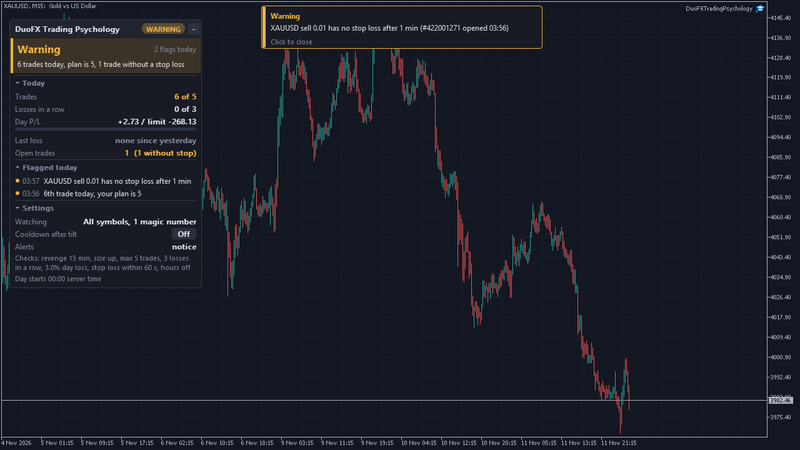
- Today: trades against your plan, losses in a row against your limit, day P/L with a bar against your daily loss limit, the last loss with the time left in its revenge window, and open trades (with the number that have no stop).
- Flagged today: the newest flags first, each with its time. Hover a line to see the symbol, side, lots and time of the trade behind it.
- Settings: what it watches, the cooldown switch, the alert outputs and the checks.
Click a section title to fold it. Click the minus in the header to minimise the panel to a one-line bar, and the plus to open it again. Drag the header to move it. On a short chart it folds Settings and shortens the list by itself. Hover any line for an explanation.
The cooldown
The cooldown is a rule you set for yourself while you are calm. It is off by default.
- 1. Switch it on in the inputs (Cooldown after tilt) or on the panel, before you start trading: Warn only or Close new trades.
- 2. Choose the length: a number of minutes (default 60) or until the next trading day.
- 3. When a losing streak, the daily loss limit or a revenge trade turns the meter to Tilt, the cooldown starts. The panel shows a countdown and the reason.
- 4. In Warn only, every trade you open during the cooldown is flagged. In Close new trades, the EA closes it at once.
Only trades within your chosen scope and opened after the cooldown began are ever closed. Trades that were open when it started are never touched, even if you close part of one. Closing a trade costs its spread and any commission already paid, so the close mode does not save money on that trade. What it does is stop one bad hour from turning into a bad day.
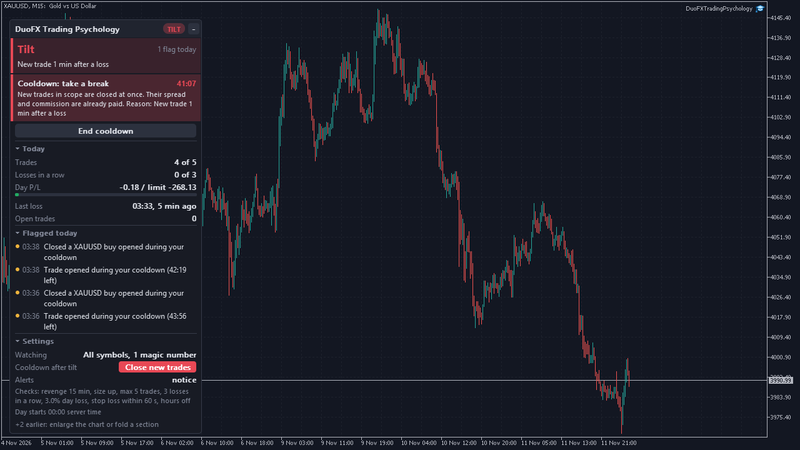
To end a cooldown early, click End cooldown, then confirm with a second click. The panel asks once, because you set the rule for moments like this one.
Alerts
- On-chart notice: a card at the top of the chart with the flag and the trade behind it. It closes after the seconds you set, or on a click.
- Sound, push notification and email: each optional. Push needs your MetaQuotes ID in Tools, Options, Notifications; email needs the mail settings in Tools, Options, Email. They are combined when several flags come close together, so you get one message, not five.
- Alert on: warnings and tilt, or tilt only.
- Send to DuoFX Alert Relay (off by default): Telegram and Discord alerts with the free DuoFX Alert Relay.
Several charts, restarts and accounts
- Today's flags, what was already alerted and a running cooldown are kept in a small file per account and scope. After a restart of the EA or the terminal nothing is alerted twice and the cooldown keeps running.
- If you attach it on several charts with the same scope, one chart sends the alerts and runs the cooldown, and the others show the same panel.
- Netting and hedging accounts both work. On MT4, a partial close creates a new ticket, and the EA follows the chain so the trade counts once.
FAQ
- Can it stop me from opening a trade? No tool can block a trade in MetaTrader. It tells you within a second or two, and the close mode closes a new trade during a cooldown.
- Does it trade? It never opens or changes a trade. It closes only in the cooldown's close mode.
- Does it read my trades from before I attached it? Yes, today's and yesterday's history, so the counters are right from the first second.
- Strategy Tester? It runs and watches the tester's own trades. Panel clicks do not work in the tester, so use the inputs there.
- Is this psychological advice? No. It reads your trades and points at patterns. It cannot tell how you feel. If trading stress feels heavy, talk to someone you trust or a professional.
Settings
- What to watch: symbols, trades, magic numbers, trading day start hour.
- Behaviour checks: revenge minutes, size up, max trades, losing streak, daily loss %, stop loss check and grace seconds, planned hours and their ranges.
- Cooldown after tilt: off, warn only or close new trades; length; minutes; max slippage for closing.
- Alerts: level, on-chart notice and seconds, sound and file, push, email, seconds between combined alerts.
- Panel: corner, offsets, theme, font, font size, start minimised, number of flagged events shown.
Try it free: DuoFX Trading Psychology for MT5 and DuoFX Trading Psychology for MT4. Free now and free for good.
Risk note: trading carries a high risk of loss. DuoFX Trading Psychology is a discipline tool for education and information. It is not financial, medical or psychological advice, it cannot block trades or prevent losses, and it does not promise results.