How to stop revenge trading in MT5: a practical routine for the minutes after a loss

Revenge trading is one of the most common ways a normal losing trade turns into a bad day. It is part of trading psychology that almost every trader meets: a stop loss is hit, the market moves on without you, and a few minutes later you are in again, often with bigger lots, to win it back. This article is about how to stop revenge trading in MT5 and MT4 with a simple routine you can keep with or without any tool, and where DuoFX Trading Psychology (user guide) helps you notice it in time.
DuoFX Trading Psychology is free for MT5 and MT4, and it will stay free.
What revenge trading looks like in your history
Revenge trading has a pattern you can find in your own account history, and it is worth looking for before you change anything:
- A short gap. A new trade a few minutes after a losing trade closed. Planned entries tend to come from a setup on the chart; revenge entries come from the clock and the feeling.
- Bigger lots. The next trade is larger than the one that lost. The plan was 0.10 lots, the revenge trade is 0.20, because "it only needs half the move now".
- A different reason. Often a different symbol, a different direction, or no stop loss at first.
- A cluster. One revenge trade rarely comes alone. Look for three or four trades inside half an hour after a loss.
Open your account history in MetaTrader (Toolbox, History), sort by close time, and mark every trade opened within 15 minutes of a losing close. Compare those trades with the rest: their win rate, their average size and their average result. For many traders this one exercise is enough to take the problem seriously, because the numbers are their own.

Why it happens
A loss is not only money. It feels like being wrong, and the mind wants to repair that quickly. A trader who just lost is also more likely to see a setup that is not there, because the wish to be back at zero colours what the chart seems to show. Fatigue makes this stronger: after hours at the screen, the patience to wait for a real setup is thin. None of this is a character flaw. It is normal, which is why the answer is a routine and not willpower alone.
A routine for the 15 minutes after a loss
You can write this on a card next to your screen:
- 1. Take your hands off the mouse. Stand up, get water, look away from the chart for a few minutes.
- 2. Write one line about the trade. Was it inside your plan? Was the stop where the plan said? A loss inside the plan is a cost of doing business, not a mistake to fix.
- 3. Check your numbers for the day. How many trades so far, how many losses in a row, how far from your daily loss limit.
- 4. Wait for the clock, not the feeling. Pick a fixed pause, 15 minutes is a common choice, and do not enter before it is over, whatever the chart does.
- 5. Size stays the same. The next trade uses the size your plan says, never more because of the last result.
- 6. Two losses, half size. Three losses, done. A fixed rule for a losing streak takes the decision away from the moment.
The aim is simple: the next trade should come from your setup, not from the last result.
Where DuoFX Trading Psychology helps
The routine works best when something reminds you of it at the right moment. DuoFX Trading Psychology watches every trade on the account, including trades from the phone app, and reacts in the moment:
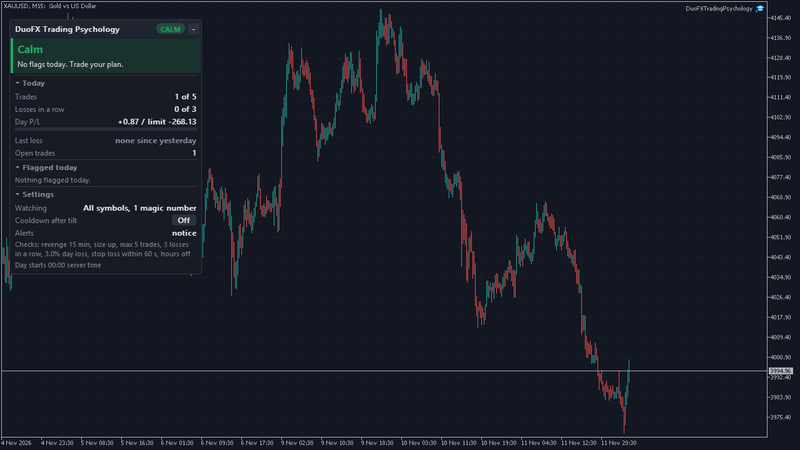
- A new trade inside the revenge window (15 minutes by default, your choice) after a losing close turns the meter to Tilt, with the reason in plain words, for example "2nd trade 4 min after a loss, lots up 2x".
- Bigger lots after a loss on the same symbol and magic number are flagged on their own as well.
- The Last loss line on the panel shows when the last loss closed and how many minutes of the revenge window are left, so step 4 of the routine has a clock.
- An on-chart notice appears at the top of the chart, with optional sound, push to your phone and email. It never blocks the terminal.
If you want a firmer rule, switch on the optional cooldown while you are calm. After a revenge trade, a losing streak or the daily loss limit it starts a break of the minutes you choose. In the close mode it closes trades you open during the break. Trades that were already open are never touched, and you can end the cooldown early with a confirmed click.
Setting it up for revenge trading
- 1. Attach DuoFX Trading Psychology to one chart in a terminal that stays on.
- 2. Set Revenge trade to the pause your routine uses (for example 15 minutes) and leave Size up after a loss on.
- 3. Set Losing streak to the number in your plan (for example 3).
- 4. Choose your alerts: the notice is on by default; add push if you also trade from the phone.
- 5. Optional: switch Cooldown after tilt to Warn only for a week. If you keep ending it early, that is useful information too.
A one-week check
At the end of the week, look at the flagged events and your history together. How many revenge trades were there? Did they lose more often than your planned trades? Did the pause after a loss get easier? Change one thing at a time: a longer pause, a smaller size after a loss, or an earlier stop for the day.
FAQ
- Can MetaTrader block a revenge trade? No. Nothing can block a trade in MetaTrader, and a phone trade never passes through your desktop. What you can do is notice it at once and have a rule ready.
- Is every quick trade after a loss a revenge trade? No. A planned re-entry on a valid setup can come quickly. The flag is a prompt to check, not a verdict.
- What revenge window should I use? Start with 15 minutes and adjust after a week of looking at your own history.
Try it free: DuoFX Trading Psychology for MT5 and DuoFX Trading Psychology for MT4. Free now and free for good, with a step by step user guide.
Risk note: trading carries a high risk of loss. This article and the tool are for education and information, not financial or psychological advice, and they do not promise results.