Ultimate Go Long
Expert Advisor for MetaTrader 5 · version 10.00 · User manual
Actual Algos · seller AnActualBanana on MQL5
- What the EA does
- Installation
- The filters
- Sizing, stops and targets
- News filter (rebuilt in version 8)
- Slot times, daylight saving and midnight (new in V6)
- Quick start
- Presets
- Built-in safeguards
- Lot sizes and cent accounts (new in version 9)
- Input reference
- Backtesting and optimisation
- Support
- Risk notice
1. What the EA does
Ultimate Go Long opens long trades at set times of day — up to four independent slots, each with its own entry time, exit time, filters, position size, stop and target. Several slots can hold a position at the same time. Each slot has its own magic number, the base number plus the slot number minus one (slot 1 uses the base number itself, slot 4 the base plus 3), so each slot's trades are managed on their own. The Inputs tab label reads "slot n uses this + n"; the rule given here is the exact one.
Entry is not limited to the entry minute. If a filter blocks the slot at its entry time, the EA checks again on every tick until the slot's exit time and buys as soon as everything passes. If an order is refused (for example not enough free margin), the slot waits After a failed entry, wait this many seconds (60 by default; version 10) before it tries again; 0 retries on every tick as version 9 did. With Each slot trades at most once a day on (the default) a slot opens at most one trade per day. Switch it off and the slot buys again whenever it holds no position and the filters pass, so after a stop or target is hit it can re-enter in the same window.
2. Installation
- Buy or download the product on the MQL5 Market, or from the Market tab inside MetaTrader 5 (you must be logged in to your MQL5 account there). It installs itself into Navigator → Expert Advisors → Market.
- Open a chart of the symbol and timeframe you want, drag the EA onto it, set the inputs and tick Allow Algo Trading.
- Switch on the Algo Trading button in the terminal toolbar. The Experts tab shows the EA's start-up messages, including its version.
- The free demo runs in the Strategy Tester only. Test there, then on a demo account, before any real account.
The Market version has no licence key. Each purchase includes a fixed number of activations (installations on different computers); reinstalling on the same computer does not use a new one.
3. The filters
| Filter | Passes when |
|---|---|
| Spread | the spread is at most the maximum (points) |
| New day high | the bid trades above the highest bid seen so far today (since 00:00 server time) — an intraday breakout trigger |
| Pullback | price is at least a distance (ATR, points or % of the high) below the historical high over the lookback (0 = all history) |
| EMA trend | price is above the EMA of the chosen timeframe (last closed bar) |
| RSI | RSI is below the level — buying weakness in an up-trend |
Each slot switches each filter on or off for itself. Filters no slot uses are never calculated.
New day high in detail: the filter passes only on the tick that sets the new high, so with it on a slot enters at the first new high inside its window. The day's high is tracked from the first tick of the day (not only inside the window), starts again at server midnight and, after the EA is restarted, is rebuilt from the day's 1-minute bars.
Ultimate Go Long has an optional news filter, switched off by default (see News filter). With it off, a slot trades through economic releases like any other time, so choose entry and exit times with that in mind.
4. Sizing, stops and targets
Each slot has its own sizing, stop and target (groups 8 to 11).
- Sizing: fixed lots (the default), risk as a % of the balance, a fixed amount of money, or risk as a % of a fixed reference account size (group 2). The three risk modes divide the amount at risk by the stop distance. With no stop the EA sizes as if price could fall to zero, which gives a small position, so use fixed lots when a slot runs without a stop.
- When the amount at risk would need less than the minimum lot, the trade is skipped (Skip a trade whose risk is below the minimum lot, on by default); switch it off to round up to the minimum lot instead. Fixed lots are rounded to the broker's lot step and kept between the broker's minimum and maximum (see Lot sizes and cent accounts).
- Stop and target can be off, a number of points, an ATR multiple or a % of the price; a target can also be a multiple of the stop distance (R). They are rounded to the symbol's tick size, and one that is closer than the broker's minimum stop distance (the symbol's stops level) is moved out to that distance.
5. News filter (rebuilt in version 8)
The news filter keeps the EA from trading around scheduled economic releases (interest-rate decisions, inflation and jobs reports and similar). It is off by default (News filter: on): with it off nothing is read and the EA trades as if the filter did not exist. The same filter, with the same inputs and the same wording, is built into every Actual Algos EA.
Switching the filter on is not enough on its own: all three impact levels start on Ignore, so you also choose an action for the levels you care about.
What each action does
| Action | What happens while a news window is active |
|---|---|
| Ignore (default) | Nothing. Events of this impact level are not used. |
| Manage only | No new trades. Trades that are already open are managed as usual. |
| Skip | No new trades, and when the window starts the EA closes its open trades and deletes its pending orders. |
A window runs from the chosen number of minutes before an event until the chosen number of minutes after it. Skip only closes this EA's own trades on the chart symbol (matched by its magic number), never other EAs' or manual trades. Closing a trade costs the spread and books whatever result it has at that moment.
In this EA:
Manage only
- No slot opens a new trade inside the window. A slot that is blocked at its entry time is not used up: it tries again on later ticks and can still buy once the window has passed, as long as its own entry window is open.
- Open trades keep their stop and target, and the slots' exit-time closes still work.
Skip
- Everything Manage only does, and while the window lasts the EA closes the open trades of all its slots (this symbol, its own magic numbers). One line is written to the Experts tab per window; a close that fails is tried again on the next tick.
The three impact levels
| Level | Settings | Default when you switch it on |
|---|---|---|
| High impact (importance 3) | Action, minutes before, minutes after | 30 before, 30 after |
| Medium impact (importance 2) | Action, minutes before, minutes after | 15 before, 15 after |
| Low impact (importance 1) | Action, minutes before, minutes after | 5 before, 5 after |
The level of an event is the importance given to it in the news file or by the MetaTrader calendar. Each level has its own action, so you can, for example, skip high-impact events and ignore the rest. All three actions are Ignore until you change them. If windows of several levels overlap, the strongest action wins (Skip over Manage only over Ignore).
Which events affect which symbol
An event only affects the symbols it should. The EA works out the currencies that move the chart symbol from its name:
| Symbol | Events that count |
|---|---|
| Forex pairs (for example EURUSD, GBPJPY) | Both currencies of the pair, every impact level. |
| US indices (S&P 500, Nasdaq 100, Dow Jones, Russell: names starting SP500, US500, SPX, NDX, NAS, US100, USTEC, WS30, US30, DJ, US2000) | USD, every impact level. |
| Gold, silver, oil and the main crypto CFDs (XAU, XAG, GOLD, SILVER, OIL, WTI, BRENT, BTC, ETH) | USD, every impact level. |
| DAX and other euro-area indices (GDAXI, DAX, GER, DE40, STOXX, EU50, FRA40, CAC) | EUR at every impact level, plus USD high impact only. |
| UK 100 (UK100, FTSE) | GBP at every impact level, plus USD high impact only. |
| Japan 225 (JP225, JPN225, NIKKEI) | JPY at every impact level, plus USD high impact only. |
| Anything else | The base and profit currency MetaTrader reports for the symbol. |
Names are matched by their start, and anything after an underscore (for example _Darwinex ) is ignored. If your broker names a symbol differently, or you want other currencies, fill in News currencies with a comma-separated list such as USD,EUR : the EA then uses exactly those currencies, at every impact level, instead of the automatic list. News categories narrows the events further (empty means all categories; categories exist only in the news file).
Getting news into the EA
| News source | What the EA uses |
|---|---|
| Auto (default) | The news file AA_News.csv if it can be opened; otherwise the live MetaTrader economic calendar. Note that a file, once found, is used instead of the calendar, also on a live chart. |
| CSV file only | Only the news file. If it cannot be opened the EA does not start. |
| Live MT5 calendar only | Only the economic calendar built into MetaTrader. Works on live and demo charts only. |
- Live and demo charts: with Auto and no news file, nothing needs to be installed; the EA uses the MetaTrader economic calendar and the Experts tab says [News] using the live MT5 economic calendar . Whether the calendar has data depends on your broker.
- Strategy Tester: MetaTrader gives the tester no economic calendar, so without a news file no news window is applied in the test and the Experts tab says so ( [News] no news CSV and the MT5 calendar is empty in the Strategy Tester ... ). To test the news filter, put AA_News.csv in the shared Common\Files folder before you start the test.
The news file AA_News.csv
Events are read from a plain CSV file ( AA_News.csv unless you change News CSV: file name) in the terminal's shared Common\Files folder (in MetaTrader: File → Open Common Data Folder, then the Files folder). All Actual Algos EAs on that terminal read the same file. The first line is a header; every other line is one event:
time is the number of seconds since 1 January 1970 counted on the broker's server clock, the clock of the chart and of the Strategy Tester, not UTC. currency is the currency code the event belongs to (USD, EUR, GBP …). importance is 1 (low), 2 (medium) or 3 (high). category is only used when you list categories in News categories (for example employment,inflation,rate_decision ; empty means every event). event is a name that appears in the Experts tab. The lines must be in time order, oldest first: the EA does not sort them, and a file that is out of order can make events be missed.
- The file is not part of the product. A Market product is a single program file, so no data file comes with it, and a file is not promised with the purchase. Build one in this format from a calendar source you trust, or ask support whether a ready-made file is available. A file made by Actual Algos uses the Darwinex server clock (GMT+2, GMT+3 during US summer time); it only fits brokers on that same clock.
- The Strategy Tester and live charts use the same file, so a news test and live trading see the same events. MetaTrader gives the tester no economic calendar of its own.
- The file is read once, when the EA starts. After you replace it, remove the EA from the chart and attach it again (or restart MetaTrader). Events that are not in the file are not blocked, and a file that ends in the past gives no protection after its last line.
- Only events that matter to the chart symbol and belong to an impact level whose action is not Ignore are kept. The Experts tab shows how many when the EA starts: [News] AA_News.csv: N events kept for SYMBOL . If N is 0, check the symbol's currencies, the actions, the categories and the file's time range.
- With News source set to CSV file only, the EA does not start when the file cannot be opened and the Experts tab says so, so a test is never run with a filter you believed was on.
A recommended starting point
This is a place to start experimenting, not an optimised or recommended setting, and it carries no promise about results:
- Switch News filter: on to true.
- Set News, high impact: action to Manage only, and leave its 30 minutes before and after. Leave medium and low impact on Ignore.
- Leave News source on Auto and the currencies empty.
- On a demo chart, check the Experts tab for the [News] line at start. To see what the filter changes, run the same test twice (filter off, filter on) over the same dates.
- Try Skip only if you want open trades closed before events, and keep in mind that closing has a cost.
Version 7 had a simpler, file-only news filter (one importance threshold, one pair of minutes). Version 8 replaces it with this shared filter, which can also use the live MT5 calendar and can close trades. Settings saved with version 7 that used the old news inputs do not carry over: switch the new filter on and choose an action per impact level. With the filter off, version 8 trades like version 6 and 7.
6. Slot times, daylight saving and midnight (new in V6)
Slot times are on the broker's server clock. Daylight saving shift (group 1) moves every slot's entry and exit time by N minutes while the chosen region's daylight saving is on -- set US and 60 minutes to keep a slot on the same UTC (or New York) moment all year on a New-York-close broker such as Darwinex (UTC+2 in winter, UTC+3 in US summer).
A slot whose exit time is earlier than its entry time runs across midnight (for example 22:00 to 02:00). From V6 such a window counts as one trading day: Each slot trades at most once a day no longer lets it open a second trade after midnight.
7. Quick start
- Attach the EA to the symbol you want to buy (index CFDs are typical).
- Set slot 1's entry and exit times in server time, its sizing and its stop.
- Switch on the filters you want for that slot, then add more slots at other times if you like.
- Backtest over several years: long-only time strategies depend heavily on the market's long-term drift.
8. Presets
Three presets are included; load one with Load on the Inputs tab. They are illustrations of how the inputs fit together, not recommendations: they are not optimised, they are not the settings Actual Algos trades, and a preset that suits one broker's history may lose on another's or on a later period. Times are server time (GMT+2, GMT+3 in US summer). Every preset sets every input (the magic number included, at its default; set your own afterwards if you run more than one chart), and the news filter is off in all of them.
| Preset | What it sets |
|---|---|
| UGL default | No changes: every input at the value the EA starts with. |
| UGL US indices - cash open and afternoon | Two slots on a US index CFD. Slot 1 buys at 16:35 and exits at 22:55 if the price is above the 200 EMA (H1), with a 3 ATR stop and no target. Slot 2 buys at 19:30 on a new day high, with a 2 ATR stop and a 2R target. Risk 0.5 % of the balance per trade; ATR on H1. |
| UGL DAX - morning pullback with RSI | One slot on a DAX CFD. Buys at 10:05 (exit 18:25) after a pullback from the high while the 2-period RSI (H1) is below 30, with a 3 ATR stop and no target. Risk 0.5 % per trade. |
9. Built-in safeguards
- If the free margin cannot carry a trade's size, the lots are reduced to what it can carry (the trade is skipped when not even the minimum lot fits), so the broker never rejects an order for lack of money.
- A trade whose stop or target is still too close to the market for the broker to accept (the spread counts) is refused instead of being sent; the Experts tab says stop or target too close to the market ... trade skipped.
10. Lot sizes and cent accounts (new in version 9)
The EA sizes every trade to what your broker allows, so the same settings work on accounts with different lot rules.
- Minimum lot and lot step. The EA follows the symbol's own minimum lot, maximum lot and lot step: 0.01 on most forex symbols, 0.001 on nano-lot accounts, 1 on some CFDs. It never sends a size the broker would reject, and a trade whose size would be below the broker's minimum is skipped (or, where the EA has the input, raised to the minimum).
- Cent accounts. If the account currency is a cent currency (USC, USX, EUC, GBC), money amounts are in cents. By default (Cent accounts: money inputs are in USD = off) the EA reads every money input in the account currency, that is in cents: each slot's size value when its sizing is set to a money amount. A value of 100 then means 100 cents, or 1 USD. Balance-based percentages are not affected.
- Money inputs in USD. Switch Cent accounts: money inputs are in USD on if you would rather type the amounts in US dollars. On a cent account the EA then multiplies them by 100 to get cents. On an ordinary account the switch changes nothing.
- Other cent codes. Cent accounts: account currency codes treated as cent lists the currency codes the EA treats as cent accounts (default USC,USX,EUC,GBC , separated by commas). If your broker uses a different code, add it to the list.
Changes in this version (9). Lot rounding now follows the broker's lot step exactly. Earlier versions rounded down through a small tolerance, so a fixed lot that is not a clean multiple in floating-point arithmetic (for example 0.29) could trade one step smaller than you set (0.28). It is now traded as set. For the same reason a trade sized from risk can come out one step larger than before in rare cases. Settings that use clean lot sizes behave as before. The two new inputs default to off and to the list above, so existing settings keep working.
11. Input reference
Every input with its default, in the order of the Inputs tab.
1. General
| Input | Default |
|---|---|
| Magic number (slot 1 uses it, slot n uses it + n - 1) | 20260908 |
| Order comment | Ultimate Go Long |
| Max slippage (points) | 20 |
| Max open positions across all slots (0 = no limit) | 0 |
| Each slot trades at most once a day (a window across midnight is one day) | true |
| After a failed entry, wait this many seconds before the slot tries again (0 = every tick, as V9) | 60 |
| Daylight saving shift of the slot times | No DST adjustment |
| Daylight saving shift (minutes) | 60 |
| Log the sizing of each entry | true |
| Detailed log | false |
2. Shared sizing
| Input | Default |
|---|---|
| Reference account size (reference-% sizing) | 10000.0 |
| Skip a trade whose risk is below the minimum lot | true |
| Cent accounts: money inputs are in USD (x100 on a cent account) | false |
| Cent accounts: account currency codes treated as cent | USC,USX,EUC,GBC |
3. Filter: EMA trend
| Input | Default |
|---|---|
| EMA: period | 200 |
| EMA: timeframe (last closed bar) | PERIOD_H1 |
4. Filter: RSI
| Input | Default |
|---|---|
| RSI: period | 2 |
| RSI: timeframe | PERIOD_CURRENT |
| RSI: buy only while RSI is below | 10.0 |
5. Filter: pullback from the historical high
| Input | Default |
|---|---|
| Pullback: distance basis | ATR multiple |
| Pullback: price at least this far below the high | 2.0 |
| Pullback: bars for the high (0 = all history) | 0 |
| Pullback: timeframe of the high | PERIOD_D1 |
6. Filter: spread
| Input | Default |
|---|---|
| Spread: max spread (points) | 30 |
7. ATR
| Input | Default |
|---|---|
| ATR period (ATR-based distances) | 14 |
| ATR timeframe | PERIOD_CURRENT |
8. Slot 1
| Input | Default |
|---|---|
| Slot 1: on | true |
| Slot 1: entry hour (server) | 9 |
| Slot 1: entry minute | 30 |
| Slot 1: exit hour | 15 |
| Slot 1: exit minute | 55 |
| Slot 1: close the position at the exit time | true |
| Slot 1: require the spread filter | false |
| Slot 1: require a new high of the day | false |
| Slot 1: require the pullback filter | false |
| Slot 1: require price above the EMA | false |
| Slot 1: require RSI below its level | false |
| Slot 1: position sizing | Fixed lots |
| Slot 1: size (lots / risk % / money / reference %) | 0.10 |
| Slot 1: stop loss basis | Points from entry |
| Slot 1: stop loss value | 1000 |
| Slot 1: take profit basis | No take profit |
| Slot 1: take profit value | 0 |
9. Slot 2
| Input | Default |
|---|---|
| Slot 2: on | false |
| Slot 2: entry hour (server) | 10 |
| Slot 2: entry minute | 30 |
| Slot 2: exit hour | 15 |
| Slot 2: exit minute | 55 |
| Slot 2: close the position at the exit time | true |
| Slot 2: require the spread filter | false |
| Slot 2: require a new high of the day | false |
| Slot 2: require the pullback filter | false |
| Slot 2: require price above the EMA | false |
| Slot 2: require RSI below its level | false |
| Slot 2: position sizing | Fixed lots |
| Slot 2: size (lots / risk % / money / reference %) | 0.10 |
| Slot 2: stop loss basis | Points from entry |
| Slot 2: stop loss value | 1000 |
| Slot 2: take profit basis | No take profit |
| Slot 2: take profit value | 0 |
10. Slot 3
| Input | Default |
|---|---|
| Slot 3: on | false |
| Slot 3: entry hour (server) | 12 |
| Slot 3: entry minute | 0 |
| Slot 3: exit hour | 15 |
| Slot 3: exit minute | 55 |
| Slot 3: close the position at the exit time | true |
| Slot 3: require the spread filter | false |
| Slot 3: require a new high of the day | false |
| Slot 3: require the pullback filter | false |
| Slot 3: require price above the EMA | false |
| Slot 3: require RSI below its level | false |
| Slot 3: position sizing | Fixed lots |
| Slot 3: size (lots / risk % / money / reference %) | 0.10 |
| Slot 3: stop loss basis | Points from entry |
| Slot 3: stop loss value | 1000 |
| Slot 3: take profit basis | No take profit |
| Slot 3: take profit value | 0 |
11. Slot 4
| Input | Default |
|---|---|
| Slot 4: on | false |
| Slot 4: entry hour (server) | 14 |
| Slot 4: entry minute | 0 |
| Slot 4: exit hour | 15 |
| Slot 4: exit minute | 55 |
| Slot 4: close the position at the exit time | true |
| Slot 4: require the spread filter | false |
| Slot 4: require a new high of the day | false |
| Slot 4: require the pullback filter | false |
| Slot 4: require price above the EMA | false |
| Slot 4: require RSI below its level | false |
| Slot 4: position sizing | Fixed lots |
| Slot 4: size (lots / risk % / money / reference %) | 0.10 |
| Slot 4: stop loss basis | Points from entry |
| Slot 4: stop loss value | 1000 |
| Slot 4: take profit basis | No take profit |
| Slot 4: take profit value | 0 |
12. News filter
| Input | Default |
|---|---|
| News filter: on | false |
| News, high impact: action | Ignore (trade as normal) |
| News, high impact: minutes before | 30 |
| News, high impact: minutes after | 30 |
| News, medium impact: action | Ignore (trade as normal) |
| News, medium impact: minutes before | 15 |
| News, medium impact: minutes after | 15 |
| News, low impact: action | Ignore (trade as normal) |
| News, low impact: minutes before | 5 |
| News, low impact: minutes after | 5 |
| News source | Auto: CSV if present, else live MT5 calendar |
| News CSV: file name in the terminals' Common\Files folder | AA_News.csv |
| News currencies (empty = automatic for the symbol) | |
| News categories, comma separated (empty = all) |
12. Backtesting and optimisation
- Model: 1 minute OHLC is fast and fine for bar-close logic; use Every tick based on real ticks for tick triggers, pending orders and tight stops.
- All times are broker server time; test on the broker and server clock you will trade.
- Keep part of the history out of the optimisation to check the result.
13. Support
Use the product comments or a private message on MQL5 to the seller (AnActualBanana). Please include the product version, broker, symbol, timeframe, your settings (a saved .set file helps) and the Experts-tab lines around the problem. No custom coding and no individual trading advice.
14. Risk notice
Trading leveraged products such as CFDs, forex and crypto carries a high risk of loss and is not suitable for everyone. You can lose all of the money you trade with.
Nothing in this manual, in the EA's default settings or in its presets is a promise, forecast or guarantee of profit. Backtested and past results do not guarantee future results, and results will differ between brokers, symbols, periods and account types. Stops, filters and safeguards can fail to limit a loss, for example in fast markets, on gaps or when the broker's spread or execution changes.
The EA and its settings are tools, not financial advice. Test on a demo account first and only trade money you can afford to lose.
Ultimate Go Long 10.00 · © 2026 Logan McClain / Actual AlgosExample settings (not optimised, for testing only)
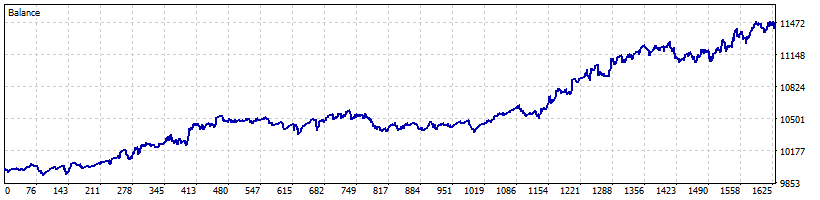
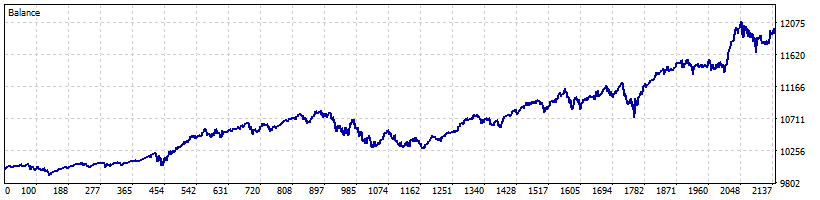
These are the two example configurations shown in the product's Strategy Tester screenshots. They are a starting point for your own testing, not a recommendation. Convert the times to your broker's server clock.
- S&P 500 index CFD, M5 chart. Slot 1 only. Buy at 18:55 New York time (the evening before the US cash session), close at 07:15 New York time. Trend filter on: price above the daily EMA 100. No stop, no target, fixed lots. Daylight saving: US.
- Nasdaq 100 index CFD, M5 chart. Slot 1 only. Buy at 18:05 New York time, close at 16:50 New York time the next day. All filters off. No stop, no target, fixed lots. Daylight saving: US.
Size with care: these hold an index position for many hours without a stop, so use a lot size where a large overnight gap is a loss you can accept. A timed long position follows the market; it gains when the index rises and loses when it falls.