Stop calculating lot size by hand: risk-based trading in MT4 and MT5

Most traders agree on one rule: risk the same small percentage of the account on every trade, for example 1%. Very few actually do it. The reason is simple: in MetaTrader the lot size has to be calculated by hand, and the calculation changes with every symbol, every stop loss distance and every account size.
In this post I explain how the calculation works, why doing it by hand leads to mistakes, and how to make MetaTrader do it for you.
The formula
The lot size for a fixed risk is:
Lots = (Balance × Risk %) ÷ (Stop loss distance × Value of one point per lot)
Example: balance 10 000 USD, risk 1% = 100 USD, stop loss 250 points on EURUSD, where one point on 1 lot is worth 1 USD. Lots = 100 ÷ (250 × 1) = 0.40 lots.
It looks easy, but in real trading:
- the value of a point is different on every symbol (gold, indices, crypto, JPY pairs, accounts in EUR...) and can change during the day;
- the stop loss is often placed on a chart level, so the distance is never a round number;
- the result has to be rounded to the broker's lot step (0.01, 0.1...) and kept within minimum and maximum lot;
- you have to do it before the price moves away.
The usual result: traders round up "a little", use the same lot on every symbol, or skip the stop loss entirely. That is exactly how one bad trade wipes out a week of good ones.
Why fixed lots are dangerous
With a fixed 0.50 lot, a 100-point stop loss and a 600-point stop loss are completely different risks: the second trade can lose six times more. Your results then depend on where you put the stop, not on how good your trades are. With a fixed risk % every trade weighs the same, and a losing streak costs a predictable amount.
Let the chart do the math
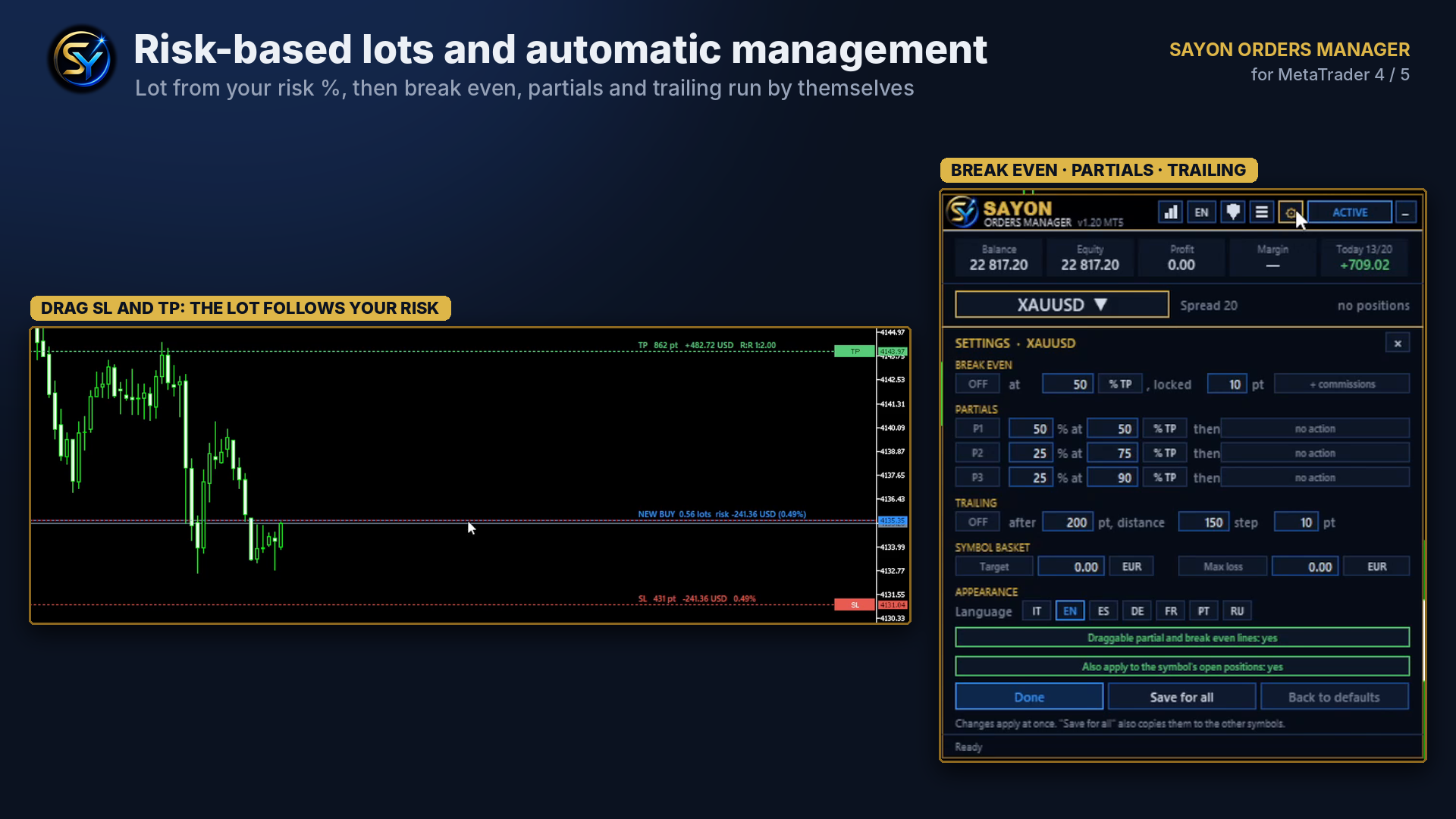
The most natural way to work is visual: you decide where the stop loss and the take profit go on the chart, and the panel calculates the lot from your risk.
- Set your risk once: a % of the balance (or a fixed amount).
- Drag the stop loss line to the level you want. The lot updates instantly, already rounded to the broker's lot step.
- Drag the take profit: you see the reward and the R:R before entering.
- Press BUY or SELL. Market or pending order, the stop loss and take profit are sent with the order.
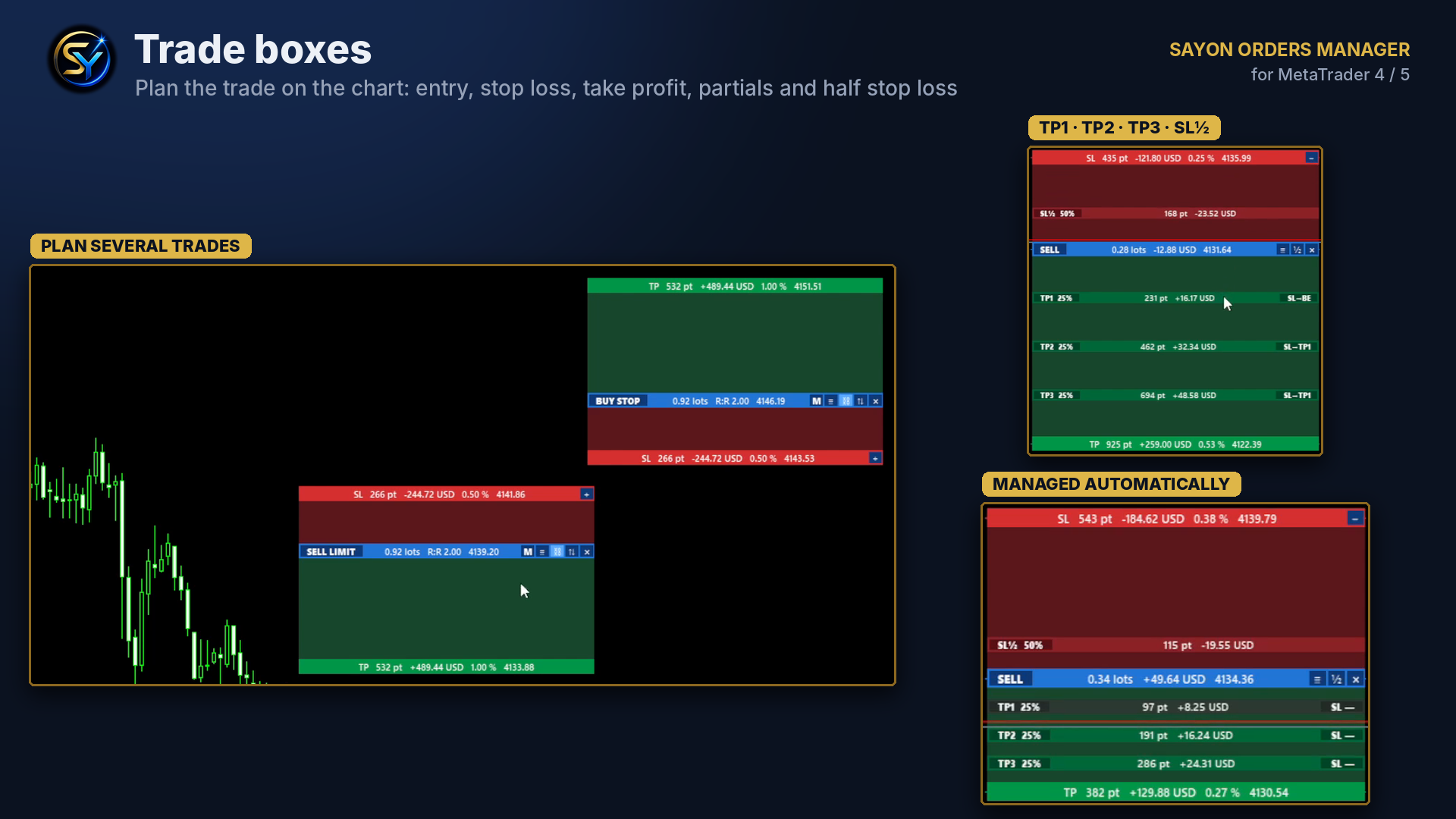
If you prefer to plan trades in advance, trade boxes do the same with a rectangle drawn on the chart: entry, stop loss and take profit are the edges of the box, and the trade opens by itself when the price reaches it. Inside the box you can add partial take profits and move the stop loss to break even automatically.
After the entry: protect the trade
Risk management does not end with the lot. The rules you decide before the trade should be applied without hesitation while it runs:
- break even when the price has moved in your favour by a set distance;
- partial closes at TP1, TP2, TP3;
- trailing stop to follow the move;
- basket close of all positions of a symbol (or of the account) at a profit or loss target.
Saved as rules per symbol, they are applied automatically to every new trade.
The panel I use
I built SAYON Orders Manager for exactly this way of trading: lot from risk with draggable lines, trade boxes with partials, grids in one click, break even, trailing, baskets, and the SAYON Coach, which reads your history and shows the rules hidden in your own results. Same features on MetaTrader 4 and MetaTrader 5.
» SAYON Orders Manager MT5
» SAYON Orders Manager MT4
» Free to track your day: SAYON Daily Dashboard MT5 / MT4
In short
- Fixed risk % on every trade, not fixed lots.
- Lots = risk in money ÷ (stop distance × point value), rounded to the lot step.
- Place the stop where the chart says, then let the panel size the lot.
- Decide break even, partials and trailing before the trade, and let them run automatically.
How do you size your trades today? Tell me in the comments.




