
AETHERIS Signal Studio: a platform for your own signals, not another trading robot

AETHERIS Signal Studio is not another trading robot. It is a platform: you design your own trading signals on a panel in the chart and run as many of them as you want, side by side, on one MetaTrader 5 account.
Almost every Expert Advisor works the same way. Someone found a strategy, sealed it inside a file and shows you a backtest. You cannot see why it trades, you cannot change what it does, and when the market changes you wait for an update or buy the next robot.
Signal Studio turns this around. It gives you the workshop instead of a finished product: the level sources, entries, filters, stops, exits, news rules and risk limits that strategies are made of, as blocks you combine on the panel. No code, no set files, nothing hidden. The strategies are yours.
That is why this page shows no profit curves. What Signal Studio earns depends on the signals you build and run. What it gives you is the freedom to build them, try them and run them all together under one set of account rules.
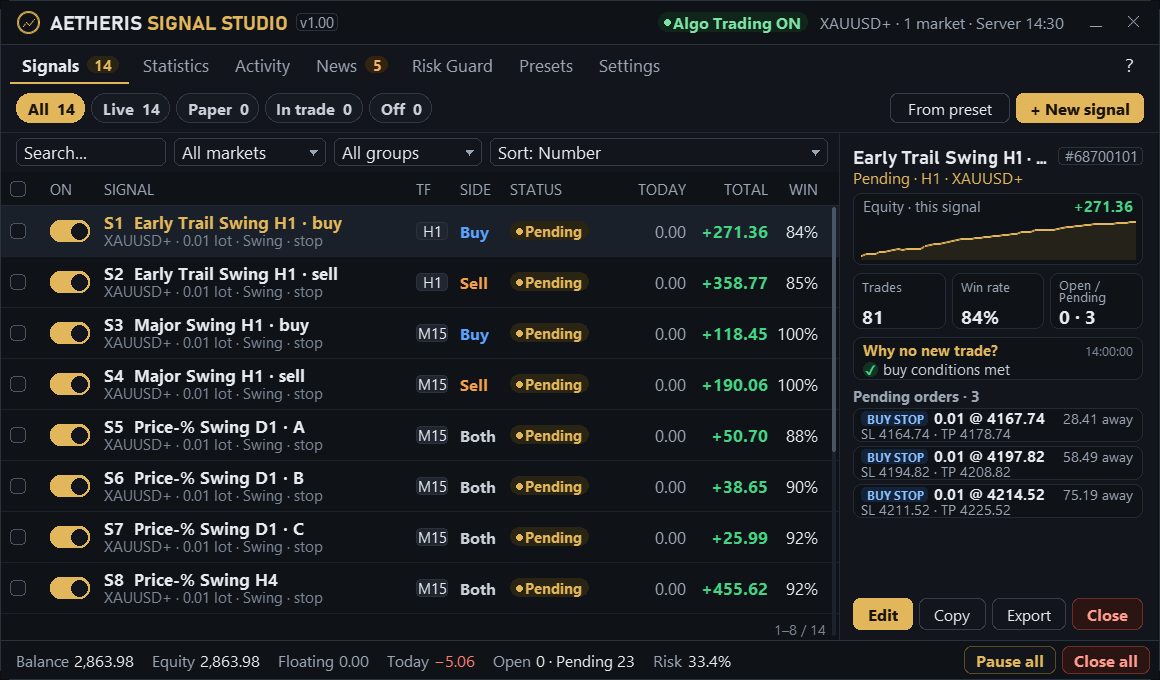
One platform, four jobs
- Build: Make a signal from blocks: where the level comes from, how to enter, which conditions must agree, how to stop, take profit, trail and exit, when to stay out. Every value is a setting you can see and change, also in the included examples, so any signal can be rebuilt by hand.
- Run many: No limit on signals, on one symbol or many: Live, Paper or Off each, switched while the EA runs. Every signal has its own magic number, statistics, activity log and limits, so you always know which idea made or lost what.
- Protect: The Risk Guard sits above every signal: open positions per account, per direction and per market, money at the stop, daily loss, equity drawdown stop, spread, Friday close, lot cap. Many signals share one balance without stacking up risk.
- Prove: Paper mode runs a signal's full logic at the real bid and ask without money. The Strategy Tester runs the signals that are on in your panel, with nothing to export. "Why no new trade?" names the condition that is not met yet.
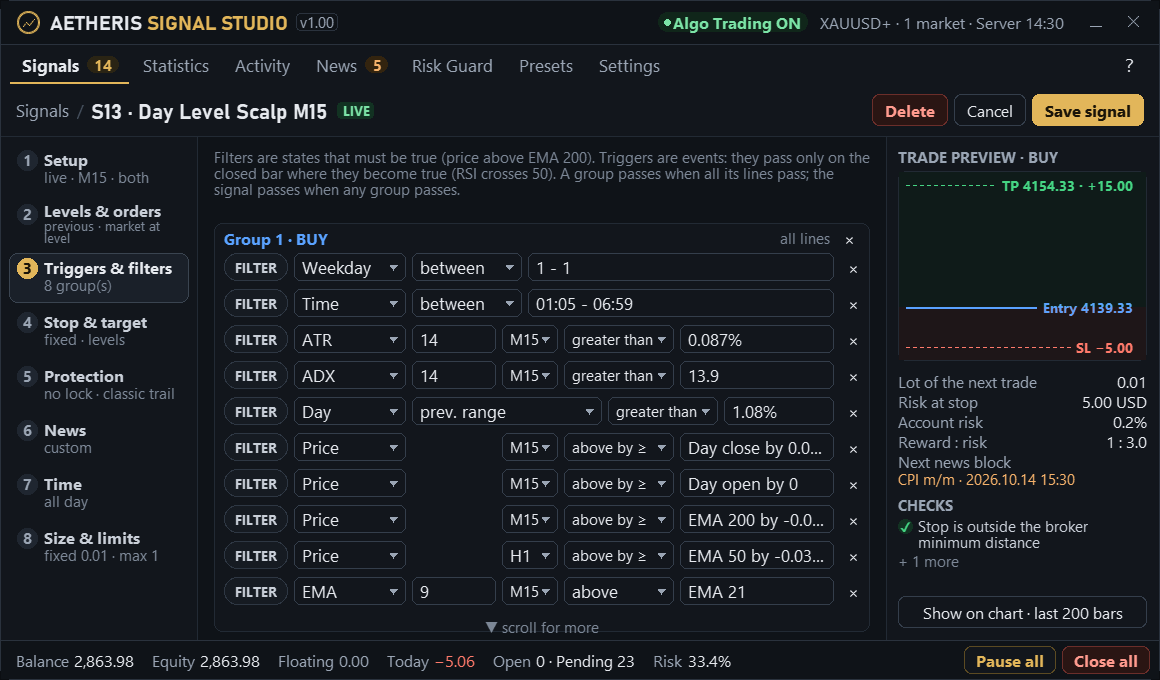
What you build with
- 12 level sources: swing fractal, ZigZag, channel, previous day/week/month, time range, open ± range, indicator line, impulse candle, round number, market structure, session open, pivot points.
- 6 entry methods: breakout stop, retest, fade, close beyond, market on a trigger, market at the level (no order waits at the broker).
- 21 indicators in AND / OR groups: SMA, EMA, WMA, RSI, MACD, Stochastic, Bollinger Bands, Keltner, ADX, CCI, ATR, Donchian, Momentum, ATR rank, Parabolic SAR, SuperTrend, Ichimoku, Williams %R, MFI, StdDev and Volume, plus price, candle body, day values, time of day and weekday. Each line has its own timeframe and settings, any line of a multi-line indicator can be picked, and a compared indicator can be read N bars back.
- Stops, targets, protection: stop from a fixed distance, ATR, swing, % of price, previous-day range or the level; up to three targets; break-even after TP1; profit lock with repeat steps; five trailing modes; time and candle exits.
- Distances in any unit: price, points, % of price, % of the day open, × ATR or × risk, so one signal fits any price level.
- News per signal: block, ignore or trade only around news; currencies, impact, window and single events (NFP, CPI, FOMC...); pending orders deleted and open trades closed or protected in the window.
- Hours, days and size: sessions of any hours on all seven days, Monday-from and Friday-until, fixed lot, lot per balance or risk %, daily limits per direction, layers, one basket at a time per group of signals.
- Any broker, several markets: signals trade markets, not symbol names: the EA finds the account's own symbol, and one chart can run signals on gold, indices or currencies at once. Lots come from the terminal's own loss calculation for the exact symbol.
- Setup checks: a signal runs exactly as it is set. Settings that contradict each other, values the EA does not understand and two live signals that would place the same orders are refused with the reason, never changed silently. Magic numbers are given out automatically and never shared.
- Statistics and activity: profit, win rate, profit factor, drawdown, equity line and result by month per signal; a log of every order, fill, stop move, exit, rule and error.
- Share and back up: export a signal as a file, import signals from others, daily backups, open-trade state kept across restarts.
- 12 languages, help on every screen: English, Russian, Chinese, Spanish, Portuguese, Japanese, German, Korean, French, Italian, Turkish and Vietnamese; press ? on any screen for its help; phone alerts in the panel language.
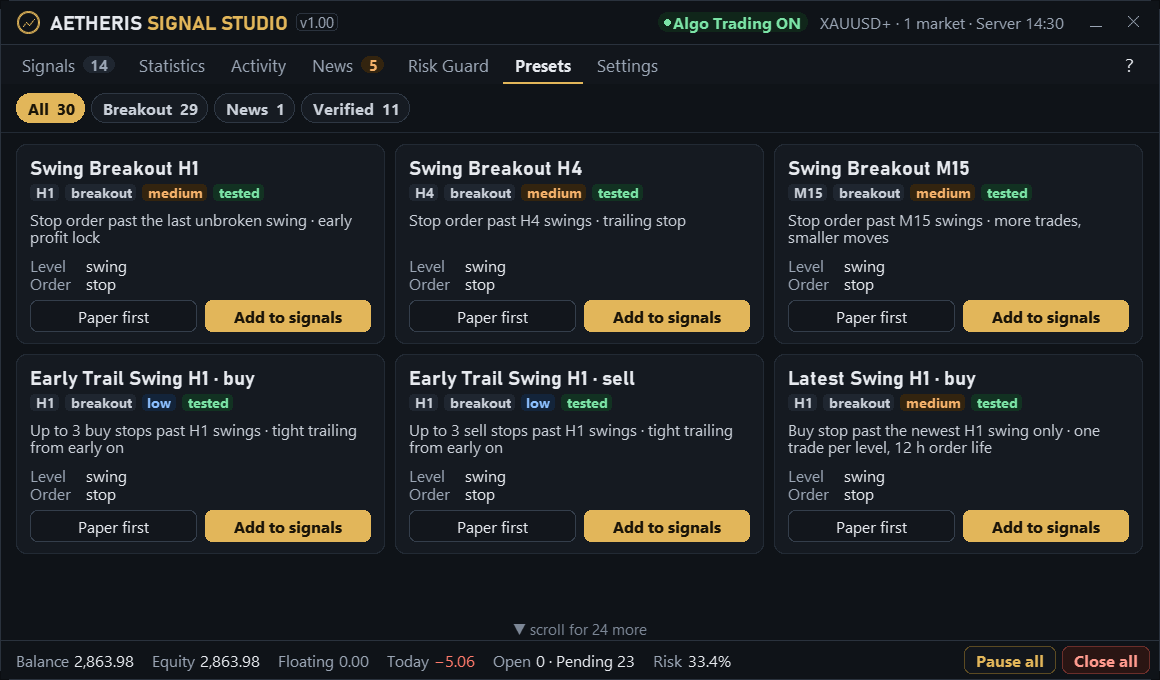
30 example signals for gold
To start from something, Signal Studio includes 30 ready signals for gold, made from the same blocks as yours: swing breakouts on M15, H1, H4 and D1, channel breakouts, entries at the previous day's high and low, and stop orders around high-impact news. The first-start setup ticks 14 of them, added switched off. Open any of them to see exactly how it is made, change it, or take it apart for your own ideas.
Roadmap: AI inside the studio
The next stage connects Signal Studio to AI models through an API, with your own key, so the platform does not only run your ideas but also helps you build and judge them:
- AI signal builder: describe a strategy in your own words; the studio drafts the blocks for you to review, try on paper and switch on.
- Prompt filters: a condition line written as a prompt (for example "is this move driven by news?") that passes or blocks an entry, next to the indicator lines.
- AI decisions: an AI step that can approve entries and manage open trades (move the stop, take profit early, close), always inside the limits of the Risk Guard.
These features are planned and are not part of version 1.00; their scope and timing may change. Market updates are free for everyone who has bought the product.
Launch price
Signal Studio starts at $99. The price goes up by $100 after every 10 copies sold, so the earliest buyers pay the least. Everyone who buys receives every update, the AI stages included, at no extra cost (an AI provider's own fees, paid with your key, are separate).
Signal Studio is available on the MQL5 Market at the launch price of $99.




