Northline Prop Shield — Northline Algo · product page and free demo
Northline Prop Shield is an Expert Advisor for MetaTrader 5 that protects a prop firm account with the real rules of its program. This guide explains how to install it, how to read the panel, and what each protection does.
1. Installation (2 minutes)
- Open one chart of your prop firm account (any symbol). One instance protects the whole account.
- Drag Northline Prop Shield onto the chart.
- In the Inputs tab:
- Prop firm program: choose your program (for example FTMO 2-Step).
- Account phase: Phase 1, Phase 2 or Funded. The profit target and the "funded only" rules depend on it.
- Account size: leave 0 to detect it from the first deposit of the account, or type it (for example 100000).
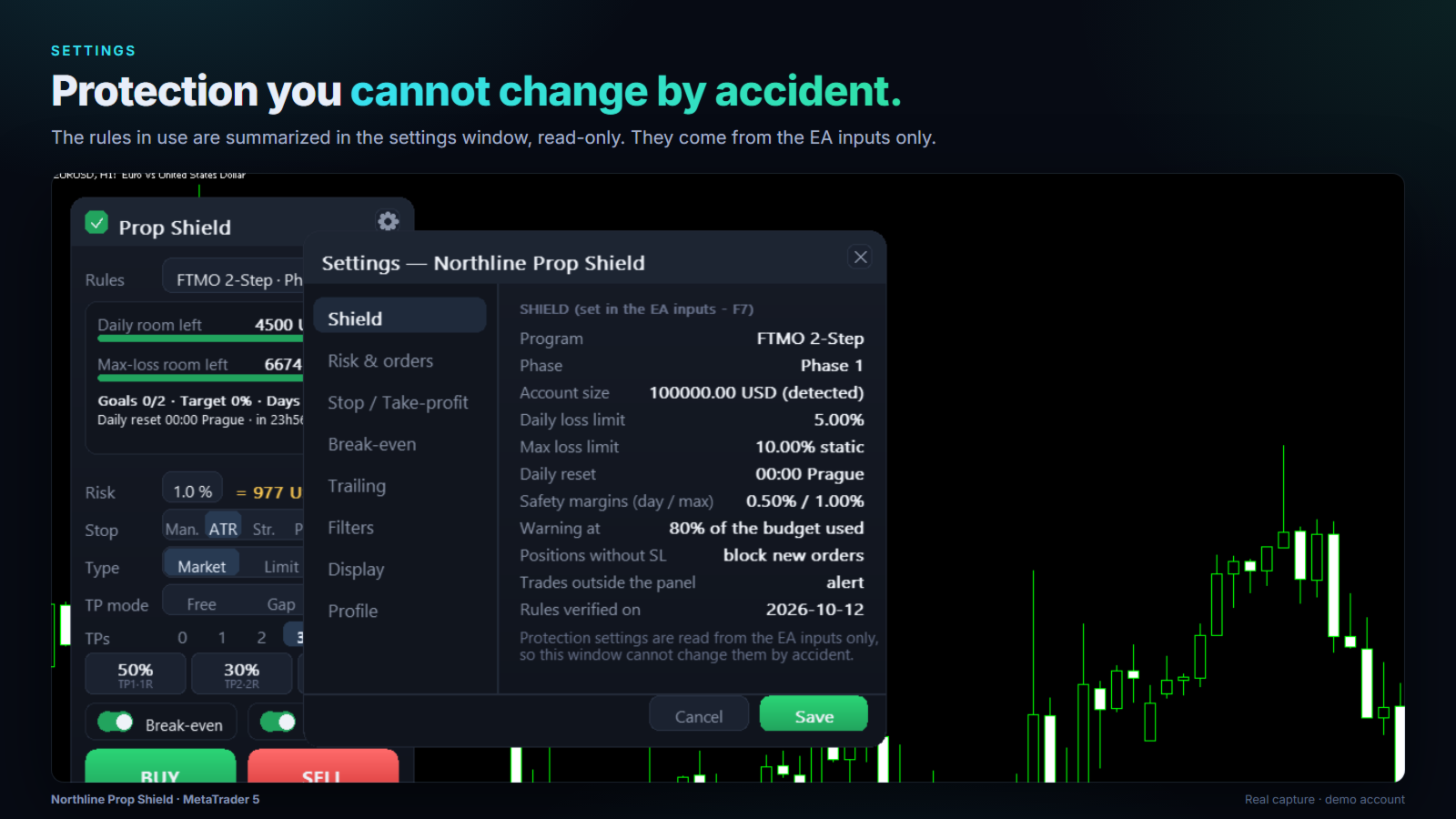
- Safety margins: how far above the firm's limits the Shield must stop (default 0.5% of the account size for the daily limit, 1% for the max-loss limit).
- Enable Algo Trading in MetaTrader.
- For push notifications: MT5 > Tools > Options > Notifications, enter your MetaQuotes ID (shown in the MT5 mobile app).
Keep MetaTrader running during your trading days (a VPS is recommended). The Shield records the equity at the firm's daily reset only while it runs.
2. Reading the panel
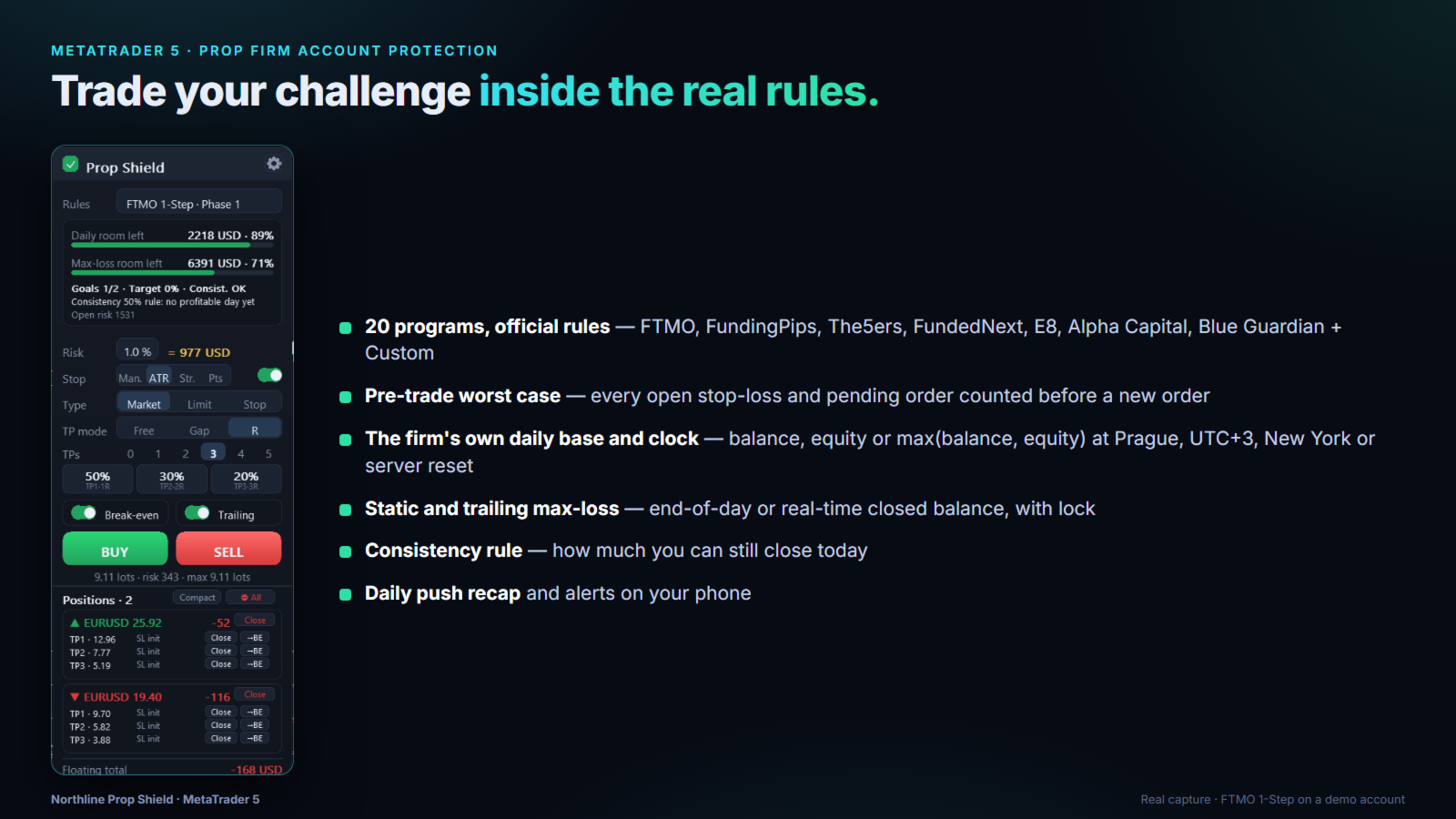
Rules — the program and phase in use.
Daily room left / Max-loss room left — the money you can still lose before the Shield line (the firm's limit plus your safety margin), and the share of the budget still available. Green, then orange near the warning level, then red.
Lines under the gauges - Goals — challenge objectives met: profit target (%), trading days, profitable days, consistency. - Consistency (programs with a best-day rule) — your current ratio, the profit still needed on other days, or how much more you can close today. - Daily reset — the next reset in the firm's own clock, and the time left. - Open risk — what you would lose in addition if every open stop-loss and pending order were hit now. - A red BLOCKED line explains why new orders are refused.
Order area — risk (% of balance), stop-loss mode (manual line, ATR, structure, points), order type (market, limit, stop), take-profit mode (free lines, gap, R multiple), number of take-profits and their partial %, break-even and trailing switches, BUY / SELL. Under the buttons: the size of the next order, its risk (stop-loss + fees) and the maximum lot you can still open.
Positions — every trade opened from the panel, with close and break-even per take-profit leg, and close all.
3. The protections
3.1 Exact firm rules
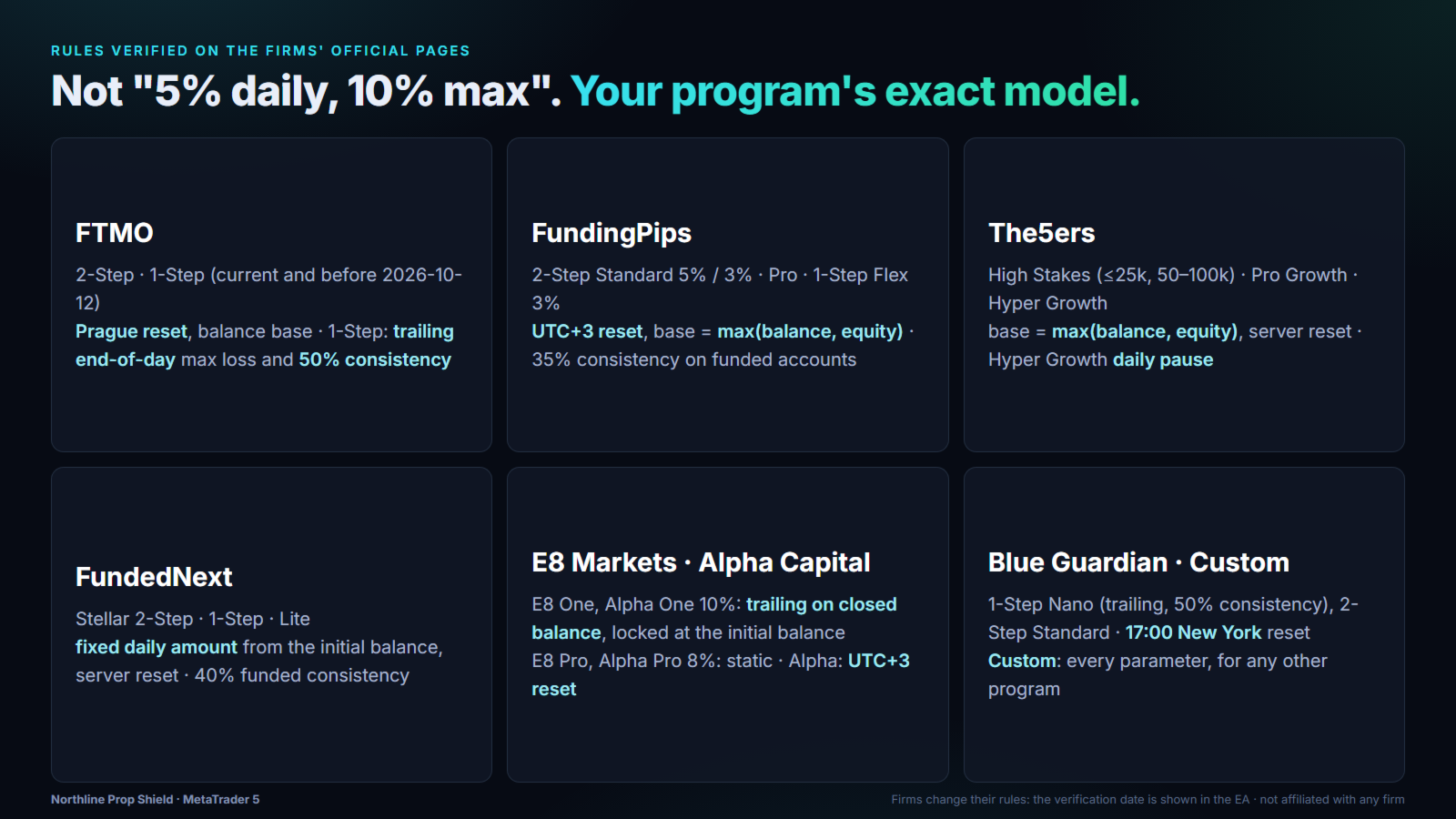
Each program defines: - the daily loss base at the reset: balance, higher of balance and equity, or equity; - whether the daily limit is a % of the initial account size or of that base; - the reset clock: Prague midnight, a fixed UTC offset, 17:00 New York or the broker server; - the max-loss model: static, trailing on the highest end-of-day balance, or trailing in real time on the highest closed balance, with or without a lock at the initial balance. The settings window (gear icon) shows the rules in use and their verification date.
3.2 Pre-trade worst case
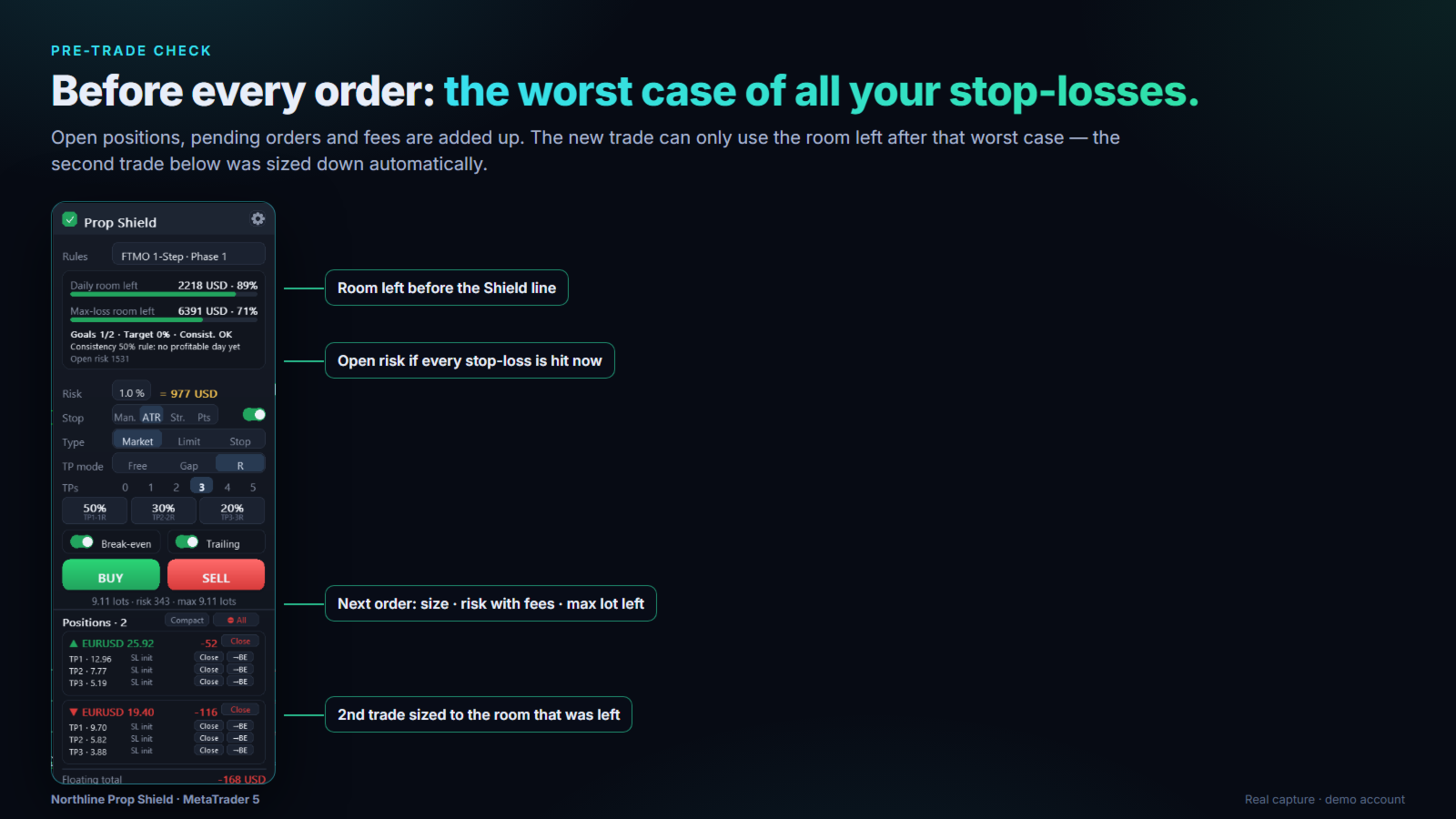
Before an order is sent, the Shield adds up the loss of all open stop-losses and pending orders (commissions included, detected per symbol). The new order can only risk a share of the room that is left after that worst case (input Max share of the remaining room one new trade may risk, default 0.5). If a position or order has no stop-loss, the worst case is unlimited and new orders are blocked until it is fixed. On a netting account, a new order is refused while a position or order already exists on the symbol, because it would merge with it and change its stop-loss. After you confirm an order, the check is done again; if the room changed, a smaller size is sent or the order is cancelled - never a bigger one.
3.3 The Shield line
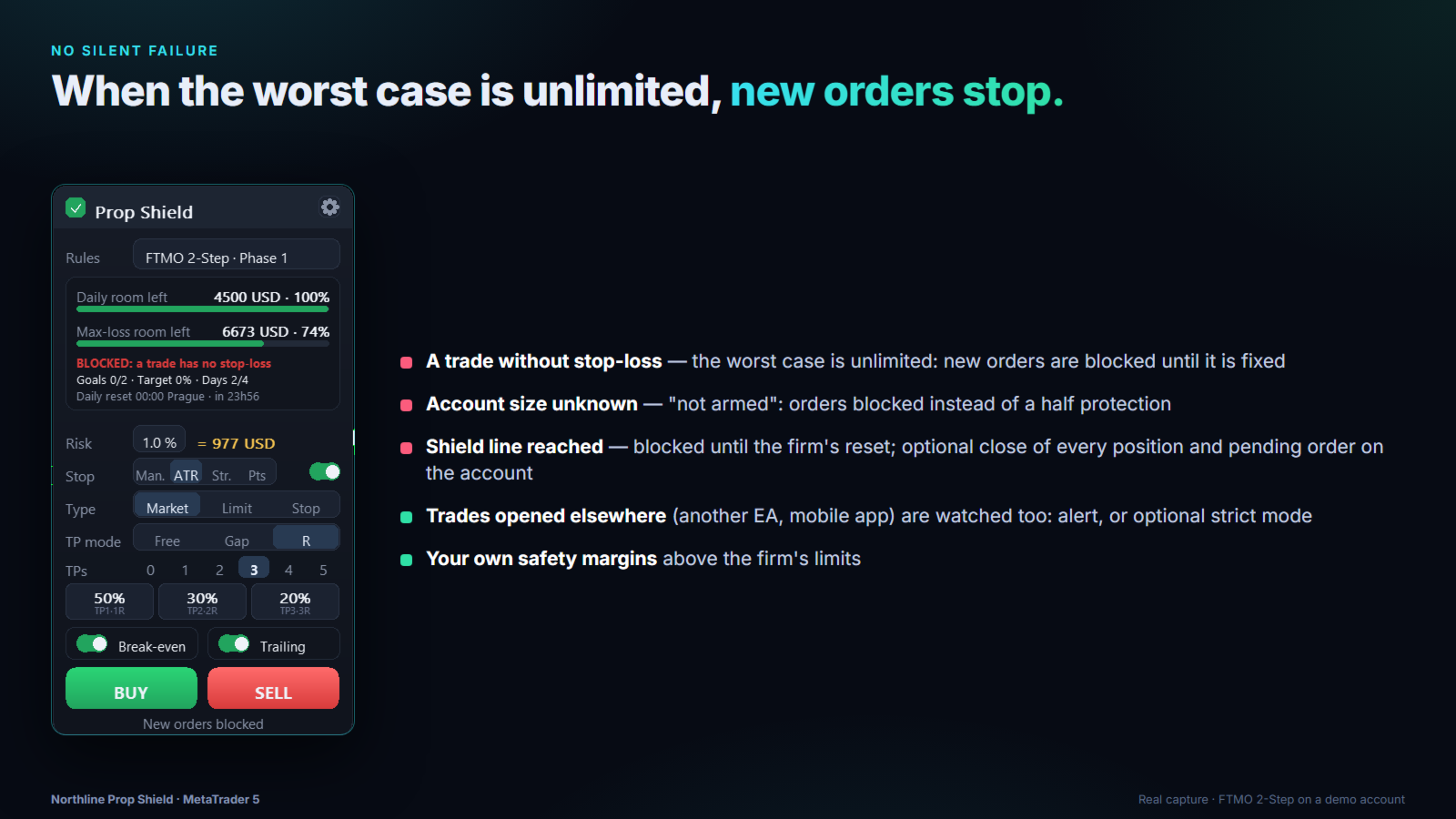
- Warning when the chosen share of a budget is used (default 80%).
- Daily line reached: new orders blocked until the firm's next reset; if Close all at the Shield line is on, every position and pending order of the account is closed (pending orders first).
- Max-loss line reached: blocked for good on this account.
- Programs with a daily pause (for example The5ers Hyper Growth) are handled as a pause, not a breach.
3.4 Trades opened outside the panel
The Shield watches the whole account. If the worst case of what is open crosses the Shield line, you get an alert. With the optional strict mode, it cancels pending orders first, then closes the position whose removal reduces the overrun the most - one action at a time, and never a winning position whose closing would only raise a trailing floor.
3.5 Consistency

For programs with a best-day rule, the Shield tracks the share of your best day in the total profit, and tells you the maximum you can still close today. If the take-profits of a new order would exceed it, the confirmation shows a warning.
3.6 Daily recap
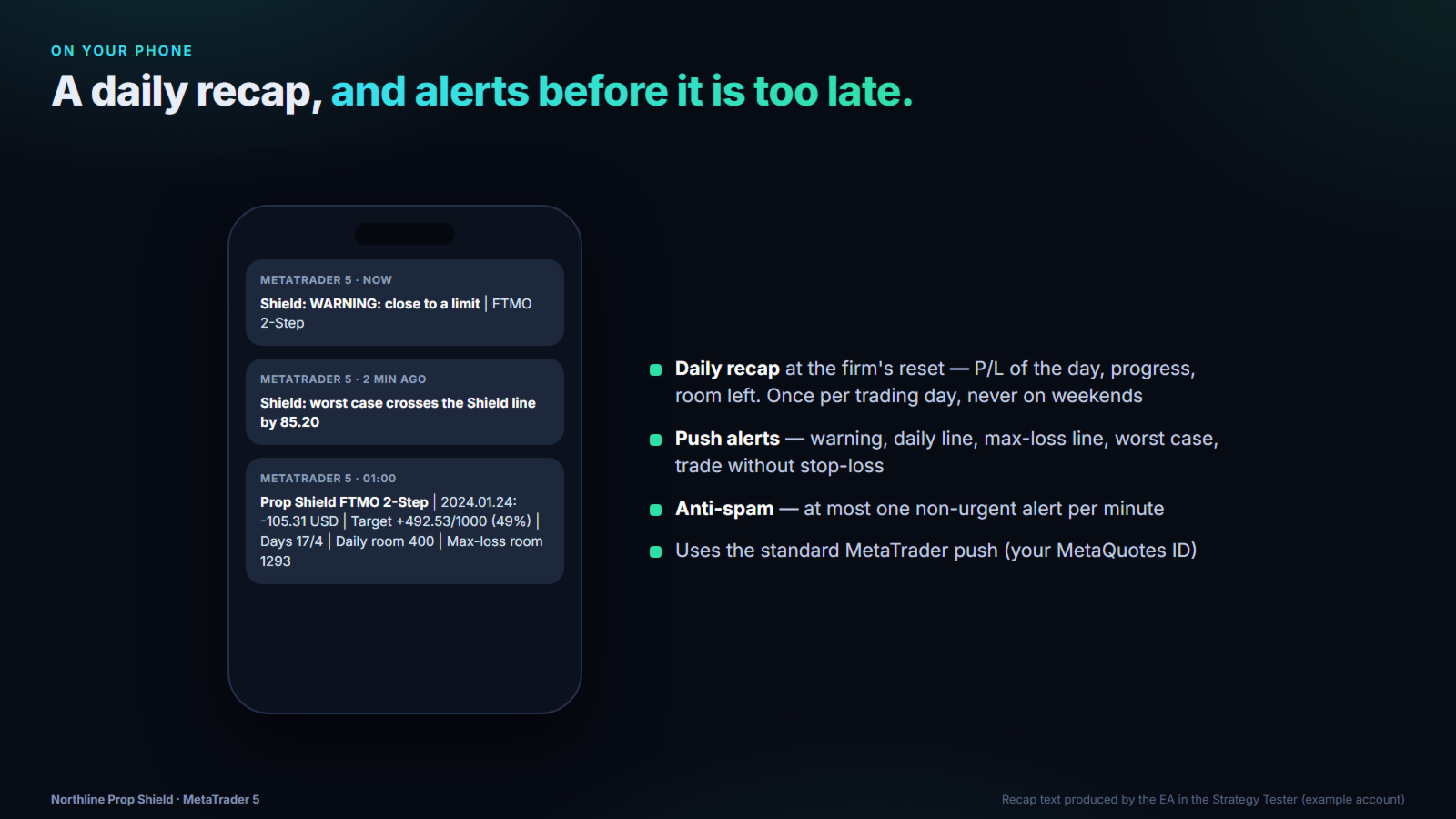
At the firm's daily reset, a push notification summarizes the day: P/L, progress toward the target, trading days, consistency and room left. It is sent once per trading day (not on days without trading).
4. Inputs reference
| Group | Input | Meaning |
|---|---|---|
| Prop firm rules | Prop firm program | One of the 20 programs, or Custom |
| Account phase | Phase 1, Phase 2, Funded | |
| Account size | 0 = detected from the first deposit | |
| Broker server DST schedule | Most MT5 servers: US (GMT+2/+3) | |
| Safety margins (daily / max-loss) | % of the account size above the firm's limits | |
| Warning | Share of the budget that triggers the warning | |
| Max simultaneous positions + orders | 0 = unlimited | |
| Pre-trade check | Block new orders without stop-loss | Recommended: on |
| Trades outside the panel | Alert only, or strict mode | |
| Notifications | Push alerts, daily recap | Requires your MetaQuotes ID in MT5 |
| Custom rules | Daily %, base, reference, max-loss %, type, lock, clock, reset hour, consistency | Used only with Custom |
| Trading panel | Magic number, close all at the Shield line, max share per trade, confirmation, panel position |
Protection settings are read only from the inputs; the settings window shows them but cannot change them.
5. Good to know
- Not affiliated with any prop firm. Rules change: always check the rules of your own account and use Custom if your program differs.
- A gap, slippage, a disconnection or a stop-loss not executed by the broker can still produce a larger loss. That is what the safety margins are for.
- In the Strategy Tester, the EA opens one demonstration trade per day through the panel so you can watch the Shield. It is not a trading strategy.
- Northline Prop Shield is a risk management tool. It does not promise any profit.
Questions or a program to add: send a message on MQL5.