
Short answer: You can evaluate the FJ Universe HFT Turbo by using the MetaTrader 5 Strategy Tester to simulate how its high-frequency logic handles historical market volatility. By adjusting inputs like HFT_TP_PERC and HFT_SL_PERC against your specific broker's execution, you can determine if the strategy aligns with your personal risk tolerance.
Who this is for
- You trade part time and miss entries during work hours.
- You want to automate a high-frequency strategy but struggle to find a consistent setup.
- You are curious about how different order sizing methods affect your account drawdown.
- You need a systematic way to integrate trade reporting into your Discord or Telegram channels.
Settings explained: Understanding the core inputs
The FJ Universe HFT Turbo relies on several critical inputs that dictate its behavior. The HFT_TP_PERC and HFT_SL_PERC fields define your target exit points as a percentage of the entry price. Because every broker has different spread costs and liquidity conditions, these percentages will perform differently depending on the symbol and timeframe you choose. A setting that works on a major pair might be too tight for a volatile cross pair.
The costFormat and costOfSingleOrder inputs allow you to switch between lot-based sizing and fixed currency amounts. Using a fixed currency amount can help keep your risk consistent regardless of the asset's price, but you must test this to ensure it does not exceed your account's margin limits during periods of high volatility.
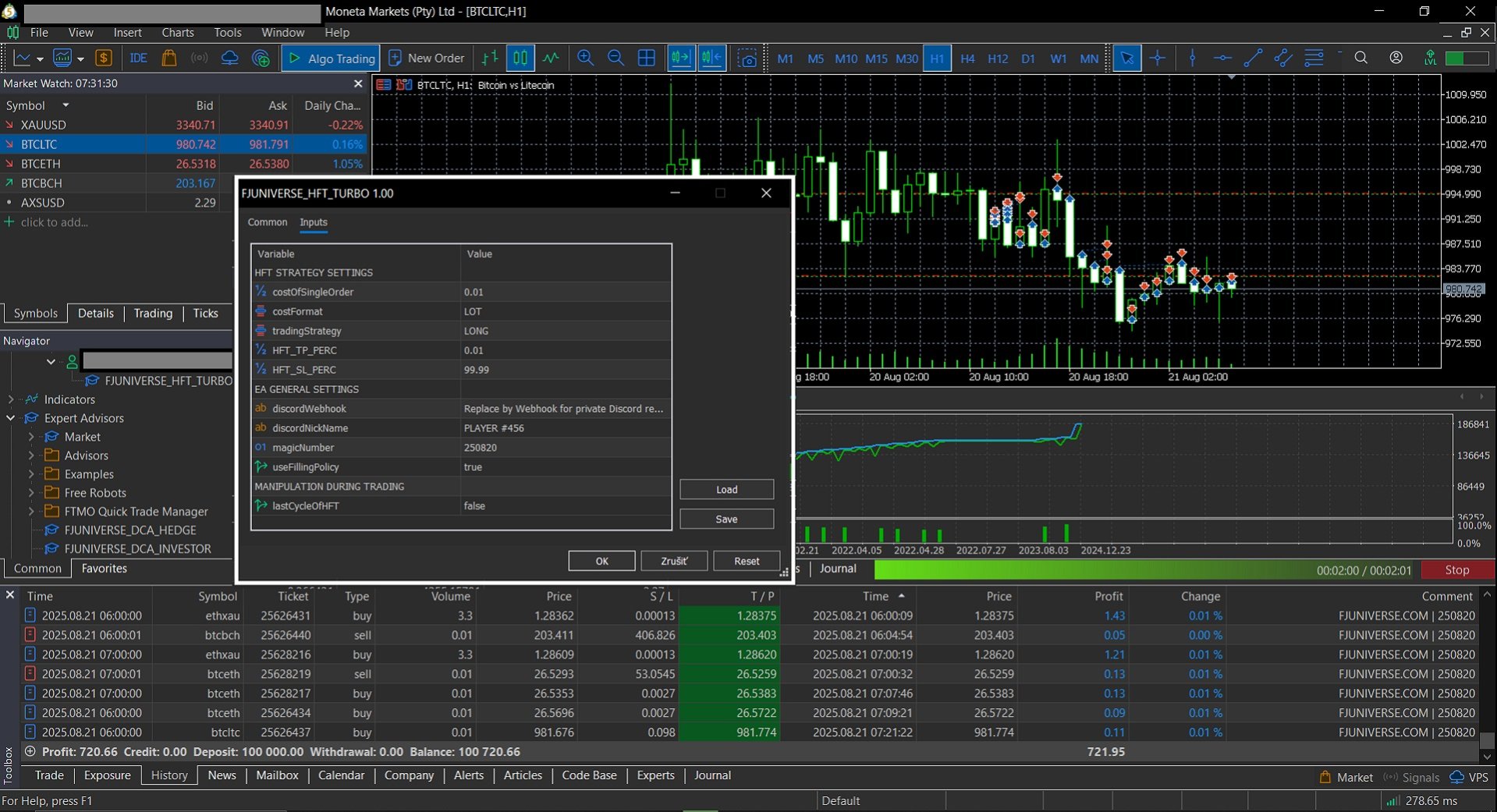
The FJ Universe HFT Turbo settings panel showing strategy selection and risk parameters.
Why backtesting is your first step
Before you ever connect this robot to a live account, you must run it through the MetaTrader 5 Strategy Tester. Select a period of at least one year that includes both trending and ranging market conditions. Watch the Max Drawdown and Longest Losing Streak figures closely. If the drawdown exceeds your personal comfort floor, you must adjust your risk inputs or reconsider the strategy before moving forward.
Benefits in practice
- Consistent execution: It removes the hesitation of manual trading by opening positions exactly at the start of each new candle.
- Reduced monitoring time: By integrating directly with Discord or Telegram, you receive real-time updates without needing to stare at your terminal.
- Customizable risk control: You can toggle useDCA or useAutoLotRecoveryByFJU to manage how the system handles losing positions, allowing for a tailored approach to recovery.
- Multi-strategy flexibility: With choices like COMBO_EXTREME_SMART, you can adapt the EA to different market regimes without changing the underlying software.
- Simplified organization: The magicNumber setting ensures that your automated trades never interfere with your manual positions or other robots.
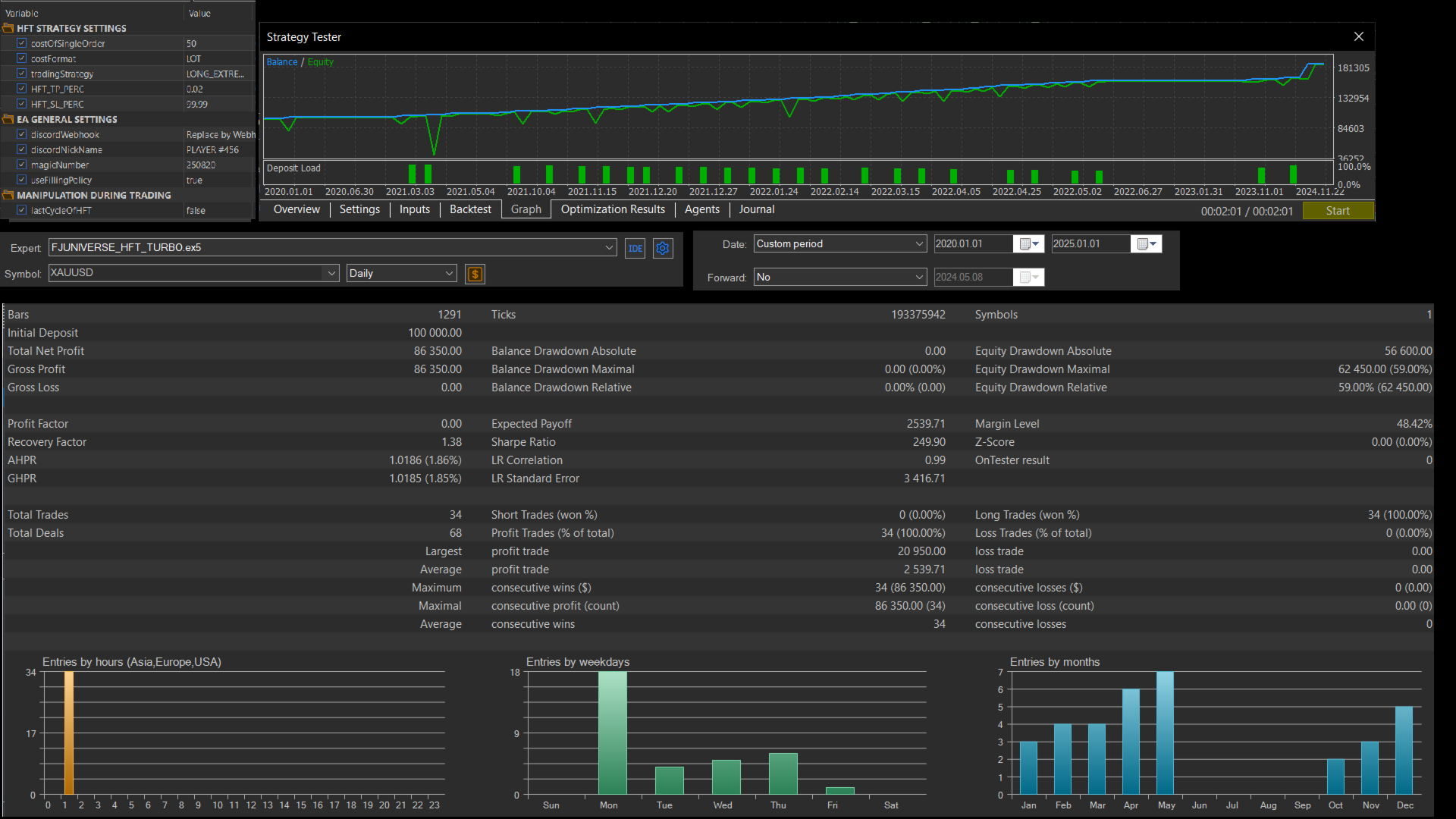
Visual representation of the FJ Universe HFT Turbo trading panel on an MT5 chart.
How to put it into practice
- Open the MetaTrader 5 Strategy Tester and select the FJ Universe HFT Turbo EA.
- Choose a one-year historical period that includes a known volatile market event to test the EA's resilience.
- Run the test using your broker's actual spread and commission data to get a realistic view of performance.
- Record the Max Drawdown and longest losing streak in your trading journal. Ask yourself if these results would have caused you to panic or stop trading.
- If the results are acceptable, deploy the EA on a demo account for at least two weeks to observe execution quality.
- Ensure your VPS is running and the WebRequest settings are configured for your Discord or Telegram webhooks.
- Set a review date on your calendar to evaluate the performance against your initial backtest metrics.
Practical tips
- Always prioritize the magicNumber to prevent the EA from accidentally closing your manual trades.
- Start with the smallest possible lot size when moving from backtesting to a live demo account.
- Verify your broker's filling policy (FOK, IOC, or Return) to ensure the EA executes as expected.
- Use the orderComment field to label your trades, which makes it much easier to filter your account history later.
- Don't ignore the risk disclosure; high leverage can amplify losses just as quickly as it amplifies gains.
Frequently asked questions
Does the FJ Universe HFT Turbo guarantee profits?
No, there is no guarantee of profit in any automated trading system. This EA uses high-frequency strategies and high leverage, which significantly increases the risk of losing part or all of your capital.
Can I run this on any currency pair?
While the EA is compatible with multiple pairs, you must backtest each one individually. Market behavior varies wildly between a major pair like EURUSD and a more volatile exotic pair.
Why should I use the recovery features?
Features like useAutoLotRecoveryByFJU are designed to manage past losses, but they also increase the risk per trade. You should only enable these if you fully understand how they impact your total account exposure.
Key takeaways
- Backtest for at least one year to understand how the EA handles market volatility.
- Use the Strategy Tester to find your personal risk floor before going live.
- Match your costFormat to your account size and risk management plan.
- Configure your WebRequest settings early to keep track of your trades via Discord or Telegram.
Trading is a journey that requires patience and rigorous testing. If you would like to explore more about how to set up your environment, you might find it useful to check out how to run multiple recovery Expert Advisors on your account. Do you have a specific currency pair you are planning to test this system on first?
For more information, visit the FJUNIVERSE seller page on MQL5 profile on MQL5.
About FJUNIVERSE: We build and run automated strategies for MetaTrader 5 and share what we learn at FJUNIVERSE.COM. Every product mentioned above is listed on our MQL5 seller page. Trading involves risk. Nothing here is investment advice, and past results describe the past only.




![[iVISTscalp5]: XAUUSD. Forecast First. Market Reaction Afterwards](https://c.mql5.com/6/1035/splash-preview-777232.png "[iVISTscalp5]: XAUUSD. Forecast First. Market Reaction Afterwards")