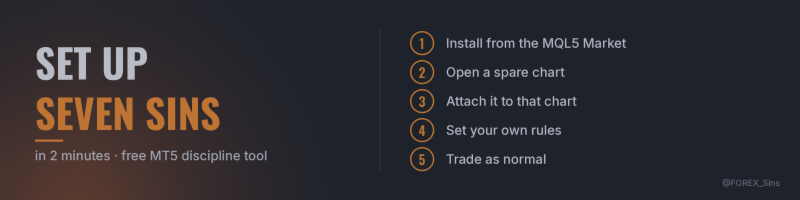

A few people have downloaded Seven Sins since it went live this week, so here is the quick setup, plus how I would choose the numbers.
Seven Sins is a free MT5 utility that calls you out on the chart when you break your own trading rules. It never opens, closes or changes a trade.
1. Install it
Click Download on the product page, or in MT5 open the Toolbox, go to the Market tab and search for "Seven Sins". After it installs, you will find it in the Navigator under Expert Advisors → Market.
It needs the MT5 desktop terminal on a PC or laptop. The MT5 phone app cannot run tools like this.
2. Open a spare chart
Open a new chart on any symbol and any timeframe. Seven Sins watches the whole account, every symbol, from that one chart, so it does not need to sit next to your trades.
A spare chart also matters because MT5 allows one Expert Advisor per chart. If you run EAs, leave their charts exactly as they are.
3. Attach it
Drag Seven Sins from the Navigator onto the spare chart and press OK. It runs whether or not algo trading is allowed, because it only reads your account. If you run EAs, keep the Algo Trading button on for them as usual; the dashboard's heartbeat panel will warn you if it ever gets switched off.
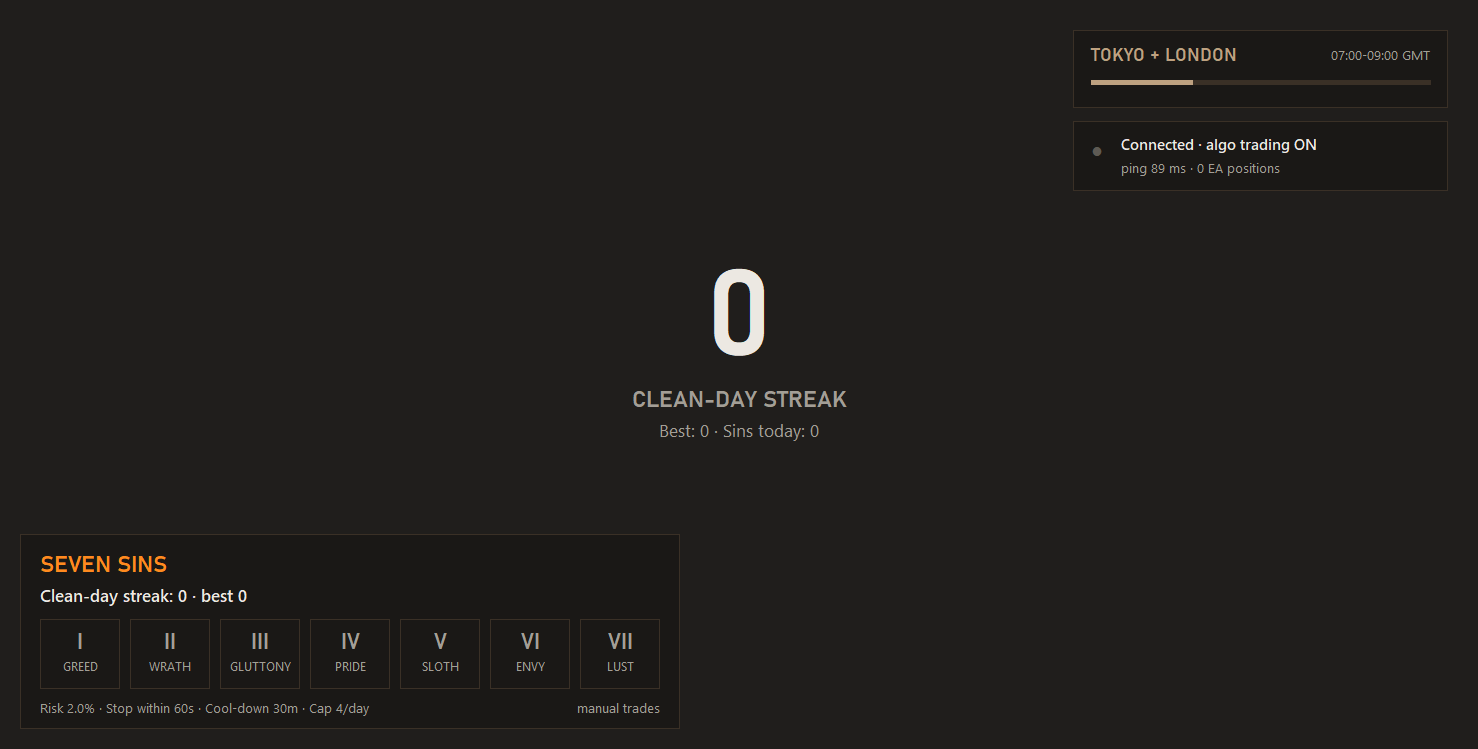
The chart turns into the dashboard: your clean-day streak in the middle, a panel at the bottom left with today's sins as seven tiles, and the current session and EA heartbeat at the top right. When a high-impact release is due within the hour, a news panel appears under them.
4. Set your rules
Everything is on the Inputs tab (right-click the chart → Expert list → Properties to change it later). The defaults are a reasonable start, but the tool works best when the numbers are ones you actually agree with. How I would think about each one:
- Max risk per trade (default 2% of balance): the risk you would be comfortable taking ten times in a row. Greed is measured to your stop loss, so it is checked once a trade has a stop. A trade with no stop is Pride's job.
- Cool-down after a losing trade (default 30 minutes): long enough to stand up and walk away from the screen. A new trade inside it is Wrath. The cool-down starts after any losing trade on the account, including one your EA closed.
- Max new trades per day (default 4): look at how many trades your plan normally takes in a day and set the cap just above it.
- Seconds to add a stop (default 60): how long you need to place a stop after entering. After that, a trade with no stop counts as Pride. So does removing a stop or moving it further away.
- News window (default 15 minutes either side): if you have a rule about trading around high-impact news, set it here. Sloth uses the MT5 economic calendar and checks both currencies of the symbol you traded (USD for gold, for example).
- Chase limit (default 1.5 × a normal move over 4 bars on M15): raise it if you trade breakouts on purpose, lower it if chasing is your habit. It uses its own timeframe setting, not the chart's.
- Also judge trades opened by EAs (default off): leave it off if your EAs have their own risk rules. Lust, closing a trade your EA opened by hand, is watched either way.
You can switch any sin off under "Sins to watch", and pick a theme and sound pack under Display and Sound.
5. Trade as normal
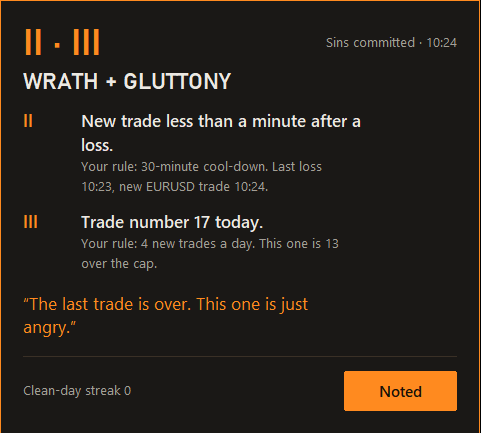
When you break a rule, a sin card appears on your charts: what you did, which rule it broke, and a one-liner. Press Noted, or let it hide itself after 30 seconds. If one trade breaks several rules, they show together on one card.
Get through a whole trading day with no sins and your clean-day streak goes up by one. A day with no trades counts as clean too. One sin resets the streak to zero.
Good to know
- Try it on a demo account first: attach Seven Sins, then open a small trade by hand with no stop loss and wait just over a minute. A Pride card appears. Close the trade afterwards.
- Run only one copy. Two copies on two charts count everything twice.
- Trades that were already open when you attached it are not judged; it starts with the next trade.
- It only works while MT5 is running. A day is credited when MT5 runs on that trading day and on the next one. If MT5 is off for a whole trading day, those days are not judged, so your streak neither grows nor breaks. Weekends don't count.
- Days follow your broker's server time.
- Your streak and counts are saved per account and survive restarts.
- The Strategy Tester has no manual trades, so no sin cards appear there (you may still see clean-day cards as the test days pass). Use a demo account to see it properly.
Your turn
Which number did you change first? If a setting is unclear, ask in the comments and I will answer there.
Seven Sins is free on the MQL5 Market:
If you also run EAs, my rule-based EURUSD Expert Advisor EUR FORGE has a free demo you can test in your own Strategy Tester:
Trading involves risk. Seven Sins does not trade and does not promise any change in results; it reminds you of the rules you set yourself.