Stop Doing Lot-Size Maths: Plan Your Trade by Dragging Three Lines

You spot a setup. Then the ritual begins: measure the stop in pips, open a calculator, work out the lot, round it to your broker's step, type it in... and the price has already moved.
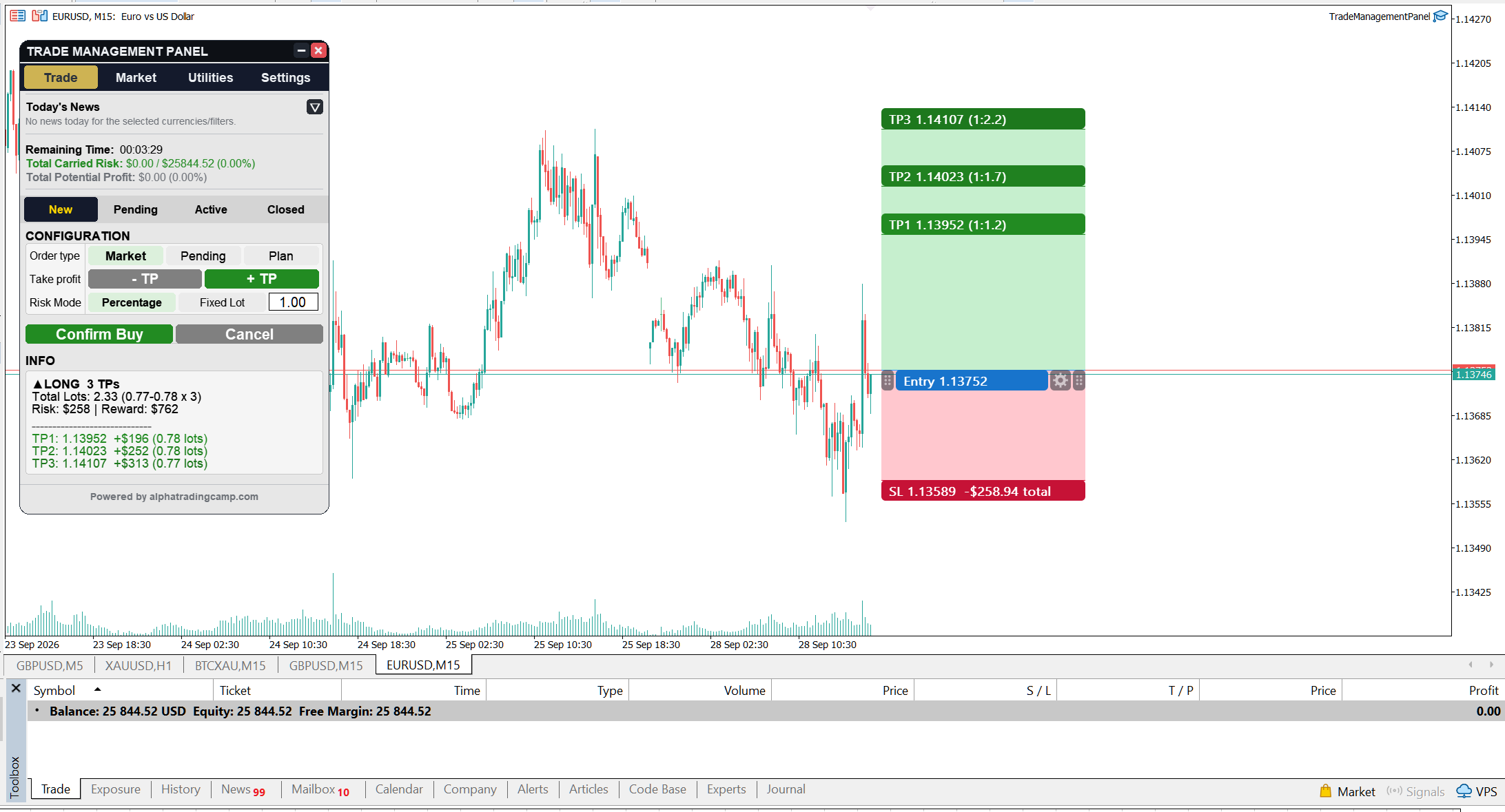
The position tool in All In One Trade Management Panel turns that ritual into a drag.
How it works
- Click New Long or New Short and place the entry on the chart.
- Drag the entry, stop loss and take-profit lines to your levels.
- The lot size is calculated from a percentage of your balance (or a fixed lot) and rounded to your broker's lot step.
- Money at risk and the R:R update live while you drag.
Up to 10 take-profit levels
Split one idea across as many as ten targets. Each level has its own lot, R:R and expected profit. Because every level is opened as its own position, multiple take-profits need a hedging account.
Market, pending, or plan
Send the trade as a market or pending order, or save it as a plan and execute it later. A pending order that expires is not deleted: it stays on the chart as a plan, marked as expired, and one click on Execute plan places it again.
Small details that save real clicks
- Levels snap to the price tick. Hold Ctrl to magnet to a candle's open, high, low or close.
- Hold Shift to change only the price. Press Esc to cancel a drag and put everything back.
- A stop or target that reaches the broker's allowed limit stops there with an amber outline, instead of throwing an error.
- The box keeps the same width in candles, even when you slide it across a weekend gap.
- Choose which timeframes each tool is shown on, from all 21 MT5 timeframes.
- The panel will not let you confirm a trade, or add a take-profit, if the lot split would fall below your broker's minimum lot.
Once the order is live, the same box stays on the chart. Drag the stop loss or take profit to modify the order, right where you planned it.
All In One Trade Management Panel MT5 is on the MQL5 Market (Utilities), with a free demo:
https://www.mql5.com/en/market/product/199878