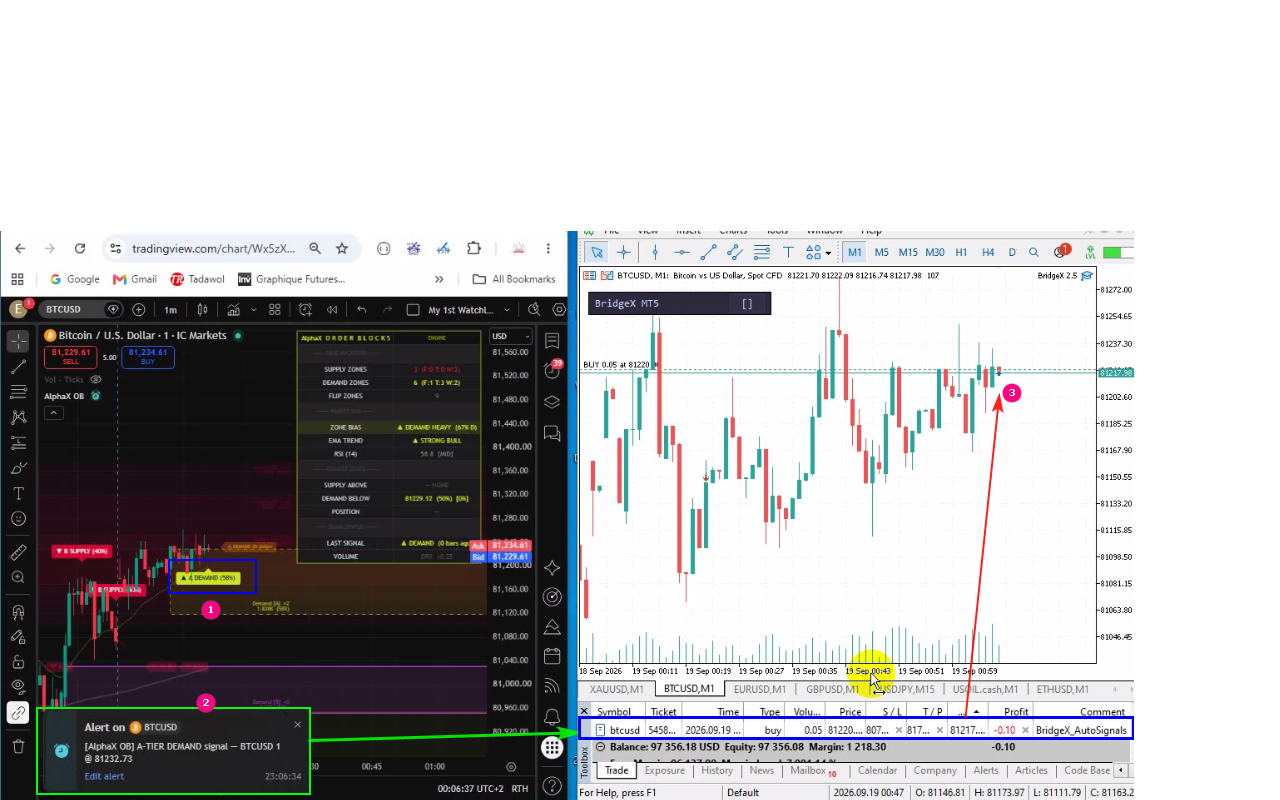
BridgeX was updated to v2.5 — Auto-Signals: Send TradingView Indicators, Strategies & Alerts directly to MT5/MT4. Fully Automatic
BridgeX is a Chrome extension that connects TradingView directly to MetaTrader 5 and 4. Draw your Long or Short position on any TradingView chart, click one button, and your order executes instantly in MT5/MT4 or use the Fast scalping consol for your scalping trading style. Or go fully automatic: let your TradingView strategies and indicators trade for you through alerts, no clicking, 24/7.
Works with most MT5/MT4 brokers and supports multiple accounts. Manual trading is free no TradingView Pro required, Alert signals Pro Plan required to set Webhhok.
BridgeX supports ALL prop firms that offer MT5/MT4 platforms.
BrigdeX is also a valuable tool for comparing brokers under the same trading conditions.
Website : https://bridgex.trader-rentable.com
🎁 Ask us for a 7-Day Free Trial of BridgeX
What's New?
**🤖 Alert Trading (the headline feature)**
- Connect ANY TradingView strategy or indicator: when your alert fires, BridgeX translates it and opens the trade on MT5/MT4 in milliseconds
- One channel per strategy, with its own secret webhook URL — create it in 4 clicks from the dashboard
- Ready-made alert templates with copy buttons (strategy, indicator, event alerts)
- Works on multi-chart layouts: each chart's utility executes only its own symbol — no double orders, ever
**🗣️ Understands ANY Alert Language**
- Built-in dictionary: "Strong Buy", "Up Arrow", "Crossing Up", bullish/bearish terms in English, French, Spanish, German, Italian, Arabic, Chinese, Japanese and more
- Emoji signals: ▲ ▼ 🟢 🔴 → BUY / SELL
- Custom Words: teach BridgeX your indicator's own vocabulary (e.g. "DEMAND signal = BUY") — no code, one line per word
- Symbol mapping: TradingView's XTIUSD automatically becomes your broker's USOIL
**🛡️ Safety First, Then Speed**
- DRY mode: new channels log and translate every alert but place NO trades — watch it work, then flip to LIVE when confident
- Master kill switch: the 🤖 toggle on your chart stops auto-trading instantly
- SL/TP your way: from the alert itself, from your channel's distances, or from the utility's Relative mode (real fill price)
- Stale-order protection: a signal expires in seconds if your terminal is offline — no surprise trades when it reconnects
- Broker-verified history: real MT5/MT4 tickets, actual fill prices and applied SL/TP are written back to your dashboard
**📡 Live Signal Feed**
- Watch every alert arrive: the raw message, the translated action, which word matched, and what BridgeX did (trade opened / duplicate blocked / ignored)
- Complete audit trail of your automated trading
**⚡ Everything from v2.4 — still included**
- Relative SL/TP Mode based on real execution prices
- Reverse Trade (Hedging) Mode
- Fast Scalping Console with Shift+B / Shift+S hotkeys and per-account TP/SL
- Multi-account, multi-platform (MT5 + MT4) one-click execution
- VPS-ready: TradingView stays local, MT5/MT4 runs anywhere
ℹ️ Note: manual trading works on a free TradingView account. Auto-Signals use TradingView alerts (webhooks), available on any paid TradingView plan.
**What this means for you**
✅ Your strategy trades while you sleep — alerts in, trades out, milliseconds
✅ Any indicator becomes an auto-trading system — even third-party ones, via Custom Words
✅ Safe by design — DRY mode, kill switch, expiry protection, full audit log
✅ Multi-account — one alert, every account, MT5 and MT4
✅ Multi-chart — trade many symbols from one TradingView, no doubled orders
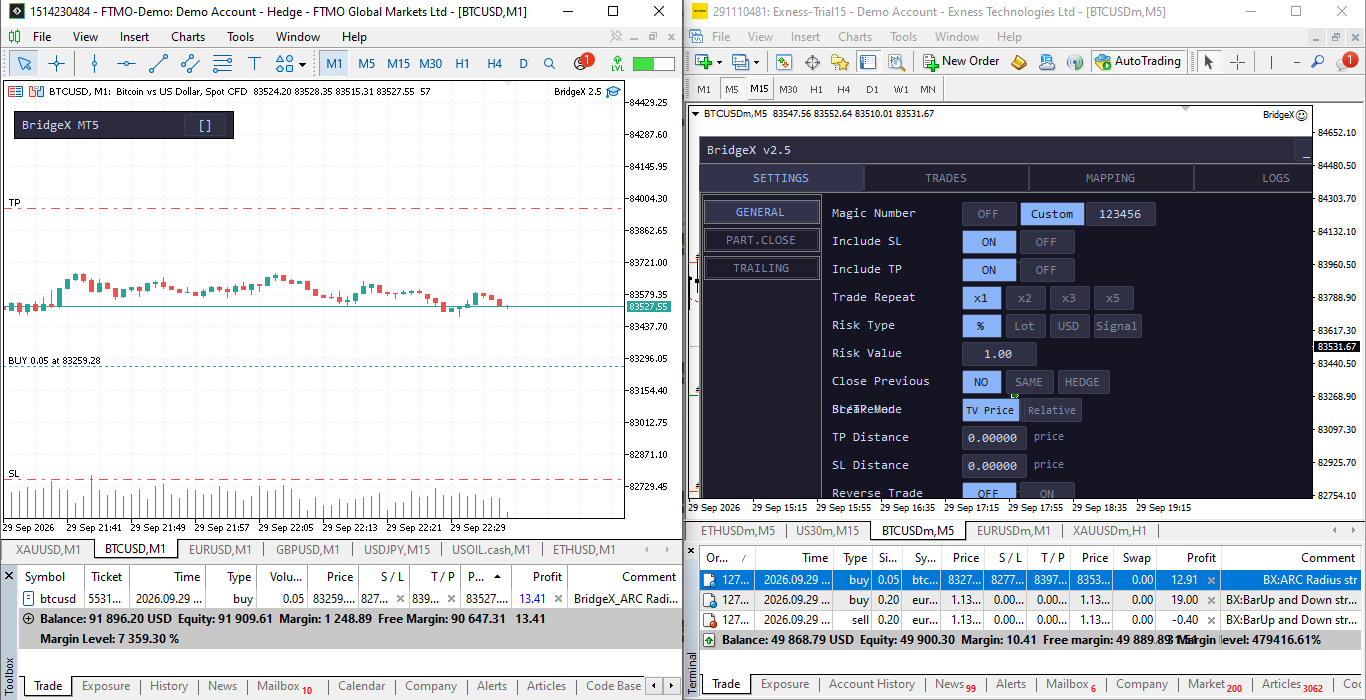
BridgeX to MT5 (left) and MT4 (Right)