How to Automatically Copy Trading Signals from Telegram to MT5 Without Bot Token & Admin Rights (PART 2)
29 June 2026, 12:33

0
494
Complete Step-by-Step Guide
🎯 Introduction
Have you ever wanted to automatically copy trading signals from Telegram directly to your MetaTrader 5 (MT5) platform without needing a bot token or admin rights?
This comprehensive guide will show you exactly how to set up a fully automated signal copying system using our TradeCopier EA.
The best part? You don't need any programming experience, Telegram bot tokens, or admin privileges on Telegram channels!
📋What You'll Need
Prerequisites:
- ✅ Windows PC with internet connection
- ✅ MetaTrader 5 installed
- ✅ Telegram account
What You'll Get:
- 🔄 Automatic signal copying from any Telegram channel
- 📊 Support for BUY/SELL signals with multiple TP/SL levels
- 🟡 Pending orders (Buy/Sell Stop/Limit)
- 🔧 SL/TP management signals
- ❌ Close signals
- 📱 Full dashboard monitoring
- 💰 Multiple lot sizing options
🚀Part 1: Installation & Setup
Step 1: Download the Required Files
First, download all the necessary files:
1. SignalListener.exe - The executable code that listens to Telegram DOWNLOAD HERE
2. Telegram Signal Copier.ex5 - The MT5 Expert Advisor Telegram to mt5 signal copier | Buy Trading Utility for MetaTrader 5
Step 2: First Run - Authentication
Launch the SignalListener.exe for the first time:
You'll be prompted to:
1. Enter your phone number (with country code: +1234567890)
2. Enter the verification code sent to Telegram
3. Enter your 2FA password if you have one
✅ Your session will be saved, so you won't need to do this(login) again!
📡 Part 2: Selecting Your Signal Channel
You'll see something like this:
```
Welcome to Signal Listener V5!
Starting Telegram client...
✅ Telegram client started successfully
📡 Scanning your channels...
Available channels:
1. 📊 Forex Signals VIP
2. 💰 Crypto Trading Group
3. 📈 Gold Signals Daily
4. 🔥 Premium Trading Chat
5. 📊 Free Forex Signals
Quick select (1-5):
```
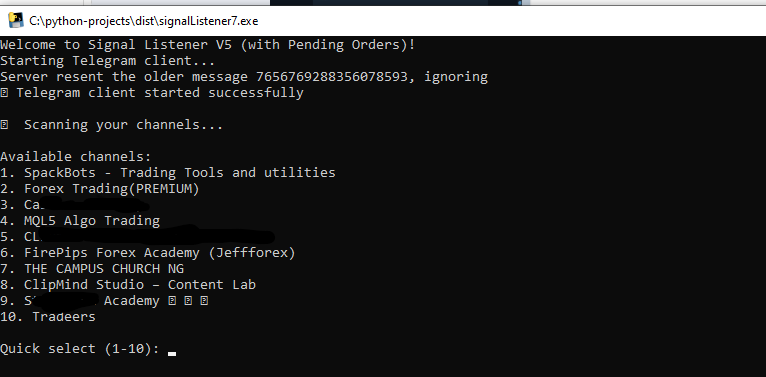
Step 1: Select Your Channel
Type the number corresponding to your desired signal channel and press Enter.
Step 2: Confirmation
```
✅ Connected! Now monitoring: Forex Signals VIP
==================================================
MAKE SURE YOU ARE CONNECTED TO THE INTERNET!
Waiting for signals...
==================================================
```
🎉 **Success!** The SignalListener is now monitoring your selected channel!
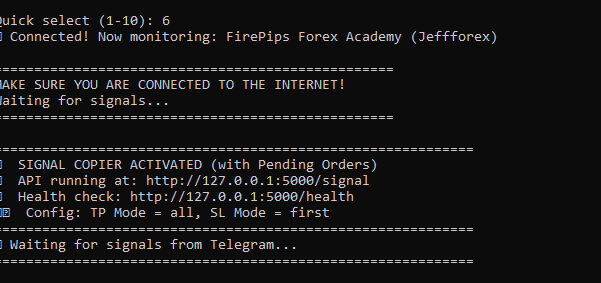
💻 Part 3: Installing the MT5 Expert Advisor
Step 1: Copy the EA File
- In MT5, open a chart (any timeframe)
- Drag the EA from the Navigator to the chart
- Configure the settings (see next section)
- Click "OK"
Step 2: Allow Algorithm Trading
- Go to Tools > Options > Expert Advisors and check: Allow Algorithm Trading and Allow WebRequest For Listed Url
- Then Add the Url:
http://127.0.0.1:5000 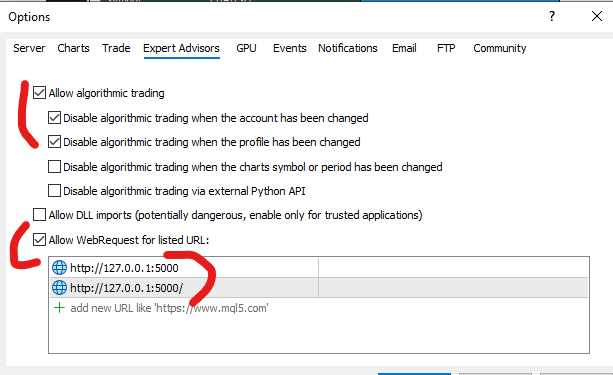
⚙️Part 4: Configuring the EA
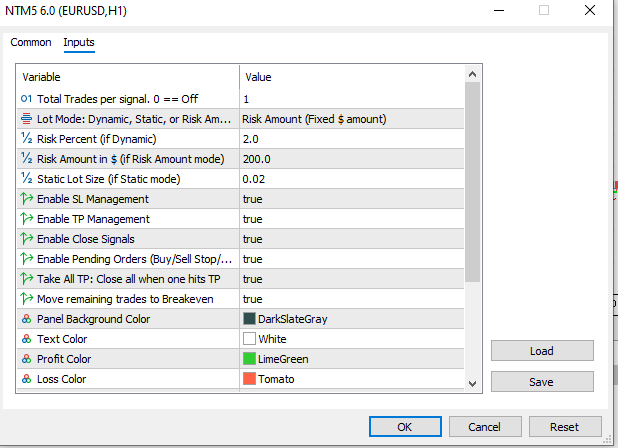
Essential Settings:
| Setting | Value | Explanation |
|---|---|---|
| Total Trades per Signal | 1 | Number of trades to open per signal |
| Lot Mode | Dynamic | Choose your lot calculation method |
| Risk Percent | 2.0 | Risk % of account (if Dynamic) |
| Risk Amount | 10.0 | Fixed $ risk (if Risk Amount mode) |
| Static Lots | 0.01 | Fixed lot size (if Static mode) |
Feature Toggles:
| Feature | Recommended | Description |
|---|---|---|
| Enable SL Management | ✅ TRUE | Automatically update SL from signals |
| Enable TP Management | ✅ TRUE | Automatically update TP from signals |
| Enable Close Signals | ✅ TRUE | Close positions on close signals |
| Enable Pending Orders | ✅ TRUE | Place Buy/Sell Stop/Limit orders |
| Take All TP | ✅ TRUE | Close all positions when one hits TP |
| Move to Breakeven | ✅ TRUE | Move remaining trades to BE when one hits TP |
Visual Settings:
- Customize colors to your preference
- Panel position automatically adjusts
🔄 Part 5: How the System Works
Signal Flow:
Telegram Channel

       ↓

SignalListener.exe

       ↓

Telegram Signal Copier EA (MT5)

       ↓

Execute Trade on MT5
Signal Types Format sample(But not limited to this formats):
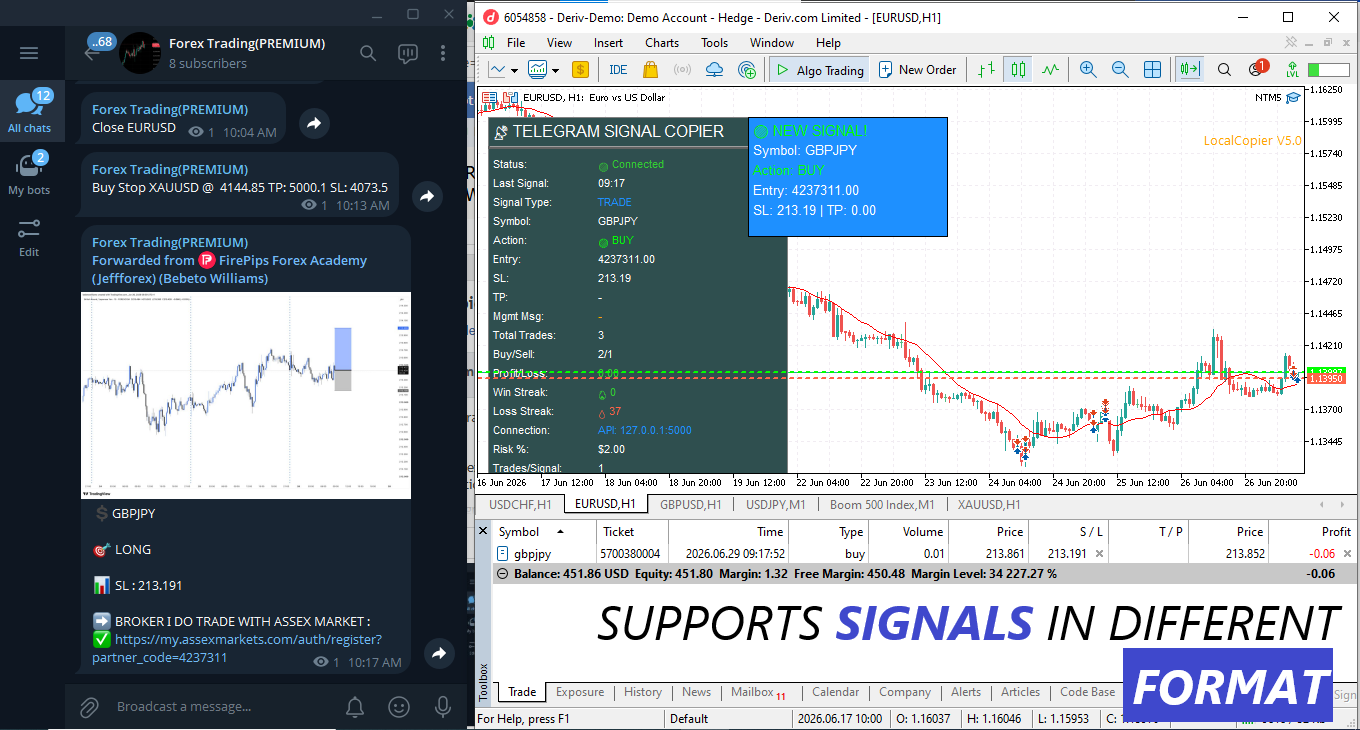
1. Regular Signals:
```
BUY XAUUSD @ 1950.00 SL 1940.00 TP 1960.00
SELL EURUSD @ 1.1000 SL 1.0950 TP 1.1050
```
2. **Pending Orders:**
```
BUY STOP XAUUSD @ 1960.00 SL 1950.00 TP 1970.00
SELL LIMIT EURUSD @ 1.1050 SL 1.1100 TP 1.0950
```
3. **Management Signals:**
```
SL MOVED TO BREAKEVEN - XAUUSD BUY
TP MODIFIED - EURUSD SELL @ 1.1150
```
4. **Close Signals:**
```
CLOSE XAUUSD BUY
EXIT ALL EURUSD POSITIONS
```
📊 Part 6: Monitoring the System
The Dashboard Display:
The EA shows a comprehensive dashboard with:
```
📡 TELEGRAM SIGNAL COPIER
───────────────────────────────
Status: 🟢 Connected
Last Signal: 15:30
Signal Type: TRADE
Symbol: XAUUSD
Action: 🟢 BUY
Entry: 1950.00
SL: 1940.00
TP: 1960.00
Mgmt Msg: -
Total Trades: 15
Buy/Sell: 8/7
Profit/Loss: +125.50
Win Streak: 🔥 3
Loss Streak: 💧 0
Connection: API: 127.0.0.1:5000
Risk %: 2.0%
Trades/Signal: 1
Lot Mode: Dynamic
SL Mgmt: ON
Pending Orders: ON
Take All TP: ON
Move to BE: ON
```
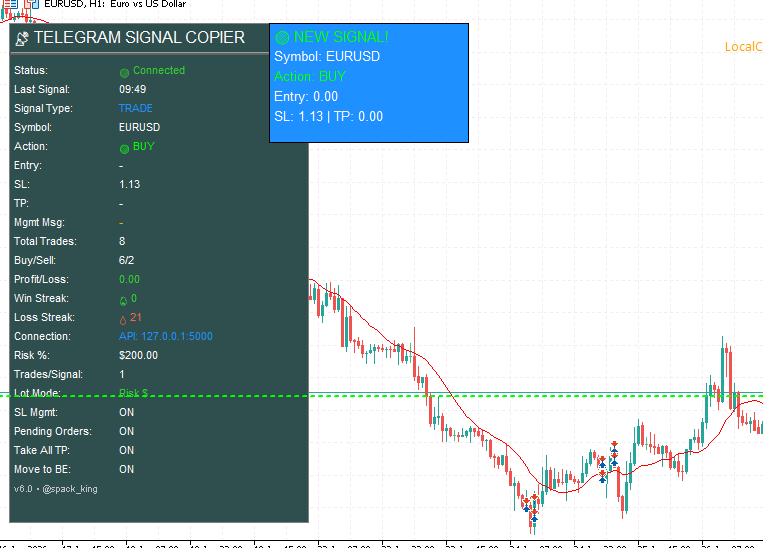
Visual Signals on Chart:
- **Green Line** = BUY entry
- **Red Line** = SELL entry
- **Dashed Green** = Take Profit level
- **Dashed Red** = Stop Loss level
🎯 Part 7: Understanding Lot Sizing Options
1. Dynamic (Risk %)
```
Lot Size = (Account Balance × Risk%) / (SL Distance × Pip Value)
```
- ✅ Adapts to account growth
- ✅ Consistent risk management
- Best for: All traders
2. Static (Fixed Lots)
```
Lot Size = User Defined (e.g., 0.01)
```
- ✅ Consistent position size
- ✅ Predictable results
- Best for: Testing, Scalping
3. Risk Amount (Fixed $)
```
Lot Size = Risk Amount / (SL Distance × Pip Value)
```
- ✅ Most intuitive
- ✅ Exact risk control
- Best for: Traders who think in dollars
🔧Part 8: Troubleshooting
Common Issues & Solutions:
| Issue | Solution |
|---|---|
| No channels found | Make sure you're a member of channels you want to monitor |
| Connection refused/disconnected | Check if SignalListener.exe is running |
| Signal too old | Signals must be received within 20 seconds |
| Invalid SL distance | Check signal format has proper SL levels |
| Symbol not found | MT5/your broker might not have the symbol available |
Checking Logs:
- SignalListener logs: Terminal output
- EA logs: Expert tab in MT5
- API status: Visit `http://127.0.0.1:5000/health`
💡 Part 9: Best Practices
1. Start Small
- Begin with demo account
- Use small lot sizes (0.01)
- Test with one channel first
2. Monitor Your System
- Keep the dashboard visible and make sure it shows 'connected' text
- Check logs regularly
- Verify signals are being received
3. Risk Management
- Never risk more than 1-2% per trade
- Use Take All TP to lock in profits
- Enable Move to BE for risk-free trades
4. Signal Quality
- Only copy from reliable channels
- Verify signal format is supported
- Watch for spam or invalid signals
### 5. Technical Setup
- Keep SignalListener running 24/7
- Use a VPS for uninterrupted trading
- Regular updates and maintenance
- Make sure the EA is not running on more than one chart
🏆 Part 10: Advanced Features
Pending Orders Support
The system now supports:
- ✅ Buy Stop
- ✅ Sell Stop
- ✅ Buy Limit
- ✅ Sell Limit
Take All TP Feature
When one trade hits TP:
- All other trades for that symbol close
- No risk of leaving positions open
- Perfect for multiple entry strategies
Move to Breakeven
When one trade hits TP:
- Remaining trades move SL to entry
- Risk-free positions
- Still have profit potential
📝 Conclusion
You've now successfully set up a fully automated signal copying system from Telegram to MT5 without needing a bot token or admin rights!
Key Benefits:
- ✅ No programming knowledge needed
- ✅ No bot tokens required
- ✅ No admin rights on channels
- ✅ Full automation
- ✅ Multiple signal types supported
- ✅ Advanced risk management
### Next Steps:
1. Start with a demo account
2. Monitor the system for a few days
3. Gradually increase lot sizes
4. Add multiple channels
5. Consider VPS hosting
Need Help?
- Contact: https://www.mql5.com/en/users/ulonet
🔗Quick Links
- Download .exe File: Telegram: View @spackbots
- Video Demo: https://youtu.be/I0Qj_u7dc04
- Support Group: Telegram: View @spackbots
- Website: https://ulonet-technology.com/contact.html
Happy Trading! 📈 Remember: Always trade responsibly and never risk more than you can afford to lose.
Disclaimer: Trading involves significant risk. Past performance is not indicative of future results. This software is for educational purposes only. Always test thoroughly on demo accounts before going live.