MT5 DLL-Free Trade Copier:Secure Multi-Account Trade Replication(Copier MT5 To MT5)

PRODUCT ACCESS LINK ON MQL5 MARKET:
https://www.mql5.com/en/ market/product/191385
Introduction
In modern multi-account trading environments, the underlying architecture of a trade copier plays a critical role in determining stability, reliability, and long-term performance.
While many systems rely on external DLL files to extend functionality, this approach introduces additional dependencies that can affect deployment consistency, system security, and operational simplicity.
A DLL-free architecture removes these external dependencies entirely and keeps all trade replication logic inside the MetaTrader 5 ecosystem.
This structural design is especially important for traders managing multiple accounts simultaneously, including prop firm traders, account managers, algorithmic traders, and signal providers.
By eliminating DLL usage, the system becomes more self-contained, easier to deploy across multiple terminals, and less prone to external failure points.
At the same time, modern DLL-free trade copiers still support advanced functionality such as ultra-fast execution, real-time synchronization, Slave Monitoring, Symbol Mapping, and multi-account management.
Core Concept of DLL-Free Architecture
A DLL-free trade copier is designed to operate without any external Dynamic Link Library files.
In traditional systems, DLLs are often used for:
• External communication between terminals
• File handling outside MetaTrader
• Data serialization and transformation
• Network-based synchronization layers
• Integration with external software tools
• Performance optimization modules
In contrast, a DLL-free system performs all these tasks internally using MQL-based logic.
This means:
• No external dependencies
• No external file execution
• No Windows-level permission requirements
• No third-party runtime components
Everything remains within MetaTrader 5’s native execution environment.
Why Removing DLL Dependencies Matters
The removal of DLL dependencies significantly improves system predictability.
Every external component introduces a potential risk factor such as:
• Missing files during migration
• Version incompatibility after updates
• Operating system permission issues
• Security restrictions in prop firms
• Antivirus interference
• VPS deployment inconsistencies
A DLL-free architecture eliminates these risks by design.
This leads to a more stable and controlled trading environment where execution behavior remains consistent across installations.
Security Advantages of DLL-Free Systems
Security is one of the most important considerations in professional trading environments.
External DLL files may:
• Access system-level resources
• Execute code outside MetaTrader
• Require elevated permissions
• Create unknown execution pathways
By removing DLL usage completely, the system reduces its attack surface and operates strictly within MetaTrader’s sandboxed environment.
This is particularly important for:
• Prop firm accounts
• Funded trading accounts
• Institutional-style setups
• Multi-client portfolio management systems
Security through simplicity becomes a core advantage.
Installation and Deployment Simplicity
One of the most practical benefits of DLL-free architecture is simplified installation.
Traditional DLL-based systems may require:
• Manual DLL placement into system folders
• Enabling “Allow DLL imports” in MetaTrader
• Adjusting Windows security settings
• Troubleshooting missing dependencies
A DLL-free system removes all of these steps.
Standard installation workflow includes:
• Attaching EA to chart
• Selecting Master or Slave mode
• Configuring account IDs
• Enabling AutoTrading
• Starting synchronization
This simplicity reduces setup errors and improves deployment speed across multiple accounts.
VPS Optimization and Continuous Operation
Most professional traders use VPS infrastructure for uninterrupted execution.
A DLL-free architecture is highly optimized for VPS environments because:
• No external file synchronization is required
• No dependency conflicts occur between terminals
• System migration between VPS servers is simplified
• Resource usage is more predictable
• Long-term uptime is more stable
In continuous trading environments, reducing complexity directly improves operational reliability.
Trade Replication Engine Overview
Even without DLL usage, modern MT5 copiers can achieve high-speed synchronization.
The trade replication engine follows a structured workflow:
- Detect new order on Master account
- Extract trade parameters (symbol, lot, SL/TP)
- Process replication logic internally
- Generate Slave execution command
- Transmit signal across terminals
- Execute trade on Slave account
- Confirm execution result
- Update synchronization state
This pipeline ensures structured and predictable trade replication.
Low-Latency Execution Model
A DLL-free architecture does not inherently reduce performance.
In fact, execution speed depends primarily on:
• Broker execution speed
• VPS latency
• Network quality
• Terminal performance
The internal system is optimized for:
• Millisecond-level signal processing
• Minimal computation overhead
• Efficient internal messaging
• Fast order execution cycles
This allows near real-time replication across multiple accounts.
Trade Accuracy and Execution Consistency
In multi-account trading, accuracy is often more important than raw speed.
A reliable copier ensures:
• Correct symbol execution
• Accurate lot calculation
• Proper SL/TP replication
• Consistent order direction
• Synchronization of modifications and closures
Even small inconsistencies can lead to divergence between accounts over time.
Multi-Account Trading Infrastructure
DLL-free systems are especially effective in multi-account environments where scalability matters.
Common use cases include:
• Prop firm account portfolios
• Signal distribution networks
• Client account replication systems
• Personal multi-strategy setups
As account numbers increase, system stability becomes more critical than feature complexity.
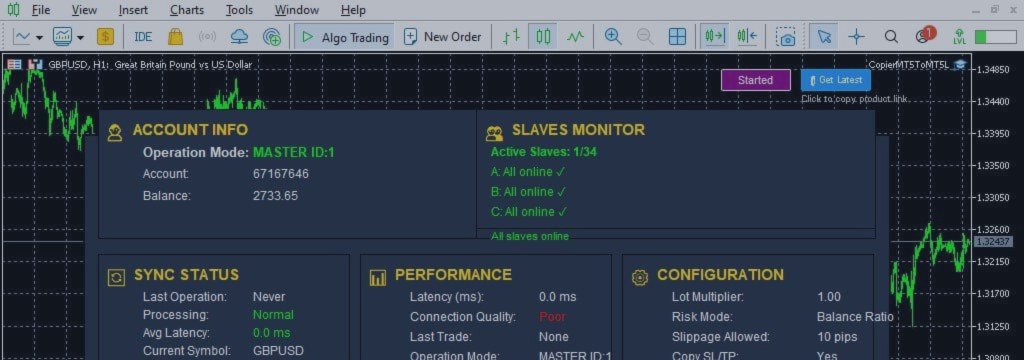
Slave Monitoring System
Slave Monitoring provides real-time visibility into all connected accounts.
It tracks:
• Online status
• Offline status
• Connection interruptions
• Reconnection events
• Synchronization health
This allows traders to immediately identify account-level issues.
Dashboard Overview
The dashboard serves as the central control interface for the entire system.
It provides:
• Real-time account status
• Synchronization activity monitoring
• Trade replication visibility
• System health indicators
• Performance tracking
This reduces the need for manual terminal inspection.
Account Information Module
This module provides essential account-level data including:
• Account number
• Balance
• Equity
• Mode (Master / Slave)
• Connection state
It ensures clarity in multi-account setups.
Synchronization Status Tracking
Synchronization tracking ensures trade alignment between accounts.
It includes:
• Last executed trade timestamp
• Processing state (active / hold / idle)
• Replication delay indicators
• Communication status
This helps identify delays or interruptions in real time.
Performance Monitoring System
Performance metrics include:
• Execution latency
• Signal processing speed
• Connection quality
• System responsiveness
These metrics help evaluate overall efficiency.
Configuration Framework
The configuration system defines how the copier behaves across all accounts.
It includes:
• Master ID assignment
• Slave ID configuration
• Copy mode selection
• Synchronization rules
• Monitoring settings
• Execution preferences
Proper configuration ensures stable operation across all terminals.
Trade Settings Engine
Trade behavior can be customized through settings such as:
• Stop Loss replication
• Take Profit replication
• Pending order copying
• Slippage control
• Spread filtering
• Execution rules
These settings allow adaptation to different trading styles.
Trade Filtering System
Filtering provides granular control over replication:
• Buy-only trades
• Sell-only trades
• Symbol-specific filtering
• Magic number filtering
This ensures precise trade distribution.
Symbol Mapping System
Different brokers often use different symbol formats.
Examples include:
• EURUSD ↔ EURUSDm
• XAUUSD ↔ GOLD
• US30 ↔ US30.cash
Symbol Mapping ensures correct instrument alignment across brokers.
Lot Management System
Lot sizing methods include:
• Fixed lot mode
• Balance-based scaling
• Multiplier-based sizing
• Risk-adjusted allocation
This ensures consistent exposure across accounts.
Reverse Trade Copying
Reverse trade copying allows inverted execution:
• BUY → SELL
• SELL → BUY
Use cases include:
• Strategy behavior testing
• Hedging structures
• Portfolio diversification
• Alternative market exposure
Reverse mode operates fully within the same DLL-free architecture.
Day Filtering System
Trade replication can be restricted by trading days:
• Monday
• Tuesday
• Wednesday
• Thursday
• Friday
This supports time-based strategy control.
Notification System
Notifications provide operational awareness:
• Trade execution alerts
• Synchronization warnings
• Connection loss alerts
• Reconnection confirmations
These alerts improve responsiveness.
Key Features
• Fully DLL-free architecture
• No external dependencies
• VPS optimized design
• Ultra-fast trade replication
• Multi-account synchronization
• Slave Monitoring system
• Symbol Mapping support
• Reverse Trade Copying
• Real-time dashboard
• Performance tracking
• Trade filtering engine
Setup Guide
Master Setup
• Attach EA to chart
• Select Master mode
• Configure Master ID
• Enable AutoTrading
Slave Setup
• Attach EA to terminal
• Select Slave mode
• Assign Slave ID
• Link to Master
• Enable AutoTrading
Validation Process
• Confirm synchronization
• Check dashboard status
• Monitor first replicated trades
• Verify Slave connectivity
FAQ
Why choose DLL-free architecture?
Because it reduces dependencies and improves system stability.
Does it affect performance?
No. Performance depends mainly on broker and VPS conditions.
Is VPS recommended?
Yes. It is optimized for VPS environments.
Can multiple accounts be managed?
Yes. It supports multi-account replication.
Does it include monitoring?
Yes. Slave Monitoring is integrated.
Does it support reverse trading?
Yes. Reverse mode is fully supported.
Conclusion
DLL-free architecture provides a structured and stable approach to multi-account trade replication in MetaTrader 5 by eliminating external dependencies and maintaining all operations within the native trading environment.
This design improves deployment simplicity, enhances system stability, and reduces maintenance complexity while still supporting advanced features such as low-latency execution, Slave Monitoring, Symbol Mapping, Reverse Trade Copying, and real-time dashboard management.
For professional traders managing multiple accounts, this architecture provides a reliable foundation for scalable and controlled trade replication.
PRODUCT ACCESS LINK ON MQL5 MARKET:




